Help! Serious Windows problem


woldsweather

Well-known member
Member
VIP
Local time
9:02 PM
Posts
319
OS
Windows 10 PRO
I left my PC processing a set of astrophotography images. An operation that can take up a couple of hours.

When I came back later there's a message that effectively says it can't find an operating system.

Tried booting holding F2 F10 F11 del escape. Even o ne that has a choice of selecting recovery still returns to the same message.

What should I do?
 

My Computer

System One

  • OS
    Windows 10 PRO
    Computer type
    PC/Desktop
    Manufacturer/Model
    HP Omen
    CPU
    Intel(R) Core(TM) i7-8700 CPU @ 3.20GHz 3.20 GHz
    Motherboard
    Board: HP 8437 1.3 Serial Number: PGUCR0HP1B90LD Bus Clock: 100 megahertz UEFI: AMI F.53 10/23/2020
    Memory
    64 GB
    Graphics Card(s)
    NVIDIA GeForce GTX 1070
    Sound Card
    NVIDIA High Definition Audio Realtek High Definition Audio
    Monitor(s) Displays
    AOC 2778X [Monitor] (27.2"vis, s/n GJGJ7HA027112, July 2018) DELL U2412M [Monitor] (24.0"vis, s/n XX-00FFXD-XXXXX-529-64AS, February 2015)
    Hard Drives
    c: (NTFS on drive 0) * 999.21 GB 857.61 GB free
    d: (NTFS on drive 1) 1984.45 GB 741.65 GB free
    e: (NTFS on drive 1) 15.95 GB 1.78 GB free
    h: (NTFS on drive 2) 239.93 GB 231.23 GB free
    i: (NTFS on drive 2) 14.81 GB 1.71 GB free
    Keyboard
    Omoton
    Mouse
    Omoton
    Internet Speed
    9Gbps
    Browser
    Chrome Edge and Firefox
    Antivirus
    Kaspersky
    Other Info
    Have discovered 31/01/2022 Internet speed at router 41 mbps. At this PC 9. Internet is via wired ethernet.
Replace the disk and restore your most recent system image to it.


Denis
 

My Computer

System One

  • OS
    Windows 11 Home x64 Version 25H2 Build 26200.8037
Where would my system image be ? Think I know the answer but I back up to NAS. Never understood what you do with a system lmage.

Are you saylng the hard drive had failed?
 

My Computer

System One

  • OS
    Windows 10 PRO
    Computer type
    PC/Desktop
    Manufacturer/Model
    HP Omen
    CPU
    Intel(R) Core(TM) i7-8700 CPU @ 3.20GHz 3.20 GHz
    Motherboard
    Board: HP 8437 1.3 Serial Number: PGUCR0HP1B90LD Bus Clock: 100 megahertz UEFI: AMI F.53 10/23/2020
    Memory
    64 GB
    Graphics Card(s)
    NVIDIA GeForce GTX 1070
    Sound Card
    NVIDIA High Definition Audio Realtek High Definition Audio
    Monitor(s) Displays
    AOC 2778X [Monitor] (27.2"vis, s/n GJGJ7HA027112, July 2018) DELL U2412M [Monitor] (24.0"vis, s/n XX-00FFXD-XXXXX-529-64AS, February 2015)
    Hard Drives
    c: (NTFS on drive 0) * 999.21 GB 857.61 GB free
    d: (NTFS on drive 1) 1984.45 GB 741.65 GB free
    e: (NTFS on drive 1) 15.95 GB 1.78 GB free
    h: (NTFS on drive 2) 239.93 GB 231.23 GB free
    i: (NTFS on drive 2) 14.81 GB 1.71 GB free
    Keyboard
    Omoton
    Mouse
    Omoton
    Internet Speed
    9Gbps
    Browser
    Chrome Edge and Firefox
    Antivirus
    Kaspersky
    Other Info
    Have discovered 31/01/2022 Internet speed at router 41 mbps. At this PC 9. Internet is via wired ethernet.
Are you saylng the hard drive had failed?
Most likely, based on the information given.
If you have a bootable USB, you could try to gain access to it.
 

My Computers

System One System Two

  • OS
    All Branches but Release
    Computer type
    Laptop
    Manufacturer/Model
    Acer Nitro ANV15-51
    CPU
    AMD Ryzen 7 7735HS 3200-4500 Mhz 8 cores x 2
    Motherboard
    Sportage_RBH
    Memory
    32 GB DDR5
    Graphics Card(s)
    Radeon Graphic / NVIDIA GeForce RTX 4060 8 GB GDDR6
    Sound Card
    AMD/Realtek(R) Audio
    Monitor(s) Displays
    Integrated Monitor (15.3"vis)
    Screen Resolution
    FHD 1920X1080 16:9 144Hz
    Hard Drives
    KINGSTON OM8SEP4512Q-AA 1TB
    Western Digital 256GB
    PSU
    19V DC 6.32 A 120 W
    Cooling
    Dual Fans
    Mouse
    MS Bluetooth
    Internet Speed
    Fiber 1GB Cox -us & 1GB Orange-fr
    Browser
    Edge Canary- Firefox Nightly-Chrome Dev-Chrome Dev
    Antivirus
    Windows Defender
  • Operating System
    Windows 11 Beta
    Computer type
    Laptop
    Manufacturer/Model
    Asus X751BP
    CPU
    AMD A9-9420
    Memory
    8 GB of DDR4
    Graphics card(s)
    AMD Radeon R5
    Screen Resolution
    1600x900
    Hard Drives
    Seagate 1 TB
Yes, it sounds like the HDD has failed.

Your system image will be whever you put it.
To understand how to restore a system image, you'll need to study the user manual or help system of the uttility you used to make the system image.
If you did not make a system image you'll have to clean install Windows.


Denis
 

My Computer

System One

  • OS
    Windows 11 Home x64 Version 25H2 Build 26200.8037
If it is a desktop, you might try removing and reinstalling the cable that connects the hard drive to the motherboard.

Ben
 

My Computer

System One

  • OS
    Windows 10 Home
    Computer type
    Laptop
    Manufacturer/Model
    HP Elitebook 2530p
    CPU
    Intel Core 2 Duo [email protected] GHz
    Memory
    2 GB
Thanks I'll try teseating the cable to the SSD.

F9 gets me to choosing UEFI boot or legacy and though I can move between the two I can't get to any more choices.

I ran the quick hard drive test and it passed.
 

My Computer

System One

  • OS
    Windows 10 PRO
    Computer type
    PC/Desktop
    Manufacturer/Model
    HP Omen
    CPU
    Intel(R) Core(TM) i7-8700 CPU @ 3.20GHz 3.20 GHz
    Motherboard
    Board: HP 8437 1.3 Serial Number: PGUCR0HP1B90LD Bus Clock: 100 megahertz UEFI: AMI F.53 10/23/2020
    Memory
    64 GB
    Graphics Card(s)
    NVIDIA GeForce GTX 1070
    Sound Card
    NVIDIA High Definition Audio Realtek High Definition Audio
    Monitor(s) Displays
    AOC 2778X [Monitor] (27.2"vis, s/n GJGJ7HA027112, July 2018) DELL U2412M [Monitor] (24.0"vis, s/n XX-00FFXD-XXXXX-529-64AS, February 2015)
    Hard Drives
    c: (NTFS on drive 0) * 999.21 GB 857.61 GB free
    d: (NTFS on drive 1) 1984.45 GB 741.65 GB free
    e: (NTFS on drive 1) 15.95 GB 1.78 GB free
    h: (NTFS on drive 2) 239.93 GB 231.23 GB free
    i: (NTFS on drive 2) 14.81 GB 1.71 GB free
    Keyboard
    Omoton
    Mouse
    Omoton
    Internet Speed
    9Gbps
    Browser
    Chrome Edge and Firefox
    Antivirus
    Kaspersky
    Other Info
    Have discovered 31/01/2022 Internet speed at router 41 mbps. At this PC 9. Internet is via wired ethernet.
Where would my system image be ? Think I know the answer but I back up to NAS. Never understood what you do with a system lmage.

Are you saylng the hard drive had failed?
A system image is a file that saves the state of the drive when the image was created. Backup software that does it may also permit incremetal backups, where you get smaller files that contain the changes since the original image was made.

I'm currently using Macrium Reflect to image C:. Reflect can also create a bootable USB "rescue" drive that is used to restore the image to the drive. (Or a new drive, if it's necessary.)

I presume that the backups you've made on a NAS are data only. Is that correct?

I'm unfamilar with a "quick hard drive test" that isn't run from Windows. What's that?
 

My Computers

System One System Two

  • OS
    Windows 11 26200.8116
    Computer type
    PC/Desktop
    Manufacturer/Model
    homebuilt
    CPU
    Amd Threadripper 7970X
    Motherboard
    Gigabyte TRX50 Aero D Rev. 1.0
    Memory
    128GB (4 X 32) G.Skill DDR5 6400 (RDIMM)
    Graphics Card(s)
    Gigabyte RTX 4090 OC
    Sound Card
    none (USB to speakers), Realtek
    Monitor(s) Displays
    Innocn 32" OLED
    Screen Resolution
    3840 X 2160 @ 60Hz
    Hard Drives
    Crucial T700 2TB M.2 NVME SSD
    WD 4TB Blue SATA SSD
    Seagate 18TB IronWolf Pro
    PSU
    BeQuiet! Straight Power 12 1500W
    Case
    Lian Li 011 Dynamic Evo XL
    Cooling
    SilverStone Technology XE360-TR5, with 3 Phanteks T30 fans
    Keyboard
    Cherry KC 500 MX LP (mechanical)
    Mouse
    Logitech M500s (wired)
    Internet Speed
    2000/250 Mbps (down/up)
    Other Info
    xFinity gateway
  • Operating System
    windows 11 26200.8116
    Computer type
    PC/Desktop
    Manufacturer/Model
    homebuilt
    CPU
    Intel I9-13900K
    Motherboard
    Asus RoG Strix Z690-E
    Memory
    64GB G.Skill DDR5-6000
    Graphics card(s)
    Gigabyte RTX 3090 ti
    Sound Card
    built in Realtek
    Monitor(s) Displays
    Philips 27E1N8900 27" OLED
    Screen Resolution
    3840 X 2160 @60Hz
    Hard Drives
    WDC SN850 1TB
    8TB Seagate Ironwolf
    4TB Seagate Ironwolf
    PSU
    eVGA SuperNOVA 1300 GT
    Case
    Lian Li 011 Dynamic Evo
    Cooling
    Corsair iCUE H150i ELITE CAPELLIX Liquid CPU Cooler
    Keyboard
    Cherry Streaming (wired)
    Mouse
    Logitech M500s (wired)
A system image is a file that saves the state of the drive when the image was created. Backup software that does it may also permit incremetal backups, where you get smaller files that contain the changes since the original image was made.

I'm currently using Macrium Reflect to image C:. Reflect can also create a bootable USB "rescue" drive that is used to restore the image to the drive. (Or a new drive, if it's necessary.)

I presume that the backups you've made on a NAS are data only. Is that correct?

I'm unfamilar with a "quick hard drive test" that isn't run from Windows. What's that?
It was an option in the BIOS. Yes data on second HD and on double HD in NAS.
 

My Computer

System One

  • OS
    Windows 10 PRO
    Computer type
    PC/Desktop
    Manufacturer/Model
    HP Omen
    CPU
    Intel(R) Core(TM) i7-8700 CPU @ 3.20GHz 3.20 GHz
    Motherboard
    Board: HP 8437 1.3 Serial Number: PGUCR0HP1B90LD Bus Clock: 100 megahertz UEFI: AMI F.53 10/23/2020
    Memory
    64 GB
    Graphics Card(s)
    NVIDIA GeForce GTX 1070
    Sound Card
    NVIDIA High Definition Audio Realtek High Definition Audio
    Monitor(s) Displays
    AOC 2778X [Monitor] (27.2"vis, s/n GJGJ7HA027112, July 2018) DELL U2412M [Monitor] (24.0"vis, s/n XX-00FFXD-XXXXX-529-64AS, February 2015)
    Hard Drives
    c: (NTFS on drive 0) * 999.21 GB 857.61 GB free
    d: (NTFS on drive 1) 1984.45 GB 741.65 GB free
    e: (NTFS on drive 1) 15.95 GB 1.78 GB free
    h: (NTFS on drive 2) 239.93 GB 231.23 GB free
    i: (NTFS on drive 2) 14.81 GB 1.71 GB free
    Keyboard
    Omoton
    Mouse
    Omoton
    Internet Speed
    9Gbps
    Browser
    Chrome Edge and Firefox
    Antivirus
    Kaspersky
    Other Info
    Have discovered 31/01/2022 Internet speed at router 41 mbps. At this PC 9. Internet is via wired ethernet.
It was an option in the BIOS. Yes data on second HD and on double HD in NAS.
If that option is present in my systems, I've never noticed. Sounds useful.

I hope that the drive is really OK, and that your Windows is repairable, but I'm not the person to advise you on that.

I strongly recommend that you acquire imaging/backup software. I'm not sure what to recommend that the moment. Macrium Reflect has gone subscription only. (It's still possible to find downloads of the free version online, but it's off support.)

I forgot that Windows includes a drive imaging capability, but I've never used it. It's apparently based on ancient code.
 

My Computers

System One System Two

  • OS
    Windows 11 26200.8116
    Computer type
    PC/Desktop
    Manufacturer/Model
    homebuilt
    CPU
    Amd Threadripper 7970X
    Motherboard
    Gigabyte TRX50 Aero D Rev. 1.0
    Memory
    128GB (4 X 32) G.Skill DDR5 6400 (RDIMM)
    Graphics Card(s)
    Gigabyte RTX 4090 OC
    Sound Card
    none (USB to speakers), Realtek
    Monitor(s) Displays
    Innocn 32" OLED
    Screen Resolution
    3840 X 2160 @ 60Hz
    Hard Drives
    Crucial T700 2TB M.2 NVME SSD
    WD 4TB Blue SATA SSD
    Seagate 18TB IronWolf Pro
    PSU
    BeQuiet! Straight Power 12 1500W
    Case
    Lian Li 011 Dynamic Evo XL
    Cooling
    SilverStone Technology XE360-TR5, with 3 Phanteks T30 fans
    Keyboard
    Cherry KC 500 MX LP (mechanical)
    Mouse
    Logitech M500s (wired)
    Internet Speed
    2000/250 Mbps (down/up)
    Other Info
    xFinity gateway
  • Operating System
    windows 11 26200.8116
    Computer type
    PC/Desktop
    Manufacturer/Model
    homebuilt
    CPU
    Intel I9-13900K
    Motherboard
    Asus RoG Strix Z690-E
    Memory
    64GB G.Skill DDR5-6000
    Graphics card(s)
    Gigabyte RTX 3090 ti
    Sound Card
    built in Realtek
    Monitor(s) Displays
    Philips 27E1N8900 27" OLED
    Screen Resolution
    3840 X 2160 @60Hz
    Hard Drives
    WDC SN850 1TB
    8TB Seagate Ironwolf
    4TB Seagate Ironwolf
    PSU
    eVGA SuperNOVA 1300 GT
    Case
    Lian Li 011 Dynamic Evo
    Cooling
    Corsair iCUE H150i ELITE CAPELLIX Liquid CPU Cooler
    Keyboard
    Cherry Streaming (wired)
    Mouse
    Logitech M500s (wired)
@woldsweather This on rare occasion has happened to me and of course I freaked out. But I realized that I have a couple other HDD in the PC and one of them still had a bootable partition on it and the boot order had (for some unexplainable reason) changed. So I entered the BIOS and corrected the boot order and I was back in business. It would be nice if your issue was this simple.
 

My Computers

System One System Two

  • OS
    Windows 11 Home, ver 25H2 build 26200.8246
    Computer type
    Laptop
    Manufacturer/Model
    Hewlett-Packard Spectre 13-4001 x360 convertable
    CPU
    Intel Core i5 5200U @ 2.20GH
    Motherboard
    Hewlett-Packard 802D
    Memory
    4 GB
    Graphics Card(s)
    Intel HD Graphics 5500 on board
    Sound Card
    Intel Smart Sound Technology (Intel SST)
    Hard Drives
    Micron 256GB M.2 2280 NGFF SSD MTFDDAV256TBN, (SATA 6.0 Gb/s)
    Keyboard
    Model # G01KB
    Antivirus
    Microsoft Defender
    Other Info
    born on date: 25 Feb 2016
  • Operating System
    Win 11 Home 25H2 build 26200.7922
    Computer type
    PC/Desktop
    Manufacturer/Model
    Asus Desktop model M32AD-US019S (DOM: 6/9/2014 )
    CPU
    Intel Core i7 4th Gen 4790 (3.60GHz), Haswell 22nm Technology, SOCKET 1150
    Motherboard
    H81M-E/M51AD/DP_MB
    Memory
    Samsung 16 GB DDR3 (8GB in 2 modules)
    Graphics card(s)
    NVIDIA GeForce GTX 760, 3GB, and on-board Intel HD Graphics 4600 Rev 6
    Monitor(s) Displays
    HP EliteDisplay E241i LED; HP EliteDisplay E243
    Hard Drives
    Samsung 500GB SSD, 870 EVO (SATA 6.0 )
    Micron 250GB SSD, CT250MX500
    Toshiba HDD, 3GB (original drive w/PC)
    Case
    ASUS
    Keyboard
    ASUS-------------------------
    Antivirus
    MS Defender
    Other Info
    Additional Laptops:

    HEWLETT PACKARD
    HP OmniBook X Flip NGAI (Next Gen AI),
    Model: 16-as0023dx
    PT# B5UH1UA#ABA Product #: B5UH1UA
    delivered and setup 7/25/25
    16" 2K Touch-Screen Laptop
    Intel Core Ultra 7 256V '24 Series 2 - CPU
    Boost Clock Frequency 4.8 gigahertz; Neural Processing Unit (NPU) Yes;
    16GB Memory, LPDDR5X
    1TB SSD PCIe 4.0
    Graphics: Intel Arc 140V
    1 x HDMI 2.1
    1 x Thunderbolt 4
    2K Touch-Screen display, LED, IPS; 1920 x 1200 (Full HD+)
    USB Ports: 1 x USB-C 3.1, 2 x USB-A 3.1
    Wi-Fi 6E
    weight 4.15 pounds

    DELL
    Model:I7591-7483BLK-PUS 2-in-1 (7000 Series)
    purchased 12/3/2019,
    15.6 inch 2-IN-1;
    4K Ultra HD Touch-Screen, 3840 x 2160,
    Intel Core i7 10510U CPU 1.80GHz,
    16GB RAM DDR4 SDRAM 2400 megahert (2 slots),
    dedicated graphics Nvidia GeForce MX250 2 GB Graphics,
    PCIe 512GB Intel SSD + 32GB Optane Memory (Intel Optane Memory H10 with solid-state storage),
    wireless-AX & Bluetooth
    Battery: 68wh, Type 4VGMP 4 cell
If you're data is on another drive I recommend unplugging all other drives so you can work on your system drive without the worry of your data getting lost.
 

My Computers

System One System Two

  • OS
    Windows 11 Pro 25H2
    Computer type
    PC/Desktop
    Manufacturer/Model
    PowerSpec B746
    CPU
    Intel Core i7-10700K
    Motherboard
    ASRock Z490 Phantom Gaming 4/ax
    Memory
    16GB (8GB PC4-19200 DDR4 SDRAM x2)
    Graphics Card(s)
    NVIDIA GeForce GTX 1050 TI
    Sound Card
    Realtek Audio
    Monitor(s) Displays
    #1. LG ULTRAWIDE 34" #2. AOC Q32G2WG3 32"
    Screen Resolution
    #1. 3440 X 1440 #2. 1920 x 1080
    Hard Drives
    NVMe WDC WDS100T2B0C-00PXH0 1TB
    Samsung SSD 860 EVO 1TB
    PSU
    750 Watts (62.5A)
    Case
    PowerSpec/Lian Li ATX 205
    Keyboard
    Logitech K270
    Mouse
    Logitech M185
    Browser
    Microsoft Edge and Firefox
    Antivirus
    Webroot SecureAnywhere CE 26.1
  • Operating System
    Windows 11 Canary Channel
    Computer type
    PC/Desktop
    Manufacturer/Model
    PowerSpec G156
    CPU
    Intel Core i5-8400 CPU @ 2.80GHz
    Motherboard
    AsusTeK Prime B360M-A
    Memory
    16 MB DDR 4-2666
    Monitor(s) Displays
    23" Speptre HDMI 75Hz
    Screen Resolution
    1920x1080
    Hard Drives
    Samsung 970 EVO 500GB NVMe
    Keyboard
    Logitek K270
    Mouse
    Logitek M185
    Browser
    Firefox, Edge and Edge Canary
    Antivirus
    Windows Defender
Is this computer the HP Omen desktop you have listed in your Profile?
If so, It shows you are running Windows 10 and you are posting in the Windows Eleven Forum?

If this is the HP Desktop, when you start your computer, press F10 repeatedly to enter Setup (Bios)
In the Bios, go to System Information. This will list all of your hardware, including your HDD/SSD(s)
If there is no Disk listed, than the drive has failed and needs to be replaced.

As stated, on a different computer, you can burn an ISO image of Windows 11 installer to a USB Flash drive using the Media Creation Tool on the same page

If the Windows Disk is showing in the Bios
Plug the Windows installer flash drive into the troubled HP desktop, start the computer and press F9 repeatedly for a one time boot menu.
Select the Flash drive to boot from.

Choose your Language, then click Repair Your Computer
This opens the Troubleshooting menu, choose Advanced.
First try a Startup Repair.
 

My Computer

System One

  • OS
    Windows 11 Pro Insider 64 bit 25H2 26200.5742
    Computer type
    PC/Desktop
    Manufacturer/Model
    Gigabyte Z390 UD
    CPU
    Intel Core i7 9700K 3.60
    Motherboard
    Gigabyte Z390 UD
    Memory
    16 GB
    Graphics Card(s)
    nVidia GEForce RTX 2060 Super
    Sound Card
    onboard
    Monitor(s) Displays
    Two 27" Dell 4K monitors
    Screen Resolution
    3840 x 2160
    Hard Drives
    M.2 NVME SSD, 500 GB; Two 2TB Mechanical HDD's
    PSU
    850w PSU
    Case
    Cyberpower PC
    Cooling
    Water cooled
    Keyboard
    Backlit Cyberpower gaming keyboard
    Mouse
    Backlit Cyberpower gaming mouse
    Internet Speed
    1 GB mbps
    Browser
    Brave
    Antivirus
    Windows Security
Is this computer the HP Omen desktop you have listed in your Profile?
If so, It shows you are running Windows 10 and you are posting in the Windows Eleven Forum?

If this is the HP Desktop, when you start your computer, press F10 repeatedly to enter Setup (Bios)
In the Bios, go to System Information. This will list all of your hardware, including your HDD/SSD(s)
If there is no Disk listed, than the drive has failed and needs to be replaced.

As stated, on a different computer, you can burn an ISO image of Windows 11 installer to a USB Flash drive using the Media Creation Tool on the same page

If the Windows Disk is showing in the Bios
Plug the Windows installer flash drive into the troubled HP desktop, start the computer and press F9 repeatedly for a one time boot menu.
Select the Flash drive to boot from.

Choose your Language, then click Repair Your Computer
This opens the Troubleshooting menu, choose Advanced.
First try a Startup Repair.
Hi Yes HP Omen W11 Pro. So far I'm up to booting from usb chkdsk and dism etc. Left running and gone to bed. Looks like it'll take a while.
 

My Computer

System One

  • OS
    Windows 10 PRO
    Computer type
    PC/Desktop
    Manufacturer/Model
    HP Omen
    CPU
    Intel(R) Core(TM) i7-8700 CPU @ 3.20GHz 3.20 GHz
    Motherboard
    Board: HP 8437 1.3 Serial Number: PGUCR0HP1B90LD Bus Clock: 100 megahertz UEFI: AMI F.53 10/23/2020
    Memory
    64 GB
    Graphics Card(s)
    NVIDIA GeForce GTX 1070
    Sound Card
    NVIDIA High Definition Audio Realtek High Definition Audio
    Monitor(s) Displays
    AOC 2778X [Monitor] (27.2"vis, s/n GJGJ7HA027112, July 2018) DELL U2412M [Monitor] (24.0"vis, s/n XX-00FFXD-XXXXX-529-64AS, February 2015)
    Hard Drives
    c: (NTFS on drive 0) * 999.21 GB 857.61 GB free
    d: (NTFS on drive 1) 1984.45 GB 741.65 GB free
    e: (NTFS on drive 1) 15.95 GB 1.78 GB free
    h: (NTFS on drive 2) 239.93 GB 231.23 GB free
    i: (NTFS on drive 2) 14.81 GB 1.71 GB free
    Keyboard
    Omoton
    Mouse
    Omoton
    Internet Speed
    9Gbps
    Browser
    Chrome Edge and Firefox
    Antivirus
    Kaspersky
    Other Info
    Have discovered 31/01/2022 Internet speed at router 41 mbps. At this PC 9. Internet is via wired ethernet.
If Check Disk takes overnight chances are great the drive is failing or has failed and needs to be replaced.
 

My Computer

System One

  • OS
    Windows 11 Pro Insider 64 bit 25H2 26200.5742
    Computer type
    PC/Desktop
    Manufacturer/Model
    Gigabyte Z390 UD
    CPU
    Intel Core i7 9700K 3.60
    Motherboard
    Gigabyte Z390 UD
    Memory
    16 GB
    Graphics Card(s)
    nVidia GEForce RTX 2060 Super
    Sound Card
    onboard
    Monitor(s) Displays
    Two 27" Dell 4K monitors
    Screen Resolution
    3840 x 2160
    Hard Drives
    M.2 NVME SSD, 500 GB; Two 2TB Mechanical HDD's
    PSU
    850w PSU
    Case
    Cyberpower PC
    Cooling
    Water cooled
    Keyboard
    Backlit Cyberpower gaming keyboard
    Mouse
    Backlit Cyberpower gaming mouse
    Internet Speed
    1 GB mbps
    Browser
    Brave
    Antivirus
    Windows Security
Look in the BIOS and see if your drive exists. Try to do a Startup Repair. If that fails, do restore Windows. If it doesn't boot at all, get the drive replaced ASAP.
 

My Computers

System One System Two

  • OS
    Windows 11 Education For 25H2
    Computer type
    Laptop
    Manufacturer/Model
    HP ZBook G2
    CPU
    Intel® Core i7 5500u
    Motherboard
    HP
    Memory
    8 GB
    Graphics Card(s)
    Intel HD Family Graphics 5500 AMD Firepro 4150M
    Sound Card
    Realtek High Audio
    Hard Drives
    1 TB SSD
    Mouse
    HP USB Mouse
    Antivirus
    Windows Defender
  • Operating System
    Windows 11 Pro For Workstations 25H2
    Computer type
    Laptop
    Manufacturer/Model
    HP Zbook G4
    CPU
    Xeon 1535m v6
    Motherboard
    HP
    Memory
    32 GB
    Graphics card(s)
    AMD Quadro Pro 4100
    Sound Card
    Bang and Olufson Audio
    Hard Drives
    1TB SSD
    Mouse
    HP USB Mouse
    Antivirus
    Windows Defender
So far I'm up to booting from usb
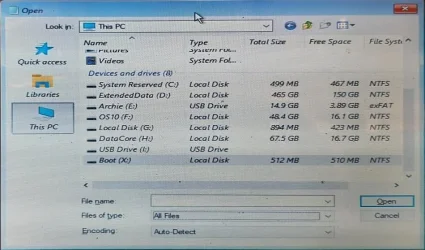
I sometimes use Notepad's FileOpen dialog as a rudimentary explorer when booted up from a USB.
You can use it to get a basic File explorer-like display of your drives so you can see what's what very quickly & clearly.
1761179094750.webp
You can even get it to help with rescuing disks before trying to reinstall anything.
Use InstallUSB Notepad as a rudimentary File explorer to backup files [post #33] - TenForums
The Macrium boot USB has its own file explorer built into it so there's no need to use Notepad as an alternative.


Best of luck,
Denis
 

My Computer

System One

  • OS
    Windows 11 Home x64 Version 25H2 Build 26200.8037
you can launch that from command prompt too

Code:
powershell -command "Add-Type -AssemblyName System.Windows.Forms; $f=New-Object Windows.Forms.SaveFileDialog; $f.ShowDialog() | Out-Null; echo $f.FileName"

obviously powershell too... just take off the
powershell -command
and the " "
 

My Computer

System One

  • OS
    Windows 11 Pro
you can launch that from command prompt too
You're talking about Notepad?
I referred to using its Open file dialog rather than its Save file dialog since I think that reduces the scope for mistakes deleting information by overwriting.
And I just launch it by typing the command
Notepad
then using its menu bar.
Or perhaps I misunderstood your post


All the best,
Denis
 

My Computer

System One

  • OS
    Windows 11 Home x64 Version 25H2 Build 26200.8037
no. i'm talking about open/save as window. run the command...
 

My Computer

System One

  • OS
    Windows 11 Pro
Back
Top Bottom