- Local time
- 1:29 PM
- Posts
- 176
- OS
- Windows 11 Pro version 25H2 build 26200.7840
For years I have been using Ccleaner to do basically one thing and that is to clean my browsing history automatically when I close the browser. I know there is manual ways to do it but I have always wanted it done automatically when I closed my browser, 95% Chrome.
People on this forum have mentioned other things like bleach bit and others that do much more than clean browsing history, every one I tried still didn't clean automictic on close. My Ccleaner is coming up for renewal and I don't want to renew it. So I started my search again for something that is the one things I wanted and that was cleaning browsing history.
I wanted to share for those who might want the same thing this extension I found that does exactly what I wanted. It is called "History Auto Cleaner" it is a simple extension that does what I want and no more. I'll insert a screenshot to show the options, it may not suit a lot of you but if you are like me and don't trust apps to make all kinds of changes to my system and only want browsing history clean on close of browser it does that great!
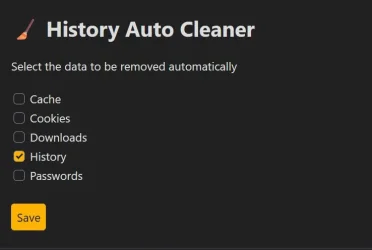
Hope this helps others.
People on this forum have mentioned other things like bleach bit and others that do much more than clean browsing history, every one I tried still didn't clean automictic on close. My Ccleaner is coming up for renewal and I don't want to renew it. So I started my search again for something that is the one things I wanted and that was cleaning browsing history.
I wanted to share for those who might want the same thing this extension I found that does exactly what I wanted. It is called "History Auto Cleaner" it is a simple extension that does what I want and no more. I'll insert a screenshot to show the options, it may not suit a lot of you but if you are like me and don't trust apps to make all kinds of changes to my system and only want browsing history clean on close of browser it does that great!
Hope this helps others.
My Computer
At a glance
Windows 11 Pro version 25H2 build 26200.7840Intel Core i7-12700KF Desktop Processor 12 (8...CORSAIR VENGEANCE DDR5 RAM 32GB (2x16GB) 6000...Gigabyte GeForce RTX™ 3060 GAMING OC 12G (rev...
- OS
- Windows 11 Pro version 25H2 build 26200.7840
- Computer type
- PC/Desktop
- Manufacturer/Model
- I built my system
- CPU
- Intel Core i7-12700KF Desktop Processor 12 (8P+4E) Core
- Motherboard
- MSI MAG Z790 Tomahawk WiFi Gaming Motherboard
- Memory
- CORSAIR VENGEANCE DDR5 RAM 32GB (2x16GB) 6000MHz CL36 Intel XMP iCUE
- Graphics Card(s)
- Gigabyte GeForce RTX™ 3060 GAMING OC 12G (rev. 2.0)
- Sound Card
- onboard
- Monitor(s) Displays
- (2) Samsung S24E310HL 23.6-Inch Screen LED-Lit Monitors
- Screen Resolution
- 1920 x 1080
- Hard Drives
- (3) SAMSUNG Electronics 870 EVO 2TB 2.5 Inch SATA III Internal SSD for storage
(1) Samsung 850 EVO 500GB 2.5-Inch SATA III Internal SSD for OS
- PSU
- Corsair RM750e Fully Modular Low-Noise ATX Power Supply
- Case
- Carbide Series™ Air 540 High Airflow ATX Cube Case
- Cooling
- Thermalright Peerless Assassin 120 SE CPU Air Cooler
- Keyboard
- Logitech K800
- Mouse
- Logitech MX Master
- Internet Speed
- 680 Mbps
- Browser
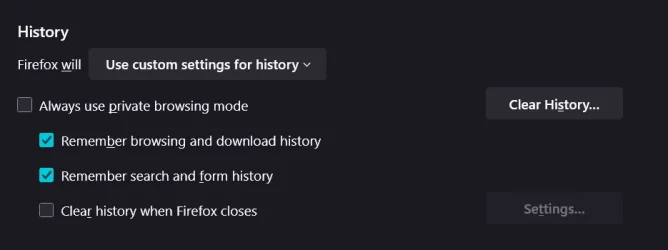
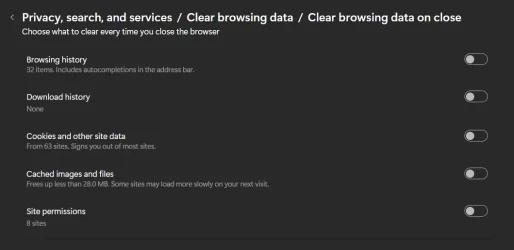
- Chrome as default with Firefox as well
- Antivirus
- Avira Pro



 Apple 13" Macbook Pro 2020 (m1)