History cleaner app


Logical Ron

Well-known member
Member
Local time
5:19 AM
Posts
176
OS
Windows 11 Pro version 25H2 build 26200.7840
For years I have been using Ccleaner to do basically one thing and that is to clean my browsing history automatically when I close the browser. I know there is manual ways to do it but I have always wanted it done automatically when I closed my browser, 95% Chrome.

People on this forum have mentioned other things like bleach bit and others that do much more than clean browsing history, every one I tried still didn't clean automictic on close. My Ccleaner is coming up for renewal and I don't want to renew it. So I started my search again for something that is the one things I wanted and that was cleaning browsing history.

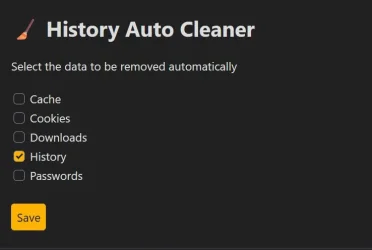
I wanted to share for those who might want the same thing this extension I found that does exactly what I wanted. It is called "History Auto Cleaner" it is a simple extension that does what I want and no more. I'll insert a screenshot to show the options, it may not suit a lot of you but if you are like me and don't trust apps to make all kinds of changes to my system and only want browsing history clean on close of browser it does that great!
0595.webp

Hope this helps others.


My Computer

System One

  • OS
    Windows 11 Pro version 25H2 build 26200.7840
    Computer type
    PC/Desktop
    Manufacturer/Model
    I built my system
    CPU
    Intel Core i7-12700KF Desktop Processor 12 (8P+4E) Core
    Motherboard
    MSI MAG Z790 Tomahawk WiFi Gaming Motherboard
    Memory
    CORSAIR VENGEANCE DDR5 RAM 32GB (2x16GB) 6000MHz CL36 Intel XMP iCUE
    Graphics Card(s)
    Gigabyte GeForce RTX™ 3060 GAMING OC 12G (rev. 2.0)
    Sound Card
    onboard
    Monitor(s) Displays
    (2) Samsung S24E310HL 23.6-Inch Screen LED-Lit Monitors
    Screen Resolution
    1920 x 1080
    Hard Drives
    (3) SAMSUNG Electronics 870 EVO 2TB 2.5 Inch SATA III Internal SSD for storage
    (1) Samsung 850 EVO 500GB 2.5-Inch SATA III Internal SSD for OS
    PSU
    Corsair RM750e Fully Modular Low-Noise ATX Power Supply
    Case
    Carbide Series™ Air 540 High Airflow ATX Cube Case
    Cooling
    Thermalright Peerless Assassin 120 SE CPU Air Cooler
    Keyboard
    Logitech K800
    Mouse
    Logitech MX Master
    Internet Speed
    680 Mbps
    Browser
    Chrome as default with Firefox as well
    Antivirus
    Avira Pro
Thank you
or
from Chrome:
chrome://settings/clearBrowserData
Select option(s)
 

My Computers

System One System Two

  • OS
    All Branches but Release
    Computer type
    Laptop
    Manufacturer/Model
    Acer Nitro ANV15-51
    CPU
    AMD Ryzen 7 7735HS 3200-4500 Mhz 8 cores x 2
    Motherboard
    Sportage_RBH
    Memory
    32 GB DDR5
    Graphics Card(s)
    Radeon Graphic / NVIDIA GeForce RTX 4060 8 GB GDDR6
    Sound Card
    AMD/Realtek(R) Audio
    Monitor(s) Displays
    Integrated Monitor (15.3"vis)
    Screen Resolution
    FHD 1920X1080 16:9 144Hz
    Hard Drives
    KINGSTON OM8SEP4512Q-AA 1TB
    Western Digital 256GB
    PSU
    19V DC 6.32 A 120 W
    Cooling
    Dual Fans
    Mouse
    MS Bluetooth
    Internet Speed
    Fiber 1GB Cox -us & 1GB Orange-fr
    Browser
    Edge Canary- Firefox Nightly-Chrome Dev-Chrome Dev
    Antivirus
    Windows Defender
  • Operating System
    Windows 11 Beta
    Computer type
    Laptop
    Manufacturer/Model
    Asus X751BP
    CPU
    AMD A9-9420
    Memory
    8 GB of DDR4
    Graphics card(s)
    AMD Radeon R5
    Screen Resolution
    1600x900
    Hard Drives
    Seagate 1 TB
chrome://settings/clearBrowserData
That is a manual process, the extension does it when I close the browser
 

My Computer

System One

  • OS
    Windows 11 Pro version 25H2 build 26200.7840
    Computer type
    PC/Desktop
    Manufacturer/Model
    I built my system
    CPU
    Intel Core i7-12700KF Desktop Processor 12 (8P+4E) Core
    Motherboard
    MSI MAG Z790 Tomahawk WiFi Gaming Motherboard
    Memory
    CORSAIR VENGEANCE DDR5 RAM 32GB (2x16GB) 6000MHz CL36 Intel XMP iCUE
    Graphics Card(s)
    Gigabyte GeForce RTX™ 3060 GAMING OC 12G (rev. 2.0)
    Sound Card
    onboard
    Monitor(s) Displays
    (2) Samsung S24E310HL 23.6-Inch Screen LED-Lit Monitors
    Screen Resolution
    1920 x 1080
    Hard Drives
    (3) SAMSUNG Electronics 870 EVO 2TB 2.5 Inch SATA III Internal SSD for storage
    (1) Samsung 850 EVO 500GB 2.5-Inch SATA III Internal SSD for OS
    PSU
    Corsair RM750e Fully Modular Low-Noise ATX Power Supply
    Case
    Carbide Series™ Air 540 High Airflow ATX Cube Case
    Cooling
    Thermalright Peerless Assassin 120 SE CPU Air Cooler
    Keyboard
    Logitech K800
    Mouse
    Logitech MX Master
    Internet Speed
    680 Mbps
    Browser
    Chrome as default with Firefox as well
    Antivirus
    Avira Pro

My Computer

System One

  • OS
    Home26H2Can
    Computer type
    PC/Desktop
    CPU
    AMD Ryzen 5 8600G (07/24)
    Motherboard
    ASROCK B650M-HDV/M.2 (07/24) BIOS 4.21 AGESA ComboAM5 1.3.0.1 (04/26)
    Memory
    2x32GB Kingston FURY DDR5 5600 MHz CL36 @5200 CL36 (07/24)
    Graphics Card(s)
    ASROCK Radeon RX 6600 Challenger D 8G @48FPS (08/24)
    Sound Card
    Creative Sound BlasterX AE-5 Plus (05/24)
    Monitor(s) Displays
    24" Philips 24M1N3200ZS/00 (05/24)
    Screen Resolution
    1920×1080@165Hz via DP1.4
    Hard Drives
    Kingston KC3000 NVMe 2TB (05/24)
    ADATA XPG GAMMIX S11 Pro 512GB (07/19)
    PSU
    Seasonic Core GM 550 Gold (04/24)
    Case
    Fractal Design Define 7 Mini with 3x Noctua NF-P14s/12@555rpm (04/24)
    Cooling
    Noctua NH-U12S with Noctua NF-P12 (04/24)
    Keyboard
    HP Pavilion Wired Keyboard 300 (07/24) + Rabalux 76017 Parker (01/24)
    Mouse
    Logitech M330 Silent Plus (01/26)
    Internet Speed
    500/100 Mbps via RouterOS (05/21) & TCP Optimizer
    Browser
    Edge, Brave for YouTube, LibreWolf for FB
    Antivirus
    NextDNS blocking 1/3 Traffic
    Other Info
    Phone: Motorola Moto G86 (02/26)
    Backup: Hasleo Backup Suite (PreOS)
    Headphones: Sennheiser RS170 (09/10)
    Chair: Huzaro Force 4.4 Grey Mesh (05/24)
    Notifier: Xiaomi Mi Band 9 Milanese (10/24)
    FlexCore USB-C 3.2 Gen 1 (M) to LAN (F) (08/25)
When the browser crashes, the history is not removed, because the extension crashes too.🙃
I have not had that problem and nothing else does the process when closing the browser except Ccleaner. Don't want to get in a big debate about it if it is something you might want use it if not fine.
 

My Computer

System One

  • OS
    Windows 11 Pro version 25H2 build 26200.7840
    Computer type
    PC/Desktop
    Manufacturer/Model
    I built my system
    CPU
    Intel Core i7-12700KF Desktop Processor 12 (8P+4E) Core
    Motherboard
    MSI MAG Z790 Tomahawk WiFi Gaming Motherboard
    Memory
    CORSAIR VENGEANCE DDR5 RAM 32GB (2x16GB) 6000MHz CL36 Intel XMP iCUE
    Graphics Card(s)
    Gigabyte GeForce RTX™ 3060 GAMING OC 12G (rev. 2.0)
    Sound Card
    onboard
    Monitor(s) Displays
    (2) Samsung S24E310HL 23.6-Inch Screen LED-Lit Monitors
    Screen Resolution
    1920 x 1080
    Hard Drives
    (3) SAMSUNG Electronics 870 EVO 2TB 2.5 Inch SATA III Internal SSD for storage
    (1) Samsung 850 EVO 500GB 2.5-Inch SATA III Internal SSD for OS
    PSU
    Corsair RM750e Fully Modular Low-Noise ATX Power Supply
    Case
    Carbide Series™ Air 540 High Airflow ATX Cube Case
    Cooling
    Thermalright Peerless Assassin 120 SE CPU Air Cooler
    Keyboard
    Logitech K800
    Mouse
    Logitech MX Master
    Internet Speed
    680 Mbps
    Browser
    Chrome as default with Firefox as well
    Antivirus
    Avira Pro
Don't want to get in a big debate about it if it is something you might want use it if not fine.
As long as it works for you, it is OK. Actually I have not seen a browser to crash in years, but it was worth mentioning. I myself rely on 3+1 ways to clear history before shutdown: 1. Clear on close, 2. Wise Disk Cleaner, 3. Manual Cleanup. +RAMdisk in case of a crash.
 

My Computer

System One

  • OS
    Home26H2Can
    Computer type
    PC/Desktop
    CPU
    AMD Ryzen 5 8600G (07/24)
    Motherboard
    ASROCK B650M-HDV/M.2 (07/24) BIOS 4.21 AGESA ComboAM5 1.3.0.1 (04/26)
    Memory
    2x32GB Kingston FURY DDR5 5600 MHz CL36 @5200 CL36 (07/24)
    Graphics Card(s)
    ASROCK Radeon RX 6600 Challenger D 8G @48FPS (08/24)
    Sound Card
    Creative Sound BlasterX AE-5 Plus (05/24)
    Monitor(s) Displays
    24" Philips 24M1N3200ZS/00 (05/24)
    Screen Resolution
    1920×1080@165Hz via DP1.4
    Hard Drives
    Kingston KC3000 NVMe 2TB (05/24)
    ADATA XPG GAMMIX S11 Pro 512GB (07/19)
    PSU
    Seasonic Core GM 550 Gold (04/24)
    Case
    Fractal Design Define 7 Mini with 3x Noctua NF-P14s/12@555rpm (04/24)
    Cooling
    Noctua NH-U12S with Noctua NF-P12 (04/24)
    Keyboard
    HP Pavilion Wired Keyboard 300 (07/24) + Rabalux 76017 Parker (01/24)
    Mouse
    Logitech M330 Silent Plus (01/26)
    Internet Speed
    500/100 Mbps via RouterOS (05/21) & TCP Optimizer
    Browser
    Edge, Brave for YouTube, LibreWolf for FB
    Antivirus
    NextDNS blocking 1/3 Traffic
    Other Info
    Phone: Motorola Moto G86 (02/26)
    Backup: Hasleo Backup Suite (PreOS)
    Headphones: Sennheiser RS170 (09/10)
    Chair: Huzaro Force 4.4 Grey Mesh (05/24)
    Notifier: Xiaomi Mi Band 9 Milanese (10/24)
    FlexCore USB-C 3.2 Gen 1 (M) to LAN (F) (08/25)
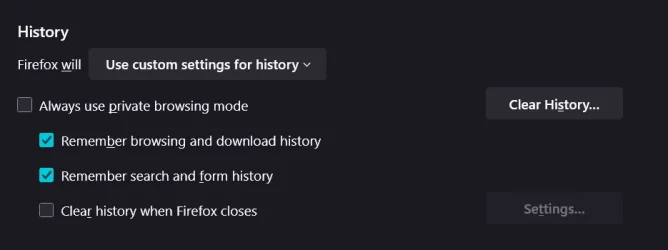
There is an option in firefox to do this for you automatically

1760208673170.webp


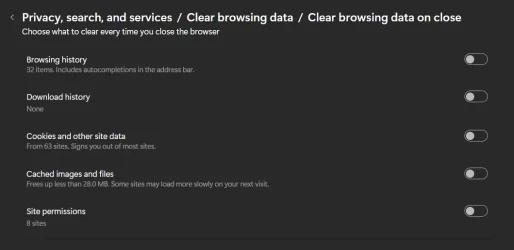
And with Edge:

Screenshot 2025-10-11 145627.webp

Just sayin :-)
 

My Computers

System One System Two

  • OS
    Windows 11 Pro x64
    Computer type
    PC/Desktop
    Manufacturer/Model
    📷🔈🎧 🪛 DIY Photoshop/Audio/Game/tinker
    CPU
    i9 14900K P/E 5.8/4.5 GHz, cache 5.0 GHz
    Motherboard
    Asus ROG Maximus Z790 Dark Hero
    Memory
    🐏 96GB (2x48) G.skill Ripjaws 6800 MT/s
    Graphics Card(s)
    Asus ROG Strix 4070 Ti OC
    Sound Card
    🔊Bowers & Wilkins 606 S3 speakers; Audiolabs 7000a integrated amp; RSL 10S Mk2 sub; Creative Pebble Pro Minimilist
    Monitor(s) Displays
    🖥️🖥️ Eizo CG2730 ColorEdge, ViewSonic VP2768
    Screen Resolution
    🖥️🖥️ 2560 x 1440p x 2
    Hard Drives
    💾 WDC SN850X 4TB nvme, SN850 1TB nvme, SK-Hynix 2 TB P41 nvme,. Sabrent USB-C DS-SC5B 5-bay docking station: 6TB WDC Black, 6TB Ironwolf Pro; 2x 2TB WDC Black HDD
    PSU
    ⚡️ 850W Seasonic Vertex PX-850 ATX 3.0/PCI-E 5.0
    Case
    Fractal Design North XL Mesh, Black Walnut
    Cooling
    ❄️ EK Nucleus black 360 AIO w/Phanteks T30-120 fans, 2 Noctua NF-A14 Chromax case fan, 1 T30-120 fan cooling memory
    Keyboard
    ⌨️ Keychron Q3 Max TKL with custom GMK Redsuns Red Samuri keycaps, TX Stabs
    Mouse
    🖱️ Logitech G305 wireless gaming
    Internet Speed
    ⬇️ 500 Mb/s ⬆️ 12 Mb/s
    Browser
    🔥🦊 Firefox
    Antivirus
    🦺 Defender, Macrium Reflect X 🏆
    Other Info
    Phangkey Amaterasu V2 Desk Mat
  • Computer type
    Laptop
    Manufacturer/Model
    💻 Apple 13" Macbook Pro 2020 (m1)
    CPU
    Apple M1
    Screen Resolution
    2560x1600
    Browser
    Firefox
There is an option in firefox to do this for you automatically
Thanks, Yes I use that and Firefox isn't an issue for me, it is GOOGLE chrome who wants to rule the world and know everything we do. OK that is a bit much but I think everyone feels the same.
 

My Computer

System One

  • OS
    Windows 11 Pro version 25H2 build 26200.7840
    Computer type
    PC/Desktop
    Manufacturer/Model
    I built my system
    CPU
    Intel Core i7-12700KF Desktop Processor 12 (8P+4E) Core
    Motherboard
    MSI MAG Z790 Tomahawk WiFi Gaming Motherboard
    Memory
    CORSAIR VENGEANCE DDR5 RAM 32GB (2x16GB) 6000MHz CL36 Intel XMP iCUE
    Graphics Card(s)
    Gigabyte GeForce RTX™ 3060 GAMING OC 12G (rev. 2.0)
    Sound Card
    onboard
    Monitor(s) Displays
    (2) Samsung S24E310HL 23.6-Inch Screen LED-Lit Monitors
    Screen Resolution
    1920 x 1080
    Hard Drives
    (3) SAMSUNG Electronics 870 EVO 2TB 2.5 Inch SATA III Internal SSD for storage
    (1) Samsung 850 EVO 500GB 2.5-Inch SATA III Internal SSD for OS
    PSU
    Corsair RM750e Fully Modular Low-Noise ATX Power Supply
    Case
    Carbide Series™ Air 540 High Airflow ATX Cube Case
    Cooling
    Thermalright Peerless Assassin 120 SE CPU Air Cooler
    Keyboard
    Logitech K800
    Mouse
    Logitech MX Master
    Internet Speed
    680 Mbps
    Browser
    Chrome as default with Firefox as well
    Antivirus
    Avira Pro
Just so you know, clearing browser data does not help you regain complete anonymity..., plus it makes the browser have to work harder and slower all over again.
 

My Computers

System One System Two

  • OS
    Windows 11 Pro
    Computer type
    PC/Desktop
    Manufacturer/Model
    ASUS ROG Strix
  • Operating System
    Windows 11 Pro
    Computer type
    Laptop
    Manufacturer/Model
    ASUS VivoBook
Just so you know, clearing browser data does not help you regain complete anonymity..., plus it makes the browser have to work harder and slower all over again.
Yes I know but the cleaning history is what I like and want. Not trying to hide form the police or anything. I just hate my history showing when I start to type in search space. Thanks for your reply
 

My Computer

System One

  • OS
    Windows 11 Pro version 25H2 build 26200.7840
    Computer type
    PC/Desktop
    Manufacturer/Model
    I built my system
    CPU
    Intel Core i7-12700KF Desktop Processor 12 (8P+4E) Core
    Motherboard
    MSI MAG Z790 Tomahawk WiFi Gaming Motherboard
    Memory
    CORSAIR VENGEANCE DDR5 RAM 32GB (2x16GB) 6000MHz CL36 Intel XMP iCUE
    Graphics Card(s)
    Gigabyte GeForce RTX™ 3060 GAMING OC 12G (rev. 2.0)
    Sound Card
    onboard
    Monitor(s) Displays
    (2) Samsung S24E310HL 23.6-Inch Screen LED-Lit Monitors
    Screen Resolution
    1920 x 1080
    Hard Drives
    (3) SAMSUNG Electronics 870 EVO 2TB 2.5 Inch SATA III Internal SSD for storage
    (1) Samsung 850 EVO 500GB 2.5-Inch SATA III Internal SSD for OS
    PSU
    Corsair RM750e Fully Modular Low-Noise ATX Power Supply
    Case
    Carbide Series™ Air 540 High Airflow ATX Cube Case
    Cooling
    Thermalright Peerless Assassin 120 SE CPU Air Cooler
    Keyboard
    Logitech K800
    Mouse
    Logitech MX Master
    Internet Speed
    680 Mbps
    Browser
    Chrome as default with Firefox as well
    Antivirus
    Avira Pro
The OP has an obsession with cleaning his history and we have to respect that.
He probably doesn’t want anyone else to know what sites he has frequented.
 

My Computer

System One

  • OS
    Win 7,8.1,10,11, Mint, Kde Plasma, Debian
    Computer type
    Laptop
    Manufacturer/Model
    Dell
    CPU
    Intel(R) Core(TM) i7-6500U CPU @ 2.50GHz
    Memory
    16 GB
    Graphics Card(s)
    Intel(R) HD Graphics 520/Nvidia GeForce 930M
    Sound Card
    Intel(R) Display Audio/RealtekAudio
    Monitor(s) Displays
    Generic Pnp Monitor
    Screen Resolution
    1366 X 768
    Hard Drives
    ST2000LM024-1EJ164
    Keyboard
    Eng (US)
    Mouse
    Sanwa Supply
    Browser
    Firefox
    Antivirus
    Avast One
    Other Info
    Too many laptops with different system specifications.
The OP has an obsession with cleaning his history and we have to respect that.
He probably doesn’t want anyone else to know what sites he has frequented.
I don’t visit any sites that I would have a problem with anyone seeing. What I don’t like is, every time I begin to type something into my Google search box, there’s still lot of searches that come up, that I no longer need. Obsession? Yes, I do have an obsession with clearing all my history, and cookies and etc. normally before I shut the PC down. Yes, I guess we all have our obsessions, mine is ice cream. 😁
 

My Computer

System One

  • OS
    Windows XP (Stable, iconic) 7/8.1/10/11
    Computer type
    PC/Desktop
    Manufacturer/Model
    Alienware PC
    CPU
    Intel i7 4790K
    Motherboard
    ASROCK Z97 EXTREME4
    Memory
    32GB DDR3 1600 MHz
    Graphics Card(s)
    ATI Radeon HD 7770 2GB GDDR5
    Sound Card
    Onboard
    Monitor(s) Displays
    SAMSUNG UE57 Series 28-Inch 4K UHD
    Hard Drives
    SAMSUNG 970 EVO PLUS M.2
    PSU
    EVGA 850 watt
    Case
    Alienware Area 51 Black Tower Case
    Keyboard
    HyperX - Alloy Elite 2 Mechanical Gaming Keyboard.
    Mouse
    Microsoft Wireless
    Internet Speed
    1.2 GHz
    Browser
    Chrome..Edge..Firefox
I never notice my search history cuz I always use voice input...

10747.webp
 

My Computers

System One System Two

  • OS
    Windows 11 Pro
    Computer type
    PC/Desktop
    Manufacturer/Model
    ASUS ROG Strix
  • Operating System
    Windows 11 Pro
    Computer type
    Laptop
    Manufacturer/Model
    ASUS VivoBook
Back
Top Bottom