Solved How do I bypass the New Windows Install and only have to Old Setup?


Just checked : yes all under [LaunchApps] does work if you get the order correct
 

My Computers My Computers

  • At a glance

    Win7,Win11i7-97002x16gb 3600mhz
    OS
    Win7,Win11
    Computer type
    PC/Desktop
    CPU
    i7-9700
    Motherboard
    gigabyte b365m ds3h
    Memory
    2x16gb 3600mhz
    Monitor(s) Displays
    benq gw2480
    PSU
    bequiet pure power 11 400CM
    Cooling
    cryorig m9i
  • At a glance

    win7,win11i5-84002x8gb 3200
    Operating System
    win7,win11
    Computer type
    PC/Desktop
    CPU
    i5-8400
    Motherboard
    gigabyte b365m ds3h
    Memory
    2x8gb 3200
    PSU
    xfx pro 450
It is easy to test

just open boot.wim\2\winows\system32 with 7-zip and drag in

winpeshl.ini
[LaunchApps]
startnet.cmd
%systemdrive%\sources\setup.exe

it runs startnet.cmd first
then setup appears as the shell

you could add a pause or something to startnet.cmd so the cmd window will wait for you to close it, then winpeshl.exe will process the next line of winpeshl.ini
 
Last edited:

My Computers My Computers

  • At a glance

    Win7,Win11i7-97002x16gb 3600mhz
    OS
    Win7,Win11
    Computer type
    PC/Desktop
    CPU
    i7-9700
    Motherboard
    gigabyte b365m ds3h
    Memory
    2x16gb 3600mhz
    Monitor(s) Displays
    benq gw2480
    PSU
    bequiet pure power 11 400CM
    Cooling
    cryorig m9i
  • At a glance

    win7,win11i5-84002x8gb 3200
    Operating System
    win7,win11
    Computer type
    PC/Desktop
    CPU
    i5-8400
    Motherboard
    gigabyte b365m ds3h
    Memory
    2x8gb 3200
    PSU
    xfx pro 450
Ias there a possibility that putting this in index: 2 and registry hacks for the old setup are incompatible ? I tried them both together and the result going back to asking me where I wanted to install windows 0n a 500gb drive!

great support SIW thank you very much.
 

My Computer My Computer

At a glance

Windows 11 proI-7 2gigaherz16Gig
OS
Windows 11 pro
Computer type
Laptop
Manufacturer/Model
Asus
CPU
I-7 2gigaherz
Motherboard
Asus
Memory
16Gig
Screen Resolution
1024x768
Hard Drives
512 SSD
You could put reg entries in whichever .cmd file you are calling

if you are calling startnet.cmd put them in there

for example

reg add "HKLM\SYSTEM\Setup\LabConfig" /f /v "BypassTPMCheck" /t REG_DWORD /d 1
reg add "HKLM\SYSTEM\Setup\LabConfig" /f /v "BypassSecureBootCheck" /t REG_DWORD /d 1
reg add "HKLM\SYSTEM\Setup\LabConfig" /f /v "BypassRAMCheck" /t REG_DWORD /d 1

or whatever the reg entries are nowadays
 

My Computers My Computers

  • At a glance

    Win7,Win11i7-97002x16gb 3600mhz
    OS
    Win7,Win11
    Computer type
    PC/Desktop
    CPU
    i7-9700
    Motherboard
    gigabyte b365m ds3h
    Memory
    2x16gb 3600mhz
    Monitor(s) Displays
    benq gw2480
    PSU
    bequiet pure power 11 400CM
    Cooling
    cryorig m9i
  • At a glance

    win7,win11i5-84002x8gb 3200
    Operating System
    win7,win11
    Computer type
    PC/Desktop
    CPU
    i5-8400
    Motherboard
    gigabyte b365m ds3h
    Memory
    2x8gb 3200
    PSU
    xfx pro 450
I tried them both together and the result going back to asking me where I wanted to install windows

yes that is what setup.exe does

if you want it automated you can use one of those unattend xml things.

OR

first create and letter the partitions with diskpart script

then use a batch file which contains dism commands to apply the image to the windows partition

and bcdboot commands to create the boot critical files on the esp


if you have already created and lettered the partitions, you know which partition to point dism at and which partition to point bcdboot at

You dont yet know the letter of the usb installation media. So you have to find that to get the location of install.wim

one way is to put a tagfile with a unique name on the root of the usb stick. For example a file named fartyname.txt or a folder with a unique name

then the batch file can search for fartyname.txt to get the letter of the usb stick

in batch speak this kind of thing


Code:
for %%i in (A B C D E F G H I J K L M N O P Q R S T U V W X Y Z) do (
    if exist "%%i:\fartyname.txt" set usbletter=%%i
     )
 
     echo %usbletter%

letter-from-tag-cmd.webp


now you know how to point dism at %usbletter%:\sources\install.wim

[ in pecmd speak is something like this

FORX \fartyname.txt,&&fd,0,TEAM envi usblett=%&fd%| Lstr USBLETT=2,%usblett%
mess %USBLETT%

pecmd-mess.webp

]
 
Last edited:

My Computers My Computers

  • At a glance

    Win7,Win11i7-97002x16gb 3600mhz
    OS
    Win7,Win11
    Computer type
    PC/Desktop
    CPU
    i7-9700
    Motherboard
    gigabyte b365m ds3h
    Memory
    2x16gb 3600mhz
    Monitor(s) Displays
    benq gw2480
    PSU
    bequiet pure power 11 400CM
    Cooling
    cryorig m9i
  • At a glance

    win7,win11i5-84002x8gb 3200
    Operating System
    win7,win11
    Computer type
    PC/Desktop
    CPU
    i5-8400
    Motherboard
    gigabyte b365m ds3h
    Memory
    2x8gb 3200
    PSU
    xfx pro 450
fartyname.txt I love it
 

My Computer My Computer

At a glance

Windows 11 proI-7 2gigaherz16Gig
OS
Windows 11 pro
Computer type
Laptop
Manufacturer/Model
Asus
CPU
I-7 2gigaherz
Motherboard
Asus
Memory
16Gig
Screen Resolution
1024x768
Hard Drives
512 SSD
If esp has been allocated S and windows partition has been allocated C

Dism /apply-image /imagefile:%usbletter%:\sources\install.wim /index:6 /ApplyDir:C:\

bcdboot c:\windows /s S: /f all

reminds me of the Michael Curtiz quote
 

My Computers My Computers

  • At a glance

    Win7,Win11i7-97002x16gb 3600mhz
    OS
    Win7,Win11
    Computer type
    PC/Desktop
    CPU
    i7-9700
    Motherboard
    gigabyte b365m ds3h
    Memory
    2x16gb 3600mhz
    Monitor(s) Displays
    benq gw2480
    PSU
    bequiet pure power 11 400CM
    Cooling
    cryorig m9i
  • At a glance

    win7,win11i5-84002x8gb 3200
    Operating System
    win7,win11
    Computer type
    PC/Desktop
    CPU
    i5-8400
    Motherboard
    gigabyte b365m ds3h
    Memory
    2x8gb 3200
    PSU
    xfx pro 450
In the Where do you want to install windows should it lost the partitions? Mine just lists the 500GB hard drive that os the physical drive!
 

My Computer My Computer

At a glance

Windows 11 proI-7 2gigaherz16Gig
OS
Windows 11 pro
Computer type
Laptop
Manufacturer/Model
Asus
CPU
I-7 2gigaherz
Motherboard
Asus
Memory
16Gig
Screen Resolution
1024x768
Hard Drives
512 SSD
SIW: yes that is what setup.exe does. But should it list partitions on that screen?
 

My Computer My Computer

At a glance

Windows 11 proI-7 2gigaherz16Gig
OS
Windows 11 pro
Computer type
Laptop
Manufacturer/Model
Asus
CPU
I-7 2gigaherz
Motherboard
Asus
Memory
16Gig
Screen Resolution
1024x768
Hard Drives
512 SSD
Can I use the answerfile and the winpeshl.ini together? To fill-in the user data& Product key ?
 

My Computer My Computer

At a glance

Windows 11 proI-7 2gigaherz16Gig
OS
Windows 11 pro
Computer type
Laptop
Manufacturer/Model
Asus
CPU
I-7 2gigaherz
Motherboard
Asus
Memory
16Gig
Screen Resolution
1024x768
Hard Drives
512 SSD
SIW: yes that is what setup.exe does. But should it list partitions on that screen?

It should show them if they are there.

Not clear what you have done. Did you run diskpart with a script from winpeshl.ini before launching setup.exe ?
 

My Computers My Computers

  • At a glance

    Win7,Win11i7-97002x16gb 3600mhz
    OS
    Win7,Win11
    Computer type
    PC/Desktop
    CPU
    i7-9700
    Motherboard
    gigabyte b365m ds3h
    Memory
    2x16gb 3600mhz
    Monitor(s) Displays
    benq gw2480
    PSU
    bequiet pure power 11 400CM
    Cooling
    cryorig m9i
  • At a glance

    win7,win11i5-84002x8gb 3200
    Operating System
    win7,win11
    Computer type
    PC/Desktop
    CPU
    i5-8400
    Motherboard
    gigabyte b365m ds3h
    Memory
    2x8gb 3200
    PSU
    xfx pro 450
I was just trying to figure out if I could use the lines of answer file before and after the partitioning a hard disk, then use winpeshl.ini for the partitioning the hard drive and making directories. Will this work?
 

My Computer My Computer

At a glance

Windows 11 proI-7 2gigaherz16Gig
OS
Windows 11 pro
Computer type
Laptop
Manufacturer/Model
Asus
CPU
I-7 2gigaherz
Motherboard
Asus
Memory
16Gig
Screen Resolution
1024x768
Hard Drives
512 SSD

hsehestedt: I am trying to go to "the previous version of setup without going through the 3 previous screens!​

You can't, the option is not shown on the first 3 screens. Unless of course there is a key combination to force it which I am not aware of. No big deal, just play along until you see the option. Also the Registry keys to bypass compatibility check work for the old setup screen. I am not sure if they apply to the new one. First time I saw the new Setup screen, I could not find out how to select a specific partition to install Windows and I was afraid I might overwrite the wrong disk! Thanks God I spotted this option and everything was familiar again.
 

My Computers My Computers

  • At a glance

    Windows 11 Pro 23H2 (5699), 25H2 (9168)Mobile DualCore Intel Core 2 Duo T7250, 2000 MHz4GBMobile Intel(R) GMA 4500M (Mobile 4 series)
    OS
    Windows 11 Pro 23H2 (5699), 25H2 (9168)
    Computer type
    Laptop
    Manufacturer/Model
    Acer Extensa 5630EZ
    CPU
    Mobile DualCore Intel Core 2 Duo T7250, 2000 MHz
    Motherboard
    Acer Extensa 5630
    Memory
    4GB
    Graphics Card(s)
    Mobile Intel(R) GMA 4500M (Mobile 4 series)
    Sound Card
    Realtek ALC268 @ Intel 82801IB ICH9 - High Definition Audio Controller
    Monitor(s) Displays
    1
    Screen Resolution
    1280x800
    Hard Drives
    Samsung SSD 850 EVO 250GB SATA Device (250 GB, SATA-III)
    Internet Speed
    802.11g wireless 54 Mbps
    Browser
    MICROSOFT EDGE
    Antivirus
    WINDOWS DEFENDER
    Other Info
    Legacy MBR installation, no TPM, no Secure Boot, no WDDM 2.0 graphics drivers, no SSE4.2, cannot get more unsupported ;) This is only my test laptop. I had installed Windows 11 here before upgrading my main PC. For my main PC I use everyday see my 2nd system specs.
  • At a glance

    Windows 11 Pro v25H2 (build 26200.9168)Intel Core-i7 3770 3.40GHz s1155 (3rd generat...2x Kingston Hyper-X Blu 8GB DDR3-1600GIGABYTE GeForce RTX 3050 WINDFORCE OC V2 6GB...
    Operating System
    Windows 11 Pro v25H2 (build 26200.9168)
    Computer type
    PC/Desktop
    Manufacturer/Model
    Custom-built PC
    CPU
    Intel Core-i7 3770 3.40GHz s1155 (3rd generation)
    Motherboard
    Asus P8H61 s1155 ATX
    Memory
    2x Kingston Hyper-X Blu 8GB DDR3-1600
    Graphics card(s)
    GIGABYTE GeForce RTX 3050 WINDFORCE OC V2 6GB (GV-N3050WF2OCV2-6GD)
    Sound Card
    Realtek HD audio (ALC887)
    Monitor(s) Displays
    Sony Bravia KDL-19L4000 19" LCD TV via VGA
    Screen Resolution
    1440x900 32-bit 60Hz
    Hard Drives
    WD Blue SA510 2.5 1000GB SSD as system disk, Western Digital Caviar Purple 4TB SATA III (WD40PURZ) as second
    PSU
    Thermaltake Litepower RGB 550W Full Wired
    Case
    SUPERCASE MIDI-TOWER
    Cooling
    Deepcool Gamma Archer CPU cooler, 1x 8cm fan at the back
    Keyboard
    Mitsumi 101-key PS/2
    Mouse
    Microsoft Compact Optical Mouse
    Internet Speed
    802.11ac 5GHz wireless 260Mpbs
    Browser
    Microsoft Edge, Mozilla Firefox
    Antivirus
    Microsoft Windows Defender
    Other Info
    Legacy BIOS (MBR) installation, no TPM, no Secure Boot, WDDM 3.0 graphics drivers, WEI score 7.4
it should read "list the partitions!"
 

My Computer My Computer

At a glance

Windows 11 proI-7 2gigaherz16Gig
OS
Windows 11 pro
Computer type
Laptop
Manufacturer/Model
Asus
CPU
I-7 2gigaherz
Motherboard
Asus
Memory
16Gig
Screen Resolution
1024x768
Hard Drives
512 SSD

SIW2: I was wondering if you can use autounattend.xml first then winpeshl.ini to partition hard disk?​


My Computer My Computer

At a glance

Windows 11 proI-7 2gigaherz16Gig
OS
Windows 11 pro
Computer type
Laptop
Manufacturer/Model
Asus
CPU
I-7 2gigaherz
Motherboard
Asus
Memory
16Gig
Screen Resolution
1024x768
Hard Drives
512 SSD
you might be better calling a batch file from winpeshl.ini to do the partitioning so you can see what it is doing

name it whatever you want e.g. dopartition.cmd

Code:
ECHO Lis Dis|diskpart.exe

rem then select whatever disk you want

rem and create the partitions.txt file

rem something like this
ECHO sel dis %selecteddiskno% >X:\partitions.txt
ECHO cle >>X:\partitions.txt
ECHO Convert GPT >>X:\partitions.txt
ECHO cre par efi size=260 >>X:\partitions.txt
ECHO for quick fs=fat32 label="System" >>X:\partitions.txt
ECHO ass letter="S" >>X:\partitions.txt
ECHO cre par msr size=16 >>X:\partitions.txt
etc

diskpart.exe /s X:\partitions.txt
pause

***********************************************************
I suppose you could put all your MD stuff after that

then dism apply and bcdboot

I would probably call separate .cmd files for those

************************************************************

as far as I know the autounattend thing is found by setup.exe If so it would be after calling the .cmd files.

depending what the autounattend does, possibly something along these lines

[LaunchApps]
dopartitions.cmd
MDstuff.cmd
applywim.cmd
%systemdrive%\sources\setup.exe

@garlin probably knows the autounattend business
 
Last edited:

My Computers My Computers

  • At a glance

    Win7,Win11i7-97002x16gb 3600mhz
    OS
    Win7,Win11
    Computer type
    PC/Desktop
    CPU
    i7-9700
    Motherboard
    gigabyte b365m ds3h
    Memory
    2x16gb 3600mhz
    Monitor(s) Displays
    benq gw2480
    PSU
    bequiet pure power 11 400CM
    Cooling
    cryorig m9i
  • At a glance

    win7,win11i5-84002x8gb 3200
    Operating System
    win7,win11
    Computer type
    PC/Desktop
    CPU
    i5-8400
    Motherboard
    gigabyte b365m ds3h
    Memory
    2x8gb 3200
    PSU
    xfx pro 450
Thank you.
 

My Computer My Computer

At a glance

Windows 11 proI-7 2gigaherz16Gig
OS
Windows 11 pro
Computer type
Laptop
Manufacturer/Model
Asus
CPU
I-7 2gigaherz
Motherboard
Asus
Memory
16Gig
Screen Resolution
1024x768
Hard Drives
512 SSD
just a rough idea, you can fill in the missing bits.
 

My Computers My Computers

  • At a glance

    Win7,Win11i7-97002x16gb 3600mhz
    OS
    Win7,Win11
    Computer type
    PC/Desktop
    CPU
    i7-9700
    Motherboard
    gigabyte b365m ds3h
    Memory
    2x16gb 3600mhz
    Monitor(s) Displays
    benq gw2480
    PSU
    bequiet pure power 11 400CM
    Cooling
    cryorig m9i
  • At a glance

    win7,win11i5-84002x8gb 3200
    Operating System
    win7,win11
    Computer type
    PC/Desktop
    CPU
    i5-8400
    Motherboard
    gigabyte b365m ds3h
    Memory
    2x8gb 3200
    PSU
    xfx pro 450
Does Diskpart.exe have to be the first line in the .txt file?
 

My Computer My Computer

At a glance

Windows 11 proI-7 2gigaherz16Gig
OS
Windows 11 pro
Computer type
Laptop
Manufacturer/Model
Asus
CPU
I-7 2gigaherz
Motherboard
Asus
Memory
16Gig
Screen Resolution
1024x768
Hard Drives
512 SSD
It shouldnt be in the text file.

the first line in partitions.txt should be select disk or sel dis whatever number for example

sel dis 0

you need to add a bit code to select the disk - here is a quick way, somebody might suggest something better but this does the job

Code:
@echo off
ECHO Lis Dis|DISKPART.EXE
echo. &echo.
:CHOOSEdiskno
ECHO.
echo  PLEASE ENTER A DISK NUMBER
ECHO.
set selecteddiskno=
set /p selecteddiskno="Disk Number => "
ECHO.
if not defined selecteddiskno goto :CHOOSEdiskno
echo. &echo.
:CHECKdiskno
echo ARE YOU SURE YOU WANT TO PROCESS DISK  %selecteddiskno%
 SET YESNO=
 SET /P YESNO="Y=YES / N=NO => "
echo.
IF /I NOT '%YESNO%'=='Y' IF /I NOT '%YESNO%'=='N' goto :CHECKdiskno
IF /I '%YESNO%'=='N' GOTO :CHOOSEdiskno

ECHO sel dis %selecteddiskno% >x:\partitions.txt
ECHO cle >>x:\partitions.txt
ECHO Convert GPT >>x:\partitions.txt
ECHO cre par efi size=260 >>x:\partitions.txt
ECHO for quick fs=fat32 label="System" >>x:\partitions.txt
ECHO ass letter="S" >>x:\partitions.txt
ECHO cre par msr size=16 >>x:\partitions.txt

rem and the rest of the partitioning commands

rem then tel diskpart to run the partitions.txt you just made

diskpart.exe /s x:\partitions.txt
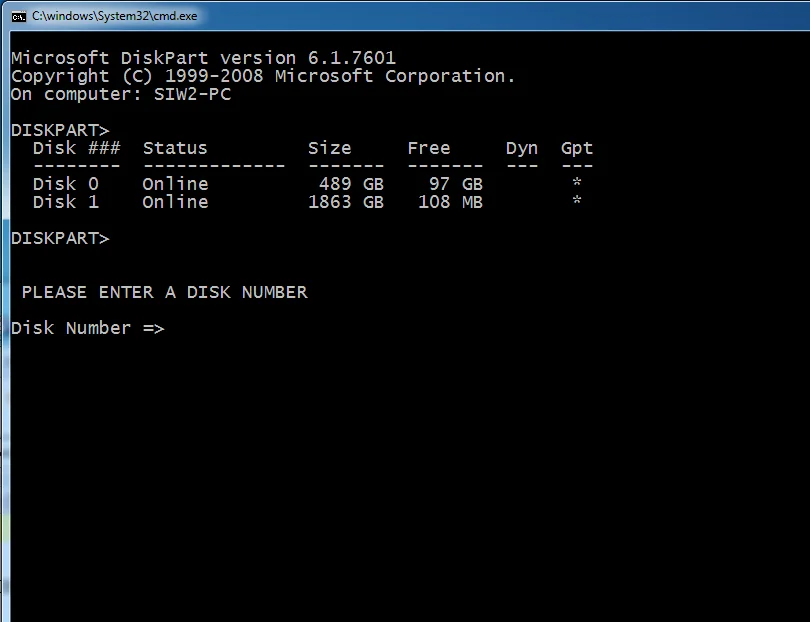
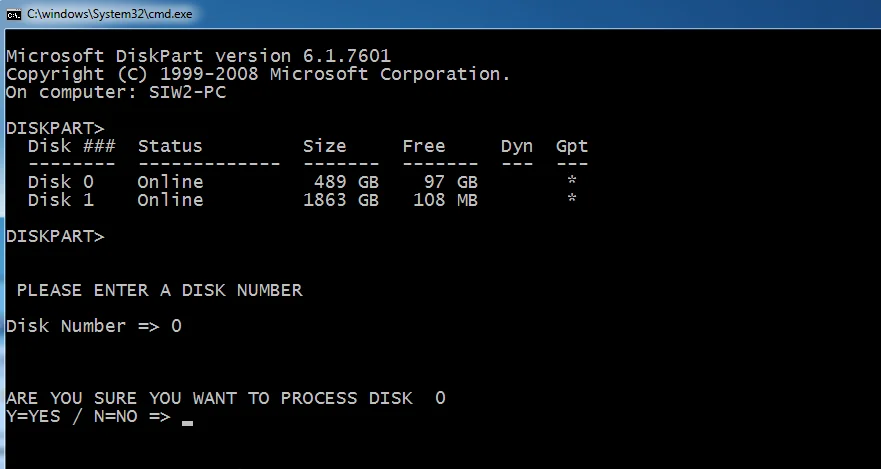
seldiskno1.webp


seldiskno2.webp

****************************************************************************************************************************************************


If you dont understand what it is doing you can run this little batch file which will produce a textfile c:\test-partitions.txt.

You can then have a look at a c:\test-partition.txt afterwards

test.cmd

@echo off
ECHO sel dis 0 >c:\test-partitions.txt
ECHO lis par >>c:\test-partitions.txt
ECHO cle >>c:\test-partitions.txt
ECHO Convert GPT >>c:\test-partitions.txt
ECHO cre par efi size=260 >>c:\test-partitions.txt
ECHO for quick fs=fat32 label="System" >>c:\test-partitions.txt
ECHO ass letter="S" >>c:\test-partitions.txt
ECHO cre par msr size=16 >>c:\test-partitions.txt
rem now have a look
notepad c:\test-partitions.txt
pause

 
Last edited:

My Computers My Computers

  • At a glance

    Win7,Win11i7-97002x16gb 3600mhz
    OS
    Win7,Win11
    Computer type
    PC/Desktop
    CPU
    i7-9700
    Motherboard
    gigabyte b365m ds3h
    Memory
    2x16gb 3600mhz
    Monitor(s) Displays
    benq gw2480
    PSU
    bequiet pure power 11 400CM
    Cooling
    cryorig m9i
  • At a glance

    win7,win11i5-84002x8gb 3200
    Operating System
    win7,win11
    Computer type
    PC/Desktop
    CPU
    i5-8400
    Motherboard
    gigabyte b365m ds3h
    Memory
    2x8gb 3200
    PSU
    xfx pro 450
Back
Top Bottom





