I have 23H3 Win 11 Pro 64bit and I don't have a password set up to log in. It goes straight to the desktop when the machine boots up.
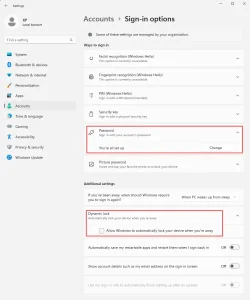
1.) What I'd like to do is be able to have a password set up to log in.
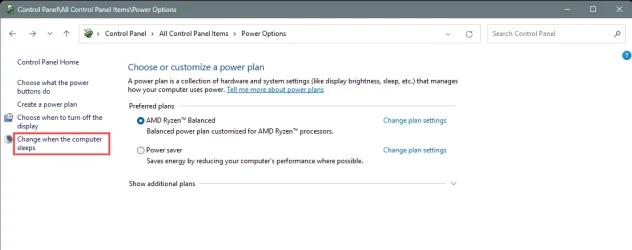
2.) But what I'd also like it to do is when the screen goes dark (or screen saver) after a few minutes, and I step away from the machine, and then I come back, touch the mousepad (or move the mouse), I want the desktop to come back. I don't want to constantly type my password in to unlock it everytime I step away.
Sleep mode and hibernation mode are turned off so the computer is running in the background doing the tasks I need it to do. Only the screen goes dark after a few minutes.
I just want the password enabled when I boot or re-boot the machine after being turned off for awhile. I never leave my machine on all the time.
Any help would be most appreciated, thank you.
1.) What I'd like to do is be able to have a password set up to log in.
2.) But what I'd also like it to do is when the screen goes dark (or screen saver) after a few minutes, and I step away from the machine, and then I come back, touch the mousepad (or move the mouse), I want the desktop to come back. I don't want to constantly type my password in to unlock it everytime I step away.
Sleep mode and hibernation mode are turned off so the computer is running in the background doing the tasks I need it to do. Only the screen goes dark after a few minutes.
I just want the password enabled when I boot or re-boot the machine after being turned off for awhile. I never leave my machine on all the time.
Any help would be most appreciated, thank you.
My Computers
-
At a glance
Windows 11 Pro 25H2 build: (26200.7623)32GB- OS
- Windows 11 Pro 25H2 build: (26200.7623)
- Computer type
- Laptop
- Manufacturer/Model
- Microsoft Surface Pro
- Memory
- 32GB
-
At a glance
Microsoft 25H2 ProIntel Core Ultra 764GBIntel Integrated Graphics- Operating System
- Microsoft 25H2 Pro
- Computer type
- Laptop
- Manufacturer/Model
- Dell Pro 14 - PC14250
- CPU
- Intel Core Ultra 7
- Memory
- 64GB
- Graphics card(s)
- Intel Integrated Graphics
- Hard Drives
- Micron 1TB SSD