How to check if your Secure Boot certs are updated. (three methods)


Thanks, the M83 has a couple less settings compared to the T460, which also has two additional options: Clear All Keys and Reset Factory Keys in addition to Secure Boot On/Off and turning on Setup Mode. I was also comparing my Mosby output to yours as it progressively installed the keys, some slight differences, not enough to identify the culprit.
You're welcome. Good luck resolving your problem. 🤞
 

My Computers

System One System Two

  • OS
    Windows 11 Pro 25H2
    Computer type
    Laptop
    Manufacturer/Model
    Lenovo T490 (2020 Hardware)
    CPU
    i7-8565U
    Motherboard
    20N20028US
    Memory
    16GB
    Graphics Card(s)
    Intel UHD Graphics 620
    Sound Card
    Realtec Audio
    Monitor(s) Displays
    ASUS VE248
    Screen Resolution
    1920 X 1080
    Hard Drives
    Samsung SSD 970 PRO 512GB NVMe
    Internet Speed
    Frontier fiber 1GB
    Browser
    Chrome, Firefox, Edge
    Antivirus
    Norton 360 Deluxe Plus
    Other Info
    Supported hardware, upgraded from Windows 10 Pro to Windows 11 Pro version 24H2 on 06/01/2025 using the Windows 11 ISO file. Used the enablement package to upgrade to version 25H2 on 10/07/2025. Secure boot enabled. Secure Boot CA 2023 updated.
  • Operating System
    Windows 11 Pro 25H2
    Computer type
    PC/Desktop
    Manufacturer/Model
    Lenovo ThinkCentre M83 (2014 Hardware)
    CPU
    i7-4770 (with SSE4.2, and POPCNT)
    Motherboard
    10AL000GUS
    Memory
    16GB
    Graphics card(s)
    Intel HD Graphics 4600
    Sound Card
    Realtec High Definition Audio
    Monitor(s) Displays
    ASUS VE248
    Screen Resolution
    1920 X 1080
    Hard Drives
    Samsung SSD 860 PRO 1TB SATA
    Internet Speed
    Frontier fiber 1GB
    Browser
    Chrome, Firefox, Edge
    Antivirus
    Norton 360 Deluxe Plus
    Other Info
    Unsupported hardware, upgraded from Windows 10 Pro (TPM 1.2 & unsupported CPU, but does have SSE4.2, and POPCNT) to Windows 11 Pro version 24H2 on 06/15/2025. Added Registry Key HKEY_LOCAL_MACHINE\SYSTEM\Setup\MoSetup – AllowUpgradesWithUnsupportedTPMOrCPU=1 to allow installation using the Windows 11 ISO file. Used the enablement package to upgrade to version 25H2 on 10/08/2025. Secure boot enabled. Secure Boot CA 2023 updated.
ADDED: Lastly, if this is scary then just realize it's essentially no different from what will be the case in a few months after the 2011 keys are expired: you'll have to disable Secure Boot to even start up and you might as well just delete them from variables for all the good they'd do you. That is, unless you can manage to get 2023 keys loaded using some other method.
This is a big myth. Expired Secure Boot certs are still valid as long as you have them enrolled in UEFI.

A cert cannot authenticate any file SIGNED AFTER THE EXPIRATION DATE. If you're booting from files signed before the cert's end expiration (older Windows releases), those files are still valid. MS cannot release a new patched boot file using an expired certificate. So it needs a new certificate to cover any files released past the CA 2011's end date.

The old files don't get magically cancelled.

The only way to invalidate the boot files (bricking your PC), is to either:
- Remove the CA 2011 cert, so boot files provided from 2011 until mid-2026 are no longer allowed because no cert can be found to validate them.​
- Cancelling the CA 2011 cert, by adding it to the DBX list.​

Here's a simple analogy: You're install a legacy app or driver which was signed back in the W7/8 days. The installer asks you to accept a cert at install time, and you click "Yes". Even though the cert distributed by the installer is expired, you have chosen to enroll it. Because you trust this cert, those old files are now considered trusted even though they're signed by a long expired cert.
 

My Computer

System One

  • OS
    Windows 7
This is a big myth. Expired Secure Boot certs are still valid as long as you have them enrolled in UEFI.

...
Then why should people be at all concerned about updating secure boot keys?

As I understand it the problem comes when Microsoft wants to push out updates in the future. In particular, that relates to updates to DBX / SVN for revocations. They won't be able to do that for 2011 keys since they can't 'sign' the updated binaries with the expired certificates. In other words: you'd be stuck with a system that has all the current vulnerabilities, and the future ones that will come without regular updates.

So specifically: how long will Microsoft continue to even support Windows 11 with 2011 signed boot manager files that can't ever be revoked as vulnerabilities arise? It's only reasonable that they will only allow 2023 signed boot manager files at some point. That's when the 2011 keys in Secure Boot variables are essentially useless even if still valid, and you might as well delete all your keys if you can't get updates to 2023 keys since you couldn't enable Secure Boot anyway.
 
Last edited:

My Computers

System One System Two

  • OS
    Windows 11 Pro
    Computer type
    PC/Desktop
    Manufacturer/Model
    DIY
    CPU
    Ryzen 7 5800X
    Motherboard
    Gigabyte B550M Aorus Pro
    Memory
    GSkill 3200, 2x8GB
    Graphics Card(s)
    MSI RX 6800 XT Gaming Z
    Sound Card
    on-board Realtek
    Monitor(s) Displays
    MSI 180hz
    Screen Resolution
    1440p
    Hard Drives
    Samsung 980 Pro, Samsung 870 Evo, generic PCIe NVME, WD 1TB 2.5" laptop spinner
    PSU
    Corsair RM 650
    Case
    mATX
    Cooling
    BeQuiet 240mm AIO and a bunch of case fans
    Keyboard
    one that clacks softly
    Mouse
    logitech
    Internet Speed
    bunches of bps
    Browser
    Firefox
    Antivirus
    Windows' own
  • Operating System
    Win11 Pro
    Computer type
    PC/Desktop
    Manufacturer/Model
    DIY
    CPU
    Ryzen 7 1700
    Motherboard
    GA-AB350M G-3
    Memory
    16GB DDR4
    Graphics card(s)
    RX-480
    Sound Card
    In-Built Realtek
    Monitor(s) Displays
    Samsung
    Screen Resolution
    1440p
    Hard Drives
    NVME/SSD's
    PSU
    Thermaltake BX1 550W
    Case
    Some junky thing
    Cooling
    ThermalTake Assassin(?)
    Browser
    FF/Edge
    Antivirus
    Whatever Windows does
    Other Info
    Secure Boot enabled updated to 2023 CA keys, TPM2.0 enabled with system drive Bitlocker'd.
How do I update the Windows Bootmgr SVN to 7.0, it seems the one remaining thing I should address.


View attachment 157659
I was able to get the SVN updates by following instructions from @hader in this post:


My Computers

System One System Two

  • OS
    Windows 11 Pro 25H2
    Computer type
    Laptop
    Manufacturer/Model
    Lenovo T490 (2020 Hardware)
    CPU
    i7-8565U
    Motherboard
    20N20028US
    Memory
    16GB
    Graphics Card(s)
    Intel UHD Graphics 620
    Sound Card
    Realtec Audio
    Monitor(s) Displays
    ASUS VE248
    Screen Resolution
    1920 X 1080
    Hard Drives
    Samsung SSD 970 PRO 512GB NVMe
    Internet Speed
    Frontier fiber 1GB
    Browser
    Chrome, Firefox, Edge
    Antivirus
    Norton 360 Deluxe Plus
    Other Info
    Supported hardware, upgraded from Windows 10 Pro to Windows 11 Pro version 24H2 on 06/01/2025 using the Windows 11 ISO file. Used the enablement package to upgrade to version 25H2 on 10/07/2025. Secure boot enabled. Secure Boot CA 2023 updated.
  • Operating System
    Windows 11 Pro 25H2
    Computer type
    PC/Desktop
    Manufacturer/Model
    Lenovo ThinkCentre M83 (2014 Hardware)
    CPU
    i7-4770 (with SSE4.2, and POPCNT)
    Motherboard
    10AL000GUS
    Memory
    16GB
    Graphics card(s)
    Intel HD Graphics 4600
    Sound Card
    Realtec High Definition Audio
    Monitor(s) Displays
    ASUS VE248
    Screen Resolution
    1920 X 1080
    Hard Drives
    Samsung SSD 860 PRO 1TB SATA
    Internet Speed
    Frontier fiber 1GB
    Browser
    Chrome, Firefox, Edge
    Antivirus
    Norton 360 Deluxe Plus
    Other Info
    Unsupported hardware, upgraded from Windows 10 Pro (TPM 1.2 & unsupported CPU, but does have SSE4.2, and POPCNT) to Windows 11 Pro version 24H2 on 06/15/2025. Added Registry Key HKEY_LOCAL_MACHINE\SYSTEM\Setup\MoSetup – AllowUpgradesWithUnsupportedTPMOrCPU=1 to allow installation using the Windows 11 ISO file. Used the enablement package to upgrade to version 25H2 on 10/08/2025. Secure boot enabled. Secure Boot CA 2023 updated.
Then why should people be at all concerned about updating secure boot keys?

I thought the problem comes when Microsoft wants to push out updates in the future. In particular, that relates to updates to DBX for revocations. They won't be able to do that for 2011 keys since they can't 'sign' the updates with the expired certificates. In other words: you'd be stuck with a system that has all the current vulnerabilities, and the future ones that will come without regular updates.

In fact, how long will Microsoft continue to even support Windows 11 with 2011 signed boot manager files can't ever be revoked as vulnerabilities arise?
As I've repeated on several of these Secure Boot threads, the goal of the CA 2023 migration are:

1. Cancel CA 2011 because of the Black Lotus UEFI rootkit, which is a known threat and available to hackers.

2. Introduce CA 2023 because the CA 2011's 15 year lifetime is ending. MS would have done this regardless of Black Lotus being reported. W11 26H2 will be released right around the expiration date for CA 2011. They can't sign it using the old cert.

3. Future Windows won't include the CA 2011 boot file, for backward compatibility. You will have to replace your UEFI certs just to boot it. I have read from a GitHub comment by a MS dev that they're planning to push UEFI updates in future OOBE sessions. So they will presumably auto-upgrade you in 26H2.

4. MS has wanted to revoke the 2011 cert for the past 3-4 years, but it's been held up by slow moving PC OEM's who won't cooperate by releasing signed KEK CA 2023 certs, either by firmware updates or by giving them to MS. In the UEFI security model, MS presents a master KEK certificate to sign all its other certificates, but your PC maker has to bless the KEK by signing it with their Platform Key.

MS can't go around the OEM's PK. Except to offer a replacement PK for users who chose to go into Setup mode, this key functionally replaces your OEM's PK, and then MS owns both the PK and KEK. That's a drastic step, and MS would prefer not to do that.

 

My Computer

System One

  • OS
    Windows 7
As I've repeated on several of these Secure Boot threads, the goal of the CA 2023 migration are:
..
I dunno what you're going on about. You just didn't read the whole thing I wrote initially.

The Windows PCA 2011 key (in particular) may be valid, but it's still going to be effectively worthless for purpose soon after it expires once Microsoft revokes the 2011 signed boot manager files (which they can never change to mitigate emergent vulnerabilities) and allows only 2023 signed files (which they can). At that point, IF you haven't gotten updates to the necessary 2023 keys through some means you'll have to disable Secure Boot to start up.

If Microsoft is going to keep the 2011 boot manager in use at that time active, even with an inevitably ever-growing list of vulnerabilities, then let us know that at least.
 
Last edited:

My Computers

System One System Two

  • OS
    Windows 11 Pro
    Computer type
    PC/Desktop
    Manufacturer/Model
    DIY
    CPU
    Ryzen 7 5800X
    Motherboard
    Gigabyte B550M Aorus Pro
    Memory
    GSkill 3200, 2x8GB
    Graphics Card(s)
    MSI RX 6800 XT Gaming Z
    Sound Card
    on-board Realtek
    Monitor(s) Displays
    MSI 180hz
    Screen Resolution
    1440p
    Hard Drives
    Samsung 980 Pro, Samsung 870 Evo, generic PCIe NVME, WD 1TB 2.5" laptop spinner
    PSU
    Corsair RM 650
    Case
    mATX
    Cooling
    BeQuiet 240mm AIO and a bunch of case fans
    Keyboard
    one that clacks softly
    Mouse
    logitech
    Internet Speed
    bunches of bps
    Browser
    Firefox
    Antivirus
    Windows' own
  • Operating System
    Win11 Pro
    Computer type
    PC/Desktop
    Manufacturer/Model
    DIY
    CPU
    Ryzen 7 1700
    Motherboard
    GA-AB350M G-3
    Memory
    16GB DDR4
    Graphics card(s)
    RX-480
    Sound Card
    In-Built Realtek
    Monitor(s) Displays
    Samsung
    Screen Resolution
    1440p
    Hard Drives
    NVME/SSD's
    PSU
    Thermaltake BX1 550W
    Case
    Some junky thing
    Cooling
    ThermalTake Assassin(?)
    Browser
    FF/Edge
    Antivirus
    Whatever Windows does
    Other Info
    Secure Boot enabled updated to 2023 CA keys, TPM2.0 enabled with system drive Bitlocker'd.
I dunno what you're going on about. You just didn't read the whole thing I wrote initially. The 2011 keys may be valid, but they're still going to be worthless soon after they expire once Microsoft revokes the 2011 boot manager files. At that time, IF you don't get updates to the necessary 2023 keys through some other means you'll have to disable Secure Boot to start up.

If Microsoft is going to keep the 2011 boot manager active, even with its current and inevitably ever-growing list of vulnerabilities, then let us know that at least.
If a person uses the current commands to install the certificates, would those same commands work in future to keep the certificates current? In my case, I've been able to manually install all the certificates with the exception of the 2023 KEK, or would that option be blocked in future builds once the 2011 certs expire.Secure Boot 25H2 Installation.webp
 

My Computer

System One

  • OS
    Windows 11
If a person uses the current commands to install the certificates, would those same commands work in future to keep the certificates current? In my case, I've been able to manually install all the certificates with the exception of the 2023 KEK, or would that option be blocked in future builds once the 2011 certs expire.View attachment 157786
As far as I'm aware, the only variable that sees regular maintenance, or "kept current", is DBX for SVN updates. Without a 2023 signed key in KEK then DBX could not be updated with updates signed only with a 2023 key. Since the 2011 key is expired at that point it can no longer be used to sign the updates. This is going to be the case regardless of what commands may or may not work.
 
Last edited:

My Computers

System One System Two

  • OS
    Windows 11 Pro
    Computer type
    PC/Desktop
    Manufacturer/Model
    DIY
    CPU
    Ryzen 7 5800X
    Motherboard
    Gigabyte B550M Aorus Pro
    Memory
    GSkill 3200, 2x8GB
    Graphics Card(s)
    MSI RX 6800 XT Gaming Z
    Sound Card
    on-board Realtek
    Monitor(s) Displays
    MSI 180hz
    Screen Resolution
    1440p
    Hard Drives
    Samsung 980 Pro, Samsung 870 Evo, generic PCIe NVME, WD 1TB 2.5" laptop spinner
    PSU
    Corsair RM 650
    Case
    mATX
    Cooling
    BeQuiet 240mm AIO and a bunch of case fans
    Keyboard
    one that clacks softly
    Mouse
    logitech
    Internet Speed
    bunches of bps
    Browser
    Firefox
    Antivirus
    Windows' own
  • Operating System
    Win11 Pro
    Computer type
    PC/Desktop
    Manufacturer/Model
    DIY
    CPU
    Ryzen 7 1700
    Motherboard
    GA-AB350M G-3
    Memory
    16GB DDR4
    Graphics card(s)
    RX-480
    Sound Card
    In-Built Realtek
    Monitor(s) Displays
    Samsung
    Screen Resolution
    1440p
    Hard Drives
    NVME/SSD's
    PSU
    Thermaltake BX1 550W
    Case
    Some junky thing
    Cooling
    ThermalTake Assassin(?)
    Browser
    FF/Edge
    Antivirus
    Whatever Windows does
    Other Info
    Secure Boot enabled updated to 2023 CA keys, TPM2.0 enabled with system drive Bitlocker'd.
As far as I'm aware, the only variable that sees regular maintenance, or "kept current", is DBX for SVN updates. Without a 2023 signed key in KEK then DBX could not be updated after the 2011 KEK certificate has expired. And that is going to be true regardless of what commands may or may not work since there is no valid KEK to validate the updates to DBX that will come signed only with a 2023 certificate.
So the issue is strictly whether, or not the DBX gets updated. If a user chooses to run on a system without ongoing updates to the DBX, then that's their choice? Otherwise, Windows will continue to operate as normal if all the other 2023 keys are in place?
 

My Computer

System One

  • OS
    Windows 11
So the issue is strictly whether, or not the DBX gets updated. If a user chooses to run on a system without ongoing updates to the DBX, then that's their choice? Otherwise, Windows will continue to operate as normal if all the other 2023 keys are in place?
That's actually a good question... one I've also asked and haven't gotten clear, concise answers to. Mostly, it almost always goes back to "When Microsoft revokes trust in compromised boot managers you'd never get it posted to DBX". Which is bad enough I suppose since it essentially means Secure Boot has become pretty much pointless (more so than many considered it before at least) or soon will be as the bad actors start throwing exploits into the wild to take advantage of that.
 

My Computers

System One System Two

  • OS
    Windows 11 Pro
    Computer type
    PC/Desktop
    Manufacturer/Model
    DIY
    CPU
    Ryzen 7 5800X
    Motherboard
    Gigabyte B550M Aorus Pro
    Memory
    GSkill 3200, 2x8GB
    Graphics Card(s)
    MSI RX 6800 XT Gaming Z
    Sound Card
    on-board Realtek
    Monitor(s) Displays
    MSI 180hz
    Screen Resolution
    1440p
    Hard Drives
    Samsung 980 Pro, Samsung 870 Evo, generic PCIe NVME, WD 1TB 2.5" laptop spinner
    PSU
    Corsair RM 650
    Case
    mATX
    Cooling
    BeQuiet 240mm AIO and a bunch of case fans
    Keyboard
    one that clacks softly
    Mouse
    logitech
    Internet Speed
    bunches of bps
    Browser
    Firefox
    Antivirus
    Windows' own
  • Operating System
    Win11 Pro
    Computer type
    PC/Desktop
    Manufacturer/Model
    DIY
    CPU
    Ryzen 7 1700
    Motherboard
    GA-AB350M G-3
    Memory
    16GB DDR4
    Graphics card(s)
    RX-480
    Sound Card
    In-Built Realtek
    Monitor(s) Displays
    Samsung
    Screen Resolution
    1440p
    Hard Drives
    NVME/SSD's
    PSU
    Thermaltake BX1 550W
    Case
    Some junky thing
    Cooling
    ThermalTake Assassin(?)
    Browser
    FF/Edge
    Antivirus
    Whatever Windows does
    Other Info
    Secure Boot enabled updated to 2023 CA keys, TPM2.0 enabled with system drive Bitlocker'd.
That's actually a good question... one I've also asked and haven't gotten clear, concise answers to. Mostly, it almost always goes back to "When Microsoft revokes trust in compromised boot managers you'd never get it posted to DBX". Which is bad enough I suppose since it essentially means Secure Boot has become pretty much pointless (more so than many considered it before at least) or soon will be as the bad actors start throwing exploits into the wild to take advantage of that.
By the time the 2011 certificates expire, the bad actors will have had 3 years to be naughty, perhaps longer if they've been busy prior to 2023. Think of all the systems they've been able to infect/exploit over the years. The whole thing sometimes seems like an exercise in damage control and showing they're doing something about it. What's worse is the fear mongering, which has created so many threads and posts, which in turn has created so much confusion, further feeding on the fear.
 

My Computer

System One

  • OS
    Windows 11
I am getting this:
1767444182037.webp
---
1767444211320.webp
---
1767444234367.webp


Disk 3 is my boot drive:
1767444285871.webp

So how can I check why the one script is showing "BANNED"?
 

My Computer

System One

  • OS
    Windows 11
    Computer type
    PC/Desktop
    Manufacturer/Model
    Custom
    CPU
    AMD Ryzen 9 5900X
    Motherboard
    MSI MEG X570 UNIFY (MS-7C35)
    Memory
    2x G.Skill F4-3600C16-16GVKC
    Graphics Card(s)
    NVIDIA GeForce RTX 4090 Founders Edition (AD102-300)
    Sound Card
    None
    Monitor(s) Displays
    Samsung Odyssey Neo G9 Gaming Monitor (49”)
    Screen Resolution
    5120 x 1440
    Hard Drives
    Samsung SSD 990 PRO 4TB
    2 x CT2000MX500SSD1
    Seagate FireCuda 530 2TB
    PSU
    Corsair HX1000i
    Case
    DARK BASE PRO 900 Rev. 2
    Cooling
    Liquid Freezer II - 420
    Keyboard
    Logitech G915
    Mouse
    Logitech G502 X Lightspeed
    Internet Speed
    Fiber: 500MB Down / 100MB Up
    Browser
    Firefox
    Antivirus
    Microsoft Defender Antivirus
So how can I check why the one script is showing "BANNED"?


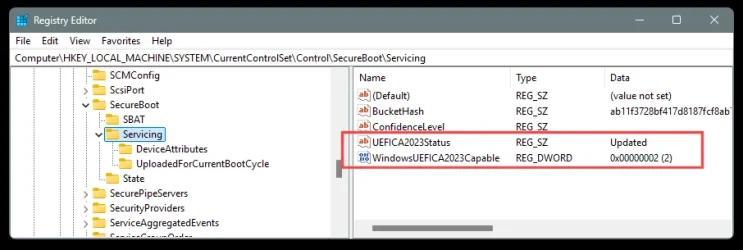
Check the registry, here...
Computer\HKEY_LOCAL_MACHINE\SYSTEM\CurrentControlSet\Control\SecureBoot\Servicing


On the right side, you should see...

UEFICA2023Status Updated
WindowsUEFICA2023Capable 0x00000002 (2)


Image1.webp


And here's ten points for filling out your computer specs. :-)
 
Last edited:

My Computers

System One System Two

  • OS
    Win 11 Home ♦♦♦26200.8457 ♦♦♦♦♦♦♦25H2
    Computer type
    PC/Desktop
    Manufacturer/Model
    Built by Ghot® [May 2020]
    CPU
    AMD Ryzen 7 3700X
    Motherboard
    Asus Pro WS X570-ACE (BIOS 5302)
    Memory
    G.Skill (F4-3200C14D-16GTZKW)
    Graphics Card(s)
    EVGA RTX 2070 (08G-P4-2171-KR)
    Sound Card
    Realtek ALC1220P / ALC S1220A
    Monitor(s) Displays
    Dell U3011 30"
    Screen Resolution
    2560 x 1600
    Hard Drives
    2x Samsung 860 EVO 500GB,
    WD 4TB Black FZBX - SATA III,
    WD 8TB Black FZBX - SATA III,
    DRW-24B1ST CD/DVD Burner
    PSU
    PC Power & Cooling 750W Quad EPS12V
    Case
    Cooler Master ATCS 840 Tower
    Cooling
    CM Hyper 212 EVO (push/pull)
    Keyboard
    Ducky DK9008 Shine II Blue LED
    Mouse
    Logitech Optical M-100
    Internet Speed
    300/300
    Browser
    Firefox (latest)
    Antivirus
    Bitdefender Total Security
    Other Info
    Speakers: Klipsch Pro Media 2.1
  • Operating System
    Windows XP Pro 32bit w/SP3
    Computer type
    PC/Desktop
    Manufacturer/Model
    Built by Ghot® (not in use)
    CPU
    AMD Athlon 64 X2 5000+ (OC'd @ 3.2Ghz)
    Motherboard
    ASUS M2N32-SLI Deluxe Wireless Edition
    Memory
    TWIN2X2048-6400C4DHX (2 x 1GB, DDR2 800)
    Graphics card(s)
    EVGA 256-P2-N758-TR GeForce 8600GT SSC
    Sound Card
    Onboard
    Monitor(s) Displays
    ViewSonic G90FB Black 19" Professional (CRT)
    Screen Resolution
    up to 2048 x 1536
    Hard Drives
    WD 36GB 10,000rpm Raptor SATA
    Seagate 80GB 7200rpm SATA
    Lite-On LTR-52246S CD/RW
    Lite-On LH-18A1P CD/DVD Burner
    PSU
    PC Power & Cooling Silencer 750 Quad EPS12V
    Case
    Generic Beige case, 80mm fans
    Cooling
    ZALMAN 9500A 92mm CPU Cooler
    Keyboard
    Logitech Classic Keybooard 200
    Mouse
    Logitech Optical M-BT96a
    Internet Speed
    300/300
    Browser
    Firefox 3.x ??
    Antivirus
    Symantec (Norton)
    Other Info
    Still assembled, still runs. Haven't turned it on for 15 years?
Check the registry
I posted a screenshot of my registry already in my post. It has the settings exactly like you indicated.
 

My Computer

System One

  • OS
    Windows 11
    Computer type
    PC/Desktop
    Manufacturer/Model
    Custom
    CPU
    AMD Ryzen 9 5900X
    Motherboard
    MSI MEG X570 UNIFY (MS-7C35)
    Memory
    2x G.Skill F4-3600C16-16GVKC
    Graphics Card(s)
    NVIDIA GeForce RTX 4090 Founders Edition (AD102-300)
    Sound Card
    None
    Monitor(s) Displays
    Samsung Odyssey Neo G9 Gaming Monitor (49”)
    Screen Resolution
    5120 x 1440
    Hard Drives
    Samsung SSD 990 PRO 4TB
    2 x CT2000MX500SSD1
    Seagate FireCuda 530 2TB
    PSU
    Corsair HX1000i
    Case
    DARK BASE PRO 900 Rev. 2
    Cooling
    Liquid Freezer II - 420
    Keyboard
    Logitech G915
    Mouse
    Logitech G502 X Lightspeed
    Internet Speed
    Fiber: 500MB Down / 100MB Up
    Browser
    Firefox
    Antivirus
    Microsoft Defender Antivirus
As an aside, I noticed that Asus has updated my 2021 B560M-A AC motherboard BIOS on December 26 2025, after 2 years since the last update (2023). Even though I am good to go, as far as the 2023 secure keys - hopefully :unsure:, it's a good sign that "old" boards may get the needed update for the new keys.
Version 2803
9.29 MB
2025/12/26
SHA-256 :E0CE74CABE9466E6DA72B2A17FCACB05DDF00BDAA62127692743455EA0BE4042
"1. Update Intel microcode
2. Improved system performance, stability, and device compatibility.
3. Implemented security updates."
 

My Computers

System One System Two

  • OS
    Win 11 Pro
    Computer type
    PC/Desktop
    Manufacturer/Model
    ABS (Newegg)
    CPU
    Intel(R) Core(TM) i5-10400F CPU @ 2.90GHz
    Motherboard
    ASUSTeK COMPUTER INC. PRIME B560M-A AC Rev 1.xx
    Memory
    Corsair VENGEANCE® LPX 32GB (2 x 16GB) DDR4 DRAM 3600MHz
    Graphics Card(s)
    MSI NVIDIA GeForce RTX 3060 Ti
    Sound Card
    Realtek Digital Output (Realtek(R) Audio)
    Monitor(s) Displays
    Viewsonic VS 2725 -2k 27"
    Screen Resolution
    2560x1440 100hz
    Hard Drives
    T-FORCE TM8FP800 1TB + a couple SATA SSDs
    PSU
    Gigabyte P650E
    Case
    DeepCool Matrexx 50 mid-tower
    Cooling
    Assassin X 120 Refined SE and 5 Thermalright TL-C12C case fans
    Keyboard
    Redragon K655 or K720
    Mouse
    CoolerMaster MM711 or Redragon M612
    Internet Speed
    Starlink: speed varies
    Browser
    Brave (default), Chrome (for ATG), Edge (for ATMS)
    Antivirus
    Windows Defender
    Other Info
    An assortment of "land fill, obsolete" computers all running Linux Mint 22 (at the moment).
  • Operating System
    Linux Mint 22.2 Cinnamon
    Computer type
    PC/Desktop
    Manufacturer/Model
    Hewlett-Packard HP ProDesk 600 G1 SFF
    CPU
    i5 4590
    Motherboard
    HP
    Memory
    16 GB
    Graphics card(s)
    Intel(R) HD Graphics 4600
    Sound Card
    Realtek High Definition Audio
    Monitor(s) Displays
    Generic 24"
    Hard Drives
    Samsung SSD 860 EVO 500GB
    Hitachi HUA722010CLA330
    WDC WD40EZAZ-19SF3B0
    PSU
    Factory 240 watt
    Case
    Low Profile Desktop
    Cooling
    Factory cooling
    Keyboard
    HP
    Mouse
    HP
    Internet Speed
    Starlink
    Browser
    Brave
    Antivirus
    ?
    Other Info
    This is my media server
So how can I check why the one script is showing "BANNED"?
You're running an edited copy of my original script, and that copy has known bugs (reporting a blank value).

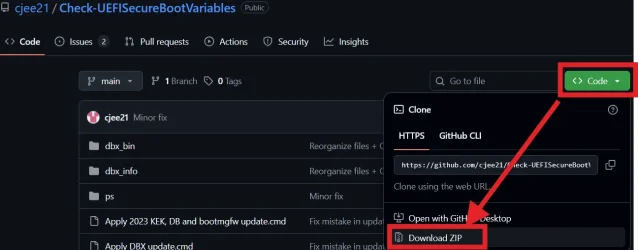
Please download a new version of the script from:
garlin's PowerShell scripts for updating Secure Boot CA 2023

Scroll all the way to the bottom of the thread's first post, for the ZIP file or GitHub link. With the updated script, there is frankly no need to run either of the two older scripts and to run the registry command. That functionality is all rolled into a single script.
 

My Computer

System One

  • OS
    Windows 7
You're running an edited copy of my original script
Thank you. With the new scripts, everything appears to be fine.
1767526032224.webp1767526053148.webp

Are the steps from the ReadMe necessary? My Secure Boot option in BIOS is set to "Standard". The stuff that is written about in the ReadMe is only possible if I set it to "Custom".
 

My Computer

System One

  • OS
    Windows 11
    Computer type
    PC/Desktop
    Manufacturer/Model
    Custom
    CPU
    AMD Ryzen 9 5900X
    Motherboard
    MSI MEG X570 UNIFY (MS-7C35)
    Memory
    2x G.Skill F4-3600C16-16GVKC
    Graphics Card(s)
    NVIDIA GeForce RTX 4090 Founders Edition (AD102-300)
    Sound Card
    None
    Monitor(s) Displays
    Samsung Odyssey Neo G9 Gaming Monitor (49”)
    Screen Resolution
    5120 x 1440
    Hard Drives
    Samsung SSD 990 PRO 4TB
    2 x CT2000MX500SSD1
    Seagate FireCuda 530 2TB
    PSU
    Corsair HX1000i
    Case
    DARK BASE PRO 900 Rev. 2
    Cooling
    Liquid Freezer II - 420
    Keyboard
    Logitech G915
    Mouse
    Logitech G502 X Lightspeed
    Internet Speed
    Fiber: 500MB Down / 100MB Up
    Browser
    Firefox
    Antivirus
    Microsoft Defender Antivirus
Thank you. With the new scripts, everything appears to be fine.
Looks good.

Are the steps from the ReadMe necessary? My Secure Boot option in BIOS is set to "Standard". The stuff that is written about in the ReadMe is only possible if I set it to "Custom".
The README.TXT is instructions for folks who have to manually update their keys (because they have unsupported BIOSes). In your case, none of those steps are required. I'll probably have to rewrite the README to make it more obvious.
 

My Computer

System One

  • OS
    Windows 7
Look Ma, I aced the test. :D


Image1.webp


I just updated post #3, of this topic. Re-arranged things and added SVN update and cjee21's files.


Added a link to this topic in the "Windows itself..." section of the following topic...
 
Last edited:

My Computers

System One System Two

  • OS
    Win 11 Home ♦♦♦26200.8457 ♦♦♦♦♦♦♦25H2
    Computer type
    PC/Desktop
    Manufacturer/Model
    Built by Ghot® [May 2020]
    CPU
    AMD Ryzen 7 3700X
    Motherboard
    Asus Pro WS X570-ACE (BIOS 5302)
    Memory
    G.Skill (F4-3200C14D-16GTZKW)
    Graphics Card(s)
    EVGA RTX 2070 (08G-P4-2171-KR)
    Sound Card
    Realtek ALC1220P / ALC S1220A
    Monitor(s) Displays
    Dell U3011 30"
    Screen Resolution
    2560 x 1600
    Hard Drives
    2x Samsung 860 EVO 500GB,
    WD 4TB Black FZBX - SATA III,
    WD 8TB Black FZBX - SATA III,
    DRW-24B1ST CD/DVD Burner
    PSU
    PC Power & Cooling 750W Quad EPS12V
    Case
    Cooler Master ATCS 840 Tower
    Cooling
    CM Hyper 212 EVO (push/pull)
    Keyboard
    Ducky DK9008 Shine II Blue LED
    Mouse
    Logitech Optical M-100
    Internet Speed
    300/300
    Browser
    Firefox (latest)
    Antivirus
    Bitdefender Total Security
    Other Info
    Speakers: Klipsch Pro Media 2.1
  • Operating System
    Windows XP Pro 32bit w/SP3
    Computer type
    PC/Desktop
    Manufacturer/Model
    Built by Ghot® (not in use)
    CPU
    AMD Athlon 64 X2 5000+ (OC'd @ 3.2Ghz)
    Motherboard
    ASUS M2N32-SLI Deluxe Wireless Edition
    Memory
    TWIN2X2048-6400C4DHX (2 x 1GB, DDR2 800)
    Graphics card(s)
    EVGA 256-P2-N758-TR GeForce 8600GT SSC
    Sound Card
    Onboard
    Monitor(s) Displays
    ViewSonic G90FB Black 19" Professional (CRT)
    Screen Resolution
    up to 2048 x 1536
    Hard Drives
    WD 36GB 10,000rpm Raptor SATA
    Seagate 80GB 7200rpm SATA
    Lite-On LTR-52246S CD/RW
    Lite-On LH-18A1P CD/DVD Burner
    PSU
    PC Power & Cooling Silencer 750 Quad EPS12V
    Case
    Generic Beige case, 80mm fans
    Cooling
    ZALMAN 9500A 92mm CPU Cooler
    Keyboard
    Logitech Classic Keybooard 200
    Mouse
    Logitech Optical M-BT96a
    Internet Speed
    300/300
    Browser
    Firefox 3.x ??
    Antivirus
    Symantec (Norton)
    Other Info
    Still assembled, still runs. Haven't turned it on for 15 years?
Look Ma, I aced the test. :D

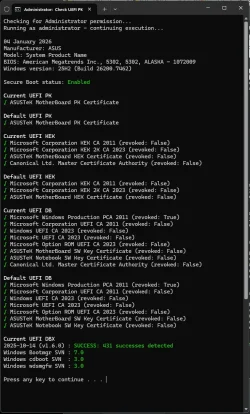
My latest BIOS did the same for me :-)

1767556808122.webp

I used cjee21's command line version.


1767557690277.webp

Just select, right click, Run as Administrator. Easy peasy :cool:

1767557837521.webp
 
Last edited:

My Computers

System One System Two

  • OS
    Win 11 Pro 25H2 26200.8524
    Computer type
    PC/Desktop
    Manufacturer/Model
    Self Built
    CPU
    Intel® Core™ i7-14700K
    Motherboard
    ASUS TUF Z690-PLUS WIFI BIOS 4505 11/29/25
    Memory
    G.SKILL Ripjaws S5 Series 64GB (2 x 32GB) DDR5
    Graphics Card(s)
    ASUS GeForce RTX 4070 Super 12GB
    Sound Card
    Sound Blaster AE-5 Plus
    Monitor(s) Displays
    ASUS TUF Gaming 27" 2K HDR Gaming
    Screen Resolution
    2560 x 1440
    Hard Drives
    Samsung 990 Pro 1TB NVMe (Win 11 25H2)
    SK hynix P41 500GB NVMe 25H2 DEV/Games
    SK hynix P41 2TB NVMe (x3)
    Crucial P3 Plus 4TB
    PSU
    Corsair RM850x Shift
    Case
    Antec Dark Phantom DP502 FLUX
    Cooling
    Corsair Nautilus 360 RS AIO
    Keyboard
    Logitech MK 320
    Mouse
    Razer Basilisk V3
    Internet Speed
    350Mbs
    Browser
    Firefox
    Antivirus
    Winows Security
    Other Info
    MR 8.1 Home

    System 3 Specs
    Win 11 Pro 25H2 26200.8524
    ASUS PRIME Z370-P II BIOS 3004 7/12/21
    Intel Core i7-8700 CPU @ 3.20GHz
    32GB DDR4 RAM (4x8)
    iGPU Intel UHD Graphics 630
  • Operating System
    Win 11 Pro 25H2 26200.8524
    Computer type
    PC/Desktop
    Manufacturer/Model
    Self Built
    CPU
    Intel Core i7-11700F
    Motherboard
    Asus TUF Gaming Z590 Plus WiFi (BIOS 2803)
    Memory
    64 GB DDR4
    Graphics card(s)
    MSI GeForce RTX 3060 Ventus 2X 12GB
    Sound Card
    SoundBlaster Audigy Fx V2
    Monitor(s) Displays
    Samsung F27T350
    Screen Resolution
    1920x1080
    Hard Drives
    Samsung 980 Pro 1TB
    Samsung 970 EVO Plus 2TB
    Samsung 870 EVO 500GB SSD
    PSU
    Corsair HX750
    Case
    Cougar MX330-G Window
    Cooling
    Thermalright Frozen Edge 240 Black AIO
    Internet Speed
    350Mbps
    Browser
    Firefox
    Antivirus
    Windows Security
Back
Top Bottom