How to fix an error in the Start menu?


Are you using Tabs?
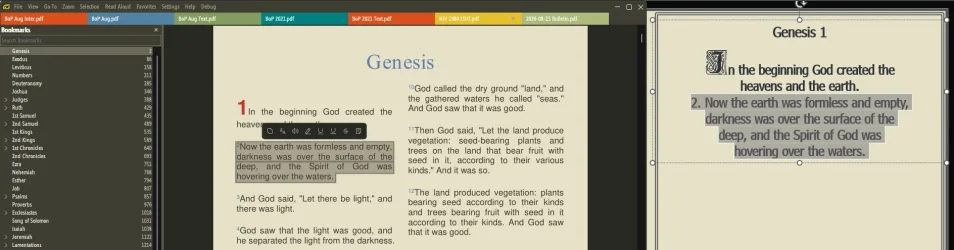
In the latest Dev release, only the active tab's X will be visible, plus, whatever you have highlighted will remain visible until you dismiss it.
Not sure if that's helpful for you, but, trust me, I copy and paste a sh*t load of material, from multiple Tabs, for Church livestreams, every week..., it works for me! 🤷‍♂️

13864.webp
 
Last edited:

My Computers My Computers

  • At a glance

    Windows 11 Pro
    OS
    Windows 11 Pro
    Computer type
    PC/Desktop
    Manufacturer/Model
    ASUS ROG Strix
  • At a glance

    Windows 11 Pro
    Operating System
    Windows 11 Pro
    Computer type
    Laptop
    Manufacturer/Model
    ASUS VivoBook
  • ASUS VivoBook 'Lite' ~ Windows 11 Home
I checked UseTabs; it is set to true.

I see what you mean about the version files. It makes sense that install.exe gives a fixed version and a zip file gives a portable one. I was looking for something that actually said "portable."
 

My Computer My Computer

At a glance

Windows 11i7-10875SH32 GBNVIDIA Quadro RTX 3000
OS
Windows 11
Computer type
Laptop
Manufacturer/Model
Dell Precision 5750
CPU
i7-10875SH
Memory
32 GB
Graphics Card(s)
NVIDIA Quadro RTX 3000
Screen Resolution
2x 1920x1200
Hard Drives
1 TB SSD
Browser
Firefox
@Lavik, referring back to your August 17 post: I installed whatever version of the program the original link led to. I tried again with the link from that post, and got the same result (none).

I later said the original problem was solved, but it wasn't. SumatraPDF is a workaround, even if a superior one. When I look for "Adobe Reader" with the Search box, I still get the "ghost" of version 10, which is no longer installed. Is there simply no way to fix this? It seems very strange, if so.
 

My Computer My Computer

At a glance

Windows 11i7-10875SH32 GBNVIDIA Quadro RTX 3000
OS
Windows 11
Computer type
Laptop
Manufacturer/Model
Dell Precision 5750
CPU
i7-10875SH
Memory
32 GB
Graphics Card(s)
NVIDIA Quadro RTX 3000
Screen Resolution
2x 1920x1200
Hard Drives
1 TB SSD
Browser
Firefox
I later said the original problem was solved, but it wasn't. SumatraPDF is a workaround, even if a superior one. When I look for "Adobe Reader" with the Search box, I still get the "ghost" of version 10, which is no longer installed. Is there simply no way to fix this? It seems very strange, if so.

If you right click on this ghost search result, do you have a "Open file location" option in the context menu to click on to hopefully delete its source?
 

My Computers My Computers

  • At a glance

    Windows 11 Pro for WorkstationsIntel i7-8700K 5 GHz64 GB (4x16GB) G.SKILL TridentZ RGB DDR4 3600...ASUS ROG-STRIX-GTX1080TI-O11G-GAMING (11GB GD...
    OS
    Windows 11 Pro for Workstations
    Computer type
    PC/Desktop
    Manufacturer/Model
    Custom self build
    CPU
    Intel i7-8700K 5 GHz
    Motherboard
    ASUS ROG Maximus XI Formula Z390
    Memory
    64 GB (4x16GB) G.SKILL TridentZ RGB DDR4 3600 MHz (F4-3600C18D-32GTZR)
    Graphics Card(s)
    ASUS ROG-STRIX-GTX1080TI-O11G-GAMING (11GB GDDR5X)
    Sound Card
    Integrated Digital Audio (S/PDIF)
    Monitor(s) Displays
    2 x Samsung Odyssey G75 27"
    Screen Resolution
    2560x1440
    Hard Drives
    1TB Samsung 990 PRO M.2,
    4TB Samsung 990 PRO M.2,
    TerraMaster F8 SSD Plus NAS
    PSU
    Seasonic Prime Titanium 850W
    Case
    Thermaltake Core P3 wall mounted
    Cooling
    Corsair Hydro H115i
    Keyboard
    Amazon Basics Wired Full Keyboard MD005
    Mouse
    Logitech MX Master 4
    Internet Speed
    2 Gbps Download and 100 Mbps Upload
    Browser
    Chrome and Edge
    Antivirus
    Microsoft Defender
    Other Info
    Logitech Z625 speaker system,
    Logitech BRIO 4K Pro webcam,
    HP Color LaserJet Pro MFP M477fdn,
    CyberPower CP1500PFCLCD
    Galaxy S23 Plus phone
  • At a glance

    Windows 11 ProSnapdragon X Elite (12 core) 3.42 GHz16 GB LPDDR5x-7467 MHz
    Operating System
    Windows 11 Pro
    Computer type
    Laptop
    Manufacturer/Model
    Surface Laptop 7 Copilot+ PC
    CPU
    Snapdragon X Elite (12 core) 3.42 GHz
    Memory
    16 GB LPDDR5x-7467 MHz
    Monitor(s) Displays
    15" HDR
    Screen Resolution
    2496 x 1664
    Hard Drives
    1 TB SSD
    Internet Speed
    Wi-Fi 7 and Bluetooth 5.4
    Browser
    Chrome and Edge
    Antivirus
    Microsoft Defender
Yes; it points to a shortcut in C:\Users\<username>\Documents\Installers\Old Programs, where I the subdirectory of the documents directory in which I keep nontrivial installers.

I created the "Installers" directory and put things in it. I didn't even know the "Old Programs" directory was there. Something (some software, probably a collection of installers) created it and put things in it.

I found numerous other shortcuts in it that claim to point to applications that no longer exist in my system.

So the problem I found is not limited to Adobe Reader. It affects at least a dozen other applications. The only difference is that the other ghosts have never bothered me because I have stopped using the programs; the Adobe Reader ghost preempts the pathname of a later version of the same program, which I do (or at least did) want to use.
 

My Computer My Computer

At a glance

Windows 11i7-10875SH32 GBNVIDIA Quadro RTX 3000
OS
Windows 11
Computer type
Laptop
Manufacturer/Model
Dell Precision 5750
CPU
i7-10875SH
Memory
32 GB
Graphics Card(s)
NVIDIA Quadro RTX 3000
Screen Resolution
2x 1920x1200
Hard Drives
1 TB SSD
Browser
Firefox

My Computer My Computer

At a glance

Windows 11 Insider Experimental (26H2)Intel Core i5-1140032Gb (DDR4 SDRAM)Intel(R) UHD Graphics 730
OS
Windows 11 Insider Experimental (26H2)
Computer type
PC/Desktop
Manufacturer/Model
Gigabyte Technology Co., Ltd.
CPU
Intel Core i5-11400
Motherboard
Z590 AORUS PRO AX
Memory
32Gb (DDR4 SDRAM)
Graphics Card(s)
Intel(R) UHD Graphics 730
Sound Card
Realtek USB Audio
Monitor(s) Displays
LG 27US500-W 4K UHD UltraFine™
Screen Resolution
3840x2160
Hard Drives
Samsung SSD 980 PRO 1TB
WDC WD7501AALS
PSU
Montech CENTURY, 650W, 80+ Gold
Case
Cougar Airface ECO RGB
Cooling
ID-COOLING SE-224-XTS BLACK
Keyboard
Microsoft SideWinder X6 Keyboard
Mouse
Microsoft SideWinder Mouse
Internet Speed
Internet speed of 1 Gbit/s
Browser
Vivaldi browser
Antivirus
Windows Defender
I did better than that--I deleted the whole darn directory. I then searched for Adobe Reader, and it opened Adobe Reader.

So the problem is solved. Thank you for your advice.
 

My Computer My Computer

At a glance

Windows 11i7-10875SH32 GBNVIDIA Quadro RTX 3000
OS
Windows 11
Computer type
Laptop
Manufacturer/Model
Dell Precision 5750
CPU
i7-10875SH
Memory
32 GB
Graphics Card(s)
NVIDIA Quadro RTX 3000
Screen Resolution
2x 1920x1200
Hard Drives
1 TB SSD
Browser
Firefox
Back
Top Bottom