How to remove a language from Windows?


Anixx

Well-known member
Member
VIP
Local time
11:52 AM
Posts
666
OS
Windows 11
I have completely removed it from the Settings app, rebooted, but it is still there, keyboard layout is cycling through it and it is available in language switcher menu.
 

My Computer My Computer

At a glance

Windows 11
OS
Windows 11
1657964255317.png
 

My Computer My Computer

At a glance

W11 Pro and Insider DevAMD Ryzen 9 7900x2x16GB Kingston 6000MHz, Cl 32 @ 6200MHz Cl30Gigabyte Rx 6600XT Gaming OC 8G Pro
OS
W11 Pro and Insider Dev
Computer type
PC/Desktop
Manufacturer/Model
Home brewed
CPU
AMD Ryzen 9 7900x
Motherboard
ASROCK b650 PRO RS
Memory
2x16GB Kingston 6000MHz, Cl 32 @ 6200MHz Cl30
Graphics Card(s)
Gigabyte Rx 6600XT Gaming OC 8G Pro
Sound Card
MB, Realtek Ac1220p
Monitor(s) Displays
3 x 27"
Screen Resolution
1080p
Hard Drives
Kingston KC3000. 1TBSamsung 970 evo Plus 500GB, Crucial P1 NVMe 1TB, Lexar NVMe 2 TB, Silicon Power M.2 SATA 500GB
PSU
Seasonic 750W
Case
Custom Raidmax
Cooling
Arctic Liquid Freezer III 360mm
Internet Speed
20/19 mbps
I did this already TWICE. It does not work. As said above, the language disappears from the Settings app but still is there in language switcer!
 

My Computer My Computer

At a glance

Windows 11
OS
Windows 11
In old Control Panel in Windows 8.1 all worked well. I generally do not use the Settings app because it is buggy, but this is one function I needed there and it simply does not work!

It seems, Windows nowadays is not tested in multi-language environment and intended only for English users.
 

My Computer My Computer

At a glance

Windows 11
OS
Windows 11
I had French and German also installed and this worked fine.
 

My Computer My Computer

At a glance

W11 Pro and Insider DevAMD Ryzen 9 7900x2x16GB Kingston 6000MHz, Cl 32 @ 6200MHz Cl30Gigabyte Rx 6600XT Gaming OC 8G Pro
OS
W11 Pro and Insider Dev
Computer type
PC/Desktop
Manufacturer/Model
Home brewed
CPU
AMD Ryzen 9 7900x
Motherboard
ASROCK b650 PRO RS
Memory
2x16GB Kingston 6000MHz, Cl 32 @ 6200MHz Cl30
Graphics Card(s)
Gigabyte Rx 6600XT Gaming OC 8G Pro
Sound Card
MB, Realtek Ac1220p
Monitor(s) Displays
3 x 27"
Screen Resolution
1080p
Hard Drives
Kingston KC3000. 1TBSamsung 970 evo Plus 500GB, Crucial P1 NVMe 1TB, Lexar NVMe 2 TB, Silicon Power M.2 SATA 500GB
PSU
Seasonic 750W
Case
Custom Raidmax
Cooling
Arctic Liquid Freezer III 360mm
Internet Speed
20/19 mbps
You should read the question, I explained that this does not work.
 

My Computer My Computer

At a glance

Windows 11
OS
Windows 11
I had French and German also installed and this worked fine.
Works for me too.

Remember also to reset administrative language settings and regional options correctly as well.

@Anixx

No problem with installing additional languages and getting most of the stuff in the target language. Some languages won't do the whole kybosh but usually 90% of it. Major languages like French, German, Spanish etc absolutely no problem.

Ocasionally with preview / beta test builds language does get hosed up after update but that's to be expected with essentially "Beta builds". RTM / stable builds are OK though. I start with the ENG GB base version of Windows as that seems to have least trouble installing other languages on top of it.

Cheers
jimbo
 

My Computer My Computer

At a glance

Windows XP,11 Linux Fedora Rawhide pre-releas...2 X Intel i7
OS
Windows XP,11 Linux Fedora Rawhide pre-release 46
Computer type
PC/Desktop
CPU
2 X Intel i7
Screen Resolution
4KUHD X 2
You should read the question, I explained that this does not work.
I read the question and explained how it worked for me and more than once.
 

My Computer My Computer

At a glance

W11 Pro and Insider DevAMD Ryzen 9 7900x2x16GB Kingston 6000MHz, Cl 32 @ 6200MHz Cl30Gigabyte Rx 6600XT Gaming OC 8G Pro
OS
W11 Pro and Insider Dev
Computer type
PC/Desktop
Manufacturer/Model
Home brewed
CPU
AMD Ryzen 9 7900x
Motherboard
ASROCK b650 PRO RS
Memory
2x16GB Kingston 6000MHz, Cl 32 @ 6200MHz Cl30
Graphics Card(s)
Gigabyte Rx 6600XT Gaming OC 8G Pro
Sound Card
MB, Realtek Ac1220p
Monitor(s) Displays
3 x 27"
Screen Resolution
1080p
Hard Drives
Kingston KC3000. 1TBSamsung 970 evo Plus 500GB, Crucial P1 NVMe 1TB, Lexar NVMe 2 TB, Silicon Power M.2 SATA 500GB
PSU
Seasonic 750W
Case
Custom Raidmax
Cooling
Arctic Liquid Freezer III 360mm
Internet Speed
20/19 mbps
Well, this tutorial worked for me:
I read the question and explained how it worked for me and more than once.
The OP says it does not work for me. If it worked, I would not post here.
 

My Computer My Computer

At a glance

Windows 11
OS
Windows 11
You should read the question, I explained that this does not work.
You should post a screenshot - you have to change the language before removing it - Windows won't remove the current language in use.
 

My Computer My Computer

At a glance

Windows
OS
Windows
Okay, this tutorial worked for me:

It is a shame that a user has to spend half a day and learn powershel commands to remove a language.
Linuxization of Windows is ongoing at full speed.

 

My Computer My Computer

At a glance

Windows 11
OS
Windows 11
You should post a screenshot - you have to change the language before removing it - Windows won't remove the current language in use.
Of course the language was not used when I removed it. It was never an interface language and the current keyboard layout was English.
 

My Computer My Computer

At a glance

Windows 11
OS
Windows 11
Of course the language was not used when I removed it. It was never an interface language and the current keyboard layout was English.
Of course?.. how? you did not even mention that beforehand. Post screenshots next time..
 

My Computer My Computer

At a glance

Windows
OS
Windows
If I want to remove language, why would I use it? And how from screenshots you will know what is available in layout switching cycle anyway?
 

My Computer My Computer

At a glance

Windows 11
OS
Windows 11
If I want to remove language, why would I use it? And how from screenshots you will know what is available in layout switching cycle anyway?
LOL.. Let's not go there - you solved your issue so moving swiftly along... :roll-eyes:
 

My Computer My Computer

At a glance

Windows
OS
Windows
This is what I did:
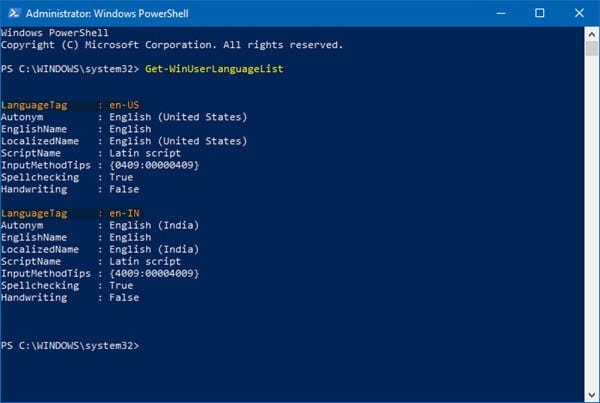
1. Run PowerShell as admin

2. Enter
Code:
PS C:\Windows\system32> Get-WinUserLanguageList
to get language codes

3. Run the following (inserting the lang code to remove):
Code:
$LangList = Get-WinUserLanguageList
$MarkedLang = $LangList | where LanguageTag -eq "<languagecode to remove>"
$LangList.Remove($MarkedLang)
Set-WinUserLanguageList $LangList -Force
 

My Computer My Computer

At a glance

Windows 11
OS
Windows 11
This is what I did:
1. Run PowerShell as admin

2. Enter
Code:
PS C:\Windows\system32> Get-WinUserLanguageList
to get language codes

3. Run the following (inserting the lang code to remove):
Code:
$LangList = Get-WinUserLanguageList
$MarkedLang = $LangList | where LanguageTag -eq "<languagecode to remove>"
$LangList.Remove($MarkedLang)
Set-WinUserLanguageList $LangList -Force
OK I didn't know about that PS command so thanx for that.

I always install Windows International and get the UK language and have to change to en-ZA in settings.
1657967333496.png
 

My Computer My Computer

At a glance

Windows
OS
Windows

Latest Support Threads

Back
Top Bottom