How to remove Windows Terminal from startup?


Windows 11 User

Well-known member
Member
Local time
9:02 PM
Posts
306
Location
Lisbon, Portugal
OS
Windows 11
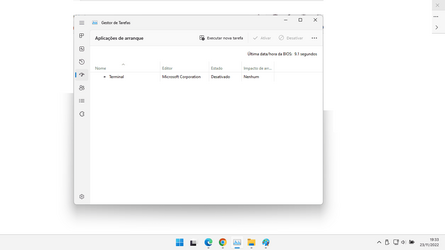
How can one remove Windows Terminal from startup? It shows up as disabled. I'm using Windows 11 22H2.
 

Attachments

  • Sem título.png
    Sem título.png
    18.6 KB · Views: 11

My Computer My Computer

At a glance

Windows 11Intel Core i7-12650H16 GB (2x8 GB) DDR5-4800MHz SO-DIMMIntel UHD Graphics + NVIDIA GeForce RTX 4070 ...
OS
Windows 11
Computer type
Laptop
Manufacturer/Model
MSI Katana 15 B12VGK
CPU
Intel Core i7-12650H
Memory
16 GB (2x8 GB) DDR5-4800MHz SO-DIMM
Graphics Card(s)
Intel UHD Graphics + NVIDIA GeForce RTX 4070 Laptop GPU 8 GB GDDR6
Monitor(s) Displays
15.6" Full HD (1920x1080) 144Hz Refresh Rate 16:9 IPS Display
Screen Resolution
1920x1080p
Hard Drives
SSD 1 TB NVMe PCIe Gen 4x4
PSU
240 W Power Supply
Case
Core Black
Cooling
Cooler Boost 5
Keyboard
Backlit keyboard with numeric keypad and PT-PT layout
Internet Speed
500 Mbps
Browser
Google Chrome
Hello, :alien:

You can use option 4 below to find the startup location for this, and then delete it to remove it.


My Computers My Computers

  • At a glance

    Windows 11 Pro for WorkstationsIntel i7-8700K 5 GHz64 GB (4x16GB) G.SKILL TridentZ RGB DDR4 3600...ASUS ROG-STRIX-GTX1080TI-O11G-GAMING (11GB GD...
    OS
    Windows 11 Pro for Workstations
    Computer type
    PC/Desktop
    Manufacturer/Model
    Custom self build
    CPU
    Intel i7-8700K 5 GHz
    Motherboard
    ASUS ROG Maximus XI Formula Z390
    Memory
    64 GB (4x16GB) G.SKILL TridentZ RGB DDR4 3600 MHz (F4-3600C18D-32GTZR)
    Graphics Card(s)
    ASUS ROG-STRIX-GTX1080TI-O11G-GAMING (11GB GDDR5X)
    Sound Card
    Integrated Digital Audio (S/PDIF)
    Monitor(s) Displays
    2 x Samsung Odyssey G75 27"
    Screen Resolution
    2560x1440
    Hard Drives
    1TB Samsung 990 PRO M.2,
    4TB Samsung 990 PRO M.2,
    TerraMaster F8 SSD Plus NAS
    PSU
    Seasonic Prime Titanium 850W
    Case
    Thermaltake Core P3 wall mounted
    Cooling
    Corsair Hydro H115i
    Keyboard
    Amazon Basics Wired Full Keyboard MD005
    Mouse
    Logitech MX Master 4
    Internet Speed
    2 Gbps Download and 100 Mbps Upload
    Browser
    Chrome and Edge
    Antivirus
    Microsoft Defender
    Other Info
    Logitech Z625 speaker system,
    Logitech BRIO 4K Pro webcam,
    HP Color LaserJet Pro MFP M477fdn,
    CyberPower CP1500PFCLCD
    Galaxy S23 Plus phone
  • At a glance

    Windows 11 ProSnapdragon X Elite (12 core) 3.42 GHz16 GB LPDDR5x-7467 MHz
    Operating System
    Windows 11 Pro
    Computer type
    Laptop
    Manufacturer/Model
    Surface Laptop 7 Copilot+ PC
    CPU
    Snapdragon X Elite (12 core) 3.42 GHz
    Memory
    16 GB LPDDR5x-7467 MHz
    Monitor(s) Displays
    15" HDR
    Screen Resolution
    2496 x 1664
    Hard Drives
    1 TB SSD
    Internet Speed
    Wi-Fi 7 and Bluetooth 5.4
    Browser
    Chrome and Edge
    Antivirus
    Microsoft Defender
Hello, :alien:

You can use option 4 below to find the startup location for this, and then delete it to remove it.


Thanks. Unfortunately, it doesn't work. After typping "wmic startup get caption,user,location" in Windows Terminal, it states:

PS C:\Users\User> wmic startup get caption,user,location
Node - USER
ERROR:
Description = Invalid query"
 

My Computer My Computer

At a glance

Windows 11Intel Core i7-12650H16 GB (2x8 GB) DDR5-4800MHz SO-DIMMIntel UHD Graphics + NVIDIA GeForce RTX 4070 ...
OS
Windows 11
Computer type
Laptop
Manufacturer/Model
MSI Katana 15 B12VGK
CPU
Intel Core i7-12650H
Memory
16 GB (2x8 GB) DDR5-4800MHz SO-DIMM
Graphics Card(s)
Intel UHD Graphics + NVIDIA GeForce RTX 4070 Laptop GPU 8 GB GDDR6
Monitor(s) Displays
15.6" Full HD (1920x1080) 144Hz Refresh Rate 16:9 IPS Display
Screen Resolution
1920x1080p
Hard Drives
SSD 1 TB NVMe PCIe Gen 4x4
PSU
240 W Power Supply
Case
Core Black
Cooling
Cooler Boost 5
Keyboard
Backlit keyboard with numeric keypad and PT-PT layout
Internet Speed
500 Mbps
Browser
Google Chrome

My Computers My Computers

  • At a glance

    Windows 11 HomeAMD Athlon Silver 3050U8GBRadeon Graphics
    OS
    Windows 11 Home
    Computer type
    Laptop
    Manufacturer/Model
    Acer Aspire 3 A315-23-R9VY
    CPU
    AMD Athlon Silver 3050U
    Memory
    8GB
    Graphics Card(s)
    Radeon Graphics
    Monitor(s) Displays
    laptop screen
    Screen Resolution
    1366x768 native resolution, up to 2560x1440 with Radeon Virtual Super Resolution
    Hard Drives
    1TB Samsung EVO 870 SSD (from April 2026: 250GB EVO 850)
    Internet Speed
    150 Mbps
    Browser
    Edge, Firefox
    Antivirus
    Defender
    Other Info
    UPDATE - 11 April 2026: due to lid hinges starting to break up this laptop has been retired from active duty. The OS with all software and files has been migrated to my System Seven in 'Other systems' to carry on as my general purpose 'main machine'.

    I've now clean installed 25H2 and used Garlin's scripts to update Secure Boot to CA 2023 and revoke the PCA 2011 certificates. It's new role is to test secure boot issues.

    Info for 2021-2026:
    fully 'Windows 11 ready' laptop. Windows 10 C: partition migrated from my old unsupported 'main machine' then upgraded to 11. A test migration ran Insider builds for 2 months. When 11 was released on 5th October 2021 it was re-imaged back to 10 and was offered the upgrade in Windows Update on 20th October. Windows Update offered the 22H2 Feature Update on 20th September 2022. It got the 23H2 Feature Update on 4th November 2023 through Windows Update, 24H2 on 3rd October 2024 through Windows Update by setting the Target Release Version for 24H2, and 25H2 on 30th September 2025 through Windows Update by setting the Target Release Version for 25H2.
  • At a glance

    Windows 11 ProIntel® Core™ i5-520M8GB(integrated graphics) Intel HD Graphics
    Operating System
    Windows 11 Pro
    Computer type
    Laptop
    Manufacturer/Model
    Dell Latitude E4310
    CPU
    Intel® Core™ i5-520M
    Motherboard
    0T6M8G
    Memory
    8GB
    Graphics card(s)
    (integrated graphics) Intel HD Graphics
    Screen Resolution
    1366x768
    Hard Drives
    500GB Crucial MX500 SSD
    Browser
    Firefox, Edge
    Antivirus
    Defender
    Other Info
    unsupported machine: Legacy bios, MBR, TPM 1.2, upgraded from W10 to W11 using W10/W11 hybrid install media workaround.

    In-place upgrade to 22H2 using ISO and a workaround.
    Feature Update to 23H2 by manually installing the Enablement Package.
    In-place upgrade to 24H2 using hybrid 23H2/24H2 install media.
    Upgraded to 25H2 by Enablement Package.

    Also running Insider Experimental 263xx and 29xxx builds and Windows 10 as native boot .vhdx.
  • My SYSTEM THREE is a Dell Latitude 5410, i7-10610U, 32GB RAM, 512GB NVMe ssd, supported device running Windows 11 Pro.

    My SYSTEM FOUR was a 2-in-1 convertible Lenovo Yoga 11e (1st gen) type 20DA, Celeron N2930, 8GB RAM, 256GB ssd. Unsupported device. This has now been sold. It has been replaced by my System Eight.

    My SYSTEM FIVE is a Dell Latitude 3190 2-in-1, Pentium Silver N5030, 8GB RAM, 1TB NVMe ssd, supported device running Windows 11 Pro, plus Insider Beta, Experimental 263xx and 29xxx builds (and a few others) as a native boot .vhdx.

    My SYSTEM SIX is a Dell Latitude 5550, Core Ultra 7 165H, 64GB RAM, 1TB NVMe SSD, supported device, Windows 11 Pro, Hyper-V host machine. Updated to 25H2 on 30th September 2025.

    My SYSTEM SEVEN is a Lenovo Thinkpad T580, 1920x1080 touchscreen, Intel Core i7-8650U, 16GB RAM, 512GB NVMe SSD + 2nd 512GB NVMe SSD, a supported device for Windows 11. This is my current general purpose 'main machine'. The installed Windows 11 Home from my System One has been migrated to this machine. As its new home has an existing digital licence for Pro I've been able to upgrade the migrated OS from Home to Pro.

    My SYSTEM EIGHT is a 2-in-1 convertible Lenovo Yoga 11e (5th gen) type 20LN, Celeron N4120, 8GB RAM, 512GB NVMe ssd, a supported device for Windows 11. Currently running Windows 11 Pro, plus Insider Beta, Experimental 263xx and 29xxx builds as native boot vhdx.

My Computer My Computer

At a glance

Windows 11Intel Core i7-12650H16 GB (2x8 GB) DDR5-4800MHz SO-DIMMIntel UHD Graphics + NVIDIA GeForce RTX 4070 ...
OS
Windows 11
Computer type
Laptop
Manufacturer/Model
MSI Katana 15 B12VGK
CPU
Intel Core i7-12650H
Memory
16 GB (2x8 GB) DDR5-4800MHz SO-DIMM
Graphics Card(s)
Intel UHD Graphics + NVIDIA GeForce RTX 4070 Laptop GPU 8 GB GDDR6
Monitor(s) Displays
15.6" Full HD (1920x1080) 144Hz Refresh Rate 16:9 IPS Display
Screen Resolution
1920x1080p
Hard Drives
SSD 1 TB NVMe PCIe Gen 4x4
PSU
240 W Power Supply
Case
Core Black
Cooling
Cooler Boost 5
Keyboard
Backlit keyboard with numeric keypad and PT-PT layout
Internet Speed
500 Mbps
Browser
Google Chrome
Thanks. Unfortunately, it doesn't work. After typping "wmic startup get caption,user,location" in Windows Terminal, it states:

PS C:\Users\User> wmic startup get caption,user,location
Node - USER
ERROR:
Description = Invalid query"

It sounds like the command may not have been typed correctly. It looks like there an extra space at the left of the command.
 

My Computers My Computers

  • At a glance

    Windows 11 Pro for WorkstationsIntel i7-8700K 5 GHz64 GB (4x16GB) G.SKILL TridentZ RGB DDR4 3600...ASUS ROG-STRIX-GTX1080TI-O11G-GAMING (11GB GD...
    OS
    Windows 11 Pro for Workstations
    Computer type
    PC/Desktop
    Manufacturer/Model
    Custom self build
    CPU
    Intel i7-8700K 5 GHz
    Motherboard
    ASUS ROG Maximus XI Formula Z390
    Memory
    64 GB (4x16GB) G.SKILL TridentZ RGB DDR4 3600 MHz (F4-3600C18D-32GTZR)
    Graphics Card(s)
    ASUS ROG-STRIX-GTX1080TI-O11G-GAMING (11GB GDDR5X)
    Sound Card
    Integrated Digital Audio (S/PDIF)
    Monitor(s) Displays
    2 x Samsung Odyssey G75 27"
    Screen Resolution
    2560x1440
    Hard Drives
    1TB Samsung 990 PRO M.2,
    4TB Samsung 990 PRO M.2,
    TerraMaster F8 SSD Plus NAS
    PSU
    Seasonic Prime Titanium 850W
    Case
    Thermaltake Core P3 wall mounted
    Cooling
    Corsair Hydro H115i
    Keyboard
    Amazon Basics Wired Full Keyboard MD005
    Mouse
    Logitech MX Master 4
    Internet Speed
    2 Gbps Download and 100 Mbps Upload
    Browser
    Chrome and Edge
    Antivirus
    Microsoft Defender
    Other Info
    Logitech Z625 speaker system,
    Logitech BRIO 4K Pro webcam,
    HP Color LaserJet Pro MFP M477fdn,
    CyberPower CP1500PFCLCD
    Galaxy S23 Plus phone
  • At a glance

    Windows 11 ProSnapdragon X Elite (12 core) 3.42 GHz16 GB LPDDR5x-7467 MHz
    Operating System
    Windows 11 Pro
    Computer type
    Laptop
    Manufacturer/Model
    Surface Laptop 7 Copilot+ PC
    CPU
    Snapdragon X Elite (12 core) 3.42 GHz
    Memory
    16 GB LPDDR5x-7467 MHz
    Monitor(s) Displays
    15" HDR
    Screen Resolution
    2496 x 1664
    Hard Drives
    1 TB SSD
    Internet Speed
    Wi-Fi 7 and Bluetooth 5.4
    Browser
    Chrome and Edge
    Antivirus
    Microsoft Defender
It sounds like the command may not have been typed correctly. It looks like there an extra space at the left of the command.

Now it states:

No Instance(s) Available.
 

My Computer My Computer

At a glance

Windows 11Intel Core i7-12650H16 GB (2x8 GB) DDR5-4800MHz SO-DIMMIntel UHD Graphics + NVIDIA GeForce RTX 4070 ...
OS
Windows 11
Computer type
Laptop
Manufacturer/Model
MSI Katana 15 B12VGK
CPU
Intel Core i7-12650H
Memory
16 GB (2x8 GB) DDR5-4800MHz SO-DIMM
Graphics Card(s)
Intel UHD Graphics + NVIDIA GeForce RTX 4070 Laptop GPU 8 GB GDDR6
Monitor(s) Displays
15.6" Full HD (1920x1080) 144Hz Refresh Rate 16:9 IPS Display
Screen Resolution
1920x1080p
Hard Drives
SSD 1 TB NVMe PCIe Gen 4x4
PSU
240 W Power Supply
Case
Core Black
Cooling
Cooler Boost 5
Keyboard
Backlit keyboard with numeric keypad and PT-PT layout
Internet Speed
500 Mbps
Browser
Google Chrome
In that case, double check your Windows Terminal settings as Bree posted to make sure it's turned off to run at startup.
 

My Computers My Computers

  • At a glance

    Windows 11 Pro for WorkstationsIntel i7-8700K 5 GHz64 GB (4x16GB) G.SKILL TridentZ RGB DDR4 3600...ASUS ROG-STRIX-GTX1080TI-O11G-GAMING (11GB GD...
    OS
    Windows 11 Pro for Workstations
    Computer type
    PC/Desktop
    Manufacturer/Model
    Custom self build
    CPU
    Intel i7-8700K 5 GHz
    Motherboard
    ASUS ROG Maximus XI Formula Z390
    Memory
    64 GB (4x16GB) G.SKILL TridentZ RGB DDR4 3600 MHz (F4-3600C18D-32GTZR)
    Graphics Card(s)
    ASUS ROG-STRIX-GTX1080TI-O11G-GAMING (11GB GDDR5X)
    Sound Card
    Integrated Digital Audio (S/PDIF)
    Monitor(s) Displays
    2 x Samsung Odyssey G75 27"
    Screen Resolution
    2560x1440
    Hard Drives
    1TB Samsung 990 PRO M.2,
    4TB Samsung 990 PRO M.2,
    TerraMaster F8 SSD Plus NAS
    PSU
    Seasonic Prime Titanium 850W
    Case
    Thermaltake Core P3 wall mounted
    Cooling
    Corsair Hydro H115i
    Keyboard
    Amazon Basics Wired Full Keyboard MD005
    Mouse
    Logitech MX Master 4
    Internet Speed
    2 Gbps Download and 100 Mbps Upload
    Browser
    Chrome and Edge
    Antivirus
    Microsoft Defender
    Other Info
    Logitech Z625 speaker system,
    Logitech BRIO 4K Pro webcam,
    HP Color LaserJet Pro MFP M477fdn,
    CyberPower CP1500PFCLCD
    Galaxy S23 Plus phone
  • At a glance

    Windows 11 ProSnapdragon X Elite (12 core) 3.42 GHz16 GB LPDDR5x-7467 MHz
    Operating System
    Windows 11 Pro
    Computer type
    Laptop
    Manufacturer/Model
    Surface Laptop 7 Copilot+ PC
    CPU
    Snapdragon X Elite (12 core) 3.42 GHz
    Memory
    16 GB LPDDR5x-7467 MHz
    Monitor(s) Displays
    15" HDR
    Screen Resolution
    2496 x 1664
    Hard Drives
    1 TB SSD
    Internet Speed
    Wi-Fi 7 and Bluetooth 5.4
    Browser
    Chrome and Edge
    Antivirus
    Microsoft Defender
I want to get rid of it in Task Manager's startup apps tab. It shows up as disabled.

In that case, double check your Windows Terminal settings as Bree posted to make sure it's turned off to run at startup.
I've just checked, and turning it off in Terminal's settings does not remove it from the startup apps in Task Manager, just switches it from enabled to disabled.

1669237143976.png

1669237154935.png
 

My Computers My Computers

  • At a glance

    Windows 11 HomeAMD Athlon Silver 3050U8GBRadeon Graphics
    OS
    Windows 11 Home
    Computer type
    Laptop
    Manufacturer/Model
    Acer Aspire 3 A315-23-R9VY
    CPU
    AMD Athlon Silver 3050U
    Memory
    8GB
    Graphics Card(s)
    Radeon Graphics
    Monitor(s) Displays
    laptop screen
    Screen Resolution
    1366x768 native resolution, up to 2560x1440 with Radeon Virtual Super Resolution
    Hard Drives
    1TB Samsung EVO 870 SSD (from April 2026: 250GB EVO 850)
    Internet Speed
    150 Mbps
    Browser
    Edge, Firefox
    Antivirus
    Defender
    Other Info
    UPDATE - 11 April 2026: due to lid hinges starting to break up this laptop has been retired from active duty. The OS with all software and files has been migrated to my System Seven in 'Other systems' to carry on as my general purpose 'main machine'.

    I've now clean installed 25H2 and used Garlin's scripts to update Secure Boot to CA 2023 and revoke the PCA 2011 certificates. It's new role is to test secure boot issues.

    Info for 2021-2026:
    fully 'Windows 11 ready' laptop. Windows 10 C: partition migrated from my old unsupported 'main machine' then upgraded to 11. A test migration ran Insider builds for 2 months. When 11 was released on 5th October 2021 it was re-imaged back to 10 and was offered the upgrade in Windows Update on 20th October. Windows Update offered the 22H2 Feature Update on 20th September 2022. It got the 23H2 Feature Update on 4th November 2023 through Windows Update, 24H2 on 3rd October 2024 through Windows Update by setting the Target Release Version for 24H2, and 25H2 on 30th September 2025 through Windows Update by setting the Target Release Version for 25H2.
  • At a glance

    Windows 11 ProIntel® Core™ i5-520M8GB(integrated graphics) Intel HD Graphics
    Operating System
    Windows 11 Pro
    Computer type
    Laptop
    Manufacturer/Model
    Dell Latitude E4310
    CPU
    Intel® Core™ i5-520M
    Motherboard
    0T6M8G
    Memory
    8GB
    Graphics card(s)
    (integrated graphics) Intel HD Graphics
    Screen Resolution
    1366x768
    Hard Drives
    500GB Crucial MX500 SSD
    Browser
    Firefox, Edge
    Antivirus
    Defender
    Other Info
    unsupported machine: Legacy bios, MBR, TPM 1.2, upgraded from W10 to W11 using W10/W11 hybrid install media workaround.

    In-place upgrade to 22H2 using ISO and a workaround.
    Feature Update to 23H2 by manually installing the Enablement Package.
    In-place upgrade to 24H2 using hybrid 23H2/24H2 install media.
    Upgraded to 25H2 by Enablement Package.

    Also running Insider Experimental 263xx and 29xxx builds and Windows 10 as native boot .vhdx.
  • My SYSTEM THREE is a Dell Latitude 5410, i7-10610U, 32GB RAM, 512GB NVMe ssd, supported device running Windows 11 Pro.

    My SYSTEM FOUR was a 2-in-1 convertible Lenovo Yoga 11e (1st gen) type 20DA, Celeron N2930, 8GB RAM, 256GB ssd. Unsupported device. This has now been sold. It has been replaced by my System Eight.

    My SYSTEM FIVE is a Dell Latitude 3190 2-in-1, Pentium Silver N5030, 8GB RAM, 1TB NVMe ssd, supported device running Windows 11 Pro, plus Insider Beta, Experimental 263xx and 29xxx builds (and a few others) as a native boot .vhdx.

    My SYSTEM SIX is a Dell Latitude 5550, Core Ultra 7 165H, 64GB RAM, 1TB NVMe SSD, supported device, Windows 11 Pro, Hyper-V host machine. Updated to 25H2 on 30th September 2025.

    My SYSTEM SEVEN is a Lenovo Thinkpad T580, 1920x1080 touchscreen, Intel Core i7-8650U, 16GB RAM, 512GB NVMe SSD + 2nd 512GB NVMe SSD, a supported device for Windows 11. This is my current general purpose 'main machine'. The installed Windows 11 Home from my System One has been migrated to this machine. As its new home has an existing digital licence for Pro I've been able to upgrade the migrated OS from Home to Pro.

    My SYSTEM EIGHT is a 2-in-1 convertible Lenovo Yoga 11e (5th gen) type 20LN, Celeron N4120, 8GB RAM, 512GB NVMe ssd, a supported device for Windows 11. Currently running Windows 11 Pro, plus Insider Beta, Experimental 263xx and 29xxx builds as native boot vhdx.
In that case, double check your Windows Terminal settings as Bree posted to make sure it's turned off to run at startup.

Already did.
 

My Computer My Computer

At a glance

Windows 11Intel Core i7-12650H16 GB (2x8 GB) DDR5-4800MHz SO-DIMMIntel UHD Graphics + NVIDIA GeForce RTX 4070 ...
OS
Windows 11
Computer type
Laptop
Manufacturer/Model
MSI Katana 15 B12VGK
CPU
Intel Core i7-12650H
Memory
16 GB (2x8 GB) DDR5-4800MHz SO-DIMM
Graphics Card(s)
Intel UHD Graphics + NVIDIA GeForce RTX 4070 Laptop GPU 8 GB GDDR6
Monitor(s) Displays
15.6" Full HD (1920x1080) 144Hz Refresh Rate 16:9 IPS Display
Screen Resolution
1920x1080p
Hard Drives
SSD 1 TB NVMe PCIe Gen 4x4
PSU
240 W Power Supply
Case
Core Black
Cooling
Cooler Boost 5
Keyboard
Backlit keyboard with numeric keypad and PT-PT layout
Internet Speed
500 Mbps
Browser
Google Chrome
If you really want terminal gone from startup you could uninstall terminal from programs then system reverts back to Powershell.

If you decide later you want to reinstall terminal you can install from the Microsoft Store or just run this command in Powershell.

get-appxpackage Microsoft.WindowsTerminal -allusers | Foreach {Add-AppxPackage -DisableDevelopmentMode -Register "$($_.InstallLocation)\AppXManifest.xml"}
 

My Computer My Computer

At a glance

Windows 11 Pro
OS
Windows 11 Pro
If you really want terminal gone from startup you could uninstall terminal from programs then system reverts back to Powershell.

If you decide later you want to reinstall terminal you can install from the Microsoft Store or just run this command in Powershell.

get-appxpackage Microsoft.WindowsTerminal -allusers | Foreach {Add-AppxPackage -DisableDevelopmentMode -Register "$($_.InstallLocation)\AppXManifest.xml"}

I don't uninstall it, only remove it from startup.
 

My Computer My Computer

At a glance

Windows 11Intel Core i7-12650H16 GB (2x8 GB) DDR5-4800MHz SO-DIMMIntel UHD Graphics + NVIDIA GeForce RTX 4070 ...
OS
Windows 11
Computer type
Laptop
Manufacturer/Model
MSI Katana 15 B12VGK
CPU
Intel Core i7-12650H
Memory
16 GB (2x8 GB) DDR5-4800MHz SO-DIMM
Graphics Card(s)
Intel UHD Graphics + NVIDIA GeForce RTX 4070 Laptop GPU 8 GB GDDR6
Monitor(s) Displays
15.6" Full HD (1920x1080) 144Hz Refresh Rate 16:9 IPS Display
Screen Resolution
1920x1080p
Hard Drives
SSD 1 TB NVMe PCIe Gen 4x4
PSU
240 W Power Supply
Case
Core Black
Cooling
Cooler Boost 5
Keyboard
Backlit keyboard with numeric keypad and PT-PT layout
Internet Speed
500 Mbps
Browser
Google Chrome

My Computer My Computer

At a glance

Windows 11 Pro
OS
Windows 11 Pro

My Computer My Computer

At a glance

Windows 11Intel Core i7-12650H16 GB (2x8 GB) DDR5-4800MHz SO-DIMMIntel UHD Graphics + NVIDIA GeForce RTX 4070 ...
OS
Windows 11
Computer type
Laptop
Manufacturer/Model
MSI Katana 15 B12VGK
CPU
Intel Core i7-12650H
Memory
16 GB (2x8 GB) DDR5-4800MHz SO-DIMM
Graphics Card(s)
Intel UHD Graphics + NVIDIA GeForce RTX 4070 Laptop GPU 8 GB GDDR6
Monitor(s) Displays
15.6" Full HD (1920x1080) 144Hz Refresh Rate 16:9 IPS Display
Screen Resolution
1920x1080p
Hard Drives
SSD 1 TB NVMe PCIe Gen 4x4
PSU
240 W Power Supply
Case
Core Black
Cooling
Cooler Boost 5
Keyboard
Backlit keyboard with numeric keypad and PT-PT layout
Internet Speed
500 Mbps
Browser
Google Chrome
Back
Top Bottom