
How to update antivirus DB?


Winfried

Member
Local time
5:36 PM
Posts
29
OS
Windows 11
Hello,

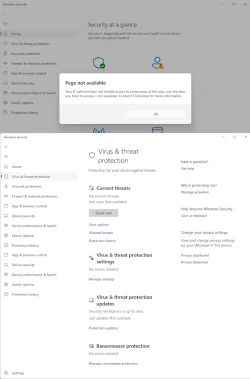
After clicking on the notification that the anti-virus needed to be updated, it says "Page not available: Your IT administrator has limited access to some areas of this app, and the item you tried to access is not available".

And then, in the "Virus & thread protection" page, the "Virus & thread protection" section says "Last update: not available".

What's a girl to do?

Cheers,
 
Windows Build/Version
Microsoft Windows [Version 10.0.22631.2715]

Attachments
  • Windows.AV_E6E91270-4F05-40EC-BCCE-915067780D71.webp
    Windows.AV_E6E91270-4F05-40EC-BCCE-915067780D71.webp
    35.9 KB · Views: 1

My Computer My Computer

At a glance

Windows 11
OS
Windows 11
Are you an admin? Is it your own computer? Look in Windows' Settings .... Accounts.
 

My Computers My Computers

  • At a glance

    Windows 11 Pro 26H2 26300.9818AMD Ryzen 7 5825U with Radeon Graphics16GB
    OS
    Windows 11 Pro 26H2 26300.9818
    Computer type
    Laptop
    Manufacturer/Model
    Acemagic LX15PRO
    CPU
    AMD Ryzen 7 5825U with Radeon Graphics
    Motherboard
    BIOS CT_BI_AMI_LX15PRO_AB8139_A-004
    Memory
    16GB
    Screen Resolution
    1920 x 1080
    Hard Drives
    SSD 2TB
    Internet Speed
    30 Mbps
    Browser
    Brave
    Antivirus
    Webroot SecureAnywhere Complete beta
  • At a glance

    Windows 11 Pro 23H2 22631.2506Atom N450 1.66GHz2GB
    Operating System
    Windows 11 Pro 23H2 22631.2506
    Computer type
    Laptop
    Manufacturer/Model
    HP Mini 210-1090NR PC (bought in late 2009!)
    CPU
    Atom N450 1.66GHz
    Memory
    2GB
    Browser
    Brave
    Antivirus
    Webroot
  • Acer Swift SF114-34 laptop
    OS Windows 11 Pro 26200.8894
    CPU Pentium Silver N6000
    RAM 4GB
    BIOS v1.17
    SSD Samsung 970 EVO Plus SSD 2TB (an upgrade)
Are you encountering the "Some settings are managed by your organization" message on your Windows device? This video provides a detailed walk-through to help you fix this common issue.


My Computer My Computer

At a glance

Windows 11AMD Ryzen 7 5700GMicron Technology DDR4-3200 16GBNVIDIA GeForce RTX 3060
OS
Windows 11
Computer type
PC/Desktop
Manufacturer/Model
HP Pavilion
CPU
AMD Ryzen 7 5700G
Motherboard
Erica6
Memory
Micron Technology DDR4-3200 16GB
Graphics Card(s)
NVIDIA GeForce RTX 3060
Sound Card
Realtek ALC671
Monitor(s) Displays
Samsung SyncMaster U28E590
Screen Resolution
3840 x 2160
Hard Drives
SAMSUNG MZVLQ1T0HALB-000H1
"Page not available: Your IT administrator has limited access to some areas of this app, and the item you tried to access is not available"
That message can be caused by Registry edits that you've done or by [Pro-only] Policies that you've set.
I imagine that it can also be caused by malware that has infiltrated and corrupted your Defender.

By the way, if you post your diagrams within your post rather than as attachments then people can see your words at the same time as your pictures.
Upload and Attach Images and Files in Post - ElevenForumTutorials [Option 1]


Denis
 

My Computer My Computer

At a glance

Windows 11 Home x64 Version 26H2 Build 26300....
OS
Windows 11 Home x64 Version 26H2 Build 26300.9457
I don't understand how multiquote works in this software.

> Are you an admin? Is it your own computer? Look in Windows' Settings .... Accounts.

Yes. Yes. Where and what to look for?

> That message can be caused by Registry edits that you've done or by [Pro-only] Policies that you've set. I imagine that it can also be caused by malware that has infiltrated and corrupted your Defender.

I don't know.

> By the way, if you post your diagrams within your post rather than as attachments then people can see your words at the same time as your pictures.

Thanks for the tip. It should be more obvious.

--
Edit: Opened a DOS box as Admin, and typed "Set-MpPreference -UILockdown $false".

Oddly, Settings > Privacy & Security > Windows Security > Virus & threat protection says "Last update 30/10/2026 11:59", so it looks like it is up to date.
 

My Computer My Computer

At a glance

Windows 11
OS
Windows 11
Use quote instead of multi-quotevand post separate replies as this makes it easier to follow.
 

My Computers My Computers

  • At a glance

    Windows 11 Pro 26H2 26300.9818AMD Ryzen 7 5825U with Radeon Graphics16GB
    OS
    Windows 11 Pro 26H2 26300.9818
    Computer type
    Laptop
    Manufacturer/Model
    Acemagic LX15PRO
    CPU
    AMD Ryzen 7 5825U with Radeon Graphics
    Motherboard
    BIOS CT_BI_AMI_LX15PRO_AB8139_A-004
    Memory
    16GB
    Screen Resolution
    1920 x 1080
    Hard Drives
    SSD 2TB
    Internet Speed
    30 Mbps
    Browser
    Brave
    Antivirus
    Webroot SecureAnywhere Complete beta
  • At a glance

    Windows 11 Pro 23H2 22631.2506Atom N450 1.66GHz2GB
    Operating System
    Windows 11 Pro 23H2 22631.2506
    Computer type
    Laptop
    Manufacturer/Model
    HP Mini 210-1090NR PC (bought in late 2009!)
    CPU
    Atom N450 1.66GHz
    Memory
    2GB
    Browser
    Brave
    Antivirus
    Webroot
  • Acer Swift SF114-34 laptop
    OS Windows 11 Pro 26200.8894
    CPU Pentium Silver N6000
    RAM 4GB
    BIOS v1.17
    SSD Samsung 970 EVO Plus SSD 2TB (an upgrade)
how multiquote works in this software
Don't use multi-quote as it's a bit awkward.
To put multiple quotes in a reply, do this instead:-
Select the words you want, click on the Quote box that appears and it will put that in a reply.
select words to quote - TenForums.webp

Then press the return key and type whatever you want about that quote.

Then you can do the same again as many times as you want and they will all get put in the same reply box.


Denis
 

My Computer My Computer

At a glance

Windows 11 Home x64 Version 26H2 Build 26300....
OS
Windows 11 Home x64 Version 26H2 Build 26300.9457
Back
Top Bottom




