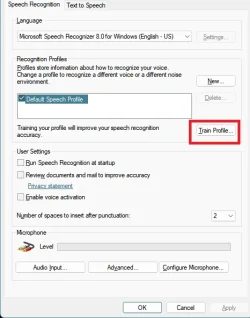
I want to train voice to text to be more accurate


Lenovo25

Member
Local time
5:49 AM
Posts
28
OS
Windows 11 Home 64-bit
Version 25H2 Build 26200.7171

I've been attempting to use Google and Microsoft support to figure out how to make voice to text more accurate in Win11, but keep getting sent down dead end roads. The app I'm referring to is accessed by holding windows key and pressing "H".

I've been told to Run Voice Training Wizard: Open the Control Panel, go to Ease of Access > Speech Recognition, and select "Train your computer to better understand you". This process involves reading text for 10-25 minutes to improve accuracy for your specific voice.

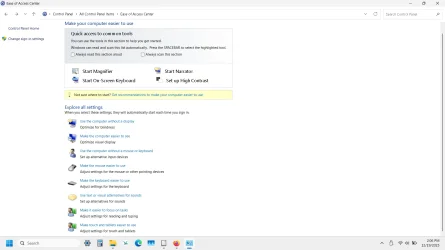
But when I go to Ease of Access, I see nothing called Speech Recognition there. There is one called "Make it easier to focus on tasks". When I click that, I can scroll to the bottom and click "Use Speech Recognition", but then I get an "access denied" error message. Not sure why since Windows + H works when I use it.

The problem I'm trying to address is all the mistakes I get while using Windows + H since it results in lots of errors and I'd like to use a training tool to make it accurate. It used to be accurate when I used it in Win10, but not so in Win11.
 

My Computer My Computer

At a glance

Windows 11 Home 64-bitIntel Processor @ 1.20GHz i-38GB DDR4128MB Intel UHD Graphics (Lenovo)
OS
Windows 11 Home 64-bit
Computer type
Laptop
Manufacturer/Model
Lenovo Ideapad 3
CPU
Intel Processor @ 1.20GHz i-3
Motherboard
LENOVO LNVNB161216 (U3E1) %1 Chipset
Memory
8GB DDR4
Graphics Card(s)
128MB Intel UHD Graphics (Lenovo)
Sound Card
Realtek High Definition Audio(SST)
Monitor(s) Displays
Generic PnP Monitor (1920x1080@60Hz)
Screen Resolution
(1920x1080@60Hz)
Hard Drives
238GB SKHynix_HFM256GDHTNI-87A0B (Unknown (SSD)) 236 usable GB
Keyboard
QWERTY
Mouse
Logitech wireless
Internet Speed
Broadband speed
Browser
Chrome/Edge, but most recently using Firefox
Antivirus
Windows Defender

My Computer My Computer

At a glance

Windows 11AMD Ryzen 7 5700GMicron Technology DDR4-3200 16GBNVIDIA GeForce RTX 3060
OS
Windows 11
Computer type
PC/Desktop
Manufacturer/Model
HP Pavilion
CPU
AMD Ryzen 7 5700G
Motherboard
Erica6
Memory
Micron Technology DDR4-3200 16GB
Graphics Card(s)
NVIDIA GeForce RTX 3060
Sound Card
Realtek ALC671
Monitor(s) Displays
Samsung SyncMaster U28E590
Screen Resolution
3840 x 2160
Hard Drives
SAMSUNG MZVLQ1T0HALB-000H1

My Computer My Computer

At a glance

Windows 11AMD Ryzen 7 5700GMicron Technology DDR4-3200 16GBNVIDIA GeForce RTX 3060
OS
Windows 11
Computer type
PC/Desktop
Manufacturer/Model
HP Pavilion
CPU
AMD Ryzen 7 5700G
Motherboard
Erica6
Memory
Micron Technology DDR4-3200 16GB
Graphics Card(s)
NVIDIA GeForce RTX 3060
Sound Card
Realtek ALC671
Monitor(s) Displays
Samsung SyncMaster U28E590
Screen Resolution
3840 x 2160
Hard Drives
SAMSUNG MZVLQ1T0HALB-000H1
Try this app.

Well, I'd like to continue using the one that's included with Windows 11. There is supposedly a way to train it to be more accurate by tailoring it to the voice of the individual using it. I've heard that the method used is to have the user read a couple paragraphs of text which trains the app to recognize how the user speaks. Would you happen to know how to access that? I've been trying to google how to find it but they keep giving me information that turns out not to be true.
 

My Computer My Computer

At a glance

Windows 11 Home 64-bitIntel Processor @ 1.20GHz i-38GB DDR4128MB Intel UHD Graphics (Lenovo)
OS
Windows 11 Home 64-bit
Computer type
Laptop
Manufacturer/Model
Lenovo Ideapad 3
CPU
Intel Processor @ 1.20GHz i-3
Motherboard
LENOVO LNVNB161216 (U3E1) %1 Chipset
Memory
8GB DDR4
Graphics Card(s)
128MB Intel UHD Graphics (Lenovo)
Sound Card
Realtek High Definition Audio(SST)
Monitor(s) Displays
Generic PnP Monitor (1920x1080@60Hz)
Screen Resolution
(1920x1080@60Hz)
Hard Drives
238GB SKHynix_HFM256GDHTNI-87A0B (Unknown (SSD)) 236 usable GB
Keyboard
QWERTY
Mouse
Logitech wireless
Internet Speed
Broadband speed
Browser
Chrome/Edge, but most recently using Firefox
Antivirus
Windows Defender
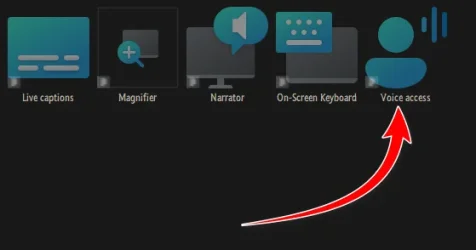
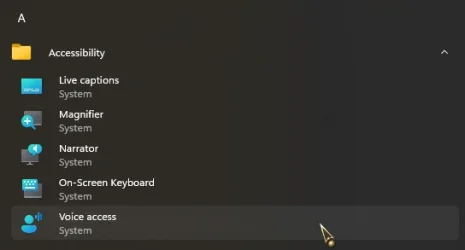
Voice Access perhaps...

11521.webp

11520.webp
 

My Computers My Computers

  • At a glance

    Windows 11 Pro
    OS
    Windows 11 Pro
    Computer type
    PC/Desktop
    Manufacturer/Model
    ASUS ROG Strix
  • At a glance

    Windows 11 Pro
    Operating System
    Windows 11 Pro
    Computer type
    Laptop
    Manufacturer/Model
    ASUS VivoBook
  • ASUS VivoBook 'Lite' ~ Windows 11 Home

My Computer My Computer

At a glance

Windows 11 Home 64-bitIntel Processor @ 1.20GHz i-38GB DDR4128MB Intel UHD Graphics (Lenovo)
OS
Windows 11 Home 64-bit
Computer type
Laptop
Manufacturer/Model
Lenovo Ideapad 3
CPU
Intel Processor @ 1.20GHz i-3
Motherboard
LENOVO LNVNB161216 (U3E1) %1 Chipset
Memory
8GB DDR4
Graphics Card(s)
128MB Intel UHD Graphics (Lenovo)
Sound Card
Realtek High Definition Audio(SST)
Monitor(s) Displays
Generic PnP Monitor (1920x1080@60Hz)
Screen Resolution
(1920x1080@60Hz)
Hard Drives
238GB SKHynix_HFM256GDHTNI-87A0B (Unknown (SSD)) 236 usable GB
Keyboard
QWERTY
Mouse
Logitech wireless
Internet Speed
Broadband speed
Browser
Chrome/Edge, but most recently using Firefox
Antivirus
Windows Defender
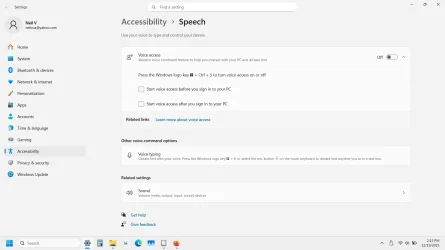
Ok, thank you! I found it, but it doesn't seem to have that "training" feature. Not sure why. I've seen this screen before and it is for using voice to control functions of the computer such as opening and closing apps. In the middle is what I'm referring to, which they call "voice typing". That's what I was hoping could be trained for accuracy, but I don't see an option for that.

Screenshot (15).webp
 

My Computer My Computer

At a glance

Windows 11 Home 64-bitIntel Processor @ 1.20GHz i-38GB DDR4128MB Intel UHD Graphics (Lenovo)
OS
Windows 11 Home 64-bit
Computer type
Laptop
Manufacturer/Model
Lenovo Ideapad 3
CPU
Intel Processor @ 1.20GHz i-3
Motherboard
LENOVO LNVNB161216 (U3E1) %1 Chipset
Memory
8GB DDR4
Graphics Card(s)
128MB Intel UHD Graphics (Lenovo)
Sound Card
Realtek High Definition Audio(SST)
Monitor(s) Displays
Generic PnP Monitor (1920x1080@60Hz)
Screen Resolution
(1920x1080@60Hz)
Hard Drives
238GB SKHynix_HFM256GDHTNI-87A0B (Unknown (SSD)) 236 usable GB
Keyboard
QWERTY
Mouse
Logitech wireless
Internet Speed
Broadband speed
Browser
Chrome/Edge, but most recently using Firefox
Antivirus
Windows Defender
I was hoping could be trained for accuracy, but I don't see an option for that.
Voice Access learns in real time, speak clearly and get a good mic.
 

My Computers My Computers

  • At a glance

    Windows 11 Pro
    OS
    Windows 11 Pro
    Computer type
    PC/Desktop
    Manufacturer/Model
    ASUS ROG Strix
  • At a glance

    Windows 11 Pro
    Operating System
    Windows 11 Pro
    Computer type
    Laptop
    Manufacturer/Model
    ASUS VivoBook
  • ASUS VivoBook 'Lite' ~ Windows 11 Home
Voice Access learns in real time, speak clearly and get a good mic.
So the more I use it, the better it gets? How does it know when it's being accurate? I go back and correct mistakes, but it keeps making them. Do you know of a way to give it feedback about what mistakes it makes and what the correct word should have been?
 

My Computer My Computer

At a glance

Windows 11 Home 64-bitIntel Processor @ 1.20GHz i-38GB DDR4128MB Intel UHD Graphics (Lenovo)
OS
Windows 11 Home 64-bit
Computer type
Laptop
Manufacturer/Model
Lenovo Ideapad 3
CPU
Intel Processor @ 1.20GHz i-3
Motherboard
LENOVO LNVNB161216 (U3E1) %1 Chipset
Memory
8GB DDR4
Graphics Card(s)
128MB Intel UHD Graphics (Lenovo)
Sound Card
Realtek High Definition Audio(SST)
Monitor(s) Displays
Generic PnP Monitor (1920x1080@60Hz)
Screen Resolution
(1920x1080@60Hz)
Hard Drives
238GB SKHynix_HFM256GDHTNI-87A0B (Unknown (SSD)) 236 usable GB
Keyboard
QWERTY
Mouse
Logitech wireless
Internet Speed
Broadband speed
Browser
Chrome/Edge, but most recently using Firefox
Antivirus
Windows Defender

My Computer My Computer

At a glance

Windows 11 Home 64-bitIntel Processor @ 1.20GHz i-38GB DDR4128MB Intel UHD Graphics (Lenovo)
OS
Windows 11 Home 64-bit
Computer type
Laptop
Manufacturer/Model
Lenovo Ideapad 3
CPU
Intel Processor @ 1.20GHz i-3
Motherboard
LENOVO LNVNB161216 (U3E1) %1 Chipset
Memory
8GB DDR4
Graphics Card(s)
128MB Intel UHD Graphics (Lenovo)
Sound Card
Realtek High Definition Audio(SST)
Monitor(s) Displays
Generic PnP Monitor (1920x1080@60Hz)
Screen Resolution
(1920x1080@60Hz)
Hard Drives
238GB SKHynix_HFM256GDHTNI-87A0B (Unknown (SSD)) 236 usable GB
Keyboard
QWERTY
Mouse
Logitech wireless
Internet Speed
Broadband speed
Browser
Chrome/Edge, but most recently using Firefox
Antivirus
Windows Defender
Win+R to run:

control /name Microsoft.TextToSpeech

but thats from the control panel text to speech (speech recognition), so i dont know if that profile will apply to the windows 11 modern voice access
 

My Computer My Computer

At a glance

Windows 11 Pro
OS
Windows 11 Pro
Win+R to run:

control /name Microsoft.TextToSpeech

but thats from the control panel text to speech (speech recognition), so i dont know if that profile will apply to the windows 11 modern voice access
I found it now and it looks like it might be what I'm looking for. I started the training, but it looks to be a bit lengthy. That's ok though. I'll get to it later. Thank you for your help!
 

My Computer My Computer

At a glance

Windows 11 Home 64-bitIntel Processor @ 1.20GHz i-38GB DDR4128MB Intel UHD Graphics (Lenovo)
OS
Windows 11 Home 64-bit
Computer type
Laptop
Manufacturer/Model
Lenovo Ideapad 3
CPU
Intel Processor @ 1.20GHz i-3
Motherboard
LENOVO LNVNB161216 (U3E1) %1 Chipset
Memory
8GB DDR4
Graphics Card(s)
128MB Intel UHD Graphics (Lenovo)
Sound Card
Realtek High Definition Audio(SST)
Monitor(s) Displays
Generic PnP Monitor (1920x1080@60Hz)
Screen Resolution
(1920x1080@60Hz)
Hard Drives
238GB SKHynix_HFM256GDHTNI-87A0B (Unknown (SSD)) 236 usable GB
Keyboard
QWERTY
Mouse
Logitech wireless
Internet Speed
Broadband speed
Browser
Chrome/Edge, but most recently using Firefox
Antivirus
Windows Defender
I'm a bit late but the Microsoft "voice to text" is not the way to go if you want to convert speech into text.
The project you are looking for is called Whisper GitHub - ggml-org/whisper.cpp: Port of OpenAI's Whisper model in C/C++
Whisper is open source, extremely fast, runs on ANY hardware you can imagine and it supports a ton of languages. You can literally slur drunkenly in a strong welsh dialect, and it will narrate it.
Better than the built in Windows stuff by large margin.
You do NOT need to train it at all, that's how things were done in 2000, today TTS and STT come as pretrained models.
The best old-style app on windows is "Dragon natural speaking" but that's hopeless outdated.

And for text to speech it's a similar situation, there are so many options.
A good comparison is here: Local tts or cloud, free and commercial for any purpose.
 

My Computer My Computer

At a glance

Windows 11 x64
OS
Windows 11 x64
Computer type
PC/Desktop
Manufacturer/Model
selfmade
Back
Top Bottom