Version 25H2 Build 26200.7171
I've been attempting to use Google and Microsoft support to figure out how to make voice to text more accurate in Win11, but keep getting sent down dead end roads. The app I'm referring to is accessed by holding windows key and pressing "H".
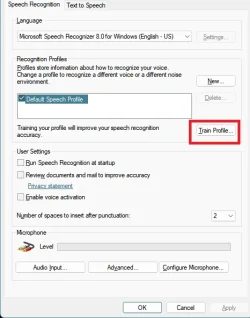
I've been told to Run Voice Training Wizard: Open the Control Panel, go to Ease of Access > Speech Recognition, and select "Train your computer to better understand you". This process involves reading text for 10-25 minutes to improve accuracy for your specific voice.
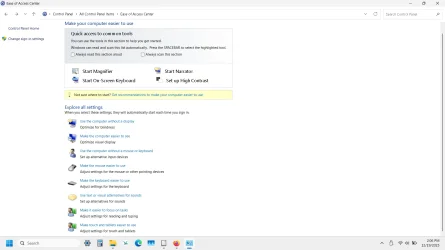
But when I go to Ease of Access, I see nothing called Speech Recognition there. There is one called "Make it easier to focus on tasks". When I click that, I can scroll to the bottom and click "Use Speech Recognition", but then I get an "access denied" error message. Not sure why since Windows + H works when I use it.
The problem I'm trying to address is all the mistakes I get while using Windows + H since it results in lots of errors and I'd like to use a training tool to make it accurate. It used to be accurate when I used it in Win10, but not so in Win11.
I've been attempting to use Google and Microsoft support to figure out how to make voice to text more accurate in Win11, but keep getting sent down dead end roads. The app I'm referring to is accessed by holding windows key and pressing "H".
I've been told to Run Voice Training Wizard: Open the Control Panel, go to Ease of Access > Speech Recognition, and select "Train your computer to better understand you". This process involves reading text for 10-25 minutes to improve accuracy for your specific voice.
But when I go to Ease of Access, I see nothing called Speech Recognition there. There is one called "Make it easier to focus on tasks". When I click that, I can scroll to the bottom and click "Use Speech Recognition", but then I get an "access denied" error message. Not sure why since Windows + H works when I use it.
The problem I'm trying to address is all the mistakes I get while using Windows + H since it results in lots of errors and I'd like to use a training tool to make it accurate. It used to be accurate when I used it in Win10, but not so in Win11.
My Computer
At a glance
Windows 11 Home 64-bitIntel Processor @ 1.20GHz i-38GB DDR4128MB Intel UHD Graphics (Lenovo)
- OS
- Windows 11 Home 64-bit
- Computer type
- Laptop
- Manufacturer/Model
- Lenovo Ideapad 3
- CPU
- Intel Processor @ 1.20GHz i-3
- Motherboard
- LENOVO LNVNB161216 (U3E1) %1 Chipset
- Memory
- 8GB DDR4
- Graphics Card(s)
- 128MB Intel UHD Graphics (Lenovo)
- Sound Card
- Realtek High Definition Audio(SST)
- Monitor(s) Displays
- Generic PnP Monitor (1920x1080@60Hz)
- Screen Resolution
- (1920x1080@60Hz)
- Hard Drives
- 238GB SKHynix_HFM256GDHTNI-87A0B (Unknown (SSD)) 236 usable GB
- Keyboard
- QWERTY
- Mouse
- Logitech wireless
- Internet Speed
- Broadband speed
- Browser
- Chrome/Edge, but most recently using Firefox
- Antivirus
- Windows Defender