Increase size of BCD for failing Windows 11 upgrade from Windows 10


The enough space error message did not designate any drive partition.

It was likely related to the missing recovery partition.

It was not related to the EFI, primary or reserved partitions.

More important are hardware incompatibilities: CPU and TPM

There was no bypass.
 

My Computer My Computer

At a glance

Windows 10Intel(R) Core(TM) i7-4800MQ CPU @ 2.70GHz16 GB Total: Manufacturer : Samsung MemoryTyp...NVIDIA Quadro K3100M; Intel(R) HD Graphics 4600
OS
Windows 10
Computer type
Laptop
Manufacturer/Model
HP
CPU
Intel(R) Core(TM) i7-4800MQ CPU @ 2.70GHz
Motherboard
Product : 190A Version : KBC Version 94.56
Memory
16 GB Total: Manufacturer : Samsung MemoryType : DDR3 FormFactor : SODIMM Capacity : 8GB Speed : 1600
Graphics Card(s)
NVIDIA Quadro K3100M; Intel(R) HD Graphics 4600
Sound Card
IDT High Definition Audio CODEC; PNP Device ID HDAUDIO\FUNC_01&VEN_111D&DEV_76E0
Hard Drives
Model Hitachi HTS727575A9E364
Antivirus
Microsoft Defender
Other Info
Mobile Workstation

My Computer My Computer

At a glance

Windows 10Intel(R) Core(TM) i7-4800MQ CPU @ 2.70GHz16 GB Total: Manufacturer : Samsung MemoryTyp...NVIDIA Quadro K3100M; Intel(R) HD Graphics 4600
OS
Windows 10
Computer type
Laptop
Manufacturer/Model
HP
CPU
Intel(R) Core(TM) i7-4800MQ CPU @ 2.70GHz
Motherboard
Product : 190A Version : KBC Version 94.56
Memory
16 GB Total: Manufacturer : Samsung MemoryType : DDR3 FormFactor : SODIMM Capacity : 8GB Speed : 1600
Graphics Card(s)
NVIDIA Quadro K3100M; Intel(R) HD Graphics 4600
Sound Card
IDT High Definition Audio CODEC; PNP Device ID HDAUDIO\FUNC_01&VEN_111D&DEV_76E0
Hard Drives
Model Hitachi HTS727575A9E364
Antivirus
Microsoft Defender
Other Info
Mobile Workstation
That's why I suggested the method I did... in post #20
On his comp, Macrium will just grab the EFI, MSR and Windows partitions.

Then he can use the bootable Macrium to erase his Disk 0 (in Disk Management), and restore the Win 10 backup.
Then he can do the In-Place Upgrade to Win 11.

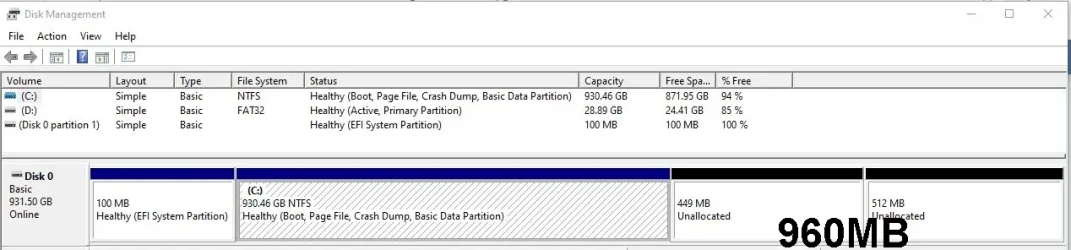
He currently has 960MB (449 and 511), of unallocated space, which, after the restore will end up at the far right... merged.
 

My Computers My Computers

  • At a glance

    Win 11 Home ♦♦♦26200.8875 ♦♦♦♦♦♦♦25H2AMD Ryzen 7 3700XG.Skill (F4-3200C14D-16GTZKW)EVGA RTX 2070 (08G-P4-2171-KR)
    OS
    Win 11 Home ♦♦♦26200.8875 ♦♦♦♦♦♦♦25H2
    Computer type
    PC/Desktop
    Manufacturer/Model
    Built by Ghot® [May 2020]
    CPU
    AMD Ryzen 7 3700X
    Motherboard
    Asus Pro WS X570-ACE (BIOS 5302)
    Memory
    G.Skill (F4-3200C14D-16GTZKW)
    Graphics Card(s)
    EVGA RTX 2070 (08G-P4-2171-KR)
    Sound Card
    Realtek ALC1220P / ALC S1220A
    Monitor(s) Displays
    Dell U3011 30"
    Screen Resolution
    2560 x 1600
    Hard Drives
    2x Samsung 860 EVO 500GB,
    WD 4TB Black FZBX - SATA III,
    WD 8TB Black FZBX - SATA III,
    DRW-24B1ST CD/DVD Burner
    PSU
    PC Power & Cooling 750W Quad EPS12V
    Case
    Cooler Master ATCS 840 Tower
    Cooling
    CM Hyper 212 EVO (push/pull)
    Keyboard
    Ducky DK9008 Shine II Blue LED
    Mouse
    Logitech Optical M-100
    Internet Speed
    300/300
    Browser
    Firefox (latest)
    Antivirus
    Bitdefender Total Security
    Other Info
    Speakers: Klipsch Pro Media 2.1
  • At a glance

    Windows XP Pro 32bit w/SP3AMD Athlon 64 X2 5000+ (OC'd @ 3.2Ghz)TWIN2X2048-6400C4DHX (2 x 1GB, DDR2 800)EVGA 256-P2-N758-TR GeForce 8600GT SSC
    Operating System
    Windows XP Pro 32bit w/SP3
    Computer type
    PC/Desktop
    Manufacturer/Model
    Built by Ghot® (not in use)
    CPU
    AMD Athlon 64 X2 5000+ (OC'd @ 3.2Ghz)
    Motherboard
    ASUS M2N32-SLI Deluxe Wireless Edition
    Memory
    TWIN2X2048-6400C4DHX (2 x 1GB, DDR2 800)
    Graphics card(s)
    EVGA 256-P2-N758-TR GeForce 8600GT SSC
    Sound Card
    Onboard
    Monitor(s) Displays
    ViewSonic G90FB Black 19" Professional (CRT)
    Screen Resolution
    up to 2048 x 1536
    Hard Drives
    WD 36GB 10,000rpm Raptor SATA
    Seagate 80GB 7200rpm SATA
    Lite-On LTR-52246S CD/RW
    Lite-On LH-18A1P CD/DVD Burner
    PSU
    PC Power & Cooling Silencer 750 Quad EPS12V
    Case
    Generic Beige case, 80mm fans
    Cooling
    ZALMAN 9500A 92mm CPU Cooler
    Keyboard
    Logitech Classic Keybooard 200
    Mouse
    Logitech Optical M-BT96a
    Internet Speed
    300/300
    Browser
    Firefox 3.x ??
    Antivirus
    Symantec (Norton)
    Other Info
    Still assembled, still runs. Haven't turned it on for 15 years?
If the CPU is AMD E1-6015 then not seen in the list of supported AMD CPU:


The "My computer" section did not have the specs.

The Microsoft health check results were not posted.

The V2 was not posted.

If these are posted then there will be information on possible incompatible CPU and TPM.
 

My Computer My Computer

At a glance

Windows 10Intel(R) Core(TM) i7-4800MQ CPU @ 2.70GHz16 GB Total: Manufacturer : Samsung MemoryTyp...NVIDIA Quadro K3100M; Intel(R) HD Graphics 4600
OS
Windows 10
Computer type
Laptop
Manufacturer/Model
HP
CPU
Intel(R) Core(TM) i7-4800MQ CPU @ 2.70GHz
Motherboard
Product : 190A Version : KBC Version 94.56
Memory
16 GB Total: Manufacturer : Samsung MemoryType : DDR3 FormFactor : SODIMM Capacity : 8GB Speed : 1600
Graphics Card(s)
NVIDIA Quadro K3100M; Intel(R) HD Graphics 4600
Sound Card
IDT High Definition Audio CODEC; PNP Device ID HDAUDIO\FUNC_01&VEN_111D&DEV_76E0
Hard Drives
Model Hitachi HTS727575A9E364
Antivirus
Microsoft Defender
Other Info
Mobile Workstation
@Ztruker


100MB EFI partition is fine, and as mentioned above... you can just delete the 16MB MSR partition.

Anyway... I have two identical SSDs, (both Disk 0's in the pic below).
I just backed up the Win 10 SSD with Macrium... then "restored" the Win 10 backup to the "new" SSD.

Then, on the Win 10 install on the "new" SSD... I just did an In-Place upgrade from Win 10 to Win 11.
Ofc, you need to use a Win 11 ISO.
Next... on the new SSD now sporting Win 11 (2nd one down in pic), I just used Minitool to recreate the D: and E: partitions.


View attachment 119247


Use the following In-Place Upgrade tutorial.
It's the same as the Windows 10 version, except you'll download the Win 11 ISO instead of the Win 10 version.

That's exactly what I did, see my first post.
 

My Computers My Computers

  • At a glance

    Windows 11 Pro X64 25H2 Build 26200.701912th Gen Intel Core i7-12700, 2.1Ghz32.0GB PC3-12800 DDR3 SDRAMEVGA GeForce GTX 780
    OS
    Windows 11 Pro X64 25H2 Build 26200.7019
    Computer type
    PC/Desktop
    Manufacturer/Model
    Dell Vostro 3910
    CPU
    12th Gen Intel Core i7-12700, 2.1Ghz
    Memory
    32.0GB PC3-12800 DDR3 SDRAM
    Graphics Card(s)
    EVGA GeForce GTX 780
    Sound Card
    Realtek HD Audio
    Monitor(s) Displays
    Visio 32" TV
    Screen Resolution
    1920x1080
    Hard Drives
    2TB Samsung NVME SSD 990 PRO with Heatsink
    4TB Fanxiang 2.5" SATA III SSD S101Q
    PSU
    ?
    Keyboard
    Dell USB SK-8115
    Mouse
    Microsoft Sculpt Mobile Mouse 1569
    Internet Speed
    374.10MB Down, 11.75MB Up
    Browser
    Edge - eM Client Pro for E-Mail
    Antivirus
    Windows Security
    Other Info
    Purchased December 2013, many upgrades since then
  • At a glance

    Windows 7 Pro X64Intel Core i3-3240 2X3.4Ghz8GB 2X4GB PC3 12800U DDR3ATI FireGL V3300
    Operating System
    Windows 7 Pro X64
    Computer type
    PC/Desktop
    Manufacturer/Model
    Dell Inspiron 660
    CPU
    Intel Core i3-3240 2X3.4Ghz
    Motherboard
    HP 0A68h
    Memory
    8GB 2X4GB PC3 12800U DDR3
    Graphics card(s)
    ATI FireGL V3300
    Sound Card
    Realtek HD Audio
    Monitor(s) Displays
    Acer KN242HYL 24"
    Screen Resolution
    1920X1080
    Hard Drives
    Kingston SA400S37 120GB SSD (boot)
    Toshiba DT01ACA200 2TB SATA
    Keyboard
    Dell USB (KVMS)
    Mouse
    Logitec USB (KVMS)
    Internet Speed
    481.77 UP; 23.21 DOWN
    Browser
    Seamonkey, Internet Explorer
    Antivirus
    Microsoft Security Essentials
    Other Info
    Apache Webserver since 2001
I know that you already said that you tried a clean install, so I assume that this means that there is nothing on the drive that needs to be kept and that you can repartition it at will. You may want to try this:
[/CODE]

I said I did a clean install then restored the C: partition from the Macrium backup. Owner does not want to lose his stuff.
 

My Computers My Computers

  • At a glance

    Windows 11 Pro X64 25H2 Build 26200.701912th Gen Intel Core i7-12700, 2.1Ghz32.0GB PC3-12800 DDR3 SDRAMEVGA GeForce GTX 780
    OS
    Windows 11 Pro X64 25H2 Build 26200.7019
    Computer type
    PC/Desktop
    Manufacturer/Model
    Dell Vostro 3910
    CPU
    12th Gen Intel Core i7-12700, 2.1Ghz
    Memory
    32.0GB PC3-12800 DDR3 SDRAM
    Graphics Card(s)
    EVGA GeForce GTX 780
    Sound Card
    Realtek HD Audio
    Monitor(s) Displays
    Visio 32" TV
    Screen Resolution
    1920x1080
    Hard Drives
    2TB Samsung NVME SSD 990 PRO with Heatsink
    4TB Fanxiang 2.5" SATA III SSD S101Q
    PSU
    ?
    Keyboard
    Dell USB SK-8115
    Mouse
    Microsoft Sculpt Mobile Mouse 1569
    Internet Speed
    374.10MB Down, 11.75MB Up
    Browser
    Edge - eM Client Pro for E-Mail
    Antivirus
    Windows Security
    Other Info
    Purchased December 2013, many upgrades since then
  • At a glance

    Windows 7 Pro X64Intel Core i3-3240 2X3.4Ghz8GB 2X4GB PC3 12800U DDR3ATI FireGL V3300
    Operating System
    Windows 7 Pro X64
    Computer type
    PC/Desktop
    Manufacturer/Model
    Dell Inspiron 660
    CPU
    Intel Core i3-3240 2X3.4Ghz
    Motherboard
    HP 0A68h
    Memory
    8GB 2X4GB PC3 12800U DDR3
    Graphics card(s)
    ATI FireGL V3300
    Sound Card
    Realtek HD Audio
    Monitor(s) Displays
    Acer KN242HYL 24"
    Screen Resolution
    1920X1080
    Hard Drives
    Kingston SA400S37 120GB SSD (boot)
    Toshiba DT01ACA200 2TB SATA
    Keyboard
    Dell USB (KVMS)
    Mouse
    Logitec USB (KVMS)
    Internet Speed
    481.77 UP; 23.21 DOWN
    Browser
    Seamonkey, Internet Explorer
    Antivirus
    Microsoft Security Essentials
    Other Info
    Apache Webserver since 2001
Are the CPU and TPM incompatible or compatible with Windows 11?
They are incompatible. I have a work around that allows Win 11 to upgrade without any problems until now. I've used it with dozens of systems.
 

My Computers My Computers

  • At a glance

    Windows 11 Pro X64 25H2 Build 26200.701912th Gen Intel Core i7-12700, 2.1Ghz32.0GB PC3-12800 DDR3 SDRAMEVGA GeForce GTX 780
    OS
    Windows 11 Pro X64 25H2 Build 26200.7019
    Computer type
    PC/Desktop
    Manufacturer/Model
    Dell Vostro 3910
    CPU
    12th Gen Intel Core i7-12700, 2.1Ghz
    Memory
    32.0GB PC3-12800 DDR3 SDRAM
    Graphics Card(s)
    EVGA GeForce GTX 780
    Sound Card
    Realtek HD Audio
    Monitor(s) Displays
    Visio 32" TV
    Screen Resolution
    1920x1080
    Hard Drives
    2TB Samsung NVME SSD 990 PRO with Heatsink
    4TB Fanxiang 2.5" SATA III SSD S101Q
    PSU
    ?
    Keyboard
    Dell USB SK-8115
    Mouse
    Microsoft Sculpt Mobile Mouse 1569
    Internet Speed
    374.10MB Down, 11.75MB Up
    Browser
    Edge - eM Client Pro for E-Mail
    Antivirus
    Windows Security
    Other Info
    Purchased December 2013, many upgrades since then
  • At a glance

    Windows 7 Pro X64Intel Core i3-3240 2X3.4Ghz8GB 2X4GB PC3 12800U DDR3ATI FireGL V3300
    Operating System
    Windows 7 Pro X64
    Computer type
    PC/Desktop
    Manufacturer/Model
    Dell Inspiron 660
    CPU
    Intel Core i3-3240 2X3.4Ghz
    Motherboard
    HP 0A68h
    Memory
    8GB 2X4GB PC3 12800U DDR3
    Graphics card(s)
    ATI FireGL V3300
    Sound Card
    Realtek HD Audio
    Monitor(s) Displays
    Acer KN242HYL 24"
    Screen Resolution
    1920X1080
    Hard Drives
    Kingston SA400S37 120GB SSD (boot)
    Toshiba DT01ACA200 2TB SATA
    Keyboard
    Dell USB (KVMS)
    Mouse
    Logitec USB (KVMS)
    Internet Speed
    481.77 UP; 23.21 DOWN
    Browser
    Seamonkey, Internet Explorer
    Antivirus
    Microsoft Security Essentials
    Other Info
    Apache Webserver since 2001
That's exactly what I did, see my first post.


There's a small difference.
After you make the backup (backup ONLY the EFI and the Windows partitions)....
boot from the Macrium media and "delete" all the partitions on the drive.

THEN restore the backup you made, to the drive.
After the restore... it will look like this...

Image1.webp


THEN when you do the In-Place upgrade to 24H2... it can use that unallocated 960MB for the Recovery partition.
I've never had a Recovery partition, but when I did an In-Place from Win 11 23H2 to Win 11 24H2, it created a Recovery partition.
I removed the Recovery partition again, but it was weird that 24H2 created one.


Summary...

1. Make a backup of the EFI and Windows partition. It will be a single backup.
2. BOOT from the Macrium media, and "DELETE" all the partitions on that Windows drive. It will be all unallocated.
3. RESTORE the backup of the EFI and Windows partition, that you made in step #1.
4. Then the drive will look like the pic above.
5. Then you can do the In-Place Upgrade to 24H2.

This is assuming that the hardware is compatible with Windows 11.


As far back as Windows 10... I've only kept the EFI and C: partitions.
 
Last edited:

My Computers My Computers

  • At a glance

    Win 11 Home ♦♦♦26200.8875 ♦♦♦♦♦♦♦25H2AMD Ryzen 7 3700XG.Skill (F4-3200C14D-16GTZKW)EVGA RTX 2070 (08G-P4-2171-KR)
    OS
    Win 11 Home ♦♦♦26200.8875 ♦♦♦♦♦♦♦25H2
    Computer type
    PC/Desktop
    Manufacturer/Model
    Built by Ghot® [May 2020]
    CPU
    AMD Ryzen 7 3700X
    Motherboard
    Asus Pro WS X570-ACE (BIOS 5302)
    Memory
    G.Skill (F4-3200C14D-16GTZKW)
    Graphics Card(s)
    EVGA RTX 2070 (08G-P4-2171-KR)
    Sound Card
    Realtek ALC1220P / ALC S1220A
    Monitor(s) Displays
    Dell U3011 30"
    Screen Resolution
    2560 x 1600
    Hard Drives
    2x Samsung 860 EVO 500GB,
    WD 4TB Black FZBX - SATA III,
    WD 8TB Black FZBX - SATA III,
    DRW-24B1ST CD/DVD Burner
    PSU
    PC Power & Cooling 750W Quad EPS12V
    Case
    Cooler Master ATCS 840 Tower
    Cooling
    CM Hyper 212 EVO (push/pull)
    Keyboard
    Ducky DK9008 Shine II Blue LED
    Mouse
    Logitech Optical M-100
    Internet Speed
    300/300
    Browser
    Firefox (latest)
    Antivirus
    Bitdefender Total Security
    Other Info
    Speakers: Klipsch Pro Media 2.1
  • At a glance

    Windows XP Pro 32bit w/SP3AMD Athlon 64 X2 5000+ (OC'd @ 3.2Ghz)TWIN2X2048-6400C4DHX (2 x 1GB, DDR2 800)EVGA 256-P2-N758-TR GeForce 8600GT SSC
    Operating System
    Windows XP Pro 32bit w/SP3
    Computer type
    PC/Desktop
    Manufacturer/Model
    Built by Ghot® (not in use)
    CPU
    AMD Athlon 64 X2 5000+ (OC'd @ 3.2Ghz)
    Motherboard
    ASUS M2N32-SLI Deluxe Wireless Edition
    Memory
    TWIN2X2048-6400C4DHX (2 x 1GB, DDR2 800)
    Graphics card(s)
    EVGA 256-P2-N758-TR GeForce 8600GT SSC
    Sound Card
    Onboard
    Monitor(s) Displays
    ViewSonic G90FB Black 19" Professional (CRT)
    Screen Resolution
    up to 2048 x 1536
    Hard Drives
    WD 36GB 10,000rpm Raptor SATA
    Seagate 80GB 7200rpm SATA
    Lite-On LTR-52246S CD/RW
    Lite-On LH-18A1P CD/DVD Burner
    PSU
    PC Power & Cooling Silencer 750 Quad EPS12V
    Case
    Generic Beige case, 80mm fans
    Cooling
    ZALMAN 9500A 92mm CPU Cooler
    Keyboard
    Logitech Classic Keybooard 200
    Mouse
    Logitech Optical M-BT96a
    Internet Speed
    300/300
    Browser
    Firefox 3.x ??
    Antivirus
    Symantec (Norton)
    Other Info
    Still assembled, still runs. Haven't turned it on for 15 years?
@zbook, CPU and TPM are not supported. The work around I have allows Windows 11 to do an upgrade o clean install.
 

My Computers My Computers

  • At a glance

    Windows 11 Pro X64 25H2 Build 26200.701912th Gen Intel Core i7-12700, 2.1Ghz32.0GB PC3-12800 DDR3 SDRAMEVGA GeForce GTX 780
    OS
    Windows 11 Pro X64 25H2 Build 26200.7019
    Computer type
    PC/Desktop
    Manufacturer/Model
    Dell Vostro 3910
    CPU
    12th Gen Intel Core i7-12700, 2.1Ghz
    Memory
    32.0GB PC3-12800 DDR3 SDRAM
    Graphics Card(s)
    EVGA GeForce GTX 780
    Sound Card
    Realtek HD Audio
    Monitor(s) Displays
    Visio 32" TV
    Screen Resolution
    1920x1080
    Hard Drives
    2TB Samsung NVME SSD 990 PRO with Heatsink
    4TB Fanxiang 2.5" SATA III SSD S101Q
    PSU
    ?
    Keyboard
    Dell USB SK-8115
    Mouse
    Microsoft Sculpt Mobile Mouse 1569
    Internet Speed
    374.10MB Down, 11.75MB Up
    Browser
    Edge - eM Client Pro for E-Mail
    Antivirus
    Windows Security
    Other Info
    Purchased December 2013, many upgrades since then
  • At a glance

    Windows 7 Pro X64Intel Core i3-3240 2X3.4Ghz8GB 2X4GB PC3 12800U DDR3ATI FireGL V3300
    Operating System
    Windows 7 Pro X64
    Computer type
    PC/Desktop
    Manufacturer/Model
    Dell Inspiron 660
    CPU
    Intel Core i3-3240 2X3.4Ghz
    Motherboard
    HP 0A68h
    Memory
    8GB 2X4GB PC3 12800U DDR3
    Graphics card(s)
    ATI FireGL V3300
    Sound Card
    Realtek HD Audio
    Monitor(s) Displays
    Acer KN242HYL 24"
    Screen Resolution
    1920X1080
    Hard Drives
    Kingston SA400S37 120GB SSD (boot)
    Toshiba DT01ACA200 2TB SATA
    Keyboard
    Dell USB (KVMS)
    Mouse
    Logitec USB (KVMS)
    Internet Speed
    481.77 UP; 23.21 DOWN
    Browser
    Seamonkey, Internet Explorer
    Antivirus
    Microsoft Security Essentials
    Other Info
    Apache Webserver since 2001
CPU and TPM are not supported.

I hope you know Microsoft just updated on 12/12/2024 what can happen if you install 11 on an unsupported system.

Things like watermark on desktop and won't be entitled to receive updates.

Read the part in bold text.


My Computer My Computer

At a glance

Windows 11 Pro
OS
Windows 11 Pro
When available please post a V2 share link into the newest post.


The logs had reported blocks for both CPU and TPM.

<HardwareItem HardwareType="CpuFms">
<CompatibilityInfo BlockingType="Hard"/>
</HardwareItem>
<HardwareItem HardwareType="TpmVersion">
<CompatibilityInfo BlockingType="Hard"/>


2024-12-12 15:12:50, Warning ShouldCheckTPMAndCPU: Error reading bypass registry key. HRESULT = 0x80070002.
2024-12-12 15:12:50, Info ShouldCheckTPMAndCPU: Unsupported CPU and TPM check is bypassed through regkey: FALSE
2024-12-12 15:12:50, Warning ShouldCheckTPMAndCPU: Error reading flighting registry key. HRESULT = 0x80070002.
 

My Computer My Computer

At a glance

Windows 10Intel(R) Core(TM) i7-4800MQ CPU @ 2.70GHz16 GB Total: Manufacturer : Samsung MemoryTyp...NVIDIA Quadro K3100M; Intel(R) HD Graphics 4600
OS
Windows 10
Computer type
Laptop
Manufacturer/Model
HP
CPU
Intel(R) Core(TM) i7-4800MQ CPU @ 2.70GHz
Motherboard
Product : 190A Version : KBC Version 94.56
Memory
16 GB Total: Manufacturer : Samsung MemoryType : DDR3 FormFactor : SODIMM Capacity : 8GB Speed : 1600
Graphics Card(s)
NVIDIA Quadro K3100M; Intel(R) HD Graphics 4600
Sound Card
IDT High Definition Audio CODEC; PNP Device ID HDAUDIO\FUNC_01&VEN_111D&DEV_76E0
Hard Drives
Model Hitachi HTS727575A9E364
Antivirus
Microsoft Defender
Other Info
Mobile Workstation
I know CPU and TPM do not meet Windows 11 requirements, I've said so several times. I've been using a work around that bypasses the installation check for that and again, as I have said, the install completes without any problems.

This is the first time I've run into this problem and I'm looking for a way to correct it. If it's not possible, that's fine but what I really want to know is what the error message I'm getting is actually addressing. I don't believe it has anything to do with the CPU or TPM.

I've tried DISM and SFC, no help. I could try a Win 10 repair install then try the Win 11 upgrade again but I suspect I'll get the same error message so I need to understand what is causing the error message to be generated.
 

My Computers My Computers

  • At a glance

    Windows 11 Pro X64 25H2 Build 26200.701912th Gen Intel Core i7-12700, 2.1Ghz32.0GB PC3-12800 DDR3 SDRAMEVGA GeForce GTX 780
    OS
    Windows 11 Pro X64 25H2 Build 26200.7019
    Computer type
    PC/Desktop
    Manufacturer/Model
    Dell Vostro 3910
    CPU
    12th Gen Intel Core i7-12700, 2.1Ghz
    Memory
    32.0GB PC3-12800 DDR3 SDRAM
    Graphics Card(s)
    EVGA GeForce GTX 780
    Sound Card
    Realtek HD Audio
    Monitor(s) Displays
    Visio 32" TV
    Screen Resolution
    1920x1080
    Hard Drives
    2TB Samsung NVME SSD 990 PRO with Heatsink
    4TB Fanxiang 2.5" SATA III SSD S101Q
    PSU
    ?
    Keyboard
    Dell USB SK-8115
    Mouse
    Microsoft Sculpt Mobile Mouse 1569
    Internet Speed
    374.10MB Down, 11.75MB Up
    Browser
    Edge - eM Client Pro for E-Mail
    Antivirus
    Windows Security
    Other Info
    Purchased December 2013, many upgrades since then
  • At a glance

    Windows 7 Pro X64Intel Core i3-3240 2X3.4Ghz8GB 2X4GB PC3 12800U DDR3ATI FireGL V3300
    Operating System
    Windows 7 Pro X64
    Computer type
    PC/Desktop
    Manufacturer/Model
    Dell Inspiron 660
    CPU
    Intel Core i3-3240 2X3.4Ghz
    Motherboard
    HP 0A68h
    Memory
    8GB 2X4GB PC3 12800U DDR3
    Graphics card(s)
    ATI FireGL V3300
    Sound Card
    Realtek HD Audio
    Monitor(s) Displays
    Acer KN242HYL 24"
    Screen Resolution
    1920X1080
    Hard Drives
    Kingston SA400S37 120GB SSD (boot)
    Toshiba DT01ACA200 2TB SATA
    Keyboard
    Dell USB (KVMS)
    Mouse
    Logitec USB (KVMS)
    Internet Speed
    481.77 UP; 23.21 DOWN
    Browser
    Seamonkey, Internet Explorer
    Antivirus
    Microsoft Security Essentials
    Other Info
    Apache Webserver since 2001
I hope you know Microsoft just updated on 12/12/2024 what can happen if you install 11 on an unsupported system.

Things like watermark on desktop and won't be entitled to receive updates.

Read the part in bold text.

That's the same warning and same page that was put out in October of 2021. I understand that I assume all risks involved in running Windows 11 on unsupported hardware, but so far there have been no problems. Windows updates of all kinds have continued to be delivered and installed just as they have been on supported systems.
 

My Computers My Computers

  • At a glance

    Windows 11 Pro X64 25H2 Build 26200.701912th Gen Intel Core i7-12700, 2.1Ghz32.0GB PC3-12800 DDR3 SDRAMEVGA GeForce GTX 780
    OS
    Windows 11 Pro X64 25H2 Build 26200.7019
    Computer type
    PC/Desktop
    Manufacturer/Model
    Dell Vostro 3910
    CPU
    12th Gen Intel Core i7-12700, 2.1Ghz
    Memory
    32.0GB PC3-12800 DDR3 SDRAM
    Graphics Card(s)
    EVGA GeForce GTX 780
    Sound Card
    Realtek HD Audio
    Monitor(s) Displays
    Visio 32" TV
    Screen Resolution
    1920x1080
    Hard Drives
    2TB Samsung NVME SSD 990 PRO with Heatsink
    4TB Fanxiang 2.5" SATA III SSD S101Q
    PSU
    ?
    Keyboard
    Dell USB SK-8115
    Mouse
    Microsoft Sculpt Mobile Mouse 1569
    Internet Speed
    374.10MB Down, 11.75MB Up
    Browser
    Edge - eM Client Pro for E-Mail
    Antivirus
    Windows Security
    Other Info
    Purchased December 2013, many upgrades since then
  • At a glance

    Windows 7 Pro X64Intel Core i3-3240 2X3.4Ghz8GB 2X4GB PC3 12800U DDR3ATI FireGL V3300
    Operating System
    Windows 7 Pro X64
    Computer type
    PC/Desktop
    Manufacturer/Model
    Dell Inspiron 660
    CPU
    Intel Core i3-3240 2X3.4Ghz
    Motherboard
    HP 0A68h
    Memory
    8GB 2X4GB PC3 12800U DDR3
    Graphics card(s)
    ATI FireGL V3300
    Sound Card
    Realtek HD Audio
    Monitor(s) Displays
    Acer KN242HYL 24"
    Screen Resolution
    1920X1080
    Hard Drives
    Kingston SA400S37 120GB SSD (boot)
    Toshiba DT01ACA200 2TB SATA
    Keyboard
    Dell USB (KVMS)
    Mouse
    Logitec USB (KVMS)
    Internet Speed
    481.77 UP; 23.21 DOWN
    Browser
    Seamonkey, Internet Explorer
    Antivirus
    Microsoft Security Essentials
    Other Info
    Apache Webserver since 2001

My Computers My Computers

  • At a glance

    Win 11 Home ♦♦♦26200.8875 ♦♦♦♦♦♦♦25H2AMD Ryzen 7 3700XG.Skill (F4-3200C14D-16GTZKW)EVGA RTX 2070 (08G-P4-2171-KR)
    OS
    Win 11 Home ♦♦♦26200.8875 ♦♦♦♦♦♦♦25H2
    Computer type
    PC/Desktop
    Manufacturer/Model
    Built by Ghot® [May 2020]
    CPU
    AMD Ryzen 7 3700X
    Motherboard
    Asus Pro WS X570-ACE (BIOS 5302)
    Memory
    G.Skill (F4-3200C14D-16GTZKW)
    Graphics Card(s)
    EVGA RTX 2070 (08G-P4-2171-KR)
    Sound Card
    Realtek ALC1220P / ALC S1220A
    Monitor(s) Displays
    Dell U3011 30"
    Screen Resolution
    2560 x 1600
    Hard Drives
    2x Samsung 860 EVO 500GB,
    WD 4TB Black FZBX - SATA III,
    WD 8TB Black FZBX - SATA III,
    DRW-24B1ST CD/DVD Burner
    PSU
    PC Power & Cooling 750W Quad EPS12V
    Case
    Cooler Master ATCS 840 Tower
    Cooling
    CM Hyper 212 EVO (push/pull)
    Keyboard
    Ducky DK9008 Shine II Blue LED
    Mouse
    Logitech Optical M-100
    Internet Speed
    300/300
    Browser
    Firefox (latest)
    Antivirus
    Bitdefender Total Security
    Other Info
    Speakers: Klipsch Pro Media 2.1
  • At a glance

    Windows XP Pro 32bit w/SP3AMD Athlon 64 X2 5000+ (OC'd @ 3.2Ghz)TWIN2X2048-6400C4DHX (2 x 1GB, DDR2 800)EVGA 256-P2-N758-TR GeForce 8600GT SSC
    Operating System
    Windows XP Pro 32bit w/SP3
    Computer type
    PC/Desktop
    Manufacturer/Model
    Built by Ghot® (not in use)
    CPU
    AMD Athlon 64 X2 5000+ (OC'd @ 3.2Ghz)
    Motherboard
    ASUS M2N32-SLI Deluxe Wireless Edition
    Memory
    TWIN2X2048-6400C4DHX (2 x 1GB, DDR2 800)
    Graphics card(s)
    EVGA 256-P2-N758-TR GeForce 8600GT SSC
    Sound Card
    Onboard
    Monitor(s) Displays
    ViewSonic G90FB Black 19" Professional (CRT)
    Screen Resolution
    up to 2048 x 1536
    Hard Drives
    WD 36GB 10,000rpm Raptor SATA
    Seagate 80GB 7200rpm SATA
    Lite-On LTR-52246S CD/RW
    Lite-On LH-18A1P CD/DVD Burner
    PSU
    PC Power & Cooling Silencer 750 Quad EPS12V
    Case
    Generic Beige case, 80mm fans
    Cooling
    ZALMAN 9500A 92mm CPU Cooler
    Keyboard
    Logitech Classic Keybooard 200
    Mouse
    Logitech Optical M-BT96a
    Internet Speed
    300/300
    Browser
    Firefox 3.x ??
    Antivirus
    Symantec (Norton)
    Other Info
    Still assembled, still runs. Haven't turned it on for 15 years?
@Ghot thank you. I'll try that tomorrow. I read your post but didn't understand, now I do. I'll let you know how it goes.
Thank you.
 

My Computers My Computers

  • At a glance

    Windows 11 Pro X64 25H2 Build 26200.701912th Gen Intel Core i7-12700, 2.1Ghz32.0GB PC3-12800 DDR3 SDRAMEVGA GeForce GTX 780
    OS
    Windows 11 Pro X64 25H2 Build 26200.7019
    Computer type
    PC/Desktop
    Manufacturer/Model
    Dell Vostro 3910
    CPU
    12th Gen Intel Core i7-12700, 2.1Ghz
    Memory
    32.0GB PC3-12800 DDR3 SDRAM
    Graphics Card(s)
    EVGA GeForce GTX 780
    Sound Card
    Realtek HD Audio
    Monitor(s) Displays
    Visio 32" TV
    Screen Resolution
    1920x1080
    Hard Drives
    2TB Samsung NVME SSD 990 PRO with Heatsink
    4TB Fanxiang 2.5" SATA III SSD S101Q
    PSU
    ?
    Keyboard
    Dell USB SK-8115
    Mouse
    Microsoft Sculpt Mobile Mouse 1569
    Internet Speed
    374.10MB Down, 11.75MB Up
    Browser
    Edge - eM Client Pro for E-Mail
    Antivirus
    Windows Security
    Other Info
    Purchased December 2013, many upgrades since then
  • At a glance

    Windows 7 Pro X64Intel Core i3-3240 2X3.4Ghz8GB 2X4GB PC3 12800U DDR3ATI FireGL V3300
    Operating System
    Windows 7 Pro X64
    Computer type
    PC/Desktop
    Manufacturer/Model
    Dell Inspiron 660
    CPU
    Intel Core i3-3240 2X3.4Ghz
    Motherboard
    HP 0A68h
    Memory
    8GB 2X4GB PC3 12800U DDR3
    Graphics card(s)
    ATI FireGL V3300
    Sound Card
    Realtek HD Audio
    Monitor(s) Displays
    Acer KN242HYL 24"
    Screen Resolution
    1920X1080
    Hard Drives
    Kingston SA400S37 120GB SSD (boot)
    Toshiba DT01ACA200 2TB SATA
    Keyboard
    Dell USB (KVMS)
    Mouse
    Logitec USB (KVMS)
    Internet Speed
    481.77 UP; 23.21 DOWN
    Browser
    Seamonkey, Internet Explorer
    Antivirus
    Microsoft Security Essentials
    Other Info
    Apache Webserver since 2001
@Ghot thank you. I'll try that tomorrow. I read your post but didn't understand, now I do. I'll let you know how it goes.
Thank you.


I hope it works for you. I don't see why it... wouldn't work.
I do KNOW that when I did the In-Place upgrade from 23H2 to 24H2... it "created" a Recovery partition, where I never had one before.

No other In-Place upgrade of any kind (on my system)... ever did that. So who really knows. 🤷‍♂️
 

My Computers My Computers

  • At a glance

    Win 11 Home ♦♦♦26200.8875 ♦♦♦♦♦♦♦25H2AMD Ryzen 7 3700XG.Skill (F4-3200C14D-16GTZKW)EVGA RTX 2070 (08G-P4-2171-KR)
    OS
    Win 11 Home ♦♦♦26200.8875 ♦♦♦♦♦♦♦25H2
    Computer type
    PC/Desktop
    Manufacturer/Model
    Built by Ghot® [May 2020]
    CPU
    AMD Ryzen 7 3700X
    Motherboard
    Asus Pro WS X570-ACE (BIOS 5302)
    Memory
    G.Skill (F4-3200C14D-16GTZKW)
    Graphics Card(s)
    EVGA RTX 2070 (08G-P4-2171-KR)
    Sound Card
    Realtek ALC1220P / ALC S1220A
    Monitor(s) Displays
    Dell U3011 30"
    Screen Resolution
    2560 x 1600
    Hard Drives
    2x Samsung 860 EVO 500GB,
    WD 4TB Black FZBX - SATA III,
    WD 8TB Black FZBX - SATA III,
    DRW-24B1ST CD/DVD Burner
    PSU
    PC Power & Cooling 750W Quad EPS12V
    Case
    Cooler Master ATCS 840 Tower
    Cooling
    CM Hyper 212 EVO (push/pull)
    Keyboard
    Ducky DK9008 Shine II Blue LED
    Mouse
    Logitech Optical M-100
    Internet Speed
    300/300
    Browser
    Firefox (latest)
    Antivirus
    Bitdefender Total Security
    Other Info
    Speakers: Klipsch Pro Media 2.1
  • At a glance

    Windows XP Pro 32bit w/SP3AMD Athlon 64 X2 5000+ (OC'd @ 3.2Ghz)TWIN2X2048-6400C4DHX (2 x 1GB, DDR2 800)EVGA 256-P2-N758-TR GeForce 8600GT SSC
    Operating System
    Windows XP Pro 32bit w/SP3
    Computer type
    PC/Desktop
    Manufacturer/Model
    Built by Ghot® (not in use)
    CPU
    AMD Athlon 64 X2 5000+ (OC'd @ 3.2Ghz)
    Motherboard
    ASUS M2N32-SLI Deluxe Wireless Edition
    Memory
    TWIN2X2048-6400C4DHX (2 x 1GB, DDR2 800)
    Graphics card(s)
    EVGA 256-P2-N758-TR GeForce 8600GT SSC
    Sound Card
    Onboard
    Monitor(s) Displays
    ViewSonic G90FB Black 19" Professional (CRT)
    Screen Resolution
    up to 2048 x 1536
    Hard Drives
    WD 36GB 10,000rpm Raptor SATA
    Seagate 80GB 7200rpm SATA
    Lite-On LTR-52246S CD/RW
    Lite-On LH-18A1P CD/DVD Burner
    PSU
    PC Power & Cooling Silencer 750 Quad EPS12V
    Case
    Generic Beige case, 80mm fans
    Cooling
    ZALMAN 9500A 92mm CPU Cooler
    Keyboard
    Logitech Classic Keybooard 200
    Mouse
    Logitech Optical M-BT96a
    Internet Speed
    300/300
    Browser
    Firefox 3.x ??
    Antivirus
    Symantec (Norton)
    Other Info
    Still assembled, still runs. Haven't turned it on for 15 years?
Moot now, owner wanted his computer back and will live with Windows 10 for now.

My thanks to all of you. I love this community.
 

My Computers My Computers

  • At a glance

    Windows 11 Pro X64 25H2 Build 26200.701912th Gen Intel Core i7-12700, 2.1Ghz32.0GB PC3-12800 DDR3 SDRAMEVGA GeForce GTX 780
    OS
    Windows 11 Pro X64 25H2 Build 26200.7019
    Computer type
    PC/Desktop
    Manufacturer/Model
    Dell Vostro 3910
    CPU
    12th Gen Intel Core i7-12700, 2.1Ghz
    Memory
    32.0GB PC3-12800 DDR3 SDRAM
    Graphics Card(s)
    EVGA GeForce GTX 780
    Sound Card
    Realtek HD Audio
    Monitor(s) Displays
    Visio 32" TV
    Screen Resolution
    1920x1080
    Hard Drives
    2TB Samsung NVME SSD 990 PRO with Heatsink
    4TB Fanxiang 2.5" SATA III SSD S101Q
    PSU
    ?
    Keyboard
    Dell USB SK-8115
    Mouse
    Microsoft Sculpt Mobile Mouse 1569
    Internet Speed
    374.10MB Down, 11.75MB Up
    Browser
    Edge - eM Client Pro for E-Mail
    Antivirus
    Windows Security
    Other Info
    Purchased December 2013, many upgrades since then
  • At a glance

    Windows 7 Pro X64Intel Core i3-3240 2X3.4Ghz8GB 2X4GB PC3 12800U DDR3ATI FireGL V3300
    Operating System
    Windows 7 Pro X64
    Computer type
    PC/Desktop
    Manufacturer/Model
    Dell Inspiron 660
    CPU
    Intel Core i3-3240 2X3.4Ghz
    Motherboard
    HP 0A68h
    Memory
    8GB 2X4GB PC3 12800U DDR3
    Graphics card(s)
    ATI FireGL V3300
    Sound Card
    Realtek HD Audio
    Monitor(s) Displays
    Acer KN242HYL 24"
    Screen Resolution
    1920X1080
    Hard Drives
    Kingston SA400S37 120GB SSD (boot)
    Toshiba DT01ACA200 2TB SATA
    Keyboard
    Dell USB (KVMS)
    Mouse
    Logitec USB (KVMS)
    Internet Speed
    481.77 UP; 23.21 DOWN
    Browser
    Seamonkey, Internet Explorer
    Antivirus
    Microsoft Security Essentials
    Other Info
    Apache Webserver since 2001
Back
Top Bottom