Install W11 on Gigabyte GA-970A


churin

Member
Local time
10:56 AM
Posts
29
Location
San Jose, CA
OS
Windows 11 Pro
Anyone installed W11 on Gigabyte GA-970 mobo which is not supported by W11?
 

My Computer

System One

  • OS
    Windows 11 Pro
    Computer type
    PC/Desktop
    Manufacturer/Model
    Self made
    CPU
    AMD Ryzen 5600X
    Motherboard
    Gigabyte X570 AORUS Ultra 1.1/1.2 BIOS F35d
    Memory
    32GB DDR4 3600 G.Skill Ripjaws V series
    Graphics Card(s)
    Radeon RX 6500 XT
    Sound Card
    Built-in
    Monitor(s) Displays
    Dell UP2720Q
    Screen Resolution
    3860 x 2160
    Hard Drives
    1TB SATA SSD(OS) SSung 870EVO, 1TB M.2 NVMe SSD9OS SSung 970
    PSU
    Corsair RM650 650W
    Case
    Fractal Design Focus G Black ATX Mid Tower FD-CA-FOCUS-BK-W
    Cooling
    Cooler Master Master Liquid Lite 120 AIO Liquid Cooler
    Keyboard
    DURGOD TAURUS K320
    Mouse
    Microsoft Model 1049
    Internet Speed
    900Mbps/25Mbps
    Browser
    Firefox/Chrome
    Antivirus
    Microsoft Defender
    Other Info
    ICY DOCK 4 x 2.5 SSD to 5.25 Drive Bay - ExpressCage MR324SP-B ICY DOCK M.2 NVMe Mobile Rack for External 3.5" Bay - MB834M2K-B
Lot a folks here have used the "install 11 on unsupported hardware" method successfully. The only firm requirement that there is no workaround for is that the cpu must handle SSE4.2 instruction set. What cpu it it? Tell us and we can check if it does.

Option 1, the Rufus method. Bypass Windows 11 System Requirements on Unsupported PC
 

My Computers

System One System Two

  • OS
    Windows 11 Pro 25H2
    Computer type
    PC/Desktop
    Manufacturer/Model
    Dell Optiplex 7080
    CPU
    i9-10900 10 core 20 threads
    Motherboard
    DELL 0J37VM
    Memory
    32 gb
    Graphics Card(s)
    none-Intel UHD Graphics 630
    Sound Card
    Integrated Realtek
    Monitor(s) Displays
    Benq 27
    Screen Resolution
    2560x1440
    Hard Drives
    2x1tb Solidigm m.2 nvme /External drives 512gb Samsung m.2 sata+2tb Kingston m2.nvme
    PSU
    500w
    Case
    MT
    Cooling
    Dell Premium
    Keyboard
    Logitech wired
    Mouse
    Logitech wireless
    Internet Speed
    so slow I'm too embarrassed to tell
    Browser
    #1 Edge #2 Firefox
    Antivirus
    Defender+MWB Premium
  • Operating System
    Windows 11 Pro 24H2 26200.8457
    Computer type
    PC/Desktop
    Manufacturer/Model
    Beelink Mini PC SER5
    CPU
    AMD Ryzen 7 6800U
    Memory
    32 gb
    Graphics card(s)
    integrated
    Sound Card
    integrated
    Monitor(s) Displays
    Benq 27
    Screen Resolution
    2560x1440
    Hard Drives
    1TB Crucial nvme
    Keyboard
    Logitech wired
    Mouse
    Logitech wireless
    Internet Speed
    still too embarrassed to tell
    Browser
    Firefox
    Antivirus
    Defender
    Other Info
    System 3 is non compliant Dell 9020 i7-4770/24gb ram Win11 PRO 26200.8457
Hi, the easiest way to install Windows 11 on an old motherboard system is to use the Rufus bootable USB tool. Just download the Windows 11 ISO from Microsoft and the Rufus tool should be version 4.9 Open Rufus and create the windows 11 USB with GPT Partition and bypass the CPU check and TPM check. As long as the USB Stick has about 20+ GB of usable space. Set the motherboard BIOS to UEFI setting and boot from the USB should be F12 Key. Check that your CPU has SSE 4.2 Support with the CPU-Z Tool, if you are installing Windows 11 24H2 if it does you should have NO installation issues. I have a Gigabyte 990FXA UD5 Version 3.0 motherboard (2012) with Windows 11 24H2 Installed with ALL current updates and No Issues. I also have an 18 year old Dell desktop PC running Windows 11 23H2. Kindly Post your results and any issues. All the Best.
 
Last edited:

My Computer

System One

  • OS
    Windows 11 Home Build 24H2 All Updates Installed
    Computer type
    PC/Desktop
    Manufacturer/Model
    AMD Gigabyte System
    CPU
    9370 AMD FX 8 Core 4.7 GHZ
    Motherboard
    Gigabyte 990FXA UD5 ( 2013 )
    Memory
    Kingston 32 GB 1600MHz XMP Profile Enabled
    Graphics Card(s)
    GTX 1050 Ti 4GB OPTIMIZED
    Sound Card
    Gigabyte Dolby 5 Channel Surround Sound
    Monitor(s) Displays
    47 Inch Panasonic LED TV
    Screen Resolution
    1920 by 1080 HD
    Hard Drives
    Western Digital 1 TB Blue for Windows and a Seagate Hybrid SSD 2 TB HDD 256 MB Cache for the Games.
    PSU
    Seasonic 1050 WATT 80 Plus Gold
    Case
    NZXT
    Cooling
    AMD FX Liquid CPU Cooler
    Keyboard
    Microsoft Sculpt
    Mouse
    TUF Gaming Mouse 16000 DPI
    Internet Speed
    100 MB /Second
    Browser
    FIrefox 64 bit
    Antivirus
    WIndows Defender
    Other Info
    High End Old school system I picked up this year for $200.00 CA. It plays most average games without overclocking. Also some AAA Titles with the System optimized. Most time I run the GPU undervolted and reduced clock speeds and the Cpu at a reduced speed to keep gaming temps down. My average FPS are Between 60 and 85. Temps CPU 35 and GPU 40. Normal gaming settings CPU is Around 45 degrees C and the GPU is around 50 degrees C. FPS up to 85. V-sync turned Off. Games played are American Truck Simulator Plague Innocence and Plague Requiem Horizon Zero Dawn Balders Gate 3 DreamFall Chapters Final Cut. No gaming issues.
The CPU is AMD FX6300 and it supports SSE4.2.
My questions:
1) Does my mobo support UEFI? I could not figure out how to do that on my mobo.
2) Are all apps and personal data present on the present W10 system lost after this OS upgrade? Or, Is In-Place Upgrading not possible?
 

My Computer

System One

  • OS
    Windows 11 Pro
    Computer type
    PC/Desktop
    Manufacturer/Model
    Self made
    CPU
    AMD Ryzen 5600X
    Motherboard
    Gigabyte X570 AORUS Ultra 1.1/1.2 BIOS F35d
    Memory
    32GB DDR4 3600 G.Skill Ripjaws V series
    Graphics Card(s)
    Radeon RX 6500 XT
    Sound Card
    Built-in
    Monitor(s) Displays
    Dell UP2720Q
    Screen Resolution
    3860 x 2160
    Hard Drives
    1TB SATA SSD(OS) SSung 870EVO, 1TB M.2 NVMe SSD9OS SSung 970
    PSU
    Corsair RM650 650W
    Case
    Fractal Design Focus G Black ATX Mid Tower FD-CA-FOCUS-BK-W
    Cooling
    Cooler Master Master Liquid Lite 120 AIO Liquid Cooler
    Keyboard
    DURGOD TAURUS K320
    Mouse
    Microsoft Model 1049
    Internet Speed
    900Mbps/25Mbps
    Browser
    Firefox/Chrome
    Antivirus
    Microsoft Defender
    Other Info
    ICY DOCK 4 x 2.5 SSD to 5.25 Drive Bay - ExpressCage MR324SP-B ICY DOCK M.2 NVMe Mobile Rack for External 3.5" Bay - MB834M2K-B
The CPU is AMD FX6300 and it supports SSE4.2.
My questions:
1) Does my mobo support UEFI? I could not figure out how to do that on my mobo.
2) Are all apps and personal data present on the present W10 system lost after this OS upgrade? Or, Is In-Place Upgrading not possible?
1) Downloadable manual: https://download1.gigabyte.com/File...ming_e.pdf?v=14460918d6cddcc495448b63e9995f4b

Lots of mentions of UEFI.

2) I'd expect an upgrade in place to be available. Make sure that the 11 version includes the same type (home, pro) and language.
 

My Computers

System One System Two

  • OS
    Windows 11 26200.8116
    Computer type
    PC/Desktop
    Manufacturer/Model
    homebuilt
    CPU
    Amd Threadripper 7970X
    Motherboard
    Gigabyte TRX50 Aero D Rev. 1.0
    Memory
    128GB (4 X 32) G.Skill DDR5 6400 (RDIMM)
    Graphics Card(s)
    Gigabyte RTX 4090 OC
    Sound Card
    none (USB to speakers), Realtek
    Monitor(s) Displays
    Innocn 32" OLED
    Screen Resolution
    3840 X 2160 @ 60Hz
    Hard Drives
    Crucial T700 2TB M.2 NVME SSD
    WD 4TB Blue SATA SSD
    Seagate 18TB IronWolf Pro
    PSU
    BeQuiet! Straight Power 12 1500W
    Case
    Lian Li 011 Dynamic Evo XL
    Cooling
    SilverStone Technology XE360-TR5, with 3 Phanteks T30 fans
    Keyboard
    Cherry KC 500 MX LP (mechanical)
    Mouse
    Logitech M500s (wired)
    Internet Speed
    2000/250 Mbps (down/up)
    Other Info
    xFinity gateway
  • Operating System
    windows 11 26200.8116
    Computer type
    PC/Desktop
    Manufacturer/Model
    homebuilt
    CPU
    Intel I9-13900K
    Motherboard
    Asus RoG Strix Z690-E
    Memory
    64GB G.Skill DDR5-6000
    Graphics card(s)
    Gigabyte RTX 3090 ti
    Sound Card
    built in Realtek
    Monitor(s) Displays
    Philips 27E1N8900 27" OLED
    Screen Resolution
    3840 X 2160 @60Hz
    Hard Drives
    WDC SN850 1TB
    8TB Seagate Ironwolf
    4TB Seagate Ironwolf
    PSU
    eVGA SuperNOVA 1300 GT
    Case
    Lian Li 011 Dynamic Evo
    Cooling
    Corsair iCUE H150i ELITE CAPELLIX Liquid CPU Cooler
    Keyboard
    Cherry Streaming (wired)
    Mouse
    Logitech M500s (wired)
It depends on your bios since it's the bios that controls disk mode. Do you have the latest bios on that old board?
Go into bios and find boot mode. If your drive is currently partitioned as MBR, it should say "Legacy" (or CSM) . That's where you can see if UEFI is an option.

I've only installed on incompatible hardware once but I didn't face all the hurdles that you are. Regarding converting a mbr disk to gpt Here'e a thread about doing it for a clean install. Also, Some 3rd party partitioning apps like Minitool and Easeus claim they can do it without data loss. . MBR to GPT

I also read here that others have installed 11 on mbr drives using Rufus set as mbr when creating it's media. Windows 11 on MBR partition - thought it wasn't possible?

All I can advise is to back up your data. Our resident "install on incompatible hardware" is @Bree who might can give you definite answers
 

My Computers

System One System Two

  • OS
    Windows 11 Pro 25H2
    Computer type
    PC/Desktop
    Manufacturer/Model
    Dell Optiplex 7080
    CPU
    i9-10900 10 core 20 threads
    Motherboard
    DELL 0J37VM
    Memory
    32 gb
    Graphics Card(s)
    none-Intel UHD Graphics 630
    Sound Card
    Integrated Realtek
    Monitor(s) Displays
    Benq 27
    Screen Resolution
    2560x1440
    Hard Drives
    2x1tb Solidigm m.2 nvme /External drives 512gb Samsung m.2 sata+2tb Kingston m2.nvme
    PSU
    500w
    Case
    MT
    Cooling
    Dell Premium
    Keyboard
    Logitech wired
    Mouse
    Logitech wireless
    Internet Speed
    so slow I'm too embarrassed to tell
    Browser
    #1 Edge #2 Firefox
    Antivirus
    Defender+MWB Premium
  • Operating System
    Windows 11 Pro 24H2 26200.8457
    Computer type
    PC/Desktop
    Manufacturer/Model
    Beelink Mini PC SER5
    CPU
    AMD Ryzen 7 6800U
    Memory
    32 gb
    Graphics card(s)
    integrated
    Sound Card
    integrated
    Monitor(s) Displays
    Benq 27
    Screen Resolution
    2560x1440
    Hard Drives
    1TB Crucial nvme
    Keyboard
    Logitech wired
    Mouse
    Logitech wireless
    Internet Speed
    still too embarrassed to tell
    Browser
    Firefox
    Antivirus
    Defender
    Other Info
    System 3 is non compliant Dell 9020 i7-4770/24gb ram Win11 PRO 26200.8457
The CPU is AMD FX6300 and it supports SSE4.2.
My questions:
1) Does my mobo support UEFI? I could not figure out how to do that on my mobo.
2) Are all apps and personal data present on the present W10 system lost after this OS upgrade? Or, Is In-Place Upgrading not possible?
Our resident "install on incompatible hardware" is @Bree who might can give you definite answers
Nice of you to say so, but I'm just one of many here ;)
(Perhaps just more enthusiastic than some.)

This tutorial covers all you need to know to bypass all requirements.


My Computers

System One System Two

  • OS
    Windows 11 Home
    Computer type
    Laptop
    Manufacturer/Model
    Acer Aspire 3 A315-23-R9VY
    CPU
    AMD Athlon Silver 3050U
    Memory
    8GB
    Graphics Card(s)
    Radeon Graphics
    Monitor(s) Displays
    laptop screen
    Screen Resolution
    1366x768 native resolution, up to 2560x1440 with Radeon Virtual Super Resolution
    Hard Drives
    1TB Samsung EVO 870 SSD (from April 2026: 250GB EVO 850)
    Internet Speed
    150 Mbps
    Browser
    Edge, Firefox
    Antivirus
    Defender
    Other Info
    fully 'Windows 11 ready' laptop. Windows 10 C: partition migrated from my old unsupported 'main machine' then upgraded to 11. A test migration ran Insider builds for 2 months. When 11 was released on 5th October 2021 it was re-imaged back to 10 and was offered the upgrade in Windows Update on 20th October. Windows Update offered the 22H2 Feature Update on 20th September 2022. It got the 23H2 Feature Update on 4th November 2023 through Windows Update, 24H2 on 3rd October 2024 through Windows Update by setting the Target Release Version for 24H2, and 25H2 on 30th September 2025 through Windows Update by setting the Target Release Version for 25H2.

    UPDATE - 11 April 2026: due to mechanical deterioration this PC has been retired from active duty. The OS with all software and files has been migrated to my System Seven below to carry on as my general purpose 'main machine'.

    My SYSTEM THREE is a Dell Latitude 5410, i7-10610U, 32GB RAM, 512GB NVMe ssd, supported device running Windows 11 Pro.

    My SYSTEM FOUR is a 2-in-1 convertible Lenovo Yoga 11e 20DA, Celeron N2930, 8GB RAM, 256GB ssd. Unsupported device: currently running Win10 Pro, plus Win11 Pro RTM and Insider Dev, Beta, and RP 24H2 as native boot vhdx.

    My SYSTEM FIVE is a Dell Latitude 3190 2-in-1, Pentium Silver N5030, 8GB RAM, 1TB NVMe ssd, supported device running Windows 11 Pro, plus Insider Beta, Dev, and Canary builds (and a few others) as a native boot .vhdx.

    My SYSTEM SIX is a Dell Latitude 5550, Core Ultra 7 165H, 64GB RAM, 1TB NVMe SSD, supported device, Windows 11 Pro 24H2, Hyper-V host machine. Updated to 25H2 on 30th September 2025.

    My SYSTEM SEVEN is a Lenovo Thinkpad T580, Intel Core i7-8650U, 16GB RAM, 512GB NVMe SSD + 2nd 512GB NVMe SSD, a supported device for Windows 11. This is my current general purpose 'main machine'. The installed Windows 11 Home from my System One has been migrated to this machine.
  • Operating System
    Windows 11 Pro
    Computer type
    Laptop
    Manufacturer/Model
    Dell Latitude E4310
    CPU
    Intel® Core™ i5-520M
    Motherboard
    0T6M8G
    Memory
    8GB
    Graphics card(s)
    (integrated graphics) Intel HD Graphics
    Screen Resolution
    1366x768
    Hard Drives
    500GB Crucial MX500 SSD
    Browser
    Firefox, Edge
    Antivirus
    Defender
    Other Info
    unsupported machine: Legacy bios, MBR, TPM 1.2, upgraded from W10 to W11 using W10/W11 hybrid install media workaround. In-place upgrade to 22H2 using ISO and a workaround. Feature Update to 23H2 by manually installing the Enablement Package. In-place upgrade to 24H2 using hybrid 23H2/24H2 install media. Upgraded to 25H2 by Enablement Package. Also running Insider Dev, and Canary builds and Windows 10 as native boot .vhdx.

    My SYSTEM THREE is a Dell Latitude 5410, i7-10610U, 32GB RAM, 512GB NVMe ssd, supported device running Windows 11 Pro.

    My SYSTEM FOUR is a 2-in-1 convertible Lenovo Yoga 11e 20DA, Celeron N2930, 8GB RAM, 256GB ssd. Unsupported device: currently running Win10 Pro, plus Win11 Pro RTM and Insider Dev, Beta, and RP 24H2 as native boot vhdx.

    My SYSTEM FIVE is a Dell Latitude 3190 2-in-1, Pentium Silver N5030, 8GB RAM, 1TB NVMe ssd, supported device running Windows 11 Pro, plus Insider Beta, Dev, and Canary builds (and a few others) as a native boot .vhdx.

    My SYSTEM SIX is a Dell Latitude 5550, Core Ultra 7 165H, 64GB RAM, 1TB NVMe SSD, supported device, Windows 11 Pro 24H2, Hyper-V host machine. Updated to 25H2 on 30th September 2025.

    My SYSTEM SEVEN is a Lenovo Thinkpad T580, Intel Core i7-8650U, 16GB RAM, 512GB NVMe SSD + 2nd 512GB NVMe SSD, a supported device for Windows 11. This is my current general purpose 'main machine'. The installed Windows 11 Home from my System One has been migrated to this machine.
I have a Gigabyte 970A-DS3 motherboard running an FX-6300 and Win11. I generally use this setup for testing with older hardware. Sitting on motherboard box and not installed in a case.

Look under the Bios heading...BIOS Features. Under that you can select:
OS Type - Win8 WHQL
CSM Support - Never
Other PCI Device ROM Priority - UEFI OpROM or Legacy OpROM. Select the UEFI one.
Secure Boot - Enabled
Secure Boot Mode - Standard.

You also need to choose AHCI for disk mode in another section, It defaults to RAID. Also this motherboard does not have any Win11 drivers supplied. I just let the installer and Microsoft Update select the drivers for the hardware.

As far as an Upgrade from a running Win10 OS....it "should" work but as suggested backing up the data seems appropriate. I did a "Clean" install using a RUFUS modified flash drive.
 

My Computer

System One

  • OS
    Win 7/10/11
    Computer type
    PC/Desktop
    Other Info
    I'm a computer enthusiast so have quite a few systems that I run. More like an advanced hobby.
It depends on your bios since it's the bios that controls disk mode. Do you have the latest bios on that old board?
Go into bios and find boot mode. If your drive is currently partitioned as MBR, it should say "Legacy" (or CSM) . That's where you can see if UEFI is an option.

I've only installed on incompatible hardware once but I didn't face all the hurdles that you are. Regarding converting a mbr disk to gpt Here'e a thread about doing it for a clean install. Also, Some 3rd party partitioning apps like Minitool and Easeus claim they can do it without data loss. . MBR to GPT

I also read here that others have installed 11 on mbr drives using Rufus set as mbr when creating it's media. Windows 11 on MBR partition - thought it wasn't possible?

All I can advise is to back up your data. Our resident "install on incompatible hardware" is @Bree who might can give you definite answers
Following is
 

My Computer

System One

  • OS
    Windows 11 Pro
    Computer type
    PC/Desktop
    Manufacturer/Model
    Self made
    CPU
    AMD Ryzen 5600X
    Motherboard
    Gigabyte X570 AORUS Ultra 1.1/1.2 BIOS F35d
    Memory
    32GB DDR4 3600 G.Skill Ripjaws V series
    Graphics Card(s)
    Radeon RX 6500 XT
    Sound Card
    Built-in
    Monitor(s) Displays
    Dell UP2720Q
    Screen Resolution
    3860 x 2160
    Hard Drives
    1TB SATA SSD(OS) SSung 870EVO, 1TB M.2 NVMe SSD9OS SSung 970
    PSU
    Corsair RM650 650W
    Case
    Fractal Design Focus G Black ATX Mid Tower FD-CA-FOCUS-BK-W
    Cooling
    Cooler Master Master Liquid Lite 120 AIO Liquid Cooler
    Keyboard
    DURGOD TAURUS K320
    Mouse
    Microsoft Model 1049
    Internet Speed
    900Mbps/25Mbps
    Browser
    Firefox/Chrome
    Antivirus
    Microsoft Defender
    Other Info
    ICY DOCK 4 x 2.5 SSD to 5.25 Drive Bay - ExpressCage MR324SP-B ICY DOCK M.2 NVMe Mobile Rack for External 3.5" Bay - MB834M2K-B
It depends on your bios since it's the bios that controls disk mode. Do you have the latest bios on that old board?
Go into bios and find boot mode. If your drive is currently partitioned as MBR, it should say "Legacy" (or CSM) . That's where you can see if UEFI is an option.

I've only installed on incompatible hardware once but I didn't face all the hurdles that you are. Regarding converting a mbr disk to gpt Here'e a thread about doing it for a clean install. Also, Some 3rd party partitioning apps like Minitool and Easeus claim they can do it without data loss. . MBR to GPT

I also read here that others have installed 11 on mbr drives using Rufus set as mbr when creating it's media. Windows 11 on MBR partition - thought it wasn't possible?

All I can advise is to back up your data. Our resident "install on incompatible hardware" is @Bree who might can give you definite answers
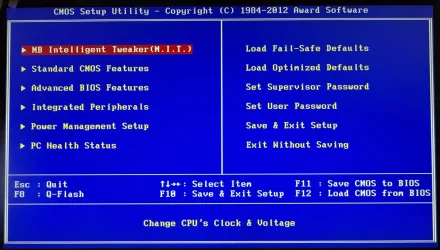
Following is the top page of the BIOS(CMOS) setting and nothing about UEFI.
1758321969596.webp
I do not see the options anywhere. As with the GPT, I can convert the MBR to GPT by using a third party utility if necessay. Further suggestions appreciated.
 

My Computer

System One

  • OS
    Windows 11 Pro
    Computer type
    PC/Desktop
    Manufacturer/Model
    Self made
    CPU
    AMD Ryzen 5600X
    Motherboard
    Gigabyte X570 AORUS Ultra 1.1/1.2 BIOS F35d
    Memory
    32GB DDR4 3600 G.Skill Ripjaws V series
    Graphics Card(s)
    Radeon RX 6500 XT
    Sound Card
    Built-in
    Monitor(s) Displays
    Dell UP2720Q
    Screen Resolution
    3860 x 2160
    Hard Drives
    1TB SATA SSD(OS) SSung 870EVO, 1TB M.2 NVMe SSD9OS SSung 970
    PSU
    Corsair RM650 650W
    Case
    Fractal Design Focus G Black ATX Mid Tower FD-CA-FOCUS-BK-W
    Cooling
    Cooler Master Master Liquid Lite 120 AIO Liquid Cooler
    Keyboard
    DURGOD TAURUS K320
    Mouse
    Microsoft Model 1049
    Internet Speed
    900Mbps/25Mbps
    Browser
    Firefox/Chrome
    Antivirus
    Microsoft Defender
    Other Info
    ICY DOCK 4 x 2.5 SSD to 5.25 Drive Bay - ExpressCage MR324SP-B ICY DOCK M.2 NVMe Mobile Rack for External 3.5" Bay - MB834M2K-B

My Computer

System One

  • OS
    Windows 11 Pro
    Computer type
    PC/Desktop
    Manufacturer/Model
    Self made
    CPU
    AMD Ryzen 5600X
    Motherboard
    Gigabyte X570 AORUS Ultra 1.1/1.2 BIOS F35d
    Memory
    32GB DDR4 3600 G.Skill Ripjaws V series
    Graphics Card(s)
    Radeon RX 6500 XT
    Sound Card
    Built-in
    Monitor(s) Displays
    Dell UP2720Q
    Screen Resolution
    3860 x 2160
    Hard Drives
    1TB SATA SSD(OS) SSung 870EVO, 1TB M.2 NVMe SSD9OS SSung 970
    PSU
    Corsair RM650 650W
    Case
    Fractal Design Focus G Black ATX Mid Tower FD-CA-FOCUS-BK-W
    Cooling
    Cooler Master Master Liquid Lite 120 AIO Liquid Cooler
    Keyboard
    DURGOD TAURUS K320
    Mouse
    Microsoft Model 1049
    Internet Speed
    900Mbps/25Mbps
    Browser
    Firefox/Chrome
    Antivirus
    Microsoft Defender
    Other Info
    ICY DOCK 4 x 2.5 SSD to 5.25 Drive Bay - ExpressCage MR324SP-B ICY DOCK M.2 NVMe Mobile Rack for External 3.5" Bay - MB834M2K-B
It does support uefi boot. Page 27 of the manual that @bobkn so kindly provided.
 

My Computers

System One System Two

  • OS
    Windows 11 Pro 25H2
    Computer type
    PC/Desktop
    Manufacturer/Model
    Dell Optiplex 7080
    CPU
    i9-10900 10 core 20 threads
    Motherboard
    DELL 0J37VM
    Memory
    32 gb
    Graphics Card(s)
    none-Intel UHD Graphics 630
    Sound Card
    Integrated Realtek
    Monitor(s) Displays
    Benq 27
    Screen Resolution
    2560x1440
    Hard Drives
    2x1tb Solidigm m.2 nvme /External drives 512gb Samsung m.2 sata+2tb Kingston m2.nvme
    PSU
    500w
    Case
    MT
    Cooling
    Dell Premium
    Keyboard
    Logitech wired
    Mouse
    Logitech wireless
    Internet Speed
    so slow I'm too embarrassed to tell
    Browser
    #1 Edge #2 Firefox
    Antivirus
    Defender+MWB Premium
  • Operating System
    Windows 11 Pro 24H2 26200.8457
    Computer type
    PC/Desktop
    Manufacturer/Model
    Beelink Mini PC SER5
    CPU
    AMD Ryzen 7 6800U
    Memory
    32 gb
    Graphics card(s)
    integrated
    Sound Card
    integrated
    Monitor(s) Displays
    Benq 27
    Screen Resolution
    2560x1440
    Hard Drives
    1TB Crucial nvme
    Keyboard
    Logitech wired
    Mouse
    Logitech wireless
    Internet Speed
    still too embarrassed to tell
    Browser
    Firefox
    Antivirus
    Defender
    Other Info
    System 3 is non compliant Dell 9020 i7-4770/24gb ram Win11 PRO 26200.8457
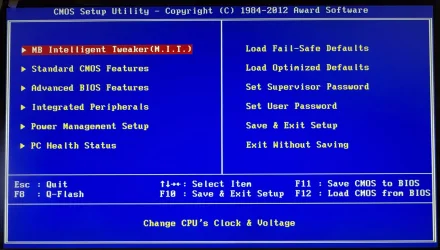
The CMOS(BIOS) does not seem to support a dual BIOS as seen in the following:
View attachment 145972
I'm not sure what to expect. DualBios is a safety feature, to keep the motherboard from being bricked if the primary BIOS is corrupted.

I've only had one dual BIOS board that I recall. It had no hardware switch to select the second BIOS; it was supposed to be automatic. It failed.
 

My Computers

System One System Two

  • OS
    Windows 11 26200.8116
    Computer type
    PC/Desktop
    Manufacturer/Model
    homebuilt
    CPU
    Amd Threadripper 7970X
    Motherboard
    Gigabyte TRX50 Aero D Rev. 1.0
    Memory
    128GB (4 X 32) G.Skill DDR5 6400 (RDIMM)
    Graphics Card(s)
    Gigabyte RTX 4090 OC
    Sound Card
    none (USB to speakers), Realtek
    Monitor(s) Displays
    Innocn 32" OLED
    Screen Resolution
    3840 X 2160 @ 60Hz
    Hard Drives
    Crucial T700 2TB M.2 NVME SSD
    WD 4TB Blue SATA SSD
    Seagate 18TB IronWolf Pro
    PSU
    BeQuiet! Straight Power 12 1500W
    Case
    Lian Li 011 Dynamic Evo XL
    Cooling
    SilverStone Technology XE360-TR5, with 3 Phanteks T30 fans
    Keyboard
    Cherry KC 500 MX LP (mechanical)
    Mouse
    Logitech M500s (wired)
    Internet Speed
    2000/250 Mbps (down/up)
    Other Info
    xFinity gateway
  • Operating System
    windows 11 26200.8116
    Computer type
    PC/Desktop
    Manufacturer/Model
    homebuilt
    CPU
    Intel I9-13900K
    Motherboard
    Asus RoG Strix Z690-E
    Memory
    64GB G.Skill DDR5-6000
    Graphics card(s)
    Gigabyte RTX 3090 ti
    Sound Card
    built in Realtek
    Monitor(s) Displays
    Philips 27E1N8900 27" OLED
    Screen Resolution
    3840 X 2160 @60Hz
    Hard Drives
    WDC SN850 1TB
    8TB Seagate Ironwolf
    4TB Seagate Ironwolf
    PSU
    eVGA SuperNOVA 1300 GT
    Case
    Lian Li 011 Dynamic Evo
    Cooling
    Corsair iCUE H150i ELITE CAPELLIX Liquid CPU Cooler
    Keyboard
    Cherry Streaming (wired)
    Mouse
    Logitech M500s (wired)
It does support uefi boot. Page 27 of the manual that @bobkn so kindly provided.
Mobo @bobkn referring does not seems to be GA-970A-UD3. Also, the graphic shown on page 25 shows "UEFI DualBIOS" but mine does not.
 

My Computer

System One

  • OS
    Windows 11 Pro
    Computer type
    PC/Desktop
    Manufacturer/Model
    Self made
    CPU
    AMD Ryzen 5600X
    Motherboard
    Gigabyte X570 AORUS Ultra 1.1/1.2 BIOS F35d
    Memory
    32GB DDR4 3600 G.Skill Ripjaws V series
    Graphics Card(s)
    Radeon RX 6500 XT
    Sound Card
    Built-in
    Monitor(s) Displays
    Dell UP2720Q
    Screen Resolution
    3860 x 2160
    Hard Drives
    1TB SATA SSD(OS) SSung 870EVO, 1TB M.2 NVMe SSD9OS SSung 970
    PSU
    Corsair RM650 650W
    Case
    Fractal Design Focus G Black ATX Mid Tower FD-CA-FOCUS-BK-W
    Cooling
    Cooler Master Master Liquid Lite 120 AIO Liquid Cooler
    Keyboard
    DURGOD TAURUS K320
    Mouse
    Microsoft Model 1049
    Internet Speed
    900Mbps/25Mbps
    Browser
    Firefox/Chrome
    Antivirus
    Microsoft Defender
    Other Info
    ICY DOCK 4 x 2.5 SSD to 5.25 Drive Bay - ExpressCage MR324SP-B ICY DOCK M.2 NVMe Mobile Rack for External 3.5" Bay - MB834M2K-B

My Computers

System One System Two

  • OS
    Windows 11 Pro 25H2
    Computer type
    PC/Desktop
    Manufacturer/Model
    Dell Optiplex 7080
    CPU
    i9-10900 10 core 20 threads
    Motherboard
    DELL 0J37VM
    Memory
    32 gb
    Graphics Card(s)
    none-Intel UHD Graphics 630
    Sound Card
    Integrated Realtek
    Monitor(s) Displays
    Benq 27
    Screen Resolution
    2560x1440
    Hard Drives
    2x1tb Solidigm m.2 nvme /External drives 512gb Samsung m.2 sata+2tb Kingston m2.nvme
    PSU
    500w
    Case
    MT
    Cooling
    Dell Premium
    Keyboard
    Logitech wired
    Mouse
    Logitech wireless
    Internet Speed
    so slow I'm too embarrassed to tell
    Browser
    #1 Edge #2 Firefox
    Antivirus
    Defender+MWB Premium
  • Operating System
    Windows 11 Pro 24H2 26200.8457
    Computer type
    PC/Desktop
    Manufacturer/Model
    Beelink Mini PC SER5
    CPU
    AMD Ryzen 7 6800U
    Memory
    32 gb
    Graphics card(s)
    integrated
    Sound Card
    integrated
    Monitor(s) Displays
    Benq 27
    Screen Resolution
    2560x1440
    Hard Drives
    1TB Crucial nvme
    Keyboard
    Logitech wired
    Mouse
    Logitech wireless
    Internet Speed
    still too embarrassed to tell
    Browser
    Firefox
    Antivirus
    Defender
    Other Info
    System 3 is non compliant Dell 9020 i7-4770/24gb ram Win11 PRO 26200.8457
Mobo @bobkn referring does not seems to be GA-970A-UD3. Also, the graphic shown on page 25 shows "UEFI DualBIOS" but mine does not.
What do you have? A GA-970A-UD3, the GA-970 Gaming (in the link I provided), or something else altogether?

Here's a link to the manual for the former:


It also lists support for DualBios.

I doubt that DualBios would show in the BIOS settings.
 

My Computers

System One System Two

  • OS
    Windows 11 26200.8116
    Computer type
    PC/Desktop
    Manufacturer/Model
    homebuilt
    CPU
    Amd Threadripper 7970X
    Motherboard
    Gigabyte TRX50 Aero D Rev. 1.0
    Memory
    128GB (4 X 32) G.Skill DDR5 6400 (RDIMM)
    Graphics Card(s)
    Gigabyte RTX 4090 OC
    Sound Card
    none (USB to speakers), Realtek
    Monitor(s) Displays
    Innocn 32" OLED
    Screen Resolution
    3840 X 2160 @ 60Hz
    Hard Drives
    Crucial T700 2TB M.2 NVME SSD
    WD 4TB Blue SATA SSD
    Seagate 18TB IronWolf Pro
    PSU
    BeQuiet! Straight Power 12 1500W
    Case
    Lian Li 011 Dynamic Evo XL
    Cooling
    SilverStone Technology XE360-TR5, with 3 Phanteks T30 fans
    Keyboard
    Cherry KC 500 MX LP (mechanical)
    Mouse
    Logitech M500s (wired)
    Internet Speed
    2000/250 Mbps (down/up)
    Other Info
    xFinity gateway
  • Operating System
    windows 11 26200.8116
    Computer type
    PC/Desktop
    Manufacturer/Model
    homebuilt
    CPU
    Intel I9-13900K
    Motherboard
    Asus RoG Strix Z690-E
    Memory
    64GB G.Skill DDR5-6000
    Graphics card(s)
    Gigabyte RTX 3090 ti
    Sound Card
    built in Realtek
    Monitor(s) Displays
    Philips 27E1N8900 27" OLED
    Screen Resolution
    3840 X 2160 @60Hz
    Hard Drives
    WDC SN850 1TB
    8TB Seagate Ironwolf
    4TB Seagate Ironwolf
    PSU
    eVGA SuperNOVA 1300 GT
    Case
    Lian Li 011 Dynamic Evo
    Cooling
    Corsair iCUE H150i ELITE CAPELLIX Liquid CPU Cooler
    Keyboard
    Cherry Streaming (wired)
    Mouse
    Logitech M500s (wired)
ChatGPT > Does the Gigabyte GA-970A-UD3 motherboard support UEFI booting from a Windows 11 USB stick?

The Gigabyte GA-970A-UD3 is an older AM3+ socket motherboard (AMD 970 chipset, released around 2011–2012). Here’s how it relates to UEFI and Windows 11 booting:


  • UEFI Support:
    The GA-970A-UD3 does not have a full modern UEFI firmware. It ships with an Award BIOS (legacy BIOS). Some later BIOS revisions added a "Hybrid EFI" module mainly for recognizing large hard drives (>2 TB), but this is not a full UEFI implementation with Secure Boot.
  • Windows 11 Requirements:
    Windows 11 requires UEFI boot with Secure Boot and TPM 2.0 (unless bypassed). The GA-970A-UD3 has no TPM 2.0 module header (only optional TPM 1.2 support, if at all) and no Secure Boot support.
  • Booting a Windows 11 USB Stick:
    • You cannot do a pure UEFI boot from this board since it doesn’t implement full UEFI boot services.
    • You can boot a Windows 11 USB stick in legacy/CSM mode, provided the installer is created to allow legacy boot. Windows 11 itself can install and run this way, but you’ll need to bypass the checks for TPM 2.0, Secure Boot, and possibly CPU requirements.

👉 In short:
The GA-970A-UD3 does not support true UEFI booting. You can still install and boot Windows 11 in legacy BIOS mode (with registry or media creation hacks to skip TPM/Secure Boot checks), but it won’t meet Microsoft’s official requirements.

Note: You have to choose Option 2, not Option 1.

How to bypass Windows 11 system requirements to perform a clean install?

Download Windows 11 ISO file, select the option "Download Windows 11 Disk Image (ISO) for x64 devices."

Insert your USB flash drive. In Rufus, select the ISO file you downloaded. Under Partition scheme, select the GPT or MBR option. The Target system and File system options will change automatically.

Option 1.

Rufus settings to create UEFI bootable USB flash drive.

"UEFI" means the system boots to Extensible Firmware, required for Secure Boot, GPT, etc.

- Partition scheme: GPT

"GPT" means installing Windows on a GPT disk (UEFI/GPT installation).

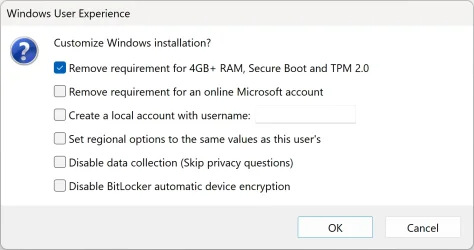
- Check the "Remove requirement for 4GB+ RAM, Secure Boot and TPM 2.0" option.

Boot the USB flash drive using UEFI mode (in the boot menu, select your USB with the UEFI prefix). If you try to boot the USB in BIOS mode, you get an error message created by Rufus: "ERROR: BIOS/LEGACY BOOT OF UEFI-ONLY MEDIA."

Option 2.

Rufus settings to create BIOS bootable USB flash drive.

"BIOS" means legacy BIOS or CSM (Compatibility Support Module).

- Partition scheme: MBR

"MBR" means installing Windows on an MBR disk (BIOS/MBR installation).

- Check the "Remove requirement for 4GB+ RAM, Secure Boot and TPM 2.0" option.

Boot the USB flash drive using BIOS mode (in the boot menu, select your USB without the UEFI prefix).

Rufus.webp

Windows Setup automatically determines the correct partition style (GPT or MBR) based on the boot mode of the USB flash drive (UEFI or BIOS).
 
Last edited:

My Computers

System One System Two

  • OS
    Windows 11 Pro
    Computer type
    PC/Desktop
    CPU
    AMD Ryzen 9 9950X3D
    Motherboard
    ASRock B650E Taichi Lite
    Memory
    Kingston FURY Beast 64GB (2x32GB) DDR5 6000MT/s
    Graphics Card(s)
    ASUS TUF Gaming Radeon RX 9070 OC Edition 16GB GDDR6
    Hard Drives
    Solidigm P44 Pro 2TB M.2 NVMe SSD
  • Operating System
    Windows 11 Home
    Computer type
    Laptop
    Manufacturer/Model
    Lenovo Legion Pro 7i Gen 10 16"
    CPU
    Intel Core Ultra 9 275HX
    Memory
    64GB (2x 32GB) DDR5-6400
    Graphics card(s)
    NVIDIA GeForce RTX 5080 16GB GDDR7 Laptop GPU
    Hard Drives
    2x 1TB M.2 NVMe SSD (SK Hynix)
aubergine:
Does this mean that I can only do W11 clean install, and not in-place upgrade?
 

My Computer

System One

  • OS
    Windows 11 Pro
    Computer type
    PC/Desktop
    Manufacturer/Model
    Self made
    CPU
    AMD Ryzen 5600X
    Motherboard
    Gigabyte X570 AORUS Ultra 1.1/1.2 BIOS F35d
    Memory
    32GB DDR4 3600 G.Skill Ripjaws V series
    Graphics Card(s)
    Radeon RX 6500 XT
    Sound Card
    Built-in
    Monitor(s) Displays
    Dell UP2720Q
    Screen Resolution
    3860 x 2160
    Hard Drives
    1TB SATA SSD(OS) SSung 870EVO, 1TB M.2 NVMe SSD9OS SSung 970
    PSU
    Corsair RM650 650W
    Case
    Fractal Design Focus G Black ATX Mid Tower FD-CA-FOCUS-BK-W
    Cooling
    Cooler Master Master Liquid Lite 120 AIO Liquid Cooler
    Keyboard
    DURGOD TAURUS K320
    Mouse
    Microsoft Model 1049
    Internet Speed
    900Mbps/25Mbps
    Browser
    Firefox/Chrome
    Antivirus
    Microsoft Defender
    Other Info
    ICY DOCK 4 x 2.5 SSD to 5.25 Drive Bay - ExpressCage MR324SP-B ICY DOCK M.2 NVMe Mobile Rack for External 3.5" Bay - MB834M2K-B

@churin:

How to bypass Windows 11 system requirements to upgrade from ISO file?

It doesn't matter if Windows 10/11 is installed on a GPT or MBR disk.

- Download Windows 11 ISO file, select the option "Download Windows 11 Disk Image (ISO) for x64 devices."
- Mount the ISO file.
- Run the following command, replace "X" with the drive letter of the mounted iso file.

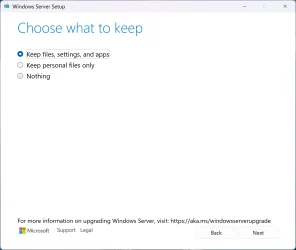
X:\setup.exe /product server

In this mode, the Windows 11 installer thinks it is installing Windows Server Edition and does not check the Windows 11 system requirements.

Windows 11 24H2.webp
 

My Computers

System One System Two

  • OS
    Windows 11 Pro
    Computer type
    PC/Desktop
    CPU
    AMD Ryzen 9 9950X3D
    Motherboard
    ASRock B650E Taichi Lite
    Memory
    Kingston FURY Beast 64GB (2x32GB) DDR5 6000MT/s
    Graphics Card(s)
    ASUS TUF Gaming Radeon RX 9070 OC Edition 16GB GDDR6
    Hard Drives
    Solidigm P44 Pro 2TB M.2 NVMe SSD
  • Operating System
    Windows 11 Home
    Computer type
    Laptop
    Manufacturer/Model
    Lenovo Legion Pro 7i Gen 10 16"
    CPU
    Intel Core Ultra 9 275HX
    Memory
    64GB (2x 32GB) DDR5-6400
    Graphics card(s)
    NVIDIA GeForce RTX 5080 16GB GDDR7 Laptop GPU
    Hard Drives
    2x 1TB M.2 NVMe SSD (SK Hynix)
@aubergine:
It worked flawlessly!!! I have tried many different things for the past 4 days. I originally worked with one of those AIs and moved to this forum. The method suggested by Arbagine is the simplest among those I tried, and more importantly, the only one that worked for my case. The system before upgrading to W11 Pro is W10 Pro on Gigabyte GA-970A(rev 1.2) with AMD FX-6300 CPU
.
Thank you very much, @aubergine, and everyone else who participated in my thread.
 
Last edited:

My Computer

System One

  • OS
    Windows 11 Pro
    Computer type
    PC/Desktop
    Manufacturer/Model
    Self made
    CPU
    AMD Ryzen 5600X
    Motherboard
    Gigabyte X570 AORUS Ultra 1.1/1.2 BIOS F35d
    Memory
    32GB DDR4 3600 G.Skill Ripjaws V series
    Graphics Card(s)
    Radeon RX 6500 XT
    Sound Card
    Built-in
    Monitor(s) Displays
    Dell UP2720Q
    Screen Resolution
    3860 x 2160
    Hard Drives
    1TB SATA SSD(OS) SSung 870EVO, 1TB M.2 NVMe SSD9OS SSung 970
    PSU
    Corsair RM650 650W
    Case
    Fractal Design Focus G Black ATX Mid Tower FD-CA-FOCUS-BK-W
    Cooling
    Cooler Master Master Liquid Lite 120 AIO Liquid Cooler
    Keyboard
    DURGOD TAURUS K320
    Mouse
    Microsoft Model 1049
    Internet Speed
    900Mbps/25Mbps
    Browser
    Firefox/Chrome
    Antivirus
    Microsoft Defender
    Other Info
    ICY DOCK 4 x 2.5 SSD to 5.25 Drive Bay - ExpressCage MR324SP-B ICY DOCK M.2 NVMe Mobile Rack for External 3.5" Bay - MB834M2K-B

Latest Support Threads

Back
Top Bottom