Solved Install Windows 11 Home using Local Account


Kari

PhD in Malt Based Liquids
Pro User
VIP
Local time
5:34 PM
Posts
811
Location
Expat from Finland in Leipzig Germany
OS
Windows 11 PRO x64 Dev
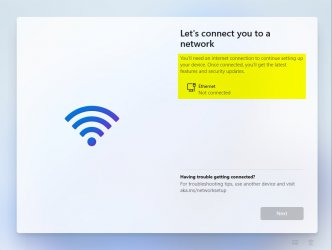
The information we have at the moment is, that Windows 11 Home edition cannot be installed using local account. A Microsoft Account, as far as we know it, will be obligatory.

I can confirm it at least when using build 21996. I spent last night with testing all to me known tricks, nothing worked.

An hour or so ago, I just got an idea, a workaround that is as far as I know about impossible for Microsoft to block. Tested it now, and it works without any whatsoever issues.

W11 Home with a local account:
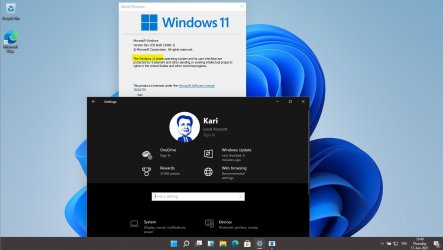
W11 Home Local Account 1.jpg
(Click to enlarge.)

Zooming in to the important part:
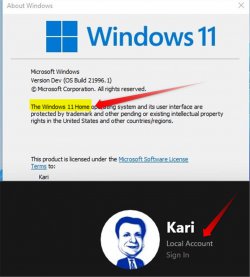
W11 Home Local Account 2.jpg

The workaround requires a bit work, but is easy. Create W11 Home install media for an unattended install, as told in tutorial on our sister site Ten Forums: https://www.tenforums.com/tutorials...utomated-unattended-install-windows-10-a.html

Part Four in tutorial shows detailed, how to create a local admin account in unattended answer file.

A bit simpler approach for those, who do not want to spend an hour plus in creating install media is to simply apply an unattended answer file to W11 ISO or USB install media. Tutorial on Ten Forums: https://www.tenforums.com/tutorials...ded-answer-file-windows-10-install-media.html

Any questions about the process, don't hesitate to ask.

Kari
 

My Computers My Computers

  • At a glance

    Windows 11 PRO x64 DevIntel Core i7-8550U6 GBMicrosoft Hyper-V Video
    OS
    Windows 11 PRO x64 Dev
    Manufacturer/Model
    Hyper-V Virtual Machine (host in System 2 specs)
    CPU
    Intel Core i7-8550U
    Memory
    6 GB
    Graphics Card(s)
    Microsoft Hyper-V Video
    Monitor(s) Displays
    Laptop display (17.1") & Samsung U28E590 (27.7")
  • At a glance

    Windows 11 PRO x64 Dev ChannelIntel Core i7-8550U16 GBIntel(R) UHD Graphics 620 & NVIDIA GeForce 930MX
    Operating System
    Windows 11 PRO x64 Dev Channel
    Computer type
    Laptop
    Manufacturer/Model
    HP HP ProBook 470 G5
    CPU
    Intel Core i7-8550U
    Motherboard
    HP 837F KBC Version 02.3D.00
    Memory
    16 GB
    Graphics card(s)
    Intel(R) UHD Graphics 620 & NVIDIA GeForce 930MX
    Sound Card
    Conexant ISST Audio
    Monitor(s) Displays
    Laptop display (17.1") & Samsung U28E590 (27.7")
    Hard Drives
    128 GB SSD & 1 TB HDD
    Keyboard
    Wireless Logitech MK710 keyboard
    Mouse
    Wireless Logitech MSX mouse
    Internet Speed
    100 Mbps down, 20 Mbps up
    Browser
    Edge Chromium Dev Channel
    Antivirus
    Windows Defender
    Other Info
    2 * 3 TB USB HDD
    6 TB WD Mirror NAS
Hi there
did you try removing Internet -- I don't have W10 HOME but W10 Pro installed OK (at least on a VM where I removed NIC's ) and then it allowed Local Account.

This might not work for W10 HOME but try not only disconnecting the Internet but disabling the NIC's.

Should be easy enough to test it in a VM.

Cheers
jimbo
 

My Computer My Computer

At a glance

Windows XP,11 Linux Fedora Rawhide pre-releas...2 X Intel i7
OS
Windows XP,11 Linux Fedora Rawhide pre-release 46
Computer type
PC/Desktop
CPU
2 X Intel i7
Screen Resolution
4KUHD X 2
I have prepared three answer files you can use in both methods told in my previous post, one for UK users (UK input language, location & time zone), and one both US west coast and east coast users:

UK:

XML:
<?xml version="1.0" encoding="utf-8"?>
<unattend xmlns="urn:schemas-microsoft-com:unattend">
    <settings pass="oobeSystem">
        <component name="Microsoft-Windows-International-Core" processorArchitecture="amd64" publicKeyToken="31bf3856ad364e35" language="neutral" versionScope="nonSxS" xmlns:wcm="http://schemas.microsoft.com/WMIConfig/2002/State" xmlns:xsi="http://www.w3.org/2001/XMLSchema-instance">
            <InputLocale>0809:00000809/InputLocale>
            <SystemLocale>EN-US</SystemLocale>
            <UILanguage>EN-US</UILanguage>
            <UILanguageFallback>EN-US</UILanguageFallback>
            <UserLocale>EN-GB</UserLocale>
        </component>
        <component name="Microsoft-Windows-Shell-Setup" processorArchitecture="amd64" publicKeyToken="31bf3856ad364e35" language="neutral" versionScope="nonSxS" xmlns:wcm="http://schemas.microsoft.com/WMIConfig/2002/State" xmlns:xsi="http://www.w3.org/2001/XMLSchema-instance">
            <OOBE>
                <VMModeOptimizations>
                    <SkipAdministratorProfileRemoval>false</SkipAdministratorProfileRemoval>
                </VMModeOptimizations>
                <HideEULAPage>true</HideEULAPage>
                <HideLocalAccountScreen>true</HideLocalAccountScreen>
                <HideOnlineAccountScreens>true</HideOnlineAccountScreens>
                <HideOEMRegistrationScreen>true</HideOEMRegistrationScreen>
                <HideWirelessSetupInOOBE>true</HideWirelessSetupInOOBE>
                <ProtectYourPC>1</ProtectYourPC>
                <UnattendEnableRetailDemo>false</UnattendEnableRetailDemo>
            </OOBE>
            <UserAccounts>
                <LocalAccounts>
                    <LocalAccount wcm:action="add">
                        <Description>Local admin</Description>
                        <DisplayName>Admin</DisplayName>
                        <Group>Administrators</Group>
                        <Name>Admin</Name>
                    </LocalAccount>
                </LocalAccounts>
            </UserAccounts>
            <RegisteredOwner>Admin</RegisteredOwner>
            <TimeZone>GMT Standard Time</TimeZone>
        </component>
    </settings>
    <settings pass="specialize">
        <component name="Microsoft-Windows-Shell-Setup" processorArchitecture="amd64" publicKeyToken="31bf3856ad364e35" language="neutral" versionScope="nonSxS" xmlns:wcm="http://schemas.microsoft.com/WMIConfig/2002/State" xmlns:xsi="http://www.w3.org/2001/XMLSchema-instance">
            <ComputerName>*</ComputerName>
            <TimeZone>GMT Standard Time</TimeZone>
        </component>
    </settings>
</unattend>

US Pacific Time:

XML:
<?xml version="1.0" encoding="utf-8"?>
<unattend xmlns="urn:schemas-microsoft-com:unattend">
    <settings pass="oobeSystem">
        <component name="Microsoft-Windows-International-Core" processorArchitecture="amd64" publicKeyToken="31bf3856ad364e35" language="neutral" versionScope="nonSxS" xmlns:wcm="http://schemas.microsoft.com/WMIConfig/2002/State" xmlns:xsi="http://www.w3.org/2001/XMLSchema-instance">
            <InputLocale>0409:00000409/InputLocale>
            <SystemLocale>EN-US</SystemLocale>
            <UILanguage>EN-US</UILanguage>
            <UILanguageFallback>EN-US</UILanguageFallback>
            <UserLocale>EN-US</UserLocale>
        </component>
        <component name="Microsoft-Windows-Shell-Setup" processorArchitecture="amd64" publicKeyToken="31bf3856ad364e35" language="neutral" versionScope="nonSxS" xmlns:wcm="http://schemas.microsoft.com/WMIConfig/2002/State" xmlns:xsi="http://www.w3.org/2001/XMLSchema-instance">
            <OOBE>
                <VMModeOptimizations>
                    <SkipAdministratorProfileRemoval>false</SkipAdministratorProfileRemoval>
                </VMModeOptimizations>
                <HideEULAPage>true</HideEULAPage>
                <HideLocalAccountScreen>true</HideLocalAccountScreen>
                <HideOnlineAccountScreens>true</HideOnlineAccountScreens>
                <HideOEMRegistrationScreen>true</HideOEMRegistrationScreen>
                <HideWirelessSetupInOOBE>true</HideWirelessSetupInOOBE>
                <ProtectYourPC>1</ProtectYourPC>
                <UnattendEnableRetailDemo>false</UnattendEnableRetailDemo>
            </OOBE>
            <UserAccounts>
                <LocalAccounts>
                    <LocalAccount wcm:action="add">
                        <Description>Local admin</Description>
                        <DisplayName>Admin</DisplayName>
                        <Group>Administrators</Group>
                        <Name>Admin</Name>
                    </LocalAccount>
                </LocalAccounts>
            </UserAccounts>
            <RegisteredOwner>Admin</RegisteredOwner>
            <TimeZone>Pacific Standard Time</TimeZone>
        </component>
    </settings>
    <settings pass="specialize">
        <component name="Microsoft-Windows-Shell-Setup" processorArchitecture="amd64" publicKeyToken="31bf3856ad364e35" language="neutral" versionScope="nonSxS" xmlns:wcm="http://schemas.microsoft.com/WMIConfig/2002/State" xmlns:xsi="http://www.w3.org/2001/XMLSchema-instance">
            <ComputerName>*</ComputerName>
            <TimeZone>Pacific Standard Time</TimeZone>
        </component>
    </settings>
</unattend>

US Eastern Time:

XML:
<?xml version="1.0" encoding="utf-8"?>
<unattend xmlns="urn:schemas-microsoft-com:unattend">
    <settings pass="oobeSystem">
        <component name="Microsoft-Windows-International-Core" processorArchitecture="amd64" publicKeyToken="31bf3856ad364e35" language="neutral" versionScope="nonSxS" xmlns:wcm="http://schemas.microsoft.com/WMIConfig/2002/State" xmlns:xsi="http://www.w3.org/2001/XMLSchema-instance">
            <InputLocale>0409:00000409/InputLocale>
            <SystemLocale>EN-US</SystemLocale>
            <UILanguage>EN-US</UILanguage>
            <UILanguageFallback>EN-US</UILanguageFallback>
            <UserLocale>EN-US</UserLocale>
        </component>
        <component name="Microsoft-Windows-Shell-Setup" processorArchitecture="amd64" publicKeyToken="31bf3856ad364e35" language="neutral" versionScope="nonSxS" xmlns:wcm="http://schemas.microsoft.com/WMIConfig/2002/State" xmlns:xsi="http://www.w3.org/2001/XMLSchema-instance">
            <OOBE>
                <VMModeOptimizations>
                    <SkipAdministratorProfileRemoval>false</SkipAdministratorProfileRemoval>
                </VMModeOptimizations>
                <HideEULAPage>true</HideEULAPage>
                <HideLocalAccountScreen>true</HideLocalAccountScreen>
                <HideOnlineAccountScreens>true</HideOnlineAccountScreens>
                <HideOEMRegistrationScreen>true</HideOEMRegistrationScreen>
                <HideWirelessSetupInOOBE>true</HideWirelessSetupInOOBE>
                <ProtectYourPC>1</ProtectYourPC>
                <UnattendEnableRetailDemo>false</UnattendEnableRetailDemo>
            </OOBE>
            <UserAccounts>
                <LocalAccounts>
                    <LocalAccount wcm:action="add">
                        <Description>Local admin</Description>
                        <DisplayName>Admin</DisplayName>
                        <Group>Administrators</Group>
                        <Name>Admin</Name>
                    </LocalAccount>
                </LocalAccounts>
            </UserAccounts>
            <RegisteredOwner>Admin</RegisteredOwner>
            <TimeZone>Eastern Standard Time</TimeZone>
        </component>
    </settings>
    <settings pass="specialize">
        <component name="Microsoft-Windows-Shell-Setup" processorArchitecture="amd64" publicKeyToken="31bf3856ad364e35" language="neutral" versionScope="nonSxS" xmlns:wcm="http://schemas.microsoft.com/WMIConfig/2002/State" xmlns:xsi="http://www.w3.org/2001/XMLSchema-instance">
            <ComputerName>*</ComputerName>
            <TimeZone>Eastern Standard Time</TimeZone>
        </component>
    </settings>
</unattend>

All these answer files create a local administrator account Admin. To change that to whatever username you'd prefer, change it in three places highlighted in screenshot:

1623933629766.png

Kari
 
Last edited:

My Computers My Computers

  • At a glance

    Windows 11 PRO x64 DevIntel Core i7-8550U6 GBMicrosoft Hyper-V Video
    OS
    Windows 11 PRO x64 Dev
    Manufacturer/Model
    Hyper-V Virtual Machine (host in System 2 specs)
    CPU
    Intel Core i7-8550U
    Memory
    6 GB
    Graphics Card(s)
    Microsoft Hyper-V Video
    Monitor(s) Displays
    Laptop display (17.1") & Samsung U28E590 (27.7")
  • At a glance

    Windows 11 PRO x64 Dev ChannelIntel Core i7-8550U16 GBIntel(R) UHD Graphics 620 & NVIDIA GeForce 930MX
    Operating System
    Windows 11 PRO x64 Dev Channel
    Computer type
    Laptop
    Manufacturer/Model
    HP HP ProBook 470 G5
    CPU
    Intel Core i7-8550U
    Motherboard
    HP 837F KBC Version 02.3D.00
    Memory
    16 GB
    Graphics card(s)
    Intel(R) UHD Graphics 620 & NVIDIA GeForce 930MX
    Sound Card
    Conexant ISST Audio
    Monitor(s) Displays
    Laptop display (17.1") & Samsung U28E590 (27.7")
    Hard Drives
    128 GB SSD & 1 TB HDD
    Keyboard
    Wireless Logitech MK710 keyboard
    Mouse
    Wireless Logitech MSX mouse
    Internet Speed
    100 Mbps down, 20 Mbps up
    Browser
    Edge Chromium Dev Channel
    Antivirus
    Windows Defender
    Other Info
    2 * 3 TB USB HDD
    6 TB WD Mirror NAS
Hi there
This might not work for W10 HOME but try not only disconnecting the Internet but disabling the NIC's.

That was of course the first test I made:

W11 OOBE no Internet.jpg
(Click to enlarge.)

Kari
 

My Computers My Computers

  • At a glance

    Windows 11 PRO x64 DevIntel Core i7-8550U6 GBMicrosoft Hyper-V Video
    OS
    Windows 11 PRO x64 Dev
    Manufacturer/Model
    Hyper-V Virtual Machine (host in System 2 specs)
    CPU
    Intel Core i7-8550U
    Memory
    6 GB
    Graphics Card(s)
    Microsoft Hyper-V Video
    Monitor(s) Displays
    Laptop display (17.1") & Samsung U28E590 (27.7")
  • At a glance

    Windows 11 PRO x64 Dev ChannelIntel Core i7-8550U16 GBIntel(R) UHD Graphics 620 & NVIDIA GeForce 930MX
    Operating System
    Windows 11 PRO x64 Dev Channel
    Computer type
    Laptop
    Manufacturer/Model
    HP HP ProBook 470 G5
    CPU
    Intel Core i7-8550U
    Motherboard
    HP 837F KBC Version 02.3D.00
    Memory
    16 GB
    Graphics card(s)
    Intel(R) UHD Graphics 620 & NVIDIA GeForce 930MX
    Sound Card
    Conexant ISST Audio
    Monitor(s) Displays
    Laptop display (17.1") & Samsung U28E590 (27.7")
    Hard Drives
    128 GB SSD & 1 TB HDD
    Keyboard
    Wireless Logitech MK710 keyboard
    Mouse
    Wireless Logitech MSX mouse
    Internet Speed
    100 Mbps down, 20 Mbps up
    Browser
    Edge Chromium Dev Channel
    Antivirus
    Windows Defender
    Other Info
    2 * 3 TB USB HDD
    6 TB WD Mirror NAS
I'm in the process of upgrading a Legacy MBR install of a W10 Home in a Hyper-V VM to W11.

It seems that the requirements for TPM 2.0 and UEFI only apply to a clean install, the upgrade did not say anything about that. One new requirement for installing W11 popped up though, apparently it requires a minimum of 4GB RAM (which I duly added).

This install of W10 Home only has local accounts, so installing W10 Home with a local account then upgrading to W11 may be another possible route.

EDIT: confirmed, upgraded successfully to W11 Home with just local accounts.


upgrade W10 Home to W11 Home.PNG
 
Last edited:

My Computers My Computers

  • At a glance

    Windows 11 HomeAMD Athlon Silver 3050U8GBRadeon Graphics
    OS
    Windows 11 Home
    Computer type
    Laptop
    Manufacturer/Model
    Acer Aspire 3 A315-23-R9VY
    CPU
    AMD Athlon Silver 3050U
    Memory
    8GB
    Graphics Card(s)
    Radeon Graphics
    Monitor(s) Displays
    laptop screen
    Screen Resolution
    1366x768 native resolution, up to 2560x1440 with Radeon Virtual Super Resolution
    Hard Drives
    1TB Samsung EVO 870 SSD (from April 2026: 250GB EVO 850)
    Internet Speed
    150 Mbps
    Browser
    Edge, Firefox
    Antivirus
    Defender
    Other Info
    UPDATE - 11 April 2026: due to lid hinges starting to break up this laptop has been retired from active duty. The OS with all software and files has been migrated to my System Seven in 'Other systems' to carry on as my general purpose 'main machine'.

    I've now clean installed 25H2 and used Garlin's scripts to update Secure Boot to CA 2023 and revoke the PCA 2011 certificates. It's new role is to test secure boot issues.

    Info for 2021-2026:
    fully 'Windows 11 ready' laptop. Windows 10 C: partition migrated from my old unsupported 'main machine' then upgraded to 11. A test migration ran Insider builds for 2 months. When 11 was released on 5th October 2021 it was re-imaged back to 10 and was offered the upgrade in Windows Update on 20th October. Windows Update offered the 22H2 Feature Update on 20th September 2022. It got the 23H2 Feature Update on 4th November 2023 through Windows Update, 24H2 on 3rd October 2024 through Windows Update by setting the Target Release Version for 24H2, and 25H2 on 30th September 2025 through Windows Update by setting the Target Release Version for 25H2.
  • At a glance

    Windows 11 ProIntel® Core™ i5-520M8GB(integrated graphics) Intel HD Graphics
    Operating System
    Windows 11 Pro
    Computer type
    Laptop
    Manufacturer/Model
    Dell Latitude E4310
    CPU
    Intel® Core™ i5-520M
    Motherboard
    0T6M8G
    Memory
    8GB
    Graphics card(s)
    (integrated graphics) Intel HD Graphics
    Screen Resolution
    1366x768
    Hard Drives
    500GB Crucial MX500 SSD
    Browser
    Firefox, Edge
    Antivirus
    Defender
    Other Info
    unsupported machine: Legacy bios, MBR, TPM 1.2, upgraded from W10 to W11 using W10/W11 hybrid install media workaround.

    In-place upgrade to 22H2 using ISO and a workaround.
    Feature Update to 23H2 by manually installing the Enablement Package.
    In-place upgrade to 24H2 using hybrid 23H2/24H2 install media.
    Upgraded to 25H2 by Enablement Package.

    Also running Insider Experimental 263xx and 29xxx builds and Windows 10 as native boot .vhdx.
  • My SYSTEM THREE is a Dell Latitude 5410, i7-10610U, 32GB RAM, 512GB NVMe ssd, supported device running Windows 11 Pro.

    My SYSTEM FOUR was a 2-in-1 convertible Lenovo Yoga 11e (1st gen) type 20DA, Celeron N2930, 8GB RAM, 256GB ssd. Unsupported device. This has now been sold. It has been replaced by my System Eight.

    My SYSTEM FIVE is a Dell Latitude 3190 2-in-1, Pentium Silver N5030, 8GB RAM, 1TB NVMe ssd, supported device running Windows 11 Pro, plus Insider Beta, Experimental 263xx and 29xxx builds (and a few others) as a native boot .vhdx.

    My SYSTEM SIX is a Dell Latitude 5550, Core Ultra 7 165H, 64GB RAM, 1TB NVMe SSD, supported device, Windows 11 Pro, Hyper-V host machine. Updated to 25H2 on 30th September 2025.

    My SYSTEM SEVEN is a Lenovo Thinkpad T580, 1920x1080 touchscreen, Intel Core i7-8650U, 16GB RAM, 512GB NVMe SSD + 2nd 512GB NVMe SSD, a supported device for Windows 11. This is my current general purpose 'main machine'. The installed Windows 11 Home from my System One has been migrated to this machine. As its new home has an existing digital licence for Pro I've been able to upgrade the migrated OS from Home to Pro.

    My SYSTEM EIGHT is a 2-in-1 convertible Lenovo Yoga 11e (5th gen) type 20LN, Celeron N4120, 8GB RAM, 512GB NVMe ssd, a supported device for Windows 11. Currently running Windows 11 Pro, plus Insider Beta, Experimental 263xx and 29xxx builds as native boot vhdx.
This install of W10 Home only has local accounts, so installing W10 Home with a local account then upgrading to W11 may be another possible route.

Nice, let's hope it really works.

An easy workaround, in case you have a Microsoft Account, but don't want to use it, is to just use it to get W11 Home installed. Then, first boot to desktop, simply switch to a local account:

W11 Switch to Local Account 2.jpg
(Click to enlarge.)

Kari
 

My Computers My Computers

  • At a glance

    Windows 11 PRO x64 DevIntel Core i7-8550U6 GBMicrosoft Hyper-V Video
    OS
    Windows 11 PRO x64 Dev
    Manufacturer/Model
    Hyper-V Virtual Machine (host in System 2 specs)
    CPU
    Intel Core i7-8550U
    Memory
    6 GB
    Graphics Card(s)
    Microsoft Hyper-V Video
    Monitor(s) Displays
    Laptop display (17.1") & Samsung U28E590 (27.7")
  • At a glance

    Windows 11 PRO x64 Dev ChannelIntel Core i7-8550U16 GBIntel(R) UHD Graphics 620 & NVIDIA GeForce 930MX
    Operating System
    Windows 11 PRO x64 Dev Channel
    Computer type
    Laptop
    Manufacturer/Model
    HP HP ProBook 470 G5
    CPU
    Intel Core i7-8550U
    Motherboard
    HP 837F KBC Version 02.3D.00
    Memory
    16 GB
    Graphics card(s)
    Intel(R) UHD Graphics 620 & NVIDIA GeForce 930MX
    Sound Card
    Conexant ISST Audio
    Monitor(s) Displays
    Laptop display (17.1") & Samsung U28E590 (27.7")
    Hard Drives
    128 GB SSD & 1 TB HDD
    Keyboard
    Wireless Logitech MK710 keyboard
    Mouse
    Wireless Logitech MSX mouse
    Internet Speed
    100 Mbps down, 20 Mbps up
    Browser
    Edge Chromium Dev Channel
    Antivirus
    Windows Defender
    Other Info
    2 * 3 TB USB HDD
    6 TB WD Mirror NAS

My Computers My Computers

  • At a glance

    Windows 11 HomeAMD Athlon Silver 3050U8GBRadeon Graphics
    OS
    Windows 11 Home
    Computer type
    Laptop
    Manufacturer/Model
    Acer Aspire 3 A315-23-R9VY
    CPU
    AMD Athlon Silver 3050U
    Memory
    8GB
    Graphics Card(s)
    Radeon Graphics
    Monitor(s) Displays
    laptop screen
    Screen Resolution
    1366x768 native resolution, up to 2560x1440 with Radeon Virtual Super Resolution
    Hard Drives
    1TB Samsung EVO 870 SSD (from April 2026: 250GB EVO 850)
    Internet Speed
    150 Mbps
    Browser
    Edge, Firefox
    Antivirus
    Defender
    Other Info
    UPDATE - 11 April 2026: due to lid hinges starting to break up this laptop has been retired from active duty. The OS with all software and files has been migrated to my System Seven in 'Other systems' to carry on as my general purpose 'main machine'.

    I've now clean installed 25H2 and used Garlin's scripts to update Secure Boot to CA 2023 and revoke the PCA 2011 certificates. It's new role is to test secure boot issues.

    Info for 2021-2026:
    fully 'Windows 11 ready' laptop. Windows 10 C: partition migrated from my old unsupported 'main machine' then upgraded to 11. A test migration ran Insider builds for 2 months. When 11 was released on 5th October 2021 it was re-imaged back to 10 and was offered the upgrade in Windows Update on 20th October. Windows Update offered the 22H2 Feature Update on 20th September 2022. It got the 23H2 Feature Update on 4th November 2023 through Windows Update, 24H2 on 3rd October 2024 through Windows Update by setting the Target Release Version for 24H2, and 25H2 on 30th September 2025 through Windows Update by setting the Target Release Version for 25H2.
  • At a glance

    Windows 11 ProIntel® Core™ i5-520M8GB(integrated graphics) Intel HD Graphics
    Operating System
    Windows 11 Pro
    Computer type
    Laptop
    Manufacturer/Model
    Dell Latitude E4310
    CPU
    Intel® Core™ i5-520M
    Motherboard
    0T6M8G
    Memory
    8GB
    Graphics card(s)
    (integrated graphics) Intel HD Graphics
    Screen Resolution
    1366x768
    Hard Drives
    500GB Crucial MX500 SSD
    Browser
    Firefox, Edge
    Antivirus
    Defender
    Other Info
    unsupported machine: Legacy bios, MBR, TPM 1.2, upgraded from W10 to W11 using W10/W11 hybrid install media workaround.

    In-place upgrade to 22H2 using ISO and a workaround.
    Feature Update to 23H2 by manually installing the Enablement Package.
    In-place upgrade to 24H2 using hybrid 23H2/24H2 install media.
    Upgraded to 25H2 by Enablement Package.

    Also running Insider Experimental 263xx and 29xxx builds and Windows 10 as native boot .vhdx.
  • My SYSTEM THREE is a Dell Latitude 5410, i7-10610U, 32GB RAM, 512GB NVMe ssd, supported device running Windows 11 Pro.

    My SYSTEM FOUR was a 2-in-1 convertible Lenovo Yoga 11e (1st gen) type 20DA, Celeron N2930, 8GB RAM, 256GB ssd. Unsupported device. This has now been sold. It has been replaced by my System Eight.

    My SYSTEM FIVE is a Dell Latitude 3190 2-in-1, Pentium Silver N5030, 8GB RAM, 1TB NVMe ssd, supported device running Windows 11 Pro, plus Insider Beta, Experimental 263xx and 29xxx builds (and a few others) as a native boot .vhdx.

    My SYSTEM SIX is a Dell Latitude 5550, Core Ultra 7 165H, 64GB RAM, 1TB NVMe SSD, supported device, Windows 11 Pro, Hyper-V host machine. Updated to 25H2 on 30th September 2025.

    My SYSTEM SEVEN is a Lenovo Thinkpad T580, 1920x1080 touchscreen, Intel Core i7-8650U, 16GB RAM, 512GB NVMe SSD + 2nd 512GB NVMe SSD, a supported device for Windows 11. This is my current general purpose 'main machine'. The installed Windows 11 Home from my System One has been migrated to this machine. As its new home has an existing digital licence for Pro I've been able to upgrade the migrated OS from Home to Pro.

    My SYSTEM EIGHT is a 2-in-1 convertible Lenovo Yoga 11e (5th gen) type 20LN, Celeron N4120, 8GB RAM, 512GB NVMe ssd, a supported device for Windows 11. Currently running Windows 11 Pro, plus Insider Beta, Experimental 263xx and 29xxx builds as native boot vhdx.
It did :)

Excellent!

We are busting myths one by one :D

Here's next: I had absolutely no issues in clean installing W11 on an MBR disk in Hyper-V:

W11 MBR disk.jpg
(Click to enlarge.)

Kari
 

My Computers My Computers

  • At a glance

    Windows 11 PRO x64 DevIntel Core i7-8550U6 GBMicrosoft Hyper-V Video
    OS
    Windows 11 PRO x64 Dev
    Manufacturer/Model
    Hyper-V Virtual Machine (host in System 2 specs)
    CPU
    Intel Core i7-8550U
    Memory
    6 GB
    Graphics Card(s)
    Microsoft Hyper-V Video
    Monitor(s) Displays
    Laptop display (17.1") & Samsung U28E590 (27.7")
  • At a glance

    Windows 11 PRO x64 Dev ChannelIntel Core i7-8550U16 GBIntel(R) UHD Graphics 620 & NVIDIA GeForce 930MX
    Operating System
    Windows 11 PRO x64 Dev Channel
    Computer type
    Laptop
    Manufacturer/Model
    HP HP ProBook 470 G5
    CPU
    Intel Core i7-8550U
    Motherboard
    HP 837F KBC Version 02.3D.00
    Memory
    16 GB
    Graphics card(s)
    Intel(R) UHD Graphics 620 & NVIDIA GeForce 930MX
    Sound Card
    Conexant ISST Audio
    Monitor(s) Displays
    Laptop display (17.1") & Samsung U28E590 (27.7")
    Hard Drives
    128 GB SSD & 1 TB HDD
    Keyboard
    Wireless Logitech MK710 keyboard
    Mouse
    Wireless Logitech MSX mouse
    Internet Speed
    100 Mbps down, 20 Mbps up
    Browser
    Edge Chromium Dev Channel
    Antivirus
    Windows Defender
    Other Info
    2 * 3 TB USB HDD
    6 TB WD Mirror NAS
Next test: in-place upgrade from an activated Win 7 PRO.

W7 to W11 upgrade.jpg

Kari

EDIT:

That was a no-go, failed almost immediately. Will test upgrade from Win 8.1 later tonight.

1623947766368.png
 
Last edited:

My Computers My Computers

  • At a glance

    Windows 11 PRO x64 DevIntel Core i7-8550U6 GBMicrosoft Hyper-V Video
    OS
    Windows 11 PRO x64 Dev
    Manufacturer/Model
    Hyper-V Virtual Machine (host in System 2 specs)
    CPU
    Intel Core i7-8550U
    Memory
    6 GB
    Graphics Card(s)
    Microsoft Hyper-V Video
    Monitor(s) Displays
    Laptop display (17.1") & Samsung U28E590 (27.7")
  • At a glance

    Windows 11 PRO x64 Dev ChannelIntel Core i7-8550U16 GBIntel(R) UHD Graphics 620 & NVIDIA GeForce 930MX
    Operating System
    Windows 11 PRO x64 Dev Channel
    Computer type
    Laptop
    Manufacturer/Model
    HP HP ProBook 470 G5
    CPU
    Intel Core i7-8550U
    Motherboard
    HP 837F KBC Version 02.3D.00
    Memory
    16 GB
    Graphics card(s)
    Intel(R) UHD Graphics 620 & NVIDIA GeForce 930MX
    Sound Card
    Conexant ISST Audio
    Monitor(s) Displays
    Laptop display (17.1") & Samsung U28E590 (27.7")
    Hard Drives
    128 GB SSD & 1 TB HDD
    Keyboard
    Wireless Logitech MK710 keyboard
    Mouse
    Wireless Logitech MSX mouse
    Internet Speed
    100 Mbps down, 20 Mbps up
    Browser
    Edge Chromium Dev Channel
    Antivirus
    Windows Defender
    Other Info
    2 * 3 TB USB HDD
    6 TB WD Mirror NAS
That's interesting. The difference between Home and Pro is that Pro let's you actually create an offline account during installation.
 

My Computers My Computers

  • At a glance

    Windows 11 ProRyzen 9 3900xCorsair Dominator Platinum 32Gb@3600MHzAsus Strix 3080 Ti OC
    OS
    Windows 11 Pro
    Computer type
    PC/Desktop
    Manufacturer/Model
    Self Built
    CPU
    Ryzen 9 3900x
    Motherboard
    Asus Strix x570-E
    Memory
    Corsair Dominator Platinum 32Gb@3600MHz
    Graphics Card(s)
    Asus Strix 3080 Ti OC
    Monitor(s) Displays
    Samsung Odyssey G7 32" Curved Gaming Monitor, IIYAMA XUB2792QSU-W1 27"
    Screen Resolution
    2560x1440@240Hz, 2560x1440@70Hz
    Hard Drives
    Samsung 980 Pro 1 Tb (OS), Samsung 970 Pro 1 Tb (games), Samsung 860 Evo 1Tb (data), Samsung 860 Evo 4 Tb (games), Crucial MX500 1Tb (photos), Synology DS920+ 32 Tb NAS.
    PSU
    Corsair RM850x
    Case
    Corsair Crystal 680x
    Cooling
    Corsair H100i Se Platinum, 8 Corsair QL120/140 fans
    Keyboard
    Corsair K70 RGB Mk 2 SE Rapid Fire
    Mouse
    Corsair M65 Elite
    Internet Speed
    58/12 Mbps
    Browser
    Microsoft Edge
    Antivirus
    Windows Defender + Malwarebytes
    Other Info
    Astro a50 Headset, Samsung Galaxy Tab S3 Tablet.
    Creative T6300 5.1 Speakers. TPM 2.0 Module.
  • At a glance

    Arch Linux KDERyzen 5600xCorsair Vengeance 32Gb@3200MHzGigabyte RTX2070 Super Gaming OC
    Operating System
    Arch Linux KDE
    Computer type
    PC/Desktop
    Manufacturer/Model
    Self Built
    CPU
    Ryzen 5600x
    Motherboard
    Asus Strix B550-E
    Memory
    Corsair Vengeance 32Gb@3200MHz
    Graphics card(s)
    Gigabyte RTX2070 Super Gaming OC
    Sound Card
    Creative Soundblaster AE-5
    Monitor(s) Displays
    Asus Strix XG43VQ 43" Ultrawide
    Screen Resolution
    3840x1200 @ 120Mhz
    Hard Drives
    Aorus Gen 4 NVMe 1 Tb (Windows Insider), Samsung 850 Pro 512Gb (data), Samsung 850 Evo 1Tb (backups), Samsung 860 Evo 2Tb (Home folder), Blu-ray player
    PSU
    Corsair RM750i
    Case
    Fractal Define R6
    Cooling
    Scythe Mugen 5 rev B and Corsair QL fans
    Keyboard
    Corsair K70 RGB MK.2 Low Profile Rapidfire
    Mouse
    Glorious Model D
    Internet Speed
    58/12 Mbps
    Browser
    Microsoft Edge
    Antivirus
    Windows Defender + Malwarebytes
    Other Info
    Corsair Virtuoso Headset
@Kari

Funny -- mine worked but it was an old Technet VL edition of W7 Ultimate

I did it with Internet off line - did the "I Don't have a product key" at install time and then after install completed re-enabled internet and "Change Product key" - to the W7 Ultimate one and it activated.

Cheers
jimbo
 

My Computer My Computer

At a glance

Windows XP,11 Linux Fedora Rawhide pre-releas...2 X Intel i7
OS
Windows XP,11 Linux Fedora Rawhide pre-release 46
Computer type
PC/Desktop
CPU
2 X Intel i7
Screen Resolution
4KUHD X 2
Availability of Win11 at the momment is probably only to developers and insiders, eh, and not the general public?
 

My Computers My Computers

  • At a glance

    Windows 11 Home, ver 25H2 build 26200.8894Intel Core i5 5200U @ 2.20GH4 GBIntel HD Graphics 5500 on board
    OS
    Windows 11 Home, ver 25H2 build 26200.8894
    Computer type
    Laptop
    Manufacturer/Model
    Hewlett-Packard Spectre 13-4001 x360 convertable
    CPU
    Intel Core i5 5200U @ 2.20GH
    Motherboard
    Hewlett-Packard 802D
    Memory
    4 GB
    Graphics Card(s)
    Intel HD Graphics 5500 on board
    Sound Card
    Intel Smart Sound Technology (Intel SST)
    Hard Drives
    Micron 256GB M.2 2280 NGFF SSD MTFDDAV256TBN, (SATA 6.0 Gb/s)
    Keyboard
    Model # G01KB
    Antivirus
    Microsoft Defender
    Other Info
    born on date: 25 Feb 2016
  • At a glance

    Win 11 Home 25H2 build 26200.8894Intel Core i7 4th Gen 4790 (3.60GHz), Haswell...Samsung 16 GB DDR3 (8GB in 2 modules)NVIDIA GeForce GTX 760, 3GB, and on-board Int...
    Operating System
    Win 11 Home 25H2 build 26200.8894
    Computer type
    PC/Desktop
    Manufacturer/Model
    Asus Desktop model M32AD-US019S (DOM: 6/9/2014 )
    CPU
    Intel Core i7 4th Gen 4790 (3.60GHz), Haswell 22nm Technology, SOCKET 1150
    Motherboard
    H81M-E/M51AD/DP_MB
    Memory
    Samsung 16 GB DDR3 (8GB in 2 modules)
    Graphics card(s)
    NVIDIA GeForce GTX 760, 3GB, and on-board Intel HD Graphics 4600 Rev 6
    Monitor(s) Displays
    HP EliteDisplay E241i LED; HP EliteDisplay E243
    Hard Drives
    Samsung 500GB SSD, 870 EVO (SATA 6.0 )
    Micron 250GB SSD, CT250MX500
    Toshiba HDD, 3GB (original drive w/PC)
    Case
    ASUS
    Keyboard
    ASUS-------------------------
    Antivirus
    MS Defender
    Other Info
    purchased 8/28/2015 from Newegg.
  • HEWLETT PACKARD
    HP OmniBook X Flip NGAI (Next Gen AI),
    Model: 16-as0023dx
    PT# B5UH1UA#ABA Product #: B5UH1UA
    delivered and setup 7/25/25
    16" 2K Touch-Screen Laptop
    Intel Core Ultra 7 256V '24 Series 2 - CPU
    Boost Clock Frequency 4.8 gigahertz; Neural Processing Unit (NPU) Yes;
    16GB Memory, LPDDR5X
    1TB SSD PCIe 4.0
    Graphics: Intel Arc 140V
    1 x HDMI 2.1
    1 x Thunderbolt 4
    2K Touch-Screen display, LED, IPS; 1920 x 1200 (Full HD+)
    USB Ports: 1 x USB-C 3.1, 2 x USB-A 3.1
    Wi-Fi 6E

    DELL
    Model:I7591-7483BLK-PUS 2-in-1 (7000 Series)
    purchased new 12/3/2019,
    15.6 inch 2-IN-1;
    4K Ultra HD Touch-Screen, 3840 x 2160,
    Intel Core i7 10510U CPU 1.80GHz,
    16GB RAM DDR4 SDRAM 2400 megahert (2 slots),
    dedicated graphics Nvidia GeForce MX250 2 GB Graphics,
    PCIe 512GB Intel SSD + 32GB Optane Memory (Intel Optane Memory H10 with solid-state storage),
    wireless-AX & Bluetooth
    Battery: 68wh, Type 4VGMP 4 cell

My Computers My Computers

  • At a glance

    Windows 11 ProRyzen 9 3900xCorsair Dominator Platinum 32Gb@3600MHzAsus Strix 3080 Ti OC
    OS
    Windows 11 Pro
    Computer type
    PC/Desktop
    Manufacturer/Model
    Self Built
    CPU
    Ryzen 9 3900x
    Motherboard
    Asus Strix x570-E
    Memory
    Corsair Dominator Platinum 32Gb@3600MHz
    Graphics Card(s)
    Asus Strix 3080 Ti OC
    Monitor(s) Displays
    Samsung Odyssey G7 32" Curved Gaming Monitor, IIYAMA XUB2792QSU-W1 27"
    Screen Resolution
    2560x1440@240Hz, 2560x1440@70Hz
    Hard Drives
    Samsung 980 Pro 1 Tb (OS), Samsung 970 Pro 1 Tb (games), Samsung 860 Evo 1Tb (data), Samsung 860 Evo 4 Tb (games), Crucial MX500 1Tb (photos), Synology DS920+ 32 Tb NAS.
    PSU
    Corsair RM850x
    Case
    Corsair Crystal 680x
    Cooling
    Corsair H100i Se Platinum, 8 Corsair QL120/140 fans
    Keyboard
    Corsair K70 RGB Mk 2 SE Rapid Fire
    Mouse
    Corsair M65 Elite
    Internet Speed
    58/12 Mbps
    Browser
    Microsoft Edge
    Antivirus
    Windows Defender + Malwarebytes
    Other Info
    Astro a50 Headset, Samsung Galaxy Tab S3 Tablet.
    Creative T6300 5.1 Speakers. TPM 2.0 Module.
  • At a glance

    Arch Linux KDERyzen 5600xCorsair Vengeance 32Gb@3200MHzGigabyte RTX2070 Super Gaming OC
    Operating System
    Arch Linux KDE
    Computer type
    PC/Desktop
    Manufacturer/Model
    Self Built
    CPU
    Ryzen 5600x
    Motherboard
    Asus Strix B550-E
    Memory
    Corsair Vengeance 32Gb@3200MHz
    Graphics card(s)
    Gigabyte RTX2070 Super Gaming OC
    Sound Card
    Creative Soundblaster AE-5
    Monitor(s) Displays
    Asus Strix XG43VQ 43" Ultrawide
    Screen Resolution
    3840x1200 @ 120Mhz
    Hard Drives
    Aorus Gen 4 NVMe 1 Tb (Windows Insider), Samsung 850 Pro 512Gb (data), Samsung 850 Evo 1Tb (backups), Samsung 860 Evo 2Tb (Home folder), Blu-ray player
    PSU
    Corsair RM750i
    Case
    Fractal Define R6
    Cooling
    Scythe Mugen 5 rev B and Corsair QL fans
    Keyboard
    Corsair K70 RGB MK.2 Low Profile Rapidfire
    Mouse
    Glorious Model D
    Internet Speed
    58/12 Mbps
    Browser
    Microsoft Edge
    Antivirus
    Windows Defender + Malwarebytes
    Other Info
    Corsair Virtuoso Headset
Excellent!

We are busting myths one by one :D

Here's next: I had absolutely no issues in clean installing W11 on an MBR disk in Hyper-V:

View attachment 143
(Click to enlarge.)

Kari

I was also able to clean install Win 11 Pro on an MBR physical SSD in my 10 year old HP machine.
Copying all files except "Install.wim" from Sources folder of Windows 10 USB installer to the Sources folder of Win 11 USB installer folder makes it possible to install Windows 11 on any old machine.

1624025155572.png
 

My Computers My Computers

  • At a glance

    Windows 11 ProAMD Ryzen 7 9800X3D32GB DDR5 CL30 Kingston FuryASUS Prime Radeon RX 9060 XT OC Edition 16GB
    OS
    Windows 11 Pro
    Computer type
    PC/Desktop
    CPU
    AMD Ryzen 7 9800X3D
    Motherboard
    MSI PRO B850-P Wifi
    Memory
    32GB DDR5 CL30 Kingston Fury
    Graphics Card(s)
    ASUS Prime Radeon RX 9060 XT OC Edition 16GB
    Monitor(s) Displays
    LG Ultrawide 34" 1440p+ MSI 27" 4K UHD
    Screen Resolution
    3440x1440
    Hard Drives
    Main Boot Drive : 512GB Adata XPG RGB Gen3x4 NVMe M.2 SSD
    PSU
    EVGA 750 Watts 80+ Gold
    Case
    Deepcool Genome II
    Cooling
    Thermalright Burst Assassin 120
    Internet Speed
    FTTH 3Gbps
    Browser
    Chrome
    Antivirus
    "Moderna"
  • At a glance

    Windows 11 Proi7-4790K16GB Corsair Vengeance ProMSI R9 290
    Operating System
    Windows 11 Pro
    Computer type
    PC/Desktop
    CPU
    i7-4790K
    Motherboard
    ASRock Xtreme6 Z97
    Memory
    16GB Corsair Vengeance Pro
    Graphics card(s)
    MSI R9 290
    Monitor(s) Displays
    LG Ultrawide 34"
    Screen Resolution
    3440x1440
    Hard Drives
    500GB Adata SSD (OS Only)
    PSU
    Thermaltake 475 Watts 80 Bronze
    Case
    Thermaltake Commander I Snow Edition
    Cooling
    Deep Cool Archer Air Cooler
    Keyboard
    Armageddon MKA-5R RGB-Hornet
    Mouse
    Logitech G402
    Internet Speed
    1Gbps
    Browser
    Chrome
    Antivirus
    Moderna :)
I was also able to clean install Win 11 Pro on an MBR physical SSD in my 10 year old HP machine.
Copying all files except "Install.wim" from Sources folder of Windows 10 USB installer to the Sources folder of Win 11 USB installer folder makes it possible to install Windows 11 on any old machine.

As well I did the same on mine, although not an HP but a self built Intel Tower from scratch; actually I built 3 identical Towers.
Here's my msinfo32 Screenshot of those same pertinent values
msinfo32..jpg

..I see I left more unallocated space on my SSD than you did for TRIM though..
 

My Computer My Computer

At a glance

Vista/Win7/Win8/Win10/Win11 (x86/x64)i7's
OS
Vista/Win7/Win8/Win10/Win11 (x86/x64)
Computer type
PC/Desktop
Manufacturer/Model
..all towers built from scratch
CPU
i7's
Other Info
..including W98SE/WXP
No VM's ..all OS's are live
I was able to create a local account during Win 11 Home install by following the steps below. Only downside is that you still need an internet connect before it will let you proceed.

When asked for a Microsoft account, enter a fake account name and click on "Next".
Enter a fake password.
You will get a message that says "Ooops, something went wrong".
Click on Next.
Now it will prompt you for a local user account name to create.

NOTE: The name I tried may have been a name that someone else already tried because I got a message saying something like too many attempts were make to logon to that account. If you use a unique name I suspect that it may ask for the password several times before you get the option to enter a local account name.
 

My Computers My Computers

  • At a glance

    Win11 Pro 26H2 (Release Preview)Intel i7-14650HX32 GBNo GPU - Built-in Intel Graphics
    OS
    Win11 Pro 26H2 (Release Preview)
    Computer type
    PC/Desktop
    Manufacturer/Model
    Acemagic Matrix M5
    CPU
    Intel i7-14650HX
    Memory
    32 GB
    Graphics Card(s)
    No GPU - Built-in Intel Graphics
    Sound Card
    Integrated
    Monitor(s) Displays
    Varies as machine will often be moved to locations with different monitors
    Screen Resolution
    Varies
    Hard Drives
    1 x 1TB Gen 4 NVMe SSD
    PSU
    120W Power Brick
    Keyboard
    Corsair K70 Max RGB Magnetic Keyboard
    Mouse
    Logitech MX Master 3
    Internet Speed
    1Gb Up / 1 Gb Down
    Browser
    Edge
    Antivirus
    Windows Defender
  • At a glance

    Win11 Pro 26H2 (Release Preview)Intel i7-1255U16 GBIntel Iris Xe Graphics
    Operating System
    Win11 Pro 26H2 (Release Preview)
    Computer type
    Laptop
    Manufacturer/Model
    Lenovo ThinkBook 13x Gen 2
    CPU
    Intel i7-1255U
    Memory
    16 GB
    Graphics card(s)
    Intel Iris Xe Graphics
    Sound Card
    Realtek® ALC3306-CG codec
    Monitor(s) Displays
    13.3-inch IPS Display
    Screen Resolution
    WQXGA (2560 x 1600)
    Hard Drives
    4 TB 4 x 4 NVMe SSD
    PSU
    USB-C / Thunderbolt 4 Power / Charging Using an Anker 160W Charger
    Keyboard
    Backlit, spill resistant keyboard
    Mouse
    Buttonless Glass Precision Touchpad
    Internet Speed
    1Gb Up / 1Gb Down
    Browser
    Edge
    Antivirus
    Windows Defender
    Other Info
    WiFi 6e / Bluetooth 5.1 / Facial Recognition / Fingerprint Sensor / ToF (Time of Flight) Human Presence Sensor
Tried a few more iterations of this and I have some more info. It does have to be an existing Microsoft account. When I tried a new install with an account name of something like "RandomAccount@xcz.com" it told me that this account does not exist. But when I tried "x@x.com" it asked for a password. I supplied a random password and that's when I got the "Oops, something went wrong" along with a message that the wrong password was entered too often and was then allowed to supply a local account name.
 

My Computers My Computers

  • At a glance

    Win11 Pro 26H2 (Release Preview)Intel i7-14650HX32 GBNo GPU - Built-in Intel Graphics
    OS
    Win11 Pro 26H2 (Release Preview)
    Computer type
    PC/Desktop
    Manufacturer/Model
    Acemagic Matrix M5
    CPU
    Intel i7-14650HX
    Memory
    32 GB
    Graphics Card(s)
    No GPU - Built-in Intel Graphics
    Sound Card
    Integrated
    Monitor(s) Displays
    Varies as machine will often be moved to locations with different monitors
    Screen Resolution
    Varies
    Hard Drives
    1 x 1TB Gen 4 NVMe SSD
    PSU
    120W Power Brick
    Keyboard
    Corsair K70 Max RGB Magnetic Keyboard
    Mouse
    Logitech MX Master 3
    Internet Speed
    1Gb Up / 1 Gb Down
    Browser
    Edge
    Antivirus
    Windows Defender
  • At a glance

    Win11 Pro 26H2 (Release Preview)Intel i7-1255U16 GBIntel Iris Xe Graphics
    Operating System
    Win11 Pro 26H2 (Release Preview)
    Computer type
    Laptop
    Manufacturer/Model
    Lenovo ThinkBook 13x Gen 2
    CPU
    Intel i7-1255U
    Memory
    16 GB
    Graphics card(s)
    Intel Iris Xe Graphics
    Sound Card
    Realtek® ALC3306-CG codec
    Monitor(s) Displays
    13.3-inch IPS Display
    Screen Resolution
    WQXGA (2560 x 1600)
    Hard Drives
    4 TB 4 x 4 NVMe SSD
    PSU
    USB-C / Thunderbolt 4 Power / Charging Using an Anker 160W Charger
    Keyboard
    Backlit, spill resistant keyboard
    Mouse
    Buttonless Glass Precision Touchpad
    Internet Speed
    1Gb Up / 1Gb Down
    Browser
    Edge
    Antivirus
    Windows Defender
    Other Info
    WiFi 6e / Bluetooth 5.1 / Facial Recognition / Fingerprint Sensor / ToF (Time of Flight) Human Presence Sensor
I'm wondering if I could do an actual "upgrade" from Win 10 Home (MBR) with the "keep everything" option selected, and then if I didn't like it... restore Win 10 from a Macrium full OS backup.

What concerns me is that the upgrade to Win 11 would activate... then if I restored to Win 10...it would say... hey we have used this key for Win 11?
 
Last edited:

My Computers My Computers

  • At a glance

    Win 11 Home ♦♦♦26300.9445 ♦♦♦♦♦♦♦26H2AMD Ryzen 7 3700XG.Skill (F4-3200C14D-16GTZKW)EVGA RTX 2070 (08G-P4-2171-KR)
    OS
    Win 11 Home ♦♦♦26300.9445 ♦♦♦♦♦♦♦26H2
    Computer type
    PC/Desktop
    Manufacturer/Model
    Built by Ghot® [May 2020]
    CPU
    AMD Ryzen 7 3700X
    Motherboard
    Asus Pro WS X570-ACE (BIOS 5302)
    Memory
    G.Skill (F4-3200C14D-16GTZKW)
    Graphics Card(s)
    EVGA RTX 2070 (08G-P4-2171-KR)
    Sound Card
    Realtek ALC1220P / ALC S1220A
    Monitor(s) Displays
    Dell U3011 30"
    Screen Resolution
    2560 x 1600
    Hard Drives
    2x Samsung 860 EVO 500GB,
    WD 4TB Black FZBX - SATA III,
    WD 8TB Black FZBX - SATA III,
    DRW-24B1ST CD/DVD Burner
    PSU
    PC Power & Cooling 750W Quad EPS12V
    Case
    Cooler Master ATCS 840 Tower
    Cooling
    CM Hyper 212 EVO (push/pull)
    Keyboard
    Ducky DK9008 Shine II Blue LED
    Mouse
    Logitech Optical M-100
    Internet Speed
    300/300
    Browser
    Firefox (latest)
    Antivirus
    Bitdefender Total Security
    Other Info
    Speakers: Klipsch Pro Media 2.1
  • At a glance

    Windows XP Pro 32bit w/SP3AMD Athlon 64 X2 5000+ (OC'd @ 3.2Ghz)TWIN2X2048-6400C4DHX (2 x 1GB, DDR2 800)EVGA 256-P2-N758-TR GeForce 8600GT SSC
    Operating System
    Windows XP Pro 32bit w/SP3
    Computer type
    PC/Desktop
    Manufacturer/Model
    Built by Ghot® (not in use)
    CPU
    AMD Athlon 64 X2 5000+ (OC'd @ 3.2Ghz)
    Motherboard
    ASUS M2N32-SLI Deluxe Wireless Edition
    Memory
    TWIN2X2048-6400C4DHX (2 x 1GB, DDR2 800)
    Graphics card(s)
    EVGA 256-P2-N758-TR GeForce 8600GT SSC
    Sound Card
    Onboard
    Monitor(s) Displays
    ViewSonic G90FB Black 19" Professional (CRT)
    Screen Resolution
    up to 2048 x 1536
    Hard Drives
    WD 36GB 10,000rpm Raptor SATA
    Seagate 80GB 7200rpm SATA
    Lite-On LTR-52246S CD/RW
    Lite-On LH-18A1P CD/DVD Burner
    PSU
    PC Power & Cooling Silencer 750 Quad EPS12V
    Case
    Generic Beige case, 80mm fans
    Cooling
    ZALMAN 9500A 92mm CPU Cooler
    Keyboard
    Logitech Classic Keybooard 200
    Mouse
    Logitech Optical M-BT96a
    Internet Speed
    300/300
    Browser
    Firefox 3.x ??
    Antivirus
    Symantec (Norton)
    Other Info
    Still assembled, still runs. Haven't turned it on for 15 years?
I'm wondering if I could do an actual "upgrade" from Win 10 Home (MBR) with the "keep everything" option selected .... What concerns me is that the upgrade to Win 11 would activate... then if I restored to Win 10...it would say... hey we have used this key for Win 11?
Not a problem. I upgraded an activated W10 Home VM that had the generic Home key to W11 for posts #5 & #7.

Activated W11 Home upgrade.PNG

I have just restored its original W10 Home (by applying a checkpoint). It is still activated by the same digital licence.

Activated W10 Home (after restore).PNG
 
Last edited:

My Computers My Computers

  • At a glance

    Windows 11 HomeAMD Athlon Silver 3050U8GBRadeon Graphics
    OS
    Windows 11 Home
    Computer type
    Laptop
    Manufacturer/Model
    Acer Aspire 3 A315-23-R9VY
    CPU
    AMD Athlon Silver 3050U
    Memory
    8GB
    Graphics Card(s)
    Radeon Graphics
    Monitor(s) Displays
    laptop screen
    Screen Resolution
    1366x768 native resolution, up to 2560x1440 with Radeon Virtual Super Resolution
    Hard Drives
    1TB Samsung EVO 870 SSD (from April 2026: 250GB EVO 850)
    Internet Speed
    150 Mbps
    Browser
    Edge, Firefox
    Antivirus
    Defender
    Other Info
    UPDATE - 11 April 2026: due to lid hinges starting to break up this laptop has been retired from active duty. The OS with all software and files has been migrated to my System Seven in 'Other systems' to carry on as my general purpose 'main machine'.

    I've now clean installed 25H2 and used Garlin's scripts to update Secure Boot to CA 2023 and revoke the PCA 2011 certificates. It's new role is to test secure boot issues.

    Info for 2021-2026:
    fully 'Windows 11 ready' laptop. Windows 10 C: partition migrated from my old unsupported 'main machine' then upgraded to 11. A test migration ran Insider builds for 2 months. When 11 was released on 5th October 2021 it was re-imaged back to 10 and was offered the upgrade in Windows Update on 20th October. Windows Update offered the 22H2 Feature Update on 20th September 2022. It got the 23H2 Feature Update on 4th November 2023 through Windows Update, 24H2 on 3rd October 2024 through Windows Update by setting the Target Release Version for 24H2, and 25H2 on 30th September 2025 through Windows Update by setting the Target Release Version for 25H2.
  • At a glance

    Windows 11 ProIntel® Core™ i5-520M8GB(integrated graphics) Intel HD Graphics
    Operating System
    Windows 11 Pro
    Computer type
    Laptop
    Manufacturer/Model
    Dell Latitude E4310
    CPU
    Intel® Core™ i5-520M
    Motherboard
    0T6M8G
    Memory
    8GB
    Graphics card(s)
    (integrated graphics) Intel HD Graphics
    Screen Resolution
    1366x768
    Hard Drives
    500GB Crucial MX500 SSD
    Browser
    Firefox, Edge
    Antivirus
    Defender
    Other Info
    unsupported machine: Legacy bios, MBR, TPM 1.2, upgraded from W10 to W11 using W10/W11 hybrid install media workaround.

    In-place upgrade to 22H2 using ISO and a workaround.
    Feature Update to 23H2 by manually installing the Enablement Package.
    In-place upgrade to 24H2 using hybrid 23H2/24H2 install media.
    Upgraded to 25H2 by Enablement Package.

    Also running Insider Experimental 263xx and 29xxx builds and Windows 10 as native boot .vhdx.
  • My SYSTEM THREE is a Dell Latitude 5410, i7-10610U, 32GB RAM, 512GB NVMe ssd, supported device running Windows 11 Pro.

    My SYSTEM FOUR was a 2-in-1 convertible Lenovo Yoga 11e (1st gen) type 20DA, Celeron N2930, 8GB RAM, 256GB ssd. Unsupported device. This has now been sold. It has been replaced by my System Eight.

    My SYSTEM FIVE is a Dell Latitude 3190 2-in-1, Pentium Silver N5030, 8GB RAM, 1TB NVMe ssd, supported device running Windows 11 Pro, plus Insider Beta, Experimental 263xx and 29xxx builds (and a few others) as a native boot .vhdx.

    My SYSTEM SIX is a Dell Latitude 5550, Core Ultra 7 165H, 64GB RAM, 1TB NVMe SSD, supported device, Windows 11 Pro, Hyper-V host machine. Updated to 25H2 on 30th September 2025.

    My SYSTEM SEVEN is a Lenovo Thinkpad T580, 1920x1080 touchscreen, Intel Core i7-8650U, 16GB RAM, 512GB NVMe SSD + 2nd 512GB NVMe SSD, a supported device for Windows 11. This is my current general purpose 'main machine'. The installed Windows 11 Home from my System One has been migrated to this machine. As its new home has an existing digital licence for Pro I've been able to upgrade the migrated OS from Home to Pro.

    My SYSTEM EIGHT is a 2-in-1 convertible Lenovo Yoga 11e (5th gen) type 20LN, Celeron N4120, 8GB RAM, 512GB NVMe ssd, a supported device for Windows 11. Currently running Windows 11 Pro, plus Insider Beta, Experimental 263xx and 29xxx builds as native boot vhdx.
Does it work?


My Computers My Computers

  • At a glance

    Windows 11 Pro - Windows 7 HP 64 - Lubuntui5 6600K - 800MHz to 4400MHz4+4G GSkill DDR4 3000IG - Intel 530
    OS
    Windows 11 Pro - Windows 7 HP 64 - Lubuntu
    Computer type
    PC/Desktop
    Manufacturer/Model
    custom build
    CPU
    i5 6600K - 800MHz to 4400MHz
    Motherboard
    GA-Z170-HD3P
    Memory
    4+4G GSkill DDR4 3000
    Graphics Card(s)
    IG - Intel 530
    Monitor(s) Displays
    Samsung 226BW
    Screen Resolution
    1680x1050
    Hard Drives
    (1) -1 SM951 – 128GB M.2 AHCI PCIe SSD drive for Win 11
    (2) -1 WD SATA 3 - 1T for Data
    (3) -1 WD SATA 3 - 1T for backup
    (4) -1 BX500 SSD - 256G for Windows 7 and Lubuntu
    PSU
    Thermaltake 450W TR2 gold
    Keyboard
    Old and good Chicony mechanical keyboard
    Mouse
    Logitech mX performance - 9 buttons (had to disable some)
    Internet Speed
    500 Mb/s
    Browser
    Firefox 64
  • At a glance

    Windows 11 Proi7-4500U 800- 3000MHz(4+4)G DDR3 1600IG intel 4400 + NVIDIA GeForce GT 745M
    Operating System
    Windows 11 Pro
    Computer type
    Laptop
    Manufacturer/Model
    Asus Q550LF
    CPU
    i7-4500U 800- 3000MHz
    Motherboard
    Asus Q550LF
    Memory
    (4+4)G DDR3 1600
    Graphics card(s)
    IG intel 4400 + NVIDIA GeForce GT 745M
    Sound Card
    Realtek
    Monitor(s) Displays
    LG Display LP156WF4-SPH1
    Screen Resolution
    1920 x 1080
    Hard Drives
    BX500 120G SSD for Windows and programs
    & 1T HDD for data
    Internet Speed
    500 Mb/s
    Browser
    Firefox 64
Back
Top Bottom