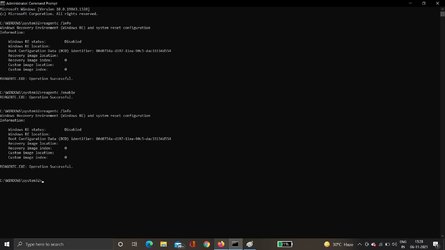
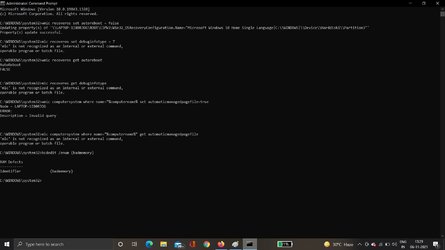
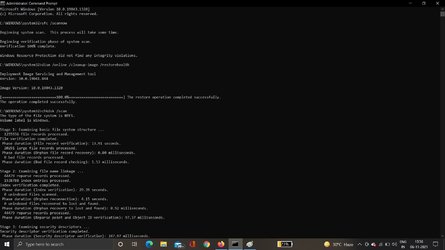
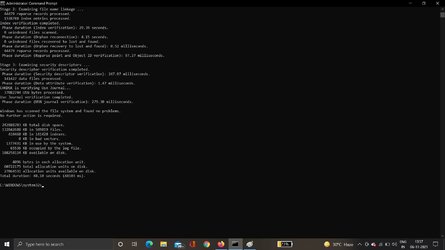
Please make sure that images are posted for all steps and tests.
Once the hosts file has been reset please upload a new V2.
There were some typos so some of the commands will be rerun later.
Please post results now for:
sfc /scannow
dism /online /cleanup-image /restorehealth
There were approximately 40 unexpected shutdowns and restarts in the past 30 days.
I've got to go to bed soon as it's very late here (3:24 AM).
Open administrative command prompt and copy and paste: (all at one time)
Code:
diskpart
lis dis
lis vol
sel dis 0
det dis
lis par
sel par 1
det par
sel par 2
det par
sel par 3
det par
sel par 4
det par
sel par 5
det par
sel par 6
det par
sel dis 1
det dis
lis par
sel par 1
det par
sel par 2
det par
sel par 3
det par
sel par 4
det par
sel par 5
det par
sel par 6
det par
Troubleshooting can take substantial time.
If you are able to reinstall drivers and applications you can:
reset save files
windows refresh
custom install
clean install
Enter the Lenovo product or serial number into this link and run the custom diagnostics (all boxes) overnight:

pcsupport.lenovo.com
Post images of the tests performed with results into this thread.
Download and install:

www.voidtools.com
Search for:
C:\$Windows.~BT\Sources\Rollback
C:\$Windows.~BT\Sources\Panther
C:\$Windows.~BT\Sources\Panther\UnattendGC
C:\Windows\Panther\setupact.log
C:\Windows\Panther\setuperr.log
C:\$Windows.~bt\Sources\Rollback\setupapi\setupapi.dev.log
Please zip and post share links.
Open administrative command prompt and type or copy and paste:
findstr /c:"CONX" C:\$Windows.~BT\Sources\Panther\setupact.log >"%userprofile%\Desktop\Setupactdetails.txt"
wmic computersystem where name="%computername%" set automaticmanagedpagefile=true
wmic computersystem where name="%computername%" get automaticmanagedpagefile
Look on the desktop for a new file.
Please zip and post share links.
Read these links on Windows Driver Verifier (WDV):
How to Enable and Disable Driver Verifier in Windows 10

www.tenforums.com
📌 Note: This article was originally created by ZigZag3143 (MS -MVP), a valued member on Answers Support Community. It provided meaningful insights and proved helpful to many. We're recreating it here on their behalf to preserve its value and ensure…
answers.microsoft.com
Do
not use WDV until it is communicated in this thread.
Code:
Event[8649]:
  Log Name: System
  Source: EventLog
  Date: 2021-11-06T08:46:31.2240000Z
  Event ID: 6008
  Task: N/A
  Level: Error
  Opcode: N/A
  Keyword: Classic
  User: N/A
  User Name: N/A
  Computer: LAPTOP-1I80RJOG
  Description:
The previous system shutdown at 00:10:28 on ?06-?11-?2021 was unexpected.
Code:
Event[8551]:
  Log Name: System
  Source: Microsoft-Windows-Kernel-Power
  Date: 2021-11-06T00:10:23.0960000Z
  Event ID: 41
  Task: N/A
  Level: Critical
  Opcode: Info
  Keyword: N/A
  User: S-1-5-18
  User Name: NT AUTHORITY\SYSTEM
  Computer: LAPTOP-1I80RJOG
  Description:
The system has rebooted without cleanly shutting down first. This error could be caused if the system stopped responding, crashed, or lost power unexpectedly.
Code:
Event[8540]:
  Log Name: System
  Source: EventLog
  Date: 2021-11-06T00:10:28.6690000Z
  Event ID: 6008
  Task: N/A
  Level: Error
  Opcode: N/A
  Keyword: Classic
  User: N/A
  User Name: N/A
  Computer: LAPTOP-1I80RJOG
  Description:
The previous system shutdown at 18:57:01 on ?05-?11-?2021 was unexpected.
Code:
Event[7925]:
  Log Name: System
  Source: EventLog
  Date: 2021-11-05T17:15:25.2850000Z
  Event ID: 6008
  Task: N/A
  Level: Error
  Opcode: N/A
  Keyword: Classic
  User: N/A
  User Name: N/A
  Computer: LAPTOP-1I80RJOG
  Description:
The previous system shutdown at 15:03:31 on ?05-?11-?2021 was unexpected.
Code:
Event[7310]:
  Log Name: System
  Source: EventLog
  Date: 2021-11-05T00:30:07.7650000Z
  Event ID: 6008
  Task: N/A
  Level: Error
  Opcode: N/A
  Keyword: Classic
  User: N/A
  User Name: N/A
  Computer: LAPTOP-1I80RJOG
  Description:
The previous system shutdown at 18:08:16 on ?04-?11-?2021 was unexpected.