Intermittent BSOD's over last few months


SDL93

Member
Local time
1:49 AM
Posts
3
OS
Windows 11 Pro
I've been getting BSOD's over the last few months ranging from MEMORY_MANAGEMENT to SYSTEM_SERVICE_EXCEPTION. I've reinstalled Windows multiple times, got a new M.2 NVME drive and reinstalled Windows onto that in case it was an issue with my other drive. Also updated my BIOS in case it was something wrong with that.

Just had another BSOD there and when I booted it BSOD again but this time it was PAGE_FAULT_IN_NON_PAGED_AREA. Not really sure the best way to proceed, I don't have a huge knowledge on troubleshooting or where to even start. They seem to only really happen when I'm gaming as well.

I've attached a zip of Minidumps from the last few crashes. Also the zip file from V2 collector. Any help or advice would be greatly appreciated!
 

Attachments

My Computer My Computer

At a glance

Windows 11 ProAMD Ryzen 7 3800X 3.9 GHz 8-Core ProcessorPatriot Viper 4 16 GB (2 x 8 GB) DDR4-3200 CL...NVIDIA Founders Edition GeForce RTX 2060 6 GB...
OS
Windows 11 Pro
Computer type
PC/Desktop
CPU
AMD Ryzen 7 3800X 3.9 GHz 8-Core Processor
Motherboard
Asus ROG STRIX B550-F GAMING ATX AM4 Motherboard
Memory
Patriot Viper 4 16 GB (2 x 8 GB) DDR4-3200 CL16 Memory
Graphics Card(s)
NVIDIA Founders Edition GeForce RTX 2060 6 GB Video Card
Hard Drives
Seagate BarraCuda 1 TB 3.5" 7200 RPM Internal Hard Drive
Sabrent Rocket 512 GB M.2-2280 PCIe 3.0 X4 NVME Solid State Drive
Corsair M.2 MP600 PRO NH
PSU
be quiet! Straight Power 11 650 W 80+ Platinum Certified Fully Modular ATX Power Supply
Case
be quiet! Pure Base 500DX ATX Mid Tower Case
Cooling
be quiet! Dark Rock 4 CPU Cooler
Please perform the following steps in sequence:


1) Increase the free space on C: so that there is > 30 GB free space


2) Run Tuneup plus > post a share link into this thread using one drive, drop box, or google drive


3) Run Get memory configuration > post a share link into this thread using one drive, drop box, or google drive


4) Turn off Windows fast startup:


5) Create a new restore point


6) The BIOS Version/Date American Megatrends Inc. 3202, 15/06/2023

Upgrade the BIOS: 3202 > 3205


7) Swap test RAM displayed on the Qualified Vendor List (QVL)


8) If QVL RAM swap testing is not immediately available then run Memtest86+ continuously for 8 or more passes


Just one error is a test fail and testing can be aborted

Take pictures > post images or share links into this thread using one drive, drop box, or google drive
 

My Computer My Computer

At a glance

Windows 10Intel(R) Core(TM) i7-4800MQ CPU @ 2.70GHz16 GB Total: Manufacturer : Samsung MemoryTyp...NVIDIA Quadro K3100M; Intel(R) HD Graphics 4600
OS
Windows 10
Computer type
Laptop
Manufacturer/Model
HP
CPU
Intel(R) Core(TM) i7-4800MQ CPU @ 2.70GHz
Motherboard
Product : 190A Version : KBC Version 94.56
Memory
16 GB Total: Manufacturer : Samsung MemoryType : DDR3 FormFactor : SODIMM Capacity : 8GB Speed : 1600
Graphics Card(s)
NVIDIA Quadro K3100M; Intel(R) HD Graphics 4600
Sound Card
IDT High Definition Audio CODEC; PNP Device ID HDAUDIO\FUNC_01&VEN_111D&DEV_76E0
Hard Drives
Model Hitachi HTS727575A9E364
Antivirus
Microsoft Defender
Other Info
Mobile Workstation
Please perform the following steps in sequence:


1) Increase the free space on C: so that there is > 30 GB free space


2) Run Tuneup plus > post a share link into this thread using one drive, drop box, or google drive


3) Run Get memory configuration > post a share link into this thread using one drive, drop box, or google drive


4) Turn off Windows fast startup:


5) Create a new restore point


6) The BIOS Version/Date American Megatrends Inc. 3202, 15/06/2023

Upgrade the BIOS: 3202 > 3205


7) Swap test RAM displayed on the Qualified Vendor List (QVL)


8) If QVL RAM swap testing is not immediately available then run Memtest86+ continuously for 8 or more passes


Just one error is a test fail and testing can be aborted

Take pictures > post images or share links into this thread using one drive, drop box, or google drive

Thanks very much, I will run through these step by step and let you know how I get on.
 

My Computer My Computer

At a glance

Windows 11 ProAMD Ryzen 7 3800X 3.9 GHz 8-Core ProcessorPatriot Viper 4 16 GB (2 x 8 GB) DDR4-3200 CL...NVIDIA Founders Edition GeForce RTX 2060 6 GB...
OS
Windows 11 Pro
Computer type
PC/Desktop
CPU
AMD Ryzen 7 3800X 3.9 GHz 8-Core Processor
Motherboard
Asus ROG STRIX B550-F GAMING ATX AM4 Motherboard
Memory
Patriot Viper 4 16 GB (2 x 8 GB) DDR4-3200 CL16 Memory
Graphics Card(s)
NVIDIA Founders Edition GeForce RTX 2060 6 GB Video Card
Hard Drives
Seagate BarraCuda 1 TB 3.5" 7200 RPM Internal Hard Drive
Sabrent Rocket 512 GB M.2-2280 PCIe 3.0 X4 NVME Solid State Drive
Corsair M.2 MP600 PRO NH
PSU
be quiet! Straight Power 11 650 W 80+ Platinum Certified Fully Modular ATX Power Supply
Case
be quiet! Pure Base 500DX ATX Mid Tower Case
Cooling
be quiet! Dark Rock 4 CPU Cooler
Please perform the following steps in sequence:


1) Increase the free space on C: so that there is > 30 GB free space


2) Run Tuneup plus > post a share link into this thread using one drive, drop box, or google drive


3) Run Get memory configuration > post a share link into this thread using one drive, drop box, or google drive


4) Turn off Windows fast startup:


5) Create a new restore point


6) The BIOS Version/Date American Megatrends Inc. 3202, 15/06/2023

Upgrade the BIOS: 3202 > 3205


7) Swap test RAM displayed on the Qualified Vendor List (QVL)


8) If QVL RAM swap testing is not immediately available then run Memtest86+ continuously for 8 or more passes


Just one error is a test fail and testing can be aborted

Take pictures > post images or share links into this thread using one drive, drop box, or google drive


Hello,


I've ran through the list that you posted above.

1. I've increased the space on my C drive so I have about 200GB overall now.

2. Ran Tuneup plus, had to run it a few times for it to work successfully, restore health kept sticking at 62.3%. Link below.


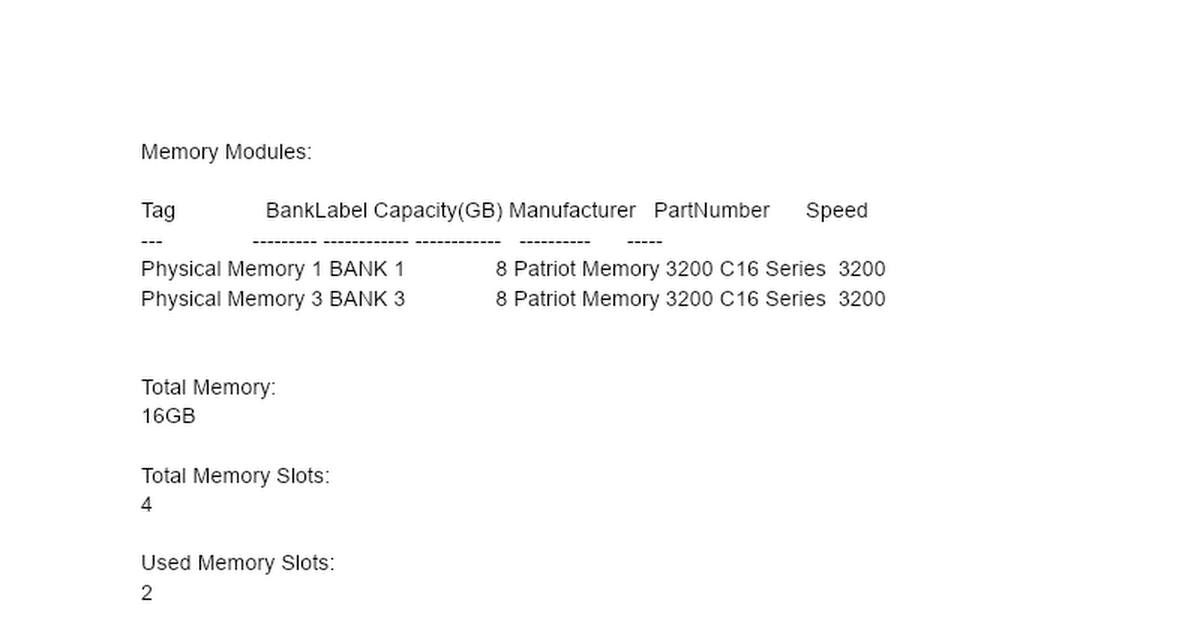
3. GetMemory ran and picture attached. I noticed my RAM slots were in DIMM slots B1 and A1, so I checked my mobos manual and seen they should ideally be in B2 & A2 so I switched them. Turned the PC on and it wouldn't boot, tried again with 1x stick in DIMM B2 and it done the same, I then switched the RAM sticks around and it booted fine?


4. Windows Fast startup turned off.

5. Restore point created.

6. BIOS updated to 3205.

7. Can’t get new RAM just now but planning on it next paycheck.

8. Ran Memtest and it didn’t even get through one pass, I done this after I switched the RAM DIMM slots.. Picture attached.
 

Attachments

  • MemTest.jpg
    MemTest.jpg
    476.8 KB · Views: 2

My Computer My Computer

At a glance

Windows 11 ProAMD Ryzen 7 3800X 3.9 GHz 8-Core ProcessorPatriot Viper 4 16 GB (2 x 8 GB) DDR4-3200 CL...NVIDIA Founders Edition GeForce RTX 2060 6 GB...
OS
Windows 11 Pro
Computer type
PC/Desktop
CPU
AMD Ryzen 7 3800X 3.9 GHz 8-Core Processor
Motherboard
Asus ROG STRIX B550-F GAMING ATX AM4 Motherboard
Memory
Patriot Viper 4 16 GB (2 x 8 GB) DDR4-3200 CL16 Memory
Graphics Card(s)
NVIDIA Founders Edition GeForce RTX 2060 6 GB Video Card
Hard Drives
Seagate BarraCuda 1 TB 3.5" 7200 RPM Internal Hard Drive
Sabrent Rocket 512 GB M.2-2280 PCIe 3.0 X4 NVME Solid State Drive
Corsair M.2 MP600 PRO NH
PSU
be quiet! Straight Power 11 650 W 80+ Platinum Certified Fully Modular ATX Power Supply
Case
be quiet! Pure Base 500DX ATX Mid Tower Case
Cooling
be quiet! Dark Rock 4 CPU Cooler
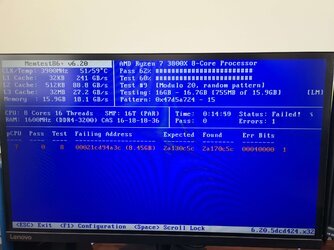
The dumps also point at RAM being the problem here.
 

My Computer My Computer

At a glance

Windows
OS
Windows
1) Please test one RAM module at a time in the same DIMM as needed to confirm the malfunctioning module.

Then use a single RAM module (check the MB manual to see if there is an optimal DIMM).


2) Run:


3) Download and install onto the desktop: Windows 11 iso


4) Uninstall any of these non-Microsoft software:
a) antivirus
b) firewall
c) drive encryption


5) Place the computer into clean boot


6) Perform an in place upgrade repair:


Second scannow:

Code:
2023-09-24 09:01:10, Info                  CSI    00000333 [SR] Cannot repair member file [l:18]'system.core.ni.dll' of NetFx4-system_core_ni, version 4.0.15912.0, arch amd64, versionScope neutral, pkt {l:8 b:b03f5f7f11d50a3a} in the store, hash mismatch
2023-09-24 09:01:10, Info                  CSI    00000335 [SR] Cannot repair member file [l:18]'system.core.ni.dll' of NetFx4-system_core_ni, version 4.0.15912.0, arch amd64, versionScope neutral, pkt {l:8 b:b03f5f7f11d50a3a} in the store, hash mismatch
2023-09-24 09:01:10, Info                  CSI    00000336 [SR] This component was referenced by [l:82]'Microsoft-Windows-NetFx4-US-OC-Package~31bf3856ad364e35~amd64~~10.0.22621.1.NetFx4'
2023-09-24 09:01:10, Info                  CSI    00000339 [SR] Could not reproject corrupted file \??\C:\Windows\Microsoft.NET\Framework64\v4.0.30319\NativeImages\\system.core.ni.dll; source file in store is also corrupted
2023-09-24 09:01:27, Info                  CSI    000003d6 [SR] Verifying 78 components
2023-09-24 09:01:27, Info                  CSI    000003d9 [SR] Repairing 1 components
2023-09-24 09:01:27, Info                  CSI    000003dc [SR] Cannot repair member file [l:18]'system.core.ni.dll' of NetFx4-system_core_ni, version 4.0.15912.0, arch amd64, versionScope neutral, pkt {l:8 b:b03f5f7f11d50a3a} in the store, hash mismatch
2023-09-24 09:01:27, Info                  CSI    000003de [SR] Cannot repair member file [l:18]'system.core.ni.dll' of NetFx4-system_core_ni, version 4.0.15912.0, arch amd64, versionScope neutral, pkt {l:8 b:b03f5f7f11d50a3a} in the store, hash mismatch
2023-09-24 09:01:27, Info                  CSI    000003df [SR] This component was referenced by [l:82]'Microsoft-Windows-NetFx4-US-OC-Package~31bf3856ad364e35~amd64~~10.0.22621.1.NetFx4'
2023-09-24 09:01:27, Info                  CSI    000003e2 [SR] Could not reproject corrupted file \??\C:\Windows\Microsoft.NET\Framework64\v4.0.30319\NativeImages\\system.core.ni.dll; source file in store is also corrupted


Code:
Memory Modules:

Tag               BankLabel Capacity(GB) Manufacturer   PartNumber      Speed
---               --------- ------------ ------------   ----------      -----
Physical Memory 1 BANK 1               8 Patriot Memory 3200 C16 Series  3200
Physical Memory 3 BANK 3               8 Patriot Memory 3200 C16 Series  3200


Total Memory:
16GB

Total Memory Slots:
4

Used Memory Slots:
2
 
Last edited:

My Computer My Computer

At a glance

Windows 10Intel(R) Core(TM) i7-4800MQ CPU @ 2.70GHz16 GB Total: Manufacturer : Samsung MemoryTyp...NVIDIA Quadro K3100M; Intel(R) HD Graphics 4600
OS
Windows 10
Computer type
Laptop
Manufacturer/Model
HP
CPU
Intel(R) Core(TM) i7-4800MQ CPU @ 2.70GHz
Motherboard
Product : 190A Version : KBC Version 94.56
Memory
16 GB Total: Manufacturer : Samsung MemoryType : DDR3 FormFactor : SODIMM Capacity : 8GB Speed : 1600
Graphics Card(s)
NVIDIA Quadro K3100M; Intel(R) HD Graphics 4600
Sound Card
IDT High Definition Audio CODEC; PNP Device ID HDAUDIO\FUNC_01&VEN_111D&DEV_76E0
Hard Drives
Model Hitachi HTS727575A9E364
Antivirus
Microsoft Defender
Other Info
Mobile Workstation
Back
Top Bottom