
issue copying or moving large files win 11


Ok I take it that robocopy command structure is built into win 11. Saved the syntax info to have a go at it. Only using defender at the moment so I will pause that for a test today. Man has to work. Will look into explorer ++.

You are correct; it does appear that something is looking at the file or the command itself. Sometimes when command just fails the video screen goes black and then resets back to my desktop. Weird !!

Just turned off defender completely and issue persists; keep it mind that all my commands are done from the right click options, not by typing in command lines. Have done some things from command prompt but my experience id quite limited. Going to write out a couple of command prompts for robocopy and see what I can do.
 
Last edited:

My Computer

System One

  • OS
    windows 11 up tp date.
    Computer type
    PC/Desktop
    Manufacturer/Model
    Self Built on ASUS board
    CPU
    AMD Rysen 5 5600 G
    Motherboard
    ASUS Prime B360-Plus
    Memory
    32 gig
    Graphics Card(s)
    Nvidia GEFORCE RTX 2060 6 gig
    Sound Card
    NVIDIA
    Monitor(s) Displays
    Samsung Odyssey CG560 43 inch
    Screen Resolution
    1920 X 1080
    Hard Drives
    Samsung 2T SSD Primary/ Samsung 1T SSD secondary; WD 4T for PLEX Storage; WD 4T external also for Plex . Also 3 HDD drives for PLEX backup.
    Case
    Deepcool CG560
    Keyboard
    Logitech
    Mouse
    Logitech
    Internet Speed
    500 down/500 up 3 ms ping
    Browser
    Edge
    Antivirus
    Defender
    Other Info
    Building a new desktop on the horizon; this was definitely a budget build based on circumstances at the time.
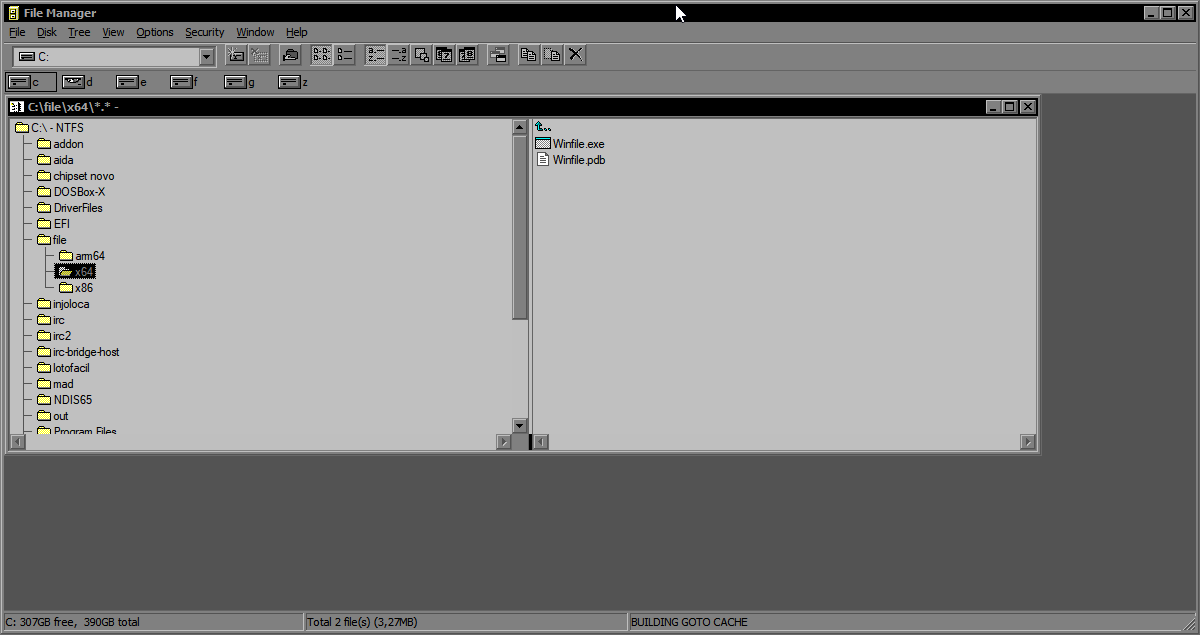

If it's still slow, use the Windows 3.1 file manager
fVJBDr.png


tell us how the speed of the 2 explorer++ and the file manager of windows 3.1 was
 

My Computer

System One

  • OS
    Windows 11 Iot Enterprise 21h2 22000.3260
    Computer type
    PC/Desktop
    Manufacturer/Model
    Asus
    CPU
    xeon E5-2697v2
    Motherboard
    rampage iv extreme
    Memory
    32gb 8x4gb ddr3 1333 mhz
    Graphics Card(s)
    gtx 570 poit of view
    Sound Card
    realtek HD (ALC898)
    Monitor(s) Displays
    samsung b2030
    Screen Resolution
    1600x900
    Hard Drives
    2tb hd 5400 rpm
    3tb hd 5400 rpm
    1tb nvme pcie 3.0
    PSU
    hx850w
    Keyboard
    mtek
    Internet Speed
    500/250 gpon
    Browser
    r3dfox 146.0
    Antivirus
    none
Question; is "explorer++" a command line ; otherwise how do I run it. Interesting I had a copy of the same large file sitting one on the desktop the other in a folder off the desktop. This time the copy in the folder deleted just fine; even gave me the ARE YOU SURE question; the copy on the desktop just sat for about 5 minutes and then I got the question. This was done while in explorer. When I get a chance, I try something else throughout the day. Not looking forward to doing what I so with command prompts. All of this is being done on my 1T SSD drive rather than either of the two HHD drives.
 

My Computer

System One

  • OS
    windows 11 up tp date.
    Computer type
    PC/Desktop
    Manufacturer/Model
    Self Built on ASUS board
    CPU
    AMD Rysen 5 5600 G
    Motherboard
    ASUS Prime B360-Plus
    Memory
    32 gig
    Graphics Card(s)
    Nvidia GEFORCE RTX 2060 6 gig
    Sound Card
    NVIDIA
    Monitor(s) Displays
    Samsung Odyssey CG560 43 inch
    Screen Resolution
    1920 X 1080
    Hard Drives
    Samsung 2T SSD Primary/ Samsung 1T SSD secondary; WD 4T for PLEX Storage; WD 4T external also for Plex . Also 3 HDD drives for PLEX backup.
    Case
    Deepcool CG560
    Keyboard
    Logitech
    Mouse
    Logitech
    Internet Speed
    500 down/500 up 3 ms ping
    Browser
    Edge
    Antivirus
    Defender
    Other Info
    Building a new desktop on the horizon; this was definitely a budget build based on circumstances at the time.
Have you checked for disk corruption?
 

My Computers

System One System Two

  • OS
    Windows 11 Enterprise 25H2 26200 7462
    Computer type
    PC/Desktop
    Manufacturer/Model
    Custom Build
    CPU
    Intel XEON E5-2699 v3
    Motherboard
    ASUS X99-A
    Memory
    64GB Teamgroup UD4-3600
    Graphics Card(s)
    NVIDIA GeForce GTX 1080 Ti
    Sound Card
    Integrated
    Monitor(s) Displays
    ACER X34 Predator
    Screen Resolution
    3440 x 1440
    Hard Drives
    Crucial CT1000P 3P SSD8 1TB
    Crucial CT1000 BX500 SSD 1TB
    PSU
    GameMax Pro
    Case
    Fractal Design
    Cooling
    Corsair H110iGT + 6 140mm Fans
    Keyboard
    Corsair K4
    Mouse
    G-Skill G502
    Internet Speed
    300MBs
    Browser
    Chrome
    Antivirus
    OEM
    Other Info
    ASUS RT-AC87U Router
  • Operating System
    25H2 26200.5074
    Computer type
    Laptop
    Manufacturer/Model
    ASUS X555LA
    Memory
    8GB
    Browser
    Chrome
    Antivirus
    OEM
"Calculating"

I haven't studied Windows (and I don't want to).
It seems to me that at this stage, the file isn't copied, but rather disk space is allocated.
Various algorithms can be used.
This can take some time, depending on the file size.
The most expensive is "prealloc."
It should also depend on the file system (it's better to use NTFS), how much space remains on the disk, fragmentation, and whether it's SSD or HDD.
 

My Computer

System One

  • OS
    Microsoft Windows 11 Home
    Computer type
    PC/Desktop
    Manufacturer/Model
    MSI MS-7D98
    CPU
    Intel Core i5-13490F
    Motherboard
    MSI B760 GAMING PLUS WIFI
    Memory
    2 x 16 Patriot Memory (PDP Systems) PSD516G560081 6400MT (32-37-37-74); 1.35V)
    Graphics Card(s)
    GIGABYTE GeForce RTX 4070 WINDFORCE OC 12G (GV-N4070WF3OC-12GD)
    Sound Card
    Bluetooth Аудио
    Monitor(s) Displays
    INNOCN 15K1F
    Screen Resolution
    1920 x 1080
    Hard Drives
    WD_BLACK SN770 250GB
    KINGSTON SNV2S1000G (ELFK0S.6)
    PSU
    Thermaltake Toughpower GF3 1000W
    Case
    CG560 - DeepCool
    Cooling
    ID-COOLING SE-224-XTS / 2 x 140Mm Fan - rear and top; 3 x 120Mm - front
    Keyboard
    Corsair K70 RGB TKL
    Mouse
    Corsair KATAR PRO XT
    Internet Speed
    100 Mbps
    Browser
    Firefox
    Antivirus
    Microsoft Defender Antivirus
    Other Info
    https://www.userbenchmark.com/UserRun/66553205
using NTFS; will look into Samsung magician for a way to check the SSD; if it was in some sort of trouble, I would gladly replace it tomorrow.
 

My Computer

System One

  • OS
    windows 11 up tp date.
    Computer type
    PC/Desktop
    Manufacturer/Model
    Self Built on ASUS board
    CPU
    AMD Rysen 5 5600 G
    Motherboard
    ASUS Prime B360-Plus
    Memory
    32 gig
    Graphics Card(s)
    Nvidia GEFORCE RTX 2060 6 gig
    Sound Card
    NVIDIA
    Monitor(s) Displays
    Samsung Odyssey CG560 43 inch
    Screen Resolution
    1920 X 1080
    Hard Drives
    Samsung 2T SSD Primary/ Samsung 1T SSD secondary; WD 4T for PLEX Storage; WD 4T external also for Plex . Also 3 HDD drives for PLEX backup.
    Case
    Deepcool CG560
    Keyboard
    Logitech
    Mouse
    Logitech
    Internet Speed
    500 down/500 up 3 ms ping
    Browser
    Edge
    Antivirus
    Defender
    Other Info
    Building a new desktop on the horizon; this was definitely a budget build based on circumstances at the time.
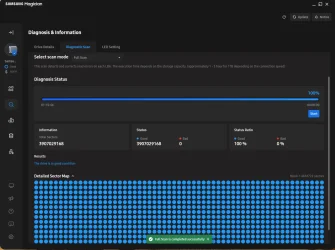
Doing a full diagnostic scan on my primary SSD; diagnostic.webpwill likely take a while.
 

My Computer

System One

  • OS
    windows 11 up tp date.
    Computer type
    PC/Desktop
    Manufacturer/Model
    Self Built on ASUS board
    CPU
    AMD Rysen 5 5600 G
    Motherboard
    ASUS Prime B360-Plus
    Memory
    32 gig
    Graphics Card(s)
    Nvidia GEFORCE RTX 2060 6 gig
    Sound Card
    NVIDIA
    Monitor(s) Displays
    Samsung Odyssey CG560 43 inch
    Screen Resolution
    1920 X 1080
    Hard Drives
    Samsung 2T SSD Primary/ Samsung 1T SSD secondary; WD 4T for PLEX Storage; WD 4T external also for Plex . Also 3 HDD drives for PLEX backup.
    Case
    Deepcool CG560
    Keyboard
    Logitech
    Mouse
    Logitech
    Internet Speed
    500 down/500 up 3 ms ping
    Browser
    Edge
    Antivirus
    Defender
    Other Info
    Building a new desktop on the horizon; this was definitely a budget build based on circumstances at the time.
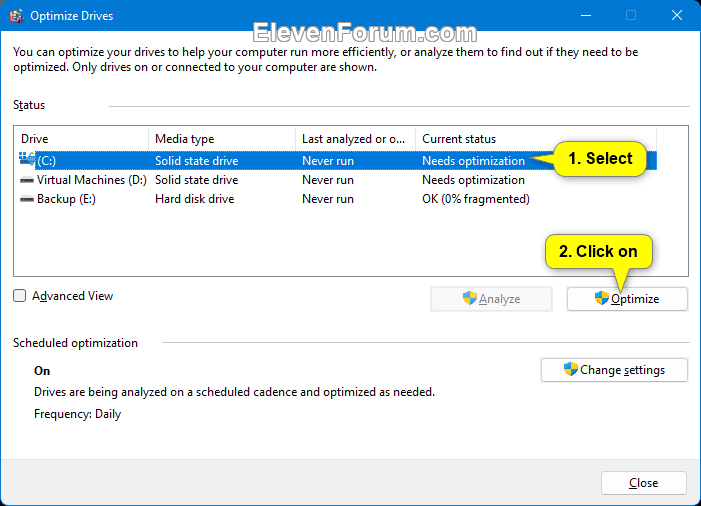
Doing a full diagnostic scan on my primary SSD; View attachment 157137will likely take a while.

Also remember to run Windows 11 built-in drive optimizer.

APDLu8h.png


My Computer

System One

  • OS
    Windows 11 Pro
    Computer type
    PC/Desktop
    CPU
    13900K
    Graphics Card(s)
    RTX 4090
    Screen Resolution
    4K
    PSU
    Corsair 2500 W
Taking me some time but trying. Just finished scanning both of my SSD drives using Samsung magician; also ran chkdsk on both 4T HHD's. Will do the other checks tonight. I really want this solved.

Thanks to all so far.C Drive Full can.webp
 

My Computer

System One

  • OS
    windows 11 up tp date.
    Computer type
    PC/Desktop
    Manufacturer/Model
    Self Built on ASUS board
    CPU
    AMD Rysen 5 5600 G
    Motherboard
    ASUS Prime B360-Plus
    Memory
    32 gig
    Graphics Card(s)
    Nvidia GEFORCE RTX 2060 6 gig
    Sound Card
    NVIDIA
    Monitor(s) Displays
    Samsung Odyssey CG560 43 inch
    Screen Resolution
    1920 X 1080
    Hard Drives
    Samsung 2T SSD Primary/ Samsung 1T SSD secondary; WD 4T for PLEX Storage; WD 4T external also for Plex . Also 3 HDD drives for PLEX backup.
    Case
    Deepcool CG560
    Keyboard
    Logitech
    Mouse
    Logitech
    Internet Speed
    500 down/500 up 3 ms ping
    Browser
    Edge
    Antivirus
    Defender
    Other Info
    Building a new desktop on the horizon; this was definitely a budget build based on circumstances at the time.
Forgot; my PC is set up to auto-optimize once a week on all drives. Cool!
 

My Computer

System One

  • OS
    windows 11 up tp date.
    Computer type
    PC/Desktop
    Manufacturer/Model
    Self Built on ASUS board
    CPU
    AMD Rysen 5 5600 G
    Motherboard
    ASUS Prime B360-Plus
    Memory
    32 gig
    Graphics Card(s)
    Nvidia GEFORCE RTX 2060 6 gig
    Sound Card
    NVIDIA
    Monitor(s) Displays
    Samsung Odyssey CG560 43 inch
    Screen Resolution
    1920 X 1080
    Hard Drives
    Samsung 2T SSD Primary/ Samsung 1T SSD secondary; WD 4T for PLEX Storage; WD 4T external also for Plex . Also 3 HDD drives for PLEX backup.
    Case
    Deepcool CG560
    Keyboard
    Logitech
    Mouse
    Logitech
    Internet Speed
    500 down/500 up 3 ms ping
    Browser
    Edge
    Antivirus
    Defender
    Other Info
    Building a new desktop on the horizon; this was definitely a budget build based on circumstances at the time.
Haven't quit!! Just doing pre-Christmas stuff. Working with Win File but struggling a bit getting around in the TREE. Like finding folders under desktop. And what's with explorer ++
 

My Computer

System One

  • OS
    windows 11 up tp date.
    Computer type
    PC/Desktop
    Manufacturer/Model
    Self Built on ASUS board
    CPU
    AMD Rysen 5 5600 G
    Motherboard
    ASUS Prime B360-Plus
    Memory
    32 gig
    Graphics Card(s)
    Nvidia GEFORCE RTX 2060 6 gig
    Sound Card
    NVIDIA
    Monitor(s) Displays
    Samsung Odyssey CG560 43 inch
    Screen Resolution
    1920 X 1080
    Hard Drives
    Samsung 2T SSD Primary/ Samsung 1T SSD secondary; WD 4T for PLEX Storage; WD 4T external also for Plex . Also 3 HDD drives for PLEX backup.
    Case
    Deepcool CG560
    Keyboard
    Logitech
    Mouse
    Logitech
    Internet Speed
    500 down/500 up 3 ms ping
    Browser
    Edge
    Antivirus
    Defender
    Other Info
    Building a new desktop on the horizon; this was definitely a budget build based on circumstances at the time.
Haven't quit!! Just doing pre-Christmas stuff. Working with Win File but struggling a bit getting around in the TREE. Like finding folders under desktop. And what's with explorer ++
new solution in windows 11 24h2 25h2 enable new driver nvme native
Code:
Windows Registry Editor Version 5.00

[HKEY_LOCAL_MACHINE\SYSTEM\CurrentControlSet\Policies\Microsoft\FeatureManagement\Overrides]
“735209102”=dword:00000001
“1853569164”=dword:00000001
“156965516”=dword:00000001
 

My Computer

System One

  • OS
    Windows 11 Iot Enterprise 21h2 22000.3260
    Computer type
    PC/Desktop
    Manufacturer/Model
    Asus
    CPU
    xeon E5-2697v2
    Motherboard
    rampage iv extreme
    Memory
    32gb 8x4gb ddr3 1333 mhz
    Graphics Card(s)
    gtx 570 poit of view
    Sound Card
    realtek HD (ALC898)
    Monitor(s) Displays
    samsung b2030
    Screen Resolution
    1600x900
    Hard Drives
    2tb hd 5400 rpm
    3tb hd 5400 rpm
    1tb nvme pcie 3.0
    PSU
    hx850w
    Keyboard
    mtek
    Internet Speed
    500/250 gpon
    Browser
    r3dfox 146.0
    Antivirus
    none
So, I will back up the registry; but what is this above supposed to accomplish.
 

My Computer

System One

  • OS
    windows 11 up tp date.
    Computer type
    PC/Desktop
    Manufacturer/Model
    Self Built on ASUS board
    CPU
    AMD Rysen 5 5600 G
    Motherboard
    ASUS Prime B360-Plus
    Memory
    32 gig
    Graphics Card(s)
    Nvidia GEFORCE RTX 2060 6 gig
    Sound Card
    NVIDIA
    Monitor(s) Displays
    Samsung Odyssey CG560 43 inch
    Screen Resolution
    1920 X 1080
    Hard Drives
    Samsung 2T SSD Primary/ Samsung 1T SSD secondary; WD 4T for PLEX Storage; WD 4T external also for Plex . Also 3 HDD drives for PLEX backup.
    Case
    Deepcool CG560
    Keyboard
    Logitech
    Mouse
    Logitech
    Internet Speed
    500 down/500 up 3 ms ping
    Browser
    Edge
    Antivirus
    Defender
    Other Info
    Building a new desktop on the horizon; this was definitely a budget build based on circumstances at the time.
worked on 3 large files this morning; no change in slow outcome. Have an idea; i also have an older win 11 laptop the I keep for some reason. Used it for traveling south for the winter but Trump has ruined that idea for sure. Will fire it up, do the updates and do the same process on that to see what happens. Running out of things to try.
 

My Computer

System One

  • OS
    windows 11 up tp date.
    Computer type
    PC/Desktop
    Manufacturer/Model
    Self Built on ASUS board
    CPU
    AMD Rysen 5 5600 G
    Motherboard
    ASUS Prime B360-Plus
    Memory
    32 gig
    Graphics Card(s)
    Nvidia GEFORCE RTX 2060 6 gig
    Sound Card
    NVIDIA
    Monitor(s) Displays
    Samsung Odyssey CG560 43 inch
    Screen Resolution
    1920 X 1080
    Hard Drives
    Samsung 2T SSD Primary/ Samsung 1T SSD secondary; WD 4T for PLEX Storage; WD 4T external also for Plex . Also 3 HDD drives for PLEX backup.
    Case
    Deepcool CG560
    Keyboard
    Logitech
    Mouse
    Logitech
    Internet Speed
    500 down/500 up 3 ms ping
    Browser
    Edge
    Antivirus
    Defender
    Other Info
    Building a new desktop on the horizon; this was definitely a budget build based on circumstances at the time.
So, I will back up the registry; but what is this above supposed to accomplish.
It's something that's not very effective right now. I suggest you avoid it.
 

My Computers

System One System Two

  • OS
    Windows 11 Enterprise 25H2 26200 7462
    Computer type
    PC/Desktop
    Manufacturer/Model
    Custom Build
    CPU
    Intel XEON E5-2699 v3
    Motherboard
    ASUS X99-A
    Memory
    64GB Teamgroup UD4-3600
    Graphics Card(s)
    NVIDIA GeForce GTX 1080 Ti
    Sound Card
    Integrated
    Monitor(s) Displays
    ACER X34 Predator
    Screen Resolution
    3440 x 1440
    Hard Drives
    Crucial CT1000P 3P SSD8 1TB
    Crucial CT1000 BX500 SSD 1TB
    PSU
    GameMax Pro
    Case
    Fractal Design
    Cooling
    Corsair H110iGT + 6 140mm Fans
    Keyboard
    Corsair K4
    Mouse
    G-Skill G502
    Internet Speed
    300MBs
    Browser
    Chrome
    Antivirus
    OEM
    Other Info
    ASUS RT-AC87U Router
  • Operating System
    25H2 26200.5074
    Computer type
    Laptop
    Manufacturer/Model
    ASUS X555LA
    Memory
    8GB
    Browser
    Chrome
    Antivirus
    OEM
Ok will forget it; have dabbled in the registry a bit but on specific issues and specific software. Thanks for input!!
 

My Computer

System One

  • OS
    windows 11 up tp date.
    Computer type
    PC/Desktop
    Manufacturer/Model
    Self Built on ASUS board
    CPU
    AMD Rysen 5 5600 G
    Motherboard
    ASUS Prime B360-Plus
    Memory
    32 gig
    Graphics Card(s)
    Nvidia GEFORCE RTX 2060 6 gig
    Sound Card
    NVIDIA
    Monitor(s) Displays
    Samsung Odyssey CG560 43 inch
    Screen Resolution
    1920 X 1080
    Hard Drives
    Samsung 2T SSD Primary/ Samsung 1T SSD secondary; WD 4T for PLEX Storage; WD 4T external also for Plex . Also 3 HDD drives for PLEX backup.
    Case
    Deepcool CG560
    Keyboard
    Logitech
    Mouse
    Logitech
    Internet Speed
    500 down/500 up 3 ms ping
    Browser
    Edge
    Antivirus
    Defender
    Other Info
    Building a new desktop on the horizon; this was definitely a budget build based on circumstances at the time.
Back after Christmas; situation the same; got my old laptop (win 11 ) up and running and transferred one of my big files onto the 500 SSD. Moved it all over the place with no issues at all. Couple of more things to try. Another thing; if I try to transfer a herd up mp4 files to another drive; same issue; really slow.
 

My Computer

System One

  • OS
    windows 11 up tp date.
    Computer type
    PC/Desktop
    Manufacturer/Model
    Self Built on ASUS board
    CPU
    AMD Rysen 5 5600 G
    Motherboard
    ASUS Prime B360-Plus
    Memory
    32 gig
    Graphics Card(s)
    Nvidia GEFORCE RTX 2060 6 gig
    Sound Card
    NVIDIA
    Monitor(s) Displays
    Samsung Odyssey CG560 43 inch
    Screen Resolution
    1920 X 1080
    Hard Drives
    Samsung 2T SSD Primary/ Samsung 1T SSD secondary; WD 4T for PLEX Storage; WD 4T external also for Plex . Also 3 HDD drives for PLEX backup.
    Case
    Deepcool CG560
    Keyboard
    Logitech
    Mouse
    Logitech
    Internet Speed
    500 down/500 up 3 ms ping
    Browser
    Edge
    Antivirus
    Defender
    Other Info
    Building a new desktop on the horizon; this was definitely a budget build based on circumstances at the time.

As mentioned by another poster, use drag and drop. Start File Explorer, find the file or folder you want to copy or move in the right window, then find the destination folder in the left window by clicking on the arrows to the left of the drives and folders. Don't highlight the folder and don't try to use Quick Access unless the destination drive or folder is already there. When you are ready to copy or move the file, right-click it and while holding the right-click, drag it to the destination folder in the left window and release the right-click. You will be given the choice of copy or move.

Ben
 

My Computer

System One

  • OS
    Windows 10 Home
    Computer type
    Laptop
    Manufacturer/Model
    HP Elitebook 2530p
    CPU
    Intel Core 2 Duo [email protected] GHz
    Memory
    2 GB
I have tried that with various results; just did it again; works fine with COPY but not with the MOVE command. File resided in a folder off of the desktop and was sending to a folder on my D drive (SSD). Either SSD doesn't matter which drive.
When I get my vpn working on the laptop I will try the complete process.
 

My Computer

System One

  • OS
    windows 11 up tp date.
    Computer type
    PC/Desktop
    Manufacturer/Model
    Self Built on ASUS board
    CPU
    AMD Rysen 5 5600 G
    Motherboard
    ASUS Prime B360-Plus
    Memory
    32 gig
    Graphics Card(s)
    Nvidia GEFORCE RTX 2060 6 gig
    Sound Card
    NVIDIA
    Monitor(s) Displays
    Samsung Odyssey CG560 43 inch
    Screen Resolution
    1920 X 1080
    Hard Drives
    Samsung 2T SSD Primary/ Samsung 1T SSD secondary; WD 4T for PLEX Storage; WD 4T external also for Plex . Also 3 HDD drives for PLEX backup.
    Case
    Deepcool CG560
    Keyboard
    Logitech
    Mouse
    Logitech
    Internet Speed
    500 down/500 up 3 ms ping
    Browser
    Edge
    Antivirus
    Defender
    Other Info
    Building a new desktop on the horizon; this was definitely a budget build based on circumstances at the time.
When you right-click and drag to the left window, make sure you are hovering over the destination folder. If you're not sure or it just doesn't look right, release the right-click, click "Cancel" and try again. File Explorer sometimes expands folders in the left window automatically and when this happens, you have to scroll down and find the destination folder again.

Ben
 

My Computer

System One

  • OS
    Windows 10 Home
    Computer type
    Laptop
    Manufacturer/Model
    HP Elitebook 2530p
    CPU
    Intel Core 2 Duo [email protected] GHz
    Memory
    2 GB

Latest Support Threads

Back
Top Bottom




