Issue with restoring Windows 7 command bar for Windows 11


Titanonectes

Member
Local time
4:31 AM
Posts
6
OS
Windows 11
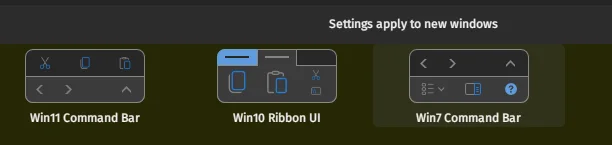
So there are currently two ways to restore the compact Windows 7 command bar for Windows 11: ExplorerPatcher or StartAllBack.
1783315764963.webp

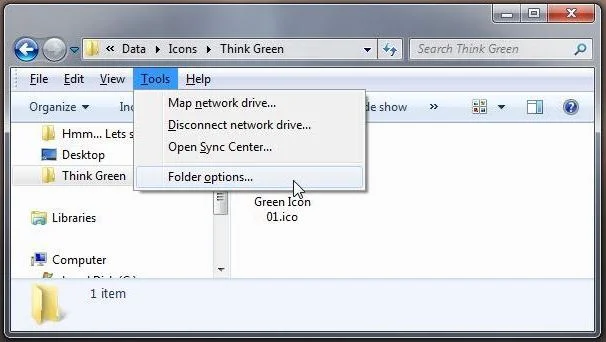
I have been using StartAllBack (and StartIsBack + OldNewExplorer back in Windows 10) and usually I can access the menu in the command bar (example image attached, the File -> Help row) by clicking "Alt". However, I have now found myself unable to do that, leaving me unable to access settings such as "Folder Options" unless I switch back to Windows 10 or 11 command bars. Have anyone ran into a similar behaviour? I jumped over to ExplorerPatcher to see if it is specifically a StartAllBack problem but could not access the menu with "Alt" either.
1783315821931.webp
 

My Computer My Computer

At a glance

Windows 11Intel Core Ultra 7 255H32GB DDR5 SDRAMIntel Arc 140T Arrow Lake 8XE
OS
Windows 11
Computer type
Laptop
Manufacturer/Model
Lenovo/Thinkpad P14s Intel g6
CPU
Intel Core Ultra 7 255H
Motherboard
LENOVO 21QTCTO1WW
Memory
32GB DDR5 SDRAM
Graphics Card(s)
Intel Arc 140T Arrow Lake 8XE
Sound Card
Intel Arrow Lake-U/H PCH
Hopefully a user who uses such tools can give you an answer. I do not.
When 11 first came out, we saw so many issues caused by 3rd party tools that altered the GUI, I chose to never use such a tool. The options are still there so it was just a slight learning curve to adjust to using them the new way. About the only thing I never could adjust to was is the new right click context menu, so I used Brink's tutorial to convert back to the old right click menu natively using the registry..
 

My Computers My Computers

  • At a glance

    Windows 11 Pro 25H2 26200.8655i9-10900 10 core 20 threads32 gbnone-Intel UHD Graphics 630
    OS
    Windows 11 Pro 25H2 26200.8655
    Computer type
    PC/Desktop
    Manufacturer/Model
    Dell Optiplex 7080
    CPU
    i9-10900 10 core 20 threads
    Motherboard
    DELL 0J37VM
    Memory
    32 gb
    Graphics Card(s)
    none-Intel UHD Graphics 630
    Sound Card
    Integrated Realtek
    Monitor(s) Displays
    Benq 27
    Screen Resolution
    2560x1440
    Hard Drives
    2x1tb Solidigm m.2 nvme /External drives 512gb Samsung m.2 sata+2tb Kingston m2.nvme
    PSU
    500w
    Case
    MT
    Cooling
    Dell Premium
    Keyboard
    Logitech wired
    Mouse
    Logitech wireless
    Internet Speed
    so slow I'm too embarrassed to tell
    Browser
    #1 Edge #2 Firefox
    Antivirus
    Defender+MWB Premium
  • At a glance

    Windows 11 Pro 24H2 26200.8457AMD Ryzen 7 6800U32 gbintegrated
    Operating System
    Windows 11 Pro 24H2 26200.8457
    Computer type
    PC/Desktop
    Manufacturer/Model
    Beelink Mini PC SER5
    CPU
    AMD Ryzen 7 6800U
    Memory
    32 gb
    Graphics card(s)
    integrated
    Sound Card
    integrated
    Monitor(s) Displays
    Benq 27
    Screen Resolution
    2560x1440
    Hard Drives
    1TB Crucial nvme
    Keyboard
    Logitech wired
    Mouse
    Logitech wireless
    Internet Speed
    still too embarrassed to tell
    Browser
    Firefox
    Antivirus
    Defender
    Other Info
    System 3 is non compliant Dell 9020 i7-4770/24gb ram Win11 PRO 26200.8457
... unable to access settings such as "Folder Options"
You can access Folder Options from the Organize▼ drop down menu...,
most other options are accessible through their respective right click context menus...

13069.webp

To get the full menu back, I've had to use an combination of StartAllBack and QTTabBar..., it's hit-n-miss though depending on the Windows version, software versions, etc...
 

My Computers My Computers

  • At a glance

    Windows 11 Pro
    OS
    Windows 11 Pro
    Computer type
    PC/Desktop
    Manufacturer/Model
    ASUS ROG Strix
  • At a glance

    Windows 11 Pro
    Operating System
    Windows 11 Pro
    Computer type
    Laptop
    Manufacturer/Model
    ASUS VivoBook
  • ASUS VivoBook 'Lite' ~ Windows 11 Home

Latest Support Threads

Back
Top Bottom