Solved Issues replacing Optane ssd with nvme


I did install the samsung firmware update and driver for mine when I swapped mine.
 

My Computers My Computers

  • At a glance

    Windows11intel 8250 I58gbintel uhd 620
    OS
    Windows11
    Computer type
    Laptop
    Manufacturer/Model
    Huawei Matebook X Pro
    CPU
    intel 8250 I5
    Memory
    8gb
    Graphics Card(s)
    intel uhd 620
    Monitor(s) Displays
    built in laptop display
    Screen Resolution
    1920x1280
    Hard Drives
    Samsung 970 Evo 500gb M2
    Browser
    Edge
    Antivirus
    Defender
  • At a glance

    Windows 10AMD Ryzen 7300U16 GB DDR4AMD Raedon RX Vega graphics onboard
    Operating System
    Windows 10
    Computer type
    Laptop
    Manufacturer/Model
    Acer A515-43-R6DE
    CPU
    AMD Ryzen 7300U
    Memory
    16 GB DDR4
    Graphics card(s)
    AMD Raedon RX Vega graphics onboard
    Monitor(s) Displays
    15"6 FHD IPS Slim Bezel
    Hard Drives
    512cb PCie NVME SSD
    Case
    Pure Silver
    Keyboard
    Inbuilt
    Mouse
    Touchpad and Logitech external mouse
    Browser
    Edge
    Antivirus
    Defender
I think you’re right. In hindsight I should have just done a clean install in the first place. But many times I’ve restored an image to a new drive and it should be quick and easy.

Yes I’ve used the generic key and it’s upgraded to pro now. Presumably my own copy with Microsoft.

Still kind of bugs me that there is Optane software in device manager with a standard nvme installed.

All experience though!
If you want to try you could make a system image then disable the Optane driver. If you uninstall it Windows update might reinstall it.
 

My Computers My Computers

  • At a glance

    Windows 11 Pro 25H2Intel Core i7-10700K16GB (8GB PC4-19200 DDR4 SDRAM x2)NVIDIA GeForce GTX 1050 TI
    OS
    Windows 11 Pro 25H2
    Computer type
    PC/Desktop
    Manufacturer/Model
    PowerSpec B746
    CPU
    Intel Core i7-10700K
    Motherboard
    ASRock Z490 Phantom Gaming 4/ax
    Memory
    16GB (8GB PC4-19200 DDR4 SDRAM x2)
    Graphics Card(s)
    NVIDIA GeForce GTX 1050 TI
    Sound Card
    Realtek Audio
    Monitor(s) Displays
    #1. LG ULTRAWIDE 34" #2. AOC Q32G2WG3 32"
    Screen Resolution
    #1. 3440 X 1440 #2. 1920 x 1080
    Hard Drives
    NVMe WDC WDS100T2B0C-00PXH0 1TB
    Samsung SSD 860 EVO 1TB
    PSU
    750 Watts (62.5A)
    Case
    PowerSpec/Lian Li ATX 205
    Keyboard
    Logitech K270
    Mouse
    Logitech M185
    Browser
    Microsoft Edge and Firefox
    Antivirus
    Webroot SecureAnywhere CE 26.1
  • At a glance

    Windows 11 Canary ChannelIntel Core i5-8400 CPU @ 2.80GHz16 MB DDR 4-2666
    Operating System
    Windows 11 Canary Channel
    Computer type
    PC/Desktop
    Manufacturer/Model
    PowerSpec G156
    CPU
    Intel Core i5-8400 CPU @ 2.80GHz
    Motherboard
    AsusTeK Prime B360M-A
    Memory
    16 MB DDR 4-2666
    Monitor(s) Displays
    23" Speptre HDMI 75Hz
    Screen Resolution
    1920x1080
    Hard Drives
    Samsung 970 EVO 500GB NVMe
    Keyboard
    Logitek K270
    Mouse
    Logitek M185
    Browser
    Firefox, Edge and Edge Canary
    Antivirus
    Windows Defender
Just wondering if it’s worth upgrading to 16gb ram now. It has 8gb removable ram installed. Just the one slot. It’s enough but 16gb would be good when I’m doing photo or video editing maybe. Which I don’t do that often but.
If you think the extra ram would be beneficial then why not? Just make sure you order the correct ram.
 

My Computers My Computers

  • At a glance

    Windows 11 Pro 25H2Intel Core i7-10700K16GB (8GB PC4-19200 DDR4 SDRAM x2)NVIDIA GeForce GTX 1050 TI
    OS
    Windows 11 Pro 25H2
    Computer type
    PC/Desktop
    Manufacturer/Model
    PowerSpec B746
    CPU
    Intel Core i7-10700K
    Motherboard
    ASRock Z490 Phantom Gaming 4/ax
    Memory
    16GB (8GB PC4-19200 DDR4 SDRAM x2)
    Graphics Card(s)
    NVIDIA GeForce GTX 1050 TI
    Sound Card
    Realtek Audio
    Monitor(s) Displays
    #1. LG ULTRAWIDE 34" #2. AOC Q32G2WG3 32"
    Screen Resolution
    #1. 3440 X 1440 #2. 1920 x 1080
    Hard Drives
    NVMe WDC WDS100T2B0C-00PXH0 1TB
    Samsung SSD 860 EVO 1TB
    PSU
    750 Watts (62.5A)
    Case
    PowerSpec/Lian Li ATX 205
    Keyboard
    Logitech K270
    Mouse
    Logitech M185
    Browser
    Microsoft Edge and Firefox
    Antivirus
    Webroot SecureAnywhere CE 26.1
  • At a glance

    Windows 11 Canary ChannelIntel Core i5-8400 CPU @ 2.80GHz16 MB DDR 4-2666
    Operating System
    Windows 11 Canary Channel
    Computer type
    PC/Desktop
    Manufacturer/Model
    PowerSpec G156
    CPU
    Intel Core i5-8400 CPU @ 2.80GHz
    Motherboard
    AsusTeK Prime B360M-A
    Memory
    16 MB DDR 4-2666
    Monitor(s) Displays
    23" Speptre HDMI 75Hz
    Screen Resolution
    1920x1080
    Hard Drives
    Samsung 970 EVO 500GB NVMe
    Keyboard
    Logitek K270
    Mouse
    Logitek M185
    Browser
    Firefox, Edge and Edge Canary
    Antivirus
    Windows Defender
Noticed the drive I removed had a sticky pad underneath. Presumably for heat? Just wondering if I should have put one on the new drive. It’s the first time I’ve installed an nvme.
If you do upgrade the ram, you can attach the pad to the drive then.
 

My Computers My Computers

  • At a glance

    Windows 11 Pro 25H2Intel Core i7-10700K16GB (8GB PC4-19200 DDR4 SDRAM x2)NVIDIA GeForce GTX 1050 TI
    OS
    Windows 11 Pro 25H2
    Computer type
    PC/Desktop
    Manufacturer/Model
    PowerSpec B746
    CPU
    Intel Core i7-10700K
    Motherboard
    ASRock Z490 Phantom Gaming 4/ax
    Memory
    16GB (8GB PC4-19200 DDR4 SDRAM x2)
    Graphics Card(s)
    NVIDIA GeForce GTX 1050 TI
    Sound Card
    Realtek Audio
    Monitor(s) Displays
    #1. LG ULTRAWIDE 34" #2. AOC Q32G2WG3 32"
    Screen Resolution
    #1. 3440 X 1440 #2. 1920 x 1080
    Hard Drives
    NVMe WDC WDS100T2B0C-00PXH0 1TB
    Samsung SSD 860 EVO 1TB
    PSU
    750 Watts (62.5A)
    Case
    PowerSpec/Lian Li ATX 205
    Keyboard
    Logitech K270
    Mouse
    Logitech M185
    Browser
    Microsoft Edge and Firefox
    Antivirus
    Webroot SecureAnywhere CE 26.1
  • At a glance

    Windows 11 Canary ChannelIntel Core i5-8400 CPU @ 2.80GHz16 MB DDR 4-2666
    Operating System
    Windows 11 Canary Channel
    Computer type
    PC/Desktop
    Manufacturer/Model
    PowerSpec G156
    CPU
    Intel Core i5-8400 CPU @ 2.80GHz
    Motherboard
    AsusTeK Prime B360M-A
    Memory
    16 MB DDR 4-2666
    Monitor(s) Displays
    23" Speptre HDMI 75Hz
    Screen Resolution
    1920x1080
    Hard Drives
    Samsung 970 EVO 500GB NVMe
    Keyboard
    Logitek K270
    Mouse
    Logitek M185
    Browser
    Firefox, Edge and Edge Canary
    Antivirus
    Windows Defender
If you want to try you could make a system image then disable the Optane driver. If you uninstall it Windows update might reinstall it.
Thanks. It’s been rather tedious reinstalling all my programs. I’ve done a system image of the new install after all programs installed. Before I install HP support assistant which downloads any other drivers needed or updates them. It is showing four to update (graphics, audio, wifi, and synaptics finger print sensor - which I guess is just synaptics touch pad as there doesn’t seem to be any finger print login on this machine). They do appear to be updated drivers from the ones installed.

Windows updates has four “optional” drivers which I decided to ignore. All ftom Intel or HP and it isn’t clear what they are for).

I’ve had the back off a few times now so got used to it! Someone on here mentioned about leaving the screws out as the clips hold it together - which I have done for now. Seeing as two of them you have to remove the rubber feet each time). So not so difficult to get the back off again next time. Just have to remember the safe place I put the screws!

I do think maybe I should add a pad under the drive like the original one had. Some of those pads came with the external enclosure - for heat purposes.

Humbird that is a very good point about using the Samsung software - which might help the drive be recognised in bios maybe? That never occurred to me / I am used to just swapping drives over and thought the software for drives was just for cloning.

But it’s a very good point. If the bios doesn’t recognise the drive then the drive won’t get firmware updates.
 

My Computers My Computers

  • At a glance

    Windows 11 Home 25H2Core i5-1035G132gb
    OS
    Windows 11 Home 25H2
    Computer type
    Laptop
    Manufacturer/Model
    HP Pavilion 14-ce3606sa
    CPU
    Core i5-1035G1
    Memory
    32gb
    Hard Drives
    Samsung 870 evo sata ssd
    Cooling
    Could be better
    Internet Speed
    50 mbps Starlink
    Browser
    Firefox
    Other Info
    Originally came installed with a 500gb H10 Optane ssd
  • At a glance

    Windows 11 HomeIntel Core i5-1035G116gb
    Operating System
    Windows 11 Home
    Computer type
    Laptop
    Manufacturer/Model
    HP Pavilion ce3606sa
    CPU
    Intel Core i5-1035G1
    Memory
    16gb
    Hard Drives
    Hynix Gold P31 2TB
    Internet Speed
    200mbps Starlink
    Browser
    Firefox
    Antivirus
    Defender
Winuser - the Optane app hasn’t reappeared as yet (it’s actually from the Microsoft store I think) but it might do if I installed those optional updates.
 

My Computers My Computers

  • At a glance

    Windows 11 Home 25H2Core i5-1035G132gb
    OS
    Windows 11 Home 25H2
    Computer type
    Laptop
    Manufacturer/Model
    HP Pavilion 14-ce3606sa
    CPU
    Core i5-1035G1
    Memory
    32gb
    Hard Drives
    Samsung 870 evo sata ssd
    Cooling
    Could be better
    Internet Speed
    50 mbps Starlink
    Browser
    Firefox
    Other Info
    Originally came installed with a 500gb H10 Optane ssd
  • At a glance

    Windows 11 HomeIntel Core i5-1035G116gb
    Operating System
    Windows 11 Home
    Computer type
    Laptop
    Manufacturer/Model
    HP Pavilion ce3606sa
    CPU
    Intel Core i5-1035G1
    Memory
    16gb
    Hard Drives
    Hynix Gold P31 2TB
    Internet Speed
    200mbps Starlink
    Browser
    Firefox
    Antivirus
    Defender
Interesting - HP Support Assistant is replacing those drivers with later ones - updating them.
 

My Computers My Computers

  • At a glance

    Windows 11 Home 25H2Core i5-1035G132gb
    OS
    Windows 11 Home 25H2
    Computer type
    Laptop
    Manufacturer/Model
    HP Pavilion 14-ce3606sa
    CPU
    Core i5-1035G1
    Memory
    32gb
    Hard Drives
    Samsung 870 evo sata ssd
    Cooling
    Could be better
    Internet Speed
    50 mbps Starlink
    Browser
    Firefox
    Other Info
    Originally came installed with a 500gb H10 Optane ssd
  • At a glance

    Windows 11 HomeIntel Core i5-1035G116gb
    Operating System
    Windows 11 Home
    Computer type
    Laptop
    Manufacturer/Model
    HP Pavilion ce3606sa
    CPU
    Intel Core i5-1035G1
    Memory
    16gb
    Hard Drives
    Hynix Gold P31 2TB
    Internet Speed
    200mbps Starlink
    Browser
    Firefox
    Antivirus
    Defender
Well the graphics driver is updated to the latest one but the synaptic and audio are still on the old drivers - it says they’re installed but they’re not. I think maybe Windows is just reverting to the old driver after install. Doesn’t bother me too much but wondering if I should let the latest drivers install. I vaguely remember with another laptop there was a way of stopping windows rolling back while you installed
 

My Computers My Computers

  • At a glance

    Windows 11 Home 25H2Core i5-1035G132gb
    OS
    Windows 11 Home 25H2
    Computer type
    Laptop
    Manufacturer/Model
    HP Pavilion 14-ce3606sa
    CPU
    Core i5-1035G1
    Memory
    32gb
    Hard Drives
    Samsung 870 evo sata ssd
    Cooling
    Could be better
    Internet Speed
    50 mbps Starlink
    Browser
    Firefox
    Other Info
    Originally came installed with a 500gb H10 Optane ssd
  • At a glance

    Windows 11 HomeIntel Core i5-1035G116gb
    Operating System
    Windows 11 Home
    Computer type
    Laptop
    Manufacturer/Model
    HP Pavilion ce3606sa
    CPU
    Intel Core i5-1035G1
    Memory
    16gb
    Hard Drives
    Hynix Gold P31 2TB
    Internet Speed
    200mbps Starlink
    Browser
    Firefox
    Antivirus
    Defender
Anyway all up and running. Speccy says the Samsung drive isn’t Smart enabled - which surprised me. Necessary if you ever want to do a secure erase I believe.

The laptop is running hotter than before now though. Not massively hot - highest it got was 67 degrees. But definitely feels a lot hotter underneath.

The original install had HP cool sense which is supposed to help keep it cool. That isn’t in software downloads. There is a link to the download on an HP page but when I downloaded it, Windows said it was an unsafe download in red!
 

My Computers My Computers

  • At a glance

    Windows 11 Home 25H2Core i5-1035G132gb
    OS
    Windows 11 Home 25H2
    Computer type
    Laptop
    Manufacturer/Model
    HP Pavilion 14-ce3606sa
    CPU
    Core i5-1035G1
    Memory
    32gb
    Hard Drives
    Samsung 870 evo sata ssd
    Cooling
    Could be better
    Internet Speed
    50 mbps Starlink
    Browser
    Firefox
    Other Info
    Originally came installed with a 500gb H10 Optane ssd
  • At a glance

    Windows 11 HomeIntel Core i5-1035G116gb
    Operating System
    Windows 11 Home
    Computer type
    Laptop
    Manufacturer/Model
    HP Pavilion ce3606sa
    CPU
    Intel Core i5-1035G1
    Memory
    16gb
    Hard Drives
    Hynix Gold P31 2TB
    Internet Speed
    200mbps Starlink
    Browser
    Firefox
    Antivirus
    Defender
I did install the samsung firmware update and driver for mine when I swapped mine.
I’ve just installed the Samsung driver but it’s not installed in device manager, which still shows the Microsoft driver. It appears in control panel programs. The installation info says it won’t work with a raid driver in bios - which my bios has. It still says IRST raid driver.
 

My Computers My Computers

  • At a glance

    Windows 11 Home 25H2Core i5-1035G132gb
    OS
    Windows 11 Home 25H2
    Computer type
    Laptop
    Manufacturer/Model
    HP Pavilion 14-ce3606sa
    CPU
    Core i5-1035G1
    Memory
    32gb
    Hard Drives
    Samsung 870 evo sata ssd
    Cooling
    Could be better
    Internet Speed
    50 mbps Starlink
    Browser
    Firefox
    Other Info
    Originally came installed with a 500gb H10 Optane ssd
  • At a glance

    Windows 11 HomeIntel Core i5-1035G116gb
    Operating System
    Windows 11 Home
    Computer type
    Laptop
    Manufacturer/Model
    HP Pavilion ce3606sa
    CPU
    Intel Core i5-1035G1
    Memory
    16gb
    Hard Drives
    Hynix Gold P31 2TB
    Internet Speed
    200mbps Starlink
    Browser
    Firefox
    Antivirus
    Defender
You have been trying really hard and hope it works out for you in the end.
I would have given up a few days ago. lol
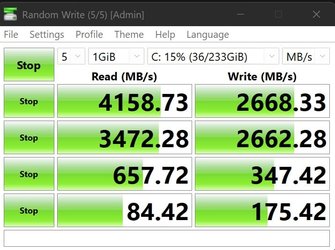
Here is my end result as I have a Samsung 980 Pro NvMe 250GB as my C: Drive on my PC.
Good luck on the laptop and hope it all works out soon.
 

Attachments

  • SamsungNvMe_256GB.jpg
    SamsungNvMe_256GB.jpg
    55.6 KB · Views: 0

My Computer My Computer

At a glance

Windows 11 Pro (x64) 24H2 build 26100.231411th Generation i5-1150016 GigIntel UHD 750
OS
Windows 11 Pro (x64) 24H2 build 26100.2314
Computer type
PC/Desktop
Manufacturer/Model
Self built - Dec 2021
CPU
11th Generation i5-11500
Motherboard
Gigabyte AORUS B560M Pro
Memory
16 Gig
Graphics Card(s)
Intel UHD 750
Sound Card
Chip on Motherboard
Monitor(s) Displays
32" UHD Samsung
Screen Resolution
3840 x 2160
Hard Drives
C: Drive Samsung 980 Pro NVMe 250GB
D: 1TB
E: 3TB
PSU
750 Watt
Case
Fractal Meshify 2 Compact
Cooling
Cooler Master Hyper 212 Black Edition
Keyboard
Logitech
Mouse
Squeaky one
Internet Speed
1G/1G
Browser
MS Edge
Antivirus
Got my 2 Shots plus my Booster Malwarebytes +
Hi Hazel, did you download Samsung Magician to see if it would recognize your drive? How did you try to update the firmware for the drive? It probably won't matter at all about the firmware, but does Magician see your drive if you have magician.
 
Last edited:

My Computers My Computers

  • At a glance

    Windows11intel 8250 I58gbintel uhd 620
    OS
    Windows11
    Computer type
    Laptop
    Manufacturer/Model
    Huawei Matebook X Pro
    CPU
    intel 8250 I5
    Memory
    8gb
    Graphics Card(s)
    intel uhd 620
    Monitor(s) Displays
    built in laptop display
    Screen Resolution
    1920x1280
    Hard Drives
    Samsung 970 Evo 500gb M2
    Browser
    Edge
    Antivirus
    Defender
  • At a glance

    Windows 10AMD Ryzen 7300U16 GB DDR4AMD Raedon RX Vega graphics onboard
    Operating System
    Windows 10
    Computer type
    Laptop
    Manufacturer/Model
    Acer A515-43-R6DE
    CPU
    AMD Ryzen 7300U
    Memory
    16 GB DDR4
    Graphics card(s)
    AMD Raedon RX Vega graphics onboard
    Monitor(s) Displays
    15"6 FHD IPS Slim Bezel
    Hard Drives
    512cb PCie NVME SSD
    Case
    Pure Silver
    Keyboard
    Inbuilt
    Mouse
    Touchpad and Logitech external mouse
    Browser
    Edge
    Antivirus
    Defender
Yes installed it. But again the literature says it won't be effective if you have a Raid driver (which my bios says it has - the IRST Raid driver).

I can't see the magician software does much - it says firmware and drivers up to date. But the driver is in control panel, not device manager (and the drive still doesn't show in bios).

Doesn't seem to have made much difference to the temperature. It's ok but running hotter than before and fan on a lot.
 

My Computers My Computers

  • At a glance

    Windows 11 Home 25H2Core i5-1035G132gb
    OS
    Windows 11 Home 25H2
    Computer type
    Laptop
    Manufacturer/Model
    HP Pavilion 14-ce3606sa
    CPU
    Core i5-1035G1
    Memory
    32gb
    Hard Drives
    Samsung 870 evo sata ssd
    Cooling
    Could be better
    Internet Speed
    50 mbps Starlink
    Browser
    Firefox
    Other Info
    Originally came installed with a 500gb H10 Optane ssd
  • At a glance

    Windows 11 HomeIntel Core i5-1035G116gb
    Operating System
    Windows 11 Home
    Computer type
    Laptop
    Manufacturer/Model
    HP Pavilion ce3606sa
    CPU
    Intel Core i5-1035G1
    Memory
    16gb
    Hard Drives
    Hynix Gold P31 2TB
    Internet Speed
    200mbps Starlink
    Browser
    Firefox
    Antivirus
    Defender
You have been trying really hard and hope it works out for you in the end.
I would have given up a few days ago. lol
Here is my end result as I have a Samsung 980 Pro NvMe 250GB as my C: Drive on my PC.
Good luck on the laptop and hope it all works out soon.
Yep. I had had enough by today. The positives are I have a working computer. And I have an image with all my programs on that will restore if needed. After doing the image I thought it would be ok to try a few things as then if it got messed up I could just reinstall the image.

So I installed all the optional drivers. Made no difference to anything! And the Samsung software and driver.

The slightly annoying thing is it did run much better with the original drive - I guess everything tuned to it - hardware and software. But it's fine - it's no slouch.
 

My Computers My Computers

  • At a glance

    Windows 11 Home 25H2Core i5-1035G132gb
    OS
    Windows 11 Home 25H2
    Computer type
    Laptop
    Manufacturer/Model
    HP Pavilion 14-ce3606sa
    CPU
    Core i5-1035G1
    Memory
    32gb
    Hard Drives
    Samsung 870 evo sata ssd
    Cooling
    Could be better
    Internet Speed
    50 mbps Starlink
    Browser
    Firefox
    Other Info
    Originally came installed with a 500gb H10 Optane ssd
  • At a glance

    Windows 11 HomeIntel Core i5-1035G116gb
    Operating System
    Windows 11 Home
    Computer type
    Laptop
    Manufacturer/Model
    HP Pavilion ce3606sa
    CPU
    Intel Core i5-1035G1
    Memory
    16gb
    Hard Drives
    Hynix Gold P31 2TB
    Internet Speed
    200mbps Starlink
    Browser
    Firefox
    Antivirus
    Defender

My Computers My Computers

  • At a glance

    Windows11intel 8250 I58gbintel uhd 620
    OS
    Windows11
    Computer type
    Laptop
    Manufacturer/Model
    Huawei Matebook X Pro
    CPU
    intel 8250 I5
    Memory
    8gb
    Graphics Card(s)
    intel uhd 620
    Monitor(s) Displays
    built in laptop display
    Screen Resolution
    1920x1280
    Hard Drives
    Samsung 970 Evo 500gb M2
    Browser
    Edge
    Antivirus
    Defender
  • At a glance

    Windows 10AMD Ryzen 7300U16 GB DDR4AMD Raedon RX Vega graphics onboard
    Operating System
    Windows 10
    Computer type
    Laptop
    Manufacturer/Model
    Acer A515-43-R6DE
    CPU
    AMD Ryzen 7300U
    Memory
    16 GB DDR4
    Graphics card(s)
    AMD Raedon RX Vega graphics onboard
    Monitor(s) Displays
    15"6 FHD IPS Slim Bezel
    Hard Drives
    512cb PCie NVME SSD
    Case
    Pure Silver
    Keyboard
    Inbuilt
    Mouse
    Touchpad and Logitech external mouse
    Browser
    Edge
    Antivirus
    Defender
Thanks. Well I quite like installing on computers as long as I’ve got one to use at the same time! On this occasion I don’t.

Thanks for the link. There are just no adjustable settings in these bios.
 

My Computers My Computers

  • At a glance

    Windows 11 Home 25H2Core i5-1035G132gb
    OS
    Windows 11 Home 25H2
    Computer type
    Laptop
    Manufacturer/Model
    HP Pavilion 14-ce3606sa
    CPU
    Core i5-1035G1
    Memory
    32gb
    Hard Drives
    Samsung 870 evo sata ssd
    Cooling
    Could be better
    Internet Speed
    50 mbps Starlink
    Browser
    Firefox
    Other Info
    Originally came installed with a 500gb H10 Optane ssd
  • At a glance

    Windows 11 HomeIntel Core i5-1035G116gb
    Operating System
    Windows 11 Home
    Computer type
    Laptop
    Manufacturer/Model
    HP Pavilion ce3606sa
    CPU
    Intel Core i5-1035G1
    Memory
    16gb
    Hard Drives
    Hynix Gold P31 2TB
    Internet Speed
    200mbps Starlink
    Browser
    Firefox
    Antivirus
    Defender
But it’s a very good point. If the bios doesn’t recognise the drive then the drive won’t get firmware updates.
The Bios may not show the drive, but it has to recognize it or the laptop wouldn't boot.
 

My Computers My Computers

  • At a glance

    Windows 11 Pro 25H2Intel Core i7-10700K16GB (8GB PC4-19200 DDR4 SDRAM x2)NVIDIA GeForce GTX 1050 TI
    OS
    Windows 11 Pro 25H2
    Computer type
    PC/Desktop
    Manufacturer/Model
    PowerSpec B746
    CPU
    Intel Core i7-10700K
    Motherboard
    ASRock Z490 Phantom Gaming 4/ax
    Memory
    16GB (8GB PC4-19200 DDR4 SDRAM x2)
    Graphics Card(s)
    NVIDIA GeForce GTX 1050 TI
    Sound Card
    Realtek Audio
    Monitor(s) Displays
    #1. LG ULTRAWIDE 34" #2. AOC Q32G2WG3 32"
    Screen Resolution
    #1. 3440 X 1440 #2. 1920 x 1080
    Hard Drives
    NVMe WDC WDS100T2B0C-00PXH0 1TB
    Samsung SSD 860 EVO 1TB
    PSU
    750 Watts (62.5A)
    Case
    PowerSpec/Lian Li ATX 205
    Keyboard
    Logitech K270
    Mouse
    Logitech M185
    Browser
    Microsoft Edge and Firefox
    Antivirus
    Webroot SecureAnywhere CE 26.1
  • At a glance

    Windows 11 Canary ChannelIntel Core i5-8400 CPU @ 2.80GHz16 MB DDR 4-2666
    Operating System
    Windows 11 Canary Channel
    Computer type
    PC/Desktop
    Manufacturer/Model
    PowerSpec G156
    CPU
    Intel Core i5-8400 CPU @ 2.80GHz
    Motherboard
    AsusTeK Prime B360M-A
    Memory
    16 MB DDR 4-2666
    Monitor(s) Displays
    23" Speptre HDMI 75Hz
    Screen Resolution
    1920x1080
    Hard Drives
    Samsung 970 EVO 500GB NVMe
    Keyboard
    Logitek K270
    Mouse
    Logitek M185
    Browser
    Firefox, Edge and Edge Canary
    Antivirus
    Windows Defender

My Computers My Computers

  • At a glance

    Windows11intel 8250 I58gbintel uhd 620
    OS
    Windows11
    Computer type
    Laptop
    Manufacturer/Model
    Huawei Matebook X Pro
    CPU
    intel 8250 I5
    Memory
    8gb
    Graphics Card(s)
    intel uhd 620
    Monitor(s) Displays
    built in laptop display
    Screen Resolution
    1920x1280
    Hard Drives
    Samsung 970 Evo 500gb M2
    Browser
    Edge
    Antivirus
    Defender
  • At a glance

    Windows 10AMD Ryzen 7300U16 GB DDR4AMD Raedon RX Vega graphics onboard
    Operating System
    Windows 10
    Computer type
    Laptop
    Manufacturer/Model
    Acer A515-43-R6DE
    CPU
    AMD Ryzen 7300U
    Memory
    16 GB DDR4
    Graphics card(s)
    AMD Raedon RX Vega graphics onboard
    Monitor(s) Displays
    15"6 FHD IPS Slim Bezel
    Hard Drives
    512cb PCie NVME SSD
    Case
    Pure Silver
    Keyboard
    Inbuilt
    Mouse
    Touchpad and Logitech external mouse
    Browser
    Edge
    Antivirus
    Defender
@Hazel123 There are sites you can probably find unlocked versions of the BIOS for that laptop (HP almost certainly have a password they can use to reveal any hidden BIOS pages/ sections to access hidden options if they exist), but I seriously advise not trying to flash with one of the custom BIOS files unless/ until you are willing to risk bricking the device, so maybe once you replace it further down the road, if you are willing to experiment with it.
Obviously such sites may host malware disguised as/ integrated into BIOS file images so extreme caution and deep research is a must.
You could also buy a device designed to connect directly to the BIOS chip with software that allows you to edit, export, overwrite and flash the BIOS, again such a device is super easy to use wrongly and brick the system being worked on if used without caution and knowledge. :)
 

My Computer My Computer

At a glance

Windows 11 Pro 22H2, build: 22621.521Intel i7-12700K 3.6GHz Base (5.0GHz Turbo)64GB DDR 3600MhzAsus Tuff RTX 3080 10GB OC
OS
Windows 11 Pro 22H2, build: 22621.521
Computer type
PC/Desktop
Manufacturer/Model
Scan 3XS Custom 1700
CPU
Intel i7-12700K 3.6GHz Base (5.0GHz Turbo)
Motherboard
Asus ProArt Creator B660 D4
Memory
64GB DDR 3600Mhz
Graphics Card(s)
Asus Tuff RTX 3080 10GB OC
Sound Card
Onboard Realtek
Monitor(s) Displays
Gigabyte G32QC 32inch 16:9 curved @2560 x 1440p 165Hz Freesync Premium Pro/ Dell SE2422H 24inch 16:9 1920 x 1080p 75Hz Freesync
Screen Resolution
2560 x 1440p & 1920 x 1080p
Hard Drives
WD SN570 1TB NVME (Boot), Samsung 870QVO 1TB (SSD), SanDisk 3D Ultra 500Gb (SSD) x2, Seagate 3Tb Expansion Desk (Ext HDD), 2x Toshiba 1Tb P300 (Ext HDD)
PSU
Corsair RM1000X Modular
Case
Corsair 4000D Airflow Desktop
Cooling
Corsair Hydro H150i RGB Pro XT 360mm Liquid Cooler, 3 x 120mm fans, 1x Exhaust
Keyboard
Microsoft Ergonomic
Mouse
Logitech G402
Internet Speed
800Mbs
Browser
Edge Chromium
Antivirus
Defender, Malwarebytes
@Hazel123 There are sites you can probably find unlocked versions of the BIOS for that laptop (HP almost certainly have a password they can use to reveal any hidden BIOS pages/ sections to access hidden options if they exist), but I seriously advise not trying to flash with one of the custom BIOS files unless/ until you are willing to risk bricking the device, so maybe once you replace it further down the road, if you are willing to experiment with it.
Obviously such sites may host malware disguised as/ integrated into BIOS file images so extreme caution and deep research is a must.
You could also buy a device designed to connect directly to the BIOS chip with software that allows you to edit, export, overwrite and flash the BIOS, again such a device is super easy to use wrongly and brick the system being worked on if used without caution and knowledge. :)
This 👆 I for one would never flash the bios with any other than an official one
 

My Computer My Computer

At a glance

Windows 11 Pro Beta, 11 Dev, W11 CanaryAMD Ryzen™ 9 5900HX32GBNVIDIA® GeForce RTX™ 3070 8GB GDDR6
OS
Windows 11 Pro Beta, 11 Dev, W11 Canary
Computer type
Laptop
Manufacturer/Model
Dell Alienware M15 Ryzen Edition R6
CPU
AMD Ryzen™ 9 5900HX
Memory
32GB
Graphics Card(s)
NVIDIA® GeForce RTX™ 3070 8GB GDDR6
Hard Drives
1 x Samsung 980 Pro 1TB
1 x Samsung 970 Evo Plus 1TB
Back
Top Bottom