Solved Issues with Microphone after Windows 11 Version 22H2 Update


gammonGo

Well-known member
Member
Local time
6:19 PM
Posts
30
OS
Win 11
Windows 11 updated to Version 22H2 (OS Build 22621.1992) and, per Windows Update's usual, it has changed the way things work and there are problems which, also per Windows usual, the instructions for fixing don't match what's on my system. This time, I'm unable to figure out what to do (aside: Why does MS do this to us? It takes hours of time to administer a home PC.)

This time, the microphone has stopped working:
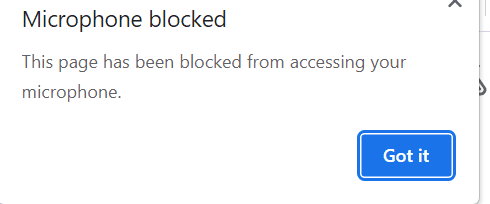
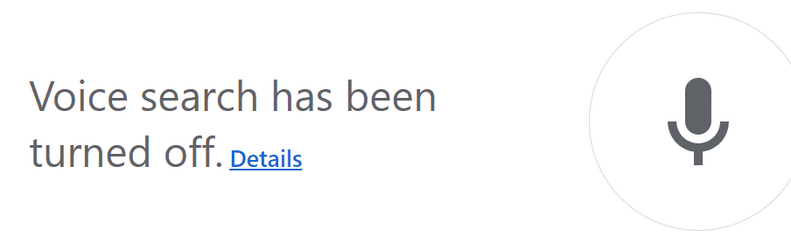
  • In Chrome's home page I click the microphone to speak my search and it says "Voice search has been turned off" with a link for "Details". There is also a "red x microphone" in the status bar which tells me "Microphone blocked", but no option for fixing it.
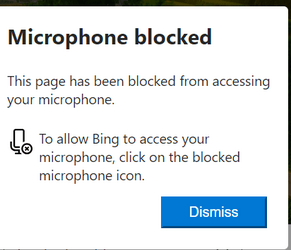
  • In Microsoft Edge it says "Microphone Blocked" and doesn't give any optoin for fixing it.
  • In Zoom I'm told "There is an issue with your microphone, select a different one" and no other microphones are presented (I only have the one).

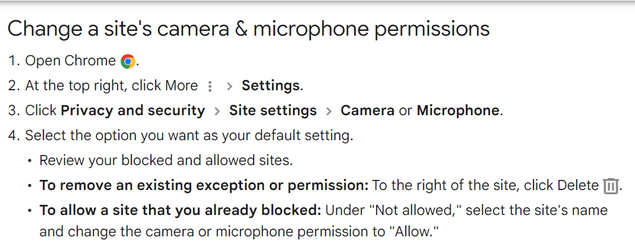
In Chrome, I click the "Details" link, but cannot follow the directions since they doesn't match my screen at most steps (*sigh*). The instructions tell me to go to Settings > Privacy and Security > etc. But there is no Privacy and Security in Chrome Settings. My only choices are "Sync and Google Services", "Manage your account", "Customizze your profile", "Import Bookmark Settings".

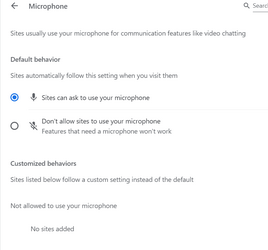
Finally, I find a setting which is set to "Sites can ask to use your microphone". But it is already turned on. Sites that are not allowed to use the microphone: None.

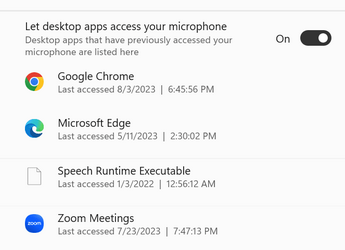
Somehow I find page. But all of those settings are also already turned on. "Microphone access" is On; "Let apps access your microphone" is On. "Let desktop apps access your microphone" is On and Chrome, Edge, and Zoom are listed (so is "Speech runtime executable").

Also note that the camera works. I'm out of ideas (and frustrated) and can't fix the microphone. Any ideas?
MS Settings 2.pngMS Settings.png

MS Support.pngChrome Settings.pngEdge Notification.png

Chrome Details.pngChrome Notification.pngChrome Response.png
 
Windows Build/Version
Version 22H2 (OS Build 22621.1992)

My Computer My Computer

At a glance

Win 11Intel(R) Core(TM) i5-10310U CPU @ 1.70GHz, 2216GBIntel(R) UHD Graphics
OS
Win 11
Computer type
Laptop
Manufacturer/Model
Lenovo 20UCS0A200
CPU
Intel(R) Core(TM) i5-10310U CPU @ 1.70GHz, 22
Motherboard
I dunno.
Memory
16GB
Graphics Card(s)
Intel(R) UHD Graphics
Sound Card
Realtek High Definition Audio(SST)
Monitor(s) Displays
I dunno. It's built in.
Screen Resolution
1920 x 1080 x 60 hertz
Hard Drives
WDC PC SN730 SDBQNTY-256G-1001
PSU
I dunno
Browser
Chrome, usually
Antivirus
MalwareBytes
Other Info
It's really a hybrid laptop/tablet
Welcome to the Forum !

Consider uninstalling the update to confirm the cause and let's go from there.
 

My Computer My Computer

At a glance

Win11 Ver 25H2 26200.6899Intel i58gb
OS
Win11 Ver 25H2 26200.6899
Computer type
Laptop
Manufacturer/Model
Dell
CPU
Intel i5
Memory
8gb
Screen Resolution
1920x1080
Hard Drives
256gb
Browser
Firefox
Antivirus
Windows Defender
Welcome to the Forum !

Consider uninstalling the update to confirm the cause and let's go from there.
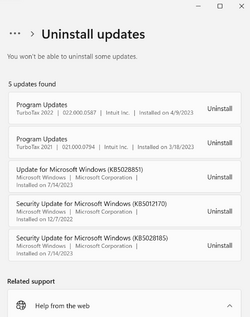
Trying that now. But it doesn't seem to want to allow me. In Settings > Windows Updates > Update History > Uninstall Updates it only shows me updates to programs on my computer... or rather, on my other computer. It shows nothing about an update in the past few days and also says I won't be able to "uninstall some update".

On top of that, it shows that I already have another update to install.

Windows Updates.pngAnother Update.png
 

My Computer My Computer

At a glance

Win 11Intel(R) Core(TM) i5-10310U CPU @ 1.70GHz, 2216GBIntel(R) UHD Graphics
OS
Win 11
Computer type
Laptop
Manufacturer/Model
Lenovo 20UCS0A200
CPU
Intel(R) Core(TM) i5-10310U CPU @ 1.70GHz, 22
Motherboard
I dunno.
Memory
16GB
Graphics Card(s)
Intel(R) UHD Graphics
Sound Card
Realtek High Definition Audio(SST)
Monitor(s) Displays
I dunno. It's built in.
Screen Resolution
1920 x 1080 x 60 hertz
Hard Drives
WDC PC SN730 SDBQNTY-256G-1001
PSU
I dunno
Browser
Chrome, usually
Antivirus
MalwareBytes
Other Info
It's really a hybrid laptop/tablet
Install the latest update and see what happens. Also, check your Device Manager for errors, Windows Event Viewer, Windows Reliability Monitor, run Windows Update Troubleshooter.

In your specs, you say your laptop is a "hybrid", meaning ? Did you replace some hardware and this is first time updating, have previous updates been successful ?
 

My Computer My Computer

At a glance

Win11 Ver 25H2 26200.6899Intel i58gb
OS
Win11 Ver 25H2 26200.6899
Computer type
Laptop
Manufacturer/Model
Dell
CPU
Intel i5
Memory
8gb
Screen Resolution
1920x1080
Hard Drives
256gb
Browser
Firefox
Antivirus
Windows Defender
Install the latest update and see what happens. Also, check your Device Manager for errors, Windows Event Viewer, Windows Reliability Monitor, run Windows Update Troubleshooter.

In your specs, you say your laptop is a "hybrid", meaning ? Did you replace some hardware and this is first time updating, have previous updates been successful ?
"Hybrid" it's a laptop, but the monitor hinges fold backwards and it goes into tablet mode. Working on the rest of your suggestions now. Then maybe I'll try the latest update. I'm a little leery of doing more updates when I already have an update-caused problem.
 

My Computer My Computer

At a glance

Win 11Intel(R) Core(TM) i5-10310U CPU @ 1.70GHz, 2216GBIntel(R) UHD Graphics
OS
Win 11
Computer type
Laptop
Manufacturer/Model
Lenovo 20UCS0A200
CPU
Intel(R) Core(TM) i5-10310U CPU @ 1.70GHz, 22
Motherboard
I dunno.
Memory
16GB
Graphics Card(s)
Intel(R) UHD Graphics
Sound Card
Realtek High Definition Audio(SST)
Monitor(s) Displays
I dunno. It's built in.
Screen Resolution
1920 x 1080 x 60 hertz
Hard Drives
WDC PC SN730 SDBQNTY-256G-1001
PSU
I dunno
Browser
Chrome, usually
Antivirus
MalwareBytes
Other Info
It's really a hybrid laptop/tablet

Install the latest update and see what happens. Also, check your Device Manager for errors, Windows Event Viewer, Windows Reliability Monitor, run Windows Update Troubleshooter.

In your specs, you say your laptop is a "hybrid", meaning ? Did you replace some hardware and this is first time updating, have previous updates been successful ?
Device Manager: Audio inputs and outputs shows speakers, but nothing about a microphone. I don't see any errors.
Event Viewer: I can't figure out how to use it and it has a really annoying UI. There's a Summary of Admin Events squeezed into a small region and I can't tell what any of the events under it mean.
I can't find the Reliability Monitor or the Update Troubleshooter. A web page on the Update Troubleshooter did not help.
 

My Computer My Computer

At a glance

Win 11Intel(R) Core(TM) i5-10310U CPU @ 1.70GHz, 2216GBIntel(R) UHD Graphics
OS
Win 11
Computer type
Laptop
Manufacturer/Model
Lenovo 20UCS0A200
CPU
Intel(R) Core(TM) i5-10310U CPU @ 1.70GHz, 22
Motherboard
I dunno.
Memory
16GB
Graphics Card(s)
Intel(R) UHD Graphics
Sound Card
Realtek High Definition Audio(SST)
Monitor(s) Displays
I dunno. It's built in.
Screen Resolution
1920 x 1080 x 60 hertz
Hard Drives
WDC PC SN730 SDBQNTY-256G-1001
PSU
I dunno
Browser
Chrome, usually
Antivirus
MalwareBytes
Other Info
It's really a hybrid laptop/tablet


Check the above links. That said, after again reading your OP the main problem is the microphone. Check the 3rd link and google other ideas Also, use the Tutorial section and Search section at the top of the page.


If the update problem persists after running the Windows Troubleshooter, do a System Restore to the date before issue began.
 

My Computer My Computer

At a glance

Win11 Ver 25H2 26200.6899Intel i58gb
OS
Win11 Ver 25H2 26200.6899
Computer type
Laptop
Manufacturer/Model
Dell
CPU
Intel i5
Memory
8gb
Screen Resolution
1920x1080
Hard Drives
256gb
Browser
Firefox
Antivirus
Windows Defender
Getting back to this now. Thanks for all your help. The microphone works again in bth browsers. I can't test Zoom right now because I can't sign in, but I suspect it's working, too. After the next Windows Update, the browsers asked for permission to use the microphone, I granted it, and the microphone worked. I suspect the problem is that the update reset permissions and the procedure for granting permission was broken. Or something like that. Anyway, thanks again.
 

My Computer My Computer

At a glance

Win 11Intel(R) Core(TM) i5-10310U CPU @ 1.70GHz, 2216GBIntel(R) UHD Graphics
OS
Win 11
Computer type
Laptop
Manufacturer/Model
Lenovo 20UCS0A200
CPU
Intel(R) Core(TM) i5-10310U CPU @ 1.70GHz, 22
Motherboard
I dunno.
Memory
16GB
Graphics Card(s)
Intel(R) UHD Graphics
Sound Card
Realtek High Definition Audio(SST)
Monitor(s) Displays
I dunno. It's built in.
Screen Resolution
1920 x 1080 x 60 hertz
Hard Drives
WDC PC SN730 SDBQNTY-256G-1001
PSU
I dunno
Browser
Chrome, usually
Antivirus
MalwareBytes
Other Info
It's really a hybrid laptop/tablet
Back
Top Bottom