Solved Just converted to Windows 11, but getting Blue Screen of Death


Referring to Post #15
(Sorry for the wait, It was getting late and I had to get to sleep for work tomorrow/today)

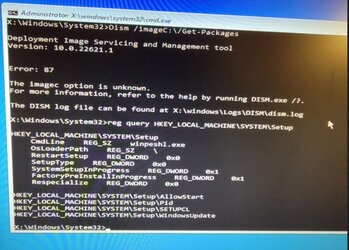
The first command line worked, but I could not get the next two lines to work (the ones that started with Dism)
The HKEY command line did work.

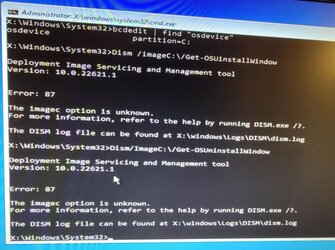
See attached pics. I kept getting a 87 Error, the same exact error for both Dism command lines. I even tried deleting the space between the DISM and the /Image just in case I was looking at it incorrectly.

Thanks
 

Attachments
  • BSOD Image C commands.JPG
    BSOD Image C commands.JPG
    91.3 KB · Views: 2
  • BSOD Hkey command.JPG
    BSOD Hkey command.JPG
    114 KB · Views: 3

My Computer My Computer

At a glance

Windows 11Intel Core i7 870032 GB DDR3Nvidia GeForce GTX 1060
OS
Windows 11
Computer type
PC/Desktop
Manufacturer/Model
Custom Self Built
CPU
Intel Core i7 8700
Motherboard
ASUSTeK ROG STRIX Z370-H
Memory
32 GB DDR3
Graphics Card(s)
Nvidia GeForce GTX 1060
Monitor(s) Displays
ASUS (Dual Monitor)
Screen Resolution
1920 x 1280
Hard Drives
Samsung SSD 850 EVD 500GB
Internet Speed
400 Mbps (Spectrum)
Browser
Google Chrome
Antivirus
Malware Bytes (Free Version)
The commands displayed imageC: instead of image:C:

Please try them again to see if they run with or without error codes.
 

My Computer My Computer

At a glance

Windows 10Intel(R) Core(TM) i7-4800MQ CPU @ 2.70GHz16 GB Total: Manufacturer : Samsung MemoryTyp...NVIDIA Quadro K3100M; Intel(R) HD Graphics 4600
OS
Windows 10
Computer type
Laptop
Manufacturer/Model
HP
CPU
Intel(R) Core(TM) i7-4800MQ CPU @ 2.70GHz
Motherboard
Product : 190A Version : KBC Version 94.56
Memory
16 GB Total: Manufacturer : Samsung MemoryType : DDR3 FormFactor : SODIMM Capacity : 8GB Speed : 1600
Graphics Card(s)
NVIDIA Quadro K3100M; Intel(R) HD Graphics 4600
Sound Card
IDT High Definition Audio CODEC; PNP Device ID HDAUDIO\FUNC_01&VEN_111D&DEV_76E0
Hard Drives
Model Hitachi HTS727575A9E364
Antivirus
Microsoft Defender
Other Info
Mobile Workstation
Wait, I think I figured it out, I will try again :)
I wish I could copy and paste...lol.
 

My Computer My Computer

At a glance

Windows 11Intel Core i7 870032 GB DDR3Nvidia GeForce GTX 1060
OS
Windows 11
Computer type
PC/Desktop
Manufacturer/Model
Custom Self Built
CPU
Intel Core i7 8700
Motherboard
ASUSTeK ROG STRIX Z370-H
Memory
32 GB DDR3
Graphics Card(s)
Nvidia GeForce GTX 1060
Monitor(s) Displays
ASUS (Dual Monitor)
Screen Resolution
1920 x 1280
Hard Drives
Samsung SSD 850 EVD 500GB
Internet Speed
400 Mbps (Spectrum)
Browser
Google Chrome
Antivirus
Malware Bytes (Free Version)
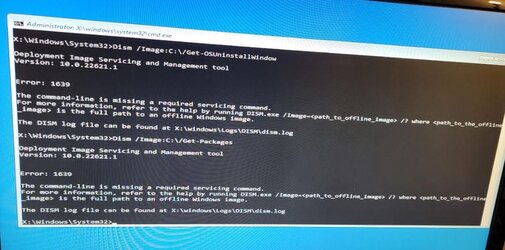
You can't see it from the enclosed pic, but, I ran the first command on the list just in case, then ran the other two Dism commands. I got a different error though.
 

Attachments

  • BSOD Image C Command 2.JPG
    BSOD Image C Command 2.JPG
    73.5 KB · Views: 2

My Computer My Computer

At a glance

Windows 11Intel Core i7 870032 GB DDR3Nvidia GeForce GTX 1060
OS
Windows 11
Computer type
PC/Desktop
Manufacturer/Model
Custom Self Built
CPU
Intel Core i7 8700
Motherboard
ASUSTeK ROG STRIX Z370-H
Memory
32 GB DDR3
Graphics Card(s)
Nvidia GeForce GTX 1060
Monitor(s) Displays
ASUS (Dual Monitor)
Screen Resolution
1920 x 1280
Hard Drives
Samsung SSD 850 EVD 500GB
Internet Speed
400 Mbps (Spectrum)
Browser
Google Chrome
Antivirus
Malware Bytes (Free Version)
If these dism commands run without errors in Windows RE then run:

DISM /Image:C:/Set-OSUninstallWindow /Value:60

The commands were checked for this tutorial:


Type:
notepad
notepad
notepad

Search for:
%systemroot%\Minidump
%systemroot%\memory.dmp
%systemroot%\LiveKernelReports

save to notepad > save to a flash drive > upload into this thread


Run startup repair > if it creates a srttrail > post a share link


Indicate whether there is an option to uninstall updates or go back:


My Computer My Computer

At a glance

Windows 10Intel(R) Core(TM) i7-4800MQ CPU @ 2.70GHz16 GB Total: Manufacturer : Samsung MemoryTyp...NVIDIA Quadro K3100M; Intel(R) HD Graphics 4600
OS
Windows 10
Computer type
Laptop
Manufacturer/Model
HP
CPU
Intel(R) Core(TM) i7-4800MQ CPU @ 2.70GHz
Motherboard
Product : 190A Version : KBC Version 94.56
Memory
16 GB Total: Manufacturer : Samsung MemoryType : DDR3 FormFactor : SODIMM Capacity : 8GB Speed : 1600
Graphics Card(s)
NVIDIA Quadro K3100M; Intel(R) HD Graphics 4600
Sound Card
IDT High Definition Audio CODEC; PNP Device ID HDAUDIO\FUNC_01&VEN_111D&DEV_76E0
Hard Drives
Model Hitachi HTS727575A9E364
Antivirus
Microsoft Defender
Other Info
Mobile Workstation
Heading to bed > will check the thread later in the day
 

My Computer My Computer

At a glance

Windows 10Intel(R) Core(TM) i7-4800MQ CPU @ 2.70GHz16 GB Total: Manufacturer : Samsung MemoryTyp...NVIDIA Quadro K3100M; Intel(R) HD Graphics 4600
OS
Windows 10
Computer type
Laptop
Manufacturer/Model
HP
CPU
Intel(R) Core(TM) i7-4800MQ CPU @ 2.70GHz
Motherboard
Product : 190A Version : KBC Version 94.56
Memory
16 GB Total: Manufacturer : Samsung MemoryType : DDR3 FormFactor : SODIMM Capacity : 8GB Speed : 1600
Graphics Card(s)
NVIDIA Quadro K3100M; Intel(R) HD Graphics 4600
Sound Card
IDT High Definition Audio CODEC; PNP Device ID HDAUDIO\FUNC_01&VEN_111D&DEV_76E0
Hard Drives
Model Hitachi HTS727575A9E364
Antivirus
Microsoft Defender
Other Info
Mobile Workstation
Not a problem, thanks for your help. I will try to get these posted before I get ready for work.
 

My Computer My Computer

At a glance

Windows 11Intel Core i7 870032 GB DDR3Nvidia GeForce GTX 1060
OS
Windows 11
Computer type
PC/Desktop
Manufacturer/Model
Custom Self Built
CPU
Intel Core i7 8700
Motherboard
ASUSTeK ROG STRIX Z370-H
Memory
32 GB DDR3
Graphics Card(s)
Nvidia GeForce GTX 1060
Monitor(s) Displays
ASUS (Dual Monitor)
Screen Resolution
1920 x 1280
Hard Drives
Samsung SSD 850 EVD 500GB
Internet Speed
400 Mbps (Spectrum)
Browser
Google Chrome
Antivirus
Malware Bytes (Free Version)
Last post before I get ready for work, I work from home so I will see what I can do at lunchtime.

When I ready your post, I realized I missed a step, so I looked over the instructions again and found that I am indeed able to get into safe mode, but, when I try to get into safe mode with networking, it crashes again with the same BSOD as before, but it should make saving files much easier.

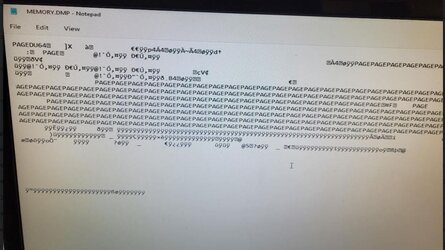
When I ran the first dump (minidump), It would not allow me to, but the memory dump worked, but, it just gave me 750MB of gibberish. When I look on the bottom of the notepad, it says ANSI, is there a way to save this so that it's readable to you? I gave an example of what I see on the notepad.
 

Attachments

  • Memory Dump Results.JPG
    Memory Dump Results.JPG
    83.9 KB · Views: 1

My Computer My Computer

At a glance

Windows 11Intel Core i7 870032 GB DDR3Nvidia GeForce GTX 1060
OS
Windows 11
Computer type
PC/Desktop
Manufacturer/Model
Custom Self Built
CPU
Intel Core i7 8700
Motherboard
ASUSTeK ROG STRIX Z370-H
Memory
32 GB DDR3
Graphics Card(s)
Nvidia GeForce GTX 1060
Monitor(s) Displays
ASUS (Dual Monitor)
Screen Resolution
1920 x 1280
Hard Drives
Samsung SSD 850 EVD 500GB
Internet Speed
400 Mbps (Spectrum)
Browser
Google Chrome
Antivirus
Malware Bytes (Free Version)
Pleas upload that C:\Windows\Memory.dmp file to the cloud with a (public) link to it here. Also please follow the BSOD Posting Instructions to provide other important troubleshooting data.
 

My Computer My Computer

At a glance

Windows
OS
Windows
Still new to this Google Drive thing, let me know if this doesn't work.

Like I said, the file looks like gibberish, so if I need to do something to it on my end to make it more readable, please let me know.

Thanks


My Computer My Computer

At a glance

Windows 11Intel Core i7 870032 GB DDR3Nvidia GeForce GTX 1060
OS
Windows 11
Computer type
PC/Desktop
Manufacturer/Model
Custom Self Built
CPU
Intel Core i7 8700
Motherboard
ASUSTeK ROG STRIX Z370-H
Memory
32 GB DDR3
Graphics Card(s)
Nvidia GeForce GTX 1060
Monitor(s) Displays
ASUS (Dual Monitor)
Screen Resolution
1920 x 1280
Hard Drives
Samsung SSD 850 EVD 500GB
Internet Speed
400 Mbps (Spectrum)
Browser
Google Chrome
Antivirus
Malware Bytes (Free Version)
If there is any way to salvage Windows 11 since I can see it in safe mode, I'd like to do that, but if all else fails, I can always go wipe it and go back to Windows 10.
 

My Computer My Computer

At a glance

Windows 11Intel Core i7 870032 GB DDR3Nvidia GeForce GTX 1060
OS
Windows 11
Computer type
PC/Desktop
Manufacturer/Model
Custom Self Built
CPU
Intel Core i7 8700
Motherboard
ASUSTeK ROG STRIX Z370-H
Memory
32 GB DDR3
Graphics Card(s)
Nvidia GeForce GTX 1060
Monitor(s) Displays
ASUS (Dual Monitor)
Screen Resolution
1920 x 1280
Hard Drives
Samsung SSD 850 EVD 500GB
Internet Speed
400 Mbps (Spectrum)
Browser
Google Chrome
Antivirus
Malware Bytes (Free Version)
No. That's not what I asked for, it's the file C:\Windows\Memory.dmp that I want, not a txt file.
 

My Computer My Computer

At a glance

Windows
OS
Windows
If there is any way to salvage Windows 11 since I can see it in safe mode, I'd like to do that, but if all else fails, I can always go wipe it and go back to Windows 10.
What do you mean salvage do you mean recover your personal files?

Can you boot your computer into Safe Mode?
 

My Computer My Computer

At a glance

Windows 11AMD Ryzen 7 5700GMicron Technology DDR4-3200 16GBNVIDIA GeForce RTX 3060
OS
Windows 11
Computer type
PC/Desktop
Manufacturer/Model
HP Pavilion
CPU
AMD Ryzen 7 5700G
Motherboard
Erica6
Memory
Micron Technology DDR4-3200 16GB
Graphics Card(s)
NVIDIA GeForce RTX 3060
Sound Card
Realtek ALC671
Monitor(s) Displays
Samsung SyncMaster U28E590
Screen Resolution
3840 x 2160
Hard Drives
SAMSUNG MZVLQ1T0HALB-000H1
It took me awhile to figure out, but I can boot into safe mode. When I go safe mode with networking, it crashes.
 

My Computer My Computer

At a glance

Windows 11Intel Core i7 870032 GB DDR3Nvidia GeForce GTX 1060
OS
Windows 11
Computer type
PC/Desktop
Manufacturer/Model
Custom Self Built
CPU
Intel Core i7 8700
Motherboard
ASUSTeK ROG STRIX Z370-H
Memory
32 GB DDR3
Graphics Card(s)
Nvidia GeForce GTX 1060
Monitor(s) Displays
ASUS (Dual Monitor)
Screen Resolution
1920 x 1280
Hard Drives
Samsung SSD 850 EVD 500GB
Internet Speed
400 Mbps (Spectrum)
Browser
Google Chrome
Antivirus
Malware Bytes (Free Version)
Uninstall network card driver then try booting normal mode.
 

My Computer My Computer

At a glance

Windows 11AMD Ryzen 7 5700GMicron Technology DDR4-3200 16GBNVIDIA GeForce RTX 3060
OS
Windows 11
Computer type
PC/Desktop
Manufacturer/Model
HP Pavilion
CPU
AMD Ryzen 7 5700G
Motherboard
Erica6
Memory
Micron Technology DDR4-3200 16GB
Graphics Card(s)
NVIDIA GeForce RTX 3060
Sound Card
Realtek ALC671
Monitor(s) Displays
Samsung SyncMaster U28E590
Screen Resolution
3840 x 2160
Hard Drives
SAMSUNG MZVLQ1T0HALB-000H1
Okay, here goes. And when I got into safe mode, I was able to find the minidump folder as well.

Minidump folder
Minidump - Google Drive

Memory.dmp file
 

My Computer My Computer

At a glance

Windows 11Intel Core i7 870032 GB DDR3Nvidia GeForce GTX 1060
OS
Windows 11
Computer type
PC/Desktop
Manufacturer/Model
Custom Self Built
CPU
Intel Core i7 8700
Motherboard
ASUSTeK ROG STRIX Z370-H
Memory
32 GB DDR3
Graphics Card(s)
Nvidia GeForce GTX 1060
Monitor(s) Displays
ASUS (Dual Monitor)
Screen Resolution
1920 x 1280
Hard Drives
Samsung SSD 850 EVD 500GB
Internet Speed
400 Mbps (Spectrum)
Browser
Google Chrome
Antivirus
Malware Bytes (Free Version)

My Computer My Computer

At a glance

Windows 11Intel Core i7 870032 GB DDR3Nvidia GeForce GTX 1060
OS
Windows 11
Computer type
PC/Desktop
Manufacturer/Model
Custom Self Built
CPU
Intel Core i7 8700
Motherboard
ASUSTeK ROG STRIX Z370-H
Memory
32 GB DDR3
Graphics Card(s)
Nvidia GeForce GTX 1060
Monitor(s) Displays
ASUS (Dual Monitor)
Screen Resolution
1920 x 1280
Hard Drives
Samsung SSD 850 EVD 500GB
Internet Speed
400 Mbps (Spectrum)
Browser
Google Chrome
Antivirus
Malware Bytes (Free Version)
I could not roll back drivers, so I disabled the devices, and then the system came up. Of course, now I have no internet :)

Am I going to have to buy a new network card? I
 

My Computer My Computer

At a glance

Windows 11Intel Core i7 870032 GB DDR3Nvidia GeForce GTX 1060
OS
Windows 11
Computer type
PC/Desktop
Manufacturer/Model
Custom Self Built
CPU
Intel Core i7 8700
Motherboard
ASUSTeK ROG STRIX Z370-H
Memory
32 GB DDR3
Graphics Card(s)
Nvidia GeForce GTX 1060
Monitor(s) Displays
ASUS (Dual Monitor)
Screen Resolution
1920 x 1280
Hard Drives
Samsung SSD 850 EVD 500GB
Internet Speed
400 Mbps (Spectrum)
Browser
Google Chrome
Antivirus
Malware Bytes (Free Version)
Visit network card manufacturer website to download the newest version of driver.
 

My Computer My Computer

At a glance

Windows 11AMD Ryzen 7 5700GMicron Technology DDR4-3200 16GBNVIDIA GeForce RTX 3060
OS
Windows 11
Computer type
PC/Desktop
Manufacturer/Model
HP Pavilion
CPU
AMD Ryzen 7 5700G
Motherboard
Erica6
Memory
Micron Technology DDR4-3200 16GB
Graphics Card(s)
NVIDIA GeForce RTX 3060
Sound Card
Realtek ALC671
Monitor(s) Displays
Samsung SyncMaster U28E590
Screen Resolution
3840 x 2160
Hard Drives
SAMSUNG MZVLQ1T0HALB-000H1
I can't seem to find drivers for my card for Windows 11, so I am just going to buy a new card. I guess that's what I get for not being picky with my network adapters. I should be good from here, which is what I said last time ;) but the computer is up and running sans internet. Thanks to everyone who helped me with this, and thanks for your endless patience. If I run into any problems, I'll open a new thread.
 

My Computer My Computer

At a glance

Windows 11Intel Core i7 870032 GB DDR3Nvidia GeForce GTX 1060
OS
Windows 11
Computer type
PC/Desktop
Manufacturer/Model
Custom Self Built
CPU
Intel Core i7 8700
Motherboard
ASUSTeK ROG STRIX Z370-H
Memory
32 GB DDR3
Graphics Card(s)
Nvidia GeForce GTX 1060
Monitor(s) Displays
ASUS (Dual Monitor)
Screen Resolution
1920 x 1280
Hard Drives
Samsung SSD 850 EVD 500GB
Internet Speed
400 Mbps (Spectrum)
Browser
Google Chrome
Antivirus
Malware Bytes (Free Version)
Back
Top Bottom