Win Update KB5086672 Windows 11 Out-of-band Update build 26100.8117 (24H2) and 26200.8117 (25H2) - March 31


UPDATE 4/14:


 Microsoft Support:

March 31, 2026 - KB5086672 (OS Builds 26200.8117 and 26100.8117) Out-of-band​

This out-of-band update for Windows 11, version 25H2 and 24H2 (KB5086672) is cumulative and includes updates from previous security and non-security releases.

This update includes the improvements and features that were introduced in the March 26, 2026 non-security preview update (KB5079391), along with a fix for an installation issue that affected some devices attempting to install that update.

Improvements

This out-of-band update contains quality improvements from KB5079473 (released March 10, 2026), KB5085516 (released March 21, 2026), and KB5079391 (released March 26, 2026 - no longer offered). The following summary outlines key issues addressed by this out-of-band update. The bold text within the brackets indicates the item or area of the change.
  • [Setup] Fixed: While installing the March 2026 Windows preview update (KB5079391), some devices running Windows 11, version 25H2 or 24H2, might encounter the following error:

    Some update files are missing or have problems. We'll try to download the update again later. Error code: (0x80073712)
This out-of-band update is offered through Windows Update for devices running Windows 11 that have already installed KB5079473 or a later update. It is also available for manual download from the Microsoft Update Catalog.

Devices that have Get the latest updates as soon as they’re available turned on may see this update offered automatically through Windows Update when it becomes available for their device. If this setting is turned off, you can install the update manually by going to Settings > Windows Update and selecting Download & install.

Note: IT administrators using Microsoft Intune or Windows Autopatch should follow the guidance below for installing the out-of-band update via Windows Update.

AI Components

This release updates the following AI components:

AI Component​
Version​
Image Search1.2603.377.0
Content Extraction1.2603.377.0
Semantic Analysis1.2603.377.0
Settings Model1.2603.377.0

Windows 11 servicing stack update (KB5079387)- 26100.8112

This update makes quality improvements to the servicing stack, which is the component that installs Windows updates. Servicing stack updates (SSU) ensure that you have a robust and reliable servicing stack so that your devices can receive and install Microsoft updates. To learn more about SSUs, see Simplifying on-premises deployment of servicing stack updates.

Known issues in this update

Microsoft is not currently aware of any issues with this update.

How to get this update

Before you install this update

Microsoft combines the latest servicing stack update (SSU) for your operating system with the latest cumulative update (LCU). For general information about SSUs, see Servicing stack updates.

Install this update

To install this update, use one of the following Windows and Microsoft release channels.

Available​
Next Step​
Included
Open Start > Settings > Windows Update. > Advanced options > Optional updates. In the Optional updates available area, you will find the link to download and install available updates.

Check for optional updates
Included
To install this release from the Microsoft Update Catalog, select the option that matches your device architecture (arm64 or x64), and then follow the instructions.

If you want to remove the LCU

Before you decide to remove the LCU, see Understanding the risks: Why you should not uninstall security updates.

To remove the LCU after installing the combined SSU and LCU package, use the DISM/Remove-Package command line option with the LCU package name as the argument. You can find the package name by using this command: DISM /online /get-packages.

Running Windows Update Standalone Installer (wusa.exe) with the /uninstall switch on the combined package will not work because the combined package contains the SSU. You cannot remove the SSU from the system after installation.

File information

For a list of the files provided in this update, download the file information for out-of-band update 5086672.

For a list of the files provided in the servicing stack update, download the file information for the SSU (KB5079387) - version 26100.8112.


 Source:


Check Windows Updates


UUP Dump:

64-bit ISO download:

ARM64 ISO download:

 
Last edited:
I'm home now. I have five other laptops (all are supported devices) that are on 25H2. Not all were on 26200.8177 yet, so I have just updated them all.

Of the five, three resume from hibernation successfully. Two fail to resume from hibernation with the same errors. The two that fail are both the same model, a Dell Latitude 3190. This is the same model as the first one in all respects except that the first is a 2-in-1 with a touch screen and these two are the non-touch version.


So this error is limited to a few very specific devices. My guess is that there is a conflict with a driver unique to these three laptops.
So the only thing in common are; They are of the same brand and model. That narrows things down a lot. On the manufacturer page I can see that latest BIOS is version 1.43.0 (nov 2025) Dell Latitude 3190 and 3190 2-in-1 System BIOS | Driver Details | Dell US Do you have this version?

Saw an article about "Latitude Systems May Not Detect Intel 5450 SSD When Waking from Low-Power State" It's about a firmware update for Intel 5450 SSD internal drives. Latitude Systems May Not Detect Intel 5450 SSD When Waking from Low-Power State | Dell US You may take a look at it.

There is are Dell pages on the subject of issues with hibernation which you may to take a look at in order to resolve your issue. Steps for Fixing Windows Computers that Do Not Wake Up or Resume from Suspend or Hibernate Mode but Will Power On | Dell US and Windows Sleep or Hibernate: Doesn't Work or Cannot Wake Up | Dell US

There maybe also other driverpackages available that are newer than the one you have. You might also look inside their support forum if this issue is known. Took a quick look; It's not.... Dell Community | DELL Technologies
 

My Computer

System One

  • OS
    Win 11 Pro "25H2" Build 26200.8524, Zorin OS Pro
    Computer type
    PC/Desktop
    Manufacturer/Model
    Self built
    CPU
    Intel® Core™ i7-12700KF 12th Gen.
    Motherboard
    ASUS Prime Z690-A, BIOS v4505
    Memory
    32GB DDR5 5600-36 Vengeance
    Graphics Card(s)
    PCIe4.0 Asus NVIDIA RTX3060Ti
    Sound Card
    Onboard; Realtek
    Monitor(s) Displays
    34" LG 34UC79G-B Curved 21:9 144Hz
    Screen Resolution
    2560x1080 (No HDR)
    Hard Drives
    250Gb Samsung 870PRO NVMe (Win 11 Pro)
    1Tb Samsung 980PRO NVMe
    1Tb Samsung 970EVO NVMe
    2Tb Samsung 990PRO NVMe with heatsink.
    4Tb WDC WD40EZRZ Blue SATA (Int.)
    4Tb WDC WD40EZRZ Blue SATA (Int.)
    3Tb WDC WD30EFRZ Red SATA (Int.)
    256Gb Samsung 840PRO SSD (RHEL 9,5)
    256Gb Samsung 850PRO SSD (Zorin OS Pro 18)
    PSU
    Coolermaster 850W V2 Gold with internal 12cm exaust fan
    Case
    Be-Quiet Pure Base 600.
    Cooling
    3x Be-Quiet! 12/14cm "Silent Wings 4" casefans, 1x Arctic Freezer i35 CPU towerblock with fan.
    Keyboard
    Steelseries APEX 7 keyboard.
    Mouse
    Logitech G-502 Hero
    Internet Speed
    1Gb
    Browser
    Brave
    Antivirus
    F-Secure
    Other Info
    No Noise system.
    256Gb Kingston Travler USB 3.0 drive.
    64Gb Sandisk USB 3.2 drive. (Ventoy)
    8Gb Philips USB 3.0 drive. (Win. Inst.)
    8Gb Philips USB 3.0 drive. (Rescue disk)
    2Tb WD USB 3.0 Passport drive.
    USB Ext. 500Gb WD SATA drive.
    External USB 3.0 C.A. CD/DVD* burner.
So the only thing in common are; They are of the same brand and model. That narrows things down a lot. On the manufacturer page I can see that latest BIOS is version 1.43.0 (nov 2025) Dell Latitude 3190 and 3190 2-in-1 System BIOS | Driver Details | Dell US Do you have this version?
Yes, all three of them are on the latest BIOS....

Saw an article about "Latitude Systems May Not Detect Intel 5450 SSD When Waking from Low-Power State" It's about a firmware update for Intel 5450 SSD internal drives. Latitude Systems May Not Detect Intel 5450 SSD When Waking from Low-Power State | Dell US You may take a look at it.
None of them have an Intel 5450 SSD. The 2-in-1 has a Kioxia NVMe KBG40ZNS512G and the others have SanDisk DA4064 eMMC.

There is are Dell pages on the subject of issues with hibernation which you may to take a look at in order to resolve your issue. Steps for Fixing Windows Computers that Do Not Wake Up or Resume from Suspend or Hibernate Mode but Will Power On | Dell US and Windows Sleep or Hibernate: Doesn't Work or Cannot Wake Up | Dell US

There maybe also other driverpackages available that are newer than the one you have.
Sleep is working normally. It's only when resuming from hibernation that it fails.

Most drivers are already the latest, particularly the display driver which was the first thing I checked (a common cause of sleep/hibernation issues). Dell SupportAssist found three updates, Intel Trusted Execution Engine Driver, Intel Dynamic Tuning Driver, and Intel Bluetooth UWD Driver. Updating made no difference though.

As this is a very specific issue for just one particular model of PC, it's probably not appropriate to fill this thread with its discussion ;)
I'll leave it for now and see what Patch Tuesday brings......
 

My Computers

System One System Two

  • OS
    Windows 11 Home
    Computer type
    Laptop
    Manufacturer/Model
    Acer Aspire 3 A315-23-R9VY
    CPU
    AMD Athlon Silver 3050U
    Memory
    8GB
    Graphics Card(s)
    Radeon Graphics
    Monitor(s) Displays
    laptop screen
    Screen Resolution
    1366x768 native resolution, up to 2560x1440 with Radeon Virtual Super Resolution
    Hard Drives
    1TB Samsung EVO 870 SSD (from April 2026: 250GB EVO 850)
    Internet Speed
    150 Mbps
    Browser
    Edge, Firefox
    Antivirus
    Defender
    Other Info
    fully 'Windows 11 ready' laptop. Windows 10 C: partition migrated from my old unsupported 'main machine' then upgraded to 11. A test migration ran Insider builds for 2 months. When 11 was released on 5th October 2021 it was re-imaged back to 10 and was offered the upgrade in Windows Update on 20th October. Windows Update offered the 22H2 Feature Update on 20th September 2022. It got the 23H2 Feature Update on 4th November 2023 through Windows Update, 24H2 on 3rd October 2024 through Windows Update by setting the Target Release Version for 24H2, and 25H2 on 30th September 2025 through Windows Update by setting the Target Release Version for 25H2.

    UPDATE - 11 April 2026: due to mechanical deterioration this PC has been retired from active duty. The OS with all software and files has been migrated to my System Seven below to carry on as my general purpose 'main machine'.

    My SYSTEM THREE is a Dell Latitude 5410, i7-10610U, 32GB RAM, 512GB NVMe ssd, supported device running Windows 11 Pro.

    My SYSTEM FOUR is a 2-in-1 convertible Lenovo Yoga 11e 20DA, Celeron N2930, 8GB RAM, 256GB ssd. Unsupported device: currently running Win10 Pro, plus Win11 Pro RTM and Insider Dev, Beta, and RP 24H2 as native boot vhdx.

    My SYSTEM FIVE is a Dell Latitude 3190 2-in-1, Pentium Silver N5030, 8GB RAM, 1TB NVMe ssd, supported device running Windows 11 Pro, plus Insider Beta, Dev, and Canary builds (and a few others) as a native boot .vhdx.

    My SYSTEM SIX is a Dell Latitude 5550, Core Ultra 7 165H, 64GB RAM, 1TB NVMe SSD, supported device, Windows 11 Pro 24H2, Hyper-V host machine. Updated to 25H2 on 30th September 2025.

    My SYSTEM SEVEN is a Lenovo Thinkpad T580, Intel Core i7-8650U, 16GB RAM, 512GB NVMe SSD + 2nd 512GB NVMe SSD, a supported device for Windows 11. This is my current general purpose 'main machine'. The installed Windows 11 Home from my System One has been migrated to this machine.
  • Operating System
    Windows 11 Pro
    Computer type
    Laptop
    Manufacturer/Model
    Dell Latitude E4310
    CPU
    Intel® Core™ i5-520M
    Motherboard
    0T6M8G
    Memory
    8GB
    Graphics card(s)
    (integrated graphics) Intel HD Graphics
    Screen Resolution
    1366x768
    Hard Drives
    500GB Crucial MX500 SSD
    Browser
    Firefox, Edge
    Antivirus
    Defender
    Other Info
    unsupported machine: Legacy bios, MBR, TPM 1.2, upgraded from W10 to W11 using W10/W11 hybrid install media workaround. In-place upgrade to 22H2 using ISO and a workaround. Feature Update to 23H2 by manually installing the Enablement Package. In-place upgrade to 24H2 using hybrid 23H2/24H2 install media. Upgraded to 25H2 by Enablement Package. Also running Insider Dev, and Canary builds and Windows 10 as native boot .vhdx.

    My SYSTEM THREE is a Dell Latitude 5410, i7-10610U, 32GB RAM, 512GB NVMe ssd, supported device running Windows 11 Pro.

    My SYSTEM FOUR is a 2-in-1 convertible Lenovo Yoga 11e 20DA, Celeron N2930, 8GB RAM, 256GB ssd. Unsupported device: currently running Win10 Pro, plus Win11 Pro RTM and Insider Dev, Beta, and RP 24H2 as native boot vhdx.

    My SYSTEM FIVE is a Dell Latitude 3190 2-in-1, Pentium Silver N5030, 8GB RAM, 1TB NVMe ssd, supported device running Windows 11 Pro, plus Insider Beta, Dev, and Canary builds (and a few others) as a native boot .vhdx.

    My SYSTEM SIX is a Dell Latitude 5550, Core Ultra 7 165H, 64GB RAM, 1TB NVMe SSD, supported device, Windows 11 Pro 24H2, Hyper-V host machine. Updated to 25H2 on 30th September 2025.

    My SYSTEM SEVEN is a Lenovo Thinkpad T580, Intel Core i7-8650U, 16GB RAM, 512GB NVMe SSD + 2nd 512GB NVMe SSD, a supported device for Windows 11. This is my current general purpose 'main machine'. The installed Windows 11 Home from my System One has been migrated to this machine.
Had to roll this update back.
(finally registered on elevenforum for this topic. Hello!!)

On my main AMD system, I did the "update and shutdown" thing for KB5086672 last Friday evening.
When I walked up to my PC the next morning, I was surprised that the PC was still running, but the screen was *blank.
(black screen with a small white, static cursor in the topleft corner)

Key/mouse unresponsive. Had to reboot w/ the power button, but it seemed to get stuck again. A few more reboots & it resumed the patch install and completed. Enabled boot logging somewhere along the way. No drivers seemed to report any errors loading. But every time I rebooted or put the machine into SLEEP, it'd hang w/ the same *blank screen. Unplugged unnecessary USB stuff. Updated drivers on my Mellanox NIC. Updated my BIOS. no change.
System while running was stable as always.

Un-installed, which required several more hard resets. Machine is stable again & sleep/restarts go as normal.

With about 3 Windows 11 desktop systems at home & several Windows server VMs in my ESXi & proxmox homelab, this is the first time I've had to remove a windows update in... 5... 10 years!?
 

My Computer

System One

  • OS
    Windows 11
    Computer type
    PC/Desktop
    Manufacturer/Model
    MSI X870E + AMD 9800X3D + NV 4090
    CPU
    Ryzen 9 9800X3D
    Motherboard
    MSI X870E Carbon Wifi
    Memory
    32GB
    Graphics Card(s)
    4090
    Sound Card
    RME HDSPe AIO
    Monitor(s) Displays
    Alienware AW3423DW
....

Un-installed, which required several more hard resets. Machine is stable again & sleep/restarts go as normal.

With about 3 Windows 11 desktop systems at home & several Windows server VMs in my ESXi & proxmox homelab, this is the first time I've had to remove a windows update in... 5... 10 years!?
Yes. There are clues that there might be another bug in this update. I am not effected by the way, but my system never sleeps. Find it strange that the only way out is to un-install this update also. MS says for now; Nothing wrong. Just have to see if this is resolved with the next regular update...... Maybe they will tell us what was wrong with it or they just say; a fix for this problem.... It all seems to revolve arround that hibernation issue....

Had also not ever to uninstall an update for as long as I can remember. An In-Place-Installment fixed the issue. (An issue with my Windows Engine...) Applying the update again worked all the time. There are many people that had to roll back this update in order to correct the situation.
 

My Computer

System One

  • OS
    Win 11 Pro "25H2" Build 26200.8524, Zorin OS Pro
    Computer type
    PC/Desktop
    Manufacturer/Model
    Self built
    CPU
    Intel® Core™ i7-12700KF 12th Gen.
    Motherboard
    ASUS Prime Z690-A, BIOS v4505
    Memory
    32GB DDR5 5600-36 Vengeance
    Graphics Card(s)
    PCIe4.0 Asus NVIDIA RTX3060Ti
    Sound Card
    Onboard; Realtek
    Monitor(s) Displays
    34" LG 34UC79G-B Curved 21:9 144Hz
    Screen Resolution
    2560x1080 (No HDR)
    Hard Drives
    250Gb Samsung 870PRO NVMe (Win 11 Pro)
    1Tb Samsung 980PRO NVMe
    1Tb Samsung 970EVO NVMe
    2Tb Samsung 990PRO NVMe with heatsink.
    4Tb WDC WD40EZRZ Blue SATA (Int.)
    4Tb WDC WD40EZRZ Blue SATA (Int.)
    3Tb WDC WD30EFRZ Red SATA (Int.)
    256Gb Samsung 840PRO SSD (RHEL 9,5)
    256Gb Samsung 850PRO SSD (Zorin OS Pro 18)
    PSU
    Coolermaster 850W V2 Gold with internal 12cm exaust fan
    Case
    Be-Quiet Pure Base 600.
    Cooling
    3x Be-Quiet! 12/14cm "Silent Wings 4" casefans, 1x Arctic Freezer i35 CPU towerblock with fan.
    Keyboard
    Steelseries APEX 7 keyboard.
    Mouse
    Logitech G-502 Hero
    Internet Speed
    1Gb
    Browser
    Brave
    Antivirus
    F-Secure
    Other Info
    No Noise system.
    256Gb Kingston Travler USB 3.0 drive.
    64Gb Sandisk USB 3.2 drive. (Ventoy)
    8Gb Philips USB 3.0 drive. (Win. Inst.)
    8Gb Philips USB 3.0 drive. (Rescue disk)
    2Tb WD USB 3.0 Passport drive.
    USB Ext. 500Gb WD SATA drive.
    External USB 3.0 C.A. CD/DVD* burner.
Had to roll this update back.
(finally registered on elevenforum for this topic. Hello!!)

On my main AMD system, I did the "update and shutdown" thing for KB5086672 last Friday evening.
When I walked up to my PC the next morning, I was surprised that the PC was still running, but the screen was *blank.
(black screen with a small white, static cursor in the topleft corner)

Key/mouse unresponsive. Had to reboot w/ the power button, but it seemed to get stuck again. A few more reboots & it resumed the patch install and completed. Enabled boot logging somewhere along the way. No drivers seemed to report any errors loading. But every time I rebooted or put the machine into SLEEP, it'd hang w/ the same *blank screen. Unplugged unnecessary USB stuff. Updated drivers on my Mellanox NIC. Updated my BIOS. no change.
System while running was stable as always.

Un-installed, which required several more hard resets. Machine is stable again & sleep/restarts go as normal.

With about 3 Windows 11 desktop systems at home & several Windows server VMs in my ESXi & proxmox homelab, this is the first time I've had to remove a windows update in... 5... 10 years!?
No problems on two PCs here, sleep and wake working as normal.
 

My Computer

System One

  • OS
    Windows 11 Pro 25H2 (RP channel)
    Computer type
    PC/Desktop
    Manufacturer/Model
    MSI
    CPU
    AMD Ryzen 7 9800X3D 8-core
    Motherboard
    MEG X870E Godlike
    Memory
    64GB Corsair Titanium 6000/CL30
    Graphics Card(s)
    MSI Suprim 5080 SOC
    Sound Card
    Soundblaster AE-9
    Monitor(s) Displays
    ASUS TUF Gaming VG289Q
    Screen Resolution
    3840x2160
    Hard Drives
    Samsung 9100 Pro 4TB (gen 5 x4, system drive/games)
    Samsung 990 Pro 2TB
    Samsung 980 Pro 2TB
    Samsung 870 Evo 4TB
    Samsung 870 Evo 2TB
    Samsung T9 4TB
    PSU
    Seasonic PX-2200
    Case
    Bequiet! Dark Base Pro 901
    Cooling
    Noctua NH-D15S Chromax black
    Keyboard
    Logitech G915 X (wired)
    Mouse
    Logitech G903 with PowerPlay charger
    Internet Speed
    900Mb/sec
    Browser
    Microsoft Edge
    Antivirus
    Windows Defender
No problems on two PCs here, sleep and wake working as normal.
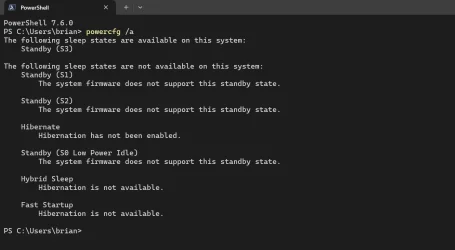
How old are these machines and what gives powercfg /a for a response? There is a rumor that it has something to do with the S3 sleep state...
 

My Computer

System One

  • OS
    Win 11 Pro "25H2" Build 26200.8524, Zorin OS Pro
    Computer type
    PC/Desktop
    Manufacturer/Model
    Self built
    CPU
    Intel® Core™ i7-12700KF 12th Gen.
    Motherboard
    ASUS Prime Z690-A, BIOS v4505
    Memory
    32GB DDR5 5600-36 Vengeance
    Graphics Card(s)
    PCIe4.0 Asus NVIDIA RTX3060Ti
    Sound Card
    Onboard; Realtek
    Monitor(s) Displays
    34" LG 34UC79G-B Curved 21:9 144Hz
    Screen Resolution
    2560x1080 (No HDR)
    Hard Drives
    250Gb Samsung 870PRO NVMe (Win 11 Pro)
    1Tb Samsung 980PRO NVMe
    1Tb Samsung 970EVO NVMe
    2Tb Samsung 990PRO NVMe with heatsink.
    4Tb WDC WD40EZRZ Blue SATA (Int.)
    4Tb WDC WD40EZRZ Blue SATA (Int.)
    3Tb WDC WD30EFRZ Red SATA (Int.)
    256Gb Samsung 840PRO SSD (RHEL 9,5)
    256Gb Samsung 850PRO SSD (Zorin OS Pro 18)
    PSU
    Coolermaster 850W V2 Gold with internal 12cm exaust fan
    Case
    Be-Quiet Pure Base 600.
    Cooling
    3x Be-Quiet! 12/14cm "Silent Wings 4" casefans, 1x Arctic Freezer i35 CPU towerblock with fan.
    Keyboard
    Steelseries APEX 7 keyboard.
    Mouse
    Logitech G-502 Hero
    Internet Speed
    1Gb
    Browser
    Brave
    Antivirus
    F-Secure
    Other Info
    No Noise system.
    256Gb Kingston Travler USB 3.0 drive.
    64Gb Sandisk USB 3.2 drive. (Ventoy)
    8Gb Philips USB 3.0 drive. (Win. Inst.)
    8Gb Philips USB 3.0 drive. (Rescue disk)
    2Tb WD USB 3.0 Passport drive.
    USB Ext. 500Gb WD SATA drive.
    External USB 3.0 C.A. CD/DVD* burner.
How old are these machines and what gives powercfg /a for a response? There is a rumor that it has something to do with the S3 sleep state...
I have no issues with this update. I have two machines listed below. System One is 2 years old and System Two is 6 months old. Sleep is S0 (S Zero) Modern Standby and works as it should.
 
Last edited:

My Computers

System One System Two

  • OS
    Windows 11 Pro
    Computer type
    Laptop
    Manufacturer/Model
    Dell XPS 16 DA16260
    CPU
    Intel Series 3 Core Ultra X9 388H
    Memory
    64GB LPDDR5x 9600 MT/s
    Graphics Card(s)
    Intel Arc graphics B390 Panther Lake
    Monitor(s) Displays
    16" 3.2K Tandem OLED Infinity Edge
    Screen Resolution
    3200 x 2000 16:10 236 PPI
    Hard Drives
    1 Terabyte M.2 PCIe NVMe SSD
    Case
    Black Anodized Aluminum
    Cooling
    Vapor Chamber Cooling
    Mouse
    None
    Internet Speed
    942 Mbps Netgear Mesh + 2 Satellites
    Browser
    Microsoft Edge (Chromium)
    Antivirus
    Windows Security (Defender)
    Other Info
    NPU delivering 67 TOPS
    Microsoft 365 subscription
    Microsoft OneDrive 1TB Cloud
    Microsoft Visual Studio
    Microsoft Visual Studio Code
    Microsoft Sysinternals Suite
    Microsoft BitLocker
    Microsoft Copilot
    Dell Support Assist
    Dell Command | Update
    Macrium Reflect X subscription
    1Password Password Manager
    Amazon Kindle for PC
    Lightroom/Photoshop subscription
    Interactive Brokers Trader Workstation
  • Operating System
    Windows 11 Pro
    Computer type
    Laptop
    Manufacturer/Model
    Microsoft Surface Laptop 7
    CPU
    Snapdragon® X Elite (12 Core) with Hexagon NPU delivering 45 TOPS
    Memory
    32GB LPDDR5x 8448 MT/s
    Graphics card(s)
    Integrated Adreno GPU
    Sound Card
    Omnisonic speakers with Dolby Atmos spatial sound
    Monitor(s) Displays
    13.8″ PixelSense Flow touchscreen 120 Hz 600 NIT
    Screen Resolution
    2304 × 1536 (201 PPI), 3:2 aspect ratio
    Hard Drives
    1 TB PCIe NVMe Gen 4 SSD
    Case
    Black Anodized Aluminum
    Cooling
    Vapor Chamber Cooling
    Mouse
    None
    Internet Speed
    942 Mbps Netgear Mesh + 2 Satellites
    Browser
    Microsoft Edge (Chromium)
    Antivirus
    Windows Security (Defender)
    Other Info
    Microsoft 365 subscription (Office)
    Microsoft OneDrive 1TB Cloud
    Microsoft Visual Studio 2026
    Microsoft Visual Studio Code
    Interactive Brokers Trader Workstation
    Lightroom/Photoshop subscription
    1Password Password Manager
    Microsoft Sysinternals
    Amazon Kindle for PC
    Microsoft BitLocker
    Microsoft Copilot
How old are these machines and what gives powercfg /a for a response? There is a rumor that it has something to do with the S3 sleep state...
This is one PC, the other one isn't on at the moment
 

Attachments

  • Screenshot 2026-04-07 203850.webp
    Screenshot 2026-04-07 203850.webp
    50.2 KB · Views: 1

My Computer

System One

  • OS
    Windows 11 Pro 25H2 (RP channel)
    Computer type
    PC/Desktop
    Manufacturer/Model
    MSI
    CPU
    AMD Ryzen 7 9800X3D 8-core
    Motherboard
    MEG X870E Godlike
    Memory
    64GB Corsair Titanium 6000/CL30
    Graphics Card(s)
    MSI Suprim 5080 SOC
    Sound Card
    Soundblaster AE-9
    Monitor(s) Displays
    ASUS TUF Gaming VG289Q
    Screen Resolution
    3840x2160
    Hard Drives
    Samsung 9100 Pro 4TB (gen 5 x4, system drive/games)
    Samsung 990 Pro 2TB
    Samsung 980 Pro 2TB
    Samsung 870 Evo 4TB
    Samsung 870 Evo 2TB
    Samsung T9 4TB
    PSU
    Seasonic PX-2200
    Case
    Bequiet! Dark Base Pro 901
    Cooling
    Noctua NH-D15S Chromax black
    Keyboard
    Logitech G915 X (wired)
    Mouse
    Logitech G903 with PowerPlay charger
    Internet Speed
    900Mb/sec
    Browser
    Microsoft Edge
    Antivirus
    Windows Defender
No problem with sleep here in any of the systems. I don't know about hibernate as I've disabled that for all my systems.
 

My Computers

System One System Two

  • OS
    Win 11 Pro 25H2, Build 26200.8524
    Computer type
    PC/Desktop
    Manufacturer/Model
    Home Brew
    CPU
    Intel Core i5 14500
    Motherboard
    Gigabyte B760M G P WIFI
    Memory
    64GB DDR4
    Graphics Card(s)
    GeForce RTX 4060
    Sound Card
    Chipset Realtek
    Monitor(s) Displays
    LG 45" Ultragear, Acer 24" 1080p
    Screen Resolution
    5120x1440, 1920x1080
    Hard Drives
    Crucial P310 2TB 2280 PCIe Gen4 3D NAND NVMe M.2 SSD (O/S)
    Silicon Power 2TB US75 NVMe PCIe Gen4 M.2 2280 SSD (backup)
    Crucial BX500 2TB 3D NAND (2nd backup)
    Seagate 4TB Ironwolf, rotating HDD archive files
    External off-line backup Drives: 2 NVMe 4TB drives in external enclosures
    PSU
    Thermaltake Toughpower GF3 750W
    Case
    LIAN LI LANCOOL 216 E-ATX PC Case
    Cooling
    Lots of fans!
    Keyboard
    Microsoft Comfort Curve 2000
    Mouse
    Logitech G305
    Internet Speed
    Verizon FiOS 1GB
    Browser
    Firefox
    Antivirus
    Malware Bytes & Windows Defender Security
  • Operating System
    Win 11 Pro 25H2, Build 26200.8524
    Computer type
    PC/Desktop
    Manufacturer/Model
    Home Brew
    CPU
    Intel Core i5 14400
    Motherboard
    Gigabyte B760M DS3H AX
    Memory
    32GB DDR5
    Graphics card(s)
    Intel 700 Embedded GPU
    Sound Card
    Realtek Embedded
    Monitor(s) Displays
    27" HP 1080p
    Screen Resolution
    1920x1080
    Hard Drives
    Crucial P310 2TB 2280 PCIe Gen4 eD NAND PCIe SSD
    Samsung EVO 990 2TB NVMe Gen4 SSD
    Samsung 2TB SATA SSD
    PSU
    Thermaltake Smart BM3 650W
    Case
    Okinos Micro ATX Case
    Cooling
    Fans
    Keyboard
    Microsoft Comfort Curve 2000
    Mouse
    Logitech G305
    Internet Speed
    Verizon FiOS 1GB
    Browser
    Firefox
    Antivirus
    Malware Bytes & Windows Defender Security
Same here, S0 modern standby and S3 sleep both work perfect on my machines but can't speak to hibernate as I haven't used that in years.
 

My Computers

System One System Two

  • OS
    Windows 11 25H2
    Computer type
    Laptop
    Manufacturer/Model
    Alienware 18 Area-51
    CPU
    Intel Core Ultra 9 275HX (24-Core)
    Motherboard
    Alienware
    Memory
    64GB DDR5 6400MT/s
    Graphics Card(s)
    NVIDIA GeForce RTX 5080 and Intel UHD Graphics
    Sound Card
    Onboard, Realtek high-performance Audio chips (ALC3329 & ALC1708))
    Monitor(s) Displays
    300HZ 18-inch QHD 500 nit Comfort View+
    Screen Resolution
    2560 x 1600
    Hard Drives
    2TB NVMe M.2 PCIe Gen 5 SSD
    Case
    Magnesium Alloy
    Cooling
    Advanced Cryo-Tech Quad-Fan Cooling system & large vapor chamber
    Keyboard
    Cherry MX ultra low profile mechanical keyboard with per key AlienFX RGB lighting
    Mouse
    Logitech MX Master 4
    Browser
    Vivaldi (main), Firefox, Chrome, Edge
    Antivirus
    MS Defender and Malwarebytes Free
  • Operating System
    Windows 11 25H2
    Computer type
    Laptop
    Manufacturer/Model
    Microsoft Surface Laptop 7
    CPU
    Qualcomm Snapdragon X Elite (12 Core) ARM based CPU
    Motherboard
    Microsoft Corp.
    Memory
    16GB LPDDR5
    Graphics card(s)
    Qualcomm Adreno X1-85
    Sound Card
    Omnisonic speakers with Dolby Atmos spatial sound
    Monitor(s) Displays
    120 Hz 13.8-inch 600 nit PixelSense Flow touchscreen
    Screen Resolution
    2304x1536
    Hard Drives
    1TB NVMe Gen 4 SSD
    Case
    Anodized Aluminum
    Cooling
    Traditional active cooling fan system
    Keyboard
    Mechanical QWERTY, backlit when in use
    Mouse
    Logitech MX Master 4 and Surface Arc Mouse
    Browser
    Vivaldi (main), Firefox, Chrome, Edge
    Antivirus
    MS Defender and Malwarebytes Free
With as many laptops as I have, chances are I'll close the lid, it will sleep, then a week later I'll remember and come back to it to find the battery has gone flat 🤣

All my machines sleep when I close the lid, then hibernate if I don't come back in 20 minutes - even the modern standby ones.....
 

My Computers

System One System Two

  • OS
    Windows 11 Home
    Computer type
    Laptop
    Manufacturer/Model
    Acer Aspire 3 A315-23-R9VY
    CPU
    AMD Athlon Silver 3050U
    Memory
    8GB
    Graphics Card(s)
    Radeon Graphics
    Monitor(s) Displays
    laptop screen
    Screen Resolution
    1366x768 native resolution, up to 2560x1440 with Radeon Virtual Super Resolution
    Hard Drives
    1TB Samsung EVO 870 SSD (from April 2026: 250GB EVO 850)
    Internet Speed
    150 Mbps
    Browser
    Edge, Firefox
    Antivirus
    Defender
    Other Info
    fully 'Windows 11 ready' laptop. Windows 10 C: partition migrated from my old unsupported 'main machine' then upgraded to 11. A test migration ran Insider builds for 2 months. When 11 was released on 5th October 2021 it was re-imaged back to 10 and was offered the upgrade in Windows Update on 20th October. Windows Update offered the 22H2 Feature Update on 20th September 2022. It got the 23H2 Feature Update on 4th November 2023 through Windows Update, 24H2 on 3rd October 2024 through Windows Update by setting the Target Release Version for 24H2, and 25H2 on 30th September 2025 through Windows Update by setting the Target Release Version for 25H2.

    UPDATE - 11 April 2026: due to mechanical deterioration this PC has been retired from active duty. The OS with all software and files has been migrated to my System Seven below to carry on as my general purpose 'main machine'.

    My SYSTEM THREE is a Dell Latitude 5410, i7-10610U, 32GB RAM, 512GB NVMe ssd, supported device running Windows 11 Pro.

    My SYSTEM FOUR is a 2-in-1 convertible Lenovo Yoga 11e 20DA, Celeron N2930, 8GB RAM, 256GB ssd. Unsupported device: currently running Win10 Pro, plus Win11 Pro RTM and Insider Dev, Beta, and RP 24H2 as native boot vhdx.

    My SYSTEM FIVE is a Dell Latitude 3190 2-in-1, Pentium Silver N5030, 8GB RAM, 1TB NVMe ssd, supported device running Windows 11 Pro, plus Insider Beta, Dev, and Canary builds (and a few others) as a native boot .vhdx.

    My SYSTEM SIX is a Dell Latitude 5550, Core Ultra 7 165H, 64GB RAM, 1TB NVMe SSD, supported device, Windows 11 Pro 24H2, Hyper-V host machine. Updated to 25H2 on 30th September 2025.

    My SYSTEM SEVEN is a Lenovo Thinkpad T580, Intel Core i7-8650U, 16GB RAM, 512GB NVMe SSD + 2nd 512GB NVMe SSD, a supported device for Windows 11. This is my current general purpose 'main machine'. The installed Windows 11 Home from my System One has been migrated to this machine.
  • Operating System
    Windows 11 Pro
    Computer type
    Laptop
    Manufacturer/Model
    Dell Latitude E4310
    CPU
    Intel® Core™ i5-520M
    Motherboard
    0T6M8G
    Memory
    8GB
    Graphics card(s)
    (integrated graphics) Intel HD Graphics
    Screen Resolution
    1366x768
    Hard Drives
    500GB Crucial MX500 SSD
    Browser
    Firefox, Edge
    Antivirus
    Defender
    Other Info
    unsupported machine: Legacy bios, MBR, TPM 1.2, upgraded from W10 to W11 using W10/W11 hybrid install media workaround. In-place upgrade to 22H2 using ISO and a workaround. Feature Update to 23H2 by manually installing the Enablement Package. In-place upgrade to 24H2 using hybrid 23H2/24H2 install media. Upgraded to 25H2 by Enablement Package. Also running Insider Dev, and Canary builds and Windows 10 as native boot .vhdx.

    My SYSTEM THREE is a Dell Latitude 5410, i7-10610U, 32GB RAM, 512GB NVMe ssd, supported device running Windows 11 Pro.

    My SYSTEM FOUR is a 2-in-1 convertible Lenovo Yoga 11e 20DA, Celeron N2930, 8GB RAM, 256GB ssd. Unsupported device: currently running Win10 Pro, plus Win11 Pro RTM and Insider Dev, Beta, and RP 24H2 as native boot vhdx.

    My SYSTEM FIVE is a Dell Latitude 3190 2-in-1, Pentium Silver N5030, 8GB RAM, 1TB NVMe ssd, supported device running Windows 11 Pro, plus Insider Beta, Dev, and Canary builds (and a few others) as a native boot .vhdx.

    My SYSTEM SIX is a Dell Latitude 5550, Core Ultra 7 165H, 64GB RAM, 1TB NVMe SSD, supported device, Windows 11 Pro 24H2, Hyper-V host machine. Updated to 25H2 on 30th September 2025.

    My SYSTEM SEVEN is a Lenovo Thinkpad T580, Intel Core i7-8650U, 16GB RAM, 512GB NVMe SSD + 2nd 512GB NVMe SSD, a supported device for Windows 11. This is my current general purpose 'main machine'. The installed Windows 11 Home from my System One has been migrated to this machine.
With this update it has reverted back to the old Nvme driver and stopped using the new Native Nvme Driver btw

edit ok i found a workaround

Native Nvme Windows 11 04/26
vivetool /enable /id:60786016,48433719

View attachment 167998
Doesn't work for me.
 

My Computer

System One

  • OS
    Windows 11 Pro 25H2
    Computer type
    Laptop
    Manufacturer/Model
    HP
    CPU
    Gen 11 Core i5
    Memory
    16GB
Installing this update takes my machines to Winver 24H2 (OS Build 26100.8117).
HOWEVER it stops an old DOS program 1by1 from opening. This is my default "flat file" MP3 player and I want to keep it
I uninstalled KB5086672 and PC reverted to Winver 24H2 (OS Build 26100.8037)

1by1 now works!!!
sfc /scannow passes with or without KB5086672 installed
(I've seen the issue on 2 different PCs)

Anyone any clues about this please?
 

My Computer

System One

  • OS
    Windows 11 Pro
    Computer type
    PC/Desktop
    Manufacturer/Model
    Chillblast
    CPU
    Intel Core i5 14400
    Motherboard
    ASUS TUF Gaming B760M-PLUS WiFi II
    Memory
    32GB
    Graphics Card(s)
    Palit GeForce RTX 3050 Dual 8GB GPU
    Sound Card
    Integrated
    Monitor(s) Displays
    HP S2331 & ASUS VS239
    Screen Resolution
    1920x1080
    Hard Drives
    WD Blue SSD 500GB + 2 x 2TB Seagate BarraCuda
    PSU
    850W Corsair
    Case
    Fractel Define 7
    Cooling
    Standard - no additional
    Keyboard
    Kensington Value (for now)
    Mouse
    Tecknet Optical
    Browser
    Edge and Chrome
    Antivirus
    Norton Security 360 Advanced
This is one PC, the other one isn't on at the moment
Funny. I have the same exact settings. Hibernate and Fast Startup turned off. My motherboard is from 2022 and considered as "modern". My older system dates back to 2015 with outdated CPU and no TPM. Gives the same response. And yet it also is using 25H2. A bit slower I must add.
On both machines S0, S1 and S2 are no longer supported because the BIOS does not support these settings any more.
 

My Computer

System One

  • OS
    Win 11 Pro "25H2" Build 26200.8524, Zorin OS Pro
    Computer type
    PC/Desktop
    Manufacturer/Model
    Self built
    CPU
    Intel® Core™ i7-12700KF 12th Gen.
    Motherboard
    ASUS Prime Z690-A, BIOS v4505
    Memory
    32GB DDR5 5600-36 Vengeance
    Graphics Card(s)
    PCIe4.0 Asus NVIDIA RTX3060Ti
    Sound Card
    Onboard; Realtek
    Monitor(s) Displays
    34" LG 34UC79G-B Curved 21:9 144Hz
    Screen Resolution
    2560x1080 (No HDR)
    Hard Drives
    250Gb Samsung 870PRO NVMe (Win 11 Pro)
    1Tb Samsung 980PRO NVMe
    1Tb Samsung 970EVO NVMe
    2Tb Samsung 990PRO NVMe with heatsink.
    4Tb WDC WD40EZRZ Blue SATA (Int.)
    4Tb WDC WD40EZRZ Blue SATA (Int.)
    3Tb WDC WD30EFRZ Red SATA (Int.)
    256Gb Samsung 840PRO SSD (RHEL 9,5)
    256Gb Samsung 850PRO SSD (Zorin OS Pro 18)
    PSU
    Coolermaster 850W V2 Gold with internal 12cm exaust fan
    Case
    Be-Quiet Pure Base 600.
    Cooling
    3x Be-Quiet! 12/14cm "Silent Wings 4" casefans, 1x Arctic Freezer i35 CPU towerblock with fan.
    Keyboard
    Steelseries APEX 7 keyboard.
    Mouse
    Logitech G-502 Hero
    Internet Speed
    1Gb
    Browser
    Brave
    Antivirus
    F-Secure
    Other Info
    No Noise system.
    256Gb Kingston Travler USB 3.0 drive.
    64Gb Sandisk USB 3.2 drive. (Ventoy)
    8Gb Philips USB 3.0 drive. (Win. Inst.)
    8Gb Philips USB 3.0 drive. (Rescue disk)
    2Tb WD USB 3.0 Passport drive.
    USB Ext. 500Gb WD SATA drive.
    External USB 3.0 C.A. CD/DVD* burner.
HOWEVER it stops an old DOS program 1by1 from opening.
Maybe your program is old, but definitely not for DOS, which was never supported in Windows 11 because no 32-bit OS version. The last x32 was Windows 10. Anyway, try to update your program or look at the error message: it may have a clue about failed component. For example, an upgraded DLL in 26200.8117.
 

My Computer

System One

  • OS
    Windows 11 Pro 25H2
    Computer type
    Laptop
    Manufacturer/Model
    Lenovo Legion 5-15ARH05
    CPU
    AMD Rysen 5 4600H
    Memory
    32 GB (2 x 16 GB Samsung SO-DIMM DDR4-3200)
    Graphics Card(s)
    GeForce GTX 1650 Ti, 4 GB GDDR6
    Screen Resolution
    1920x1080
    Hard Drives
    SSD M.2 512 GB SAMSUNG MZALQ512; SSD M.2 1 TB Seagate FireCuda 530
    Mouse
    Logitech M650L in Bluetooth mode
  • Like
Reactions: VBF
Installing this update takes my machines to Winver 24H2 (OS Build 26100.8117).
HOWEVER it stops an old DOS program 1by1 from opening. This is my default "flat file" MP3 player and I want to keep it
I uninstalled KB5086672 and PC reverted to Winver 24H2 (OS Build 26100.8037)

1by1 now works!!!
sfc /scannow passes with or without KB5086672 installed
(I've seen the issue on 2 different PCs)

Anyone any clues about this please?
I would leave at that. There seems to be a couple of issues that revolve arround this update. It (as an OOB) was intended to fix an issue with preview version 26200.8116. It did. But also introduced other issues. In your case you have to wait until the next real update as many of us also must do. (Not a preview build but a final build.)

In your case? That old DOS program will stop working in the future anyways. Did you try to make a link to it and set the compatibility settings back to Windows 7 and start it by that link? Even older releases have dropped of the map by now... :LOL: This will getting worse as time progresses. It is time to find a more modern version of this program. You can't expect MS to support these ancient DOS programs forever.....
 

My Computer

System One

  • OS
    Win 11 Pro "25H2" Build 26200.8524, Zorin OS Pro
    Computer type
    PC/Desktop
    Manufacturer/Model
    Self built
    CPU
    Intel® Core™ i7-12700KF 12th Gen.
    Motherboard
    ASUS Prime Z690-A, BIOS v4505
    Memory
    32GB DDR5 5600-36 Vengeance
    Graphics Card(s)
    PCIe4.0 Asus NVIDIA RTX3060Ti
    Sound Card
    Onboard; Realtek
    Monitor(s) Displays
    34" LG 34UC79G-B Curved 21:9 144Hz
    Screen Resolution
    2560x1080 (No HDR)
    Hard Drives
    250Gb Samsung 870PRO NVMe (Win 11 Pro)
    1Tb Samsung 980PRO NVMe
    1Tb Samsung 970EVO NVMe
    2Tb Samsung 990PRO NVMe with heatsink.
    4Tb WDC WD40EZRZ Blue SATA (Int.)
    4Tb WDC WD40EZRZ Blue SATA (Int.)
    3Tb WDC WD30EFRZ Red SATA (Int.)
    256Gb Samsung 840PRO SSD (RHEL 9,5)
    256Gb Samsung 850PRO SSD (Zorin OS Pro 18)
    PSU
    Coolermaster 850W V2 Gold with internal 12cm exaust fan
    Case
    Be-Quiet Pure Base 600.
    Cooling
    3x Be-Quiet! 12/14cm "Silent Wings 4" casefans, 1x Arctic Freezer i35 CPU towerblock with fan.
    Keyboard
    Steelseries APEX 7 keyboard.
    Mouse
    Logitech G-502 Hero
    Internet Speed
    1Gb
    Browser
    Brave
    Antivirus
    F-Secure
    Other Info
    No Noise system.
    256Gb Kingston Travler USB 3.0 drive.
    64Gb Sandisk USB 3.2 drive. (Ventoy)
    8Gb Philips USB 3.0 drive. (Win. Inst.)
    8Gb Philips USB 3.0 drive. (Rescue disk)
    2Tb WD USB 3.0 Passport drive.
    USB Ext. 500Gb WD SATA drive.
    External USB 3.0 C.A. CD/DVD* burner.
  • Like
Reactions: VBF
Maybe your program is old, but definitely not for DOS, which was never supported in Windows 11 because no 32-bit OS version. The last x32 was Windows 10. Anyway, try to update your program or look at the error message: it may have a clue about failed component. For example, an upgraded DLL in 26200.8117.
Ahum. Old DOS programs were even based on 16-bit code. Those can not run on a Windows 10/11 system. It has run before 8117 and after this update not. So it must be a 32-bit version. And a x64 machine still supports 32-bit programs. See their different locations. "Program Files" contains 64-bit programs and "Program Files (x86)" contains 32-bit programs.

You can always check if it's a 32 or 64 bit program by using MS Sysinternals: sigcheck <Drive>\<Path>\<Program>.exe or .com
 

My Computer

System One

  • OS
    Win 11 Pro "25H2" Build 26200.8524, Zorin OS Pro
    Computer type
    PC/Desktop
    Manufacturer/Model
    Self built
    CPU
    Intel® Core™ i7-12700KF 12th Gen.
    Motherboard
    ASUS Prime Z690-A, BIOS v4505
    Memory
    32GB DDR5 5600-36 Vengeance
    Graphics Card(s)
    PCIe4.0 Asus NVIDIA RTX3060Ti
    Sound Card
    Onboard; Realtek
    Monitor(s) Displays
    34" LG 34UC79G-B Curved 21:9 144Hz
    Screen Resolution
    2560x1080 (No HDR)
    Hard Drives
    250Gb Samsung 870PRO NVMe (Win 11 Pro)
    1Tb Samsung 980PRO NVMe
    1Tb Samsung 970EVO NVMe
    2Tb Samsung 990PRO NVMe with heatsink.
    4Tb WDC WD40EZRZ Blue SATA (Int.)
    4Tb WDC WD40EZRZ Blue SATA (Int.)
    3Tb WDC WD30EFRZ Red SATA (Int.)
    256Gb Samsung 840PRO SSD (RHEL 9,5)
    256Gb Samsung 850PRO SSD (Zorin OS Pro 18)
    PSU
    Coolermaster 850W V2 Gold with internal 12cm exaust fan
    Case
    Be-Quiet Pure Base 600.
    Cooling
    3x Be-Quiet! 12/14cm "Silent Wings 4" casefans, 1x Arctic Freezer i35 CPU towerblock with fan.
    Keyboard
    Steelseries APEX 7 keyboard.
    Mouse
    Logitech G-502 Hero
    Internet Speed
    1Gb
    Browser
    Brave
    Antivirus
    F-Secure
    Other Info
    No Noise system.
    256Gb Kingston Travler USB 3.0 drive.
    64Gb Sandisk USB 3.2 drive. (Ventoy)
    8Gb Philips USB 3.0 drive. (Win. Inst.)
    8Gb Philips USB 3.0 drive. (Rescue disk)
    2Tb WD USB 3.0 Passport drive.
    USB Ext. 500Gb WD SATA drive.
    External USB 3.0 C.A. CD/DVD* burner.
  • Like
Reactions: VBF
Maybe your program is old, but definitely not for DOS, which was never supported in Windows 11 because no 32-bit OS version. The last x32 was Windows 10. Anyway, try to update your program or look at the error message: it may have a clue about failed component. For example, an upgraded DLL in 26200.8117.
Correct - my bad -I originally used it on Win 98 and have used it on every Windows version since - it's just so simple, and with a GUI I Ilike. It's working now and future investigations will be undertaken after the next Patch Tuesday if necessary. Thank you 👍
 

My Computer

System One

  • OS
    Windows 11 Pro
    Computer type
    PC/Desktop
    Manufacturer/Model
    Chillblast
    CPU
    Intel Core i5 14400
    Motherboard
    ASUS TUF Gaming B760M-PLUS WiFi II
    Memory
    32GB
    Graphics Card(s)
    Palit GeForce RTX 3050 Dual 8GB GPU
    Sound Card
    Integrated
    Monitor(s) Displays
    HP S2331 & ASUS VS239
    Screen Resolution
    1920x1080
    Hard Drives
    WD Blue SSD 500GB + 2 x 2TB Seagate BarraCuda
    PSU
    850W Corsair
    Case
    Fractel Define 7
    Cooling
    Standard - no additional
    Keyboard
    Kensington Value (for now)
    Mouse
    Tecknet Optical
    Browser
    Edge and Chrome
    Antivirus
    Norton Security 360 Advanced
I would leave at that. There seems to be a couple of issues that revolve arround this update. It (as an OOB) was intended to fix an issue with preview version 26200.8116. It did. But also introduced other issues. In your case you have to wait until the next real update as many of us also must do. (Not a preview build but a final build.)

In your case? That old DOS program will stop working in the future anyways. Did you try to make a link to it and set the compatibility settings back to Windows 7 and start it by that link? Even older releases have dropped of the map by now... :LOL: This will getting worse as time progresses. It is time to find a more modern version of this program. You can't expect MS to support these ancient DOS programs forever.....

Thank you 👍
It was after I installed KB 5086672 that I fully took on board that it's OOB and I didn't need it anyway - serves me right for not RTFM!!
If I get issues after the next Patch Tuesday updates, I'll do as you say and investigate compatibility modes. No expectation of support for it and several other old programs I use but I'll do what I can to keep them going just because I like 'em!

I just found that HAD I RTFM'd I would have found this mp3DirectCut and 1by1 - Questions and contact so the developer is actually working on problems with Windows 11.
In the unlikely event that anyone else has similar issues, there's the link to look at.
 

My Computer

System One

  • OS
    Windows 11 Pro
    Computer type
    PC/Desktop
    Manufacturer/Model
    Chillblast
    CPU
    Intel Core i5 14400
    Motherboard
    ASUS TUF Gaming B760M-PLUS WiFi II
    Memory
    32GB
    Graphics Card(s)
    Palit GeForce RTX 3050 Dual 8GB GPU
    Sound Card
    Integrated
    Monitor(s) Displays
    HP S2331 & ASUS VS239
    Screen Resolution
    1920x1080
    Hard Drives
    WD Blue SSD 500GB + 2 x 2TB Seagate BarraCuda
    PSU
    850W Corsair
    Case
    Fractel Define 7
    Cooling
    Standard - no additional
    Keyboard
    Kensington Value (for now)
    Mouse
    Tecknet Optical
    Browser
    Edge and Chrome
    Antivirus
    Norton Security 360 Advanced
Interesting. I had to do a fix off an ISO yesterday. I'm on OS Build 26200.8117, my watermark is gone... But when I look at my Update/Insider screen...
1775753690461.webp
 

My Computer

System One

  • OS
    Windows 11
    Computer type
    Laptop
    Manufacturer/Model
    MSFT Surface Pro 8
    CPU
    11th Gen Intel(R) Core(TM) i7-1185G7 @ 3.00GH
    Memory
    16GB

Latest Support Threads

Back
Top Bottom