Win Update KB5094126 Windows 11 Cumulative Update build 26100.8655 (24H2) and 26200.8655 (25H2) - June 9


 Microsoft Support:

This cumulative update for Windows 11, version 25H2 and 24H2 (KB5094126) includes the latest security fixes and improvements, along with non-security updates from last month's optional preview release.

Visit the Windows release health dashboard for the latest status on this release.


Announcements and messages

This section provides key notifications related to this release, including announcements, change logs, and end-of-support notices.

Windows Secure Boot certificate expiration
Important
: Secure Boot certificates used by most Windows devices are set to expire starting in June 2026. Microsoft has been updating these certificates on consumer and non-managed business devices over the past several months. Devices that haven’t received the newer certificates will continue to start and operate normally, and standard Windows updates will continue to install. Updated certificates will continue to be delivered through Windows Update in the coming months.


End of updates​

Windows 11, version 24H2 Home and Pro editions will reach end of updates on October 13, 2026. Devices running these editions will no longer receive fixes for known issues, time zone updates, technical support, or monthly security and preview updates containing protections from the latest security threats. Enterprise and Education editions remain supported until October 12, 2027.

To stay protected and up to date, we recommend you upgrade to the latest version of Windows 11.

Change log​

Change date​
Change description​
June 10, 2026Update: Folder customization added.

Improvements

This update includes new features and quality improvements that were part of the following update:
This update addresses security vulnerabilities documented in the following guide:
The following summary outlines key quality improvements addressed by this update. The bold text within the brackets indicates the item or area of the change.
  • [Secure Boot] With this update, Windows quality updates include additional high confidence device targeting data, increasing coverage of devices eligible to automatically receive new Secure Boot certificates. Devices receive the new certificates only after demonstrating sufficient successful update signals, maintaining a controlled and phased rollout.
  • [Virtualization] Fixed: This update addresses an issue that could result in Stop errors HYPERVISOR_ERROR (0x20001) and KMODE_EXCEPTION_NOT_HANDLED (0x1E) after installing KB5089573 on some devices during system restarts, virtual machine operations, or while running some gaming applications
  • [Folder customization] This update introduces a security hardening change to how Windows processes desktop.ini files. As a result, some users might notice missing custom folder icons or localized folder names for content from downloaded or remote locations. Note that access to folders is not affected. For more information, see Custom folder icons or localized folder names might not appear after installing the June 2026 Windows security update.
If you've already installed previous updates, your device will download and install only the new updates included in this package.

AI Components

This release updates the following AI components:

AI Component​
Version​
Image Search1.2605.856.0
Content Extraction1.2605.856.0
Semantic Analysis1.2605.856.0
Settings Model1.2605.856.0

Windows 11 servicing stack update (KB5094135)- 26100.8648

This update makes quality improvements to the servicing stack, which is the component that installs Windows updates. Servicing stack updates (SSU) ensure that you have a robust and reliable servicing stack so that your devices can receive and install Microsoft updates. To learn more about SSUs, see Simplifying on-premises deployment of servicing stack updates.

Known issues in this update

Microsoft is not currently aware of any issues with this update.

How to get this update

Before you install this update

Microsoft combines the latest servicing stack update (SSU) for your operating system with the latest cumulative update (LCU). For general information about SSUs, see Servicing stack updates.

Deployment

If you deploy dynamic updates such as this update to an existing Windows image, ensure the boot.stl file is included as part of the installation media. Failure to include the file might prevent devices from successfully starting from the installation media and can result in error code 0xc0430001.

Note: The boot.stl file is used during Secure Boot validation and must match the Windows version and architecture of the image you are updating.

To ensure the boot.stl file is included as part of the installation media, do one of the following:
  • Use the Update WinPE script to update an existing Windows image. (Recommended)
  • Manually copy the boot.stl file from the device Windows\Boot\EFI folder to the corresponding folder on your installation media before deploying the update.
For information about how to apply Dynamic Update packages to existing Windows images, see Update Windows installation media with Dynamic Update.

Install this update

To install this update, use one of the following Windows and Microsoft release channels.

Available​
Next Step​
Included
This update downloads and installs automatically from Windows Update and Microsoft Update.
Included
To install this release from the Microsoft Update Catalog, select the option that matches your device architecture (arm64 or x64), and then follow the instructions.

File information

For a list of the files provided in this update, download the file information for cumulative update 5094126.

For a list of the files provided in the servicing stack update, download the file information for the SSU (KB5094135) - version 26100.8648.


 Source:


Check Windows Updates


UUP Dump:

64-bit ISO download:

ARM64 ISO download:

 
Last edited:
The DISM /Online /Cleanup-Image /StartComponentCleanup /ResetBase command by itself does NOT remove the two reclaimable packages, but it does fix the Disk Cleanup 190MB bug.

It will remove all BUT the last two reclaimable packages, which doesn't break anything.
 

My Computers

System One System Two

  • OS
    Win 11 Home ♦♦♦26200.8655 ♦♦♦♦♦♦♦25H2
    Computer type
    PC/Desktop
    Manufacturer/Model
    Built by Ghot® [May 2020]
    CPU
    AMD Ryzen 7 3700X
    Motherboard
    Asus Pro WS X570-ACE (BIOS 5302)
    Memory
    G.Skill (F4-3200C14D-16GTZKW)
    Graphics Card(s)
    EVGA RTX 2070 (08G-P4-2171-KR)
    Sound Card
    Realtek ALC1220P / ALC S1220A
    Monitor(s) Displays
    Dell U3011 30"
    Screen Resolution
    2560 x 1600
    Hard Drives
    2x Samsung 860 EVO 500GB,
    WD 4TB Black FZBX - SATA III,
    WD 8TB Black FZBX - SATA III,
    DRW-24B1ST CD/DVD Burner
    PSU
    PC Power & Cooling 750W Quad EPS12V
    Case
    Cooler Master ATCS 840 Tower
    Cooling
    CM Hyper 212 EVO (push/pull)
    Keyboard
    Ducky DK9008 Shine II Blue LED
    Mouse
    Logitech Optical M-100
    Internet Speed
    300/300
    Browser
    Firefox (latest)
    Antivirus
    Bitdefender Total Security
    Other Info
    Speakers: Klipsch Pro Media 2.1
  • Operating System
    Windows XP Pro 32bit w/SP3
    Computer type
    PC/Desktop
    Manufacturer/Model
    Built by Ghot® (not in use)
    CPU
    AMD Athlon 64 X2 5000+ (OC'd @ 3.2Ghz)
    Motherboard
    ASUS M2N32-SLI Deluxe Wireless Edition
    Memory
    TWIN2X2048-6400C4DHX (2 x 1GB, DDR2 800)
    Graphics card(s)
    EVGA 256-P2-N758-TR GeForce 8600GT SSC
    Sound Card
    Onboard
    Monitor(s) Displays
    ViewSonic G90FB Black 19" Professional (CRT)
    Screen Resolution
    up to 2048 x 1536
    Hard Drives
    WD 36GB 10,000rpm Raptor SATA
    Seagate 80GB 7200rpm SATA
    Lite-On LTR-52246S CD/RW
    Lite-On LH-18A1P CD/DVD Burner
    PSU
    PC Power & Cooling Silencer 750 Quad EPS12V
    Case
    Generic Beige case, 80mm fans
    Cooling
    ZALMAN 9500A 92mm CPU Cooler
    Keyboard
    Logitech Classic Keybooard 200
    Mouse
    Logitech Optical M-BT96a
    Internet Speed
    300/300
    Browser
    Firefox 3.x ??
    Antivirus
    Symantec (Norton)
    Other Info
    Still assembled, still runs. Haven't turned it on for 15 years?
I have previously removed the two packages using DISM /Online /Cleanup-Image /StartComponentCleanup /ResetBase and the 190 MB of Windows update files after previous updates.
There are many posts on the pros and cons re leaving or removing the two reclaimable packages. Posts have stated the two reclaimable packages are needed as a baseline for security updates but have I not read anything from Microsoft to say they are or not needed.
I have run my system with and without the two reclaimable packages and not noticed any difference.
The two reclaimable packages reappeared on my system after a recent repair install using Windows Update.
Just a recap on why you should NOT remove the two UN-reclaimable packages. I did it a few times and had Windows Update errors several times after doing so and have since left them alone.

Why You Shouldn’t Remove Un‑Reclaimable Component Store Packages
🔒
Un‑reclaimable packages are marked that way because Windows still needs them. They may include:

Core system libraries
Servicing stack components
Security components
Features that appear unused but are tied to dependencies
Removing them can break Windows in subtle or catastrophic ways.

🔄
Windows Update relies on the Component Store to:

Apply cumulative updates
Roll back failed updates
Perform DISM repairs
Enable or disable optional features
If you remove these packages, you may find that:

Updates fail
DISM /restorehealth can’t repair the system
SFC /scannow can’t restore missing files
Feature updates refuse to install

🧱
Even if a package looks old or unused, Windows may need it to:

Roll back to a previous version
Support side-by-side assemblies
Maintain compatibility with drivers or apps
Removing these can cause:

Random app crashes
Driver failures
Boot issues

🧮
Many people try to shrink WinSxS because it looks huge. But:

Much of the size is hard links, not actual disk usage
Windows already reclaims what it safely can
The “un‑reclaimable” portion is usually small and essential
Trying to manually remove it rarely saves meaningful space.

🛑
Microsoft explicitly warns that:

Deleting WinSxS files manually
Using third‑party “cleanup” tools
Removing packages not marked as reclaimable
…can corrupt the OS in ways that cannot be repaired.

This often leads to:

In-place upgrade repairs
Full reinstall
Data loss if the system becomes unbootable

🧠 The bottom line
Un‑reclaimable packages are not bloat — they’re the backbone of Windows servicing. Removing them is almost guaranteed to cause problems down the line, even if the system seems fine at first.
 

My Computers

System One System Two

  • OS
    Windows 11 25H2
    Computer type
    Laptop
    Manufacturer/Model
    Alienware 18 Area-51
    CPU
    Intel Core Ultra 9 275HX (24-Core)
    Motherboard
    Alienware
    Memory
    64GB DDR5 6400MT/s
    Graphics Card(s)
    NVIDIA GeForce RTX 5080 and Intel UHD Graphics
    Sound Card
    Onboard, Realtek high-performance Audio chips (ALC3329 & ALC1708))
    Monitor(s) Displays
    300HZ 18-inch QHD 500 nit Comfort View+
    Screen Resolution
    2560 x 1600
    Hard Drives
    2TB NVMe M.2 PCIe Gen 5 SSD
    Case
    Magnesium Alloy
    Cooling
    Advanced Cryo-Tech Quad-Fan Cooling system & large vapor chamber
    Keyboard
    Cherry MX ultra low profile mechanical keyboard with per key AlienFX RGB lighting
    Mouse
    Logitech MX Master 4
    Browser
    Vivaldi (main), Firefox, Chrome, Edge
    Antivirus
    MS Defender and Malwarebytes Free
  • Operating System
    Windows 11 25H2
    Computer type
    Laptop
    Manufacturer/Model
    Microsoft Surface Laptop 7
    CPU
    Qualcomm Snapdragon X Elite (12 Core) ARM based CPU
    Motherboard
    Microsoft Corp.
    Memory
    16GB LPDDR5
    Graphics card(s)
    Qualcomm Adreno X1-85
    Sound Card
    Omnisonic speakers with Dolby Atmos spatial sound
    Monitor(s) Displays
    120 Hz 13.8-inch 600 nit PixelSense Flow touchscreen
    Screen Resolution
    2304x1536
    Hard Drives
    1TB NVMe Gen 4 SSD
    Case
    Anodized Aluminum
    Cooling
    Traditional active cooling fan system
    Keyboard
    Mechanical QWERTY, backlit when in use
    Mouse
    Logitech MX Master 4 and Surface Arc Mouse
    Browser
    Vivaldi (main), Firefox, Chrome, Edge
    Antivirus
    MS Defender and Malwarebytes Free
I made the mistake of 'cleaning' the two remaining reclaimable packages one time. I had to jump through several hoops to get Windows Update working again. I did manage to escape without needing a clean install.
 

My Computer

System One

  • OS
    Windows 11 25H2
    Computer type
    PC/Desktop
    Manufacturer/Model
    EVGA home brew
    CPU
    Broadwell-e 6850K 4.5ghz @1.36v
    Motherboard
    EVGA X99 FTW K
    Memory
    32GB Corsair LPM 3600 C16
    Graphics Card(s)
    EVGA RTX 3080Ti FTW
    Sound Card
    Asus Centurion true 7.1 headset. (5 speakers in each earpeice)
    Monitor(s) Displays
    LG C4 55"
    Screen Resolution
    4K 144hz
    Hard Drives
    Various models of SSDs ~10TB No HDDs installed.
    PSU
    be quiet! BN516 Straight Power 12-1000w 80 Plus Platinum
    Case
    Corsair 780T modified to dual 200mm intake fans
    Cooling
    Corsair H110i
    Keyboard
    Corsair K95 Platinum
    Mouse
    Corsair M65 RGB Elite
    Internet Speed
    50Mbs
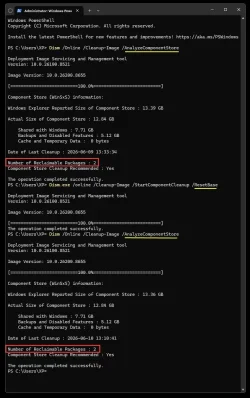
The DISM /Online /Cleanup-Image /StartComponentCleanup /ResetBase command by itself does NOT remove the two reclaimable packages, but it does fix the Disk Cleanup 190MB bug.

It will remove all BUT the last two reclaimable packages, which doesn't break anything.
My experience is that if I run DISM /Online /Cleanup-Image /StartComponentCleanup /ResetBase
then run DISM /Online /Cleanup-Image /AnalyzeComponentStore
Number of Reclaimable Packages : 0
Component Store Cleanup Recommended : No

Clean Up the WinSxS Folder
 

My Computer

System One

  • OS
    Windows 11
    Computer type
    PC/Desktop
    Manufacturer/Model
    Generic
    CPU
    AMD Ryzen 8700G
    Motherboard
    Gigabyte B650 UD AC
    Memory
    64 GB
    Graphics Card(s)
    Onboard
    Sound Card
    Onboard
    Monitor(s) Displays
    Del U2723QE
    Screen Resolution
    3840 x 2160
    Hard Drives
    Corsiar MP600 1TB
    PSU
    Silverstone 750 GOLD
    Case
    Silverstone FARA 513
My experience is that if I run DISM /Online /Cleanup-Image /StartComponentCleanup /ResetBase
then run DISM /Online /Cleanup-Image /AnalyzeComponentStore
Number of Reclaimable Packages : 0
Component Store Cleanup Recommended : No

Clean Up the WinSxS Folder


IF you already removed the last two at one time then the ResetBase command will keep them removed.
But to remove them the first time...


Here... I just ran these commands.
Previously, on my system, when I went to ZERO reclaimable packages... it broke my Windows Update.
So I restored from a backup, back to where I had TWO reclaimable packages. This happened back in March 2025.

This pic is from today...

Image1.webp
 
Last edited:

My Computers

System One System Two

  • OS
    Win 11 Home ♦♦♦26200.8655 ♦♦♦♦♦♦♦25H2
    Computer type
    PC/Desktop
    Manufacturer/Model
    Built by Ghot® [May 2020]
    CPU
    AMD Ryzen 7 3700X
    Motherboard
    Asus Pro WS X570-ACE (BIOS 5302)
    Memory
    G.Skill (F4-3200C14D-16GTZKW)
    Graphics Card(s)
    EVGA RTX 2070 (08G-P4-2171-KR)
    Sound Card
    Realtek ALC1220P / ALC S1220A
    Monitor(s) Displays
    Dell U3011 30"
    Screen Resolution
    2560 x 1600
    Hard Drives
    2x Samsung 860 EVO 500GB,
    WD 4TB Black FZBX - SATA III,
    WD 8TB Black FZBX - SATA III,
    DRW-24B1ST CD/DVD Burner
    PSU
    PC Power & Cooling 750W Quad EPS12V
    Case
    Cooler Master ATCS 840 Tower
    Cooling
    CM Hyper 212 EVO (push/pull)
    Keyboard
    Ducky DK9008 Shine II Blue LED
    Mouse
    Logitech Optical M-100
    Internet Speed
    300/300
    Browser
    Firefox (latest)
    Antivirus
    Bitdefender Total Security
    Other Info
    Speakers: Klipsch Pro Media 2.1
  • Operating System
    Windows XP Pro 32bit w/SP3
    Computer type
    PC/Desktop
    Manufacturer/Model
    Built by Ghot® (not in use)
    CPU
    AMD Athlon 64 X2 5000+ (OC'd @ 3.2Ghz)
    Motherboard
    ASUS M2N32-SLI Deluxe Wireless Edition
    Memory
    TWIN2X2048-6400C4DHX (2 x 1GB, DDR2 800)
    Graphics card(s)
    EVGA 256-P2-N758-TR GeForce 8600GT SSC
    Sound Card
    Onboard
    Monitor(s) Displays
    ViewSonic G90FB Black 19" Professional (CRT)
    Screen Resolution
    up to 2048 x 1536
    Hard Drives
    WD 36GB 10,000rpm Raptor SATA
    Seagate 80GB 7200rpm SATA
    Lite-On LTR-52246S CD/RW
    Lite-On LH-18A1P CD/DVD Burner
    PSU
    PC Power & Cooling Silencer 750 Quad EPS12V
    Case
    Generic Beige case, 80mm fans
    Cooling
    ZALMAN 9500A 92mm CPU Cooler
    Keyboard
    Logitech Classic Keybooard 200
    Mouse
    Logitech Optical M-BT96a
    Internet Speed
    300/300
    Browser
    Firefox 3.x ??
    Antivirus
    Symantec (Norton)
    Other Info
    Still assembled, still runs. Haven't turned it on for 15 years?
Not working here, I'm afraid.
View attachment 173852
I fixed it by using the Windows update repair.

Although DISM found errors, I didn't notice any problems in using the laptop. It's working now, although it still took a long time to complete DISM with the /RestoreHealth option.

John.
 

My Computers

System One System Two

  • OS
    Linux Mint (22.3) and Windows 11
    Computer type
    PC/Desktop
    Manufacturer/Model
    Home built
    CPU
    Ryzen 3900x
    Motherboard
    Gigabyte Aorus Master x570 rel 1.0
    Memory
    32GB (2x16) @ 3600 MHz Corsair Vengeance LPX
    Graphics Card(s)
    Asus Geforce RTX 5060 Ti Dual OC 16 GB
    Sound Card
    No separate sound card.
    Monitor(s) Displays
    Dell U2718Q
    Screen Resolution
    3840x2160
    Hard Drives
    1TB WD-Black SN850; 1TB Samsung Sata 850 Evo; 4 TB WD Blue Sata SA510 2.5''; 4TB Samsung Sata SSD 870 EVO 2.5".
    PSU
    Be Quiet Dark Power Pro 11 750W
    Case
    Lian Li PC-8FIB
    Cooling
    CPU: Noctua NH-U12A; Case: BeQuiet + Lian Li fans.
    Keyboard
    Steelseries Apex 7 brown keys.
    Mouse
    Logitech (wired) G403
    Internet Speed
    940 Mb/s down; 105 Mb/s up
    Browser
    Firefox
    Other Info
    Pioneer blu-ray optical drive.
  • Operating System
    Windows 11 Home (ARM version) (latest update)
    Computer type
    Laptop
    Manufacturer/Model
    Samsung Galaxy Book4 Edge 14" Copilot+ PC
    CPU
    Qualcomm Snapdragon X Elite X1E-80-100
    Memory
    16 GB LPDDR5
    Graphics card(s)
    Qualcomm Adreno
    Monitor(s) Displays
    Touch screen 14" AMOLED monitor
    Screen Resolution
    2880x1800
    Hard Drives
    512 GB eUFS
    Internet Speed
    930 Mb/s (Wifi)
    Browser
    Firefox
    Antivirus
    Eset Internet Security
    Other Info
    NPU Qualcomm Hexagon
I hope you remain lucky.
I got 2 crashes in half an hour. Xaml stuff is still misbehaving.

Its been stable. But it was slow getting it installed. It took an hour to get up and running on my ultrabook workstation with two reboots.
 

My Computers

System One System Two

  • OS
    Windows 11 Education For 25H2
    Computer type
    Laptop
    Manufacturer/Model
    HP ZBook G2
    CPU
    Intel® Core i7 5500u
    Motherboard
    HP
    Memory
    8 GB
    Graphics Card(s)
    Intel HD Family Graphics 5500 AMD Firepro 4150M
    Sound Card
    Realtek High Audio
    Hard Drives
    1 TB SSD
    Mouse
    HP USB Mouse
    Antivirus
    Windows Defender
  • Operating System
    Windows 11 Pro For Workstations 25H2
    Computer type
    Laptop
    Manufacturer/Model
    HP Zbook G4
    CPU
    Xeon 1535m v6
    Motherboard
    HP
    Memory
    32 GB
    Graphics card(s)
    AMD Quadro Pro 4100
    Sound Card
    Bang and Olufson Audio
    Hard Drives
    1TB SSD
    Mouse
    HP USB Mouse
    Antivirus
    Windows Defender
I hope you remain lucky.
I got 2 crashes in half an hour. Xaml stuff is still misbehaving.
I've not had any crashes but I do occasionally get this weird hang when I right click on the task bar and the context window will open but be frozen. The rest of the OS still operates and after 5-10 seconds the context menu unfreezes and works. Sometimes Task Manager is very slow to open, other times almost instant. This has been going on for awhile.
 

My Computer

System One

  • OS
    Windows 11 25H2
    Computer type
    PC/Desktop
    Manufacturer/Model
    EVGA home brew
    CPU
    Broadwell-e 6850K 4.5ghz @1.36v
    Motherboard
    EVGA X99 FTW K
    Memory
    32GB Corsair LPM 3600 C16
    Graphics Card(s)
    EVGA RTX 3080Ti FTW
    Sound Card
    Asus Centurion true 7.1 headset. (5 speakers in each earpeice)
    Monitor(s) Displays
    LG C4 55"
    Screen Resolution
    4K 144hz
    Hard Drives
    Various models of SSDs ~10TB No HDDs installed.
    PSU
    be quiet! BN516 Straight Power 12-1000w 80 Plus Platinum
    Case
    Corsair 780T modified to dual 200mm intake fans
    Cooling
    Corsair H110i
    Keyboard
    Corsair K95 Platinum
    Mouse
    Corsair M65 RGB Elite
    Internet Speed
    50Mbs
Windows is fast and responsive. Its not the build. I've all the eye candy and effects that slow Windows down turned off. All apps running in the background have also been turned off.
 

My Computers

System One System Two

  • OS
    Windows 11 Education For 25H2
    Computer type
    Laptop
    Manufacturer/Model
    HP ZBook G2
    CPU
    Intel® Core i7 5500u
    Motherboard
    HP
    Memory
    8 GB
    Graphics Card(s)
    Intel HD Family Graphics 5500 AMD Firepro 4150M
    Sound Card
    Realtek High Audio
    Hard Drives
    1 TB SSD
    Mouse
    HP USB Mouse
    Antivirus
    Windows Defender
  • Operating System
    Windows 11 Pro For Workstations 25H2
    Computer type
    Laptop
    Manufacturer/Model
    HP Zbook G4
    CPU
    Xeon 1535m v6
    Motherboard
    HP
    Memory
    32 GB
    Graphics card(s)
    AMD Quadro Pro 4100
    Sound Card
    Bang and Olufson Audio
    Hard Drives
    1TB SSD
    Mouse
    HP USB Mouse
    Antivirus
    Windows Defender

My Computer

System One

  • OS
    26200.8037
    Computer type
    PC/Desktop
    CPU
    i5-11400F
    Motherboard
    Gigabyte
    Memory
    32GB
    Graphics Card(s)
    Geforce GT-1030
    Keyboard
    Logitech K400
    Mouse
    Logitech M720
    Internet Speed
    600 Mb
    Browser
    Edge
I've been using the new update for the past day, and it's been solid on both machines. I've been trading using Interactive Brokers Trader Workstation. I've been doing some writing with Microsoft Word. I've been doing some software development using Microsoft Visual Studio.

On my two systems there's no need for hacks of any kind. Everything is fast and flawless.
 

My Computers

System One System Two

  • OS
    Windows 11 Pro
    Computer type
    Laptop
    Manufacturer/Model
    Dell XPS 16 DA16260
    CPU
    Intel Series 3 Core Ultra X9 388H
    Memory
    64GB LPDDR5x 9600 MT/s
    Graphics Card(s)
    Intel Arc graphics B390 Panther Lake
    Monitor(s) Displays
    16" 3.2K Tandem OLED Infinity Edge
    Screen Resolution
    3200 x 2000 16:10 236 PPI
    Hard Drives
    1 Terabyte M.2 PCIe NVMe SSD
    Case
    Black Anodized Aluminum
    Cooling
    Vapor Chamber Cooling
    Mouse
    None
    Internet Speed
    942 Mbps Netgear Mesh + 2 Satellites
    Browser
    Microsoft Edge (Chromium)
    Antivirus
    Windows Security (Defender)
    Other Info
    NPU delivering 67 TOPS
    Microsoft 365 subscription
    Microsoft OneDrive 1TB Cloud
    Microsoft Visual Studio
    Microsoft Visual Studio Code
    Microsoft Sysinternals Suite
    Microsoft BitLocker
    Microsoft Copilot
    Dell Support Assist
    Dell Command | Update
    Macrium Reflect X subscription
    1Password Password Manager
    Amazon Kindle for PC
    Lightroom/Photoshop subscription
    Interactive Brokers Trader Workstation
  • Operating System
    Windows 11 Pro
    Computer type
    Laptop
    Manufacturer/Model
    Microsoft Surface Laptop 7
    CPU
    Snapdragon® X Elite (12 Core) with Hexagon NPU delivering 45 TOPS
    Memory
    32GB LPDDR5x 8448 MT/s
    Graphics card(s)
    Integrated Adreno GPU
    Sound Card
    Omnisonic speakers with Dolby Atmos spatial sound
    Monitor(s) Displays
    13.8″ PixelSense Flow touchscreen 120 Hz 600 NIT
    Screen Resolution
    2304 × 1536 (201 PPI), 3:2 aspect ratio
    Hard Drives
    1 TB PCIe NVMe Gen 4 SSD
    Case
    Black Anodized Aluminum
    Cooling
    Vapor Chamber Cooling
    Mouse
    None
    Internet Speed
    942 Mbps Netgear Mesh + 2 Satellites
    Browser
    Microsoft Edge (Chromium)
    Antivirus
    Windows Security (Defender)
    Other Info
    Microsoft 365 subscription (Office)
    Microsoft OneDrive 1TB Cloud
    Microsoft Visual Studio 2026
    Microsoft Visual Studio Code
    Interactive Brokers Trader Workstation
    Lightroom/Photoshop subscription
    1Password Password Manager
    Microsoft Sysinternals
    Amazon Kindle for PC
    Microsoft BitLocker
    Microsoft Copilot

My Computers

System One System Two

  • OS
    Windows 11 Pro for Workstations
    Computer type
    PC/Desktop
    Manufacturer/Model
    Custom self build
    CPU
    Intel i7-8700K 5 GHz
    Motherboard
    ASUS ROG Maximus XI Formula Z390
    Memory
    64 GB (4x16GB) G.SKILL TridentZ RGB DDR4 3600 MHz (F4-3600C18D-32GTZR)
    Graphics Card(s)
    ASUS ROG-STRIX-GTX1080TI-O11G-GAMING (11GB GDDR5X)
    Sound Card
    Integrated Digital Audio (S/PDIF)
    Monitor(s) Displays
    2 x Samsung Odyssey G75 27"
    Screen Resolution
    2560x1440
    Hard Drives
    1TB Samsung 990 PRO M.2,
    4TB Samsung 990 PRO M.2,
    TerraMaster F8 SSD Plus NAS
    PSU
    Seasonic Prime Titanium 850W
    Case
    Thermaltake Core P3 wall mounted
    Cooling
    Corsair Hydro H115i
    Keyboard
    Amazon Basics Wired Full Keyboard MD005
    Mouse
    Logitech MX Master 4
    Internet Speed
    2 Gbps Download and 100 Mbps Upload
    Browser
    Chrome and Edge
    Antivirus
    Microsoft Defender
    Other Info
    Logitech Z625 speaker system,
    Logitech BRIO 4K Pro webcam,
    HP Color LaserJet Pro MFP M477fdn,
    CyberPower CP1500PFCLCD
    Galaxy S23 Plus phone
  • Operating System
    Windows 11 Pro
    Computer type
    Laptop
    Manufacturer/Model
    Surface Laptop 7 Copilot+ PC
    CPU
    Snapdragon X Elite (12 core) 3.42 GHz
    Memory
    16 GB LPDDR5x-7467 MHz
    Monitor(s) Displays
    15" HDR
    Screen Resolution
    2496 x 1664
    Hard Drives
    1 TB SSD
    Internet Speed
    Wi-Fi 7 and Bluetooth 5.4
    Browser
    Chrome and Edge
    Antivirus
    Microsoft Defender

June 10, 2026Update: Folder customization added.
 

My Computer

System One

  • OS
    26200.8037
    Computer type
    PC/Desktop
    CPU
    i5-11400F
    Motherboard
    Gigabyte
    Memory
    32GB
    Graphics Card(s)
    Geforce GT-1030
    Keyboard
    Logitech K400
    Mouse
    Logitech M720
    Internet Speed
    600 Mb
    Browser
    Edge
Then, all of you are lucky and I'm glad :)

I don't use any tricky/smart tools on windows. Certainly nothing extra related to it during the last few months.
The Explorer used to crash for going over its limit of GDI objects. I use graphics a lot and that probably explains it.
I disabled the Explorer's GPU usage, raised its GDI limit by increasing its value in the registry and all was well for some time.

Then since the previous preview and up to now with the current release, the crash has changed and it's always in the same file which is part of Windows new UI design SDK.
I don't see or can think of a way to control that, other than waiting for some future update :(
 

My Computer

System One

  • OS
    Windows 11 Pro for Workstations 25H2 26200.8655
    Computer type
    PC/Desktop
    Manufacturer/Model
    ASRock
    CPU
    6C+4c Intel 13th Gen Intel(R) Core(TM) i5-13400, 4100 M
    Motherboard
    ASRock B660M-HDV
    Memory
    64 GB
    Graphics Card(s)
    NVIDIA GeForce RTX 4060, Intel UHD Graphics 730
    Sound Card
    Realtek
    Monitor(s) Displays
    AOC 24V2W1G5
    Screen Resolution
    1920x1080
    Hard Drives
    Samsung SSD 990 Pro with Heatsink
    Keyboard
    Logitech
    Mouse
    Logitech
    Internet Speed
    1GB
    Antivirus
    Windows Defender

Change log​

Change date​
Change description​
June 10, 2026Update: Folder customization added.

[Folder customization] This update introduces a security hardening change to how Windows processes desktop.ini files. As a result, some users might notice missing custom folder icons or localized folder names for content from downloaded or remote locations. Note that access to folders is not affected. For more information, see Custom folder icons or localized folder names might not appear after installing the June 2026 Windows security update.
 

My Computers

System One System Two

  • OS
    Windows 11 Pro for Workstations
    Computer type
    PC/Desktop
    Manufacturer/Model
    Custom self build
    CPU
    Intel i7-8700K 5 GHz
    Motherboard
    ASUS ROG Maximus XI Formula Z390
    Memory
    64 GB (4x16GB) G.SKILL TridentZ RGB DDR4 3600 MHz (F4-3600C18D-32GTZR)
    Graphics Card(s)
    ASUS ROG-STRIX-GTX1080TI-O11G-GAMING (11GB GDDR5X)
    Sound Card
    Integrated Digital Audio (S/PDIF)
    Monitor(s) Displays
    2 x Samsung Odyssey G75 27"
    Screen Resolution
    2560x1440
    Hard Drives
    1TB Samsung 990 PRO M.2,
    4TB Samsung 990 PRO M.2,
    TerraMaster F8 SSD Plus NAS
    PSU
    Seasonic Prime Titanium 850W
    Case
    Thermaltake Core P3 wall mounted
    Cooling
    Corsair Hydro H115i
    Keyboard
    Amazon Basics Wired Full Keyboard MD005
    Mouse
    Logitech MX Master 4
    Internet Speed
    2 Gbps Download and 100 Mbps Upload
    Browser
    Chrome and Edge
    Antivirus
    Microsoft Defender
    Other Info
    Logitech Z625 speaker system,
    Logitech BRIO 4K Pro webcam,
    HP Color LaserJet Pro MFP M477fdn,
    CyberPower CP1500PFCLCD
    Galaxy S23 Plus phone
  • Operating System
    Windows 11 Pro
    Computer type
    Laptop
    Manufacturer/Model
    Surface Laptop 7 Copilot+ PC
    CPU
    Snapdragon X Elite (12 core) 3.42 GHz
    Memory
    16 GB LPDDR5x-7467 MHz
    Monitor(s) Displays
    15" HDR
    Screen Resolution
    2496 x 1664
    Hard Drives
    1 TB SSD
    Internet Speed
    Wi-Fi 7 and Bluetooth 5.4
    Browser
    Chrome and Edge
    Antivirus
    Microsoft Defender
All working. Finally got the new startmenu. I must say i really like it. It is what it is supposed to be: very simple and clear. Is Microsoft finally waking up?
 

My Computers

System One System Two

  • OS
    Windows 11 pro
    Computer type
    PC/Desktop
    Manufacturer/Model
    Lalashops.nl (Bol.com)
    CPU
    Intel i9-12900KF
    Motherboard
    B760 Gaming PLUS WIFI
    Memory
    Patriot 32GB DDR5
    Graphics Card(s)
    MSI Nvidia Geforce RTX 4070 12GB GDDR6
    Sound Card
    Behringer Xair XR18 (External via USB)
    Monitor(s) Displays
    Acer XF240Y S3
    Screen Resolution
    1920x1080
    Hard Drives
    Crucial T700 1TB Nvme PCI Express 5.0 x4
    Sandisk Extreme SDSSDE61-2T00-G25
    PSU
    750 watt (80+ Gold)
    Case
    Xilence XILENT BLADE II X613
    Cooling
    Coolermaster MasterLiquid 240L Core ARGB
    Keyboard
    Steelseries Apex M750
    Mouse
    Logitech M170
    Internet Speed
    100mbit
    Browser
    Chrome
    Antivirus
    Panda
  • Operating System
    Windows 10 pro
    Computer type
    PC/Desktop
    Manufacturer/Model
    HP Z400
    CPU
    Intel Xeon W3520
    Motherboard
    Hewlett-Packard 0B4Ch
    Memory
    12,0GB DDR3
    Graphics card(s)
    ASUS Radeon RX 560 Series 4GB
    Sound Card
    Internal from motherboard
    Monitor(s) Displays
    BenQ G2420HD
    Screen Resolution
    1920x1080
    Hard Drives
    465GB Crucial CT500MX500SSD1
    465GB Western Digital WDC WD5000AAKX-001CA0
    PSU
    450W
    Case
    HP Z400
    Cooling
    Aircooling
    Keyboard
    Compaq KU9978
    Mouse
    Cheap 10 euro mouse
    Internet Speed
    100mbit
    Browser
    Chrome
    Antivirus
    Panda

Latest Support Threads

Back
Top Bottom