Laptop keeps crashing - ASUS Zenbook


developer981

New member
Local time
5:14 PM
Posts
9
OS
Windows 11
My laptop crashes every one or two hours. There's no pattern that I know of. It started doing this maybe two or three weeks ago.

I have an ASUS Zenbook Q536FD running Windows 11 Home 10.0.26200 Build 2600.

It's over 7 years old, not sure when I bought it. no warranty left.

Mini dumps and V2 zip here: Windows 11 Mini Dump and V2 - Google Drive


C:\>systeminfo

OS Name: Microsoft Windows 11 Home
OS Version: 10.0.26200 N/A Build 26200
OS Manufacturer: Microsoft Corporation
OS Configuration: Standalone Workstation
OS Build Type: Multiprocessor Free
Registered Organization: N/A
Product ID: 00325-81110-41265-AAOEM
Original Install Date: 7/1/2025, 6:06:30 AM
System Boot Time: 12/15/2025, 10:25:12 PM
System Manufacturer: ASUSTeK COMPUTER INC.
System Model: ZenBook Q536FD_Q536FD
System Type: x64-based PC
Processor(s): 1 Processor(s) Installed.
[01]: Intel64 Family 6 Model 142 Stepping 11 GenuineIntel ~1792 Mhz
BIOS Version: American Megatrends Inc. Q536FD.306, 5/31/2019
Windows Directory: C:\WINDOWS
System Directory: C:\WINDOWS\system32
Boot Device: \Device\HarddiskVolume2
System Locale: en-us;English (United States)
Input Locale: en-us;English (United States)
Time Zone: (UTC-05:00) Eastern Time (US & Canada)
Total Physical Memory: 16,203 MB
Available Physical Memory: 4,689 MB
Virtual Memory: Max Size: 21,579 MB
Virtual Memory: Available: 7,886 MB
Virtual Memory: In Use: 13,693 MB
Page File Location(s): C:\pagefile.sys
Domain: WORKGROUP
Hotfix(s): 5 Hotfix(s) Installed.
[01]: KB5066128
[02]: KB5054156
[03]: KB5072033
[04]: KB5067035
[05]: KB5071142
Network Card(s): 2 NIC(s) Installed.
[01]: TAP-Windows Adapter V9
Connection Name: Local Area Connection
Status: Media disconnected
[02]: Intel(R) Wireless-AC 9560 160MHz
Connection Name: Wi-Fi
Virtualization-based security: Status: Not enabled
App Control for Business policy: Enforced
App Control for Business user mode policy: Off
Security Features Enabled:
Hyper-V Requirements: VM Monitor Mode Extensions: Yes
Virtualization Enabled In Firmware: Yes
Second Level Address Translation: Yes
Data Execution Prevention Available: Yes
 

My Computer

System One

  • OS
    Windows 11
    Computer type
    Laptop
    Manufacturer/Model
    ASUS Zenbook Q536FD
    CPU
    Intel(R) Core(TM) i7-8565U CPU @ 1.80GHz, 199
    Memory
    16 GB
    Antivirus
    Malwarebytes
Please perform the following steps:


1) Run Tuneup plus > post a share link


Batch files for use in BSOD debugging - Windows 10 Help Forums

Batch files for use in BSOD debugging - Windows 10 Help Forums


2) Temporarily uninstall Malwarebytes using the applicable uninstall tool:


3) Reinstall the Intel chipset drivers:


4) Create a new restore point:

Create System Restore Point in Windows 10


5) Run Memtest86+ for 8 or more passes > take pictures > post images or share links

Memtest86+ | The Open-Source Memory Testing Tool

Just 1 error is a test fail and testing can be aborted.

The more the passes the better the testing conditions.

It sometimes takes passes into the 20's to detect malfunctioning RAM.

The RAM can be tested all at one time or one at a time in the same DIMM.

Memtest86+ | The Open-Source Memory Testing Tool

MemTest86+ - Test RAM


6) Run Sea Tools Long generic test (all drives) > post images or share links


7) Open administrative command prompt and copy and paste:

chkdsk /b /v

Run these chkdsk switches on all drives using the syntax: chkdsk /b /v C: or chkdsk /b /v D: or chkdsk /b /v E: etc.

Make sure that the windows drive runs overnight while sleeping.

C:\WINDOWS\system32>chkdsk /b /v
The type of the file system is NTFS.
Cannot lock current drive.
Chkdsk cannot run because the volume is in use by another
process. Would you like to schedule this volume to be
checked the next time the system restarts? (Y/N)

Type: Y

Reboot as needed.


8) After completing all chkdsk /b /v run:

https://www.tenforums.com/attachmen...-files-use-bsod-debugging-chkdskfromevent.bat

Batch files for use in BSOD debugging - Windows 10 Help Forums

Batch files for use in BSOD debugging - Windows 10 Help Forums


Make sure that this runs only after the prior three steps for each drive.


9) Run HD Sentinel (all drives) > post images or share links (do not run until posting results for each steps 6, 7 and 8)

Hard Disk Sentinel - HDD health and temperature monitoring
a) Overview
b) Temperature
c) SMART


10) Please make sure that all of the above steps are performed in sequence

These steps / tests can be performed overnight while sleeping:
a) Memtest86+
b) Sea Tools Long generic test
c) HD Tune Full error scan
d) Chkdsk /b /v


Code:
Event[4166]
  Log Name: System
  Source: Microsoft-Windows-Ntfs
  Date: 2025-12-06T06:54:27.1600000Z
  Event ID: 98
  Task: N/A
  Level: Warning
  Opcode: Info
  Keyword: N/A
  User: S-1-5-18
  User Name: NT AUTHORITY\SYSTEM
  Computer: DESKTOP-C7A4GLI
  Description:
Volume C: (\Device\HarddiskVolume4) requires an Online Scan.  An Online Scan will automatically run as part of the next scheduled maintenance task.  Alternatively you may run "CHKDSK /SCAN" locally via the command line, or run "REPAIR-VOLUME <drive:> -SCAN" locally or remotely via PowerShell.

Event[4167]
  Log Name: System
  Source: Ntfs
  Date: 2025-12-06T06:54:27.1600000Z
  Event ID: 55
  Task: N/A
  Level: Error
  Opcode: Info
  Keyword: N/A
  User: S-1-5-18
  User Name: NT AUTHORITY\SYSTEM
  Computer: DESKTOP-C7A4GLI
  Description:
A corruption was discovered in the file system structure on volume C:.

The exact nature of the corruption is unknown.  The file system structures need to be scanned online.


Code:
Event[10115]
  Log Name: System
  Source: Microsoft-Windows-TPM-WMI
  Date: 2025-12-10T22:13:29.9590000Z
  Event ID: 1801
  Task: N/A
  Level: Error
  Opcode: Info
  Keyword: N/A
  User: S-1-5-18
  User Name: NT AUTHORITY\SYSTEM
  Computer: DESKTOP-C7A4GLI
  Description:
Secure Boot certificates have been updated but are not yet applied to the device firmware. Review the published guidance to complete the update and ensure full protection. This device signature information is included here.
DeviceAttributes: BaseBoardManufacturer:ASUSTeK COMPUTER INC.;FirmwareManufacturer:American Megatrends Inc.;FirmwareVersion:Q536FD.306;OEMModelBaseBoard:Q536FD;OEMManufacturerName:ASUSTeK COMPUTER INC.;OSArchitecture:amd64;
BucketId: 56b26a6db0d16304579777bef60ac7f2e3d97aa744dadb7c4c5bfc1715a3aa34
BucketConfidenceLevel:
UpdateType:
For more information, please see https://go.microsoft.com/fwlink/?linkid=2301018.


Code:
Name    Intel(R) 300 Series Chipset Family SATA AHCI Controller
Manufacturer    Intel Corporation
Status    OK
PNP Device ID    PCI\VEN_8086&DEV_9DD3&SUBSYS_14811043&REV_30\3&11583659&1&B8
Memory Address    0x00000000B4220000-0x00000000B4221FFF
Memory Address    0x00000000B4229000-0x00000000B42290FF
I/O Port    0x00004090-0x00004097
I/O Port    0x00004080-0x00004083
I/O Port    0x00004060-0x0000407F
Memory Address    0x00000000B4228000-0x00000000B42287FF
IRQ Channel    IRQ 4294967292
Driver    C:\WINDOWS\SYSTEM32\DRIVERS\IASTORAC.SYS (16.5.1.1030, 945.02 KB (967,696 bytes), 8/29/2018 3:41 AM)


Code:
 iaStorAC.sys Tue Jun 12 13:02:57 2018 (5B200AD1)
 
Last edited:

My Computer

System One

  • OS
    Windows 10
    Computer type
    Laptop
    Manufacturer/Model
    HP
    CPU
    Intel(R) Core(TM) i7-4800MQ CPU @ 2.70GHz
    Motherboard
    Product : 190A Version : KBC Version 94.56
    Memory
    16 GB Total: Manufacturer : Samsung MemoryType : DDR3 FormFactor : SODIMM Capacity : 8GB Speed : 1600
    Graphics Card(s)
    NVIDIA Quadro K3100M; Intel(R) HD Graphics 4600
    Sound Card
    IDT High Definition Audio CODEC; PNP Device ID HDAUDIO\FUNC_01&VEN_111D&DEV_76E0
    Hard Drives
    Model Hitachi HTS727575A9E364
    Antivirus
    Microsoft Defender
    Other Info
    Mobile Workstation

My Computer

System One

  • OS
    Windows 11
    Computer type
    Laptop
    Manufacturer/Model
    ASUS Zenbook Q536FD
    CPU
    Intel(R) Core(TM) i7-8565U CPU @ 1.80GHz, 199
    Memory
    16 GB
    Antivirus
    Malwarebytes

For Sea Tools please run the flash drive (bootable application) for the Long generic tests.


Memtest86+
16 GB 24 passes 0 errors test pass

Tuneup plus good
 

My Computer

System One

  • OS
    Windows 10
    Computer type
    Laptop
    Manufacturer/Model
    HP
    CPU
    Intel(R) Core(TM) i7-4800MQ CPU @ 2.70GHz
    Motherboard
    Product : 190A Version : KBC Version 94.56
    Memory
    16 GB Total: Manufacturer : Samsung MemoryType : DDR3 FormFactor : SODIMM Capacity : 8GB Speed : 1600
    Graphics Card(s)
    NVIDIA Quadro K3100M; Intel(R) HD Graphics 4600
    Sound Card
    IDT High Definition Audio CODEC; PNP Device ID HDAUDIO\FUNC_01&VEN_111D&DEV_76E0
    Hard Drives
    Model Hitachi HTS727575A9E364
    Antivirus
    Microsoft Defender
    Other Info
    Mobile Workstation
For Sea Tools please run the flash drive (bootable application) for the Long generic tests.
Thanks. Didn't know that was an option.
 

My Computer

System One

  • OS
    Windows 11
    Computer type
    Laptop
    Manufacturer/Model
    ASUS Zenbook Q536FD
    CPU
    Intel(R) Core(TM) i7-8565U CPU @ 1.80GHz, 199
    Memory
    16 GB
    Antivirus
    Malwarebytes

My Computer

System One

  • OS
    Windows 10
    Computer type
    Laptop
    Manufacturer/Model
    HP
    CPU
    Intel(R) Core(TM) i7-4800MQ CPU @ 2.70GHz
    Motherboard
    Product : 190A Version : KBC Version 94.56
    Memory
    16 GB Total: Manufacturer : Samsung MemoryType : DDR3 FormFactor : SODIMM Capacity : 8GB Speed : 1600
    Graphics Card(s)
    NVIDIA Quadro K3100M; Intel(R) HD Graphics 4600
    Sound Card
    IDT High Definition Audio CODEC; PNP Device ID HDAUDIO\FUNC_01&VEN_111D&DEV_76E0
    Hard Drives
    Model Hitachi HTS727575A9E364
    Antivirus
    Microsoft Defender
    Other Info
    Mobile Workstation
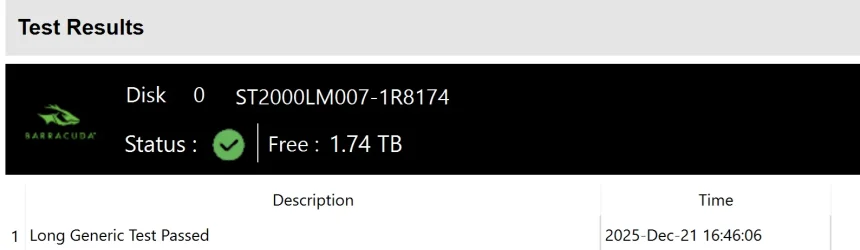
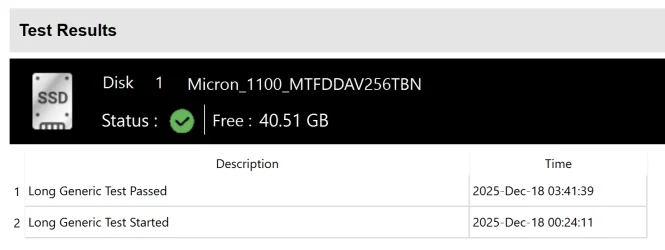
Seatest passed. Going to run the next tests.

Disk 0 Seatest.webp

Disk 1 Seatest.webp
 

My Computer

System One

  • OS
    Windows 11
    Computer type
    Laptop
    Manufacturer/Model
    ASUS Zenbook Q536FD
    CPU
    Intel(R) Core(TM) i7-8565U CPU @ 1.80GHz, 199
    Memory
    16 GB
    Antivirus
    Malwarebytes
After completing chkdsk /b /v and HDS:


1) Choose one of the temperature monitoring software applications: Speed fan, Speecy, HW monitor:

SpeedFan - Access temperature sensor in your computer: SpeedFan - Access temperature sensor in your computer

Speccy - Free Download - Piriform: Speccy - System Information - Free

HWMONITOR | Softwares | CPUID: HWMONITOR | Softwares | CPUID


2) Run Prime95 - Stress Test Your CPU

Prime95 - Stress Test Your CPU Windows 10 Performance Maintenance Tutorials

a) Record the maximum temperature and post the maximum temperature into the thread

b) Record test duration and post the uninterrupted test duration into the thread

c) Aim for testing > 3 hrs and abort testing as needed for freezing, temperature changes (see link)


3) Run FurMark - GPU Stress Test Windows 10 Performance Maintenance Tutorials

FurMark - GPU Stress Test Windows 10 Performance Maintenance Tutorials:

Please make note of the importance of temperature monitoring and aborting the test in the GPU link.

a) Record the maximum temperature and post the maximum temperature into the thread.

b) Record the test duration and post the uninterrupted test duration into the thread.

c) Aim for testing 1 hour.
 

My Computer

System One

  • OS
    Windows 10
    Computer type
    Laptop
    Manufacturer/Model
    HP
    CPU
    Intel(R) Core(TM) i7-4800MQ CPU @ 2.70GHz
    Motherboard
    Product : 190A Version : KBC Version 94.56
    Memory
    16 GB Total: Manufacturer : Samsung MemoryType : DDR3 FormFactor : SODIMM Capacity : 8GB Speed : 1600
    Graphics Card(s)
    NVIDIA Quadro K3100M; Intel(R) HD Graphics 4600
    Sound Card
    IDT High Definition Audio CODEC; PNP Device ID HDAUDIO\FUNC_01&VEN_111D&DEV_76E0
    Hard Drives
    Model Hitachi HTS727575A9E364
    Antivirus
    Microsoft Defender
    Other Info
    Mobile Workstation
chkdsk on D: ran fine, it took hours. Log here: Drive D chckdsk.txt

Something strange seems to be happening when I try chkdsk on C:
When I restart it, it takes about 8 seconds before it finishes, then it starts up. chkdsk on C.mp4
Then I can't find the log in the event viewer.
Did it run or not?
 

My Computer

System One

  • OS
    Windows 11
    Computer type
    Laptop
    Manufacturer/Model
    ASUS Zenbook Q536FD
    CPU
    Intel(R) Core(TM) i7-8565U CPU @ 1.80GHz, 199
    Memory
    16 GB
    Antivirus
    Malwarebytes
1) Please create a bootable Windows 11 Media Creation Tool (MCT) (Windows 11 iso):


2) Boot to the MCT (iso) > command prompt > type these commands:


bcdedit | find "osdevice"

diskpart
lis dis
lis vol
sel dis 1
det dis
lis par
sel dis 2
det dis
lis par
sel dis 3
det dis
lis par
exit

chkdsk /b /v W:
(change the drive letter W: to the drive letter displayed in the result for the osdevice partition)
 
Last edited:

My Computer

System One

  • OS
    Windows 10
    Computer type
    Laptop
    Manufacturer/Model
    HP
    CPU
    Intel(R) Core(TM) i7-4800MQ CPU @ 2.70GHz
    Motherboard
    Product : 190A Version : KBC Version 94.56
    Memory
    16 GB Total: Manufacturer : Samsung MemoryType : DDR3 FormFactor : SODIMM Capacity : 8GB Speed : 1600
    Graphics Card(s)
    NVIDIA Quadro K3100M; Intel(R) HD Graphics 4600
    Sound Card
    IDT High Definition Audio CODEC; PNP Device ID HDAUDIO\FUNC_01&VEN_111D&DEV_76E0
    Hard Drives
    Model Hitachi HTS727575A9E364
    Antivirus
    Microsoft Defender
    Other Info
    Mobile Workstation
chkdsk: chkdskFromEvent.log

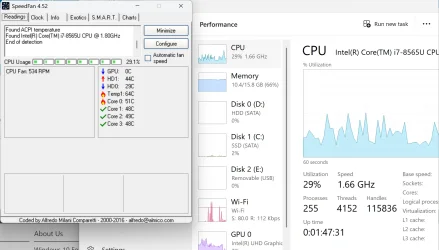
Haven't had a crash in hours. Maybe it helped. Also running speedfan (pic below). Occasionally it does get hot (apparently). But I'm not sure how hot is too hot. It seems to go through cycles, getting hot, then cooling back down.

speedfan.webp
 

My Computer

System One

  • OS
    Windows 11
    Computer type
    Laptop
    Manufacturer/Model
    ASUS Zenbook Q536FD
    CPU
    Intel(R) Core(TM) i7-8565U CPU @ 1.80GHz, 199
    Memory
    16 GB
    Antivirus
    Malwarebytes
Please post a new V2 share link into the newest post.


Repeat chkdsk /b /v on the Windows drive (run overnight while sleeping) using the flash drive Windows RE command prompt.

bcdedit | find "osdevice"

(prior post edited)


chkdsk:
Code:
              Total duration: 1.37 minutes (82420 ms).


Last edited:

My Computer

System One

  • OS
    Windows 10
    Computer type
    Laptop
    Manufacturer/Model
    HP
    CPU
    Intel(R) Core(TM) i7-4800MQ CPU @ 2.70GHz
    Motherboard
    Product : 190A Version : KBC Version 94.56
    Memory
    16 GB Total: Manufacturer : Samsung MemoryType : DDR3 FormFactor : SODIMM Capacity : 8GB Speed : 1600
    Graphics Card(s)
    NVIDIA Quadro K3100M; Intel(R) HD Graphics 4600
    Sound Card
    IDT High Definition Audio CODEC; PNP Device ID HDAUDIO\FUNC_01&VEN_111D&DEV_76E0
    Hard Drives
    Model Hitachi HTS727575A9E364
    Antivirus
    Microsoft Defender
    Other Info
    Mobile Workstation

My Computer

System One

  • OS
    Windows 11
    Computer type
    Laptop
    Manufacturer/Model
    ASUS Zenbook Q536FD
    CPU
    Intel(R) Core(TM) i7-8565U CPU @ 1.80GHz, 199
    Memory
    16 GB
    Antivirus
    Malwarebytes
1) Uninstall McAfee AV using the applicable uninstall tool:


2) After the new BSOD and uninstalling McAfee > post a new V2 share link into the newest post


3) Boot to the flash drive Windows RE > command prompt > copy and paste:

bcdedit | find "osdevice"

fsutil dirty set W:

(change the drive letter W: to the drive letter displayed in the result for the osdevice partition)

Post images or share links.


4) Reboot so it runs an automatic chkdsk.


5) Reboot to the flash drive Windows RE > command prompt > copy and paste:


bcdedit | find "osdevice"

chkdsk /b /v W:

(change the drive letter W: to the drive letter displayed in the result for the osdevice partition)

Post images or share links before rebooting


6) Allow it to run overnight while sleeping


7) After the repeat chkdsk testing run Prime95 and Furmark

For each > take pictures > post images or share links


8) Post a new V2 share link into the newest post


Code:
Correcting errors in the Volume Bitmap.

Windows has made corrections to the file system.

Code:
McAfee Security Scan Plus    c:\progra~1\mcafee~1\311~1.233\sssche~1.exe    Public    Common Startup
 
Last edited:

My Computer

System One

  • OS
    Windows 10
    Computer type
    Laptop
    Manufacturer/Model
    HP
    CPU
    Intel(R) Core(TM) i7-4800MQ CPU @ 2.70GHz
    Motherboard
    Product : 190A Version : KBC Version 94.56
    Memory
    16 GB Total: Manufacturer : Samsung MemoryType : DDR3 FormFactor : SODIMM Capacity : 8GB Speed : 1600
    Graphics Card(s)
    NVIDIA Quadro K3100M; Intel(R) HD Graphics 4600
    Sound Card
    IDT High Definition Audio CODEC; PNP Device ID HDAUDIO\FUNC_01&VEN_111D&DEV_76E0
    Hard Drives
    Model Hitachi HTS727575A9E364
    Antivirus
    Microsoft Defender
    Other Info
    Mobile Workstation

Latest Support Threads

Back
Top Bottom