Latest Intel Graphics Driver for Windows 11


Intel_banner.png


 Intel 7th-10th Gen Processor Graphics Drivers for Windows 10 and Windows 11

Driver Version: 31.0.101.2141
Release Date: April 06, 2026

Windows 11 and Windows 10 64-bit only download

Release Notes (.pdf)

Platform Support
  • 7th Gen Intel® Core™ processor family (Codename Kaby Lake)
  • 8th Gen Intel® Core™ processor family (Codename Kaby Lake-R, Coffee Lake, Whiskey Lake)
  • 9th Gen Intel® Core™ processor family (Codename Coffee Lake-R)
  • 10th Gen Intel® Core™ processor family (Codename Comet Lake, Amber Lake, Ice Lake)
  • Intel® Core™ Processor with Intel® Hybrid Technology (Codename Lakefield)
  • Intel® Atom®, Pentium® and Celeron® processor family (Codename Apollo Lake, Elkhart Lake)
  • Intel® Pentium® and Celeron® processor family (Codename Gemini Lake, Jasper Lake)
CONTENTS OF THE PACKAGE:
  • Intel Graphics Driver
  • Intel Display Audio Driver 10.26.0.14 (6th Gen and related Pentium Silver and Celeron processors)
  • Intel Display Audio Driver 10.27.0.14 (7th, 8th, 9th, 10th Gen Intel Core processors)
  • Intel Display Audio Driver 11.1.0.23 (10th Gen Intel Core processors with Iris Plus Graphics)
  • Intel Display Audio Driver 11.2.0.12 (Intel Core Processors with Intel Hybrid Technology)
  • Intel Media SDK Runtime (21.0.1.35)
  • Intel Graphics Compute Runtime for OpenCL* Driver
  • Intel Graphics Command Center (installed via Microsoft* Store)
  • Vulkan*3 Runtime Installer
  • Intel Graphics Driver Installer (1.0.1168.2)
  • oneAPI Level Zero Loader and Validation Layer
  • Intel Graphics Compute Runtime for oneAPI Level Zero specification


 Intel 11th-14th Gen Processor Graphics Drivers for Windows 10/11

Driver Version: 32.0.101.7085
Release Date: March 18, 2026

Windows 11 and Windows 10 64-bit only download

Platform (OS Support)
  • 11th Gen Intel® Core™ processor family (Codename Tiger Lake, Rocket Lake, Tiger Lake-H)
  • 12th Gen Intel® Core™ processor family (Codename Alder Lake-S, Alder Lake-H, Alder Lake-P, Alder Lake-U, Alder Lake-HX, Alder Lake-N, Twin Lake)
  • 13th Gen Intel® Core™ processor family (Codename Raptor Lake-S, Raptor Lake-HX, Raptor Lake-H, Raptor Lake-P, Raptor Lake-U)
  • 14th Gen Intel® Core™ processor family (Codename Raptor Lake-S Refresh, Raptor Lake-H Refresh, Raptor Lake-U Refresh)
  • Intel® Iris® Xe Dedicated Graphics family (Codename DG1)
Release Notes (.pdf)


 Intel Arc Pro WHQL Graphics Drivers for Windows 10/11

Driver Version: 32.0.101.8517 (WHQL)
Release Date: April 24, 2026

Windows 11 and Windows 10 64-bit only download

Platform (OS Support):
  • Intel® Arc™ Graphics family (Codename Alchemist, Battlemage)
  • Intel® Core™ Ultra processor family (Codename Meteor Lake, Lunar Lake, Arrow Lake-S, Arrow Lake-H, Panther Lake)
  • Wildcat Lake
Release Notes (PDF)


 Intel Arc and Core Ultra WHQL Graphics Drivers for Windows 10/11

Driver Version: 32.0.101.8826 (WHQL)
Release Date: June 04, 2026

Windows 11 and Windows 10 64-bit only download

Platform (OS Support):
  • Intel® Arc™ Graphics family (Codename Alchemist, Battlemage)
  • Intel® Core™ Ultra processor family (Codename Meteor Lake, Lunar Lake, Arrow Lake-S, Arrow Lake-H, Panther Lake)
  • Wildcat Lake
Release Notes (.pdf)


 Intel Arc and Core Ultra Non-WHQL Graphics Drivers for Windows 10/11

Driver Version: 32.0.101.8826 (Non-WHQL)
Release Date: May 30, 2026

Windows 11 and Windows 10 64-bit only download

Platform (OS Support):
  • Intel® Arc™ Graphics family (Codename Alchemist, Battlemage)
  • Intel® Core™ Ultra processor family (Codename Meteor Lake, Lunar Lake, Arrow Lake-S, Arrow Lake-H, Panther Lake)
  • Wildcat Lake
Release Notes (.pdf)
 
Last edited:

New Intel Graphics Windows 10 and Windows 11 DCH WHQL driver version 30.0.100.9805 released. See first post for more details. :-)
 

My Computers

System One System Two

  • OS
    Windows 11 Pro for Workstations
    Computer type
    PC/Desktop
    Manufacturer/Model
    Custom self build
    CPU
    Intel i7-8700K 5 GHz
    Motherboard
    ASUS ROG Maximus XI Formula Z390
    Memory
    64 GB (4x16GB) G.SKILL TridentZ RGB DDR4 3600 MHz (F4-3600C18D-32GTZR)
    Graphics Card(s)
    ASUS ROG-STRIX-GTX1080TI-O11G-GAMING (11GB GDDR5X)
    Sound Card
    Integrated Digital Audio (S/PDIF)
    Monitor(s) Displays
    2 x Samsung Odyssey G75 27"
    Screen Resolution
    2560x1440
    Hard Drives
    1TB Samsung 990 PRO M.2,
    4TB Samsung 990 PRO M.2,
    TerraMaster F8 SSD Plus NAS
    PSU
    Seasonic Prime Titanium 850W
    Case
    Thermaltake Core P3 wall mounted
    Cooling
    Corsair Hydro H115i
    Keyboard
    Amazon Basics Wired Full Keyboard MD005
    Mouse
    Logitech MX Master 4
    Internet Speed
    2 Gbps Download and 100 Mbps Upload
    Browser
    Chrome and Edge
    Antivirus
    Microsoft Defender
    Other Info
    Logitech Z625 speaker system,
    Logitech BRIO 4K Pro webcam,
    HP Color LaserJet Pro MFP M477fdn,
    CyberPower CP1500PFCLCD
    Galaxy S23 Plus phone
  • Operating System
    Windows 11 Pro
    Computer type
    Laptop
    Manufacturer/Model
    Surface Laptop 7 Copilot+ PC
    CPU
    Snapdragon X Elite (12 core) 3.42 GHz
    Memory
    16 GB LPDDR5x-7467 MHz
    Monitor(s) Displays
    15" HDR
    Screen Resolution
    2496 x 1664
    Hard Drives
    1 TB SSD
    Internet Speed
    Wi-Fi 7 and Bluetooth 5.4
    Browser
    Chrome and Edge
    Antivirus
    Microsoft Defender
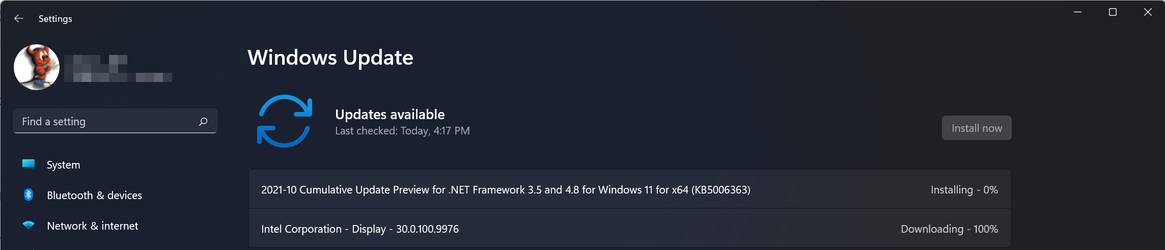
Has anyone figured a way to prevent Windows Update from installing a older version after 30.0.100.x had been installed as I already have:
2021-08-12_15-34-31.jpg
Intel says to not uninstall the old version and just to run the installer and install the new version over it except the installer uninstalls the old version first as part of the installation process.
 

My Computer

System One

  • OS
    WindowsXP/7/8/8.1/10/11,Linux,Android,FreeBSD Unix
    Computer type
    Laptop
    Manufacturer/Model
    Dell XPS 15 9570
    CPU
    Intel® Core™ i7-8750H 8th Gen 2.2Ghz up to 4.1Ghz
    Motherboard
    Dell XPS 15 9570
    Memory
    64GB using 2x32GB CL16 Mushkin redLine modules
    Graphics Card(s)
    Intel UHD 630 & NVIDIA GeForce GTX 1050 Ti with 4GB DDR5
    Sound Card
    Realtek ALC3266-CG
    Monitor(s) Displays
    15.6" 4K Touch UltraHD 3840x2160 made by Sharp
    Screen Resolution
    3840x2160 4K UltraHD
    Hard Drives
    Samsung MZ-V9P4T0B/AM 990 PRO 4TB PCIe®4.0 NVMe™ M.2 SSD was Toshiba KXG60ZNV1T02 NVMe 1TB SSD
    PSU
    Dell XPS 15 9570
    Case
    Dell XPS 15 9570
    Cooling
    Stock
    Keyboard
    Stock
    Mouse
    SwitftPoint ProPoint
    Internet Speed
    Comcast/XFinity 1.44Gbps/42.5Mbps
    Browser
    Microsoft EDGE (Chromium based) & Google Chrome
    Antivirus
    Windows Defender that came with Windows
New Intel Graphics Windows 10 and Windows 11 DCH Beta driver version 30.0.100.9862 released. See first post for more details. :-)
 

My Computers

System One System Two

  • OS
    Windows 11 Pro for Workstations
    Computer type
    PC/Desktop
    Manufacturer/Model
    Custom self build
    CPU
    Intel i7-8700K 5 GHz
    Motherboard
    ASUS ROG Maximus XI Formula Z390
    Memory
    64 GB (4x16GB) G.SKILL TridentZ RGB DDR4 3600 MHz (F4-3600C18D-32GTZR)
    Graphics Card(s)
    ASUS ROG-STRIX-GTX1080TI-O11G-GAMING (11GB GDDR5X)
    Sound Card
    Integrated Digital Audio (S/PDIF)
    Monitor(s) Displays
    2 x Samsung Odyssey G75 27"
    Screen Resolution
    2560x1440
    Hard Drives
    1TB Samsung 990 PRO M.2,
    4TB Samsung 990 PRO M.2,
    TerraMaster F8 SSD Plus NAS
    PSU
    Seasonic Prime Titanium 850W
    Case
    Thermaltake Core P3 wall mounted
    Cooling
    Corsair Hydro H115i
    Keyboard
    Amazon Basics Wired Full Keyboard MD005
    Mouse
    Logitech MX Master 4
    Internet Speed
    2 Gbps Download and 100 Mbps Upload
    Browser
    Chrome and Edge
    Antivirus
    Microsoft Defender
    Other Info
    Logitech Z625 speaker system,
    Logitech BRIO 4K Pro webcam,
    HP Color LaserJet Pro MFP M477fdn,
    CyberPower CP1500PFCLCD
    Galaxy S23 Plus phone
  • Operating System
    Windows 11 Pro
    Computer type
    Laptop
    Manufacturer/Model
    Surface Laptop 7 Copilot+ PC
    CPU
    Snapdragon X Elite (12 core) 3.42 GHz
    Memory
    16 GB LPDDR5x-7467 MHz
    Monitor(s) Displays
    15" HDR
    Screen Resolution
    2496 x 1664
    Hard Drives
    1 TB SSD
    Internet Speed
    Wi-Fi 7 and Bluetooth 5.4
    Browser
    Chrome and Edge
    Antivirus
    Microsoft Defender
New Intel Graphics Windows 10 and Windows 11 DCH WHQL driver version 30.0.100.9864 released. See first post for more details. :-)
 

My Computers

System One System Two

  • OS
    Windows 11 Pro for Workstations
    Computer type
    PC/Desktop
    Manufacturer/Model
    Custom self build
    CPU
    Intel i7-8700K 5 GHz
    Motherboard
    ASUS ROG Maximus XI Formula Z390
    Memory
    64 GB (4x16GB) G.SKILL TridentZ RGB DDR4 3600 MHz (F4-3600C18D-32GTZR)
    Graphics Card(s)
    ASUS ROG-STRIX-GTX1080TI-O11G-GAMING (11GB GDDR5X)
    Sound Card
    Integrated Digital Audio (S/PDIF)
    Monitor(s) Displays
    2 x Samsung Odyssey G75 27"
    Screen Resolution
    2560x1440
    Hard Drives
    1TB Samsung 990 PRO M.2,
    4TB Samsung 990 PRO M.2,
    TerraMaster F8 SSD Plus NAS
    PSU
    Seasonic Prime Titanium 850W
    Case
    Thermaltake Core P3 wall mounted
    Cooling
    Corsair Hydro H115i
    Keyboard
    Amazon Basics Wired Full Keyboard MD005
    Mouse
    Logitech MX Master 4
    Internet Speed
    2 Gbps Download and 100 Mbps Upload
    Browser
    Chrome and Edge
    Antivirus
    Microsoft Defender
    Other Info
    Logitech Z625 speaker system,
    Logitech BRIO 4K Pro webcam,
    HP Color LaserJet Pro MFP M477fdn,
    CyberPower CP1500PFCLCD
    Galaxy S23 Plus phone
  • Operating System
    Windows 11 Pro
    Computer type
    Laptop
    Manufacturer/Model
    Surface Laptop 7 Copilot+ PC
    CPU
    Snapdragon X Elite (12 core) 3.42 GHz
    Memory
    16 GB LPDDR5x-7467 MHz
    Monitor(s) Displays
    15" HDR
    Screen Resolution
    2496 x 1664
    Hard Drives
    1 TB SSD
    Internet Speed
    Wi-Fi 7 and Bluetooth 5.4
    Browser
    Chrome and Edge
    Antivirus
    Microsoft Defender
Intel graphics driver 30.0.100.9894 for Windows 11 and 10 corrects some bugs (beta)
 

My Computer

System One

  • OS
    Windows 11

My Computers

System One System Two

  • OS
    Windows 11 Pro for Workstations
    Computer type
    PC/Desktop
    Manufacturer/Model
    Custom self build
    CPU
    Intel i7-8700K 5 GHz
    Motherboard
    ASUS ROG Maximus XI Formula Z390
    Memory
    64 GB (4x16GB) G.SKILL TridentZ RGB DDR4 3600 MHz (F4-3600C18D-32GTZR)
    Graphics Card(s)
    ASUS ROG-STRIX-GTX1080TI-O11G-GAMING (11GB GDDR5X)
    Sound Card
    Integrated Digital Audio (S/PDIF)
    Monitor(s) Displays
    2 x Samsung Odyssey G75 27"
    Screen Resolution
    2560x1440
    Hard Drives
    1TB Samsung 990 PRO M.2,
    4TB Samsung 990 PRO M.2,
    TerraMaster F8 SSD Plus NAS
    PSU
    Seasonic Prime Titanium 850W
    Case
    Thermaltake Core P3 wall mounted
    Cooling
    Corsair Hydro H115i
    Keyboard
    Amazon Basics Wired Full Keyboard MD005
    Mouse
    Logitech MX Master 4
    Internet Speed
    2 Gbps Download and 100 Mbps Upload
    Browser
    Chrome and Edge
    Antivirus
    Microsoft Defender
    Other Info
    Logitech Z625 speaker system,
    Logitech BRIO 4K Pro webcam,
    HP Color LaserJet Pro MFP M477fdn,
    CyberPower CP1500PFCLCD
    Galaxy S23 Plus phone
  • Operating System
    Windows 11 Pro
    Computer type
    Laptop
    Manufacturer/Model
    Surface Laptop 7 Copilot+ PC
    CPU
    Snapdragon X Elite (12 core) 3.42 GHz
    Memory
    16 GB LPDDR5x-7467 MHz
    Monitor(s) Displays
    15" HDR
    Screen Resolution
    2496 x 1664
    Hard Drives
    1 TB SSD
    Internet Speed
    Wi-Fi 7 and Bluetooth 5.4
    Browser
    Chrome and Edge
    Antivirus
    Microsoft Defender
I am sometimes seeing Hardware Error Live Kernel Event 141 in the Reliability Monitor.
This corresponds in the event log to “Display driver igfx stopped responding and has successfully recovered 4101”.
I have been trying all the new drivers and had stopped Windows updating drivers using gpedit.msc
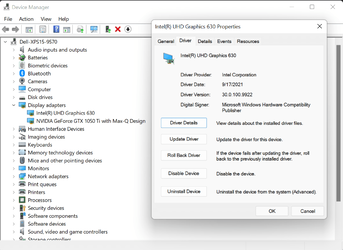
Today I re-enabled Windows driver updates and it fetched Intel Display driver 30.0.100.9922 dated 17 Sep 21.
Hopefully it will fix my driver errors!

Update : Well I just checked today (18 Oct) and see that Windows update has reverted the Intel Display driver to 9864 on the 12 Oct ??
However I have not had the above Hardware Error since 1 Oct.

Update : Spoke too soon - got this error again 26 Oct and 31 Oct. Anyone else seeing this error in the Reliability Monitor ?
 
Last edited:

My Computer

System One

  • OS
    Windows 11 Pro 22H2
    Computer type
    PC/Desktop
    Manufacturer/Model
    Dell XPS8940
    CPU
    i5-11400
    Memory
    8GB
    Hard Drives
    512GB M.2 PCIe NVMe
Last edited:

My Computer

System One

  • OS
    WindowsXP/7/8/8.1/10/11,Linux,Android,FreeBSD Unix
    Computer type
    Laptop
    Manufacturer/Model
    Dell XPS 15 9570
    CPU
    Intel® Core™ i7-8750H 8th Gen 2.2Ghz up to 4.1Ghz
    Motherboard
    Dell XPS 15 9570
    Memory
    64GB using 2x32GB CL16 Mushkin redLine modules
    Graphics Card(s)
    Intel UHD 630 & NVIDIA GeForce GTX 1050 Ti with 4GB DDR5
    Sound Card
    Realtek ALC3266-CG
    Monitor(s) Displays
    15.6" 4K Touch UltraHD 3840x2160 made by Sharp
    Screen Resolution
    3840x2160 4K UltraHD
    Hard Drives
    Samsung MZ-V9P4T0B/AM 990 PRO 4TB PCIe®4.0 NVMe™ M.2 SSD was Toshiba KXG60ZNV1T02 NVMe 1TB SSD
    PSU
    Dell XPS 15 9570
    Case
    Dell XPS 15 9570
    Cooling
    Stock
    Keyboard
    Stock
    Mouse
    SwitftPoint ProPoint
    Internet Speed
    Comcast/XFinity 1.44Gbps/42.5Mbps
    Browser
    Microsoft EDGE (Chromium based) & Google Chrome
    Antivirus
    Windows Defender that came with Windows
30.0.100.9922 was either causing my screen to go black with the blacklight on or ever since October 5, 2021 when Windows 11 officially was released, I never did a thing to the Windows 11 22000.194 I had installed, it just locks up the system solid. So installed 30.0.100.9894 using the installer and same problem too.
 
Last edited:

My Computer

System One

  • OS
    WindowsXP/7/8/8.1/10/11,Linux,Android,FreeBSD Unix
    Computer type
    Laptop
    Manufacturer/Model
    Dell XPS 15 9570
    CPU
    Intel® Core™ i7-8750H 8th Gen 2.2Ghz up to 4.1Ghz
    Motherboard
    Dell XPS 15 9570
    Memory
    64GB using 2x32GB CL16 Mushkin redLine modules
    Graphics Card(s)
    Intel UHD 630 & NVIDIA GeForce GTX 1050 Ti with 4GB DDR5
    Sound Card
    Realtek ALC3266-CG
    Monitor(s) Displays
    15.6" 4K Touch UltraHD 3840x2160 made by Sharp
    Screen Resolution
    3840x2160 4K UltraHD
    Hard Drives
    Samsung MZ-V9P4T0B/AM 990 PRO 4TB PCIe®4.0 NVMe™ M.2 SSD was Toshiba KXG60ZNV1T02 NVMe 1TB SSD
    PSU
    Dell XPS 15 9570
    Case
    Dell XPS 15 9570
    Cooling
    Stock
    Keyboard
    Stock
    Mouse
    SwitftPoint ProPoint
    Internet Speed
    Comcast/XFinity 1.44Gbps/42.5Mbps
    Browser
    Microsoft EDGE (Chromium based) & Google Chrome
    Antivirus
    Windows Defender that came with Windows
New Intel Graphics Windows 10 and Windows 11 DCH WHQL driver version 30.0.100.9955 released. See first post for more details. :-)
 

My Computers

System One System Two

  • OS
    Windows 11 Pro for Workstations
    Computer type
    PC/Desktop
    Manufacturer/Model
    Custom self build
    CPU
    Intel i7-8700K 5 GHz
    Motherboard
    ASUS ROG Maximus XI Formula Z390
    Memory
    64 GB (4x16GB) G.SKILL TridentZ RGB DDR4 3600 MHz (F4-3600C18D-32GTZR)
    Graphics Card(s)
    ASUS ROG-STRIX-GTX1080TI-O11G-GAMING (11GB GDDR5X)
    Sound Card
    Integrated Digital Audio (S/PDIF)
    Monitor(s) Displays
    2 x Samsung Odyssey G75 27"
    Screen Resolution
    2560x1440
    Hard Drives
    1TB Samsung 990 PRO M.2,
    4TB Samsung 990 PRO M.2,
    TerraMaster F8 SSD Plus NAS
    PSU
    Seasonic Prime Titanium 850W
    Case
    Thermaltake Core P3 wall mounted
    Cooling
    Corsair Hydro H115i
    Keyboard
    Amazon Basics Wired Full Keyboard MD005
    Mouse
    Logitech MX Master 4
    Internet Speed
    2 Gbps Download and 100 Mbps Upload
    Browser
    Chrome and Edge
    Antivirus
    Microsoft Defender
    Other Info
    Logitech Z625 speaker system,
    Logitech BRIO 4K Pro webcam,
    HP Color LaserJet Pro MFP M477fdn,
    CyberPower CP1500PFCLCD
    Galaxy S23 Plus phone
  • Operating System
    Windows 11 Pro
    Computer type
    Laptop
    Manufacturer/Model
    Surface Laptop 7 Copilot+ PC
    CPU
    Snapdragon X Elite (12 core) 3.42 GHz
    Memory
    16 GB LPDDR5x-7467 MHz
    Monitor(s) Displays
    15" HDR
    Screen Resolution
    2496 x 1664
    Hard Drives
    1 TB SSD
    Internet Speed
    Wi-Fi 7 and Bluetooth 5.4
    Browser
    Chrome and Edge
    Antivirus
    Microsoft Defender
Hello guys. My driver version is 27.20.100.8783 and whenever i try to check for updates through windows update or the intel tool i get a message that my driver is up to date. Please check my system information in my profile. Why is this?

Thanks
 

My Computer

System One

  • OS
    Windows 11
    Computer type
    PC/Desktop
    Manufacturer/Model
    Lenovo ideaCentre 510-15ICB (90HU00BHCY)
    CPU
    Intel i3-8100 CPU @ 3.60GHz
    Motherboard
    Intel B360
    Memory
    2 x 8GB 2666MHz TEAM GROUP TED48G2666C1901 (16GB Total)
    Graphics Card(s)
    Integrated Intel UHD Graphics 630
    Sound Card
    High Definition (HD) Audio, Realtek® ALC233 codec
    Monitor(s) Displays
    24" SAMSUNG LF24T450FQRXEN
    Screen Resolution
    1920 x 1080 @ 75Hz
    Hard Drives
    1x SSD GIGABYTE AORUS RGB 256GB M.2 2280 NVME PCI-EXPRESS 3.0 X4
    1x 1TB HDD 7200rpm 3.5"
    PSU
    LENOVO 100-240Vac SFF 180W PSU POWER SUPPLY 00PC745
    Case
    Factory
    Cooling
    Factory
    Keyboard
    A4Tech KL-5
    Mouse
    Logitech G502 Hero
    Internet Speed
    100 Mb/s Fiber
    Browser
    Chrome
    Antivirus
    Windows Security
    Other Info
    2.1 Logitech X-210 Speakers
I guess the new driver has only deltas for latest GPUs, probably nothin' in for you. Same here btw, I'm on a gForce 1050Ti, nothing to update as it runs stable.
 

My Computers

System One System Two

  • OS
    W10 Enterprise LTSC
    Computer type
    PC/Desktop
    Manufacturer/Model
    custom
    CPU
    i7-2700K
    Motherboard
    Gigabyte GA-P67A-D3-B3
    Memory
    24GB
    Graphics Card(s)
    MSI GeForce RTX2060 Super
    Sound Card
    onboard
    Monitor(s) Displays
    Samsung curved
    Screen Resolution
    FHD
    Hard Drives
    Samsung EVO870 SSD 1TB
    Seagate Barracuda HDD 8TB
    PSU
    be quiet 550W
    Case
    CoolerMaster
    Cooling
    be quiet PURE ROCK SLIM BK008
    Keyboard
    KLIM Domination k852
    Mouse
    Logitech standard cordless
    Internet Speed
    10/1 DSL (the fastest line speed available here...)
    Browser
    Mozilla FF 91.2.0esr
    Antivirus
    Defender
    Other Info
    W10 GUI heavily modified with Stardock Blinds "7 for 10" skin and Startmenu.
    No MS Account and no MS apps.
    I upgraded to W10 only for gaming purposes, otherwise I'd kept my beloved W7 Ultimate x64
  • Operating System
    W11 Pro
    Computer type
    PC/Desktop
    Manufacturer/Model
    custom
    CPU
    Intel Core i5-2500
    Motherboard
    Gigabyte PH67A-D3-B3
    Memory
    4GB
    Graphics card(s)
    MSI Geforce 1050Ti
    Sound Card
    onboard
    Monitor(s) Displays
    FujitsuSiemens 19"
    Screen Resolution
    1280x1024 (oldschool 4:3)
    Hard Drives
    Samsung EVO850 SSD 250GB + Samsung 1TB HDD
    PSU
    be quiet 550W
    Case
    Mars MCNW ATX Gaming
    Cooling
    be quiet PURE ROCK SLIM BK008
    Keyboard
    Dell German 102
    Mouse
    oldschool Dell optical wired
    Internet Speed
    slow DSL, 10/1Mbps, but thats the best offer here
    Browser
    Mozilla 91.2.0esr
    Antivirus
    Defender
    Other Info
    This is an older PC for testing new OS,
    Furthermore: 4 Dell/HP laptops on Win7 Ultimate x64, used for NAS, Media server, browsing, workshop and sound studio
Last edited:

My Computer

System One

  • OS
    WindowsXP/7/8/8.1/10/11,Linux,Android,FreeBSD Unix
    Computer type
    Laptop
    Manufacturer/Model
    Dell XPS 15 9570
    CPU
    Intel® Core™ i7-8750H 8th Gen 2.2Ghz up to 4.1Ghz
    Motherboard
    Dell XPS 15 9570
    Memory
    64GB using 2x32GB CL16 Mushkin redLine modules
    Graphics Card(s)
    Intel UHD 630 & NVIDIA GeForce GTX 1050 Ti with 4GB DDR5
    Sound Card
    Realtek ALC3266-CG
    Monitor(s) Displays
    15.6" 4K Touch UltraHD 3840x2160 made by Sharp
    Screen Resolution
    3840x2160 4K UltraHD
    Hard Drives
    Samsung MZ-V9P4T0B/AM 990 PRO 4TB PCIe®4.0 NVMe™ M.2 SSD was Toshiba KXG60ZNV1T02 NVMe 1TB SSD
    PSU
    Dell XPS 15 9570
    Case
    Dell XPS 15 9570
    Cooling
    Stock
    Keyboard
    Stock
    Mouse
    SwitftPoint ProPoint
    Internet Speed
    Comcast/XFinity 1.44Gbps/42.5Mbps
    Browser
    Microsoft EDGE (Chromium based) & Google Chrome
    Antivirus
    Windows Defender that came with Windows
30.0.100.9864 and 30.0.100.9955 started to cause severe lag when using alt+tab or anything related to explorer (icons are redrawing slowly).
 

My Computer

System One

  • OS
    Win11
Got Intel driver update today, or should I say downgrade... Windows didn't even ask..

Anybody have an idea what is going on??

1635870331358.png
 

My Computers

System One System Two

  • OS
    Windows 10 Pro, Windows 11 Dev
    Computer type
    PC/Desktop
    Manufacturer/Model
    Homebuilt
    CPU
    Intel I3 10100
    Motherboard
    ASUS B460M
    Memory
    16 GB DDR4 Crucial
    Graphics Card(s)
    Intel on chip
    Sound Card
    Realtek onboard
    Monitor(s) Displays
    ASUS 24, LG 24
    Screen Resolution
    Full HD x 2
    Hard Drives
    kingston A2000 NVMe PCIe 500 GB
    PSU
    LC Power 650W
    Case
    Noname
    Cooling
    Air 2x 120mm
    Keyboard
    Cherry G-81
    Mouse
    Logitech M500
    Internet Speed
    100/20
    Browser
    Firefox, Vivaldi
    Antivirus
    MS Defender
  • Operating System
    Windows 10 Home
    Computer type
    Laptop
    Manufacturer/Model
    ASUS/Vivobook Flip 14
    CPU
    Ryzen 7 4700u
    Memory
    8 GB DDR4
    Graphics card(s)
    AMD Vega
    Sound Card
    Realtek onboard
    Monitor(s) Displays
    14"
    Screen Resolution
    FullHD
    Hard Drives
    512 Samsung NVMe PCIe
    PSU
    -
    Case
    Laptop
    Mouse
    Touchpad, Touchscreen
    Internet Speed
    100/20
    Browser
    Firefox, Vivaldi
    Antivirus
    MS Defender
New Intel Display Driver v30.0.101.1002 are out:

This version supposedly fixes a memory leak issue with Windows DWM.exe that has existed for over a year as discussed at:
BUG: dwm.exe uses memory leakage with Intel HD Graphics 630
Specifically, this version is mentioned here, Gabriela is the Intel moderator who reproduced the problem while the driver developers at Intel did not:
Re: BUG: dwm.exe uses memory leakage with Intel HD Graphics 630
Update: The version does not fix the memory leak issue as Intel did not start work on the fix until after that version is out.

In case anyone wants to know whey don't go to 10000 and stick to the 4 digits numbering,
Probably because build 9999 is reserved for test drivers, e.g.
Intel Graphics Test Driver, Version: VA Test 15.60-9999
So Windows update cannot find a higher build and uninstall these test drivers

Download here:
 
Last edited:

My Computer

System One

  • OS
    WindowsXP/7/8/8.1/10/11,Linux,Android,FreeBSD Unix
    Computer type
    Laptop
    Manufacturer/Model
    Dell XPS 15 9570
    CPU
    Intel® Core™ i7-8750H 8th Gen 2.2Ghz up to 4.1Ghz
    Motherboard
    Dell XPS 15 9570
    Memory
    64GB using 2x32GB CL16 Mushkin redLine modules
    Graphics Card(s)
    Intel UHD 630 & NVIDIA GeForce GTX 1050 Ti with 4GB DDR5
    Sound Card
    Realtek ALC3266-CG
    Monitor(s) Displays
    15.6" 4K Touch UltraHD 3840x2160 made by Sharp
    Screen Resolution
    3840x2160 4K UltraHD
    Hard Drives
    Samsung MZ-V9P4T0B/AM 990 PRO 4TB PCIe®4.0 NVMe™ M.2 SSD was Toshiba KXG60ZNV1T02 NVMe 1TB SSD
    PSU
    Dell XPS 15 9570
    Case
    Dell XPS 15 9570
    Cooling
    Stock
    Keyboard
    Stock
    Mouse
    SwitftPoint ProPoint
    Internet Speed
    Comcast/XFinity 1.44Gbps/42.5Mbps
    Browser
    Microsoft EDGE (Chromium based) & Google Chrome
    Antivirus
    Windows Defender that came with Windows
New Intel Graphics Windows 10 UHD WHQL driver version 30.0.100.9928 released. See first post for more details. :-)
 

My Computers

System One System Two

  • OS
    Windows 11 Pro for Workstations
    Computer type
    PC/Desktop
    Manufacturer/Model
    Custom self build
    CPU
    Intel i7-8700K 5 GHz
    Motherboard
    ASUS ROG Maximus XI Formula Z390
    Memory
    64 GB (4x16GB) G.SKILL TridentZ RGB DDR4 3600 MHz (F4-3600C18D-32GTZR)
    Graphics Card(s)
    ASUS ROG-STRIX-GTX1080TI-O11G-GAMING (11GB GDDR5X)
    Sound Card
    Integrated Digital Audio (S/PDIF)
    Monitor(s) Displays
    2 x Samsung Odyssey G75 27"
    Screen Resolution
    2560x1440
    Hard Drives
    1TB Samsung 990 PRO M.2,
    4TB Samsung 990 PRO M.2,
    TerraMaster F8 SSD Plus NAS
    PSU
    Seasonic Prime Titanium 850W
    Case
    Thermaltake Core P3 wall mounted
    Cooling
    Corsair Hydro H115i
    Keyboard
    Amazon Basics Wired Full Keyboard MD005
    Mouse
    Logitech MX Master 4
    Internet Speed
    2 Gbps Download and 100 Mbps Upload
    Browser
    Chrome and Edge
    Antivirus
    Microsoft Defender
    Other Info
    Logitech Z625 speaker system,
    Logitech BRIO 4K Pro webcam,
    HP Color LaserJet Pro MFP M477fdn,
    CyberPower CP1500PFCLCD
    Galaxy S23 Plus phone
  • Operating System
    Windows 11 Pro
    Computer type
    Laptop
    Manufacturer/Model
    Surface Laptop 7 Copilot+ PC
    CPU
    Snapdragon X Elite (12 core) 3.42 GHz
    Memory
    16 GB LPDDR5x-7467 MHz
    Monitor(s) Displays
    15" HDR
    Screen Resolution
    2496 x 1664
    Hard Drives
    1 TB SSD
    Internet Speed
    Wi-Fi 7 and Bluetooth 5.4
    Browser
    Chrome and Edge
    Antivirus
    Microsoft Defender
New Intel 6th-12th Generation UHD Graphics Drivers for Windows 10 and 11 v30.0.101.1069 for out - Build date: November 2, 2021


My Computer

System One

  • OS
    WindowsXP/7/8/8.1/10/11,Linux,Android,FreeBSD Unix
    Computer type
    Laptop
    Manufacturer/Model
    Dell XPS 15 9570
    CPU
    Intel® Core™ i7-8750H 8th Gen 2.2Ghz up to 4.1Ghz
    Motherboard
    Dell XPS 15 9570
    Memory
    64GB using 2x32GB CL16 Mushkin redLine modules
    Graphics Card(s)
    Intel UHD 630 & NVIDIA GeForce GTX 1050 Ti with 4GB DDR5
    Sound Card
    Realtek ALC3266-CG
    Monitor(s) Displays
    15.6" 4K Touch UltraHD 3840x2160 made by Sharp
    Screen Resolution
    3840x2160 4K UltraHD
    Hard Drives
    Samsung MZ-V9P4T0B/AM 990 PRO 4TB PCIe®4.0 NVMe™ M.2 SSD was Toshiba KXG60ZNV1T02 NVMe 1TB SSD
    PSU
    Dell XPS 15 9570
    Case
    Dell XPS 15 9570
    Cooling
    Stock
    Keyboard
    Stock
    Mouse
    SwitftPoint ProPoint
    Internet Speed
    Comcast/XFinity 1.44Gbps/42.5Mbps
    Browser
    Microsoft EDGE (Chromium based) & Google Chrome
    Antivirus
    Windows Defender that came with Windows
Intel released v30.0.101.1121 driver and says it contains the fix for the dwm.exe memory leakage:
community.intel.com/t5/Graphics/BUG-dwm-exe-uses-memory-leakage-with-Intel-HD-Graphics-630/m-p/1336791#M103013

Download link:
 
Last edited:

My Computer

System One

  • OS
    WindowsXP/7/8/8.1/10/11,Linux,Android,FreeBSD Unix
    Computer type
    Laptop
    Manufacturer/Model
    Dell XPS 15 9570
    CPU
    Intel® Core™ i7-8750H 8th Gen 2.2Ghz up to 4.1Ghz
    Motherboard
    Dell XPS 15 9570
    Memory
    64GB using 2x32GB CL16 Mushkin redLine modules
    Graphics Card(s)
    Intel UHD 630 & NVIDIA GeForce GTX 1050 Ti with 4GB DDR5
    Sound Card
    Realtek ALC3266-CG
    Monitor(s) Displays
    15.6" 4K Touch UltraHD 3840x2160 made by Sharp
    Screen Resolution
    3840x2160 4K UltraHD
    Hard Drives
    Samsung MZ-V9P4T0B/AM 990 PRO 4TB PCIe®4.0 NVMe™ M.2 SSD was Toshiba KXG60ZNV1T02 NVMe 1TB SSD
    PSU
    Dell XPS 15 9570
    Case
    Dell XPS 15 9570
    Cooling
    Stock
    Keyboard
    Stock
    Mouse
    SwitftPoint ProPoint
    Internet Speed
    Comcast/XFinity 1.44Gbps/42.5Mbps
    Browser
    Microsoft EDGE (Chromium based) & Google Chrome
    Antivirus
    Windows Defender that came with Windows

Latest Support Threads

Back
Top Bottom