Latest Intel Graphics Driver for Windows 11


Intel_banner.png


 Intel 7th-10th Gen Processor Graphics Drivers for Windows 10 and Windows 11

Driver Version: 31.0.101.2141
Release Date: April 06, 2026

Windows 11 and Windows 10 64-bit only download

Release Notes (.pdf)

Platform Support
  • 7th Gen Intel® Core™ processor family (Codename Kaby Lake)
  • 8th Gen Intel® Core™ processor family (Codename Kaby Lake-R, Coffee Lake, Whiskey Lake)
  • 9th Gen Intel® Core™ processor family (Codename Coffee Lake-R)
  • 10th Gen Intel® Core™ processor family (Codename Comet Lake, Amber Lake, Ice Lake)
  • Intel® Core™ Processor with Intel® Hybrid Technology (Codename Lakefield)
  • Intel® Atom®, Pentium® and Celeron® processor family (Codename Apollo Lake, Elkhart Lake)
  • Intel® Pentium® and Celeron® processor family (Codename Gemini Lake, Jasper Lake)
CONTENTS OF THE PACKAGE:
  • Intel Graphics Driver
  • Intel Display Audio Driver 10.26.0.14 (6th Gen and related Pentium Silver and Celeron processors)
  • Intel Display Audio Driver 10.27.0.14 (7th, 8th, 9th, 10th Gen Intel Core processors)
  • Intel Display Audio Driver 11.1.0.23 (10th Gen Intel Core processors with Iris Plus Graphics)
  • Intel Display Audio Driver 11.2.0.12 (Intel Core Processors with Intel Hybrid Technology)
  • Intel Media SDK Runtime (21.0.1.35)
  • Intel Graphics Compute Runtime for OpenCL* Driver
  • Intel Graphics Command Center (installed via Microsoft* Store)
  • Vulkan*3 Runtime Installer
  • Intel Graphics Driver Installer (1.0.1168.2)
  • oneAPI Level Zero Loader and Validation Layer
  • Intel Graphics Compute Runtime for oneAPI Level Zero specification


 Intel 11th-14th Gen Processor Graphics Drivers for Windows 10/11

Driver Version: 32.0.101.7088
Release Date: June 22, 2026

Windows 11 and Windows 10 64-bit only download

Platform (OS Support)
  • 11th Gen Intel® Core™ processor family (Codename Tiger Lake, Rocket Lake, Tiger Lake-H)
  • 12th Gen Intel® Core™ processor family (Codename Alder Lake-S, Alder Lake-H, Alder Lake-P, Alder Lake-U, Alder Lake-HX, Alder Lake-N, Twin Lake)
  • 13th Gen Intel® Core™ processor family (Codename Raptor Lake-S, Raptor Lake-HX, Raptor Lake-H, Raptor Lake-P, Raptor Lake-U)
  • 14th Gen Intel® Core™ processor family (Codename Raptor Lake-S Refresh, Raptor Lake-H Refresh, Raptor Lake-U Refresh)
  • Intel® Iris® Xe Dedicated Graphics family (Codename DG1)
Release Notes (.pdf)


 Intel Arc Pro WHQL Graphics Drivers for Windows 10/11

Driver Version: 32.0.101.8805 (WHQL)
Release Date: July 16, 2026

Windows 11 and Windows 10 64-bit only download

Platform (OS Support):
  • Intel® Arc™ Graphics family (Codename Alchemist, Battlemage)
  • Intel® Core™ Ultra processor family (Codename Meteor Lake, Lunar Lake, Arrow Lake-S, Arrow Lake-H, Panther Lake)
Release Notes (PDF)


 Intel Arc and Core Ultra WHQL Graphics Drivers for Windows 10/11

Driver Version: 32.0.101.8860 (WHQL)
Release Date: June 30, 2026

Windows 11 and Windows 10 64-bit only download

Platform (OS Support):
  • Intel® Arc™ Graphics family (Codename Alchemist, Battlemage)
  • Intel® Core™ Ultra processor family (Codename Meteor Lake, Lunar Lake, Arrow Lake-S, Arrow Lake-H, Panther Lake)
  • Wildcat Lake
Release Notes (.pdf)


 Intel Arc and Core Ultra Non-WHQL Graphics Drivers for Windows 10/11

Driver Version: 32.0.101.8864 (Non-WHQL)
Release Date: July 20, 2026

Windows 11 and Windows 10 64-bit only download

Platform (OS Support):
  • Intel® Arc™ Graphics family (Codename Alchemist, Battlemage)
  • Intel® Core™ Ultra processor family (Codename Meteor Lake, Lunar Lake, Arrow Lake-S, Arrow Lake-H, Panther Lake)
  • Intel® Core™ processor family (Codename Wildcat Lake)
Release Notes (.pdf)
 
Last edited:

Intel Arc & Iris Xe Graphics (NON WHQL) 31.0.101.5084/31.0.101.5122​


My Computer My Computer

At a glance

Windows 11 ProIntel Core i9 12900KFCorsair 64GB DDR5 Vengeance C40 5200MhzASUS GeForce RTX 3090 ROG Strix OC 24GB
OS
Windows 11 Pro
Computer type
PC/Desktop
Manufacturer/Model
Custom Build
CPU
Intel Core i9 12900KF
Motherboard
ASUS ROG Maximus Z690 Hero
Memory
Corsair 64GB DDR5 Vengeance C40 5200Mhz
Graphics Card(s)
ASUS GeForce RTX 3090 ROG Strix OC 24GB
Sound Card
OnBoard
Monitor(s) Displays
Acer Predator XB323UGP 32" QHD G-SYNC-C 144Hz 1MS IPS LED
Screen Resolution
2560 x 1440
Hard Drives
1x Samsung 980 Pro Series Gen4 250GB M.2 NVMe
1x Samsung 980 Pro Series Gen4 500GB M.2 NVMe
2x Samsung 980 Pro Series Gen4 2TB M.2 NVMe
PSU
Corsair AX1200i 1200W 80PLUS Titanium Modular
Case
Corsair 4000D Black Case w/ Tempered Glass Side Panel
Cooling
Noctua NH-U12A Chromax Black CPU Cooler, 4x Noctua 120mm Fans
Keyboard
Logitech MK545
Mouse
Logitech MX Master 3
Internet Speed
Fixed Wireless 150mbps/75mbps
Browser
Firefox
Antivirus
Kaspersky
Other Info
Thrustmaster TS-PC RACER
Fanatec CSL Elite Pedals with the Load Cell Kit
Yamaha Amp with Bose Speakers
New Intel Arc Pro graphic DCH driver 31.0.101.4955 version released. See first post for more details. :-)
 

My Computers My Computers

  • At a glance

    Windows 11 Pro for WorkstationsIntel i7-8700K 5 GHz64 GB (4x16GB) G.SKILL TridentZ RGB DDR4 3600...ASUS ROG-STRIX-GTX1080TI-O11G-GAMING (11GB GD...
    OS
    Windows 11 Pro for Workstations
    Computer type
    PC/Desktop
    Manufacturer/Model
    Custom self build
    CPU
    Intel i7-8700K 5 GHz
    Motherboard
    ASUS ROG Maximus XI Formula Z390
    Memory
    64 GB (4x16GB) G.SKILL TridentZ RGB DDR4 3600 MHz (F4-3600C18D-32GTZR)
    Graphics Card(s)
    ASUS ROG-STRIX-GTX1080TI-O11G-GAMING (11GB GDDR5X)
    Sound Card
    Integrated Digital Audio (S/PDIF)
    Monitor(s) Displays
    2 x Samsung Odyssey G75 27"
    Screen Resolution
    2560x1440
    Hard Drives
    1TB Samsung 990 PRO M.2,
    4TB Samsung 990 PRO M.2,
    TerraMaster F8 SSD Plus NAS
    PSU
    Seasonic Prime Titanium 850W
    Case
    Thermaltake Core P3 wall mounted
    Cooling
    Corsair Hydro H115i
    Keyboard
    Amazon Basics Wired Full Keyboard MD005
    Mouse
    Logitech MX Master 4
    Internet Speed
    2 Gbps Download and 100 Mbps Upload
    Browser
    Chrome and Edge
    Antivirus
    Microsoft Defender
    Other Info
    Logitech Z625 speaker system,
    Logitech BRIO 4K Pro webcam,
    HP Color LaserJet Pro MFP M477fdn,
    CyberPower CP1500PFCLCD
    Galaxy S23 Plus phone
  • At a glance

    Windows 11 ProSnapdragon X Elite (12 core) 3.42 GHz16 GB LPDDR5x-7467 MHz
    Operating System
    Windows 11 Pro
    Computer type
    Laptop
    Manufacturer/Model
    Surface Laptop 7 Copilot+ PC
    CPU
    Snapdragon X Elite (12 core) 3.42 GHz
    Memory
    16 GB LPDDR5x-7467 MHz
    Monitor(s) Displays
    15" HDR
    Screen Resolution
    2496 x 1664
    Hard Drives
    1 TB SSD
    Internet Speed
    Wi-Fi 7 and Bluetooth 5.4
    Browser
    Chrome and Edge
    Antivirus
    Microsoft Defender

Intel Arc & Iris Xe Graphics 31.0.101.5084/31.0.101.5122 (WHQL Certified)​


My Computer My Computer

At a glance

Windows 11 ProIntel Core i9 12900KFCorsair 64GB DDR5 Vengeance C40 5200MhzASUS GeForce RTX 3090 ROG Strix OC 24GB
OS
Windows 11 Pro
Computer type
PC/Desktop
Manufacturer/Model
Custom Build
CPU
Intel Core i9 12900KF
Motherboard
ASUS ROG Maximus Z690 Hero
Memory
Corsair 64GB DDR5 Vengeance C40 5200Mhz
Graphics Card(s)
ASUS GeForce RTX 3090 ROG Strix OC 24GB
Sound Card
OnBoard
Monitor(s) Displays
Acer Predator XB323UGP 32" QHD G-SYNC-C 144Hz 1MS IPS LED
Screen Resolution
2560 x 1440
Hard Drives
1x Samsung 980 Pro Series Gen4 250GB M.2 NVMe
1x Samsung 980 Pro Series Gen4 500GB M.2 NVMe
2x Samsung 980 Pro Series Gen4 2TB M.2 NVMe
PSU
Corsair AX1200i 1200W 80PLUS Titanium Modular
Case
Corsair 4000D Black Case w/ Tempered Glass Side Panel
Cooling
Noctua NH-U12A Chromax Black CPU Cooler, 4x Noctua 120mm Fans
Keyboard
Logitech MK545
Mouse
Logitech MX Master 3
Internet Speed
Fixed Wireless 150mbps/75mbps
Browser
Firefox
Antivirus
Kaspersky
Other Info
Thrustmaster TS-PC RACER
Fanatec CSL Elite Pedals with the Load Cell Kit
Yamaha Amp with Bose Speakers
New Intel Arc & Iris Xe WHQL graphic DCH driver 31.0.101.5085/31.0.101.5122 version released. See first post for more details. :-)
 

My Computers My Computers

  • At a glance

    Windows 11 Pro for WorkstationsIntel i7-8700K 5 GHz64 GB (4x16GB) G.SKILL TridentZ RGB DDR4 3600...ASUS ROG-STRIX-GTX1080TI-O11G-GAMING (11GB GD...
    OS
    Windows 11 Pro for Workstations
    Computer type
    PC/Desktop
    Manufacturer/Model
    Custom self build
    CPU
    Intel i7-8700K 5 GHz
    Motherboard
    ASUS ROG Maximus XI Formula Z390
    Memory
    64 GB (4x16GB) G.SKILL TridentZ RGB DDR4 3600 MHz (F4-3600C18D-32GTZR)
    Graphics Card(s)
    ASUS ROG-STRIX-GTX1080TI-O11G-GAMING (11GB GDDR5X)
    Sound Card
    Integrated Digital Audio (S/PDIF)
    Monitor(s) Displays
    2 x Samsung Odyssey G75 27"
    Screen Resolution
    2560x1440
    Hard Drives
    1TB Samsung 990 PRO M.2,
    4TB Samsung 990 PRO M.2,
    TerraMaster F8 SSD Plus NAS
    PSU
    Seasonic Prime Titanium 850W
    Case
    Thermaltake Core P3 wall mounted
    Cooling
    Corsair Hydro H115i
    Keyboard
    Amazon Basics Wired Full Keyboard MD005
    Mouse
    Logitech MX Master 4
    Internet Speed
    2 Gbps Download and 100 Mbps Upload
    Browser
    Chrome and Edge
    Antivirus
    Microsoft Defender
    Other Info
    Logitech Z625 speaker system,
    Logitech BRIO 4K Pro webcam,
    HP Color LaserJet Pro MFP M477fdn,
    CyberPower CP1500PFCLCD
    Galaxy S23 Plus phone
  • At a glance

    Windows 11 ProSnapdragon X Elite (12 core) 3.42 GHz16 GB LPDDR5x-7467 MHz
    Operating System
    Windows 11 Pro
    Computer type
    Laptop
    Manufacturer/Model
    Surface Laptop 7 Copilot+ PC
    CPU
    Snapdragon X Elite (12 core) 3.42 GHz
    Memory
    16 GB LPDDR5x-7467 MHz
    Monitor(s) Displays
    15" HDR
    Screen Resolution
    2496 x 1664
    Hard Drives
    1 TB SSD
    Internet Speed
    Wi-Fi 7 and Bluetooth 5.4
    Browser
    Chrome and Edge
    Antivirus
    Microsoft Defender
New Intel Arc & Iris Xe WHQL graphic DCH driver 31.0.101.5186/31.0.101.5234 version released. See first post for more details. :-)
 

My Computers My Computers

  • At a glance

    Windows 11 Pro for WorkstationsIntel i7-8700K 5 GHz64 GB (4x16GB) G.SKILL TridentZ RGB DDR4 3600...ASUS ROG-STRIX-GTX1080TI-O11G-GAMING (11GB GD...
    OS
    Windows 11 Pro for Workstations
    Computer type
    PC/Desktop
    Manufacturer/Model
    Custom self build
    CPU
    Intel i7-8700K 5 GHz
    Motherboard
    ASUS ROG Maximus XI Formula Z390
    Memory
    64 GB (4x16GB) G.SKILL TridentZ RGB DDR4 3600 MHz (F4-3600C18D-32GTZR)
    Graphics Card(s)
    ASUS ROG-STRIX-GTX1080TI-O11G-GAMING (11GB GDDR5X)
    Sound Card
    Integrated Digital Audio (S/PDIF)
    Monitor(s) Displays
    2 x Samsung Odyssey G75 27"
    Screen Resolution
    2560x1440
    Hard Drives
    1TB Samsung 990 PRO M.2,
    4TB Samsung 990 PRO M.2,
    TerraMaster F8 SSD Plus NAS
    PSU
    Seasonic Prime Titanium 850W
    Case
    Thermaltake Core P3 wall mounted
    Cooling
    Corsair Hydro H115i
    Keyboard
    Amazon Basics Wired Full Keyboard MD005
    Mouse
    Logitech MX Master 4
    Internet Speed
    2 Gbps Download and 100 Mbps Upload
    Browser
    Chrome and Edge
    Antivirus
    Microsoft Defender
    Other Info
    Logitech Z625 speaker system,
    Logitech BRIO 4K Pro webcam,
    HP Color LaserJet Pro MFP M477fdn,
    CyberPower CP1500PFCLCD
    Galaxy S23 Plus phone
  • At a glance

    Windows 11 ProSnapdragon X Elite (12 core) 3.42 GHz16 GB LPDDR5x-7467 MHz
    Operating System
    Windows 11 Pro
    Computer type
    Laptop
    Manufacturer/Model
    Surface Laptop 7 Copilot+ PC
    CPU
    Snapdragon X Elite (12 core) 3.42 GHz
    Memory
    16 GB LPDDR5x-7467 MHz
    Monitor(s) Displays
    15" HDR
    Screen Resolution
    2496 x 1664
    Hard Drives
    1 TB SSD
    Internet Speed
    Wi-Fi 7 and Bluetooth 5.4
    Browser
    Chrome and Edge
    Antivirus
    Microsoft Defender
Intel Graphics UHD 7th-10th Drivers 31.0.101.2127


My Computer My Computer

At a glance

Windows 11 ProIntel Core i9 12900KFCorsair 64GB DDR5 Vengeance C40 5200MhzASUS GeForce RTX 3090 ROG Strix OC 24GB
OS
Windows 11 Pro
Computer type
PC/Desktop
Manufacturer/Model
Custom Build
CPU
Intel Core i9 12900KF
Motherboard
ASUS ROG Maximus Z690 Hero
Memory
Corsair 64GB DDR5 Vengeance C40 5200Mhz
Graphics Card(s)
ASUS GeForce RTX 3090 ROG Strix OC 24GB
Sound Card
OnBoard
Monitor(s) Displays
Acer Predator XB323UGP 32" QHD G-SYNC-C 144Hz 1MS IPS LED
Screen Resolution
2560 x 1440
Hard Drives
1x Samsung 980 Pro Series Gen4 250GB M.2 NVMe
1x Samsung 980 Pro Series Gen4 500GB M.2 NVMe
2x Samsung 980 Pro Series Gen4 2TB M.2 NVMe
PSU
Corsair AX1200i 1200W 80PLUS Titanium Modular
Case
Corsair 4000D Black Case w/ Tempered Glass Side Panel
Cooling
Noctua NH-U12A Chromax Black CPU Cooler, 4x Noctua 120mm Fans
Keyboard
Logitech MK545
Mouse
Logitech MX Master 3
Internet Speed
Fixed Wireless 150mbps/75mbps
Browser
Firefox
Antivirus
Kaspersky
Other Info
Thrustmaster TS-PC RACER
Fanatec CSL Elite Pedals with the Load Cell Kit
Yamaha Amp with Bose Speakers

Intel Arc & Iris Xe Graphics - Windows 31.0.101.5194/31.0.101.5252​


My Computer My Computer

At a glance

Windows 11 ProIntel Core i9 12900KFCorsair 64GB DDR5 Vengeance C40 5200MhzASUS GeForce RTX 3090 ROG Strix OC 24GB
OS
Windows 11 Pro
Computer type
PC/Desktop
Manufacturer/Model
Custom Build
CPU
Intel Core i9 12900KF
Motherboard
ASUS ROG Maximus Z690 Hero
Memory
Corsair 64GB DDR5 Vengeance C40 5200Mhz
Graphics Card(s)
ASUS GeForce RTX 3090 ROG Strix OC 24GB
Sound Card
OnBoard
Monitor(s) Displays
Acer Predator XB323UGP 32" QHD G-SYNC-C 144Hz 1MS IPS LED
Screen Resolution
2560 x 1440
Hard Drives
1x Samsung 980 Pro Series Gen4 250GB M.2 NVMe
1x Samsung 980 Pro Series Gen4 500GB M.2 NVMe
2x Samsung 980 Pro Series Gen4 2TB M.2 NVMe
PSU
Corsair AX1200i 1200W 80PLUS Titanium Modular
Case
Corsair 4000D Black Case w/ Tempered Glass Side Panel
Cooling
Noctua NH-U12A Chromax Black CPU Cooler, 4x Noctua 120mm Fans
Keyboard
Logitech MK545
Mouse
Logitech MX Master 3
Internet Speed
Fixed Wireless 150mbps/75mbps
Browser
Firefox
Antivirus
Kaspersky
Other Info
Thrustmaster TS-PC RACER
Fanatec CSL Elite Pedals with the Load Cell Kit
Yamaha Amp with Bose Speakers

Intel Arc & Iris Xe Graphics - Windows non-WHQL 31.0.101.5330​


My Computer My Computer

At a glance

Windows 11 ProIntel Core i9 12900KFCorsair 64GB DDR5 Vengeance C40 5200MhzASUS GeForce RTX 3090 ROG Strix OC 24GB
OS
Windows 11 Pro
Computer type
PC/Desktop
Manufacturer/Model
Custom Build
CPU
Intel Core i9 12900KF
Motherboard
ASUS ROG Maximus Z690 Hero
Memory
Corsair 64GB DDR5 Vengeance C40 5200Mhz
Graphics Card(s)
ASUS GeForce RTX 3090 ROG Strix OC 24GB
Sound Card
OnBoard
Monitor(s) Displays
Acer Predator XB323UGP 32" QHD G-SYNC-C 144Hz 1MS IPS LED
Screen Resolution
2560 x 1440
Hard Drives
1x Samsung 980 Pro Series Gen4 250GB M.2 NVMe
1x Samsung 980 Pro Series Gen4 500GB M.2 NVMe
2x Samsung 980 Pro Series Gen4 2TB M.2 NVMe
PSU
Corsair AX1200i 1200W 80PLUS Titanium Modular
Case
Corsair 4000D Black Case w/ Tempered Glass Side Panel
Cooling
Noctua NH-U12A Chromax Black CPU Cooler, 4x Noctua 120mm Fans
Keyboard
Logitech MK545
Mouse
Logitech MX Master 3
Internet Speed
Fixed Wireless 150mbps/75mbps
Browser
Firefox
Antivirus
Kaspersky
Other Info
Thrustmaster TS-PC RACER
Fanatec CSL Elite Pedals with the Load Cell Kit
Yamaha Amp with Bose Speakers

Intel Arc & Iris Xe Graphics - Windows WHQL 31.0.101.5333​


My Computer My Computer

At a glance

Windows 11 ProIntel Core i9 12900KFCorsair 64GB DDR5 Vengeance C40 5200MhzASUS GeForce RTX 3090 ROG Strix OC 24GB
OS
Windows 11 Pro
Computer type
PC/Desktop
Manufacturer/Model
Custom Build
CPU
Intel Core i9 12900KF
Motherboard
ASUS ROG Maximus Z690 Hero
Memory
Corsair 64GB DDR5 Vengeance C40 5200Mhz
Graphics Card(s)
ASUS GeForce RTX 3090 ROG Strix OC 24GB
Sound Card
OnBoard
Monitor(s) Displays
Acer Predator XB323UGP 32" QHD G-SYNC-C 144Hz 1MS IPS LED
Screen Resolution
2560 x 1440
Hard Drives
1x Samsung 980 Pro Series Gen4 250GB M.2 NVMe
1x Samsung 980 Pro Series Gen4 500GB M.2 NVMe
2x Samsung 980 Pro Series Gen4 2TB M.2 NVMe
PSU
Corsair AX1200i 1200W 80PLUS Titanium Modular
Case
Corsair 4000D Black Case w/ Tempered Glass Side Panel
Cooling
Noctua NH-U12A Chromax Black CPU Cooler, 4x Noctua 120mm Fans
Keyboard
Logitech MK545
Mouse
Logitech MX Master 3
Internet Speed
Fixed Wireless 150mbps/75mbps
Browser
Firefox
Antivirus
Kaspersky
Other Info
Thrustmaster TS-PC RACER
Fanatec CSL Elite Pedals with the Load Cell Kit
Yamaha Amp with Bose Speakers
Anyone got success installing 31.0.101.2127? i get an error and cant install it with uhd 630 and 8th gen intel dell xps 9570, Im still on 31.0.101.2115.
 

My Computer My Computer

At a glance

Windows 11
OS
Windows 11
New Intel Arc Pro graphic driver 31.0.101.5319 version released. See first post for more details. :-)
 

My Computers My Computers

  • At a glance

    Windows 11 Pro for WorkstationsIntel i7-8700K 5 GHz64 GB (4x16GB) G.SKILL TridentZ RGB DDR4 3600...ASUS ROG-STRIX-GTX1080TI-O11G-GAMING (11GB GD...
    OS
    Windows 11 Pro for Workstations
    Computer type
    PC/Desktop
    Manufacturer/Model
    Custom self build
    CPU
    Intel i7-8700K 5 GHz
    Motherboard
    ASUS ROG Maximus XI Formula Z390
    Memory
    64 GB (4x16GB) G.SKILL TridentZ RGB DDR4 3600 MHz (F4-3600C18D-32GTZR)
    Graphics Card(s)
    ASUS ROG-STRIX-GTX1080TI-O11G-GAMING (11GB GDDR5X)
    Sound Card
    Integrated Digital Audio (S/PDIF)
    Monitor(s) Displays
    2 x Samsung Odyssey G75 27"
    Screen Resolution
    2560x1440
    Hard Drives
    1TB Samsung 990 PRO M.2,
    4TB Samsung 990 PRO M.2,
    TerraMaster F8 SSD Plus NAS
    PSU
    Seasonic Prime Titanium 850W
    Case
    Thermaltake Core P3 wall mounted
    Cooling
    Corsair Hydro H115i
    Keyboard
    Amazon Basics Wired Full Keyboard MD005
    Mouse
    Logitech MX Master 4
    Internet Speed
    2 Gbps Download and 100 Mbps Upload
    Browser
    Chrome and Edge
    Antivirus
    Microsoft Defender
    Other Info
    Logitech Z625 speaker system,
    Logitech BRIO 4K Pro webcam,
    HP Color LaserJet Pro MFP M477fdn,
    CyberPower CP1500PFCLCD
    Galaxy S23 Plus phone
  • At a glance

    Windows 11 ProSnapdragon X Elite (12 core) 3.42 GHz16 GB LPDDR5x-7467 MHz
    Operating System
    Windows 11 Pro
    Computer type
    Laptop
    Manufacturer/Model
    Surface Laptop 7 Copilot+ PC
    CPU
    Snapdragon X Elite (12 core) 3.42 GHz
    Memory
    16 GB LPDDR5x-7467 MHz
    Monitor(s) Displays
    15" HDR
    Screen Resolution
    2496 x 1664
    Hard Drives
    1 TB SSD
    Internet Speed
    Wi-Fi 7 and Bluetooth 5.4
    Browser
    Chrome and Edge
    Antivirus
    Microsoft Defender
Anyone got success installing 31.0.101.2127? i get an error and cant install it with uhd 630 and 8th gen intel dell xps 9570, Im still on 31.0.101.2115.
Yes, installs fine on a Dell XPS 15 9570 with Intel Core i7-8750H CPU, both installing over the older installation and also completely uninstalling until the Microsoft Basic Video Driver and Windows will replace it with a older version and then install over it.

1710292790877.png
 

My Computer My Computer

At a glance

WindowsXP/7/8/8.1/10/11,Linux,Android,FreeBSD...Intel® Core™ i7-8750H 8th Gen 2.2Ghz up to 4....64GB using 2x32GB CL16 Mushkin redLine modulesIntel UHD 630 & NVIDIA GeForce GTX 1050 Ti wi...
OS
WindowsXP/7/8/8.1/10/11,Linux,Android,FreeBSD Unix
Computer type
Laptop
Manufacturer/Model
Dell XPS 15 9570
CPU
Intel® Core™ i7-8750H 8th Gen 2.2Ghz up to 4.1Ghz
Motherboard
Dell XPS 15 9570
Memory
64GB using 2x32GB CL16 Mushkin redLine modules
Graphics Card(s)
Intel UHD 630 & NVIDIA GeForce GTX 1050 Ti with 4GB DDR5
Sound Card
Realtek ALC3266-CG
Monitor(s) Displays
15.6" 4K Touch UltraHD 3840x2160 made by Sharp
Screen Resolution
3840x2160 4K UltraHD
Hard Drives
Samsung MZ-V9P4T0B/AM 990 PRO 4TB PCIe®4.0 NVMe™ M.2 SSD was Toshiba KXG60ZNV1T02 NVMe 1TB SSD
PSU
Dell XPS 15 9570
Case
Dell XPS 15 9570
Cooling
Stock
Keyboard
Stock
Mouse
SwitftPoint ProPoint
Internet Speed
Comcast/XFinity 1.44Gbps/42.5Mbps
Browser
Microsoft EDGE (Chromium based) & Google Chrome
Antivirus
Windows Defender that came with Windows
both installing over the older installation and also completely uninstalling until the Microsoft Basic Video Driver and Windows will replace it with a older version and then install over it.
what? so what of the both scenarios worked? I am on 2115 and I cant install it. The Intel setup gives an error claiming I should try again after a reboot, but that also doesnt work. I guess there is no change between 2115 and 2127 anyway, the build numbers are way too close for any important change. Intel isnt working on these drivers anymore since 2022 or so.
 

My Computer My Computer

At a glance

Windows 11
OS
Windows 11
what? so what of the both scenarios worked? I am on 2115 and I cant install it. The Intel setup gives an error claiming I should try again after a reboot, but that also doesnt work. I guess there is no change between 2115 and 2127 anyway, the build numbers are way too close for any important change. Intel isnt working on these drivers anymore since 2022 or so.
Yes, I did it both ways as I forgot to try to completely delete the drivers the first time even though it has a clean install option but there was a time a former build in the 30.x.x.x caused black screens that was fixed after I completely uninstalled and deleted the drivers in Device Manager. I had 2125 before 2127 and I have used 2115, 2121, 2125 before 2127 without issues. Did you try redownloading to make sure the file is not corrupt? Assuming it isn't, just right click on the Intel GPU in Device Driver and uninstall and answer yes to deleting the drivers until it shows Microsoft Basic VGA driver before installing. And if it still doesn't work, you might need to start a thread on Intel's forums. I am sure there are changes, just that they don't tell you what was fixed and what were changed, new bugs, etc. I also am on Windows 11 Beta Insiders so things can be different. Also, BIOS v1.27.0. Are you the same maffle who posted about the 9570 using S3 standby instead of Modern Standby?
 
Last edited:

My Computer My Computer

At a glance

WindowsXP/7/8/8.1/10/11,Linux,Android,FreeBSD...Intel® Core™ i7-8750H 8th Gen 2.2Ghz up to 4....64GB using 2x32GB CL16 Mushkin redLine modulesIntel UHD 630 & NVIDIA GeForce GTX 1050 Ti wi...
OS
WindowsXP/7/8/8.1/10/11,Linux,Android,FreeBSD Unix
Computer type
Laptop
Manufacturer/Model
Dell XPS 15 9570
CPU
Intel® Core™ i7-8750H 8th Gen 2.2Ghz up to 4.1Ghz
Motherboard
Dell XPS 15 9570
Memory
64GB using 2x32GB CL16 Mushkin redLine modules
Graphics Card(s)
Intel UHD 630 & NVIDIA GeForce GTX 1050 Ti with 4GB DDR5
Sound Card
Realtek ALC3266-CG
Monitor(s) Displays
15.6" 4K Touch UltraHD 3840x2160 made by Sharp
Screen Resolution
3840x2160 4K UltraHD
Hard Drives
Samsung MZ-V9P4T0B/AM 990 PRO 4TB PCIe®4.0 NVMe™ M.2 SSD was Toshiba KXG60ZNV1T02 NVMe 1TB SSD
PSU
Dell XPS 15 9570
Case
Dell XPS 15 9570
Cooling
Stock
Keyboard
Stock
Mouse
SwitftPoint ProPoint
Internet Speed
Comcast/XFinity 1.44Gbps/42.5Mbps
Browser
Microsoft EDGE (Chromium based) & Google Chrome
Antivirus
Windows Defender that came with Windows
Are you the same maffle who posted about the 9570 using S3 standby instead of Modern Standby?
Yes. And I am still using S3 btw, I also found out whats causing the power drain bug with S3.

I had used the Intel for IT administrator versions as zip file in the past because the setup will detect youre using a Dell laptop and refuse to allow installation, but it seems Intel is not offering these anymore. I am not in the mood right now to remove all drivers back to have the MS basic GPU driver to just then find it it still wont work and I did it for nothing. I will mostly try in the next days.

Opening a forum post in the Intel forums is useless. They will ask you what laptop you use / want to send them a sysinfo log file, you tell Dell XPS, and from that moment on they refuse to help you and tell you "ask Dell for OEM drivers we wont help for OEM laptops". And obviously the Dell driver is useless and years behind.
 

My Computer My Computer

At a glance

Windows 11
OS
Windows 11
Yes. And I am still using S3 btw, I also found out whats causing the power drain bug with S3.

I had used the Intel for IT administrator versions as zip file in the past because the setup will detect youre using a Dell laptop and refuse to allow installation, but it seems Intel is not offering these anymore. I am not in the mood right now to remove all drivers back to have the MS basic GPU driver to just then find it it still wont work and I did it for nothing. I will mostly try in the next days.

Opening a forum post in the Intel forums is useless. They will ask you what laptop you use / want to send them a sysinfo log file, you tell Dell XPS, and from that moment on they refuse to help you and tell you "ask Dell for OEM drivers we wont help for OEM laptops". And obviously the Dell driver is useless and years behind.
I can't remember but I think you mentioned what caused it but did you ever find a fix for it? I had been using S3 for atleast 2+ years and using it now.

I was always able to get the generic Intel releases to install. You are more or less correct about Intel forums but I did solve my own problem as seen Re: Re:Intel Graphics UHD 630 Driver(s) causing random black screen issues or locks up video randoml where v30.0.100.9922 caused a black screen issue.
 

My Computer My Computer

At a glance

WindowsXP/7/8/8.1/10/11,Linux,Android,FreeBSD...Intel® Core™ i7-8750H 8th Gen 2.2Ghz up to 4....64GB using 2x32GB CL16 Mushkin redLine modulesIntel UHD 630 & NVIDIA GeForce GTX 1050 Ti wi...
OS
WindowsXP/7/8/8.1/10/11,Linux,Android,FreeBSD Unix
Computer type
Laptop
Manufacturer/Model
Dell XPS 15 9570
CPU
Intel® Core™ i7-8750H 8th Gen 2.2Ghz up to 4.1Ghz
Motherboard
Dell XPS 15 9570
Memory
64GB using 2x32GB CL16 Mushkin redLine modules
Graphics Card(s)
Intel UHD 630 & NVIDIA GeForce GTX 1050 Ti with 4GB DDR5
Sound Card
Realtek ALC3266-CG
Monitor(s) Displays
15.6" 4K Touch UltraHD 3840x2160 made by Sharp
Screen Resolution
3840x2160 4K UltraHD
Hard Drives
Samsung MZ-V9P4T0B/AM 990 PRO 4TB PCIe®4.0 NVMe™ M.2 SSD was Toshiba KXG60ZNV1T02 NVMe 1TB SSD
PSU
Dell XPS 15 9570
Case
Dell XPS 15 9570
Cooling
Stock
Keyboard
Stock
Mouse
SwitftPoint ProPoint
Internet Speed
Comcast/XFinity 1.44Gbps/42.5Mbps
Browser
Microsoft EDGE (Chromium based) & Google Chrome
Antivirus
Windows Defender that came with Windows
what caused it but did you ever find a fix for it?
Yes. I found out a year or so by luck whats causing the drain (2w above average SOC power usage) after wake up from S3. It is caused by the touchpad driver in combination with the Intel I2C device. If you disable this device the drain is not happening anymore after S3 wakeup. Another fix is to touch the touch pad one time and the drain also vanishes. This makes S3 100% usable on the XPS 9570 and no 2w drain anymore after S3 wakeup.
 

Attachments

  • mmc_2024-03-13_11-27-56_proc.jpg
    mmc_2024-03-13_11-27-56_proc.jpg
    44.2 KB · Views: 2

My Computer My Computer

At a glance

Windows 11
OS
Windows 11
Yes. I found out a year or so by luck whats causing the drain (2w above average SOC power usage) after wake up from S3. It is caused by the touchpad driver in combination with the Intel I2C device. If you disable this device the drain is not happening anymore after S3 wakeup. Another fix is to touch the touch pad one time and the drain also vanishes. This makes S3 100% usable on the XPS 9570 and no 2w drain anymore after S3 wakeup.
Oh yeah, I remember reading about that but I never put my 9570 to sleep as it's on 24/7/365 connected to the wall. Only the display turns off. The I2C is what makes the touchscreen work. Where exactly do you touch the touchscreen? My problems with the 9570 has always been the high temps even with the Honeywell thermal paste and recently, a few keys are breaking and the key hinge keeps sliding up which makes it pop out the upper left pin. How do I even see the drain? Does HWinfo show it?
 

My Computer My Computer

At a glance

WindowsXP/7/8/8.1/10/11,Linux,Android,FreeBSD...Intel® Core™ i7-8750H 8th Gen 2.2Ghz up to 4....64GB using 2x32GB CL16 Mushkin redLine modulesIntel UHD 630 & NVIDIA GeForce GTX 1050 Ti wi...
OS
WindowsXP/7/8/8.1/10/11,Linux,Android,FreeBSD Unix
Computer type
Laptop
Manufacturer/Model
Dell XPS 15 9570
CPU
Intel® Core™ i7-8750H 8th Gen 2.2Ghz up to 4.1Ghz
Motherboard
Dell XPS 15 9570
Memory
64GB using 2x32GB CL16 Mushkin redLine modules
Graphics Card(s)
Intel UHD 630 & NVIDIA GeForce GTX 1050 Ti with 4GB DDR5
Sound Card
Realtek ALC3266-CG
Monitor(s) Displays
15.6" 4K Touch UltraHD 3840x2160 made by Sharp
Screen Resolution
3840x2160 4K UltraHD
Hard Drives
Samsung MZ-V9P4T0B/AM 990 PRO 4TB PCIe®4.0 NVMe™ M.2 SSD was Toshiba KXG60ZNV1T02 NVMe 1TB SSD
PSU
Dell XPS 15 9570
Case
Dell XPS 15 9570
Cooling
Stock
Keyboard
Stock
Mouse
SwitftPoint ProPoint
Internet Speed
Comcast/XFinity 1.44Gbps/42.5Mbps
Browser
Microsoft EDGE (Chromium based) & Google Chrome
Antivirus
Windows Defender that came with Windows
How do I even see the drain? Does HWinfo show it?
You see it after S3 wakeup in ThrottleStop of SOC power. Under perfect idle condition with no programs open no systray and so on, it should be as low as 0.5-0.8w. With the bug it idles at around 2-3w. Touching the touchpad with your finger to move the mouse with it fixes it and it instantly goes down again to 0.8w. I never noticed this before because I also use the laptop stationary and never used the touchpad. If you use it like this, you can disable the above shown I2C in device manager and this also fixes the issue. The touchpad still works btw it is not that quick though anymore, I think the bug has something to do with too high poll rate which is stuck after S3 sleep.

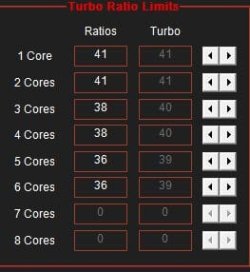
I have undervolted my 9570 like this in ThrottleStop, helps a lot with thermals, and also throttle boost wattage like this which still is enough for the device but keeps temps cool, even that much that my fans never are on and always off. Cache needs to be 1/2 of core voltage.
 

Attachments

  • ThrottleStop_2024-03-13_12-23-37_proc.jpg
    ThrottleStop_2024-03-13_12-23-37_proc.jpg
    14.1 KB · Views: 2
  • ThrottleStop_2024-03-13_12-24-00_proc.jpg
    ThrottleStop_2024-03-13_12-24-00_proc.jpg
    13.7 KB · Views: 2
  • ThrottleStop_2024-03-13_12-24-13_proc.jpg
    ThrottleStop_2024-03-13_12-24-13_proc.jpg
    9.2 KB · Views: 1

My Computer My Computer

At a glance

Windows 11
OS
Windows 11
Windows update has just installed 32.0.101.5365 on my Dell Inspiron
 

My Computers My Computers

  • At a glance

    Windows 11 build 26200.8728 / WSL 2 running U...Intel i7-1355U16GBIntel Iris XE
    OS
    Windows 11 build 26200.8728 / WSL 2 running Ubuntu
    Computer type
    Laptop
    Manufacturer/Model
    Dell Inspiron 14 5430
    CPU
    Intel i7-1355U
    Motherboard
    Dell 0GMW80
    Memory
    16GB
    Graphics Card(s)
    Intel Iris XE
    Sound Card
    Realtek
    Monitor(s) Displays
    Dell 14", LG 32" Curved Wide screen monitor and LG Ultrawide 26"
    Screen Resolution
    1920 x 1200 @ 60Hz, 1920 x 1080 @ 100Hz and 2560 x 1080 @ 60Hz
    Hard Drives
    Samsung 990 Pro 1TB NVME Gen 4 M.2 SSD
    PSU
    Dell
    Case
    Dell
    Cooling
    Dell
    Keyboard
    Dell KM3322W
    Mouse
    Dell Trackpad or Dell KM3322W
    Internet Speed
    900mb down / 400mb up FTTP
    Browser
    Edge 149.0.4022.80
    Antivirus
    Windows Defender
    Other Info
    Windows 365
    1TB OneDrive
    Outlook Classic
    Visual Studio Code running in WSL
    Python 3.14
    Samsung Magician
    Garmin Express
    Dell TB16 Thunderbolt dock
    WSL
    WEI Score: 8.3
  • At a glance

    Windows 11Core i5 - 1035G48GBIntel Iris Plus
    Operating System
    Windows 11
    Computer type
    Tablet
    Manufacturer/Model
    Microsoft Surface Pro 7
    CPU
    Core i5 - 1035G4
    Motherboard
    Microsoft
    Memory
    8GB
    Graphics card(s)
    Intel Iris Plus
    Monitor(s) Displays
    Surface touch
    Screen Resolution
    2736 x 1824
    Hard Drives
    128GB
    PSU
    Microsoft
    Case
    Microsoft Keyboard
    Cooling
    None
    Keyboard
    Microsoft Surface Keyboard
    Mouse
    Microsoft Arc Intellimouse
    Internet Speed
    900mb / 400mb FTTP
    Browser
    Edge
    Antivirus
    Windows Defender
Back
Top Bottom