Solved Latest Macrium Reflect X updates


Latest Update:

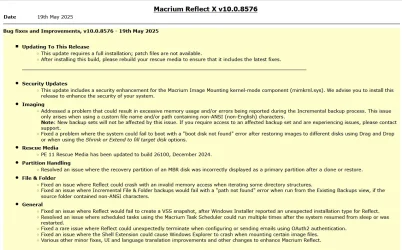
v10.0.8843 - 9th April 2026

1775775187178.webp

Release notes: Macrium Reflect X Patch Details

Despite the minimal changes this is another full install.


Previous Update:

v10.0.8750 - 3rd December 2025
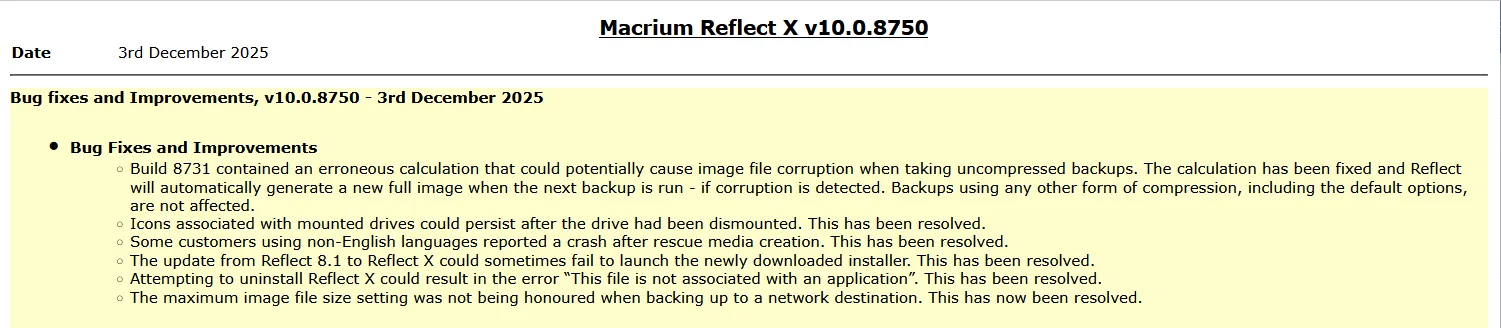
1764764947955.webp

Release notes: Macrium Reflect X Patch Details

Note: This is another full install, not just a patch.


31st March 2026: Macrium now offer the choice of purchasing a 3 year plan or an annual plan.

1775775710503.webp


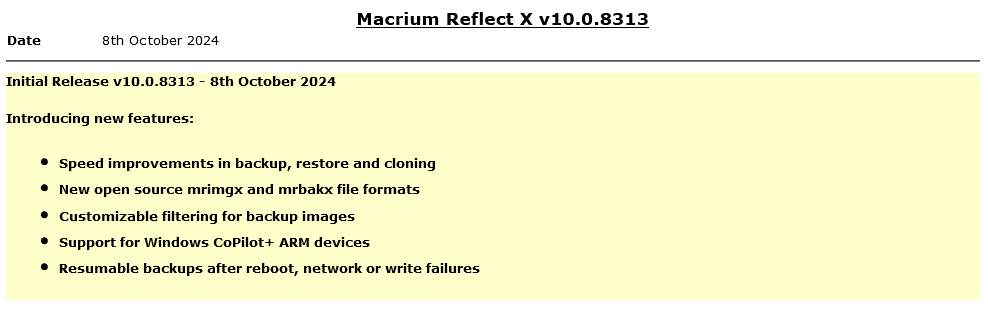
Reflect X launched on 8th October.

1728399207213.png

The Reflect X Knowledge Base is now live:


We now know the trade in offers that will be available to those with older V8, v7, and v6 one-time licences, and for recently purchased perpetual v8 licences.

Macrium said:
I purchased a one-time license
If you purchased on or after July 1st, 2024, you have three options;
  • Continue using Reflect 8 for as long as you want. You will continue to have access to 12 months technical support from the date you bought the licenses.
  • Trade in (your existing license will be deactivated after your new license is activated) your one-time license (which has one year of support from the date of purchase) and receive a 3-year Annual Plan at no extra cost. Macrium may make loyalty offers available at the end of your 3-year term. However, even without a license, Reflect always allows you to restore/recover your data (you won’t be able to make new backups). We’ve also made your backup files open-source - it’s your data and you own it.
  • NEW: Trade in (your existing license will be deactivated after your new license is activated) your one-time license (which has one year support from the date of purchase) and receive 50% off the normal annual plan price for life (must turn on auto-renew and not allow the license to expire/lapse).
Home users have 6 months from the launch of Reflect X to decide which option suits them best. Step-by-step instructions to obtain either option from the grace period will be published this week.

For Reflect Home users who purchased V8 before July 1, 2024:
You are eligible for two options. The first option is 50% off Annual plans for life. Option 2 is our “Better than Black Friday 2024 Offer:” 3 years for the price of 2:

If you choose 50% off annual plans for life, you will have to trade in your current Reflect Home V8 license.

If you choose 3 years for the price of 2, you can keep your Reflect Home V8 license. This amount must be paid up front and at the end of the plan, customers may renew based on offers available at the time (or return to your one-time license.)

For Home V6 & V7: We are offering 3 years for the price of two. This amount must be paid up front and at the end of the plan, customers may renew based on offers available at the time (or return to your one-time license.)This offer ends March 31st 2025.

If you have a Macrium Account, then the trade in offers are available there. If you don't, then you can register for a Macrium Account with the email address you used for your original purchase.
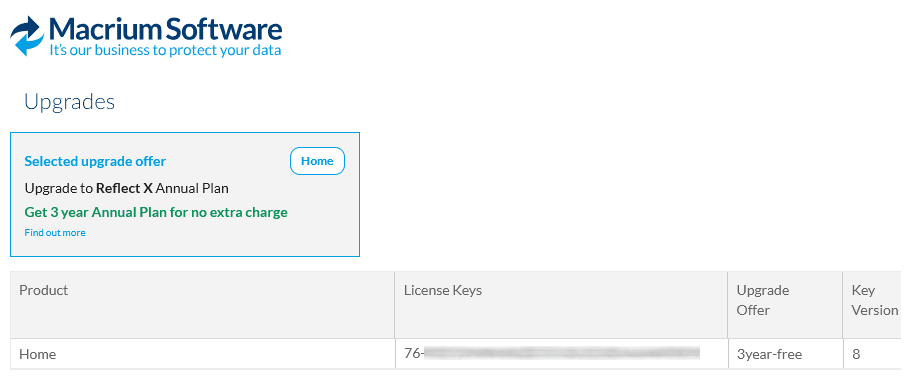
1728399141587.png

Upgrading from v8, v7 or v6

Macrium said:

Viewing your Upgrade Options​

Based on the timing of your existing license purchase and the current status of your Support and Maintenance plan, there are various personalized upgrade options available. There are multiple upgrade paths that can be accessed through the Macrium Reflect application or the Macrium Account.


Attachments

  • 1763571423325.webp
    1763571423325.webp
    132.8 KB · Views: 11
Last edited:
That also means they produce bugs promp
The bugs listed are pretty obscure and would not affect majority of users.

Just look back over V7, V8 update logs - you will see the same pattern.

What is critical is the after sales support and their response to fixing bugs promptly.

My worry now Paramount have been taken over is that they will eventually cut back the effort in fixing bugs like Acronis who let bugs linger for months.
 

My Computer My Computer

At a glance

Windows 11 Pro + Win11 Canary VM.I9 13th gen i9-13900H 2.60 GHZ16 GB solderedIntegrated Intel Iris XE
OS
Windows 11 Pro + Win11 Canary VM.
Computer type
Laptop
Manufacturer/Model
ASUS Zenbook 14
CPU
I9 13th gen i9-13900H 2.60 GHZ
Motherboard
Yep, Laptop has one.
Memory
16 GB soldered
Graphics Card(s)
Integrated Intel Iris XE
Sound Card
Realtek built in
Monitor(s) Displays
laptop OLED screen
Screen Resolution
2880x1800 touchscreen
Hard Drives
1 TB NVME SSD (only weakness is only one slot)
PSU
Internal + 65W thunderbolt USB4 charger
Case
Yep, got one
Cooling
Stella Artois (UK pint cans - 568 ml) - extra cost.
Keyboard
Built in UK keybd
Mouse
Bluetooth , wireless dongled, wired
Internet Speed
900 mbs (ethernet), wifi 6 typical 350-450 mb/s both up and down
Browser
Edge
Antivirus
Defender
Other Info
TPM 2.0, 2xUSB4 thunderbolt, 1xUsb3 (usb a), 1xUsb-c, hdmi out, 3.5 mm audio out/in combo, ASUS backlit trackpad (inc. switchable number pad)

Macrium Reflect Home V8
Office 365 Family (6 users each 1TB onedrive space)
Hyper-V (a vm runs almost as fast as my older laptop)
We'll just have to wait and see whether the new payment model is a success or failure.

I've seen posts on the Macrium forum where they said Paramount Software polled customers to see what model they preferred, and they said it is a subscription model. I don't believe that for one second.
 

My Computers My Computers

  • At a glance

    Windows 11 ProIntel Core i9-10900XCorsair 64 GB (4 x 16 GB) CMW64GX4M4C3000C15 ...GIGABYTE GeForce GTX 1660 Super Mini ITX 6 GB OC
    OS
    Windows 11 Pro
    Computer type
    PC/Desktop
    Manufacturer/Model
    Stigg's Build
    CPU
    Intel Core i9-10900X
    Motherboard
    GIGABYTE X299X DESIGNARE 10G
    Memory
    Corsair 64 GB (4 x 16 GB) CMW64GX4M4C3000C15 Vengeance RGB Pro 3000Mhz DDR4
    Graphics Card(s)
    GIGABYTE GeForce GTX 1660 Super Mini ITX 6 GB OC
    Sound Card
    Realtek ALC1220
    Monitor(s) Displays
    Samsung 27" FHD LED FreeSync Gaming Monitor (LS27F350FHEXXY)
    Screen Resolution
    1920 x 1080
    Hard Drives
    Samsung 970 Pro Series 1TB M.2 2280 NVMe SSD
    Western Digital Red Pro WD8003FFBX-68B9AN0 8 TB, 7200 RPM, SATA-III
    Western Digital Red Pro WD8003FFBX-68B9AN0 8 TB, 7200 RPM, SATA-III
    PSU
    Corsair HX1200 1200W 80 Plus Platinum
    Case
    Fractal Design Define 7 Black Solid Case
    Cooling
    Noctua NH-D15 Chromax Black
    Keyboard
    Razer Ornata V2
    Mouse
    Razer DeathAdder Essential
    Internet Speed
    FTTN 100Mbps / 40Mbps
    Browser
    Mozilla Firefox
    Antivirus
    N/A
    Other Info
    Logitech BRIO 4k Ultra HD USB-C Webcam
  • At a glance

    Windows 10 ProCore i7-8750HSK Hynix 32 GB (2 x 16 GB) HMA82GS6CJR8N-VK 1...NVIDIA GeForce GTX 1070
    Operating System
    Windows 10 Pro
    Computer type
    Laptop
    Manufacturer/Model
    ASUS ROG Zephyrus M GM501GS
    CPU
    Core i7-8750H
    Motherboard
    Zephyrus M GM501GS
    Memory
    SK Hynix 32 GB (2 x 16 GB) HMA82GS6CJR8N-VK 16 GB DDR4-2666 DDR4 SDRAM
    Graphics card(s)
    NVIDIA GeForce GTX 1070
    Sound Card
    Realtek ALC294
    Monitor(s) Displays
    AU Optronics B156HAN07.1 [15.6" LCD]
    Screen Resolution
    1920 x 1080
    Hard Drives
    Samsung MZVKW512HMJP-00000 512 GB, PCI-E 3.0 x4
    Samsung SSD 860 QVO 4TB 4 TB, SATA-III
    PSU
    N/A
    Case
    N/A
    Cooling
    N/A
    Keyboard
    PC/AT Enhanced PS2 Keyboard (101/102-Key)
    Mouse
    Razer DeathAdder Essential
    Internet Speed
    FTTN 100Mbps / 40Mbps
    Browser
    Mozilla Firefox
    Antivirus
    N/A
    Other Info
    USB2.0 HD UVC Webcam
We'll just have to wait and see whether the new payment model is a success or failure.

I've seen posts on the Macrium forum where they said Paramount Software polled customers to see what model they preferred, and they said it is a subscription model. I don't believe that for one second.
I seriously doubt it will fail, because it is obvious the new strategy is going after the corporate market. Most of the VX upgrades are only of interest to corporate users, and they only lease anyway.

I would bet Macrium Home users only represent a small portion of the overall profit.

Whether it is a success for MR Home users or not probably will make sfa difference in the scheme of things.

Not really any different to Windows - their cash cows are corporate related (Enterprise, Office 365 for Business, Azure etc).
 

My Computer My Computer

At a glance

Windows 11 Pro + Win11 Canary VM.I9 13th gen i9-13900H 2.60 GHZ16 GB solderedIntegrated Intel Iris XE
OS
Windows 11 Pro + Win11 Canary VM.
Computer type
Laptop
Manufacturer/Model
ASUS Zenbook 14
CPU
I9 13th gen i9-13900H 2.60 GHZ
Motherboard
Yep, Laptop has one.
Memory
16 GB soldered
Graphics Card(s)
Integrated Intel Iris XE
Sound Card
Realtek built in
Monitor(s) Displays
laptop OLED screen
Screen Resolution
2880x1800 touchscreen
Hard Drives
1 TB NVME SSD (only weakness is only one slot)
PSU
Internal + 65W thunderbolt USB4 charger
Case
Yep, got one
Cooling
Stella Artois (UK pint cans - 568 ml) - extra cost.
Keyboard
Built in UK keybd
Mouse
Bluetooth , wireless dongled, wired
Internet Speed
900 mbs (ethernet), wifi 6 typical 350-450 mb/s both up and down
Browser
Edge
Antivirus
Defender
Other Info
TPM 2.0, 2xUSB4 thunderbolt, 1xUsb3 (usb a), 1xUsb-c, hdmi out, 3.5 mm audio out/in combo, ASUS backlit trackpad (inc. switchable number pad)

Macrium Reflect Home V8
Office 365 Family (6 users each 1TB onedrive space)
Hyper-V (a vm runs almost as fast as my older laptop)
I seriously doubt it will fail, because it is obvious the new strategy is going after the corporate market. Most of the VX upgrades are only of interest to corporate users, and they only lease anyway.

I would bet Macrium Home users only represent a small portion of the overall profit.

Whether it is a success for MR Home users or not probably will make sfa difference in the scheme of things.

Not really any different to Windows - their cash cows are corporate related (Enterprise, Office 365 for Business, Azure etc).
Even more reasons to give home users a break.
 

My Computer My Computer

At a glance

W11 Pro and Insider DevAMD Ryzen 9 7900x2x16GB Kingston 6000MHz, Cl 32 @ 6200MHz Cl30Gigabyte Rx 6600XT Gaming OC 8G Pro
OS
W11 Pro and Insider Dev
Computer type
PC/Desktop
Manufacturer/Model
Home brewed
CPU
AMD Ryzen 9 7900x
Motherboard
ASROCK b650 PRO RS
Memory
2x16GB Kingston 6000MHz, Cl 32 @ 6200MHz Cl30
Graphics Card(s)
Gigabyte Rx 6600XT Gaming OC 8G Pro
Sound Card
MB, Realtek Ac1220p
Monitor(s) Displays
3 x 27"
Screen Resolution
1080p
Hard Drives
Kingston KC3000. 1TBSamsung 970 evo Plus 500GB, Crucial P1 NVMe 1TB, Lexar NVMe 2 TB, Silicon Power M.2 SATA 500GB
PSU
Seasonic 750W
Case
Custom Raidmax
Cooling
Arctic Liquid Freezer III 360mm
Internet Speed
20/19 mbps

My Computer My Computer

At a glance

Windows 11 Pro + Win11 Canary VM.I9 13th gen i9-13900H 2.60 GHZ16 GB solderedIntegrated Intel Iris XE
OS
Windows 11 Pro + Win11 Canary VM.
Computer type
Laptop
Manufacturer/Model
ASUS Zenbook 14
CPU
I9 13th gen i9-13900H 2.60 GHZ
Motherboard
Yep, Laptop has one.
Memory
16 GB soldered
Graphics Card(s)
Integrated Intel Iris XE
Sound Card
Realtek built in
Monitor(s) Displays
laptop OLED screen
Screen Resolution
2880x1800 touchscreen
Hard Drives
1 TB NVME SSD (only weakness is only one slot)
PSU
Internal + 65W thunderbolt USB4 charger
Case
Yep, got one
Cooling
Stella Artois (UK pint cans - 568 ml) - extra cost.
Keyboard
Built in UK keybd
Mouse
Bluetooth , wireless dongled, wired
Internet Speed
900 mbs (ethernet), wifi 6 typical 350-450 mb/s both up and down
Browser
Edge
Antivirus
Defender
Other Info
TPM 2.0, 2xUSB4 thunderbolt, 1xUsb3 (usb a), 1xUsb-c, hdmi out, 3.5 mm audio out/in combo, ASUS backlit trackpad (inc. switchable number pad)

Macrium Reflect Home V8
Office 365 Family (6 users each 1TB onedrive space)
Hyper-V (a vm runs almost as fast as my older laptop)
Why would they if that sector operates at a loss? They are not a charity.
That would be advertising by word of mouth, it's valid business strategy, goes hand in hand with "Loss leader" marketing.
 

My Computer My Computer

At a glance

W11 Pro and Insider DevAMD Ryzen 9 7900x2x16GB Kingston 6000MHz, Cl 32 @ 6200MHz Cl30Gigabyte Rx 6600XT Gaming OC 8G Pro
OS
W11 Pro and Insider Dev
Computer type
PC/Desktop
Manufacturer/Model
Home brewed
CPU
AMD Ryzen 9 7900x
Motherboard
ASROCK b650 PRO RS
Memory
2x16GB Kingston 6000MHz, Cl 32 @ 6200MHz Cl30
Graphics Card(s)
Gigabyte Rx 6600XT Gaming OC 8G Pro
Sound Card
MB, Realtek Ac1220p
Monitor(s) Displays
3 x 27"
Screen Resolution
1080p
Hard Drives
Kingston KC3000. 1TBSamsung 970 evo Plus 500GB, Crucial P1 NVMe 1TB, Lexar NVMe 2 TB, Silicon Power M.2 SATA 500GB
PSU
Seasonic 750W
Case
Custom Raidmax
Cooling
Arctic Liquid Freezer III 360mm
Internet Speed
20/19 mbps
I have Macrium Reflect 8.1 with a perpetual license.

My main OS is Manjaro Linux, and I have installed Windows 11 for cases that I need it (for example SSD firmware updates).

In practice, I boot Windows 11 once every week, install updates, and get a new backup image with Macrium Reflect.

I think the yearly price for Macrium Reflect doesn't make sense to me. A reasonable perpetual license would be better.
 

My Computer My Computer

At a glance

macOSApple silicon M432 GBApple silicon M4
OS
macOS
Computer type
PC/Desktop
Manufacturer/Model
Mac mini M4
CPU
Apple silicon M4
Memory
32 GB
Graphics Card(s)
Apple silicon M4
Monitor(s) Displays
LG 27GN650-B IPS HDR Gaming Monitor 27" FHD
Screen Resolution
1080p
Hard Drives
Apple SSD AP1024Z
Internet Speed
1 Gbps / 1 Gbps symmetrical FTTH (GPON)
Browser
Microsoft Edge

My Computers My Computers

  • At a glance

    Windows 11 HomeAMD Athlon Silver 3050U8GBRadeon Graphics
    OS
    Windows 11 Home
    Computer type
    Laptop
    Manufacturer/Model
    Acer Aspire 3 A315-23-R9VY
    CPU
    AMD Athlon Silver 3050U
    Memory
    8GB
    Graphics Card(s)
    Radeon Graphics
    Monitor(s) Displays
    laptop screen
    Screen Resolution
    1366x768 native resolution, up to 2560x1440 with Radeon Virtual Super Resolution
    Hard Drives
    1TB Samsung EVO 870 SSD (from April 2026: 250GB EVO 850)
    Internet Speed
    150 Mbps
    Browser
    Edge, Firefox
    Antivirus
    Defender
    Other Info
    UPDATE - 11 April 2026: due to lid hinges starting to break up this laptop has been retired from active duty. The OS with all software and files has been migrated to my System Seven in 'Other systems' to carry on as my general purpose 'main machine'.

    I've now clean installed 25H2 and used Garlin's scripts to update Secure Boot to CA 2023 and revoke the PCA 2011 certificates. It's new role is to test secure boot issues.

    Info for 2021-2026:
    fully 'Windows 11 ready' laptop. Windows 10 C: partition migrated from my old unsupported 'main machine' then upgraded to 11. A test migration ran Insider builds for 2 months. When 11 was released on 5th October 2021 it was re-imaged back to 10 and was offered the upgrade in Windows Update on 20th October. Windows Update offered the 22H2 Feature Update on 20th September 2022. It got the 23H2 Feature Update on 4th November 2023 through Windows Update, 24H2 on 3rd October 2024 through Windows Update by setting the Target Release Version for 24H2, and 25H2 on 30th September 2025 through Windows Update by setting the Target Release Version for 25H2.
  • At a glance

    Windows 11 ProIntel® Core™ i5-520M8GB(integrated graphics) Intel HD Graphics
    Operating System
    Windows 11 Pro
    Computer type
    Laptop
    Manufacturer/Model
    Dell Latitude E4310
    CPU
    Intel® Core™ i5-520M
    Motherboard
    0T6M8G
    Memory
    8GB
    Graphics card(s)
    (integrated graphics) Intel HD Graphics
    Screen Resolution
    1366x768
    Hard Drives
    500GB Crucial MX500 SSD
    Browser
    Firefox, Edge
    Antivirus
    Defender
    Other Info
    unsupported machine: Legacy bios, MBR, TPM 1.2, upgraded from W10 to W11 using W10/W11 hybrid install media workaround.

    In-place upgrade to 22H2 using ISO and a workaround.
    Feature Update to 23H2 by manually installing the Enablement Package.
    In-place upgrade to 24H2 using hybrid 23H2/24H2 install media.
    Upgraded to 25H2 by Enablement Package.

    Also running Insider Experimental 263xx and 29xxx builds and Windows 10 as native boot .vhdx.
  • My SYSTEM THREE is a Dell Latitude 5410, i7-10610U, 32GB RAM, 512GB NVMe ssd, supported device running Windows 11 Pro.

    My SYSTEM FOUR was a 2-in-1 convertible Lenovo Yoga 11e (1st gen) type 20DA, Celeron N2930, 8GB RAM, 256GB ssd. Unsupported device. This has now been sold. It has been replaced by my System Eight.

    My SYSTEM FIVE is a Dell Latitude 3190 2-in-1, Pentium Silver N5030, 8GB RAM, 1TB NVMe ssd, supported device running Windows 11 Pro, plus Insider Beta, Experimental 263xx and 29xxx builds (and a few others) as a native boot .vhdx.

    My SYSTEM SIX is a Dell Latitude 5550, Core Ultra 7 165H, 64GB RAM, 1TB NVMe SSD, supported device, Windows 11 Pro, Hyper-V host machine. Updated to 25H2 on 30th September 2025.

    My SYSTEM SEVEN is a Lenovo Thinkpad T580, 1920x1080 touchscreen, Intel Core i7-8650U, 16GB RAM, 512GB NVMe SSD + 2nd 512GB NVMe SSD, a supported device for Windows 11. This is my current general purpose 'main machine'. The installed Windows 11 Home from my System One has been migrated to this machine. As its new home has an existing digital licence for Pro I've been able to upgrade the migrated OS from Home to Pro.

    My SYSTEM EIGHT is a 2-in-1 convertible Lenovo Yoga 11e (5th gen) type 20LN, Celeron N4120, 8GB RAM, 512GB NVMe ssd, a supported device for Windows 11. Currently running Windows 11 Pro, plus Insider Beta, Experimental 263xx and 29xxx builds as native boot vhdx.
The bugs listed are pretty obscure and would not affect majority of users.

Just look back over V7, V8 update logs - you will see the same pattern.
I did - you do....

Macrium Reflect v8.0 - First Public Release v8.0.5903 - 17th May 2021
Bug fixes and Improvements v8.0.5928 - 25th May 2021
Bug fixes and Improvements v8.0.5942 - 29th May 2021
Bug fixes and Improvements v8.0.5945 - 30th May 2021
Bug fixes and Improvements v8.0.5946 - 1st June 2021
Bug fixes and Improvements v8.0.5963 - 7th June 2021
Bug fixes and Improvements v8.0.5994 - 21st June 2021
 

My Computers My Computers

  • At a glance

    Windows 11 HomeAMD Athlon Silver 3050U8GBRadeon Graphics
    OS
    Windows 11 Home
    Computer type
    Laptop
    Manufacturer/Model
    Acer Aspire 3 A315-23-R9VY
    CPU
    AMD Athlon Silver 3050U
    Memory
    8GB
    Graphics Card(s)
    Radeon Graphics
    Monitor(s) Displays
    laptop screen
    Screen Resolution
    1366x768 native resolution, up to 2560x1440 with Radeon Virtual Super Resolution
    Hard Drives
    1TB Samsung EVO 870 SSD (from April 2026: 250GB EVO 850)
    Internet Speed
    150 Mbps
    Browser
    Edge, Firefox
    Antivirus
    Defender
    Other Info
    UPDATE - 11 April 2026: due to lid hinges starting to break up this laptop has been retired from active duty. The OS with all software and files has been migrated to my System Seven in 'Other systems' to carry on as my general purpose 'main machine'.

    I've now clean installed 25H2 and used Garlin's scripts to update Secure Boot to CA 2023 and revoke the PCA 2011 certificates. It's new role is to test secure boot issues.

    Info for 2021-2026:
    fully 'Windows 11 ready' laptop. Windows 10 C: partition migrated from my old unsupported 'main machine' then upgraded to 11. A test migration ran Insider builds for 2 months. When 11 was released on 5th October 2021 it was re-imaged back to 10 and was offered the upgrade in Windows Update on 20th October. Windows Update offered the 22H2 Feature Update on 20th September 2022. It got the 23H2 Feature Update on 4th November 2023 through Windows Update, 24H2 on 3rd October 2024 through Windows Update by setting the Target Release Version for 24H2, and 25H2 on 30th September 2025 through Windows Update by setting the Target Release Version for 25H2.
  • At a glance

    Windows 11 ProIntel® Core™ i5-520M8GB(integrated graphics) Intel HD Graphics
    Operating System
    Windows 11 Pro
    Computer type
    Laptop
    Manufacturer/Model
    Dell Latitude E4310
    CPU
    Intel® Core™ i5-520M
    Motherboard
    0T6M8G
    Memory
    8GB
    Graphics card(s)
    (integrated graphics) Intel HD Graphics
    Screen Resolution
    1366x768
    Hard Drives
    500GB Crucial MX500 SSD
    Browser
    Firefox, Edge
    Antivirus
    Defender
    Other Info
    unsupported machine: Legacy bios, MBR, TPM 1.2, upgraded from W10 to W11 using W10/W11 hybrid install media workaround.

    In-place upgrade to 22H2 using ISO and a workaround.
    Feature Update to 23H2 by manually installing the Enablement Package.
    In-place upgrade to 24H2 using hybrid 23H2/24H2 install media.
    Upgraded to 25H2 by Enablement Package.

    Also running Insider Experimental 263xx and 29xxx builds and Windows 10 as native boot .vhdx.
  • My SYSTEM THREE is a Dell Latitude 5410, i7-10610U, 32GB RAM, 512GB NVMe ssd, supported device running Windows 11 Pro.

    My SYSTEM FOUR was a 2-in-1 convertible Lenovo Yoga 11e (1st gen) type 20DA, Celeron N2930, 8GB RAM, 256GB ssd. Unsupported device. This has now been sold. It has been replaced by my System Eight.

    My SYSTEM FIVE is a Dell Latitude 3190 2-in-1, Pentium Silver N5030, 8GB RAM, 1TB NVMe ssd, supported device running Windows 11 Pro, plus Insider Beta, Experimental 263xx and 29xxx builds (and a few others) as a native boot .vhdx.

    My SYSTEM SIX is a Dell Latitude 5550, Core Ultra 7 165H, 64GB RAM, 1TB NVMe SSD, supported device, Windows 11 Pro, Hyper-V host machine. Updated to 25H2 on 30th September 2025.

    My SYSTEM SEVEN is a Lenovo Thinkpad T580, 1920x1080 touchscreen, Intel Core i7-8650U, 16GB RAM, 512GB NVMe SSD + 2nd 512GB NVMe SSD, a supported device for Windows 11. This is my current general purpose 'main machine'. The installed Windows 11 Home from my System One has been migrated to this machine. As its new home has an existing digital licence for Pro I've been able to upgrade the migrated OS from Home to Pro.

    My SYSTEM EIGHT is a 2-in-1 convertible Lenovo Yoga 11e (5th gen) type 20LN, Celeron N4120, 8GB RAM, 512GB NVMe ssd, a supported device for Windows 11. Currently running Windows 11 Pro, plus Insider Beta, Experimental 263xx and 29xxx builds as native boot vhdx.

My Computer My Computer

At a glance

Windows 11 Pro
OS
Windows 11 Pro
Ya a lot of bug fixes means you have crappy coders.
No, it just means you have Reflect running on a far wider range of hardware combinations than was ever possible (or practical) to test for in Beta.
 

My Computers My Computers

  • At a glance

    Windows 11 HomeAMD Athlon Silver 3050U8GBRadeon Graphics
    OS
    Windows 11 Home
    Computer type
    Laptop
    Manufacturer/Model
    Acer Aspire 3 A315-23-R9VY
    CPU
    AMD Athlon Silver 3050U
    Memory
    8GB
    Graphics Card(s)
    Radeon Graphics
    Monitor(s) Displays
    laptop screen
    Screen Resolution
    1366x768 native resolution, up to 2560x1440 with Radeon Virtual Super Resolution
    Hard Drives
    1TB Samsung EVO 870 SSD (from April 2026: 250GB EVO 850)
    Internet Speed
    150 Mbps
    Browser
    Edge, Firefox
    Antivirus
    Defender
    Other Info
    UPDATE - 11 April 2026: due to lid hinges starting to break up this laptop has been retired from active duty. The OS with all software and files has been migrated to my System Seven in 'Other systems' to carry on as my general purpose 'main machine'.

    I've now clean installed 25H2 and used Garlin's scripts to update Secure Boot to CA 2023 and revoke the PCA 2011 certificates. It's new role is to test secure boot issues.

    Info for 2021-2026:
    fully 'Windows 11 ready' laptop. Windows 10 C: partition migrated from my old unsupported 'main machine' then upgraded to 11. A test migration ran Insider builds for 2 months. When 11 was released on 5th October 2021 it was re-imaged back to 10 and was offered the upgrade in Windows Update on 20th October. Windows Update offered the 22H2 Feature Update on 20th September 2022. It got the 23H2 Feature Update on 4th November 2023 through Windows Update, 24H2 on 3rd October 2024 through Windows Update by setting the Target Release Version for 24H2, and 25H2 on 30th September 2025 through Windows Update by setting the Target Release Version for 25H2.
  • At a glance

    Windows 11 ProIntel® Core™ i5-520M8GB(integrated graphics) Intel HD Graphics
    Operating System
    Windows 11 Pro
    Computer type
    Laptop
    Manufacturer/Model
    Dell Latitude E4310
    CPU
    Intel® Core™ i5-520M
    Motherboard
    0T6M8G
    Memory
    8GB
    Graphics card(s)
    (integrated graphics) Intel HD Graphics
    Screen Resolution
    1366x768
    Hard Drives
    500GB Crucial MX500 SSD
    Browser
    Firefox, Edge
    Antivirus
    Defender
    Other Info
    unsupported machine: Legacy bios, MBR, TPM 1.2, upgraded from W10 to W11 using W10/W11 hybrid install media workaround.

    In-place upgrade to 22H2 using ISO and a workaround.
    Feature Update to 23H2 by manually installing the Enablement Package.
    In-place upgrade to 24H2 using hybrid 23H2/24H2 install media.
    Upgraded to 25H2 by Enablement Package.

    Also running Insider Experimental 263xx and 29xxx builds and Windows 10 as native boot .vhdx.
  • My SYSTEM THREE is a Dell Latitude 5410, i7-10610U, 32GB RAM, 512GB NVMe ssd, supported device running Windows 11 Pro.

    My SYSTEM FOUR was a 2-in-1 convertible Lenovo Yoga 11e (1st gen) type 20DA, Celeron N2930, 8GB RAM, 256GB ssd. Unsupported device. This has now been sold. It has been replaced by my System Eight.

    My SYSTEM FIVE is a Dell Latitude 3190 2-in-1, Pentium Silver N5030, 8GB RAM, 1TB NVMe ssd, supported device running Windows 11 Pro, plus Insider Beta, Experimental 263xx and 29xxx builds (and a few others) as a native boot .vhdx.

    My SYSTEM SIX is a Dell Latitude 5550, Core Ultra 7 165H, 64GB RAM, 1TB NVMe SSD, supported device, Windows 11 Pro, Hyper-V host machine. Updated to 25H2 on 30th September 2025.

    My SYSTEM SEVEN is a Lenovo Thinkpad T580, 1920x1080 touchscreen, Intel Core i7-8650U, 16GB RAM, 512GB NVMe SSD + 2nd 512GB NVMe SSD, a supported device for Windows 11. This is my current general purpose 'main machine'. The installed Windows 11 Home from my System One has been migrated to this machine. As its new home has an existing digital licence for Pro I've been able to upgrade the migrated OS from Home to Pro.

    My SYSTEM EIGHT is a 2-in-1 convertible Lenovo Yoga 11e (5th gen) type 20LN, Celeron N4120, 8GB RAM, 512GB NVMe ssd, a supported device for Windows 11. Currently running Windows 11 Pro, plus Insider Beta, Experimental 263xx and 29xxx builds as native boot vhdx.
(y)+1
 

My Computer My Computer

At a glance

Windows 10, Linux MINT (V-guests 7, 11, ZorinOS)Intel Core i7-1070032gB (DDR4)Intel UHD Graphics 630
OS
Windows 10, Linux MINT (V-guests 7, 11, ZorinOS)
Computer type
PC/Desktop
Manufacturer/Model
HP Z2 G5 Workstation
CPU
Intel Core i7-10700
Motherboard
HP Model# 8751
Memory
32gB (DDR4)
Graphics Card(s)
Intel UHD Graphics 630
Sound Card
Realtek basic audio
Monitor(s) Displays
32" (Viewsonic) UHD
Screen Resolution
3840 x 2160
Hard Drives
2-NvME (mainboard), 1-NvME (PCIe), 1-SATA3 SSD
Ya a lot of bug fixes means you have crappy coders.
Nonsense. There are very few significant bugs. Have you ever been a programmer for a commercial product?

It is IMPOSSIBLE to get rid of the obsure bugs as there is an almost infinite combination of hardware and software to handle.

We could wait months whilst the developers test the software as much as is reasonable.

I guarantee you somebody will still feel find an obsure bug within a few days.

There comes a point where any developer has to release it.

I know Paramount do a lot of testing with its Beta testers but no matter how much is done, a few things WILL slip through the net.

In the end if it concerns you, use another product.
 

My Computer My Computer

At a glance

Windows 11 Pro + Win11 Canary VM.I9 13th gen i9-13900H 2.60 GHZ16 GB solderedIntegrated Intel Iris XE
OS
Windows 11 Pro + Win11 Canary VM.
Computer type
Laptop
Manufacturer/Model
ASUS Zenbook 14
CPU
I9 13th gen i9-13900H 2.60 GHZ
Motherboard
Yep, Laptop has one.
Memory
16 GB soldered
Graphics Card(s)
Integrated Intel Iris XE
Sound Card
Realtek built in
Monitor(s) Displays
laptop OLED screen
Screen Resolution
2880x1800 touchscreen
Hard Drives
1 TB NVME SSD (only weakness is only one slot)
PSU
Internal + 65W thunderbolt USB4 charger
Case
Yep, got one
Cooling
Stella Artois (UK pint cans - 568 ml) - extra cost.
Keyboard
Built in UK keybd
Mouse
Bluetooth , wireless dongled, wired
Internet Speed
900 mbs (ethernet), wifi 6 typical 350-450 mb/s both up and down
Browser
Edge
Antivirus
Defender
Other Info
TPM 2.0, 2xUSB4 thunderbolt, 1xUsb3 (usb a), 1xUsb-c, hdmi out, 3.5 mm audio out/in combo, ASUS backlit trackpad (inc. switchable number pad)

Macrium Reflect Home V8
Office 365 Family (6 users each 1TB onedrive space)
Hyper-V (a vm runs almost as fast as my older laptop)
No, it just means you have Reflect running on a far wider range of hardware combinations than was ever possible (or practical) to test for in Beta.
None of the bugs they just fixed say anything about particular hardware or OS.
They are things that should have been addressed before the release.
Maybe not crappy coders but rather lazy ones.
 

My Computer My Computer

At a glance

Windows 11 Pro
OS
Windows 11 Pro
Maybe not crappy coders but rather lazy ones.
They are getting more efficient at debugging with each new version. For V7 (Macrium Reflect Patch Details) it took more than two months and 15 updates from '27th February 2017 - Initial Release' until v'7.0.2199 - 15th June 2017' to sort out the obscure bugs and return to routine updates every month or so.

For v8 that initial stage completed in a little over a month: Post #189.
 

My Computers My Computers

  • At a glance

    Windows 11 HomeAMD Athlon Silver 3050U8GBRadeon Graphics
    OS
    Windows 11 Home
    Computer type
    Laptop
    Manufacturer/Model
    Acer Aspire 3 A315-23-R9VY
    CPU
    AMD Athlon Silver 3050U
    Memory
    8GB
    Graphics Card(s)
    Radeon Graphics
    Monitor(s) Displays
    laptop screen
    Screen Resolution
    1366x768 native resolution, up to 2560x1440 with Radeon Virtual Super Resolution
    Hard Drives
    1TB Samsung EVO 870 SSD (from April 2026: 250GB EVO 850)
    Internet Speed
    150 Mbps
    Browser
    Edge, Firefox
    Antivirus
    Defender
    Other Info
    UPDATE - 11 April 2026: due to lid hinges starting to break up this laptop has been retired from active duty. The OS with all software and files has been migrated to my System Seven in 'Other systems' to carry on as my general purpose 'main machine'.

    I've now clean installed 25H2 and used Garlin's scripts to update Secure Boot to CA 2023 and revoke the PCA 2011 certificates. It's new role is to test secure boot issues.

    Info for 2021-2026:
    fully 'Windows 11 ready' laptop. Windows 10 C: partition migrated from my old unsupported 'main machine' then upgraded to 11. A test migration ran Insider builds for 2 months. When 11 was released on 5th October 2021 it was re-imaged back to 10 and was offered the upgrade in Windows Update on 20th October. Windows Update offered the 22H2 Feature Update on 20th September 2022. It got the 23H2 Feature Update on 4th November 2023 through Windows Update, 24H2 on 3rd October 2024 through Windows Update by setting the Target Release Version for 24H2, and 25H2 on 30th September 2025 through Windows Update by setting the Target Release Version for 25H2.
  • At a glance

    Windows 11 ProIntel® Core™ i5-520M8GB(integrated graphics) Intel HD Graphics
    Operating System
    Windows 11 Pro
    Computer type
    Laptop
    Manufacturer/Model
    Dell Latitude E4310
    CPU
    Intel® Core™ i5-520M
    Motherboard
    0T6M8G
    Memory
    8GB
    Graphics card(s)
    (integrated graphics) Intel HD Graphics
    Screen Resolution
    1366x768
    Hard Drives
    500GB Crucial MX500 SSD
    Browser
    Firefox, Edge
    Antivirus
    Defender
    Other Info
    unsupported machine: Legacy bios, MBR, TPM 1.2, upgraded from W10 to W11 using W10/W11 hybrid install media workaround.

    In-place upgrade to 22H2 using ISO and a workaround.
    Feature Update to 23H2 by manually installing the Enablement Package.
    In-place upgrade to 24H2 using hybrid 23H2/24H2 install media.
    Upgraded to 25H2 by Enablement Package.

    Also running Insider Experimental 263xx and 29xxx builds and Windows 10 as native boot .vhdx.
  • My SYSTEM THREE is a Dell Latitude 5410, i7-10610U, 32GB RAM, 512GB NVMe ssd, supported device running Windows 11 Pro.

    My SYSTEM FOUR was a 2-in-1 convertible Lenovo Yoga 11e (1st gen) type 20DA, Celeron N2930, 8GB RAM, 256GB ssd. Unsupported device. This has now been sold. It has been replaced by my System Eight.

    My SYSTEM FIVE is a Dell Latitude 3190 2-in-1, Pentium Silver N5030, 8GB RAM, 1TB NVMe ssd, supported device running Windows 11 Pro, plus Insider Beta, Experimental 263xx and 29xxx builds (and a few others) as a native boot .vhdx.

    My SYSTEM SIX is a Dell Latitude 5550, Core Ultra 7 165H, 64GB RAM, 1TB NVMe SSD, supported device, Windows 11 Pro, Hyper-V host machine. Updated to 25H2 on 30th September 2025.

    My SYSTEM SEVEN is a Lenovo Thinkpad T580, 1920x1080 touchscreen, Intel Core i7-8650U, 16GB RAM, 512GB NVMe SSD + 2nd 512GB NVMe SSD, a supported device for Windows 11. This is my current general purpose 'main machine'. The installed Windows 11 Home from my System One has been migrated to this machine. As its new home has an existing digital licence for Pro I've been able to upgrade the migrated OS from Home to Pro.

    My SYSTEM EIGHT is a 2-in-1 convertible Lenovo Yoga 11e (5th gen) type 20LN, Celeron N4120, 8GB RAM, 512GB NVMe ssd, a supported device for Windows 11. Currently running Windows 11 Pro, plus Insider Beta, Experimental 263xx and 29xxx builds as native boot vhdx.

My Computer My Computer

At a glance

Windows 11 Pro
OS
Windows 11 Pro
All this talk about bugs and in the 2+ years since I've adopted Macrium Reflect and used it every day, I've never had a problem. To what do you think I should attribute this?
 

My Computers My Computers

  • At a glance

    Windows 11 ProIntel Series 3 Core Ultra X9 388H64GB LPDDR5x 9600 MT/sIntel Arc graphics B390 Panther Lake
    OS
    Windows 11 Pro
    Computer type
    Laptop
    Manufacturer/Model
    Dell XPS 16 DA16260
    CPU
    Intel Series 3 Core Ultra X9 388H
    Memory
    64GB LPDDR5x 9600 MT/s
    Graphics Card(s)
    Intel Arc graphics B390 Panther Lake
    Monitor(s) Displays
    16" 3.2K Tandem OLED Infinity Edge
    Screen Resolution
    3200 x 2000 16:10 236 PPI
    Hard Drives
    1 Terabyte M.2 PCIe NVMe SSD
    Case
    Black Anodized Aluminum
    Cooling
    Vapor Chamber Cooling
    Mouse
    None
    Internet Speed
    942 Mbps Netgear Mesh + 2 Satellites
    Browser
    Microsoft Edge (Chromium)
    Antivirus
    Windows Security (Defender)
    Other Info
    NPU delivering 67 TOPS
    Microsoft 365 subscription
    Microsoft Office 365
    Microsoft OneDrive 1TB Cloud
    Microsoft Visual Studio
    Microsoft Visual Studio Code
    Microsoft Sysinternals Suite
    Microsoft BitLocker
    Microsoft Copilot
    Dell Support Assist
    Dell Command | Update
    Macrium Reflect X subscription
    1Password Password Manager
    Amazon Kindle for PC
    Lightroom/Photoshop subscription
    Interactive Brokers Trader Workstation
  • At a glance

    Windows 11 ProSnapdragon® X Elite (12 Core) with Hexagon NP...32GB LPDDR5x 8448 MT/sIntegrated Adreno GPU
    Operating System
    Windows 11 Pro
    Computer type
    Laptop
    Manufacturer/Model
    Microsoft Surface Laptop 7
    CPU
    Snapdragon® X Elite (12 Core) with Hexagon NPU delivering 45 TOPS
    Memory
    32GB LPDDR5x 8448 MT/s
    Graphics card(s)
    Integrated Adreno GPU
    Sound Card
    Omnisonic speakers with Dolby Atmos spatial sound
    Monitor(s) Displays
    13.8″ PixelSense Flow touchscreen 120 Hz 600 NIT
    Screen Resolution
    2304 × 1536 (201 PPI), 3:2 aspect ratio
    Hard Drives
    1 TB PCIe NVMe Gen 4 SSD
    Case
    Black Anodized Aluminum
    Cooling
    Vapor Chamber Cooling
    Mouse
    None
    Internet Speed
    942 Mbps Netgear Mesh + 2 Satellites
    Browser
    Microsoft Edge (Chromium)
    Antivirus
    Windows Security (Defender)
    Other Info
    Microsoft 365 subscription (Office)
    Microsoft Office 365
    Microsoft OneDrive 1TB Cloud
    Microsoft Visual Studio 2026
    Microsoft Visual Studio Code
    Interactive Brokers Trader Workstation
    Lightroom/Photoshop subscription
    1Password Password Manager
    Microsoft Sysinternals
    Amazon Kindle for PC
    Microsoft BitLocker
    Microsoft Copilot
All this talk about bugs and in the 2+ years since I've adopted Macrium Reflect and used it every day, I've never had a problem. To what do you think I should attribute this?
Same for me for over 8 years. Most bugs are pretty obscure and never really affect most users.
 

My Computer My Computer

At a glance

Windows 11 Pro + Win11 Canary VM.I9 13th gen i9-13900H 2.60 GHZ16 GB solderedIntegrated Intel Iris XE
OS
Windows 11 Pro + Win11 Canary VM.
Computer type
Laptop
Manufacturer/Model
ASUS Zenbook 14
CPU
I9 13th gen i9-13900H 2.60 GHZ
Motherboard
Yep, Laptop has one.
Memory
16 GB soldered
Graphics Card(s)
Integrated Intel Iris XE
Sound Card
Realtek built in
Monitor(s) Displays
laptop OLED screen
Screen Resolution
2880x1800 touchscreen
Hard Drives
1 TB NVME SSD (only weakness is only one slot)
PSU
Internal + 65W thunderbolt USB4 charger
Case
Yep, got one
Cooling
Stella Artois (UK pint cans - 568 ml) - extra cost.
Keyboard
Built in UK keybd
Mouse
Bluetooth , wireless dongled, wired
Internet Speed
900 mbs (ethernet), wifi 6 typical 350-450 mb/s both up and down
Browser
Edge
Antivirus
Defender
Other Info
TPM 2.0, 2xUSB4 thunderbolt, 1xUsb3 (usb a), 1xUsb-c, hdmi out, 3.5 mm audio out/in combo, ASUS backlit trackpad (inc. switchable number pad)

Macrium Reflect Home V8
Office 365 Family (6 users each 1TB onedrive space)
Hyper-V (a vm runs almost as fast as my older laptop)
All this talk about bugs and in the 2+ years since I've adopted Macrium Reflect and used it every day, I've never had a problem. To what do you think I should attribute this?
Same for me for over 8 years. Most bugs are pretty obscure and never really affect most users.
I have used Reflect getting on for 7 years, first Reflect Free, Reflect Home for the last 5 years.

I actually did have one bug! On 14th October 2020 the v7.3.5281 patch installed, the upgrade from v7.2 to v7.3. If CBT was enabled it caused a BSoD on ejecting a USB HDD. I reported it immediately...


...and worked with Macrium Support to test a fix.
Bree said:
I love Macrium support, they're so fast to respond. They've just asked me to test an updated driver and it fixed the issue in my v7.3.5281. So expect an update shortly....
New Macrium Reflect Updates [2] - Windows 10 Help Forums - post #1272

A day later the patch was released publicly.
Bug fixes and Improvements v7.3.5283 - 15th October 2020
  • Changed Block Tracker
    When removing a USB attached storage device, an APC_INDEX_MISMATCH BSoD could be generated if there was an outstanding kernel lock on the device. This has been resolved.

Just try getting Microsoft to respond that quickly :ROFLMAO:
 
Last edited:

My Computers My Computers

  • At a glance

    Windows 11 HomeAMD Athlon Silver 3050U8GBRadeon Graphics
    OS
    Windows 11 Home
    Computer type
    Laptop
    Manufacturer/Model
    Acer Aspire 3 A315-23-R9VY
    CPU
    AMD Athlon Silver 3050U
    Memory
    8GB
    Graphics Card(s)
    Radeon Graphics
    Monitor(s) Displays
    laptop screen
    Screen Resolution
    1366x768 native resolution, up to 2560x1440 with Radeon Virtual Super Resolution
    Hard Drives
    1TB Samsung EVO 870 SSD (from April 2026: 250GB EVO 850)
    Internet Speed
    150 Mbps
    Browser
    Edge, Firefox
    Antivirus
    Defender
    Other Info
    UPDATE - 11 April 2026: due to lid hinges starting to break up this laptop has been retired from active duty. The OS with all software and files has been migrated to my System Seven in 'Other systems' to carry on as my general purpose 'main machine'.

    I've now clean installed 25H2 and used Garlin's scripts to update Secure Boot to CA 2023 and revoke the PCA 2011 certificates. It's new role is to test secure boot issues.

    Info for 2021-2026:
    fully 'Windows 11 ready' laptop. Windows 10 C: partition migrated from my old unsupported 'main machine' then upgraded to 11. A test migration ran Insider builds for 2 months. When 11 was released on 5th October 2021 it was re-imaged back to 10 and was offered the upgrade in Windows Update on 20th October. Windows Update offered the 22H2 Feature Update on 20th September 2022. It got the 23H2 Feature Update on 4th November 2023 through Windows Update, 24H2 on 3rd October 2024 through Windows Update by setting the Target Release Version for 24H2, and 25H2 on 30th September 2025 through Windows Update by setting the Target Release Version for 25H2.
  • At a glance

    Windows 11 ProIntel® Core™ i5-520M8GB(integrated graphics) Intel HD Graphics
    Operating System
    Windows 11 Pro
    Computer type
    Laptop
    Manufacturer/Model
    Dell Latitude E4310
    CPU
    Intel® Core™ i5-520M
    Motherboard
    0T6M8G
    Memory
    8GB
    Graphics card(s)
    (integrated graphics) Intel HD Graphics
    Screen Resolution
    1366x768
    Hard Drives
    500GB Crucial MX500 SSD
    Browser
    Firefox, Edge
    Antivirus
    Defender
    Other Info
    unsupported machine: Legacy bios, MBR, TPM 1.2, upgraded from W10 to W11 using W10/W11 hybrid install media workaround.

    In-place upgrade to 22H2 using ISO and a workaround.
    Feature Update to 23H2 by manually installing the Enablement Package.
    In-place upgrade to 24H2 using hybrid 23H2/24H2 install media.
    Upgraded to 25H2 by Enablement Package.

    Also running Insider Experimental 263xx and 29xxx builds and Windows 10 as native boot .vhdx.
  • My SYSTEM THREE is a Dell Latitude 5410, i7-10610U, 32GB RAM, 512GB NVMe ssd, supported device running Windows 11 Pro.

    My SYSTEM FOUR was a 2-in-1 convertible Lenovo Yoga 11e (1st gen) type 20DA, Celeron N2930, 8GB RAM, 256GB ssd. Unsupported device. This has now been sold. It has been replaced by my System Eight.

    My SYSTEM FIVE is a Dell Latitude 3190 2-in-1, Pentium Silver N5030, 8GB RAM, 1TB NVMe ssd, supported device running Windows 11 Pro, plus Insider Beta, Experimental 263xx and 29xxx builds (and a few others) as a native boot .vhdx.

    My SYSTEM SIX is a Dell Latitude 5550, Core Ultra 7 165H, 64GB RAM, 1TB NVMe SSD, supported device, Windows 11 Pro, Hyper-V host machine. Updated to 25H2 on 30th September 2025.

    My SYSTEM SEVEN is a Lenovo Thinkpad T580, 1920x1080 touchscreen, Intel Core i7-8650U, 16GB RAM, 512GB NVMe SSD + 2nd 512GB NVMe SSD, a supported device for Windows 11. This is my current general purpose 'main machine'. The installed Windows 11 Home from my System One has been migrated to this machine. As its new home has an existing digital licence for Pro I've been able to upgrade the migrated OS from Home to Pro.

    My SYSTEM EIGHT is a 2-in-1 convertible Lenovo Yoga 11e (5th gen) type 20LN, Celeron N4120, 8GB RAM, 512GB NVMe ssd, a supported device for Windows 11. Currently running Windows 11 Pro, plus Insider Beta, Experimental 263xx and 29xxx builds as native boot vhdx.
Nonsense. There are very few significant bugs. Have you ever been a programmer for a commercial product?
Yes, for several years. It was a constant tug-of-war between the Director of Development and the Director of Marketing. Guess which one always wanted a "few more months" to shake out the remaining "bugs"?
 

My Computer My Computer

At a glance

Windows 11Ryzen 5600X16GBEVGA GT 710
OS
Windows 11
Computer type
PC/Desktop
Manufacturer/Model
Custom built
CPU
Ryzen 5600X
Motherboard
ASRock Steel Legend
Memory
16GB
Graphics Card(s)
EVGA GT 710
Sound Card
None
Monitor(s) Displays
23",24", 19" - flat panels
Screen Resolution
1920x1200
Hard Drives
None - only M.2 SATA and NVMe drives
PSU
750W
Case
Antec
Cooling
stock Wraith cooler
Keyboard
Corsair gaming
Mouse
Logitech M720
Internet Speed
1Gb
Back
Top Bottom