How to Determine Currently Installed NVIDIA Graphics Display Driver Version in Windows
NVIDIA Graphics Firmware Update Tool for DisplayPort 1.3 and 1.4 Displays
NVIDIA GPU UEFI Firmware Update Tool for RTX 4090 and 4080 Series
NVIDIA GPU UEFI Firmware Update Tool for RTX 5060 Series
Support has ended for Maxwell, Pascal, and Volta-series GeForce GPUs.
Support Plan for Maxwell, Pascal, and Volta-series GeForce GPUs
List of Maxwell, Pascal and Volta Series GeForce GPUs
GeForce 582.28 graphics driver as a security update released 1/29/2026 for Maxwell, Pascal, and Volta-series GeForce GPUs.

The Ultimate GeForce GPU Comparison

Release Date: September 03, 2026
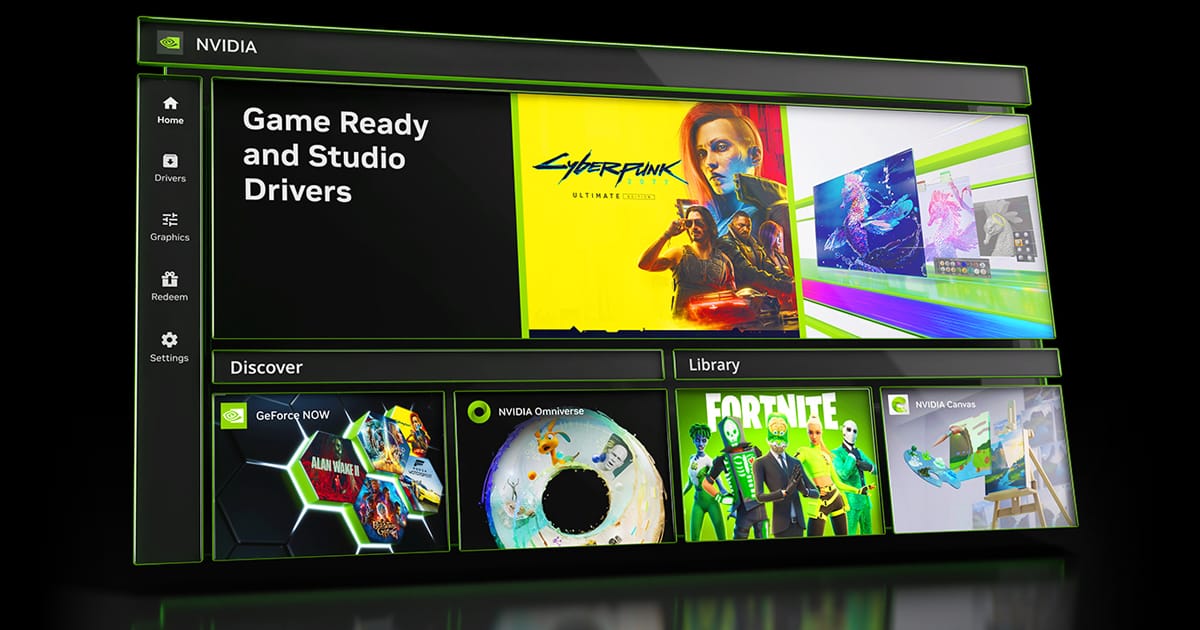
What's new in NVIDIA App 11.0.9
New Updates:
- DLSS 4.5 Ray Reconstruction Available Now
- Added support for DLSS 4.5 Ray Reconstruction on GeForce RTX Series GPUs. Access these DLSS features under Graphics > Program Settings > Driver Settings > DLSS Override - Model Presets > “Recommended”.
- New Graphics Settings
- Per-app Resizable BAR controls are now available in the NVIDIA app to help optimize game performance for your specific hardware setup. Access this feature under Graphics > Program Settings > Driver Settings > Resizable BAR.
- Additional Updates
- Added a green dot notification badge for new features, along with hover-enabled sidebar links for quick access.
- Added a toggle for Windows Desktop right-click context menu for the NVIDIA app.
- Migrated CUDA System Fallback policy from the NVIDIA Control Panel.
- Added Borderless Windowed mode support to Optimal Playable Settings.
- 007 First Light
- Assassin's Creed Black Flag Resynced
- Beast of Reincarnation
- Blades of Fire
- Conan Exiles Enhanced
- Corsair Cove
- Dead as Disco
- Deep Rock Galactic: Rogue Core
- Directive 8020
- Empulse
- Fatekeeper
- Forza Horizon 6
- GOALS
- Gothic 1 Remake
- Halo: Campaign Evolved
- Hell Let Loose: Vietnam
- I Am Jesus Christ
- LEGO Batman: Legacy of the Dark Knight
- Luminary
- Luna Abyss
- Mistfall Hunter
- Mortal Shell II
- NBA THE RUN
- Reaper Actual
- SAND: Raiders of Sophie
- Starminer
- Subnautica 2
- The Mound: Omen of Cthulhu
- The Sinking City 2
- Tides of Tomorrow
- World of Tanks: HEAT
- Zenless Zone Zero
- STAR WARS Zero Company™
- Painkiller RTX
- Onimusha: Way of the Sword
- NBA 2K27
- The Blood of Dawnwalker
- Resonance: A Plague Tale Legacy
- 007 First Light
- Halo: Campaign Evolved
- Mistfall Hunter
- Subnautica 2
- STAR WARS Zero Company™
- Painkiller RTX
- Onimusha: Way of the Sword
- NBA 2K27
- The Blood of Dawnwalker
- Resonance: A Plague Tale Legacy
- Fixed an issue where Game filters stopped working in Battlefield 4.
- Fixed an compatibility issue with video playback and statistics overlay in multi-GPU configurations.
- Fixed an issue where Photo Mode Super Resolution produced incorrect color output.
- Fixed an issue where Image Sharpening was not working on a per-app basis.
- Fixed an issue where statistic logging failed to start.
- Fixed an issue where 10 bpc was unavailable for Output Color Depth on selected displays when YCbCr444 was selected.
- Various stability fixes.

New GeForce Game Ready Driver Released For 007 First Light’s Path Tracing Update, Active Matter, Aniimo & WARDOGS
Version: 616.92
Release Date for Desktops and Notebooks: September 09, 2026
Desktop DCH: GEFORCE GAME READY DRIVER 64-bit Windows 10, Windows 11 Download
Notebook DCH: GEFORCE GAME READY DRIVER 64-bit Windows 10, Windows 11 Download
GeForce GRD 616.92 Feedback Thread
NVIDIA GeForce Driver Release Highlights
Game Ready Driver Release Notes (PDF)
Control Panel User's Guide (PDF)
Note: After 20 years of dedicated service, the classic NVIDIA Control Panel is officially retiring for Game Ready and Studio Drivers. For NVIDIA RTX PRO users, the NVIDIA Control Panel will continue to be supported until we have migrated professional features to the NVIDIA app.
Existing installs of the NVIDIA Control Panel will remain on users’ systems, unless they perform a clean installation, and users who still need the NVIDIA Control Panel can continue to download it from the Microsoft Store, but we won’t be adding features, fixes, or other changes.
The NVIDIA app contains all of the modern functionality of the NVIDIA Control Panel available for GeForce RTX GPUs, and much more, while running faster and more efficiently.
Game Ready for 007 First Light, Active Matter, Aniimo & WARDOGS
Game Ready Driver which provides the best gaming experience for 007 First Light’s Path Tracing Update as well as the latest new games and updates supporting DLSS and RTX technologies including Matter, Aniimo, PUBG, and WARDOGS.
Fixed Gaming Bugs
> N/A
Fixed General Bugs
> Intermittent flicker may be observed in browsers when navigating to certain websites [6673430]
> Fixed an issue where virtual displays could not be created after updating to driver 616.56 [6674464]
> Remote Desktop Protocol (RDP) sessions may display a black screen after updating to driver 616.56 [6687328]
Open Issues
> “Prefer Maximum Performance” Power Management Mode may not be applied correctly [6007998]
> Assassin's Creed Shadows may crash to desktop after extended gameplay after updating to driver 616.56 [6685219]
> Judgement/Lost Judgement/ Virtua Fighter 5 R.E.V.O. may fail to launch after updating to driver 616.56 [6681537]
Version: 616.92
Release Date for Desktops and Notebooks: September 09, 2026
Desktop DCH: GEFORCE GAME READY DRIVER 64-bit Windows 10, Windows 11 Download
Notebook DCH: GEFORCE GAME READY DRIVER 64-bit Windows 10, Windows 11 Download
NVIDIA Studio Driver Release Highlights
Studio Driver Release Notes (PDF)
Control Panel User's Guide (PDF)
Note: After 20 years of dedicated service, the classic NVIDIA Control Panel is officially retiring for Game Ready and Studio Drivers. For NVIDIA RTX PRO users, the NVIDIA Control Panel will continue to be supported until we have migrated professional features to the NVIDIA app.
Existing installs of the NVIDIA Control Panel will remain on users’ systems, unless they perform a clean installation, and users who still need the NVIDIA Control Panel can continue to download it from the Microsoft Store, but we won’t be adding features, fixes, or other changes.
The NVIDIA app contains all of the modern functionality of the NVIDIA Control Panel available for GeForce RTX GPUs, and much more, while running faster and more efficiently.
Applications
The September NVIDIA Studio Driver provides optimal support for the latest new creative applications and updates including Adobe Premiere, Blender, Maxon Redshift, and llama.ccp support for CUDA 13.3 and CUDA 13.4.
Fixed Application Bugs
> N/A
Fixed General Bugs
> Intermittent flicker may be observed in browsers when navigating to certain websites [6673430]
> Fixed an issue where virtual displays could not be created after updating to driver 616.56 [6674464]
> Remote Desktop Protocol (RDP) sessions may display a black screen after updating to driver 616.56 [6687328]
Open Issues
> “Prefer Maximum Performance” Power Management Mode may not be applied correctly [6007998]
> Assassin's Creed Shadows may crash to desktop after extended gameplay after updating to driver 616.56 [6685219]
> Judgement/Lost Judgement/ Virtua Fighter 5 R.E.V.O. may fail to launch after updating to driver 616.56 [6681537]




 Those products don't magically fly from the shipping dock direct to the consumer's mailbox, there are anywhere from one to three steps in the chain before the consumer has the product in their hands, and every one of those steps takes a bite out of the profit.