Latest NVIDIA GeForce Graphics Drivers for Windows 11


Support has ended for Maxwell, Pascal, and Volta-series GeForce GPUs.

Support Plan for Maxwell, Pascal, and Volta-series GeForce GPUs

List of Maxwell, Pascal and Volta Series GeForce GPUs

GeForce 582.28 graphics driver as a security update released 1/29/2026 for Maxwell, Pascal, and Volta-series GeForce GPUs.


 NVIDIA App


Release Date: July 17, 2026

What's new in NVIDIA App 11.0.8

New Updates:

  • ShadowPlay 240 FPS Recording
    • The NVIDIA app now supports 240 FPS ShadowPlay recording, for GeForce RTX 50 and 40 Series GPUs, providing competitive gamers and creators with ultra-smooth, high-resolution source footage. Configure via Alt+Z > Settings > Video Capture
  • Control Panel Updates
    • Added features for users to confine the taskbar to a single display and maximize windows to all displays. Access via System > Displays > Surround
DLSS Override Support Added For :
  • ‘83
  • Active Matter
  • Bus Bound
  • Cthulhu: The Cosmic Abyss
  • Dawn of Defiance
  • Far Far West
  • INDUSTRIA 2
  • MONGIL: STAR DIVE
  • MOUSE: P.I. For Hire
  • NTE (Neverness to Everness)
  • PRAGMATA
  • Samson
  • Screamer
  • Subliminal
  • Sudden Strike 5
  • Twinmotion
  • Windrose
Optimal Settings Support Added For:
  • Cairn
  • Crimson Desert
  • DEATH STRANDING 2: ON THE BEACH
  • Marathon
  • Monster Hunter Stories 3: Twisted Reflection
  • Nioh 3
  • PRAGMATA
  • Quarantine Zone: The Last Check
  • Resident Evil Requiem
  • The Seven Deadly Sins: Origin
  • Windrose
Squashed Bugs:
  • Fixed an issue where Shadowplay recordings fail when game title contains special character
  • Various stability fixes to improve overall app reliability


 NVIDIA GeForce GAME READY Driver (WHQL)

Version: 610.88
Release Date for Desktops and Notebooks: July 28, 2026

Desktop DCH: GEFORCE GAME READY DRIVER 64-bit Windows 10, Windows 11 Download

Notebook DCH: GEFORCE GAME READY DRIVER 64-bit Windows 10, Windows 11 Download

GeForce GRD 610.88 Feedback Thread

NVIDIA GeForce Driver Release Highlights

Game Ready Driver Release Notes (PDF)

Control Panel User's Guide (PDF)

Note: After 20 years of dedicated service, the classic NVIDIA Control Panel is officially retiring for Game Ready and Studio Drivers. For NVIDIA RTX PRO users, the NVIDIA Control Panel will continue to be supported until we have migrated professional features to the NVIDIA app.

Existing installs of the NVIDIA Control Panel will remain on users’ systems, unless they perform a clean installation, and users who still need the NVIDIA Control Panel can continue to download it from the Microsoft Store, but we won’t be adding features, fixes, or other changes.

The NVIDIA app contains all of the modern functionality of the NVIDIA Control Panel available for GeForce RTX GPUs, and much more, while running faster and more efficiently.

Fixed Gaming Bugs
> [Halo: Campaign Evolved]: Resolved game crashes observed on RTX 50 Series GPUs with R610 drivers. [6259837]
> Path of Exile 2: Fixed intermittent long pauses that could occur after extended gameplay sessions in DX12 mode [5090018]
> Silent Hill F: Gaming stability improvements [6432954]
> [Strange Brigade/Zombie Army 4 Dead War]: Game may crash when exiting if NVIDIA App In-Game Overlay is enabled [6392324]
> Improves frame pacing in certain DX11 games when Smooth Motion is used while GSYNC is enabled [6300603]

Fixed General Bugs
> RTX Dynamic Vibrance is incorrectly applied to Wallpaper Engine [6244021]
> Paint.NET may crash during launch when NVIDIA Surround is enabled [5366537]

Open Issues
> Prefer Maximum Performance” Power Management Mode may not be applied correctly [6007998]


 NVIDIA Studio DRIVER (WHQL)

Version: 610.88
Release Date for Desktops and Notebooks: July 28, 2026

Desktop DCH: GEFORCE GAME READY DRIVER 64-bit Windows 10, Windows 11 Download

Notebook DCH: GEFORCE GAME READY DRIVER 64-bit Windows 10, Windows 11 Download

NVIDIA Studio Driver Release Highlights

Studio Driver Release Notes (PDF)

Control Panel User's Guide (PDF)

Note: After 20 years of dedicated service, the classic NVIDIA Control Panel is officially retiring for Game Ready and Studio Drivers. For NVIDIA RTX PRO users, the NVIDIA Control Panel will continue to be supported until we have migrated professional features to the NVIDIA app.

Existing installs of the NVIDIA Control Panel will remain on users’ systems, unless they perform a clean installation, and users who still need the NVIDIA Control Panel can continue to download it from the Microsoft Store, but we won’t be adding features, fixes, or other changes.

The NVIDIA app contains all of the modern functionality of the NVIDIA Control Panel available for GeForce RTX GPUs, and much more, while running faster and more efficiently.

Fixed Application Bugs
> Chaos Vantage: Broken gaussian splat rendering when SER (Shader Execution Reordering) is enabled [6060019]
> Adobe Substance: Sampler crash at exit with 610 drivers. [6237191]
> [Halo: Campaign Evolved]: Resolved game crashes observed on RTX 50 Series GPUs with R610 drivers. [6259837]
> Path of Exile 2: Fixed intermittent long pauses that could occur after extended gameplay sessions in DX12 mode [5090018]
> Silent Hill F: Gaming stability improvements [6432954]
> [Strange Brigade/Zombie Army 4:Dead War]: Game may crash when exiting if NVIDIA App In-Game Overlay is enabled [6392324]
> Improves frame pacing in certain DX11 games when Smooth Motion is used while GSYNC is enabled [6300603]
> RTX Dynamic Vibrance is incorrectly applied to Wallpaper Engine [6244021]
> Paint.NET may crash during launch when NVIDIA Surround is enabled [5366537]
> Tencent Me

Fixed General Bugs
> N/A

Open Issues
> “Prefer Maximum Performance” Power Management Mode may not be applied correctly [6007998]

 
Last edited:
Fine...what is "RDC"?

I ran nvidia-smi under Admin Powershell and it shows 576.02
RDC stands for Remote Desktop Connection, if you have another PC on your home network you can connect to the one that needs to do the driver update and do the update that way.
You need to allow the connection from another PC by enabling this in settings.
Then start the Remote Desktop Connection Application from the other PC and connect to the PC that needs to do the update.
You can then install the driver without getting stuck with the black screen. 😉
Once it completes the driver installation, you can disconnect and sign in again locally.

1744923166465.webp
 

My Computer My Computer

At a glance

Windows 11 Pro 25H2Intel I9-9900K64GBNVIDIA RTX 2060
OS
Windows 11 Pro 25H2
Computer type
PC/Desktop
Manufacturer/Model
Dell XPS 8930
CPU
Intel I9-9900K
Memory
64GB
Graphics Card(s)
NVIDIA RTX 2060
Sound Card
NVIDIA High Definition Audio
Monitor(s) Displays
4k Samsung
Screen Resolution
3840 x 2160
Hard Drives
512GB NVMe, ADATA SU 800, 2TB HDD
RDC stands for Remote Desktop Connection
I always disable RDC for system security, so I won't do that. That's been a part of my standard system tweaks for a very long time. That's why I was unaware of what you meant by it at first.

However I did re-download, re-ran the installer, and did a clean install of the drivers (remove all old and install) and it completed with zero errors.
 

My Computer My Computer

At a glance

Windows 11 Pro 25H2 (26200.8894)AMD Ryzen 7 7800X3D32gb Team Group (T-Force) DDR5-6000Zotac nVidia GeForce RTX 4070 SUPER - 12gb
OS
Windows 11 Pro 25H2 (26200.8894)
Computer type
PC/Desktop
Manufacturer/Model
Pre-built
CPU
AMD Ryzen 7 7800X3D
Motherboard
MSI Pro B650-VC WiFi
Memory
32gb Team Group (T-Force) DDR5-6000
Graphics Card(s)
Zotac nVidia GeForce RTX 4070 SUPER - 12gb
Sound Card
Sound BlasterX G6
Monitor(s) Displays
Koorui G2421V and ViewSonic VX2453
Screen Resolution
P:2560x1440 S:1920x1080
Hard Drives
WD Blue SN5000 - 500gb NVME
WD Blue SN580 - 2TB NVME
Seagate 4TB HDD - ST4000VN008-2DR166
Keyboard
Mountain Everest
Mouse
Logitech G502 Hero
Internet Speed
T-Mobile Home Internet
Browser
Firefox
Other Info
QNAP TS-469 Pro NAS
TP-Link W7200 (2 unit mesh network)
Elgato Streamdeck
I always disable RDC for system security, so I won't do that. That's been a part of my standard system tweaks for a very long time. That's why I was unaware of what you meant by it at first.

However I did re-download, re-ran the installer, and did a clean install of the drivers (remove all old and install) and it completed with zero errors.
Good for you!
Anyway,
RDC can be easily disabled again after you use it locally. I don't keep it enabled either. It is just a workaround to avoid the Black Screen during the driver install. 😉
I had already tried the clean install too, but it still failed for me, so I used RDC. 🤷‍♂️
 
Last edited:

My Computer My Computer

At a glance

Windows 11 Pro 25H2Intel I9-9900K64GBNVIDIA RTX 2060
OS
Windows 11 Pro 25H2
Computer type
PC/Desktop
Manufacturer/Model
Dell XPS 8930
CPU
Intel I9-9900K
Memory
64GB
Graphics Card(s)
NVIDIA RTX 2060
Sound Card
NVIDIA High Definition Audio
Monitor(s) Displays
4k Samsung
Screen Resolution
3840 x 2160
Hard Drives
512GB NVMe, ADATA SU 800, 2TB HDD
Holy scary black screen, Batman. I was worried that I would have to clean boot and roll back my driver, but it went in the first time. It just left me with a black screen until I forced a reboot after about five minutes. When the PC came back, the new drivers were all installed and working. Scared the hell out of me.

C'mon Nvidia, get it together.
 

My Computer My Computer

At a glance

Win 11 Pro 25H2Intel i7 13700KF32 GB Team Group DDR5 - 6000 CL 30ASUS TUF GAMING RTX 3070 Ti
OS
Win 11 Pro 25H2
Computer type
PC/Desktop
Manufacturer/Model
Self build
CPU
Intel i7 13700KF
Motherboard
Gigabyte Z790 UD AC
Memory
32 GB Team Group DDR5 - 6000 CL 30
Graphics Card(s)
ASUS TUF GAMING RTX 3070 Ti
Sound Card
On board Realtek
Monitor(s) Displays
ACER 34 inch
Screen Resolution
Not 4K like I thought. 35" wide though.
Hard Drives
1 TB Samsung 980 Pro Nvme, 1 TB Samsung 970 EVO Nvme, 2 x Samsung 970 2TB SSD SATA
PSU
EVGA 1000Q
Case
Rosewill something or other
Cooling
Noctua NH-D15. A whole schwak of Noctua case fans. $$$
Keyboard
Logitech G815
Mouse
Logitech G502 Hero
Internet Speed
700 up, 600 down
Browser
Firefox
Antivirus
MalwareBytes
Holy scary black screen, Batman. I was worried that I would have to clean boot and roll back my driver, but it went in the first time. It just left me with a black screen until I forced a reboot after about five minutes. When the PC came back, the new drivers were all installed and working. Scared the hell out of me.

C'mon Nvidia, get it together.
To work around the problem, I installed the driver while connected with RDC from another PC on my home network.
When the install was complete, I disconnected and sign in again locally.
I only had the black screen problem with machines that are on Canary Build 27823. 🤷‍♂️
 

My Computer My Computer

At a glance

Windows 11 Pro 25H2Intel I9-9900K64GBNVIDIA RTX 2060
OS
Windows 11 Pro 25H2
Computer type
PC/Desktop
Manufacturer/Model
Dell XPS 8930
CPU
Intel I9-9900K
Memory
64GB
Graphics Card(s)
NVIDIA RTX 2060
Sound Card
NVIDIA High Definition Audio
Monitor(s) Displays
4k Samsung
Screen Resolution
3840 x 2160
Hard Drives
512GB NVMe, ADATA SU 800, 2TB HDD
Hi everyone,

- NVIDIA GeForce GPU Drivers (DCH - Game Ready | HotFix) :
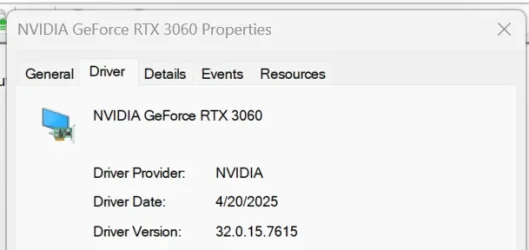
Drivers : 576.15 (32.0.15.7615 WHQL [20/04/2025])​
Download : Link
Release Notes : Link

Fixed Issues :
  • [RTX 50 series] Some games may display shadow flicker/corruption after updating to GRD 576.02 [5231537]
  • Lumion 2024 crashes on GeForce RTX 50 series graphics card when entering render mode [5232345]
  • GPU monitoring utilities may stop reporting the GPU temperature after PC wakes from sleep [5231307]
  • [RTX 50 series] Some games may crash while compiling shaders after updating to GRD 576.02 [5230492]
  • [GeForce RTX 50 series notebook] Resume from Modern Standy can result in black screen [5204385]
  • [RTX 50 series] SteamVR may display random V-SYNC micro-stutters when using multiple displays [5152246]
  • [RTX 50 series] Lower idle GPU clock speeds after updating to GRD 576.02 [5232414]
 

My Computer My Computer

At a glance

Windows 11 ProAMD Ryzen 7 7800X3DG.Skill Trident Z5 Neo RGB DDR5 6000MHz CL30 ...ASUS ROG Strix RTX 4080 OC
OS
Windows 11 Pro
Computer type
PC/Desktop
CPU
AMD Ryzen 7 7800X3D
Motherboard
ASUS ROG Strix B650E-F Gaming WiFi
Memory
G.Skill Trident Z5 Neo RGB DDR5 6000MHz CL30 - 32GB (2 x 16GB)
Graphics Card(s)
ASUS ROG Strix RTX 4080 OC
Monitor(s) Displays
ASUS ROG Strix XG35VQ
Screen Resolution
3440 x 1440 Full RGB @ 100Hz
Hard Drives
SSD Samsung 990 PRO 1TB
SSD Samsung 970 EVO Plus 500GB
PSU
Seasonic Focus GX 850W ATX 3.0
Case
NZXT H5 Flow
Cooling
NZXT Kraken X53
Keyboard
Logitech G513
Mouse
Logitech G502
Thanks but I am done with NVIDIA Driver updates that are approaching 1GB and flawed. I tried the prior one and had to go back to 566.36.
 

My Computers My Computers

  • At a glance

    Windows11 Pro 26200.8973Intel Core i9 14900F (24 -Core, 68 MB Total C...32GB DDR5RTX 4080 Super w/610.74
    OS
    Windows11 Pro 26200.8973
    Computer type
    PC/Desktop
    Manufacturer/Model
    Dell Alienware Aurora R16
    CPU
    Intel Core i9 14900F (24 -Core, 68 MB Total Cache)
    Motherboard
    Dell Alienware
    Memory
    32GB DDR5
    Graphics Card(s)
    RTX 4080 Super w/610.74
    Sound Card
    Realtec
    Monitor(s) Displays
    Corsair XENEON 32QHD165
    Screen Resolution
    2560 X 1440
    Hard Drives
    1-2TB Samsung 990 Pro PCIe NVMe M2 SSD
    1-4TB Samsung 990 Pro PCIe NVMe M2 SSD
    PSU
    1000 Watt Platinum Dell
    Case
    Alienware
    Cooling
    Liquid Closed Loop
    Keyboard
    Corsair Strafe RGB
    Mouse
    Logitech MK270 Wireless
    Internet Speed
    100Gb's Down-20 Up
    Browser
    Firefox 153.0.1
    Antivirus
    Defender
    Other Info
    Very Quiet And Fast
    CyberPower UPS CP1500PFCLCD
  • At a glance

    PClinuxOS Mate (2025.7)13th Gen Inter(R) Core(TM) i3-1315U64 GB DDR4 @3200 MHz.Internal
    Operating System
    PClinuxOS Mate (2025.7)
    Computer type
    PC/Desktop
    Manufacturer/Model
    Intel
    CPU
    13th Gen Inter(R) Core(TM) i3-1315U
    Motherboard
    Intel
    Memory
    64 GB DDR4 @3200 MHz.
    Graphics card(s)
    Internal
    Sound Card
    None
    Monitor(s) Displays
    Dell 2419HGCF
    Screen Resolution
    1920 X 1080
    Hard Drives
    SAMSUNG 980 PRO SSD 2TB, PCIe 4.0 M.2 2280
    PSU
    Chicony 30 Watt
    Case
    Small
    Keyboard
    Dell
    Mouse
    Razor
    Internet Speed
    1GB
    Browser
    Slimjet
Version 576.15 still gets stuck with a black screen when Installing on Canary Build 27823.1000.
Again, I had to install while connected with RDC to avoid the problem. 😵‍💫🤷‍♂️

1745265669927.webp
 

My Computer My Computer

At a glance

Windows 11 Pro 25H2Intel I9-9900K64GBNVIDIA RTX 2060
OS
Windows 11 Pro 25H2
Computer type
PC/Desktop
Manufacturer/Model
Dell XPS 8930
CPU
Intel I9-9900K
Memory
64GB
Graphics Card(s)
NVIDIA RTX 2060
Sound Card
NVIDIA High Definition Audio
Monitor(s) Displays
4k Samsung
Screen Resolution
3840 x 2160
Hard Drives
512GB NVMe, ADATA SU 800, 2TB HDD
Hmm... I had a different experience. I was having issues that my monitors would briefly blink out for a second or two every half hour or so, since I installed the latest drivers, that issue is gone. My GPU is the RTX 4060.
 

My Computers My Computers

  • At a glance

    Win 11 Pro 25H2, Build 26200.8973Intel Core i5 1450064GB DDR4GeForce RTX 4060
    OS
    Win 11 Pro 25H2, Build 26200.8973
    Computer type
    PC/Desktop
    Manufacturer/Model
    Home Brew
    CPU
    Intel Core i5 14500
    Motherboard
    Gigabyte B760M G P WIFI
    Memory
    64GB DDR4
    Graphics Card(s)
    GeForce RTX 4060
    Sound Card
    Chipset Realtek
    Monitor(s) Displays
    LG 45" Ultragear, Acer 24" 1080p
    Screen Resolution
    5120x1440, 1920x1080
    Hard Drives
    Crucial P310 2TB 2280 PCIe Gen4 3D NAND NVMe M.2 SSD (O/S)
    Silicon Power 2TB US75 NVMe PCIe Gen4 M.2 2280 SSD (backup)
    Crucial BX500 2TB 3D NAND (2nd backup)
    Seagate 4TB Ironwolf, rotating HDD archive files
    External off-line backup Drives: 2 NVMe 4TB drives in external enclosures
    PSU
    Thermaltake Toughpower GF3 750W
    Case
    LIAN LI LANCOOL 216 E-ATX PC Case
    Cooling
    Lots of fans!
    Keyboard
    Microsoft Comfort Curve 2000
    Mouse
    Logitech G305
    Internet Speed
    Verizon FiOS 1GB
    Browser
    Firefox
    Antivirus
    Malware Bytes & Windows Defender Security
  • At a glance

    Win 11 Pro 25H2, Build 26200.8894Intel Core i5 1440032GB DDR5Intel 700 Embedded GPU
    Operating System
    Win 11 Pro 25H2, Build 26200.8894
    Computer type
    PC/Desktop
    Manufacturer/Model
    Home Brew
    CPU
    Intel Core i5 14400
    Motherboard
    Gigabyte B760M DS3H AX
    Memory
    32GB DDR5
    Graphics card(s)
    Intel 700 Embedded GPU
    Sound Card
    Realtek Embedded
    Monitor(s) Displays
    27" HP 1080p
    Screen Resolution
    1920x1080
    Hard Drives
    Crucial P310 2TB 2280 PCIe Gen4 eD NAND PCIe SSD
    Samsung EVO 990 2TB NVMe Gen4 SSD
    Samsung 2TB SATA SSD
    PSU
    Thermaltake Smart BM3 650W
    Case
    Okinos Micro ATX Case
    Cooling
    Fans
    Keyboard
    Microsoft Comfort Curve 2000
    Mouse
    Logitech G305
    Internet Speed
    Verizon FiOS 1GB
    Browser
    Firefox
    Antivirus
    Malware Bytes & Windows Defender Security
  • Nimo N171 17" Laptop, (Intel i3-1215U, 16GB RAM, 2TB NVMe, Win11 Pro)
    Acemagic Vista Mini PC V1 (Intel N150, 16GB RAM, 1TB NVMe, Win11 Pro)
    HP ENVY h8-1540t, (24GB RAM, 2TB SSD, 2TB HDD, Win11 Pro)
I have v576.02 installed using my EVGA GeForce RTX 3070 Ti 8GB XC3 graphics card..
I am not having any major issues outside of the desktop wallpaper disappearing again if I turn off and turn back on the monitor..
I have not installed the latest hotfix yet.
 

My Computers My Computers

  • At a glance

    Windows 11 Pro (x64)(v25H2)(26200.8973)AMD Ryzen 9 3900X 12-Core/24-threads64GB, 2x G.Skill 32GB (PC3200)(DDR4-2137)ASUS PRIME GeForce RTX 5070 12GB OC Edition, ...
    OS
    Windows 11 Pro (x64)(v25H2)(26200.8973)
    Computer type
    PC/Desktop
    Manufacturer/Model
    [Self-built](custom-build)(June 2020)
    CPU
    AMD Ryzen 9 3900X 12-Core/24-threads
    Motherboard
    Asus PRIME X570-PRO (BIOS_r5044 [01/04/2026])
    Memory
    64GB, 2x G.Skill 32GB (PC3200)(DDR4-2137)
    Graphics Card(s)
    ASUS PRIME GeForce RTX 5070 12GB OC Edition, GPU by NVIDIA.
    Sound Card
    Realtek® ALC1220A 8-Channel High Definition Audio CODEC
    Monitor(s) Displays
    24" DELL Gaming Monitor - G2422HS - DisplayPort used
    Screen Resolution
    1920x1080p at 165Hz (16:9 Aspect Ratio)
    Hard Drives
    2TB Samsung 980 Pro (NVMe)(SSD)
    4TB Samsung 990 Pro (NVMe)(SSD)
    2TB Samsung 870 EVO (SSD)

    NVMe 2TB
    -- OS(Win11 Pro x64),
    -- programs,
    -- programming(MS Visual Studios 2022 Community Ed.),
    -- music

    NVMe 4TB
    video game installs.

    #3 FILE Server!
    PSU
    Thermaltake TOUGHPOWER DPS G RGB Titanium Certified 1250Watt
    Case
    Corsair Graphite Series 780T Full Tower PC Case
    Cooling
    AMD Wraith cooler (stock) & 3x Corsair case fans
    Keyboard
    Redragon K580 VATA RGB LED Backlit Mechanical Gaming Keyboard (brown switches).
    Mouse
    Redragon M602 RGB Wired USB Gaming mouse
    Internet Speed
    2,100Mbps Download, 300Mbps Upload
    Browser
    Firefox & Google Chrome
    Antivirus
    n/a aka "ABOVE TOP SECRET!" lol ;)
    Other Info
    My System is the ULTIMATE GAMING RIG ^_^
    TP-Link BE9300 Tri-Band Wi-Fi 7 Wireless 2.5Gigabit Router
    Model Archer BE550 (v1.0)
    Arris S34 Cable Modem

    printer/scanner/copier: Brother DCP-7065DN

    Nvidia GFX Drivers: (v610.74)
    Realtek UAD Drivers: (v6.0.10010.1)
    Realtek LAN Drivers:(v1125.30.50.508)(2026-06-21)
    Intel LAN Drivers: (v14.01.24.00)(2025-10-03)
  • At a glance

    Windows 11 Pro x64AMD Ryzen 7 5800H32GB GSkill DDR4 2x 16GB sticksRyzen 7 5800H integrated AMD Radeon Graphics ...
    Operating System
    Windows 11 Pro x64
    Computer type
    Laptop
    Manufacturer/Model
    DELL G15 Ryzen edition, model 5515
    CPU
    AMD Ryzen 7 5800H
    Motherboard
    DELL G15 Ryzen edition
    Memory
    32GB GSkill DDR4 2x 16GB sticks
    Graphics card(s)
    Ryzen 7 5800H integrated AMD Radeon Graphics and Nvidia GeForce 3060 6GB
    Sound Card
    Realtek ALC3254 with Nahimic 3D Audio for Gamers
    Monitor(s) Displays
    built-in
    Screen Resolution
    1920x1080
    Hard Drives
    512GB NVMe SSD, 1TB Samsung 970 EVO NVMe SSD
    PSU
    unknown
    Case
    laptop
    Keyboard
    built-in
    Mouse
    Logitech B100 USB
    Internet Speed
    2,100Mbps download, 300Mbps upload
    Browser
    Firefox & Google Chrome
I have v576.02 installed using my EVGA GeForce RTX 3070 Ti 8GB XC3 graphics card..
I am not having any major issues outside of the desktop wallpaper disappearing again if I turn off and turn back on the monitor..
I have not installed the latest hotfix yet.
JayzTwoCents released a vid on YouTube warning about an issues with this version of the driver.
 

My Computers My Computers

  • At a glance

    Windows 11 Pro10th Gen Intel(R) Core(TM) i7-10700, 2.90GHz32GB, 2x16GB, DDR4, 2933MhzNVIDIA(R) GeForce(R) RTX 2060 SUPER(TM) 8GB G...
    OS
    Windows 11 Pro
    Computer type
    PC/Desktop
    Manufacturer/Model
    Dell 8940 XPS
    CPU
    10th Gen Intel(R) Core(TM) i7-10700, 2.90GHz
    Motherboard
    Dell 0KV3RP (U3E1)
    Memory
    32GB, 2x16GB, DDR4, 2933Mhz
    Graphics Card(s)
    NVIDIA(R) GeForce(R) RTX 2060 SUPER(TM) 8GB GDDR6
    Sound Card
    Onboard, Realtek Codec, NVIDIA Hi Def Audio, Intel Display Audio
    Monitor(s) Displays
    Dell UltraSharp U3415W
    Screen Resolution
    3440x1440
    Hard Drives
    2TB M.2 PCIe NVMe SSD; 2TB Samsung SSD 860 EVO; 2TB Samsung SSD 860 EVO 2
    PSU
    500 W Dell
    Case
    Night Sky Bezel Chassis
    Cooling
    Dell
    Keyboard
    Logi Wireless
    Mouse
    Logi Wireless
    Internet Speed
    111 Mbps Download, 132 Mbps Upload
    Browser
    Edge, Chrome
    Antivirus
    Windows Defender, MalwareBytes
  • At a glance

    Windows 11 ProIntel 13900K Core I9 24 Core LGA 170032GB (2x16) Kingston Fury Beast 6000MHZ DDR5nVidia 4090 Founders Edition
    Operating System
    Windows 11 Pro
    Computer type
    PC/Desktop
    Manufacturer/Model
    Falcon Northwest Talon
    CPU
    Intel 13900K Core I9 24 Core LGA 1700
    Motherboard
    Asus ROG Z970 Maximus Hero
    Memory
    32GB (2x16) Kingston Fury Beast 6000MHZ DDR5
    Graphics card(s)
    nVidia 4090 Founders Edition
    Sound Card
    Motherboard
    Monitor(s) Displays
    Alienware 34” Curved OLED
    Screen Resolution
    4K
    Hard Drives
    SSD M.2 Kingston Renegade Fury 4 TB x 2; Western Digital Red Pro 8 TB SATA III
    PSU
    1000W ECGA Platinum Modular ATX
    Case
    Falcon NW Custom
    Cooling
    AIO Falcon NW 280mm Liquid Cooler
    Keyboard
    Logitech Pro Gamer
    Mouse
    Logitech G502
    Internet Speed
    111 Mbps Download, 132 Mbps Upload
    Browser
    Edge, Chrome
    Antivirus
    Windows Defender, MalwareBytes
    Other Info
    Noise Blocker Fans
I venture to say there's probably issues with almost any set of drivers, the key is do they affect you. :unsure:
 

My Computers My Computers

  • At a glance

    Win 11 Pro 25H2, Build 26200.8973Intel Core i5 1450064GB DDR4GeForce RTX 4060
    OS
    Win 11 Pro 25H2, Build 26200.8973
    Computer type
    PC/Desktop
    Manufacturer/Model
    Home Brew
    CPU
    Intel Core i5 14500
    Motherboard
    Gigabyte B760M G P WIFI
    Memory
    64GB DDR4
    Graphics Card(s)
    GeForce RTX 4060
    Sound Card
    Chipset Realtek
    Monitor(s) Displays
    LG 45" Ultragear, Acer 24" 1080p
    Screen Resolution
    5120x1440, 1920x1080
    Hard Drives
    Crucial P310 2TB 2280 PCIe Gen4 3D NAND NVMe M.2 SSD (O/S)
    Silicon Power 2TB US75 NVMe PCIe Gen4 M.2 2280 SSD (backup)
    Crucial BX500 2TB 3D NAND (2nd backup)
    Seagate 4TB Ironwolf, rotating HDD archive files
    External off-line backup Drives: 2 NVMe 4TB drives in external enclosures
    PSU
    Thermaltake Toughpower GF3 750W
    Case
    LIAN LI LANCOOL 216 E-ATX PC Case
    Cooling
    Lots of fans!
    Keyboard
    Microsoft Comfort Curve 2000
    Mouse
    Logitech G305
    Internet Speed
    Verizon FiOS 1GB
    Browser
    Firefox
    Antivirus
    Malware Bytes & Windows Defender Security
  • At a glance

    Win 11 Pro 25H2, Build 26200.8894Intel Core i5 1440032GB DDR5Intel 700 Embedded GPU
    Operating System
    Win 11 Pro 25H2, Build 26200.8894
    Computer type
    PC/Desktop
    Manufacturer/Model
    Home Brew
    CPU
    Intel Core i5 14400
    Motherboard
    Gigabyte B760M DS3H AX
    Memory
    32GB DDR5
    Graphics card(s)
    Intel 700 Embedded GPU
    Sound Card
    Realtek Embedded
    Monitor(s) Displays
    27" HP 1080p
    Screen Resolution
    1920x1080
    Hard Drives
    Crucial P310 2TB 2280 PCIe Gen4 eD NAND PCIe SSD
    Samsung EVO 990 2TB NVMe Gen4 SSD
    Samsung 2TB SATA SSD
    PSU
    Thermaltake Smart BM3 650W
    Case
    Okinos Micro ATX Case
    Cooling
    Fans
    Keyboard
    Microsoft Comfort Curve 2000
    Mouse
    Logitech G305
    Internet Speed
    Verizon FiOS 1GB
    Browser
    Firefox
    Antivirus
    Malware Bytes & Windows Defender Security
  • Nimo N171 17" Laptop, (Intel i3-1215U, 16GB RAM, 2TB NVMe, Win11 Pro)
    Acemagic Vista Mini PC V1 (Intel N150, 16GB RAM, 1TB NVMe, Win11 Pro)
    HP ENVY h8-1540t, (24GB RAM, 2TB SSD, 2TB HDD, Win11 Pro)
JayzTwoCents released a vid on YouTube warning about an issues with this version of the driver.
I watched that, he was kinda upset about it.
 

My Computers My Computers

  • At a glance

    Windows11 Pro 26200.8973Intel Core i9 14900F (24 -Core, 68 MB Total C...32GB DDR5RTX 4080 Super w/610.74
    OS
    Windows11 Pro 26200.8973
    Computer type
    PC/Desktop
    Manufacturer/Model
    Dell Alienware Aurora R16
    CPU
    Intel Core i9 14900F (24 -Core, 68 MB Total Cache)
    Motherboard
    Dell Alienware
    Memory
    32GB DDR5
    Graphics Card(s)
    RTX 4080 Super w/610.74
    Sound Card
    Realtec
    Monitor(s) Displays
    Corsair XENEON 32QHD165
    Screen Resolution
    2560 X 1440
    Hard Drives
    1-2TB Samsung 990 Pro PCIe NVMe M2 SSD
    1-4TB Samsung 990 Pro PCIe NVMe M2 SSD
    PSU
    1000 Watt Platinum Dell
    Case
    Alienware
    Cooling
    Liquid Closed Loop
    Keyboard
    Corsair Strafe RGB
    Mouse
    Logitech MK270 Wireless
    Internet Speed
    100Gb's Down-20 Up
    Browser
    Firefox 153.0.1
    Antivirus
    Defender
    Other Info
    Very Quiet And Fast
    CyberPower UPS CP1500PFCLCD
  • At a glance

    PClinuxOS Mate (2025.7)13th Gen Inter(R) Core(TM) i3-1315U64 GB DDR4 @3200 MHz.Internal
    Operating System
    PClinuxOS Mate (2025.7)
    Computer type
    PC/Desktop
    Manufacturer/Model
    Intel
    CPU
    13th Gen Inter(R) Core(TM) i3-1315U
    Motherboard
    Intel
    Memory
    64 GB DDR4 @3200 MHz.
    Graphics card(s)
    Internal
    Sound Card
    None
    Monitor(s) Displays
    Dell 2419HGCF
    Screen Resolution
    1920 X 1080
    Hard Drives
    SAMSUNG 980 PRO SSD 2TB, PCIe 4.0 M.2 2280
    PSU
    Chicony 30 Watt
    Case
    Small
    Keyboard
    Dell
    Mouse
    Razor
    Internet Speed
    1GB
    Browser
    Slimjet

My Computers My Computers

  • At a glance

    Windows 11 Pro10th Gen Intel(R) Core(TM) i7-10700, 2.90GHz32GB, 2x16GB, DDR4, 2933MhzNVIDIA(R) GeForce(R) RTX 2060 SUPER(TM) 8GB G...
    OS
    Windows 11 Pro
    Computer type
    PC/Desktop
    Manufacturer/Model
    Dell 8940 XPS
    CPU
    10th Gen Intel(R) Core(TM) i7-10700, 2.90GHz
    Motherboard
    Dell 0KV3RP (U3E1)
    Memory
    32GB, 2x16GB, DDR4, 2933Mhz
    Graphics Card(s)
    NVIDIA(R) GeForce(R) RTX 2060 SUPER(TM) 8GB GDDR6
    Sound Card
    Onboard, Realtek Codec, NVIDIA Hi Def Audio, Intel Display Audio
    Monitor(s) Displays
    Dell UltraSharp U3415W
    Screen Resolution
    3440x1440
    Hard Drives
    2TB M.2 PCIe NVMe SSD; 2TB Samsung SSD 860 EVO; 2TB Samsung SSD 860 EVO 2
    PSU
    500 W Dell
    Case
    Night Sky Bezel Chassis
    Cooling
    Dell
    Keyboard
    Logi Wireless
    Mouse
    Logi Wireless
    Internet Speed
    111 Mbps Download, 132 Mbps Upload
    Browser
    Edge, Chrome
    Antivirus
    Windows Defender, MalwareBytes
  • At a glance

    Windows 11 ProIntel 13900K Core I9 24 Core LGA 170032GB (2x16) Kingston Fury Beast 6000MHZ DDR5nVidia 4090 Founders Edition
    Operating System
    Windows 11 Pro
    Computer type
    PC/Desktop
    Manufacturer/Model
    Falcon Northwest Talon
    CPU
    Intel 13900K Core I9 24 Core LGA 1700
    Motherboard
    Asus ROG Z970 Maximus Hero
    Memory
    32GB (2x16) Kingston Fury Beast 6000MHZ DDR5
    Graphics card(s)
    nVidia 4090 Founders Edition
    Sound Card
    Motherboard
    Monitor(s) Displays
    Alienware 34” Curved OLED
    Screen Resolution
    4K
    Hard Drives
    SSD M.2 Kingston Renegade Fury 4 TB x 2; Western Digital Red Pro 8 TB SATA III
    PSU
    1000W ECGA Platinum Modular ATX
    Case
    Falcon NW Custom
    Cooling
    AIO Falcon NW 280mm Liquid Cooler
    Keyboard
    Logitech Pro Gamer
    Mouse
    Logitech G502
    Internet Speed
    111 Mbps Download, 132 Mbps Upload
    Browser
    Edge, Chrome
    Antivirus
    Windows Defender, MalwareBytes
    Other Info
    Noise Blocker Fans
I don't use any of those add-on fan or temperature controls, so I suspect I'm OK. Truthfully, my GPU is overkill for almost everything I do, only the 3D modeling might tax it a bit. Since the driver actually did fix a problem for me, I'll keep it.
 

My Computers My Computers

  • At a glance

    Win 11 Pro 25H2, Build 26200.8973Intel Core i5 1450064GB DDR4GeForce RTX 4060
    OS
    Win 11 Pro 25H2, Build 26200.8973
    Computer type
    PC/Desktop
    Manufacturer/Model
    Home Brew
    CPU
    Intel Core i5 14500
    Motherboard
    Gigabyte B760M G P WIFI
    Memory
    64GB DDR4
    Graphics Card(s)
    GeForce RTX 4060
    Sound Card
    Chipset Realtek
    Monitor(s) Displays
    LG 45" Ultragear, Acer 24" 1080p
    Screen Resolution
    5120x1440, 1920x1080
    Hard Drives
    Crucial P310 2TB 2280 PCIe Gen4 3D NAND NVMe M.2 SSD (O/S)
    Silicon Power 2TB US75 NVMe PCIe Gen4 M.2 2280 SSD (backup)
    Crucial BX500 2TB 3D NAND (2nd backup)
    Seagate 4TB Ironwolf, rotating HDD archive files
    External off-line backup Drives: 2 NVMe 4TB drives in external enclosures
    PSU
    Thermaltake Toughpower GF3 750W
    Case
    LIAN LI LANCOOL 216 E-ATX PC Case
    Cooling
    Lots of fans!
    Keyboard
    Microsoft Comfort Curve 2000
    Mouse
    Logitech G305
    Internet Speed
    Verizon FiOS 1GB
    Browser
    Firefox
    Antivirus
    Malware Bytes & Windows Defender Security
  • At a glance

    Win 11 Pro 25H2, Build 26200.8894Intel Core i5 1440032GB DDR5Intel 700 Embedded GPU
    Operating System
    Win 11 Pro 25H2, Build 26200.8894
    Computer type
    PC/Desktop
    Manufacturer/Model
    Home Brew
    CPU
    Intel Core i5 14400
    Motherboard
    Gigabyte B760M DS3H AX
    Memory
    32GB DDR5
    Graphics card(s)
    Intel 700 Embedded GPU
    Sound Card
    Realtek Embedded
    Monitor(s) Displays
    27" HP 1080p
    Screen Resolution
    1920x1080
    Hard Drives
    Crucial P310 2TB 2280 PCIe Gen4 eD NAND PCIe SSD
    Samsung EVO 990 2TB NVMe Gen4 SSD
    Samsung 2TB SATA SSD
    PSU
    Thermaltake Smart BM3 650W
    Case
    Okinos Micro ATX Case
    Cooling
    Fans
    Keyboard
    Microsoft Comfort Curve 2000
    Mouse
    Logitech G305
    Internet Speed
    Verizon FiOS 1GB
    Browser
    Firefox
    Antivirus
    Malware Bytes & Windows Defender Security
  • Nimo N171 17" Laptop, (Intel i3-1215U, 16GB RAM, 2TB NVMe, Win11 Pro)
    Acemagic Vista Mini PC V1 (Intel N150, 16GB RAM, 1TB NVMe, Win11 Pro)
    HP ENVY h8-1540t, (24GB RAM, 2TB SSD, 2TB HDD, Win11 Pro)
I found with Nvidia display drivers v576.15hf it was causing a 140Mhz or so overclock...
so I downgraded back to v576.02 and now my RTX 3070 Ti is again at the correct frequency 1,815MHz. it appears..
so no chance of a meltdown lol...

maybe its still doing it at 1935MHz bummer.. I don't do manual over clocking to avoid the potential of a meltdown.
I was testing it in one of two games I play
so far Final Fantasy 14 online is doing it..
 
Last edited:

My Computers My Computers

  • At a glance

    Windows 11 Pro (x64)(v25H2)(26200.8973)AMD Ryzen 9 3900X 12-Core/24-threads64GB, 2x G.Skill 32GB (PC3200)(DDR4-2137)ASUS PRIME GeForce RTX 5070 12GB OC Edition, ...
    OS
    Windows 11 Pro (x64)(v25H2)(26200.8973)
    Computer type
    PC/Desktop
    Manufacturer/Model
    [Self-built](custom-build)(June 2020)
    CPU
    AMD Ryzen 9 3900X 12-Core/24-threads
    Motherboard
    Asus PRIME X570-PRO (BIOS_r5044 [01/04/2026])
    Memory
    64GB, 2x G.Skill 32GB (PC3200)(DDR4-2137)
    Graphics Card(s)
    ASUS PRIME GeForce RTX 5070 12GB OC Edition, GPU by NVIDIA.
    Sound Card
    Realtek® ALC1220A 8-Channel High Definition Audio CODEC
    Monitor(s) Displays
    24" DELL Gaming Monitor - G2422HS - DisplayPort used
    Screen Resolution
    1920x1080p at 165Hz (16:9 Aspect Ratio)
    Hard Drives
    2TB Samsung 980 Pro (NVMe)(SSD)
    4TB Samsung 990 Pro (NVMe)(SSD)
    2TB Samsung 870 EVO (SSD)

    NVMe 2TB
    -- OS(Win11 Pro x64),
    -- programs,
    -- programming(MS Visual Studios 2022 Community Ed.),
    -- music

    NVMe 4TB
    video game installs.

    #3 FILE Server!
    PSU
    Thermaltake TOUGHPOWER DPS G RGB Titanium Certified 1250Watt
    Case
    Corsair Graphite Series 780T Full Tower PC Case
    Cooling
    AMD Wraith cooler (stock) & 3x Corsair case fans
    Keyboard
    Redragon K580 VATA RGB LED Backlit Mechanical Gaming Keyboard (brown switches).
    Mouse
    Redragon M602 RGB Wired USB Gaming mouse
    Internet Speed
    2,100Mbps Download, 300Mbps Upload
    Browser
    Firefox & Google Chrome
    Antivirus
    n/a aka "ABOVE TOP SECRET!" lol ;)
    Other Info
    My System is the ULTIMATE GAMING RIG ^_^
    TP-Link BE9300 Tri-Band Wi-Fi 7 Wireless 2.5Gigabit Router
    Model Archer BE550 (v1.0)
    Arris S34 Cable Modem

    printer/scanner/copier: Brother DCP-7065DN

    Nvidia GFX Drivers: (v610.74)
    Realtek UAD Drivers: (v6.0.10010.1)
    Realtek LAN Drivers:(v1125.30.50.508)(2026-06-21)
    Intel LAN Drivers: (v14.01.24.00)(2025-10-03)
  • At a glance

    Windows 11 Pro x64AMD Ryzen 7 5800H32GB GSkill DDR4 2x 16GB sticksRyzen 7 5800H integrated AMD Radeon Graphics ...
    Operating System
    Windows 11 Pro x64
    Computer type
    Laptop
    Manufacturer/Model
    DELL G15 Ryzen edition, model 5515
    CPU
    AMD Ryzen 7 5800H
    Motherboard
    DELL G15 Ryzen edition
    Memory
    32GB GSkill DDR4 2x 16GB sticks
    Graphics card(s)
    Ryzen 7 5800H integrated AMD Radeon Graphics and Nvidia GeForce 3060 6GB
    Sound Card
    Realtek ALC3254 with Nahimic 3D Audio for Gamers
    Monitor(s) Displays
    built-in
    Screen Resolution
    1920x1080
    Hard Drives
    512GB NVMe SSD, 1TB Samsung 970 EVO NVMe SSD
    PSU
    unknown
    Case
    laptop
    Keyboard
    built-in
    Mouse
    Logitech B100 USB
    Internet Speed
    2,100Mbps download, 300Mbps upload
    Browser
    Firefox & Google Chrome
I found with Nvidia display drivers v576.15hf it was causing a 140Mhz or so overclock...
so I downgraded back to v576.02 and now my RTX 3070 Ti is again at the correct frequency 1,815MHz. it appears..
so no chance of a meltdown lol...

maybe its still doing it at 1935MHz bummer.. I don't do manual over clocking to avoid the potential of a meltdown.
I was testing it in one of two games I play
so far Final Fantasy 14 online is doing it..
I donwloaded the "current" driver, and what I got a couple days ago was v576.02. I have no desire to overclock, I'm perfectly happy with the stock performance.
 

My Computers My Computers

  • At a glance

    Win 11 Pro 25H2, Build 26200.8973Intel Core i5 1450064GB DDR4GeForce RTX 4060
    OS
    Win 11 Pro 25H2, Build 26200.8973
    Computer type
    PC/Desktop
    Manufacturer/Model
    Home Brew
    CPU
    Intel Core i5 14500
    Motherboard
    Gigabyte B760M G P WIFI
    Memory
    64GB DDR4
    Graphics Card(s)
    GeForce RTX 4060
    Sound Card
    Chipset Realtek
    Monitor(s) Displays
    LG 45" Ultragear, Acer 24" 1080p
    Screen Resolution
    5120x1440, 1920x1080
    Hard Drives
    Crucial P310 2TB 2280 PCIe Gen4 3D NAND NVMe M.2 SSD (O/S)
    Silicon Power 2TB US75 NVMe PCIe Gen4 M.2 2280 SSD (backup)
    Crucial BX500 2TB 3D NAND (2nd backup)
    Seagate 4TB Ironwolf, rotating HDD archive files
    External off-line backup Drives: 2 NVMe 4TB drives in external enclosures
    PSU
    Thermaltake Toughpower GF3 750W
    Case
    LIAN LI LANCOOL 216 E-ATX PC Case
    Cooling
    Lots of fans!
    Keyboard
    Microsoft Comfort Curve 2000
    Mouse
    Logitech G305
    Internet Speed
    Verizon FiOS 1GB
    Browser
    Firefox
    Antivirus
    Malware Bytes & Windows Defender Security
  • At a glance

    Win 11 Pro 25H2, Build 26200.8894Intel Core i5 1440032GB DDR5Intel 700 Embedded GPU
    Operating System
    Win 11 Pro 25H2, Build 26200.8894
    Computer type
    PC/Desktop
    Manufacturer/Model
    Home Brew
    CPU
    Intel Core i5 14400
    Motherboard
    Gigabyte B760M DS3H AX
    Memory
    32GB DDR5
    Graphics card(s)
    Intel 700 Embedded GPU
    Sound Card
    Realtek Embedded
    Monitor(s) Displays
    27" HP 1080p
    Screen Resolution
    1920x1080
    Hard Drives
    Crucial P310 2TB 2280 PCIe Gen4 eD NAND PCIe SSD
    Samsung EVO 990 2TB NVMe Gen4 SSD
    Samsung 2TB SATA SSD
    PSU
    Thermaltake Smart BM3 650W
    Case
    Okinos Micro ATX Case
    Cooling
    Fans
    Keyboard
    Microsoft Comfort Curve 2000
    Mouse
    Logitech G305
    Internet Speed
    Verizon FiOS 1GB
    Browser
    Firefox
    Antivirus
    Malware Bytes & Windows Defender Security
  • Nimo N171 17" Laptop, (Intel i3-1215U, 16GB RAM, 2TB NVMe, Win11 Pro)
    Acemagic Vista Mini PC V1 (Intel N150, 16GB RAM, 1TB NVMe, Win11 Pro)
    HP ENVY h8-1540t, (24GB RAM, 2TB SSD, 2TB HDD, Win11 Pro)
Read about the issues other people were having (also watched video by JayzTwoCents) and because of my own issues (posted here earlier), I downloaded the HotFix, booted into Safe Mode, used DDU and DriveStoreExplorer to ensure all traces of previous driver were removed, re-booted back into Windows and installed the HotFix.

Install was clean with zero issues.

Rebooted and reset the driver/monitor settings and now running some game tests (still trying to get the squirrel helm in Last Epoch.... :P ).

Will edit/update post when testing done.

EDIT: Tuneup_Plus completed with zero errors. Played some Last Epoch with zero errors (still no squirrel helm :( ).
 
Last edited:

My Computer My Computer

At a glance

Windows 11 Pro 25H2 (26200.8894)AMD Ryzen 7 7800X3D32gb Team Group (T-Force) DDR5-6000Zotac nVidia GeForce RTX 4070 SUPER - 12gb
OS
Windows 11 Pro 25H2 (26200.8894)
Computer type
PC/Desktop
Manufacturer/Model
Pre-built
CPU
AMD Ryzen 7 7800X3D
Motherboard
MSI Pro B650-VC WiFi
Memory
32gb Team Group (T-Force) DDR5-6000
Graphics Card(s)
Zotac nVidia GeForce RTX 4070 SUPER - 12gb
Sound Card
Sound BlasterX G6
Monitor(s) Displays
Koorui G2421V and ViewSonic VX2453
Screen Resolution
P:2560x1440 S:1920x1080
Hard Drives
WD Blue SN5000 - 500gb NVME
WD Blue SN580 - 2TB NVME
Seagate 4TB HDD - ST4000VN008-2DR166
Keyboard
Mountain Everest
Mouse
Logitech G502 Hero
Internet Speed
T-Mobile Home Internet
Browser
Firefox
Other Info
QNAP TS-469 Pro NAS
TP-Link W7200 (2 unit mesh network)
Elgato Streamdeck
Not every update is an improvement............ :wink:
 

My Computers My Computers

  • At a glance

    Windows11 Pro 25H2i732GBnVidia
    OS
    Windows11 Pro 25H2
    Computer type
    PC/Desktop
    Manufacturer/Model
    Asus
    CPU
    i7
    Motherboard
    z97k
    Memory
    32GB
    Graphics Card(s)
    nVidia
    Sound Card
    Realtek
    Hard Drives
    3
    Cooling
    air
    Browser
    Edge
    Antivirus
    ESET
  • At a glance

    Windows11 ProIntel i516GBIntel
    Operating System
    Windows11 Pro
    Computer type
    PC/Desktop
    Manufacturer/Model
    ASUS
    CPU
    Intel i5
    Motherboard
    ASUS Basic
    Memory
    16GB
    Graphics card(s)
    Intel
    Sound Card
    Realtek
    Monitor(s) Displays
    Samsung
    Hard Drives
    one intern , 0ne extern, OS on SSD
    Cooling
    air
    Keyboard
    wireless Logitech
    Mouse
    wireless Logitech
    Internet Speed
    1GB
    Browser
    Edge
    Antivirus
    ESET
I looked at the hotfix release notes, looks like it's really for the RTX 50 series, they don't mention the RTX 40 series that I have. I'm holding my breath, but so far it's been smooth sailing and my only video problem fixed.
 

My Computers My Computers

  • At a glance

    Win 11 Pro 25H2, Build 26200.8973Intel Core i5 1450064GB DDR4GeForce RTX 4060
    OS
    Win 11 Pro 25H2, Build 26200.8973
    Computer type
    PC/Desktop
    Manufacturer/Model
    Home Brew
    CPU
    Intel Core i5 14500
    Motherboard
    Gigabyte B760M G P WIFI
    Memory
    64GB DDR4
    Graphics Card(s)
    GeForce RTX 4060
    Sound Card
    Chipset Realtek
    Monitor(s) Displays
    LG 45" Ultragear, Acer 24" 1080p
    Screen Resolution
    5120x1440, 1920x1080
    Hard Drives
    Crucial P310 2TB 2280 PCIe Gen4 3D NAND NVMe M.2 SSD (O/S)
    Silicon Power 2TB US75 NVMe PCIe Gen4 M.2 2280 SSD (backup)
    Crucial BX500 2TB 3D NAND (2nd backup)
    Seagate 4TB Ironwolf, rotating HDD archive files
    External off-line backup Drives: 2 NVMe 4TB drives in external enclosures
    PSU
    Thermaltake Toughpower GF3 750W
    Case
    LIAN LI LANCOOL 216 E-ATX PC Case
    Cooling
    Lots of fans!
    Keyboard
    Microsoft Comfort Curve 2000
    Mouse
    Logitech G305
    Internet Speed
    Verizon FiOS 1GB
    Browser
    Firefox
    Antivirus
    Malware Bytes & Windows Defender Security
  • At a glance

    Win 11 Pro 25H2, Build 26200.8894Intel Core i5 1440032GB DDR5Intel 700 Embedded GPU
    Operating System
    Win 11 Pro 25H2, Build 26200.8894
    Computer type
    PC/Desktop
    Manufacturer/Model
    Home Brew
    CPU
    Intel Core i5 14400
    Motherboard
    Gigabyte B760M DS3H AX
    Memory
    32GB DDR5
    Graphics card(s)
    Intel 700 Embedded GPU
    Sound Card
    Realtek Embedded
    Monitor(s) Displays
    27" HP 1080p
    Screen Resolution
    1920x1080
    Hard Drives
    Crucial P310 2TB 2280 PCIe Gen4 eD NAND PCIe SSD
    Samsung EVO 990 2TB NVMe Gen4 SSD
    Samsung 2TB SATA SSD
    PSU
    Thermaltake Smart BM3 650W
    Case
    Okinos Micro ATX Case
    Cooling
    Fans
    Keyboard
    Microsoft Comfort Curve 2000
    Mouse
    Logitech G305
    Internet Speed
    Verizon FiOS 1GB
    Browser
    Firefox
    Antivirus
    Malware Bytes & Windows Defender Security
  • Nimo N171 17" Laptop, (Intel i3-1215U, 16GB RAM, 2TB NVMe, Win11 Pro)
    Acemagic Vista Mini PC V1 (Intel N150, 16GB RAM, 1TB NVMe, Win11 Pro)
    HP ENVY h8-1540t, (24GB RAM, 2TB SSD, 2TB HDD, Win11 Pro)
Back
Top Bottom