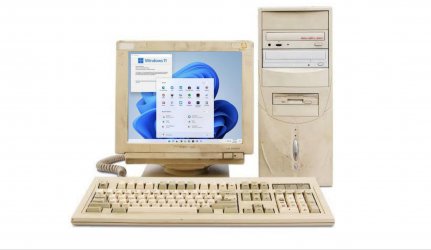
Let's install Windows 11 on incompatible hardware


Without any experience of Windows 11 yet, I would suspect that Windows Setup - i.e. the WinPE module that installs Windows, is responsible for all the system checking and barriers to installation on inappropriately specified hardware as judged by the Windows 11 developers. So a Deployment via Dism/imagex will presumably succeed on "inadequate" kit, and if sysprep is bypassed it should run with the built-in administrator without any difficulties? (Took about 35 minutes from starting to apply install.wim to the VHD to first boot to Windows 11 desktop)

@ish4d0w Here's the iMac 9.1 Core2Duo you asked for, running nicely on mbr in a native boot VHD of 60GB, no secureboot, no TPM:
View attachment 1052
Nice one, thank you! Is ACPI alright? Apple used obscure patches for Windows 7. Can you change the brightness?
 

My Computers My Computers

This might explain why Windows 11 is easily installed in a Virtual Machine.

From this MS PDF document (page 16):

download.microsoft.com/download/7/8/8/788bf5ab-0751-4928-a22c-dffdc23c27f2/Minimum%20Hardware%20Requirements%20for%20Windows%2011.pdf

. . . . Windows 11 does not apply the hardware-compliance check for virtualized instances either during setup or upgrade . . . .

5 Virtual Machine

Microsoft recognizes that the user experience when running the Windows 11 in virtualized environments may vary from the experience when running non-virtualized. So, while Microsoft recommends that all virtualized instances of the Windows 11 follow the same minimum hardware requirements as described in Section 1.2, the Windows 11 does not apply the hardware-compliance check for virtualized instances either during setup or upgrade. Note that, if the virtualized environment is provisioned such that it does not meet the minimum requirements, this will have an impact to aspects of the user experience when running the OS in the virtualized environment.
 

My Computer My Computer

At a glance

Windows 11 Pro [25H2]
OS
Windows 11 Pro [25H2]
Hi, I updated the thread. We have now an cover!
Cover image:
20210628_181849.jpg


BTW,
If you now have the workaround for the stable release of W11, you can share it here.
 

My Computers My Computers

  • At a glance

    Windows 11 HomeCore i5-12450HX20GB DDR5-4800iGPU + RTX 3050 Mobile (6GB)
    OS
    Windows 11 Home
    Computer type
    Laptop
    Manufacturer/Model
    Lenovo
    CPU
    Core i5-12450HX
    Memory
    20GB DDR5-4800
    Graphics Card(s)
    iGPU + RTX 3050 Mobile (6GB)
    Sound Card
    Realtek
    Monitor(s) Displays
    the built-in laptop screen, and a generic monitor
    Screen Resolution
    1080p * 2
    Hard Drives
    GIGABYTE NVMe SSD 256GB (GP-GSM2NE3256GNTD)
    Micron NVMe SSD 512GB (MTFDKCD512QFM-1BDIAABLA)
    Browser
    Firefox
    Antivirus
    WD
  • At a glance

    Windows 10 ProCore i3-21004GB DDR3-2133iGPU
    Operating System
    Windows 10 Pro
    Computer type
    PC/Desktop
    Manufacturer/Model
    Dell
    CPU
    Core i3-2100
    Memory
    4GB DDR3-2133
    Graphics card(s)
    iGPU
    Screen Resolution
    1080p
    Antivirus
    WD
Nice one, thank you! Is ACPI alright? Apple used obscure patches for Windows 7. Can you change the brightness?
I have used iMacs like this for Windows 10 since September 2018, when I realised they were being sold cheaply at CEX, since they were pretty much incapable of running the more recent versions of OSX (and thus most recent Mac software including browsers), where else could I get a 23" 1920x1200 monitor all-in-one system with firewire and bluetooth, for less than £150? It pretty much runs everything quietly.The only upgrade I am planning is to swap out the DVD for a SSD at some time, and maybe see if I can change the CCFL for LED back lighting. I'd be interested in a 27" screen too!

I can change brightness in the Nvidia (GForce GT 130!) control panel - which is nominally set, like the contrast, at 50%, which is just right for most things.

The BIOS on this iMac is a mystery to me - never seen it! I have got OSX Mountain Lion on here too, but I never use it. In what way might the ACPI not be ok? All hardware and power functions seem to behave as they should. Boot-up time is poor, but I rarely have to boot it. Like me it sleeps much of the time I am not doing anything with it!
 

My Computer My Computer

At a glance

Windows 11, update 21H2 29/06/2021 10.0.22000.51Intel(R) Core(TM)2 Duo E8435 @ 3.06GHz8 GB DDR3Nvidia GForce GT 130
OS
Windows 11, update 21H2 29/06/2021 10.0.22000.51
Computer type
PC/Desktop
Manufacturer/Model
Apple iMac9,1
CPU
Intel(R) Core(TM)2 Duo E8435 @ 3.06GHz
Motherboard
Apple Inc. Mac-F2218FA9
Memory
8 GB DDR3
Graphics Card(s)
Nvidia GForce GT 130
Sound Card
Realtek HD audio
Monitor(s) Displays
Imac 2009 23"
Screen Resolution
1920x1200
Hard Drives
WDC WD1001FALS-40K1B0 SATA 1TB
PSU
Apple
Case
Aluminium (or is it Aluminum?)
Cooling
Fan
Keyboard
USB UK extended generic
Mouse
Novatech USB wheel optical mouse
Internet Speed
51.4 down 16.7 up ethernet
Browser
Chrome
Antivirus
MS Defender
Other Info
obtained secondhand from CEX 2018 £140

My Computers My Computers

  • At a glance

    Windows 11 23H2 Current buildAMD Ryzen 9 3950X4 * 32 GB - Corsair Vengeance 3600 MHzEVGA GeForce RTX 3080 Ti XC3 ULTRA GAMING (12...
    OS
    Windows 11 23H2 Current build
    Computer type
    PC/Desktop
    Manufacturer/Model
    HomeBrew
    CPU
    AMD Ryzen 9 3950X
    Motherboard
    MSI MEG X570 GODLIKE
    Memory
    4 * 32 GB - Corsair Vengeance 3600 MHz
    Graphics Card(s)
    EVGA GeForce RTX 3080 Ti XC3 ULTRA GAMING (12G-P5-3955-KR)
    Sound Card
    Realtek® ALC1220 Codec
    Monitor(s) Displays
    2x Eve Spectrum ES07D03 4K Gaming Monitor (Matte) | Eve Spectrum ES07DC9 4K Gaming Monitor (Glossy)
    Screen Resolution
    3x 3840 x 2160
    Hard Drives
    3x Samsung 980 Pro NVMe PCIe 4 M.2 2 TB SSD (MZ-V8P2T0B/AM) } 3x Sabrent Rocket NVMe 4.0 1 TB SSD (USB)
    PSU
    PC Power & Cooling’s Silencer Series 1050 Watt, 80 Plus Platinum
    Case
    Fractal Design Define 7 XL Dark ATX Full Tower Case
    Cooling
    Arctic Liquid Freezer III 420 RGB + Air 3x 140mm case fans (pull front) + 1x 120 mm (push back) and 1 x 120 mm (pull bottom)
    Keyboard
    SteelSeries Apex Pro Wired Gaming Keyboard
    Mouse
    Logitech MX Master 3S | MX Master 3 for Business
    Internet Speed
    AT&T LightSpeed Gigabit Duplex Ftth
    Browser
    Nightly (default) + Firefox (stable), Chrome, Edge , Arc
    Antivirus
    Defender + MB 5 Beta
  • At a glance

    ChromeOS Flex Dev Channel (current)Intel(R) Core(TM) i5-6300U CPU @ 2.40GHz, 250...16 GBIntel(R) HD Graphics 520
    Operating System
    ChromeOS Flex Dev Channel (current)
    Computer type
    Laptop
    Manufacturer/Model
    Dell Latitude E5470
    CPU
    Intel(R) Core(TM) i5-6300U CPU @ 2.40GHz, 2501 Mhz, 2 Core(s), 4 Logical Processor(s)
    Motherboard
    Dell
    Memory
    16 GB
    Graphics card(s)
    Intel(R) HD Graphics 520
    Sound Card
    Intel(R) HD Graphics 520 + RealTek Audio
    Monitor(s) Displays
    Dell laptop display 15"
    Screen Resolution
    1920 * 1080
    Hard Drives
    Toshiba 128GB M.2 22300 drive
    INTEL Cherryville 520 Series SSDSC2CW180A 180 GB SATA III SSD
    PSU
    Dell
    Case
    Dell
    Cooling
    Dell
    Keyboard
    Dell
    Mouse
    Logitech MX Master 3S (shared w. Sys 1) | Dell TouchPad
    Internet Speed
    AT&T LightSpeed Gigabit Duplex Ftth
Yes, the Apply method works fine with no checks. Can also work fine with bios/mbr, at the moment.

I used the apply method for efi install.

I used the doctoring boot.wim registry method for bios install.

Either method works.
 

My Computers My Computers

  • At a glance

    Win7,Win11i7-97002x16gb 3600mhz
    OS
    Win7,Win11
    Computer type
    PC/Desktop
    CPU
    i7-9700
    Motherboard
    gigabyte b365m ds3h
    Memory
    2x16gb 3600mhz
    Monitor(s) Displays
    benq gw2480
    PSU
    bequiet pure power 11 400CM
    Cooling
    cryorig m9i
  • At a glance

    win7,win11i5-84002x8gb 3200
    Operating System
    win7,win11
    Computer type
    PC/Desktop
    CPU
    i5-8400
    Motherboard
    gigabyte b365m ds3h
    Memory
    2x8gb 3200
    PSU
    xfx pro 450

Attachments

  • iMac911.png
    iMac911.png
    360 KB · Views: 23

My Computer My Computer

At a glance

Windows 11, update 21H2 29/06/2021 10.0.22000.51Intel(R) Core(TM)2 Duo E8435 @ 3.06GHz8 GB DDR3Nvidia GForce GT 130
OS
Windows 11, update 21H2 29/06/2021 10.0.22000.51
Computer type
PC/Desktop
Manufacturer/Model
Apple iMac9,1
CPU
Intel(R) Core(TM)2 Duo E8435 @ 3.06GHz
Motherboard
Apple Inc. Mac-F2218FA9
Memory
8 GB DDR3
Graphics Card(s)
Nvidia GForce GT 130
Sound Card
Realtek HD audio
Monitor(s) Displays
Imac 2009 23"
Screen Resolution
1920x1200
Hard Drives
WDC WD1001FALS-40K1B0 SATA 1TB
PSU
Apple
Case
Aluminium (or is it Aluminum?)
Cooling
Fan
Keyboard
USB UK extended generic
Mouse
Novatech USB wheel optical mouse
Internet Speed
51.4 down 16.7 up ethernet
Browser
Chrome
Antivirus
MS Defender
Other Info
obtained secondhand from CEX 2018 £140

My Computers My Computers

  • At a glance

    Windows 11 HomeCore i5-12450HX20GB DDR5-4800iGPU + RTX 3050 Mobile (6GB)
    OS
    Windows 11 Home
    Computer type
    Laptop
    Manufacturer/Model
    Lenovo
    CPU
    Core i5-12450HX
    Memory
    20GB DDR5-4800
    Graphics Card(s)
    iGPU + RTX 3050 Mobile (6GB)
    Sound Card
    Realtek
    Monitor(s) Displays
    the built-in laptop screen, and a generic monitor
    Screen Resolution
    1080p * 2
    Hard Drives
    GIGABYTE NVMe SSD 256GB (GP-GSM2NE3256GNTD)
    Micron NVMe SSD 512GB (MTFDKCD512QFM-1BDIAABLA)
    Browser
    Firefox
    Antivirus
    WD
  • At a glance

    Windows 10 ProCore i3-21004GB DDR3-2133iGPU
    Operating System
    Windows 10 Pro
    Computer type
    PC/Desktop
    Manufacturer/Model
    Dell
    CPU
    Core i3-2100
    Memory
    4GB DDR3-2133
    Graphics card(s)
    iGPU
    Screen Resolution
    1080p
    Antivirus
    WD
Hi, I updated the thread. We have now an cover!
Cover image:
View attachment 1060


BTW,
If you now have the workaround for the stable release of W11, you can share it here.
Could you get it to run on a TRS-80? Graphics and all. That would be super swell! 🤣

All kidding aside, I'm glad I found this thread. I have a Rampage V Extreme with a 5960x CPU and as far as I know, I'm pretty much out of luck with TPM 2.0 support, for at least my CPU. I know there's a module which can be added to my board for Motherboard TPM 2.0 support, but I'm also hearing that this is for TPM 1.2, so I'm not sure what it really supports.

Meanwhile, I'll be trying your method to get it to run on my PC, at least in a VM.
 

My Computer My Computer

At a glance

Windows 11Intel Core i7-5960x64GB RAMEVGA GTX 980 SC'd
OS
Windows 11
Computer type
PC/Desktop
Manufacturer/Model
N/A
CPU
Intel Core i7-5960x
Motherboard
Rampage V Extreme
Memory
64GB RAM
Graphics Card(s)
EVGA GTX 980 SC'd
Sound Card
N/A
Monitor(s) Displays
ASUS 27" Monitor
Screen Resolution
1920x1080p
Hard Drives
Samsung 960 Pro NVME 2TB (System Drive)
Samsung QVO 8TB SSD (Data) - Installed on Feb 2024
Seagate BarraCuda Pro 10TB HDD (Backup, haven't used much since installing the 8TB SSD.
The first Dev W11 build is out! For those have Insider accounts, and incompatible PCs, you can now post here your experience.
 

My Computers My Computers

  • At a glance

    Windows 11 HomeCore i5-12450HX20GB DDR5-4800iGPU + RTX 3050 Mobile (6GB)
    OS
    Windows 11 Home
    Computer type
    Laptop
    Manufacturer/Model
    Lenovo
    CPU
    Core i5-12450HX
    Memory
    20GB DDR5-4800
    Graphics Card(s)
    iGPU + RTX 3050 Mobile (6GB)
    Sound Card
    Realtek
    Monitor(s) Displays
    the built-in laptop screen, and a generic monitor
    Screen Resolution
    1080p * 2
    Hard Drives
    GIGABYTE NVMe SSD 256GB (GP-GSM2NE3256GNTD)
    Micron NVMe SSD 512GB (MTFDKCD512QFM-1BDIAABLA)
    Browser
    Firefox
    Antivirus
    WD
  • At a glance

    Windows 10 ProCore i3-21004GB DDR3-2133iGPU
    Operating System
    Windows 10 Pro
    Computer type
    PC/Desktop
    Manufacturer/Model
    Dell
    CPU
    Core i3-2100
    Memory
    4GB DDR3-2133
    Graphics card(s)
    iGPU
    Screen Resolution
    1080p
    Antivirus
    WD
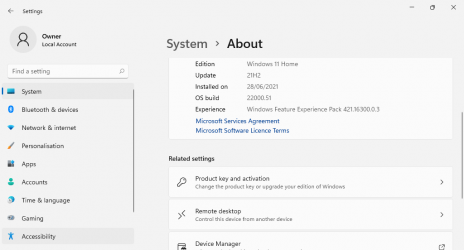
Some of us who aren't Insiders have got it from UUPDump. My 'this really shouldn't be able to run it' netbook in post #38 has just had another clean install and is running it now. First impression - this feels like it deserves the new name, Settings and File Explorer have had the makeover treatment too, not just Start.

1624965822763.png
 

My Computers My Computers

  • At a glance

    Windows 11 HomeAMD Athlon Silver 3050U8GBRadeon Graphics
    OS
    Windows 11 Home
    Computer type
    Laptop
    Manufacturer/Model
    Acer Aspire 3 A315-23-R9VY
    CPU
    AMD Athlon Silver 3050U
    Memory
    8GB
    Graphics Card(s)
    Radeon Graphics
    Monitor(s) Displays
    laptop screen
    Screen Resolution
    1366x768 native resolution, up to 2560x1440 with Radeon Virtual Super Resolution
    Hard Drives
    1TB Samsung EVO 870 SSD (from April 2026: 250GB EVO 850)
    Internet Speed
    150 Mbps
    Browser
    Edge, Firefox
    Antivirus
    Defender
    Other Info
    fully 'Windows 11 ready' laptop. Windows 10 C: partition migrated from my old unsupported 'main machine' then upgraded to 11. A test migration ran Insider builds for 2 months. When 11 was released on 5th October 2021 it was re-imaged back to 10 and was offered the upgrade in Windows Update on 20th October. Windows Update offered the 22H2 Feature Update on 20th September 2022. It got the 23H2 Feature Update on 4th November 2023 through Windows Update, 24H2 on 3rd October 2024 through Windows Update by setting the Target Release Version for 24H2, and 25H2 on 30th September 2025 through Windows Update by setting the Target Release Version for 25H2.

    UPDATE - 11 April 2026: due to mechanical deterioration this PC has been retired from active duty. The OS with all software and files has been migrated to my System Seven in 'Other systems' to carry on as my general purpose 'main machine'.
  • At a glance

    Windows 11 ProIntel® Core™ i5-520M8GB(integrated graphics) Intel HD Graphics
    Operating System
    Windows 11 Pro
    Computer type
    Laptop
    Manufacturer/Model
    Dell Latitude E4310
    CPU
    Intel® Core™ i5-520M
    Motherboard
    0T6M8G
    Memory
    8GB
    Graphics card(s)
    (integrated graphics) Intel HD Graphics
    Screen Resolution
    1366x768
    Hard Drives
    500GB Crucial MX500 SSD
    Browser
    Firefox, Edge
    Antivirus
    Defender
    Other Info
    unsupported machine: Legacy bios, MBR, TPM 1.2, upgraded from W10 to W11 using W10/W11 hybrid install media workaround.

    In-place upgrade to 22H2 using ISO and a workaround.
    Feature Update to 23H2 by manually installing the Enablement Package.
    In-place upgrade to 24H2 using hybrid 23H2/24H2 install media.
    Upgraded to 25H2 by Enablement Package.

    Also running Insider Dev, and Canary builds and Windows 10 as native boot .vhdx.
  • My SYSTEM THREE is a Dell Latitude 5410, i7-10610U, 32GB RAM, 512GB NVMe ssd, supported device running Windows 11 Pro.

    My SYSTEM FOUR is a 2-in-1 convertible Lenovo Yoga 11e 20DA, Celeron N2930, 8GB RAM, 256GB ssd. Unsupported device: currently running Win10 Pro, plus Win11 Pro RTM and Insider Dev, Beta, and RP 24H2 as native boot vhdx.

    My SYSTEM FIVE is a Dell Latitude 3190 2-in-1, Pentium Silver N5030, 8GB RAM, 1TB NVMe ssd, supported device running Windows 11 Pro, plus Insider Beta, Dev, and Canary builds (and a few others) as a native boot .vhdx.

    My SYSTEM SIX is a Dell Latitude 5550, Core Ultra 7 165H, 64GB RAM, 1TB NVMe SSD, supported device, Windows 11 Pro 24H2, Hyper-V host machine. Updated to 25H2 on 30th September 2025.

    My SYSTEM SEVEN is a Lenovo Thinkpad T580, Intel Core i7-8650U, 16GB RAM, 512GB NVMe SSD + 2nd 512GB NVMe SSD, a supported device for Windows 11. This is my current general purpose 'main machine'. The installed Windows 11 Home from my System One has been migrated to this machine.
The first Dev W11 build is out! For those have Insider accounts, and incompatible PCs, you can now post here your experience.
Who needs insider accounts these days? (I do but rarely use it, except for feedback!) Running UUPtoISO since 12:04, creating install.wim @12:15...
 

My Computer My Computer

At a glance

Windows 11, update 21H2 29/06/2021 10.0.22000.51Intel(R) Core(TM)2 Duo E8435 @ 3.06GHz8 GB DDR3Nvidia GForce GT 130
OS
Windows 11, update 21H2 29/06/2021 10.0.22000.51
Computer type
PC/Desktop
Manufacturer/Model
Apple iMac9,1
CPU
Intel(R) Core(TM)2 Duo E8435 @ 3.06GHz
Motherboard
Apple Inc. Mac-F2218FA9
Memory
8 GB DDR3
Graphics Card(s)
Nvidia GForce GT 130
Sound Card
Realtek HD audio
Monitor(s) Displays
Imac 2009 23"
Screen Resolution
1920x1200
Hard Drives
WDC WD1001FALS-40K1B0 SATA 1TB
PSU
Apple
Case
Aluminium (or is it Aluminum?)
Cooling
Fan
Keyboard
USB UK extended generic
Mouse
Novatech USB wheel optical mouse
Internet Speed
51.4 down 16.7 up ethernet
Browser
Chrome
Antivirus
MS Defender
Other Info
obtained secondhand from CEX 2018 £140
Who needs insider accounts these days? (I do but rarely use it, except for feedback!) Running UUPtoISO since 12:04, creating install.wim @12:15...
Great. Without using an Insider account, it is now possible.
 

My Computers My Computers

  • At a glance

    Windows 11 HomeCore i5-12450HX20GB DDR5-4800iGPU + RTX 3050 Mobile (6GB)
    OS
    Windows 11 Home
    Computer type
    Laptop
    Manufacturer/Model
    Lenovo
    CPU
    Core i5-12450HX
    Memory
    20GB DDR5-4800
    Graphics Card(s)
    iGPU + RTX 3050 Mobile (6GB)
    Sound Card
    Realtek
    Monitor(s) Displays
    the built-in laptop screen, and a generic monitor
    Screen Resolution
    1080p * 2
    Hard Drives
    GIGABYTE NVMe SSD 256GB (GP-GSM2NE3256GNTD)
    Micron NVMe SSD 512GB (MTFDKCD512QFM-1BDIAABLA)
    Browser
    Firefox
    Antivirus
    WD
  • At a glance

    Windows 10 ProCore i3-21004GB DDR3-2133iGPU
    Operating System
    Windows 10 Pro
    Computer type
    PC/Desktop
    Manufacturer/Model
    Dell
    CPU
    Core i3-2100
    Memory
    4GB DDR3-2133
    Graphics card(s)
    iGPU
    Screen Resolution
    1080p
    Antivirus
    WD
I am much more concerned with the chip shortage, and its effects on hardware costs over the next few years. Windows 11 glibly introduces(!) "Widgets", nothing like those in Windows 7, but just a rehash of the old MSN, and totally redundant when there is the same trash on the Edge front page. In place of celebrity wardrobe fails, I'd like to see positive movements to get the hardware needed to run Windows 11 cheaply available for all, because without this, Windows 11 will be as widely avoided as Vista was, for the same reasons, because it just won't run acceptably on currently available hardware
 

My Computer My Computer

At a glance

Windows 11, update 21H2 29/06/2021 10.0.22000.51Intel(R) Core(TM)2 Duo E8435 @ 3.06GHz8 GB DDR3Nvidia GForce GT 130
OS
Windows 11, update 21H2 29/06/2021 10.0.22000.51
Computer type
PC/Desktop
Manufacturer/Model
Apple iMac9,1
CPU
Intel(R) Core(TM)2 Duo E8435 @ 3.06GHz
Motherboard
Apple Inc. Mac-F2218FA9
Memory
8 GB DDR3
Graphics Card(s)
Nvidia GForce GT 130
Sound Card
Realtek HD audio
Monitor(s) Displays
Imac 2009 23"
Screen Resolution
1920x1200
Hard Drives
WDC WD1001FALS-40K1B0 SATA 1TB
PSU
Apple
Case
Aluminium (or is it Aluminum?)
Cooling
Fan
Keyboard
USB UK extended generic
Mouse
Novatech USB wheel optical mouse
Internet Speed
51.4 down 16.7 up ethernet
Browser
Chrome
Antivirus
MS Defender
Other Info
obtained secondhand from CEX 2018 £140
I wanted to familiarise with Windows 11 first, so I created a VMWARE virtual machine and installed Windows 11 there. I would normally select Windows 10 as the target system, but I had an old version of VMWARE Player, so I selected Windows 8. There was no option for BIOS or UEFI or TPM or any other advanced setting, so I just mounted Windows 11 ISO and booted into Windows Setup. I am not sure if the virtual machine meets the minimum requirements, but I saw the familiar cyan Windows 10 booting logo which indicates legacy, rather than UEFI mode. As expected Windows 8/10 drivers installed without any issue in Windows 11. Since I had an old version of VMWARE Player, it couldn't automatically download the drivers, so I manually downloaded VMWARE Tools ISO and mounted it. One nice first impression was that Windows 11 icons are much better looking than the flat Windows 10 icons. One strange thing was that there was no Microsoft Edge or other browser, so I had to download the Edge offline installer from the Windows 10 host and copy-paste it to Windows 11. Apart from that, once installed I could finally browse the internet. A quick look reminds me of Windows 10, I did not see many differences, excluding the new icons and the new taskbar and start menu. If one is familiar with Windows 10, he shouldn't have any problem using Windows 11 instead.
 

My Computers My Computers

  • At a glance

    Windows 11 Pro 23H2 (5699), 25H2 (8655)Mobile DualCore Intel Core 2 Duo T7250, 2000 MHz4GBMobile Intel(R) GMA 4500M (Mobile 4 series)
    OS
    Windows 11 Pro 23H2 (5699), 25H2 (8655)
    Computer type
    Laptop
    Manufacturer/Model
    Acer Extensa 5630EZ
    CPU
    Mobile DualCore Intel Core 2 Duo T7250, 2000 MHz
    Motherboard
    Acer Extensa 5630
    Memory
    4GB
    Graphics Card(s)
    Mobile Intel(R) GMA 4500M (Mobile 4 series)
    Sound Card
    Realtek ALC268 @ Intel 82801IB ICH9 - High Definition Audio Controller
    Monitor(s) Displays
    1
    Screen Resolution
    1280x800
    Hard Drives
    Samsung SSD 850 EVO 250GB SATA Device (250 GB, SATA-III)
    Internet Speed
    VDSL 50 Mbps
    Browser
    MICROSOFT EDGE
    Antivirus
    WINDOWS DEFENDER
    Other Info
    Legacy MBR installation, no TPM, no Secure Boot, no WDDM 2.0 graphics drivers, no SSE4.2, cannot get more unsupported ;) This is only my test laptop. I had installed Windows 11 here before upgrading my main PC. For my main PC I use everyday see my 2nd system specs.
  • At a glance

    Windows 11 Pro v25H2 (build 26200.8655)Intel Core-i7 3770 3.40GHz s1155 (3rd generat...2x Kingston Hyper-X Blu 8GB DDR3-1600GIGABYTE GeForce RTX 3050 WINDFORCE OC V2 6GB...
    Operating System
    Windows 11 Pro v25H2 (build 26200.8655)
    Computer type
    PC/Desktop
    Manufacturer/Model
    Custom-built PC
    CPU
    Intel Core-i7 3770 3.40GHz s1155 (3rd generation)
    Motherboard
    Asus P8H61 s1155 ATX
    Memory
    2x Kingston Hyper-X Blu 8GB DDR3-1600
    Graphics card(s)
    GIGABYTE GeForce RTX 3050 WINDFORCE OC V2 6GB (GV-N3050WF2OCV2-6GD)
    Sound Card
    Realtek HD audio (ALC887)
    Monitor(s) Displays
    Sony Bravia KDL-19L4000 19" LCD TV via VGA
    Screen Resolution
    1440x900 32-bit 60Hz
    Hard Drives
    WD Blue SA510 2.5 1000GB SSD as system disk, Western Digital Caviar Purple 4TB SATA III (WD40PURZ) as second
    PSU
    Thermaltake Litepower RGB 550W Full Wired
    Case
    SUPERCASE MIDI-TOWER
    Cooling
    Deepcool Gamma Archer CPU cooler, 1x 8cm fan at the back
    Keyboard
    Mitsumi 101-key PS/2
    Mouse
    Sunnyline OptiEye PS/2
    Internet Speed
    100Mbps
    Browser
    Microsoft Edge, Mozilla Firefox
    Antivirus
    Microsoft Windows Defender
    Other Info
    Legacy BIOS (MBR) installation, no TPM, no Secure Boot, WDDM 3.0 graphics drivers, WEI score 7.4
I wanted to familiarise with Windows 11 first, so I created a VMWARE virtual machine and installed Windows 11 there. I would normally select Windows 10 as the target system, but I had an old version of VMWARE Player, so I selected Windows 8. There was no option for BIOS or UEFI or TPM or any other advanced setting, so I just mounted Windows 11 ISO and booted into Windows Setup. I am not sure if the virtual machine meets the minimum requirements, but I saw the familiar cyan Windows 10 booting logo which indicates legacy, rather than UEFI mode. As expected Windows 8/10 drivers installed without any issue in Windows 11. Since I had an old version of VMWARE Player, it couldn't automatically download the drivers, so I manually downloaded VMWARE Tools ISO and mounted it. One nice first impression was that Windows 11 icons are much better looking than the flat Windows 10 icons. One strange thing was that there was no Microsoft Edge or other browser, so I had to download the Edge offline installer from the Windows 10 host and copy-paste it to Windows 11. Apart from that, once installed I could finally browse the internet. A quick look reminds me of Windows 10, I did not see many differences, excluding the new icons and the new taskbar and start menu. If one is familiar with Windows 10, he shouldn't have any problem using Windows 11 instead.
The answer is higher up this thread in SteveEngland's post #43: This PC CAN run Windows 11: Let's run Windows 11 on an incompatible hardware

Odd you can't find Edge, it's on the Taskbar, Desktop and Start on Windows 11 here
 

My Computer My Computer

At a glance

Windows 11, update 21H2 29/06/2021 10.0.22000.51Intel(R) Core(TM)2 Duo E8435 @ 3.06GHz8 GB DDR3Nvidia GForce GT 130
OS
Windows 11, update 21H2 29/06/2021 10.0.22000.51
Computer type
PC/Desktop
Manufacturer/Model
Apple iMac9,1
CPU
Intel(R) Core(TM)2 Duo E8435 @ 3.06GHz
Motherboard
Apple Inc. Mac-F2218FA9
Memory
8 GB DDR3
Graphics Card(s)
Nvidia GForce GT 130
Sound Card
Realtek HD audio
Monitor(s) Displays
Imac 2009 23"
Screen Resolution
1920x1200
Hard Drives
WDC WD1001FALS-40K1B0 SATA 1TB
PSU
Apple
Case
Aluminium (or is it Aluminum?)
Cooling
Fan
Keyboard
USB UK extended generic
Mouse
Novatech USB wheel optical mouse
Internet Speed
51.4 down 16.7 up ethernet
Browser
Chrome
Antivirus
MS Defender
Other Info
obtained secondhand from CEX 2018 £140
I thought so... I will try installing Windows 11 on a real system and let you know.
 

My Computers My Computers

  • At a glance

    Windows 11 Pro 23H2 (5699), 25H2 (8655)Mobile DualCore Intel Core 2 Duo T7250, 2000 MHz4GBMobile Intel(R) GMA 4500M (Mobile 4 series)
    OS
    Windows 11 Pro 23H2 (5699), 25H2 (8655)
    Computer type
    Laptop
    Manufacturer/Model
    Acer Extensa 5630EZ
    CPU
    Mobile DualCore Intel Core 2 Duo T7250, 2000 MHz
    Motherboard
    Acer Extensa 5630
    Memory
    4GB
    Graphics Card(s)
    Mobile Intel(R) GMA 4500M (Mobile 4 series)
    Sound Card
    Realtek ALC268 @ Intel 82801IB ICH9 - High Definition Audio Controller
    Monitor(s) Displays
    1
    Screen Resolution
    1280x800
    Hard Drives
    Samsung SSD 850 EVO 250GB SATA Device (250 GB, SATA-III)
    Internet Speed
    VDSL 50 Mbps
    Browser
    MICROSOFT EDGE
    Antivirus
    WINDOWS DEFENDER
    Other Info
    Legacy MBR installation, no TPM, no Secure Boot, no WDDM 2.0 graphics drivers, no SSE4.2, cannot get more unsupported ;) This is only my test laptop. I had installed Windows 11 here before upgrading my main PC. For my main PC I use everyday see my 2nd system specs.
  • At a glance

    Windows 11 Pro v25H2 (build 26200.8655)Intel Core-i7 3770 3.40GHz s1155 (3rd generat...2x Kingston Hyper-X Blu 8GB DDR3-1600GIGABYTE GeForce RTX 3050 WINDFORCE OC V2 6GB...
    Operating System
    Windows 11 Pro v25H2 (build 26200.8655)
    Computer type
    PC/Desktop
    Manufacturer/Model
    Custom-built PC
    CPU
    Intel Core-i7 3770 3.40GHz s1155 (3rd generation)
    Motherboard
    Asus P8H61 s1155 ATX
    Memory
    2x Kingston Hyper-X Blu 8GB DDR3-1600
    Graphics card(s)
    GIGABYTE GeForce RTX 3050 WINDFORCE OC V2 6GB (GV-N3050WF2OCV2-6GD)
    Sound Card
    Realtek HD audio (ALC887)
    Monitor(s) Displays
    Sony Bravia KDL-19L4000 19" LCD TV via VGA
    Screen Resolution
    1440x900 32-bit 60Hz
    Hard Drives
    WD Blue SA510 2.5 1000GB SSD as system disk, Western Digital Caviar Purple 4TB SATA III (WD40PURZ) as second
    PSU
    Thermaltake Litepower RGB 550W Full Wired
    Case
    SUPERCASE MIDI-TOWER
    Cooling
    Deepcool Gamma Archer CPU cooler, 1x 8cm fan at the back
    Keyboard
    Mitsumi 101-key PS/2
    Mouse
    Sunnyline OptiEye PS/2
    Internet Speed
    100Mbps
    Browser
    Microsoft Edge, Mozilla Firefox
    Antivirus
    Microsoft Windows Defender
    Other Info
    Legacy BIOS (MBR) installation, no TPM, no Secure Boot, WDDM 3.0 graphics drivers, WEI score 7.4
Is the VM actually able to get on the net?
 

My Computers My Computers

  • At a glance

    Windows 11 23H2 Current buildAMD Ryzen 9 3950X4 * 32 GB - Corsair Vengeance 3600 MHzEVGA GeForce RTX 3080 Ti XC3 ULTRA GAMING (12...
    OS
    Windows 11 23H2 Current build
    Computer type
    PC/Desktop
    Manufacturer/Model
    HomeBrew
    CPU
    AMD Ryzen 9 3950X
    Motherboard
    MSI MEG X570 GODLIKE
    Memory
    4 * 32 GB - Corsair Vengeance 3600 MHz
    Graphics Card(s)
    EVGA GeForce RTX 3080 Ti XC3 ULTRA GAMING (12G-P5-3955-KR)
    Sound Card
    Realtek® ALC1220 Codec
    Monitor(s) Displays
    2x Eve Spectrum ES07D03 4K Gaming Monitor (Matte) | Eve Spectrum ES07DC9 4K Gaming Monitor (Glossy)
    Screen Resolution
    3x 3840 x 2160
    Hard Drives
    3x Samsung 980 Pro NVMe PCIe 4 M.2 2 TB SSD (MZ-V8P2T0B/AM) } 3x Sabrent Rocket NVMe 4.0 1 TB SSD (USB)
    PSU
    PC Power & Cooling’s Silencer Series 1050 Watt, 80 Plus Platinum
    Case
    Fractal Design Define 7 XL Dark ATX Full Tower Case
    Cooling
    Arctic Liquid Freezer III 420 RGB + Air 3x 140mm case fans (pull front) + 1x 120 mm (push back) and 1 x 120 mm (pull bottom)
    Keyboard
    SteelSeries Apex Pro Wired Gaming Keyboard
    Mouse
    Logitech MX Master 3S | MX Master 3 for Business
    Internet Speed
    AT&T LightSpeed Gigabit Duplex Ftth
    Browser
    Nightly (default) + Firefox (stable), Chrome, Edge , Arc
    Antivirus
    Defender + MB 5 Beta
  • At a glance

    ChromeOS Flex Dev Channel (current)Intel(R) Core(TM) i5-6300U CPU @ 2.40GHz, 250...16 GBIntel(R) HD Graphics 520
    Operating System
    ChromeOS Flex Dev Channel (current)
    Computer type
    Laptop
    Manufacturer/Model
    Dell Latitude E5470
    CPU
    Intel(R) Core(TM) i5-6300U CPU @ 2.40GHz, 2501 Mhz, 2 Core(s), 4 Logical Processor(s)
    Motherboard
    Dell
    Memory
    16 GB
    Graphics card(s)
    Intel(R) HD Graphics 520
    Sound Card
    Intel(R) HD Graphics 520 + RealTek Audio
    Monitor(s) Displays
    Dell laptop display 15"
    Screen Resolution
    1920 * 1080
    Hard Drives
    Toshiba 128GB M.2 22300 drive
    INTEL Cherryville 520 Series SSDSC2CW180A 180 GB SATA III SSD
    PSU
    Dell
    Case
    Dell
    Cooling
    Dell
    Keyboard
    Dell
    Mouse
    Logitech MX Master 3S (shared w. Sys 1) | Dell TouchPad
    Internet Speed
    AT&T LightSpeed Gigabit Duplex Ftth
Let's see, which of my machines would be the lowest spec and least appropriate to install Windows 11 on?

That would be my little netbook, an Acer Aspire One D270.

Specs: Legacy BIOS, no TPM or secure boot. Intel Atom N2600, 2GB RAM. Even the display at 1024x600 doesn't meet Win11's minimum requirement of a "High definition (720p) display". And there are no display drivers available, so it's stuck with the Microsoft Basic Display Adapter.

So to install I used the MCT to make a 21H1 x64 ISO in the same language (en-us) as the W11 ISO, then copied everything to a USB except for the sources\install.esd. That I replaced with the install.wim from the Win11 ISO.

The install was a little slow, and the OOBE initial setup was excruciatingly slow. The Microsoft Basic Display Adapter cannot really handle the fancy graphic effects on the opening screen.

As this machine only has a digital license for Home (it was supplied by the OEM with 32-bit Win7 Starter) I installed W11 Home. As I didn't have a MS account to sign in with I needed to create a local account. To do that, at the 'Let's get you connected' screen press Alt+F4.

Once installed it seems to run surprisingly well (I'm posting this from it). Of course, 2GB RAM is really not enough for a 64-bit OS, whether it's 7, 8, 10 or 11.

View attachment 1034

Hi,
Were you mbr or gpt disks
 

My Computer My Computer

At a glance

Win-7-10-11Pro's10900k & 9940x & 5930kTrident-Z Royal 4000c16 2x16gb & Trident-Z 36...Titan Xp & 1080ti FTW3 & evga 980ti gaming
OS
Win-7-10-11Pro's
Computer type
PC/Desktop
Manufacturer/Model
Acer 17" Nitro 7840sn/ 2x16gb 5600c40/ 4060/ stock 1tb-os/ 4tb sn850x
CPU
10900k & 9940x & 5930k
Motherboard
z490-Apex & x299-Apex & x99-Sabertooth
Memory
Trident-Z Royal 4000c16 2x16gb & Trident-Z 3600c16 4x8gb & 3200c14 4x8gb
Graphics Card(s)
Titan Xp & 1080ti FTW3 & evga 980ti gaming
Sound Card
Onboard Realtek x3
Monitor(s) Displays
1-AOC G2460PG 24"G-Sync 144Hz/ 2nd 1-ASUS VG248QE 24"/ 3rd LG 43" series
Screen Resolution
1920-1080 not sure what the t.v is besides 43" class scales from 1920-1080 perfectly
Hard Drives
2-WD-sn850x 4tb/ 970evo+500gb/ 980 pro 2tb.
PSU
1000p2 & 1200p2 & 850p2
Case
D450 x2 & 1 Test bench in cherry Entertainment center
Cooling
Custom water loops x3 with 2x mora 360mm rads only 980ti gaming air cooled
Keyboard
G710+x3
Mouse
Redragon x3
Internet Speed
xfinity gigabyte
Browser
Firefox
Antivirus
mbam pro

My Computers My Computers

  • At a glance

    Windows 11 HomeCore i5-12450HX20GB DDR5-4800iGPU + RTX 3050 Mobile (6GB)
    OS
    Windows 11 Home
    Computer type
    Laptop
    Manufacturer/Model
    Lenovo
    CPU
    Core i5-12450HX
    Memory
    20GB DDR5-4800
    Graphics Card(s)
    iGPU + RTX 3050 Mobile (6GB)
    Sound Card
    Realtek
    Monitor(s) Displays
    the built-in laptop screen, and a generic monitor
    Screen Resolution
    1080p * 2
    Hard Drives
    GIGABYTE NVMe SSD 256GB (GP-GSM2NE3256GNTD)
    Micron NVMe SSD 512GB (MTFDKCD512QFM-1BDIAABLA)
    Browser
    Firefox
    Antivirus
    WD
  • At a glance

    Windows 10 ProCore i3-21004GB DDR3-2133iGPU
    Operating System
    Windows 10 Pro
    Computer type
    PC/Desktop
    Manufacturer/Model
    Dell
    CPU
    Core i3-2100
    Memory
    4GB DDR3-2133
    Graphics card(s)
    iGPU
    Screen Resolution
    1080p
    Antivirus
    WD
Back
Top Bottom