Let's install Windows 11 on incompatible hardware


You should repost your more detailed questions to one of the dedicated Secure Boot threads, instead of continuing here ("Windows on incompatible HW").
Did you manually update your Secure Boot Keys ?

But I will try to provide some quick answers.

Some confusion still, in the case that a PC can not update to the CA 2023 because there is not enough room or what ever. -- If I add a boot entry as a check to see if it will be overwritten after a BIOS flash as some BIOS does not wipe out the NVRAM during a flash if a PC has been re-flashed with the latest BIOS and it removed the boot entry I made, this would clean up any firmware modification that could exist. ? Because if the reflash of the bios removes the boot entry it will also remove everything from the NVRAM. ?
There is legitimate concern about the limited NVRAM size on some older BIOS'es. But it's not about boot entries, it's because the old UEFI spec only recommended allocating a fixed amount of NVRAM for all UEFI cert entries. Steadily adding signature hashes to the DBX list (over time) may eventually exhaust the limited space which certs are allowed to fit under.

Typically NVRAM settings for BIOS are treated separately from the UEFI variables. Whether a firmware update erases all existing NVRAM settings is up to how the OEM handles it. There are reported instances where a BIOS flash resets all the BIOS settings, but that's not an universal for all BIOS'es.

If the hard drive was cleaned with the manufactures CLEAN function - this wipes everything off the SSD drive --- and I did not add any drivers that were not on the windows 11 install unless they were checked to be safe, in this case this machine would be free of any firmware compromise. ? --
RIGHT? at least its 99.99% likely to be clean of any firmware modification. ?
Apparently the compromise happens when we allow a hardware driver that is not signed - it has the ability to infect the firmware. ? It seams if a Paid version of Antivirus was running on this machine then compromise of the firmware would be unlikely ? My understanding is firmware rootkit happens by installing unsigned programs that were not hash checked. IM still a bit confused as to how a firmware compromise happens without a person being present at the machine ? or even how the keys get updated to CA 2023 without me being present. I would at least like to find out if I can make a safe OFFLINE system out of these older machines that refuse to update to CA 2023
Rootkits can exist at multiple levels. On the system disk, buried in the kernel files or loaded at boot time. On the UEFI, as one of the UEFI routines that's executed during power up & boot. UEFI has other functions like talking to your graphics chip (or card), so it can display a working screen in BIOS.

You seem to worried about the OS level, which some security products claim they can partially protect from rootkits (or at least if you boot into offline mode, and scan it from outside the normal Windows instance). None of that will matter to an UEFI rootkit.

Some vendors like HP have Sure Start, and other 3rd-parties sell custom UEFI extensions which function as security checks on added UEFI code. They run at the UEFI level. As a normal retail user, you won't have any of those to protect you unless your PC is an enterprise-grade model.

For older machines, you may have two options depending on what your OEM provided you in BIOS:
- Manual enrollment of KEK CA 2023 thru the BIOS menu
- Clearing all onboard certs, and allowing a script or tool to install a substitute PK and KEK, so that the rest of CA 2023 certs can be installed.

I can't tell you if those two options are available to you. You will have to examine your BIOS menus, and see what the vendor provided.
 

My Computer

System One

  • OS
    Windows 7
Did you manually update your Secure Boot Keys ?

But I will try to provide some quick answers.
Thanks for answering these questions I am guessing this link above is for newer devices and the 3 scripts you wrote - are for older machines that did not get updated. So we can add manually to the secure boot. Im going to try these on a few latitudes and OptiPlexs and a Skylake systems. Its interesting we can add the new certs without adding the revokes. Im still trying to wrap my head around these 3 scripts.
 

My Computers

System One System Two

  • OS
    Windows 11 pro
    Computer type
    Laptop
    Manufacturer/Model
    Precision 7780
    CPU
    Processor 13th Gen Intel(R) Core(TM) i9-13950HX, 2200 M
    Motherboard
    Dell calls it the “system board” in the service manual.
    Memory
    64GIG
    Graphics Card(s)
    NVIDIA RTX 5000 Ada Generation Laptop GPU
    Sound Card
    NVIDIA HIGH DEFINITION AUDIO
    Monitor(s) Displays
    Samsung and a HP Monitor
    Screen Resolution
    Resolution 3840 x 2160 x 60 hertz
    Hard Drives
    3 1T NVME and 1 223 Gb
    PSU
    External
    Case
    Laptop
    Cooling
    Dual fans
    Keyboard
    LOGI REMOTE KEYBOARD
    Mouse
    LOGI REMOTE MOUSE
    Internet Speed
    538 Mbps 163 Mbps upload
    Browser
    Duck, Chrome, Edge, Opra
    Antivirus
    Norton Antivirus
  • Operating System
    WIN 11 PRO
    Computer type
    Laptop
    Manufacturer/Model
    HP
    CPU
    RTX ADA 5000
    Memory
    32
    Monitor(s) Displays
    MY BIG SCREEN TV
    Screen Resolution
    3840 X 2016
    Hard Drives
    2 NVME
    Keyboard
    REMOTE USB
    Mouse
    REMOTE USB LOGI
    Internet Speed
    FIBER TO MY DOOR
    Browser
    DUCK FIREFOX CHROME OPRA
    Antivirus
    NORTON
Thanks for answering these questions I am guessing this link above is for newer devices and the 3 scripts you wrote - are for older machines that did not get updated. So we can add manually to the secure boot. Im going to try these on a few latitudes and OptiPlexs and a Skylake systems. Its interesting we can add the new certs without adding the revokes. Im still trying to wrap my head around these 3 scripts.
The CA 2023 migration is a multi-step process. But it can be divided into two halves:

1. Add CA 2023 certs, in parallel to existing CA 2011. You can boot old and new Windows releases, and old and new Windows boot files.
2. Ban CA 2011 cert. You can't boot old Windows which aren't patched, and you can't use the old Windows boot file.

Obviously if you can't get past the first half, then you can't do the revocation. Depending on how old your PC's are (it's really the BIOS age, and not the CPU model), other updates may work.

If it can't be fixed or it's too difficult for you to follow the process, you can always disable Secure Boot mode. It's not the best answer, but it always a final workaround if your older PC can't be updated.
 

My Computer

System One

  • OS
    Windows 7
Installed Win11 25H2 on a friend's older HP Pavillion AIO Core i5 whose processor was not on the list for Win11. It does support SSE4.2. Downloaded the ISO using MS MCT and installed it with Rufus. Installation was successful with no glitches. :)
 

My Computers

System One System Two

  • OS
    Win11
    Computer type
    Laptop
    Manufacturer/Model
    2023 HP Pavilion 15t-eg200
    CPU
    Intel® Core™ i7-1255U
    Memory
    16 GB DDR4-3200 SDRAM (2 x 8 GB); 512 GB PCIe® NVMe™ M.2 SSD
    Screen Resolution
    1920x1080
  • Operating System
    Win 11 23H2
    Computer type
    PC/Desktop
    Manufacturer/Model
    HP AIO
    CPU
    13th Gen Intel(R) Core(TM) i7-13700T 1.40 GHz
    Motherboard
    HP
    Memory
    500GB Samsung M.2 SSD WD HD 1TB RAM 16GB
    Graphics card(s)
    GForce RTX 3050
    Screen Resolution
    1920x1080
    Hard Drives
    500GB Samsung M.2 SSD
    WD HD 1TB
Installed Win11 25H2 on a friend's older HP Pavillion AIO Core i5 whose processor was not on the list for Win11. It does support SSE4.2. Downloaded the ISO using MS MCT and installed it with Rufus. Installation was successful with no glitches. :)

Out of curiosity, do you know exactly what i5 CPU this is?
 

My Computers

System One System Two

  • OS
    Win11 Pro 25H2 (RTM+)
    Computer type
    PC/Desktop
    Manufacturer/Model
    Acemagic
    CPU
    Intel i7-14650HX
    Memory
    32 GB
    Graphics Card(s)
    No GPU - Built-in Intel Graphics
    Sound Card
    Integrated
    Monitor(s) Displays
    Varies as machine will often be moved to locations with different monitors
    Screen Resolution
    Varies
    Hard Drives
    1 x 1TB Gen 4 NVMe SSD
    PSU
    120W Power Brick
    Keyboard
    Corsair K70 Max RGB Magnetic Keyboard
    Mouse
    Logitech MX Master 3
    Internet Speed
    1Gb Up / 1 Gb Down
    Browser
    Edge
    Antivirus
    Windows Defender
  • Operating System
    Win11 Pro 25H2 (RTM+)
    Computer type
    Laptop
    Manufacturer/Model
    Lenovo ThinkBook 13x Gen 2
    CPU
    Intel i7-1255U
    Memory
    16 GB
    Graphics card(s)
    Intel Iris Xe Graphics
    Sound Card
    Realtek® ALC3306-CG codec
    Monitor(s) Displays
    13.3-inch IPS Display
    Screen Resolution
    WQXGA (2560 x 1600)
    Hard Drives
    2 TB 4 x 4 NVMe SSD
    PSU
    USB-C / Thunderbolt 4 Power / Charging
    Keyboard
    Backlit, spill resistant keyboard
    Mouse
    Buttonless Glass Precision Touchpad
    Internet Speed
    1Gb Up / 1Gb Down
    Browser
    Edge
    Antivirus
    Windows Defender
    Other Info
    WiFi 6e / Bluetooth 5.1 / Facial Recognition / Fingerprint Sensor / ToF (Time of Flight) Human Presence Sensor

My Computers

System One System Two

  • OS
    Win11
    Computer type
    Laptop
    Manufacturer/Model
    2023 HP Pavilion 15t-eg200
    CPU
    Intel® Core™ i7-1255U
    Memory
    16 GB DDR4-3200 SDRAM (2 x 8 GB); 512 GB PCIe® NVMe™ M.2 SSD
    Screen Resolution
    1920x1080
  • Operating System
    Win 11 23H2
    Computer type
    PC/Desktop
    Manufacturer/Model
    HP AIO
    CPU
    13th Gen Intel(R) Core(TM) i7-13700T 1.40 GHz
    Motherboard
    HP
    Memory
    500GB Samsung M.2 SSD WD HD 1TB RAM 16GB
    Graphics card(s)
    GForce RTX 3050
    Screen Resolution
    1920x1080
    Hard Drives
    500GB Samsung M.2 SSD
    WD HD 1TB

My Computers

System One System Two

  • OS
    Win11 Pro 25H2 (RTM+)
    Computer type
    PC/Desktop
    Manufacturer/Model
    Acemagic
    CPU
    Intel i7-14650HX
    Memory
    32 GB
    Graphics Card(s)
    No GPU - Built-in Intel Graphics
    Sound Card
    Integrated
    Monitor(s) Displays
    Varies as machine will often be moved to locations with different monitors
    Screen Resolution
    Varies
    Hard Drives
    1 x 1TB Gen 4 NVMe SSD
    PSU
    120W Power Brick
    Keyboard
    Corsair K70 Max RGB Magnetic Keyboard
    Mouse
    Logitech MX Master 3
    Internet Speed
    1Gb Up / 1 Gb Down
    Browser
    Edge
    Antivirus
    Windows Defender
  • Operating System
    Win11 Pro 25H2 (RTM+)
    Computer type
    Laptop
    Manufacturer/Model
    Lenovo ThinkBook 13x Gen 2
    CPU
    Intel i7-1255U
    Memory
    16 GB
    Graphics card(s)
    Intel Iris Xe Graphics
    Sound Card
    Realtek® ALC3306-CG codec
    Monitor(s) Displays
    13.3-inch IPS Display
    Screen Resolution
    WQXGA (2560 x 1600)
    Hard Drives
    2 TB 4 x 4 NVMe SSD
    PSU
    USB-C / Thunderbolt 4 Power / Charging
    Keyboard
    Backlit, spill resistant keyboard
    Mouse
    Buttonless Glass Precision Touchpad
    Internet Speed
    1Gb Up / 1Gb Down
    Browser
    Edge
    Antivirus
    Windows Defender
    Other Info
    WiFi 6e / Bluetooth 5.1 / Facial Recognition / Fingerprint Sensor / ToF (Time of Flight) Human Presence Sensor
My main PC had a 3rd generation Core-i3 (3220 3.3 GHz) and I eventually upgraded it to a second hand Intel Core-i7 3770 3.5GHz (it is much faster because of the larger cache, not only the clock difference). Both have SSE4.2 and can run 24H2 and 25H2 just bypassing compatibility check. In fact I am posting this from this PC running 25H2 (2nd system specs). Any Core-i3 CPU including the first generation or equivalent AMD has SSE4.2 so they can run 24H2 or 25H2. When in doubt, just confirm with CPU-Z.


Good news is that 26H2 most likely will be available as an Enablement Package in certain build of 25H2 which means it has exactly the same hardware requirements. Even better, we won't have to bypass compatibility to upgrade, just manually download the 26H2 Enablement Package and install it. Of course don't expect to be offered in Windows Update for our unsupported PCs...
 

My Computers

System One System Two

  • OS
    Windows 11 Pro 23H2 (5699), 25H2 (8457)
    Computer type
    Laptop
    Manufacturer/Model
    Acer Extensa 5630EZ
    CPU
    Mobile DualCore Intel Core 2 Duo T7250, 2000 MHz
    Motherboard
    Acer Extensa 5630
    Memory
    4GB
    Graphics Card(s)
    Mobile Intel(R) GMA 4500M (Mobile 4 series)
    Sound Card
    Realtek ALC268 @ Intel 82801IB ICH9 - High Definition Audio Controller
    Monitor(s) Displays
    1
    Screen Resolution
    1280x800
    Hard Drives
    Samsung SSD 850 EVO 250GB SATA Device (250 GB, SATA-III)
    Internet Speed
    VDSL 50 Mbps
    Browser
    MICROSOFT EDGE
    Antivirus
    WINDOWS DEFENDER
    Other Info
    Legacy MBR installation, no TPM, no Secure Boot, no WDDM 2.0 graphics drivers, no SSE4.2, cannot get more unsupported ;) This is only my test laptop. I had installed Windows 11 here before upgrading my main PC. For my main PC I use everyday see my 2nd system specs.
  • Operating System
    Windows 11 Pro v25H2 (build 26200.8457)
    Computer type
    PC/Desktop
    Manufacturer/Model
    Custom-built PC
    CPU
    Intel Core-i7 3770 3.40GHz s1155 (3rd generation)
    Motherboard
    Asus P8H61 s1155 ATX
    Memory
    2x Kingston Hyper-X Blu 8GB DDR3-1600
    Graphics card(s)
    GIGABYTE GeForce RTX 3050 WINDFORCE OC V2 6GB (GV-N3050WF2OCV2-6GD)
    Sound Card
    Realtek HD audio (ALC887)
    Monitor(s) Displays
    Sony Bravia KDL-19L4000 19" LCD TV via VGA
    Screen Resolution
    1440x900 32-bit 60Hz
    Hard Drives
    WD Blue SA510 2.5 1000GB SSD as system disk, Western Digital Caviar Purple 4TB SATA III (WD40PURZ) as second
    PSU
    Thermaltake Litepower RGB 550W Full Wired
    Case
    SUPERCASE MIDI-TOWER
    Cooling
    Deepcool Gamma Archer CPU cooler, 1x 8cm fan at the back
    Keyboard
    Mitsumi 101-key PS/2
    Mouse
    Sunnyline OptiEye PS/2
    Internet Speed
    100Mbps
    Browser
    Microsoft Edge, Mozilla Firefox
    Antivirus
    Microsoft Windows Defender
    Other Info
    Legacy BIOS (MBR) installation, no TPM, no Secure Boot, WDDM 3.0 graphics drivers, WEI score 7.4
Slightly off topic, but this post started way back in 2021. It's now 155 pages long and a lot to wade through. Is there anything more current and condensed that someone can find help for when doing this?

Thanks
 

My Computers

System One System Two

  • OS
    Windows 11 Pro 25H2 build: (26200.7623)
    Computer type
    Laptop
    Manufacturer/Model
    Microsoft Surface Pro
    Memory
    32GB
  • Operating System
    Microsoft 25H2 Pro
    Computer type
    Laptop
    Manufacturer/Model
    Dell Pro 14 - PC14250
    CPU
    Intel Core Ultra 7
    Memory
    64GB
    Graphics card(s)
    Intel Integrated Graphics
    Hard Drives
    Micron 1TB SSD
Slightly off topic, but this post started way back in 2021. It's now 155 pages long and a lot to wade through. Is there anything more current and condensed that someone can find help for when doing this?

Thanks
How to bypass the checks have changed over the years as Microsoft has closed some of the known methods. The current known workarounds are in this tutorial.


My Computers

System One System Two

  • OS
    Windows 11 Home
    Computer type
    Laptop
    Manufacturer/Model
    Acer Aspire 3 A315-23-R9VY
    CPU
    AMD Athlon Silver 3050U
    Memory
    8GB
    Graphics Card(s)
    Radeon Graphics
    Monitor(s) Displays
    laptop screen
    Screen Resolution
    1366x768 native resolution, up to 2560x1440 with Radeon Virtual Super Resolution
    Hard Drives
    1TB Samsung EVO 870 SSD (from April 2026: 250GB EVO 850)
    Internet Speed
    150 Mbps
    Browser
    Edge, Firefox
    Antivirus
    Defender
    Other Info
    fully 'Windows 11 ready' laptop. Windows 10 C: partition migrated from my old unsupported 'main machine' then upgraded to 11. A test migration ran Insider builds for 2 months. When 11 was released on 5th October 2021 it was re-imaged back to 10 and was offered the upgrade in Windows Update on 20th October. Windows Update offered the 22H2 Feature Update on 20th September 2022. It got the 23H2 Feature Update on 4th November 2023 through Windows Update, 24H2 on 3rd October 2024 through Windows Update by setting the Target Release Version for 24H2, and 25H2 on 30th September 2025 through Windows Update by setting the Target Release Version for 25H2.

    UPDATE - 11 April 2026: due to mechanical deterioration this PC has been retired from active duty. The OS with all software and files has been migrated to my System Seven below to carry on as my general purpose 'main machine'.

    My SYSTEM THREE is a Dell Latitude 5410, i7-10610U, 32GB RAM, 512GB NVMe ssd, supported device running Windows 11 Pro.

    My SYSTEM FOUR is a 2-in-1 convertible Lenovo Yoga 11e 20DA, Celeron N2930, 8GB RAM, 256GB ssd. Unsupported device: currently running Win10 Pro, plus Win11 Pro RTM and Insider Dev, Beta, and RP 24H2 as native boot vhdx.

    My SYSTEM FIVE is a Dell Latitude 3190 2-in-1, Pentium Silver N5030, 8GB RAM, 1TB NVMe ssd, supported device running Windows 11 Pro, plus Insider Beta, Dev, and Canary builds (and a few others) as a native boot .vhdx.

    My SYSTEM SIX is a Dell Latitude 5550, Core Ultra 7 165H, 64GB RAM, 1TB NVMe SSD, supported device, Windows 11 Pro 24H2, Hyper-V host machine. Updated to 25H2 on 30th September 2025.

    My SYSTEM SEVEN is a Lenovo Thinkpad T580, Intel Core i7-8650U, 16GB RAM, 512GB NVMe SSD + 2nd 512GB NVMe SSD, a supported device for Windows 11. This is my current general purpose 'main machine'. The installed Windows 11 Home from my System One has been migrated to this machine.
  • Operating System
    Windows 11 Pro
    Computer type
    Laptop
    Manufacturer/Model
    Dell Latitude E4310
    CPU
    Intel® Core™ i5-520M
    Motherboard
    0T6M8G
    Memory
    8GB
    Graphics card(s)
    (integrated graphics) Intel HD Graphics
    Screen Resolution
    1366x768
    Hard Drives
    500GB Crucial MX500 SSD
    Browser
    Firefox, Edge
    Antivirus
    Defender
    Other Info
    unsupported machine: Legacy bios, MBR, TPM 1.2, upgraded from W10 to W11 using W10/W11 hybrid install media workaround. In-place upgrade to 22H2 using ISO and a workaround. Feature Update to 23H2 by manually installing the Enablement Package. In-place upgrade to 24H2 using hybrid 23H2/24H2 install media. Upgraded to 25H2 by Enablement Package. Also running Insider Dev, and Canary builds and Windows 10 as native boot .vhdx.

    My SYSTEM THREE is a Dell Latitude 5410, i7-10610U, 32GB RAM, 512GB NVMe ssd, supported device running Windows 11 Pro.

    My SYSTEM FOUR is a 2-in-1 convertible Lenovo Yoga 11e 20DA, Celeron N2930, 8GB RAM, 256GB ssd. Unsupported device: currently running Win10 Pro, plus Win11 Pro RTM and Insider Dev, Beta, and RP 24H2 as native boot vhdx.

    My SYSTEM FIVE is a Dell Latitude 3190 2-in-1, Pentium Silver N5030, 8GB RAM, 1TB NVMe ssd, supported device running Windows 11 Pro, plus Insider Beta, Dev, and Canary builds (and a few others) as a native boot .vhdx.

    My SYSTEM SIX is a Dell Latitude 5550, Core Ultra 7 165H, 64GB RAM, 1TB NVMe SSD, supported device, Windows 11 Pro 24H2, Hyper-V host machine. Updated to 25H2 on 30th September 2025.

    My SYSTEM SEVEN is a Lenovo Thinkpad T580, Intel Core i7-8650U, 16GB RAM, 512GB NVMe SSD + 2nd 512GB NVMe SSD, a supported device for Windows 11. This is my current general purpose 'main machine'. The installed Windows 11 Home from my System One has been migrated to this machine.
Slightly off topic, but this post started way back in 2021. It's now 155 pages long and a lot to wade through. Is there anything more current and condensed that someone can find help for when doing this?

Thanks
For a fresh (aka clean) installation of Windows 25H2 on an unsupported computer, you either create a patched USB flash drive with Rufus from the official Windows 11 25H2 ISO, or you manually change some keys in Registry after running Setup and before proceeding. For upgrading from Windows 10 or from an earlier Windows 11 version to 25H2, you either create a patched USB flash drive with Rufus from the official Windows 11 25H2 ISO, or you mount the ISO (aka open with File Explorer), press WIN+R to open a Run dialog box and execute this command:

D:\setup /product server

assuming D: is the drive letter of the virtual DVD-ROM that contains the ISO data. Change if different. The command tricks Setup that it is about to install/upgrade to a Windows Server version which by default bypasses compatibility check. Of course it will in fact upgrade to Home or Pro respectively, according to what you already have.


Run Rufus, select your USB flash drive (Warning: It will be wiped!) and then select the ISO. Rufus detects it is a Windows 11 ISO and upon clicking on start to begin it asks you if you want to bypass compatibility check. Select all options. You can even force a local administrator account (the default is to use a Microsoft account).

For reference: If you do a clean installation and you decide to manually patch the Registry, boot with the USB flash drive and wait for the first setup screen. Press SHIFT+F10, or for laptops FN+SHIFT+F10 to open a Command Prompt. Usually it is opened but not in front, so before start typing click it to bring it in front. Then execute Regedit to open Registry Editor. I just copy-paste from my notes:

- When the Registry Editor shows up, find this key:
-- HKEY_LOCAL_MACHINE\SYSTEM\Setup
-- Create new key LabConfig inside the Setup.
-- Create DWORD (32 Bit) BypassTPMCheck and set to 1
-- Create DWORD (32 Bit) BypassSecureBootCheck and set to 1
-- Create DWORD (32 Bit) BypassRAMCheck and set to 1
-- Create DWORD (32 Bit) BypassCPUCheck and set to 1

- You can close the Registry Editor and the Command Prompt window. You have bypassed compatibility check and you may proceed with the installation until it is finished. Many might argue that not all these keys are necessary. Maybe, but why loosing time to find out which ones are or not? It doesn't harm to do all of them. Besides this is a temporary step to bypass compatibility. This is not the final Registry of Windows 11.
 
Last edited:

My Computers

System One System Two

  • OS
    Windows 11 Pro 23H2 (5699), 25H2 (8457)
    Computer type
    Laptop
    Manufacturer/Model
    Acer Extensa 5630EZ
    CPU
    Mobile DualCore Intel Core 2 Duo T7250, 2000 MHz
    Motherboard
    Acer Extensa 5630
    Memory
    4GB
    Graphics Card(s)
    Mobile Intel(R) GMA 4500M (Mobile 4 series)
    Sound Card
    Realtek ALC268 @ Intel 82801IB ICH9 - High Definition Audio Controller
    Monitor(s) Displays
    1
    Screen Resolution
    1280x800
    Hard Drives
    Samsung SSD 850 EVO 250GB SATA Device (250 GB, SATA-III)
    Internet Speed
    VDSL 50 Mbps
    Browser
    MICROSOFT EDGE
    Antivirus
    WINDOWS DEFENDER
    Other Info
    Legacy MBR installation, no TPM, no Secure Boot, no WDDM 2.0 graphics drivers, no SSE4.2, cannot get more unsupported ;) This is only my test laptop. I had installed Windows 11 here before upgrading my main PC. For my main PC I use everyday see my 2nd system specs.
  • Operating System
    Windows 11 Pro v25H2 (build 26200.8457)
    Computer type
    PC/Desktop
    Manufacturer/Model
    Custom-built PC
    CPU
    Intel Core-i7 3770 3.40GHz s1155 (3rd generation)
    Motherboard
    Asus P8H61 s1155 ATX
    Memory
    2x Kingston Hyper-X Blu 8GB DDR3-1600
    Graphics card(s)
    GIGABYTE GeForce RTX 3050 WINDFORCE OC V2 6GB (GV-N3050WF2OCV2-6GD)
    Sound Card
    Realtek HD audio (ALC887)
    Monitor(s) Displays
    Sony Bravia KDL-19L4000 19" LCD TV via VGA
    Screen Resolution
    1440x900 32-bit 60Hz
    Hard Drives
    WD Blue SA510 2.5 1000GB SSD as system disk, Western Digital Caviar Purple 4TB SATA III (WD40PURZ) as second
    PSU
    Thermaltake Litepower RGB 550W Full Wired
    Case
    SUPERCASE MIDI-TOWER
    Cooling
    Deepcool Gamma Archer CPU cooler, 1x 8cm fan at the back
    Keyboard
    Mitsumi 101-key PS/2
    Mouse
    Sunnyline OptiEye PS/2
    Internet Speed
    100Mbps
    Browser
    Microsoft Edge, Mozilla Firefox
    Antivirus
    Microsoft Windows Defender
    Other Info
    Legacy BIOS (MBR) installation, no TPM, no Secure Boot, WDDM 3.0 graphics drivers, WEI score 7.4
Slightly off topic, but this post started way back in 2021. It's now 155 pages long and a lot to wade through. Is there anything more current and condensed that someone can find help for when doing this?

Thanks
Another easy way:

Take the text below and save it to a text file. Name it autounattend.xml. Drop it onto the root of your installation disk. That's all!

NOTE: This will NOT perform an unattended installation of Windows. All it does is bypass the Windows 11 system requirements and it also bypasses the installation of Windows quality updates during the installation process because that can cause installation to take a lot longer. My preference is to install Windows updates later.

I can also provide you another such file that does the exact same things but adds one thing that it does: It will create a local user account for you and bypass the to create a Microsoft account during installation. If you want this, just ask.

In both cases Windows installation is still the same as always and not fully automated.

EDIT: I should note that the below file has a Windows PRO key. If you are installing Home edition replace that key with

Windows 11 Home Single Language: BT79Q-G7N6G-PGBYW-4YWX6-6F4BT
Windows 11 Home: YTMG3-N6DKC-DKB77-7M9GH-8HVX7
Windows 11 Pro: VK7JG-NPHTM-C97JM-9MPGT-3V66T

XML:
<?xml version="1.0" encoding="utf-8"?>

<!--
Last updated on Mar 21, 2025

This answer file will NOT perform a completely unattended installation. It will bypass the Windows 11 system requirements
but will not perform the installation of Windows. Installation will still be interactive with the user.

This answer file will also bypass the installation of quality updates during setup.

To use: Save this text to a file named Autounattend.xml and drop it onto the root of your Windows installation
media. If you use installation media that has 2 partitions, you can drop this on either partition although my
preference is to drop it on the first partition.

END OF NOTES
-->

<unattend xmlns="urn:schemas-microsoft-com:unattend">
    <settings pass="windowsPE">
        <component name="Microsoft-Windows-Setup" processorArchitecture="amd64" publicKeyToken="31bf3856ad364e35" language="neutral" versionScope="nonSxS" xmlns:wcm="http://schemas.microsoft.com/WMIConfig/2002/State" xmlns:xsi="http://www.w3.org/2001/XMLSchema-instance">
            <UserData>
                <ProductKey>
                    <Key>VK7JG-NPHTM-C97JM-9MPGT-3V66T</Key>
                </ProductKey>
                <AcceptEula>true</AcceptEula>
            </UserData>
            <RunSynchronous>
                <RunSynchronousCommand wcm:action="add">
                    <Order>1</Order>
                    <Path>reg add HKLM\System\Setup\LabConfig /v BypassTPMCheck /t reg_dword /d 0x00000001 /f</Path>
                </RunSynchronousCommand>
                <RunSynchronousCommand wcm:action="add">
                    <Order>2</Order>
                    <Path>reg add HKLM\System\Setup\LabConfig /v BypassSecureBootCheck /t reg_dword /d 0x00000001 /f</Path>
                </RunSynchronousCommand>
                <RunSynchronousCommand wcm:action="add">
                    <Order>3</Order>
                    <Path>reg add HKLM\System\Setup\LabConfig /v BypassRAMCheck /t reg_dword /d 0x00000001 /f</Path>
                </RunSynchronousCommand>
            </RunSynchronous>
        </component>
    </settings>
    <settings pass="specialize">
        <component name="Microsoft-Windows-Deployment" processorArchitecture="amd64" publicKeyToken="31bf3856ad364e35" language="neutral" versionScope="nonSxS" xmlns:wcm="http://schemas.microsoft.com/WMIConfig/2002/State" xmlns:xsi="http://www.w3.org/2001/XMLSchema-instance">
            <RunSynchronous>
                <RunSynchronousCommand wcm:action="add">
                    <Order>1</Order>
                    <Path>powershell.exe -Command &quot;Get-NetAdapter | ForEach-Object { Disable-NetAdapter -Name $_.Name -Confirm:$false }&quot;</Path>
                </RunSynchronousCommand>
            </RunSynchronous>
        </component>
    </settings>
    <settings pass="oobeSystem">
        <component name="Microsoft-Windows-Shell-Setup" processorArchitecture="amd64" publicKeyToken="31bf3856ad364e35" language="neutral" versionScope="nonSxS" xmlns:wcm="http://schemas.microsoft.com/WMIConfig/2002/State" xmlns:xsi="http://www.w3.org/2001/XMLSchema-instance">
            <FirstLogonCommands>
                <SynchronousCommand wcm:action="add">
                    <Order>1</Order>
                    <CommandLine>powershell.exe -Command &quot;Get-NetAdapter | ForEach-Object { Enable-NetAdapter -Name $_.Name -Confirm:$false }&quot;</CommandLine>
                </SynchronousCommand>
            </FirstLogonCommands>
        </component>
    </settings>
</unattend>
 

My Computers

System One System Two

  • OS
    Win11 Pro 25H2 (RTM+)
    Computer type
    PC/Desktop
    Manufacturer/Model
    Acemagic
    CPU
    Intel i7-14650HX
    Memory
    32 GB
    Graphics Card(s)
    No GPU - Built-in Intel Graphics
    Sound Card
    Integrated
    Monitor(s) Displays
    Varies as machine will often be moved to locations with different monitors
    Screen Resolution
    Varies
    Hard Drives
    1 x 1TB Gen 4 NVMe SSD
    PSU
    120W Power Brick
    Keyboard
    Corsair K70 Max RGB Magnetic Keyboard
    Mouse
    Logitech MX Master 3
    Internet Speed
    1Gb Up / 1 Gb Down
    Browser
    Edge
    Antivirus
    Windows Defender
  • Operating System
    Win11 Pro 25H2 (RTM+)
    Computer type
    Laptop
    Manufacturer/Model
    Lenovo ThinkBook 13x Gen 2
    CPU
    Intel i7-1255U
    Memory
    16 GB
    Graphics card(s)
    Intel Iris Xe Graphics
    Sound Card
    Realtek® ALC3306-CG codec
    Monitor(s) Displays
    13.3-inch IPS Display
    Screen Resolution
    WQXGA (2560 x 1600)
    Hard Drives
    2 TB 4 x 4 NVMe SSD
    PSU
    USB-C / Thunderbolt 4 Power / Charging
    Keyboard
    Backlit, spill resistant keyboard
    Mouse
    Buttonless Glass Precision Touchpad
    Internet Speed
    1Gb Up / 1Gb Down
    Browser
    Edge
    Antivirus
    Windows Defender
    Other Info
    WiFi 6e / Bluetooth 5.1 / Facial Recognition / Fingerprint Sensor / ToF (Time of Flight) Human Presence Sensor
adds one thing that it does: It will create a local user account for you and bypass the to create a Microsoft account during installation. If you want this, just ask
Hannes,

I'm soon to set up another Windows 11 computer and I'm interested in trying your bypass+non-updates+local-account xml.


All the best,
Denis
 

My Computer

System One

  • OS
    Windows 11 Home x64 Version 25H2 Build 26200.8037
Hannes,

I'm soon to set up another Windows 11 computer and I'm interested in trying your bypass+non-updates+local-account xml.


All the best,
Denis

Below is that answer file. Full instructions are in the notes at the start of the file. As always, if you have any questions at all or if you need any customization, I'm here to help!

XML:
<?xml version="1.0" encoding="utf-8"?>

<!--
Last updated on Mar 21, 2025

The purpose of this answer file is to bypass the Windows 11 system requirement checks, create a local user account, and
eliminate the need for an internet connection during setup. It does NOT perform an unattended installation of Windows.

It includes a Windows 10 / 11 Pro key.

It will create a local user account named "WinUser" with a full name of "Windows User" and a password of "Password1".

This answer file will also bypass the installation of quality updates during Windows setup.

To use this answer file, save this text to a plain text file named "autounattend.xml" and drop it onto the root of your Windows installation media. That is all that ytou need to do. If you use an installation media that has two partitions you can drop this file onto the root of either partition. My preference is to use the first partition (the smaller FAT32 partition).

THINGS THAT YOU MAY WANT TO ALTER:

Generic Installation Product Key
================================

The Product Key below is a generic Windows 10 / 11 Pro key. If you want to the Home edition, use the appropriate Windows Home edition key:

Windows 11 Home Single Language:    BT79Q-G7N6G-PGBYW-4YWX6-6F4BT
Windows 11 Home:            YTMG3-N6DKC-DKB77-7M9GH-8HVX7
Windows 11 Pro:                VK7JG-NPHTM-C97JM-9MPGT-3V66T

You can find keys to other editions of Windows in this article:

https://www.elevenforum.com/t/generic-product-keys-to-install-or-upgrade-windows-11-editions.3713/

Note that these are generic Windows installation keys - they do not activate Windows. If Windows has been previously activated on the machine to which you are installing, it should automatically activate, otherwise you will need to supply an activation key.

User Name
=========

I am currently specifying that a local account named "WinUser" with a full name of "Windows User" is to be created. Make sure to change that below.

Password
========

I am specifying that the user be created with a password of "Password1". Note that the password is hashed and looks like this:

                        <Password>
                            <Value>UABhAHMAcwB3AG8AcgBkADEAUABhAHMAcwB3AG8AcgBkAA==</Value>
                            <PlainText>false</PlainText>
                        </Password>

To change it, you have two options:

You can change the "false" found in the line "<PlainText>false</PlainText>" to "true" and then you can specify the password in plain text on the line above it that currently looks like "<Value>UABhAHMAcwB3AG8AcgBkADEAUABhAHMAcwB3AG8AcgBkAA==</Value>". Here is an example:

                        <Password>
                            <Value>MyPassword</Value>
                            <PlainText>true</PlainText>
                        </Password>

If you prefer to keep the password hashed so that it does not appear in plain text, you can load this answer file in Windows System Image Manager and modify the password there. If you need help with this, please let me know.

END OF NOTES
-->

<unattend xmlns="urn:schemas-microsoft-com:unattend">
    <settings pass="windowsPE">
        <component name="Microsoft-Windows-Setup" processorArchitecture="amd64" publicKeyToken="31bf3856ad364e35" language="neutral" versionScope="nonSxS" xmlns:wcm="http://schemas.microsoft.com/WMIConfig/2002/State" xmlns:xsi="http://www.w3.org/2001/XMLSchema-instance">
            <UserData>
                <ProductKey>
                    <Key>VK7JG-NPHTM-C97JM-9MPGT-3V66T</Key>
                </ProductKey>
                <AcceptEula>true</AcceptEula>
            </UserData>
            <RunSynchronous>
                <RunSynchronousCommand wcm:action="add">
                    <Order>1</Order>
                    <Path>reg add HKLM\System\Setup\LabConfig /v BypassTPMCheck /t reg_dword /d 0x00000001 /f</Path>
                </RunSynchronousCommand>
                <RunSynchronousCommand wcm:action="add">
                    <Order>2</Order>
                    <Path>reg add HKLM\System\Setup\LabConfig /v BypassSecureBootCheck /t reg_dword /d 0x00000001 /f</Path>
                </RunSynchronousCommand>
                <RunSynchronousCommand wcm:action="add">
                    <Order>3</Order>
                    <Path>reg add HKLM\System\Setup\LabConfig /v BypassRAMCheck /t reg_dword /d 0x00000001 /f</Path>
                </RunSynchronousCommand>
            </RunSynchronous>
        </component>
    </settings>
    <settings pass="oobeSystem">
        <component name="Microsoft-Windows-Shell-Setup" processorArchitecture="amd64" publicKeyToken="31bf3856ad364e35" language="neutral" versionScope="nonSxS" xmlns:wcm="http://schemas.microsoft.com/WMIConfig/2002/State" xmlns:xsi="http://www.w3.org/2001/XMLSchema-instance">
            <UserAccounts>
                <LocalAccounts>
                    <LocalAccount wcm:action="add">
                        <Password>
                            <Value>UABhAHMAcwB3AG8AcgBkADEAUABhAHMAcwB3AG8AcgBkAA==</Value>
                            <PlainText>false</PlainText>
                        </Password>
                        <DisplayName>Windows User</DisplayName>
                        <Group>Administrators</Group>
                        <Name>WinUser</Name>
                    </LocalAccount>
                </LocalAccounts>
            </UserAccounts>
            <OOBE>
                <HideWirelessSetupInOOBE>true</HideWirelessSetupInOOBE>
                <UnattendEnableRetailDemo>false</UnattendEnableRetailDemo>
                <HideEULAPage>true</HideEULAPage>
                <HideOEMRegistrationScreen>true</HideOEMRegistrationScreen>
                <HideOnlineAccountScreens>true</HideOnlineAccountScreens>
                <ProtectYourPC>1</ProtectYourPC>
            </OOBE>
            <FirstLogonCommands>
                <SynchronousCommand wcm:action="add">
                    <Order>1</Order>
                    <CommandLine>powershell.exe -Command &quot;Get-NetAdapter | ForEach-Object { Enable-NetAdapter -Name $_.Name -Confirm:$false }&quot;</CommandLine>
                </SynchronousCommand>
            </FirstLogonCommands>
        </component>
    </settings>
    <settings pass="specialize">
        <component name="Microsoft-Windows-Deployment" processorArchitecture="amd64" publicKeyToken="31bf3856ad364e35" language="neutral" versionScope="nonSxS" xmlns:wcm="http://schemas.microsoft.com/WMIConfig/2002/State" xmlns:xsi="http://www.w3.org/2001/XMLSchema-instance">
            <RunSynchronous>
                <RunSynchronousCommand wcm:action="add">
                    <Order>1</Order>
                    <Path>powershell.exe -Command &quot;Get-NetAdapter | ForEach-Object { Disable-NetAdapter -Name $_.Name -Confirm:$false }&quot;</Path>
                </RunSynchronousCommand>
            </RunSynchronous>
        </component>
    </settings>
</unattend>
 

My Computers

System One System Two

  • OS
    Win11 Pro 25H2 (RTM+)
    Computer type
    PC/Desktop
    Manufacturer/Model
    Acemagic
    CPU
    Intel i7-14650HX
    Memory
    32 GB
    Graphics Card(s)
    No GPU - Built-in Intel Graphics
    Sound Card
    Integrated
    Monitor(s) Displays
    Varies as machine will often be moved to locations with different monitors
    Screen Resolution
    Varies
    Hard Drives
    1 x 1TB Gen 4 NVMe SSD
    PSU
    120W Power Brick
    Keyboard
    Corsair K70 Max RGB Magnetic Keyboard
    Mouse
    Logitech MX Master 3
    Internet Speed
    1Gb Up / 1 Gb Down
    Browser
    Edge
    Antivirus
    Windows Defender
  • Operating System
    Win11 Pro 25H2 (RTM+)
    Computer type
    Laptop
    Manufacturer/Model
    Lenovo ThinkBook 13x Gen 2
    CPU
    Intel i7-1255U
    Memory
    16 GB
    Graphics card(s)
    Intel Iris Xe Graphics
    Sound Card
    Realtek® ALC3306-CG codec
    Monitor(s) Displays
    13.3-inch IPS Display
    Screen Resolution
    WQXGA (2560 x 1600)
    Hard Drives
    2 TB 4 x 4 NVMe SSD
    PSU
    USB-C / Thunderbolt 4 Power / Charging
    Keyboard
    Backlit, spill resistant keyboard
    Mouse
    Buttonless Glass Precision Touchpad
    Internet Speed
    1Gb Up / 1Gb Down
    Browser
    Edge
    Antivirus
    Windows Defender
    Other Info
    WiFi 6e / Bluetooth 5.1 / Facial Recognition / Fingerprint Sensor / ToF (Time of Flight) Human Presence Sensor
Hannes,

I've never used such a file before.
Reading through it, I think all I want to change will be the username
<DisplayName>Denis</DisplayName>
<Name>Denis</Name>
but I'm unsure because I have never had to set a Full name [net user Denis, 2nd property] for a local account and just assume that's what your DisplayName field is.


Thanks,
Denis
 

My Computer

System One

  • OS
    Windows 11 Home x64 Version 25H2 Build 26200.8037
Hannes,

I've never used such a file before.
Reading through it, I think all I want to change will be the username
<DisplayName>Denis</DisplayName>
<Name>Denis</Name>
but I'm unsure because I have never had to set a Full name [net user Denis, 2nd property] for a local account and just assume that's what your DisplayName field is.


Thanks,
Denis

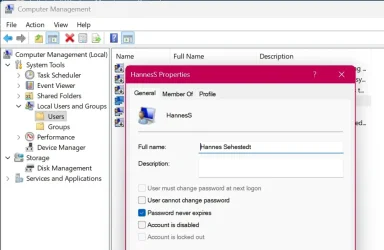
Ah, yes, you bring up a good point that I should clarify. On Windows Pro, if you look up your user details in Computer Management, you may see something like this:

Image1.webp

Note how in the above image my real username is "HannesS" and full name is "Hannes Sehestedt". At the logon screen it will show me as "Hannes Sehestedt". This is just a way of providing a friendly name that it can use in some places. I guess that is especially good if someone has a cryptic username that is just a series of random numbers and letters so it can still reference you by the friendly name.

My guess is that the full username could be completely omitted, but I have not tested that. I am going perform a clean install right now and let know if that line can simply be deleted. Look for my response in a few minutes.
 

My Computers

System One System Two

  • OS
    Win11 Pro 25H2 (RTM+)
    Computer type
    PC/Desktop
    Manufacturer/Model
    Acemagic
    CPU
    Intel i7-14650HX
    Memory
    32 GB
    Graphics Card(s)
    No GPU - Built-in Intel Graphics
    Sound Card
    Integrated
    Monitor(s) Displays
    Varies as machine will often be moved to locations with different monitors
    Screen Resolution
    Varies
    Hard Drives
    1 x 1TB Gen 4 NVMe SSD
    PSU
    120W Power Brick
    Keyboard
    Corsair K70 Max RGB Magnetic Keyboard
    Mouse
    Logitech MX Master 3
    Internet Speed
    1Gb Up / 1 Gb Down
    Browser
    Edge
    Antivirus
    Windows Defender
  • Operating System
    Win11 Pro 25H2 (RTM+)
    Computer type
    Laptop
    Manufacturer/Model
    Lenovo ThinkBook 13x Gen 2
    CPU
    Intel i7-1255U
    Memory
    16 GB
    Graphics card(s)
    Intel Iris Xe Graphics
    Sound Card
    Realtek® ALC3306-CG codec
    Monitor(s) Displays
    13.3-inch IPS Display
    Screen Resolution
    WQXGA (2560 x 1600)
    Hard Drives
    2 TB 4 x 4 NVMe SSD
    PSU
    USB-C / Thunderbolt 4 Power / Charging
    Keyboard
    Backlit, spill resistant keyboard
    Mouse
    Buttonless Glass Precision Touchpad
    Internet Speed
    1Gb Up / 1Gb Down
    Browser
    Edge
    Antivirus
    Windows Defender
    Other Info
    WiFi 6e / Bluetooth 5.1 / Facial Recognition / Fingerprint Sensor / ToF (Time of Flight) Human Presence Sensor
Denis, sorry it took me so long to test. I was testing on a slow system.

Yes, you can entirely delete the line that looks like this:

<DisplayName>Windows User</DisplayName>

If you prefer, you can comment it out like this:

XML:
                    <LocalAccount wcm:action="add">
                        <Password>
                            <Value>UABhAHMAcwB3AG8AcgBkADEAUABhAHMAcwB3AG8AcgBkAA==</Value>
                            <PlainText>false</PlainText>
                        </Password>
<!--
                        <DisplayName>Windows User</DisplayName>
-->
                        <Group>Administrators</Group>
                        <Name>WinUser</Name>
                    </LocalAccount>
 

My Computers

System One System Two

  • OS
    Win11 Pro 25H2 (RTM+)
    Computer type
    PC/Desktop
    Manufacturer/Model
    Acemagic
    CPU
    Intel i7-14650HX
    Memory
    32 GB
    Graphics Card(s)
    No GPU - Built-in Intel Graphics
    Sound Card
    Integrated
    Monitor(s) Displays
    Varies as machine will often be moved to locations with different monitors
    Screen Resolution
    Varies
    Hard Drives
    1 x 1TB Gen 4 NVMe SSD
    PSU
    120W Power Brick
    Keyboard
    Corsair K70 Max RGB Magnetic Keyboard
    Mouse
    Logitech MX Master 3
    Internet Speed
    1Gb Up / 1 Gb Down
    Browser
    Edge
    Antivirus
    Windows Defender
  • Operating System
    Win11 Pro 25H2 (RTM+)
    Computer type
    Laptop
    Manufacturer/Model
    Lenovo ThinkBook 13x Gen 2
    CPU
    Intel i7-1255U
    Memory
    16 GB
    Graphics card(s)
    Intel Iris Xe Graphics
    Sound Card
    Realtek® ALC3306-CG codec
    Monitor(s) Displays
    13.3-inch IPS Display
    Screen Resolution
    WQXGA (2560 x 1600)
    Hard Drives
    2 TB 4 x 4 NVMe SSD
    PSU
    USB-C / Thunderbolt 4 Power / Charging
    Keyboard
    Backlit, spill resistant keyboard
    Mouse
    Buttonless Glass Precision Touchpad
    Internet Speed
    1Gb Up / 1Gb Down
    Browser
    Edge
    Antivirus
    Windows Defender
    Other Info
    WiFi 6e / Bluetooth 5.1 / Facial Recognition / Fingerprint Sensor / ToF (Time of Flight) Human Presence Sensor
For reference: If you do a clean installation and you decide to manually patch the Registry, boot with the USB flash drive and wait for the first setup screen. Press SHIFT+F10, or for laptops FN+SHIFT+F10 to open a Command Prompt. Usually it is opened but not in front, so before start typing click it to bring it in front. Then execute Regedit to open Registry Editor. I just copy-paste from my notes:

- When the Registry Editor shows up, find this key:
-- HKEY_LOCAL_MACHINE\SYSTEM\Setup
-- Create new key LabConfig inside the Setup.
-- Create DWORD (32 Bit) BypassTPMCheck and set to1
-- Create DWORD (32 Bit) BypassSecureBootCheck and set to 1
-- Create DWORD (32 Bit) BypassRAMCheck and set to 1
-- Create DWORD (32 Bit) BypassCPUCheck and set to 1

Create a .reg file with the following content:

Code:
Windows Registry Editor Version 5.00

[HKEY_LOCAL_MACHINE\SYSTEM\Setup\LabConfig]
"BypassTPMCheck"=dword:00000001
"BypassSecureBootCheck"=dword:00000001
"BypassRAMCheck"=dword:00000001

- Save this file to your Windows 11 installation USB stick (for example, as bypass.reg).
- During Windows Setup, press Shift + F10 to open a Command Prompt.
- Type regedit and press Enter to open the Registry Editor.
- In Registry Editor, click File > Import, locate your .reg file on the USB stick, and select it.
- Close the Registry Editor and the Command Prompt.
 

My Computers

System One System Two

  • OS
    Windows 11 Pro
    Computer type
    PC/Desktop
    CPU
    AMD Ryzen 9 9950X3D
    Motherboard
    ASRock B650E Taichi Lite
    Memory
    Kingston FURY Beast 64GB (2x32GB) DDR5 6000MT/s
    Graphics Card(s)
    ASUS TUF Gaming Radeon RX 9070 OC Edition 16GB GDDR6
    Hard Drives
    Solidigm P44 Pro 2TB M.2 NVMe SSD
  • Operating System
    Windows 11 Home
    Computer type
    Laptop
    Manufacturer/Model
    Lenovo Legion Pro 7i Gen 10 16"
    CPU
    Intel Core Ultra 9 275HX
    Memory
    64GB (2x 32GB) DDR5-6400
    Graphics card(s)
    NVIDIA GeForce RTX 5080 16GB GDDR7 Laptop GPU
    Hard Drives
    2x 1TB M.2 NVMe SSD (SK Hynix)
During Windows Setup, press Shift + F10 to open a Command Prompt. I am referring to the regedit Setup\LabConfig]
At some point during the install this is no longer available, and newer versions change when this is available. But not clear about when ALSO I am guessing that autounattend.xml does the same thing but in a different way.
 

My Computers

System One System Two

  • OS
    Windows 11 pro
    Computer type
    Laptop
    Manufacturer/Model
    Precision 7780
    CPU
    Processor 13th Gen Intel(R) Core(TM) i9-13950HX, 2200 M
    Motherboard
    Dell calls it the “system board” in the service manual.
    Memory
    64GIG
    Graphics Card(s)
    NVIDIA RTX 5000 Ada Generation Laptop GPU
    Sound Card
    NVIDIA HIGH DEFINITION AUDIO
    Monitor(s) Displays
    Samsung and a HP Monitor
    Screen Resolution
    Resolution 3840 x 2160 x 60 hertz
    Hard Drives
    3 1T NVME and 1 223 Gb
    PSU
    External
    Case
    Laptop
    Cooling
    Dual fans
    Keyboard
    LOGI REMOTE KEYBOARD
    Mouse
    LOGI REMOTE MOUSE
    Internet Speed
    538 Mbps 163 Mbps upload
    Browser
    Duck, Chrome, Edge, Opra
    Antivirus
    Norton Antivirus
  • Operating System
    WIN 11 PRO
    Computer type
    Laptop
    Manufacturer/Model
    HP
    CPU
    RTX ADA 5000
    Memory
    32
    Monitor(s) Displays
    MY BIG SCREEN TV
    Screen Resolution
    3840 X 2016
    Hard Drives
    2 NVME
    Keyboard
    REMOTE USB
    Mouse
    REMOTE USB LOGI
    Internet Speed
    FIBER TO MY DOOR
    Browser
    DUCK FIREFOX CHROME OPRA
    Antivirus
    NORTON
Back
Top Bottom