Lightweight Virtual Machine Suggestions


Xplorer4x4

Well-known member
Local time
4:26 AM
Posts
23
OS
Windows 11 Pro Insider Preview Dev
I know this is expanding a bit beyond the focus of Windows, but I am looking to find the lightest VM software that is cross-compatible with Linux(CachyOS/Arch based) and Windows. I want to run the VM on bare metal and be able to run it regardless of being in Windows or Linux.
 

My Computer

System One

  • OS
    Windows 11 Pro Insider Preview Dev
    Computer type
    PC/Desktop
    CPU
    AMD Ryzen 5 2600x
    Motherboard
    MSI MPG B550 GAMING EDGE WIFI
    Memory
    Corsair DDR4-2132
    Graphics Card(s)
    AMD B550
    Monitor(s) Displays
    Spectere C24
i found this which is about all i can help with as i have never tried to use a VM on bare metal

best of luck Steve ..
 

My Computers

System One System Two

  • OS
    Debian Trixie KDE Windows 11 Home
    Computer type
    PC/Desktop
    Manufacturer/Model
    HP 24" AiO
    CPU
    Ryzen 7 5825u
    Motherboard
    HP
    Memory
    64GB DDR4 3200
    Graphics Card(s)
    Ryzen 7 5825u
    Sound Card
    RealTek
    Monitor(s) Displays
    24" HP AiO
    Screen Resolution
    1920 x 1080 @60 Hz
    Hard Drives
    1TB WD Blue SN580 M2 SSD Partitioned.
    2x 1TB USB HDD External Backup/Storage.
    PSU
    90W external power brick
    Case
    24" All in One
    Cooling
    Default Air Cooling
    Keyboard
    HP WiFi UK extended
    Mouse
    HP WiFi 3 Button
    Internet Speed
    1GB full fibre
    Browser
    Edge & Firefox
    Antivirus
    AVG Internet Security/Windows Defender
    Other Info
    Mainly Open Source Software
  • Operating System
    Ubuntu 22.04.5 LTS
    Computer type
    Laptop
    Manufacturer/Model
    Dell 13" Latitude 2017
    CPU
    i5 7200u
    Motherboard
    Dell
    Memory
    16GB DDR4
    Graphics card(s)
    Intel
    Sound Card
    Intel
    Monitor(s) Displays
    13" Dell Laptop
    Hard Drives
    250GB Crucial 2.5" SSD
    Mouse
    Generic WiFi 3 button
    Internet Speed
    WiFi only
    Browser
    Firefox
    Antivirus
    ClamAV TK
    Other Info
    Mainly Open Source Software
i found this which is about all i can help with as i have never tried to use a VM on bare metal

best of luck Steve ..
Thanks, thats an interesting read. I was going to use Qemu as it is cross-compatible and operate on a Hypervisor 1 level with few resources, but I may dive into this list and see if something better exists.

Thanks for your tip and hoopefully others will chime in as well!
 

My Computer

System One

  • OS
    Windows 11 Pro Insider Preview Dev
    Computer type
    PC/Desktop
    CPU
    AMD Ryzen 5 2600x
    Motherboard
    MSI MPG B550 GAMING EDGE WIFI
    Memory
    Corsair DDR4-2132
    Graphics Card(s)
    AMD B550
    Monitor(s) Displays
    Spectere C24
Thanks, thats an interesting read. I was going to use Qemu as it is cross-compatible and operate on a Hypervisor 1 level with few resources, but I may dive into this list and see if something better exists.

Thanks for your tip and hoopefully others will chime in as well!
I run Linux Debian KVM QEMU and have been for a few years and that hypervisor has almost zero fingerprint on system load... and i use virt-manager as GUI
 

My Computers

System One System Two

  • OS
    Linux: Debian, Kali-linux, Alma, Win: 7, 8.1,2012R
    Manufacturer/Model
    HP Elitebook 840, AsusX53, Aspire E1-572. AsusUX32A, HP Pro3130mt+3010mt, HP Proliant ML150, 3xCustom-PC, i3, i5, i7
    CPU
    i3, i5 and i7 From 2gen to 9th gen... Server dual Xenon
    Hard Drives
    Sata, M.2, SAS
  • Operating System
    Retro: 2003server.XPpro, Win2000, Win98SE, Win95, Win3.11, MS-DOS, IBM-DOS
    Manufacturer/Model
    Commodore, AST, Fujitsu, Compaq, etc etc. etc Around 15 desktops and 20 laptops in the collection
    CPU
    Oldest intel 8088 up to P4 dual core
    Hard Drives
    MFM, IDE, SCSI
Good to know. Debian seems like a strong contender but I'm also considering arch or Ubuntu server as I don't need a DE.

But definitely good to hear so many endorsements for Qemu.
 

My Computer

System One

  • OS
    Windows 11 Pro Insider Preview Dev
    Computer type
    PC/Desktop
    CPU
    AMD Ryzen 5 2600x
    Motherboard
    MSI MPG B550 GAMING EDGE WIFI
    Memory
    Corsair DDR4-2132
    Graphics Card(s)
    AMD B550
    Monitor(s) Displays
    Spectere C24
Good to know. Debian seems like a strong contender but I'm also considering arch or Ubuntu server as I don't need a DE.

But definitely good to hear so many endorsements for Qemu.
If you going for a stable long term solution.. then Ubuntu is better then Arch.
I run Debian Stable (LTS) without DE on a backup fileserver.. and i always use the Net installer to get a minimal system.

Alma Linux or Rocky Linux is 1:1 builds on Redhat.. this two was born from that IBM ditched CentOS that all small to big business used for their servers when they didn't want/needed the paid Redhat support.

But go for the distro you feel is best for you. LTS versions is best for server usage and Rolling distros like Arch is a bit more risky and can need a lot more attention.
 

My Computers

System One System Two

  • OS
    Linux: Debian, Kali-linux, Alma, Win: 7, 8.1,2012R
    Manufacturer/Model
    HP Elitebook 840, AsusX53, Aspire E1-572. AsusUX32A, HP Pro3130mt+3010mt, HP Proliant ML150, 3xCustom-PC, i3, i5, i7
    CPU
    i3, i5 and i7 From 2gen to 9th gen... Server dual Xenon
    Hard Drives
    Sata, M.2, SAS
  • Operating System
    Retro: 2003server.XPpro, Win2000, Win98SE, Win95, Win3.11, MS-DOS, IBM-DOS
    Manufacturer/Model
    Commodore, AST, Fujitsu, Compaq, etc etc. etc Around 15 desktops and 20 laptops in the collection
    CPU
    Oldest intel 8088 up to P4 dual core
    Hard Drives
    MFM, IDE, SCSI
I run Linux Debian KVM QEMU and have been for a few years and that hypervisor has almost zero fingerprint on system load... and i use virt-manager as GUI
From what I can tell, virt-manager is not available for Windows. Am I wrong? How would I control the VM on the Windows side? I suppose trying one of the 8 options mentioned above?
 

My Computer

System One

  • OS
    Windows 11 Pro Insider Preview Dev
    Computer type
    PC/Desktop
    CPU
    AMD Ryzen 5 2600x
    Motherboard
    MSI MPG B550 GAMING EDGE WIFI
    Memory
    Corsair DDR4-2132
    Graphics Card(s)
    AMD B550
    Monitor(s) Displays
    Spectere C24
From what I can tell, virt-manager is not available for Windows. Am I wrong? How would I control the VM on the Windows side? I suppose trying one of the 8 options mentioned above?
Hi there
By "Controlling the VM" I assume you mean adding things / modifying things on the VM rather than just logging in on to the VM itself.

If your Linux system has a GUI (I use Fedora kde version) then you should be able to use something like Windows RDP to connect to the VM or even the Linux system itself.

If you can't get this to work then you can ssh from Windows to the Linux machine and then use a text editor to edit or control any virtual machines running on that system.

Note that any Windows VM's on the Linux host should be accessible from your Windows (remote) machine via RDP if the Windows privileges are set OK

I rarely use Windows "Physical machines" any more -- 99% of the things I need Windows for run perfectly well on a Windows 11 VM !!!!

One area where I still use physical W11 machines BTW is to have them as "physical vhdx" files so they can run on external media -- that way I can test out all sorts of new builds etc - with different apps / languages etc etc and all keep the same activation !!

One can also do this on a Linux host - it's a bit fiddly to set up but works a treat. Remember also that the Windows EULA does not permit you to run versions of Windows concurrently unless each ahas a separate license. Testing different W11 builds usually means it's the same license so you can't run these concurrently.

(Disk geometry : EFI partition, vhdx1, vhdx2 etc) same whether on a VM or a real machine.


Cheers
jimbo
 

My Computer

System One

  • OS
    Windows XP,11 Linux Fedora Rawhide pre-release 45
    Computer type
    PC/Desktop
    CPU
    2 X Intel i7
    Screen Resolution
    4KUHD X 2
Hi there
By "Controlling the VM" I assume you mean adding things / modifying things on the VM rather than just logging in on to the VM itself.

If your Linux system has a GUI (I use Fedora kde version) then you should be able to use something like Windows RDP to connect to the VM or even the Linux system itself.

If you can't get this to work then you can ssh from Windows to the Linux machine and then use a text editor to edit any virtual machines running on that system.

Note that any Windows VM's on the Linux host should be accessible from your Windows (remote) machine via RDP if the Windows privileges are set OK

I rarely use Windows "Physical machines" any more -- 99% of the things I need Windows for run perfectly well on a Windows 11 VM !!!!

Cheers
jimbo
I use CachyOs with KDE but won't the VM shut down when I reboot from CachyOS to Windows(and vice versa) making it impossible to use ssh or rdp as the VM would power off during the reboot?
 

My Computer

System One

  • OS
    Windows 11 Pro Insider Preview Dev
    Computer type
    PC/Desktop
    CPU
    AMD Ryzen 5 2600x
    Motherboard
    MSI MPG B550 GAMING EDGE WIFI
    Memory
    Corsair DDR4-2132
    Graphics Card(s)
    AMD B550
    Monitor(s) Displays
    Spectere C24
I use CachyOs with KDE but won't the VM shut down when I reboot from CachyOS to Windows(and vice versa) making it impossible to use ssh or rdp as the VM would power off during the reboot?
I Don't know about CachyOs -- Debian Linux though itself plays quite OK with Windows. Main problem is the X-Server (the video server).

In modern linux kernels this has switched away from XORG which was compatible with RDP. The modern Wayland system isn't so that's a problem for some distros although there are a few get-arounds.

SSH or even TELNET should always work though assuming no weird apps -- CachyOs seems like a weird app !!!.

Cheers
jimbo
 

My Computer

System One

  • OS
    Windows XP,11 Linux Fedora Rawhide pre-release 45
    Computer type
    PC/Desktop
    CPU
    2 X Intel i7
    Screen Resolution
    4KUHD X 2
I Don't know about CachyOs -- Debian Linux though itself plays quite OK with Windows. Main problem is the X-Server (the video server).

In modern linux kernels this has switched away from XORG which was compatible with RDP. The modern Wayland system isn't so that's a problem for some distros although there are a few get-arounds.

SSH or even TELNET should always work though assuming no weird apps -- CachyOs seems like a weird app !!!.

Cheers
jimbo
I don't see how this answered my question. I am not running a normal hypervisor situation here.

CachyOS is a Linux distro based on Arch and is gaining ground fast in the vast world of Linux.

I want to run a bare metal VM using a Linux distro. I want it run Emby Server and Emby Server only. I want to access it from CachyOS and Windows(at separate times of course) while in the VM. If I run the VM in CachyOS, and I reboot to Windows, are you telling me the VM isn't going to shut down and SSH and RDP are still going to be operational when I boot in to Windows? How is this strange? What does that have to do with CachyOS?

Oh and Wayland is capable of RDP as well. I've used it on my CachyOS install. Some apps don't support it but Teamviewer is in the progress of working on Wayland support and I think Any desk does too. Rustdesk works with Wayland as well.
 

My Computer

System One

  • OS
    Windows 11 Pro Insider Preview Dev
    Computer type
    PC/Desktop
    CPU
    AMD Ryzen 5 2600x
    Motherboard
    MSI MPG B550 GAMING EDGE WIFI
    Memory
    Corsair DDR4-2132
    Graphics Card(s)
    AMD B550
    Monitor(s) Displays
    Spectere C24
I don't see how this answered my question. I am not running a normal hypervisor situation here.

CachyOS is a Linux distro based on Arch and is gaining ground fast in the vast world of Linux.

I want to run a bare metal VM using a Linux distro. I want it run Emby Server and Emby Server only. I want to access it from CachyOS and Windows(at separate times of course) while in the VM. If I run the VM in CachyOS, and I reboot to Windows, are you telling me the VM isn't going to shut down and SSH and RDP are still going to be operational when I boot in to Windows? How is this strange? What does that have to do with CachyOS?

Oh and Wayland is capable of RDP as well. I've used it on my CachyOS install. Some apps don't support it but Teamviewer is in the progress of working on Wayland support and I think Any desk does too. Rustdesk works with Wayland as well.
You can run a "bare metal" VM easily enough on KVM / any Linux distro -- if you want to run a SERVER as a VM on Linux then you need to enable "Nested virtualisation".

It's good now Wayland and RDP are working on some distros.

I found the simplest way of creating a VM of a currently running physical system was

1) on the physical system simply run Macrium free (old V8) to image the system.
2) on Linux define the VM - you don't need to INSTALL the OS.
3) add the physical device (where your W11 is installed) to the VM
4) in the VM boot it -- Yes it will boot !!!!
5) now use diskpart to define your disk(s) for the VM -- you should see at least two devices - the Windows boot drive and the "Empty" virtual disk for the VM. Use disk part to create an EFI and standard partition for the target VM.
7) restore the image to the VM's virtual disk (again via Macrium Free)
8) install the bootloader
9) exit the VM, remove the W11 (physical) disk from the VM spec.
10) boot the new VM -- should boot perfectly although you might have no network connection (yet)
11) install the "vertio windows drivers" - these work like vmware tools / guest additions on those other vm platforms and will allow proper display, text adjustment , mouse and Network plus optimises disk I/O etc.

Now perfectly in business and your W11 might still be activated too !!!!
I don't use secure boot or bit-locker so that might be a problem with this method but working perfect ly for the latest W11 experimental release !! and performance is perfectly OK too ion a reasonable laptop.

For running a Hypervisor on Windows to create a Linux VM which you want to use as a server then again you need to enable nested virtualisation. That works quite well too - at least from memory when I tried this out a while ago.

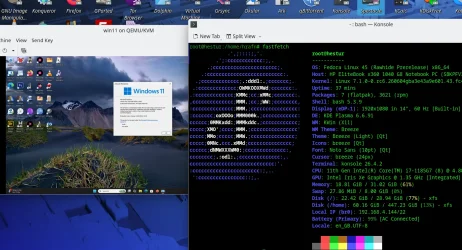
Anyway currently this is what I've got

Screenshot_20260607_121702.webp

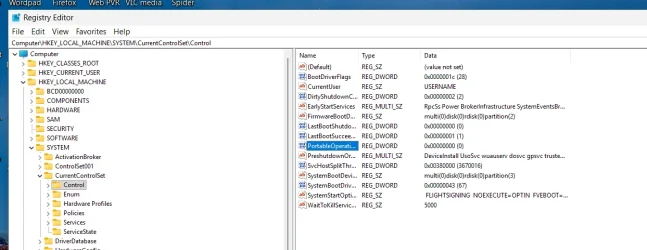
Finally if creating this VM from a W11 physical vhdx tyte of install that is on an EXTERNAL device then don't forget to set the PortableOS flag in the registry to '0' - otherwise you can't update W11 to a newer build !!!.


Screenshot 2026-06-07 125233.webp

BTW I HATE Teamviwer etc. !!!

Cheers
jimbo
 
Last edited:

My Computer

System One

  • OS
    Windows XP,11 Linux Fedora Rawhide pre-release 45
    Computer type
    PC/Desktop
    CPU
    2 X Intel i7
    Screen Resolution
    4KUHD X 2
That really confused me even more.

If I run it as a true server, wouldn't I have to boot into the actual third os which defeats the purpose here? Arguably, yes, the VM will be strictly a lightweight server simply running Emby Server and nothing else other than what's shipped and maybe what I can research and find out if I can strip it down anymore.

I have Win 11 and CachyOS installed already, but the VM is going to run a third OS. Possibly Ubuntu Server Maybe Debian Server, but I want to double-check something with the Emby team first.

I have created a L2 Hypervisor VM in Cachy before using Virt Manager and Qemu, but not a L1. As I recall Virt-Manager gives an easy option to install on bare metal, but the problem I see is finding a way to manage the VM from Windows that is lightweight. Maybe AQEMU but I really don't want to build from source, but if someone feels generous and wants to build a binary for me, that would be great!
 

My Computer

System One

  • OS
    Windows 11 Pro Insider Preview Dev
    Computer type
    PC/Desktop
    CPU
    AMD Ryzen 5 2600x
    Motherboard
    MSI MPG B550 GAMING EDGE WIFI
    Memory
    Corsair DDR4-2132
    Graphics Card(s)
    AMD B550
    Monitor(s) Displays
    Spectere C24
Hi @Xplorer4x4 :-)
I see that @jimbo45 has some good suggestions :-) ...... just a tiny mention, another cross platform remote desktop solution is Rustdesk RustDesk: Open-Source Remote Desktop with Self-Hosted Server Solutions This one runs on Windows, Linux, MacOS, Android and iOS

I might have misunderstood your initial question :-)
So are you dualbooting Windows and CatchyOS? .... and you want a hypervisor that you can run both from Windows and from Linux on the same computer so you dont have to boot in to the other OS to start up your VMs?
Or.. You only booting Windows and using WSL to run CatchyOS and then want to use other VM's?


Here is my solution/setup
If i start with ignore my server as that is another thing that dont fit in this discussion....

I have one laptop and one desktop where i often run several VM's to test different OS's or tweaks.
Those two machines is kind of dualboot, the laptop has a Windows OEM install i never have used or even sat up an user account on, and the desktop do have a win10 version i only installed, but never used.... but i still keep those just in case it can be good to have in the future....
Then i have Linux Debian 12 Xfce as my Daily driver OS on all my machines.

So I'm using QEMU and virt-manager as my Host OS is Linux... In that i run several different Windows VM's. and i run several Linux VM's and some.
But even if i would start to use my dualboot windows, i would not set up them to run my VM's, as i would only boot in to windows for a specific purposes.

As this is a Windows forum, then lets make it the other way around.. If i had Windows as my main daily driver system, and Linux as a second system i only need for a few things.. Then i would only set up all my VM's in Windows and not have access to those VM's from Linux dualboot.

But here is my opinion that can seem a bit biased..
My Linux Debian 12 Xfce install has a memory footprint of 890MB RAM(say 1GB) usage on boot, Windows 11 has around 2-3GB in Ram on boot (I'm guessing a bit here as i dont run win11, but i have seen people post printscreens)

So what i would do is to use Linux as Host system instead of Windows (1GB VS 2-3GB) .... and then you run your Windows as a VM to make life simpler to avoid constant dualbooting.... and if you are a gamer.. have a dualboot with a minimized install of Windows for gaming only and nothing else.. and use the Windows VM for the more daily stuff where you need software that is Windows-only....
Then you can also use the Linux Host system for daily browsing, email stuff etc that you dont need windows for (and also get both a bit better security and privacy as a bonus if you visit less trustworthy websites.)

I started with ignoring my server setup....
When it comes to my server that run both VM's and docker containers...
When i want to interact with those VM's I'm using X2Go for remote interaction instead of SSH as I'm no real fan of the Terminal.. i get to much of the late 80's feeling looking/interacting with a terminal.... Retro is fun, but not to often. *LOL*😅 .... So i prefer GUI solutions when i can.🤓
Or if needed i walk in to the server and power up the screen for maintaining the server OS as i have blocked remote access to the host OS for security reasons.


So the real question is.
What solution do you want. :-) :-) :-)

 

My Computers

System One System Two

  • OS
    Linux: Debian, Kali-linux, Alma, Win: 7, 8.1,2012R
    Manufacturer/Model
    HP Elitebook 840, AsusX53, Aspire E1-572. AsusUX32A, HP Pro3130mt+3010mt, HP Proliant ML150, 3xCustom-PC, i3, i5, i7
    CPU
    i3, i5 and i7 From 2gen to 9th gen... Server dual Xenon
    Hard Drives
    Sata, M.2, SAS
  • Operating System
    Retro: 2003server.XPpro, Win2000, Win98SE, Win95, Win3.11, MS-DOS, IBM-DOS
    Manufacturer/Model
    Commodore, AST, Fujitsu, Compaq, etc etc. etc Around 15 desktops and 20 laptops in the collection
    CPU
    Oldest intel 8088 up to P4 dual core
    Hard Drives
    MFM, IDE, SCSI
I really don't understand how my intentions aren't clear.

I want to dual boot CachyOS and Win 11. Both are installed and good to go. I want to run a third OS in a VM.I don't believe it will require any heavy use.

I believe qemu and virt-manager should be enough on the Linux side to run and control the VM and install on bare metal. My concern is controlling the VM from windows. I hate to do it but I may go virtualbox just to make it a universal setup on Linux and windows if no one can recommend a lightweight GUI to control the same VM in Windows.
 

My Computer

System One

  • OS
    Windows 11 Pro Insider Preview Dev
    Computer type
    PC/Desktop
    CPU
    AMD Ryzen 5 2600x
    Motherboard
    MSI MPG B550 GAMING EDGE WIFI
    Memory
    Corsair DDR4-2132
    Graphics Card(s)
    AMD B550
    Monitor(s) Displays
    Spectere C24
I really don't understand how my intentions aren't clear.

I want to dual boot CachyOS and Win 11. Both are installed and good to go. I want to run a third OS in a VM.I don't believe it will require any heavy use.

I believe qemu and virt-manager should be enough on the Linux side to run and control the VM and install on bare metal. My concern is controlling the VM from windows. I hate to do it but I may go virtualbox just to make it a universal setup on Linux and windows if no one can recommend a lightweight GUI to control the same VM in Windows.
If you really want to run the third OS as a VM from both Windows and Linux... Yeah i will agree that virtualbox will give you less headache as you have the same VM engine on both platforms so you dont need to learn two different hypervisors.
Or... skip the VM and go for a triple boot system. :cool:
 

My Computers

System One System Two

  • OS
    Linux: Debian, Kali-linux, Alma, Win: 7, 8.1,2012R
    Manufacturer/Model
    HP Elitebook 840, AsusX53, Aspire E1-572. AsusUX32A, HP Pro3130mt+3010mt, HP Proliant ML150, 3xCustom-PC, i3, i5, i7
    CPU
    i3, i5 and i7 From 2gen to 9th gen... Server dual Xenon
    Hard Drives
    Sata, M.2, SAS
  • Operating System
    Retro: 2003server.XPpro, Win2000, Win98SE, Win95, Win3.11, MS-DOS, IBM-DOS
    Manufacturer/Model
    Commodore, AST, Fujitsu, Compaq, etc etc. etc Around 15 desktops and 20 laptops in the collection
    CPU
    Oldest intel 8088 up to P4 dual core
    Hard Drives
    MFM, IDE, SCSI
If you really want to run the third OS as a VM from both Windows and Linux... Yeah i will agree that virtualbox will give you less headache as you have the same VM engine on both platforms so you dont need to learn two different hypervisors.
Or... skip the VM and go for a triple boot system. :cool:
As I have stated many times, i need the third OS/VM to run 24/7 regardless of which is I am using.
 

My Computer

System One

  • OS
    Windows 11 Pro Insider Preview Dev
    Computer type
    PC/Desktop
    CPU
    AMD Ryzen 5 2600x
    Motherboard
    MSI MPG B550 GAMING EDGE WIFI
    Memory
    Corsair DDR4-2132
    Graphics Card(s)
    AMD B550
    Monitor(s) Displays
    Spectere C24
The only way to keep the third OS running all the time is to use a type one hypervisor and run all three operating systems as VMs.

If you have a VM running under Linux, for example, then reboot to go into Windows, the VM shuts down while you’re changing OS. At a minimum, it goes into a suspended state.
 

My Computer

System One

  • OS
    Windows 11 Pro 25H2
    Computer type
    PC/Desktop
    Manufacturer/Model
    Intel NUC12WSHi7
    CPU
    12th Gen Core i7-1260P
    Motherboard
    NUC12WSBi7
    Memory
    64 GB Micron PC4-25600
    Graphics Card(s)
    Intel Iris Xe Graphics
    Sound Card
    on-board Realtek HD Audio
    Monitor(s) Displays
    Dell U3219Q
    Screen Resolution
    3840 x 2160
    Hard Drives
    Samsung SSD 990 PRO 1TB
    Crucial MX500 2 TB
    Antivirus
    Microsoft Defender
The only way to keep the third OS running all the time is to use a type one hypervisor and run all three operating systems as VMs.

If you have a VM running under Linux, for example, then reboot to go into Windows, the VM shuts down while you’re changing OS. At a minimum, it goes into a suspended state.
I was exaggerating slightly there as it literally takes like 1 minute to boot out of CachyOS and boot into windows. Maybe another 30 seconds at best to boot the vm back up.
 

My Computer

System One

  • OS
    Windows 11 Pro Insider Preview Dev
    Computer type
    PC/Desktop
    CPU
    AMD Ryzen 5 2600x
    Motherboard
    MSI MPG B550 GAMING EDGE WIFI
    Memory
    Corsair DDR4-2132
    Graphics Card(s)
    AMD B550
    Monitor(s) Displays
    Spectere C24
Ok then do that?
 

My Computer

System One

  • OS
    Windows 11 Pro 25H2
    Computer type
    PC/Desktop
    Manufacturer/Model
    Intel NUC12WSHi7
    CPU
    12th Gen Core i7-1260P
    Motherboard
    NUC12WSBi7
    Memory
    64 GB Micron PC4-25600
    Graphics Card(s)
    Intel Iris Xe Graphics
    Sound Card
    on-board Realtek HD Audio
    Monitor(s) Displays
    Dell U3219Q
    Screen Resolution
    3840 x 2160
    Hard Drives
    Samsung SSD 990 PRO 1TB
    Crucial MX500 2 TB
    Antivirus
    Microsoft Defender

Latest Support Threads

Back
Top Bottom