Locale messed up on fresh install?


Octopuss

Member
Local time
9:00 AM
Posts
91
OS
Windows 11
This must be a "feature" of Windows 11 or I don't know. It never happened in 10. Anyway.
I have international english ISO as a base for my unattended install. In the answer file, I set
<SystemLocale>en-GB</SystemLocale>
<UserLocale>cs-CZ</UserLocale>
Which, up until now on both Win 7 and 10 resulted in the interface being in english (not like there is any other option by default with this image) and regional settings like time and date and whatever in such format we use in Czech republic.
Fast forward to Windows 11.
I installed it in a VM, right clicked on a .cmd file, and in the context menu, among entries in english, was "upravit v poznámkovém bloku" instead of "edit with notepad" or something.

Can anyone explain what on earth is the bloody system doing and how do I fix it? Because this cannot be intentional.
 

My Computer

System One

  • OS
    Windows 11
Did you integrate the Czech Language Pack files into the install image? If you don't, then some Windows text may be incorrectly mapped.
 

My Computer

System One

  • OS
    Windows 7
Wait, there is a misunderstanding I guess. I set the system to specifically display everything in english. I do not want the UI in czech. I just want the regional stuff to be in czech format, but that has nothing to do with text.
There is no point in installing czech language pack when the interface is in english, nor does it make any sense for it missing causing certain texts to appear in czech.
 

My Computer

System One

  • OS
    Windows 11
Wait, there is a misunderstanding I guess. I set the system to specifically display everything in english. I do not want the UI in czech. I just want the regional stuff to be in czech format, but that has nothing to do with text.
There is no point in installing czech language pack when the interface is in english, nor does it make any sense for it missing causing certain texts to appear in czech.


Image1.webp
 

My Computers

System One System Two

  • OS
    Win 11 Home ♦♦♦26200.8655 ♦♦♦♦♦♦♦25H2
    Computer type
    PC/Desktop
    Manufacturer/Model
    Built by Ghot® [May 2020]
    CPU
    AMD Ryzen 7 3700X
    Motherboard
    Asus Pro WS X570-ACE (BIOS 5302)
    Memory
    G.Skill (F4-3200C14D-16GTZKW)
    Graphics Card(s)
    EVGA RTX 2070 (08G-P4-2171-KR)
    Sound Card
    Realtek ALC1220P / ALC S1220A
    Monitor(s) Displays
    Dell U3011 30"
    Screen Resolution
    2560 x 1600
    Hard Drives
    2x Samsung 860 EVO 500GB,
    WD 4TB Black FZBX - SATA III,
    WD 8TB Black FZBX - SATA III,
    DRW-24B1ST CD/DVD Burner
    PSU
    PC Power & Cooling 750W Quad EPS12V
    Case
    Cooler Master ATCS 840 Tower
    Cooling
    CM Hyper 212 EVO (push/pull)
    Keyboard
    Ducky DK9008 Shine II Blue LED
    Mouse
    Logitech Optical M-100
    Internet Speed
    300/300
    Browser
    Firefox (latest)
    Antivirus
    Bitdefender Total Security
    Other Info
    Speakers: Klipsch Pro Media 2.1
  • Operating System
    Windows XP Pro 32bit w/SP3
    Computer type
    PC/Desktop
    Manufacturer/Model
    Built by Ghot® (not in use)
    CPU
    AMD Athlon 64 X2 5000+ (OC'd @ 3.2Ghz)
    Motherboard
    ASUS M2N32-SLI Deluxe Wireless Edition
    Memory
    TWIN2X2048-6400C4DHX (2 x 1GB, DDR2 800)
    Graphics card(s)
    EVGA 256-P2-N758-TR GeForce 8600GT SSC
    Sound Card
    Onboard
    Monitor(s) Displays
    ViewSonic G90FB Black 19" Professional (CRT)
    Screen Resolution
    up to 2048 x 1536
    Hard Drives
    WD 36GB 10,000rpm Raptor SATA
    Seagate 80GB 7200rpm SATA
    Lite-On LTR-52246S CD/RW
    Lite-On LH-18A1P CD/DVD Burner
    PSU
    PC Power & Cooling Silencer 750 Quad EPS12V
    Case
    Generic Beige case, 80mm fans
    Cooling
    ZALMAN 9500A 92mm CPU Cooler
    Keyboard
    Logitech Classic Keybooard 200
    Mouse
    Logitech Optical M-BT96a
    Internet Speed
    300/300
    Browser
    Firefox 3.x ??
    Antivirus
    Symantec (Norton)
    Other Info
    Still assembled, still runs. Haven't turned it on for 15 years?
Getting mixed languages in Windows is a problem I've seen many times when testing my apps with different system languages.

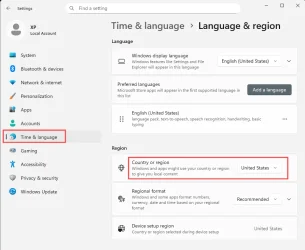
Since you only want Czech regional settings, such as date format, I suggest first setting the region to UK or USA. Then restart and see if it's English everywhere. If so, then try changing the region to Czech and, hopefully, the display language will remain English.

Of course, the regional settings should NOT affect the display language, but sometimes it just does.

Also, I seem to recall that there is some separate language setting for Store apps, but I can't find that now. Maybe I was imagining that one...
 

My Computer

System One

  • OS
    Windows 10/11
    Computer type
    Laptop
    Manufacturer/Model
    Acer
It sounds like you need a PS script:
Code:
Import-Module International

Set-WinSystemLocale en-GB
Set-Culture cs-CZ
Set-WinHomeLocation -GeoId 0x4b
Set-WinUserLanguageList en-GB -Force
 

My Computer

System One

  • OS
    Windows 7
I found the culprit. Microsoft in their infinite idiocy added something called preferred languages order for store apps, so regardless of the interface being set to english, the junk that comes from the store would display in czech 🤦🏻‍♀️
 

My Computer

System One

  • OS
    Windows 11
Back
Top Bottom