M.2 install question (s)


AMI native nvme support is only for drive access within the BIOS. It doesn't matter for Windows. I have native AMI nvme support turned on but use both Intel RST (which supports nvme) and Microsoft nvme drivers in Windows. So I would just leave it enabled in BIOS.
I have the same motherboard as the OP. I just checked my BIOS settings. By default, AMI NVME support is Disabled. Before you recommend that be Enabled can you prove why it should? I have read online where others have asked that question but nobody could answer it.
 

My Computers My Computers

  • At a glance

    Windows 11 Pro 25H2 (26200.6901)AMD Ryzen 7 6800H with Radeon 680M GPU (486MB...Crucial DDR5-4800 (2400MHz) 32GB (2 x 16GB)NVIDIA RTX 3060 Laptop (6GB RAM)
    OS
    Windows 11 Pro 25H2 (26200.6901)
    Computer type
    Laptop
    Manufacturer/Model
    ASUS TUF Gaming A15 (2022)
    CPU
    AMD Ryzen 7 6800H with Radeon 680M GPU (486MB RAM)
    Memory
    Crucial DDR5-4800 (2400MHz) 32GB (2 x 16GB)
    Graphics Card(s)
    NVIDIA RTX 3060 Laptop (6GB RAM)
    Sound Card
    n/a
    Monitor(s) Displays
    15.6-inch
    Screen Resolution
    1920x1080 300Hz
    Hard Drives
    2 x Samsung 990 Evo Plus (2TB M.2 NVME SSD)
    PSU
    n/a
    Mouse
    Wireless Mouse M510
    Internet Speed
    2100Mbps/300Mbps
    Browser
    Firefox
    Antivirus
    Malwarebytes
  • At a glance

    Windows 11 Pro 25H2 (26200.8246)AMD Ryzen 7 5700X3DG.SKILL Flare X 32GB (2x16GB) DDR4ASUS ROG-STRIX-RTX3060TI-08G-V2-GAMING (RTX 3...
    Operating System
    Windows 11 Pro 25H2 (26200.8246)
    Computer type
    PC/Desktop
    Manufacturer/Model
    Custom build
    CPU
    AMD Ryzen 7 5700X3D
    Motherboard
    ASUS ROG Strix B550-F Gaming WiFi II
    Memory
    G.SKILL Flare X 32GB (2x16GB) DDR4
    Graphics card(s)
    ASUS ROG-STRIX-RTX3060TI-08G-V2-GAMING (RTX 3060-Ti, 8GB RAM)
    Monitor(s) Displays
    Samsung G50D IPS 27"
    Screen Resolution
    1440p/180Hz
    Hard Drives
    SAMSUNG 990 EVO Plus (2TB] M.2 NVME SSD
    SAMSUNG 990 EVO Plus (4TB) M.2 NVME SSD
    PSU
    Corsair RM750x (750 watts)
    Case
    Cooler Master MasterCase 5
    Cooling
    Scythe Mugen 6
    Keyboard
    Logitech K520 (MK540 keyboard/mouse combo)
    Mouse
    Logitech M310 (MK540 keyboard/mouse combo)
    Internet Speed
    2100 Mbps down / 300 Mbps up
    Browser
    Firefox, Edge, Chrome
    Antivirus
    Malwarebytes (Premium)
    Other Info
    ASUS Blu-ray Burner BW-16D1HT (SATA) || Western Digital Easystore 20TB USB 3.0 external hard drive used with Acronis True Image 2025 backup software || HP OfficeJet Pro 6975 Printer/Scanner
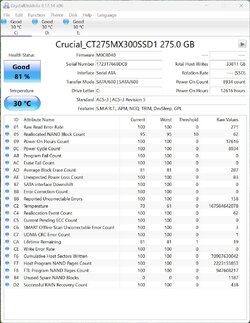
if you set crystal disk to display 10[DEC] you will be able to understand it better

Function>Advanced Feature>Raw values>10[DEC]

then you can read the values in the right pane
Results with set Function/Advanced Feature/Raw Values/10[DEC]

Screenshot 2023-02-18 143630.jpg
 

My Computer My Computer

At a glance

Windows 11 Pro Version 25H2 (OS Build 26200.7...AMD Ryzen 9-3900X 12-Core 3.80Ghz16Gb Corsair DDR4 3466 MhzAsus DUAL-RTX2070-O8G-EVO-V2
OS
Windows 11 Pro Version 25H2 (OS Build 26200.7309)
Computer type
PC/Desktop
Manufacturer/Model
Custom built
CPU
AMD Ryzen 9-3900X 12-Core 3.80Ghz
Motherboard
Asus Prime X370-Pro
Memory
16Gb Corsair DDR4 3466 Mhz
Graphics Card(s)
Asus DUAL-RTX2070-O8G-EVO-V2
Sound Card
On Motherboard
Monitor(s) Displays
ASUS PA329C
Screen Resolution
3840x2160
Hard Drives
Samsung 980 SSD 1TB PCle 3.0x4, NVMe M.2 2280
Hitachi Deskstar 2Tb 7200 RPM 32MB Cache
Seagate Barracuda 500Gb 7200 RPM
PSU
Seasonic X750 Gold
Case
Antec C100
Cooling
CRYORIG H7 Tower Cooler
Keyboard
Macally USB
Mouse
Microsoft Basic Optical Mouse - USB
Internet Speed
350 Mbs
Browser
Firefox
Antivirus
PC Matic

My Computer My Computer

At a glance

Win11 26100.332312th Gen Intel(R) Core(TM) i7-1270P 2.20 GHz16Gb
OS
Win11 26100.3323
Computer type
Laptop
Manufacturer/Model
Dell Latitude 7430
CPU
12th Gen Intel(R) Core(TM) i7-1270P 2.20 GHz
Motherboard
Dell
Memory
16Gb
I have the same motherboard as the OP. I just checked my BIOS settings. By default, AMI NVME support is Disabled. Before you recommend that be Enabled can you prove why it should? I have read online where others have asked that question but nobody could answer it.

Then again it is enabled by default in my UEFI BIOS:

Code:
Setup Question    = AMI Native NVMe Driver Support
Map String    = AMI Native NVMe Driver Support
Token    =10AE    // Do NOT change this line
Offset    =8BB
Width    =01
BIOS Default    =[01]Enabled
Options    =[00]Disabled    // Move "*" to the desired Option
         *[01]Enabled
 

My Computers My Computers

  • At a glance

    Windows 11 Pro x64i9 14900K P/E 5.8/4.5 GHz, cache 5.0 GHz96GB (2x48) G.skill Ripjaws 6800 MT/sAsus ROG Strix 4070 Ti OC
    OS
    Windows 11 Pro x64
    Computer type
    PC/Desktop
    Manufacturer/Model
    📷🔈🎧 🪛 DIY Photoshop/Audio/Game/tinker
    CPU
    i9 14900K P/E 5.8/4.5 GHz, cache 5.0 GHz
    Motherboard
    Asus ROG Maximus Z790 Dark Hero
    Memory
    🐏 96GB (2x48) G.skill Ripjaws 6800 MT/s
    Graphics Card(s)
    Asus ROG Strix 4070 Ti OC
    Sound Card
    🔊Bowers & Wilkins 606 S3 speakers; Audiolabs 7000a integrated amp; RSL 10S Mk2 sub; Creative Pebble Pro Minimilist
    Monitor(s) Displays
    🖥️🖥️ Eizo CG2730 ColorEdge, ViewSonic VP2768
    Screen Resolution
    🖥️🖥️ 2560 x 1440p x 2
    Hard Drives
    💾 WDC SN850X 4TB nvme, SN850 1TB nvme, SK-Hynix 2 TB P41 nvme,. Sabrent USB-C DS-SC5B 5-bay docking station: 6TB WDC Black, 6TB Ironwolf Pro; 2x 2TB WDC Black HDD
    PSU
    ⚡️ 850W Seasonic Vertex PX-850 ATX 3.0/PCI-E 5.0
    Case
    Fractal Design North XL Mesh, Black Walnut
    Cooling
    ❄️ EK Nucleus black 360 AIO w/Phanteks T30-120 fans, 2 Noctua NF-A14 Chromax case fan, 1 T30-120 fan cooling memory
    Keyboard
    ⌨️ Keychron Q3 Max TKL with custom GMK Redsuns Red Samuri keycaps, TX Stabs
    Mouse
    🖱️ Logitech G305 wireless gaming
    Internet Speed
    ⬇️ 500 Mb/s ⬆️ 12 Mb/s
    Browser
    🔥🦊 Firefox
    Antivirus
    🦺 Defender, Macrium Reflect X 🏆
    Other Info
    Phangkey Amaterasu V2 Desk Mat
  • At a glance

    Apple M1
    Computer type
    Laptop
    Manufacturer/Model
    💻 Apple 13" Macbook Pro 2020 (m1)
    CPU
    Apple M1
    Screen Resolution
    2560x1600
    Browser
    Firefox
Then again it is enabled by default in my UEFI BIOS:

Code:
Setup Question    = AMI Native NVMe Driver Support
Map String    = AMI Native NVMe Driver Support
Token    =10AE    // Do NOT change this line
Offset    =8BB
Width    =01
BIOS Default    =[01]Enabled
Options    =[00]Disabled    // Move "*" to the desired Option
         *[01]Enabled
AMI Native NVMe Driver Support is disabled by default on the Asus Prime x370Pro motherboard. So what's your point? I'm waiting for a reason why it needs to be enabled.
 

My Computers My Computers

  • At a glance

    Windows 11 Pro 25H2 (26200.6901)AMD Ryzen 7 6800H with Radeon 680M GPU (486MB...Crucial DDR5-4800 (2400MHz) 32GB (2 x 16GB)NVIDIA RTX 3060 Laptop (6GB RAM)
    OS
    Windows 11 Pro 25H2 (26200.6901)
    Computer type
    Laptop
    Manufacturer/Model
    ASUS TUF Gaming A15 (2022)
    CPU
    AMD Ryzen 7 6800H with Radeon 680M GPU (486MB RAM)
    Memory
    Crucial DDR5-4800 (2400MHz) 32GB (2 x 16GB)
    Graphics Card(s)
    NVIDIA RTX 3060 Laptop (6GB RAM)
    Sound Card
    n/a
    Monitor(s) Displays
    15.6-inch
    Screen Resolution
    1920x1080 300Hz
    Hard Drives
    2 x Samsung 990 Evo Plus (2TB M.2 NVME SSD)
    PSU
    n/a
    Mouse
    Wireless Mouse M510
    Internet Speed
    2100Mbps/300Mbps
    Browser
    Firefox
    Antivirus
    Malwarebytes
  • At a glance

    Windows 11 Pro 25H2 (26200.8246)AMD Ryzen 7 5700X3DG.SKILL Flare X 32GB (2x16GB) DDR4ASUS ROG-STRIX-RTX3060TI-08G-V2-GAMING (RTX 3...
    Operating System
    Windows 11 Pro 25H2 (26200.8246)
    Computer type
    PC/Desktop
    Manufacturer/Model
    Custom build
    CPU
    AMD Ryzen 7 5700X3D
    Motherboard
    ASUS ROG Strix B550-F Gaming WiFi II
    Memory
    G.SKILL Flare X 32GB (2x16GB) DDR4
    Graphics card(s)
    ASUS ROG-STRIX-RTX3060TI-08G-V2-GAMING (RTX 3060-Ti, 8GB RAM)
    Monitor(s) Displays
    Samsung G50D IPS 27"
    Screen Resolution
    1440p/180Hz
    Hard Drives
    SAMSUNG 990 EVO Plus (2TB] M.2 NVME SSD
    SAMSUNG 990 EVO Plus (4TB) M.2 NVME SSD
    PSU
    Corsair RM750x (750 watts)
    Case
    Cooler Master MasterCase 5
    Cooling
    Scythe Mugen 6
    Keyboard
    Logitech K520 (MK540 keyboard/mouse combo)
    Mouse
    Logitech M310 (MK540 keyboard/mouse combo)
    Internet Speed
    2100 Mbps down / 300 Mbps up
    Browser
    Firefox, Edge, Chrome
    Antivirus
    Malwarebytes (Premium)
    Other Info
    ASUS Blu-ray Burner BW-16D1HT (SATA) || Western Digital Easystore 20TB USB 3.0 external hard drive used with Acronis True Image 2025 backup software || HP OfficeJet Pro 6975 Printer/Scanner
AMI Native NVMe Driver Support is disabled by default on the Asus Prime x370Pro motherboard. So what's your point? I'm waiting for a reason why it needs to be enabled.
So you reason that it is disabled by default on YOUR board (maybe that is true). I demonstrated that It is enabled by default on my Hero 13 z590 board. I based my opinion on experience and in how this MUST work. You are the one wanting to make a point - what is it besides your opinion with no justification and apparently wanting to argue?

As far as I know, the setting may be an anachronism, but having it enabled on my board works with two different nvme drivers enabled in Windows. The Windows nvme driver for nvme on the chipset PCI-E is Intel RST for the two drives I have in those m.2 slots, and the Windows nvme driver for my drive on the processor nvme m.2 slot is the standard Windows nvme. With the AMI nvme enabled in the EFI.
 
Last edited:

My Computers My Computers

  • At a glance

    Windows 11 Pro x64i9 14900K P/E 5.8/4.5 GHz, cache 5.0 GHz96GB (2x48) G.skill Ripjaws 6800 MT/sAsus ROG Strix 4070 Ti OC
    OS
    Windows 11 Pro x64
    Computer type
    PC/Desktop
    Manufacturer/Model
    📷🔈🎧 🪛 DIY Photoshop/Audio/Game/tinker
    CPU
    i9 14900K P/E 5.8/4.5 GHz, cache 5.0 GHz
    Motherboard
    Asus ROG Maximus Z790 Dark Hero
    Memory
    🐏 96GB (2x48) G.skill Ripjaws 6800 MT/s
    Graphics Card(s)
    Asus ROG Strix 4070 Ti OC
    Sound Card
    🔊Bowers & Wilkins 606 S3 speakers; Audiolabs 7000a integrated amp; RSL 10S Mk2 sub; Creative Pebble Pro Minimilist
    Monitor(s) Displays
    🖥️🖥️ Eizo CG2730 ColorEdge, ViewSonic VP2768
    Screen Resolution
    🖥️🖥️ 2560 x 1440p x 2
    Hard Drives
    💾 WDC SN850X 4TB nvme, SN850 1TB nvme, SK-Hynix 2 TB P41 nvme,. Sabrent USB-C DS-SC5B 5-bay docking station: 6TB WDC Black, 6TB Ironwolf Pro; 2x 2TB WDC Black HDD
    PSU
    ⚡️ 850W Seasonic Vertex PX-850 ATX 3.0/PCI-E 5.0
    Case
    Fractal Design North XL Mesh, Black Walnut
    Cooling
    ❄️ EK Nucleus black 360 AIO w/Phanteks T30-120 fans, 2 Noctua NF-A14 Chromax case fan, 1 T30-120 fan cooling memory
    Keyboard
    ⌨️ Keychron Q3 Max TKL with custom GMK Redsuns Red Samuri keycaps, TX Stabs
    Mouse
    🖱️ Logitech G305 wireless gaming
    Internet Speed
    ⬇️ 500 Mb/s ⬆️ 12 Mb/s
    Browser
    🔥🦊 Firefox
    Antivirus
    🦺 Defender, Macrium Reflect X 🏆
    Other Info
    Phangkey Amaterasu V2 Desk Mat
  • At a glance

    Apple M1
    Computer type
    Laptop
    Manufacturer/Model
    💻 Apple 13" Macbook Pro 2020 (m1)
    CPU
    Apple M1
    Screen Resolution
    2560x1600
    Browser
    Firefox
Installed Samsung 980 PCIe® 3.0 NVMe SSD 1TB & new 3.0v MB battery. Removed old C drive SSD then clean install of Windows 11 Pro & now running v22H2 (OS Build 22621.1265.

The biggest issue was finding a M2/.4 metric thread screw to secure the drive to the MB. I did have to remove the graphic card for install. I also have a CRYORIG H7 Tower Cooler for the CPU which is huge & hung over the M.2 slot slightly. No big deal.

Did not have to make changes in BIOS for the new NVMe M.2 drive. BIOS seems intuitive. I let the computer in sleep mode for a few hours without issues.

I consider my post solved. Thanks to everyone who offered suggestions.
 

My Computer My Computer

At a glance

Windows 11 Pro Version 25H2 (OS Build 26200.7...AMD Ryzen 9-3900X 12-Core 3.80Ghz16Gb Corsair DDR4 3466 MhzAsus DUAL-RTX2070-O8G-EVO-V2
OS
Windows 11 Pro Version 25H2 (OS Build 26200.7309)
Computer type
PC/Desktop
Manufacturer/Model
Custom built
CPU
AMD Ryzen 9-3900X 12-Core 3.80Ghz
Motherboard
Asus Prime X370-Pro
Memory
16Gb Corsair DDR4 3466 Mhz
Graphics Card(s)
Asus DUAL-RTX2070-O8G-EVO-V2
Sound Card
On Motherboard
Monitor(s) Displays
ASUS PA329C
Screen Resolution
3840x2160
Hard Drives
Samsung 980 SSD 1TB PCle 3.0x4, NVMe M.2 2280
Hitachi Deskstar 2Tb 7200 RPM 32MB Cache
Seagate Barracuda 500Gb 7200 RPM
PSU
Seasonic X750 Gold
Case
Antec C100
Cooling
CRYORIG H7 Tower Cooler
Keyboard
Macally USB
Mouse
Microsoft Basic Optical Mouse - USB
Internet Speed
350 Mbs
Browser
Firefox
Antivirus
PC Matic
Installed Samsung 980 PCIe® 3.0 NVMe SSD 1TB & new 3.0v MB battery. Removed old C drive SSD then clean install of Windows 11 Pro & now running v22H2 (OS Build 22621.1265.

The biggest issue was finding a M2/.4 metric thread screw to secure the drive to the MB. I did have to remove the graphic card for install. I also have a CRYORIG H7 Tower Cooler for the CPU which is huge & hung over the M.2 slot slightly. No big deal.

Did not have to make changes in BIOS for the new NVMe M.2 drive. BIOS seems intuitive. I let the computer in sleep mode for a few hours without issues.

I consider my post solved. Thanks to everyone who offered suggestions.
Good to see you got everything working now. I am surprised you had to look for an M.2 screw. My ASUS Prime X370-Pro motherboard came with this screw. Did you check the box to make sure there wasn't one in it?
 

My Computers My Computers

  • At a glance

    Windows 11 Pro 25H2 (26200.6901)AMD Ryzen 7 6800H with Radeon 680M GPU (486MB...Crucial DDR5-4800 (2400MHz) 32GB (2 x 16GB)NVIDIA RTX 3060 Laptop (6GB RAM)
    OS
    Windows 11 Pro 25H2 (26200.6901)
    Computer type
    Laptop
    Manufacturer/Model
    ASUS TUF Gaming A15 (2022)
    CPU
    AMD Ryzen 7 6800H with Radeon 680M GPU (486MB RAM)
    Memory
    Crucial DDR5-4800 (2400MHz) 32GB (2 x 16GB)
    Graphics Card(s)
    NVIDIA RTX 3060 Laptop (6GB RAM)
    Sound Card
    n/a
    Monitor(s) Displays
    15.6-inch
    Screen Resolution
    1920x1080 300Hz
    Hard Drives
    2 x Samsung 990 Evo Plus (2TB M.2 NVME SSD)
    PSU
    n/a
    Mouse
    Wireless Mouse M510
    Internet Speed
    2100Mbps/300Mbps
    Browser
    Firefox
    Antivirus
    Malwarebytes
  • At a glance

    Windows 11 Pro 25H2 (26200.8246)AMD Ryzen 7 5700X3DG.SKILL Flare X 32GB (2x16GB) DDR4ASUS ROG-STRIX-RTX3060TI-08G-V2-GAMING (RTX 3...
    Operating System
    Windows 11 Pro 25H2 (26200.8246)
    Computer type
    PC/Desktop
    Manufacturer/Model
    Custom build
    CPU
    AMD Ryzen 7 5700X3D
    Motherboard
    ASUS ROG Strix B550-F Gaming WiFi II
    Memory
    G.SKILL Flare X 32GB (2x16GB) DDR4
    Graphics card(s)
    ASUS ROG-STRIX-RTX3060TI-08G-V2-GAMING (RTX 3060-Ti, 8GB RAM)
    Monitor(s) Displays
    Samsung G50D IPS 27"
    Screen Resolution
    1440p/180Hz
    Hard Drives
    SAMSUNG 990 EVO Plus (2TB] M.2 NVME SSD
    SAMSUNG 990 EVO Plus (4TB) M.2 NVME SSD
    PSU
    Corsair RM750x (750 watts)
    Case
    Cooler Master MasterCase 5
    Cooling
    Scythe Mugen 6
    Keyboard
    Logitech K520 (MK540 keyboard/mouse combo)
    Mouse
    Logitech M310 (MK540 keyboard/mouse combo)
    Internet Speed
    2100 Mbps down / 300 Mbps up
    Browser
    Firefox, Edge, Chrome
    Antivirus
    Malwarebytes (Premium)
    Other Info
    ASUS Blu-ray Burner BW-16D1HT (SATA) || Western Digital Easystore 20TB USB 3.0 external hard drive used with Acronis True Image 2025 backup software || HP OfficeJet Pro 6975 Printer/Scanner
AMI Native NVMe Driver Support
Googled it.

Highlights:
The most likely picture is as follows. NVMe drives are fairly new and not as common as conventional SSD SATA drives. This is why the bios may not see the NVMe drive when the PC is switched on, because more often than not, the boot drive is a regular HDD or SSD. Therefore, if you have the operating system installed on NVMe, I think you should enable this option.
This option can have two meanings - either it activates NVMe support in general or it only activates support in the bios, and then, after booting the operating system, the NVMe drive will appear anyway. Why is this needed? If AMI Native NVMe Driver Support is disabled - the bios can just boot a bit faster and the NVMe drive will be initialized already during OS boot.
Should it be enabled or not? If the system works stable - you can leave it off. If you bought a new NVMe and are planning to install it in your PC, I think you should turn it on.
 

My Computer My Computer

At a glance

Microsoft Windows 11 HomeIntel Core i5-13490F2 x 16 Patriot Memory (PDP Systems) PSD516G56...GIGABYTE GeForce RTX 4070 WINDFORCE OC 12G (G...
OS
Microsoft Windows 11 Home
Computer type
PC/Desktop
Manufacturer/Model
MSI MS-7D98
CPU
Intel Core i5-13490F
Motherboard
MSI B760 GAMING PLUS WIFI
Memory
2 x 16 Patriot Memory (PDP Systems) PSD516G560081 6400MT (32-37-37-74); 1.35V)
Graphics Card(s)
GIGABYTE GeForce RTX 4070 WINDFORCE OC 12G (GV-N4070WF3OC-12GD)
Sound Card
Bluetooth Аудио
Monitor(s) Displays
INNOCN 15K1F
Screen Resolution
1920 x 1080
Hard Drives
WD_BLACK SN770 250GB
KINGSTON SNV2S1000G (ELFK0S.6)
PSU
Thermaltake Toughpower GF3 1000W
Case
CG560 - DeepCool
Cooling
ID-COOLING SE-224-XTS / 2 x 140Mm Fan - rear and top; 3 x 120Mm - front
Keyboard
Corsair K70 RGB TKL
Mouse
Corsair KATAR PRO XT
Internet Speed
100 Mbps
Browser
Firefox
Antivirus
Microsoft Defender Antivirus
Other Info
https://www.userbenchmark.com/UserRun/66553205
Good to see you got everything working now. I am surprised you had to look for an M.2 screw. My ASUS Prime X370-Pro motherboard came with this screw. Did you check the box to make sure there wasn't one in it?
I installed the MB 5 years ago & keep additional hardware in the original box. I searched high & low but never found a match. Got it working, that's what matters.
 

My Computer My Computer

At a glance

Windows 11 Pro Version 25H2 (OS Build 26200.7...AMD Ryzen 9-3900X 12-Core 3.80Ghz16Gb Corsair DDR4 3466 MhzAsus DUAL-RTX2070-O8G-EVO-V2
OS
Windows 11 Pro Version 25H2 (OS Build 26200.7309)
Computer type
PC/Desktop
Manufacturer/Model
Custom built
CPU
AMD Ryzen 9-3900X 12-Core 3.80Ghz
Motherboard
Asus Prime X370-Pro
Memory
16Gb Corsair DDR4 3466 Mhz
Graphics Card(s)
Asus DUAL-RTX2070-O8G-EVO-V2
Sound Card
On Motherboard
Monitor(s) Displays
ASUS PA329C
Screen Resolution
3840x2160
Hard Drives
Samsung 980 SSD 1TB PCle 3.0x4, NVMe M.2 2280
Hitachi Deskstar 2Tb 7200 RPM 32MB Cache
Seagate Barracuda 500Gb 7200 RPM
PSU
Seasonic X750 Gold
Case
Antec C100
Cooling
CRYORIG H7 Tower Cooler
Keyboard
Macally USB
Mouse
Microsoft Basic Optical Mouse - USB
Internet Speed
350 Mbs
Browser
Firefox
Antivirus
PC Matic
Googled it.

Highlights:
The most likely picture is as follows. NVMe drives are fairly new and not as common as conventional SSD SATA drives. This is why the bios may not see the NVMe drive when the PC is switched on, because more often than not, the boot drive is a regular HDD or SSD. Therefore, if you have the operating system installed on NVMe, I think you should enable this option.
This option can have two meanings - either it activates NVMe support in general or it only activates support in the bios, and then, after booting the operating system, the NVMe drive will appear anyway. Why is this needed? If AMI Native NVMe Driver Support is disabled - the bios can just boot a bit faster and the NVMe drive will be initialized already during OS boot.
Should it be enabled or not? If the system works stable - you can leave it off. If you bought a new NVMe and are planning to install it in your PC, I think you should turn it on.
As I said in post #47, "Did not have to make changes in BIOS for the new NVMe M.2 drive. BIOS seems intuitive. I let the computer in sleep mode for a few hours without issues."
As I had some odd issues with the Windows Insider version of Win 11 Pro & one recommendation was to replace the MB 3v battery. Another was to update BIOS to the latest version. Many here said my SSD driver was probably okay but, as moving back to the stable version of Windows 11 was to do a clean install, I decided to go with the much faster M.2 drive.
Replacing the 3v battery meant the need to reset BIOS. When booting into BIOS for the install, the M.2 was already found & set. I did nothing more in BIOS & haven't since the install.
 

My Computer My Computer

At a glance

Windows 11 Pro Version 25H2 (OS Build 26200.7...AMD Ryzen 9-3900X 12-Core 3.80Ghz16Gb Corsair DDR4 3466 MhzAsus DUAL-RTX2070-O8G-EVO-V2
OS
Windows 11 Pro Version 25H2 (OS Build 26200.7309)
Computer type
PC/Desktop
Manufacturer/Model
Custom built
CPU
AMD Ryzen 9-3900X 12-Core 3.80Ghz
Motherboard
Asus Prime X370-Pro
Memory
16Gb Corsair DDR4 3466 Mhz
Graphics Card(s)
Asus DUAL-RTX2070-O8G-EVO-V2
Sound Card
On Motherboard
Monitor(s) Displays
ASUS PA329C
Screen Resolution
3840x2160
Hard Drives
Samsung 980 SSD 1TB PCle 3.0x4, NVMe M.2 2280
Hitachi Deskstar 2Tb 7200 RPM 32MB Cache
Seagate Barracuda 500Gb 7200 RPM
PSU
Seasonic X750 Gold
Case
Antec C100
Cooling
CRYORIG H7 Tower Cooler
Keyboard
Macally USB
Mouse
Microsoft Basic Optical Mouse - USB
Internet Speed
350 Mbs
Browser
Firefox
Antivirus
PC Matic
As I said in post #47, "Did not have to make changes in BIOS for the new NVMe M.2 drive. BIOS seems intuitive. I let the computer in sleep mode for a few hours without issues."
As I had some odd issues with the Windows Insider version of Win 11 Pro & one recommendation was to replace the MB 3v battery. Another was to update BIOS to the latest version. Many here said my SSD driver was probably okay but, as moving back to the stable version of Windows 11 was to do a clean install, I decided to go with the much faster M.2 drive.
Replacing the 3v battery meant the need to reset BIOS. When booting into BIOS for the install, the M.2 was already found & set. I did nothing more in BIOS & haven't since the install.
After you changed the battery did you check your BIOS settings? One thing for sure you need to do is set the RAM settings to D.O.C.P.. Otherwise the RAM will run at the default 2133MHz. Note this motherboard uses D.O.C.P. instead of XMP.
 

My Computers My Computers

  • At a glance

    Windows 11 Pro 25H2 (26200.6901)AMD Ryzen 7 6800H with Radeon 680M GPU (486MB...Crucial DDR5-4800 (2400MHz) 32GB (2 x 16GB)NVIDIA RTX 3060 Laptop (6GB RAM)
    OS
    Windows 11 Pro 25H2 (26200.6901)
    Computer type
    Laptop
    Manufacturer/Model
    ASUS TUF Gaming A15 (2022)
    CPU
    AMD Ryzen 7 6800H with Radeon 680M GPU (486MB RAM)
    Memory
    Crucial DDR5-4800 (2400MHz) 32GB (2 x 16GB)
    Graphics Card(s)
    NVIDIA RTX 3060 Laptop (6GB RAM)
    Sound Card
    n/a
    Monitor(s) Displays
    15.6-inch
    Screen Resolution
    1920x1080 300Hz
    Hard Drives
    2 x Samsung 990 Evo Plus (2TB M.2 NVME SSD)
    PSU
    n/a
    Mouse
    Wireless Mouse M510
    Internet Speed
    2100Mbps/300Mbps
    Browser
    Firefox
    Antivirus
    Malwarebytes
  • At a glance

    Windows 11 Pro 25H2 (26200.8246)AMD Ryzen 7 5700X3DG.SKILL Flare X 32GB (2x16GB) DDR4ASUS ROG-STRIX-RTX3060TI-08G-V2-GAMING (RTX 3...
    Operating System
    Windows 11 Pro 25H2 (26200.8246)
    Computer type
    PC/Desktop
    Manufacturer/Model
    Custom build
    CPU
    AMD Ryzen 7 5700X3D
    Motherboard
    ASUS ROG Strix B550-F Gaming WiFi II
    Memory
    G.SKILL Flare X 32GB (2x16GB) DDR4
    Graphics card(s)
    ASUS ROG-STRIX-RTX3060TI-08G-V2-GAMING (RTX 3060-Ti, 8GB RAM)
    Monitor(s) Displays
    Samsung G50D IPS 27"
    Screen Resolution
    1440p/180Hz
    Hard Drives
    SAMSUNG 990 EVO Plus (2TB] M.2 NVME SSD
    SAMSUNG 990 EVO Plus (4TB) M.2 NVME SSD
    PSU
    Corsair RM750x (750 watts)
    Case
    Cooler Master MasterCase 5
    Cooling
    Scythe Mugen 6
    Keyboard
    Logitech K520 (MK540 keyboard/mouse combo)
    Mouse
    Logitech M310 (MK540 keyboard/mouse combo)
    Internet Speed
    2100 Mbps down / 300 Mbps up
    Browser
    Firefox, Edge, Chrome
    Antivirus
    Malwarebytes (Premium)
    Other Info
    ASUS Blu-ray Burner BW-16D1HT (SATA) || Western Digital Easystore 20TB USB 3.0 external hard drive used with Acronis True Image 2025 backup software || HP OfficeJet Pro 6975 Printer/Scanner
After you changed the battery did you check your BIOS settings? One thing for sure you need to do is set the RAM settings to D.O.C.P.. Otherwise the RAM will run at the default 2133MHz. Note this motherboard uses D.O.C.P. instead of XMP.
I went through every BIOS setting & took a photo of each setting. Then replaced the 3v & installed the M.2. Back into BIOS I updated every setting in BIOS including D.O.P.C. before moving on to the clean install.
 
Last edited:

My Computer My Computer

At a glance

Windows 11 Pro Version 25H2 (OS Build 26200.7...AMD Ryzen 9-3900X 12-Core 3.80Ghz16Gb Corsair DDR4 3466 MhzAsus DUAL-RTX2070-O8G-EVO-V2
OS
Windows 11 Pro Version 25H2 (OS Build 26200.7309)
Computer type
PC/Desktop
Manufacturer/Model
Custom built
CPU
AMD Ryzen 9-3900X 12-Core 3.80Ghz
Motherboard
Asus Prime X370-Pro
Memory
16Gb Corsair DDR4 3466 Mhz
Graphics Card(s)
Asus DUAL-RTX2070-O8G-EVO-V2
Sound Card
On Motherboard
Monitor(s) Displays
ASUS PA329C
Screen Resolution
3840x2160
Hard Drives
Samsung 980 SSD 1TB PCle 3.0x4, NVMe M.2 2280
Hitachi Deskstar 2Tb 7200 RPM 32MB Cache
Seagate Barracuda 500Gb 7200 RPM
PSU
Seasonic X750 Gold
Case
Antec C100
Cooling
CRYORIG H7 Tower Cooler
Keyboard
Macally USB
Mouse
Microsoft Basic Optical Mouse - USB
Internet Speed
350 Mbs
Browser
Firefox
Antivirus
PC Matic
Make sure you have a magnetized screw driver. Just upgraded an SSD and that is the only way to put the
screw back in.
 

My Computers My Computers

  • At a glance

    Windows 11 Proi510210u16g - 16g - 8g -8gCPU
    OS
    Windows 11 Pro
    Computer type
    PC/Desktop
    Manufacturer/Model
    Intel NUC 10i5FNH - Lenovo A510 desktop -- Lenovo Laptop -- Acer laptop
    CPU
    i510210u
    Motherboard
    Intel
    Memory
    16g - 16g - 8g -8g
    Graphics Card(s)
    CPU
    Monitor(s) Displays
    acer 21 inch
    Screen Resolution
    1920x1080
    Hard Drives
    500g ssd
    500g spinner
    Keyboard
    cheap from Walmart
    Mouse
    cheap from Walmart
    Internet Speed
    109mbs
    Browser
    Chrome + FireFox+Waterfox+Brave+Edge
    Antivirus
    Emsisoft + Malwarebytes
  • At a glance

    Win 10 ProI516gcpu
    Operating System
    Win 10 Pro
    Computer type
    PC/Desktop
    Manufacturer/Model
    Lenovo 510
    CPU
    I5
    Motherboard
    Lenovo
    Memory
    16g
    Graphics card(s)
    cpu
    Monitor(s) Displays
    20 inch
    Hard Drives
    SSD
    Internet Speed
    109mbs
    Antivirus
    Emsisoft + Malwarebytes Free
Make sure you have a magnetized screw driver. Just upgraded an SSD and that is the only way to put the
screw back in.
Or get an Asus motherboard. The newer ones use no screws for the M.2 drives. (A little cam is used instead.)
 

My Computers My Computers

  • At a glance

    Windows 11 26200.8728Amd Threadripper 7970X128GB (4 X 32) G.Skill DDR5 6400 (RDIMM)Gigabyte RTX 4090 OC
    OS
    Windows 11 26200.8728
    Computer type
    PC/Desktop
    Manufacturer/Model
    homebuilt
    CPU
    Amd Threadripper 7970X
    Motherboard
    Gigabyte TRX50 Aero D Rev. 1.0
    Memory
    128GB (4 X 32) G.Skill DDR5 6400 (RDIMM)
    Graphics Card(s)
    Gigabyte RTX 4090 OC
    Sound Card
    none (USB to speakers), Realtek
    Monitor(s) Displays
    Innocn 32" OLED
    Screen Resolution
    3840 X 2160 @ 60Hz
    Hard Drives
    Crucial T700 2TB M.2 NVME SSD
    WD 4TB Blue SATA SSD
    Seagate 18TB IronWolf Pro
    PSU
    BeQuiet! Straight Power 12 1500W
    Case
    Lian Li 011 Dynamic Evo XL
    Cooling
    SilverStone Technology XE360-TR5, with 3 Phanteks T30 fans
    Keyboard
    Cherry KC 500 MX LP (mechanical)
    Mouse
    Logitech M500s (wired)
    Internet Speed
    2000/250 Mbps (down/up)
    Other Info
    xFinity gateway
  • At a glance

    windows 11 26200.8728Intel I9-13900K64GB G.Skill DDR5-6000Gigabyte RTX 3090 ti
    Operating System
    windows 11 26200.8728
    Computer type
    PC/Desktop
    Manufacturer/Model
    homebuilt
    CPU
    Intel I9-13900K
    Motherboard
    Asus RoG Strix Z690-E
    Memory
    64GB G.Skill DDR5-6000
    Graphics card(s)
    Gigabyte RTX 3090 ti
    Sound Card
    built in Realtek
    Monitor(s) Displays
    Philips 27E1N8900 27" OLED
    Screen Resolution
    3840 X 2160 @60Hz
    Hard Drives
    WDC SN850 1TB
    8TB Seagate Ironwolf
    4TB Seagate Ironwolf
    PSU
    eVGA SuperNOVA 1300 GT
    Case
    Lian Li 011 Dynamic Evo
    Cooling
    Corsair iCUE H150i ELITE CAPELLIX Liquid CPU Cooler
    Keyboard
    Cherry Streaming (wired)
    Mouse
    Logitech M500s (wired)
MSI motherboards too!
 

My Computers My Computers

  • At a glance

    Windows 11 Pro 23H2Intel i7-13700KCorsair Vengence 5600 - 32GBMSI RTX3060 Ventus 2x 12GB
    OS
    Windows 11 Pro 23H2
    Computer type
    PC/Desktop
    Manufacturer/Model
    Self Built
    CPU
    Intel i7-13700K
    Motherboard
    MSI PRO Z790-A WiFi
    Memory
    Corsair Vengence 5600 - 32GB
    Graphics Card(s)
    MSI RTX3060 Ventus 2x 12GB
    Sound Card
    On board - Realtek ALC4080
    Monitor(s) Displays
    LG 27GL850
    Screen Resolution
    2560 x 1440
    Hard Drives
    WD Black SN850X Nvme - 1TB
    WD Black 6TB HDD 256MB cache CMR
    WD Black 6TB HDD 128MB cache CMR
    PSU
    Corsair RM850x
    Case
    Fractal Design - Define 7
    Cooling
    Deepcool AK400
    Keyboard
    MS KC0405
    Mouse
    MS Model 1113 / MS Wireless Mobile Mouse 3500
    Internet Speed
    940 Mbps
    Browser
    Firefox
    Antivirus
    Windows Security
    Other Info
    I have a Case Speaker!
    I have a Blueray Disk drive!
  • At a glance

    Windows 10 Pro 22H2i7-9700KCorsair Vengence 32GBEVGA GTX1060
    Operating System
    Windows 10 Pro 22H2
    Computer type
    PC/Desktop
    Manufacturer/Model
    Self Built
    CPU
    i7-9700K
    Motherboard
    Asus Prime Z390-A
    Memory
    Corsair Vengence 32GB
    Graphics card(s)
    EVGA GTX1060
    Sound Card
    On Board
    Monitor(s) Displays
    Acer 27"
    Screen Resolution
    1920 x 1080
    Hard Drives
    WD Black Nvme 500GB
    Toshiba X300 5TB
    PSU
    Corsair RM850x
    Case
    Antec P101 Silent
    Cooling
    CoolerMaster Hyper T4
    Keyboard
    MS KC0405
    Mouse
    Logitec M-U0007
    Internet Speed
    940 Mbps
    Browser
    Firefox
    Antivirus
    Avast!
    Other Info
    I have a Case Speaker!
Make sure you have a magnetized screw driver. Just upgraded an SSD and that is the only way to put the
screw back in.

If you don't, make one. All you need is a magnet. Strike the screw driver on the magnet in one direction several times. Instant magnetized screw driver. A lot of LED flashlights nowadays have a magnet on one end.

Or get an Asus motherboard. The newer ones use no screws for the M.2 drives. (A little cam is used instead.)

My Asus mobo uses those little cams, but the heat sinks use those dang little screws.
 

My Computers My Computers

  • At a glance

    Win 11 Pro 25H2 26200.8655Intel® Core™ i7-14700KG.SKILL Ripjaws S5 Series 64GB (2 x 32GB) DDR5ASUS GeForce RTX 4070 Super 12GB
    OS
    Win 11 Pro 25H2 26200.8655
    Computer type
    PC/Desktop
    Manufacturer/Model
    Self Built
    CPU
    Intel® Core™ i7-14700K
    Motherboard
    ASUS TUF Z690-PLUS WIFI BIOS 4505 11/29/25
    Memory
    G.SKILL Ripjaws S5 Series 64GB (2 x 32GB) DDR5
    Graphics Card(s)
    ASUS GeForce RTX 4070 Super 12GB
    Sound Card
    Sound Blaster AE-5 Plus
    Monitor(s) Displays
    ASUS TUF Gaming 27" 2K HDR Gaming
    Screen Resolution
    2560 x 1440
    Hard Drives
    Samsung 990 Pro 1TB NVMe (Win 11 25H2)
    SK hynix P41 500GB NVMe 25H2 DEV/Games
    SK hynix P41 2TB NVMe (x3)
    Crucial P3 Plus 4TB
    PSU
    Corsair RM850x Shift
    Case
    Antec Dark Phantom DP502 FLUX
    Cooling
    Corsair Nautilus 360 RS AIO
    Keyboard
    Logitech MK 320
    Mouse
    Razer Basilisk V3
    Internet Speed
    750Mbs
    Browser
    Firefox
    Antivirus
    Winows Security
    Other Info
    MR 8.1 Home
  • At a glance

    Win 11 Pro 25H2 26200.8655Intel Core i7-11700F64 GB DDR4MSI GeForce RTX 3060 Ventus 2X 12GB
    Operating System
    Win 11 Pro 25H2 26200.8655
    Computer type
    PC/Desktop
    Manufacturer/Model
    Self Built
    CPU
    Intel Core i7-11700F
    Motherboard
    Asus TUF Gaming Z590 Plus WiFi (BIOS 2803)
    Memory
    64 GB DDR4
    Graphics card(s)
    MSI GeForce RTX 3060 Ventus 2X 12GB
    Sound Card
    SoundBlaster Audigy Fx V2
    Monitor(s) Displays
    Samsung F27T350
    Screen Resolution
    1920x1080
    Hard Drives
    Samsung 980 Pro 1TB
    Samsung 970 EVO Plus 2TB
    Samsung 870 EVO 500GB SSD
    PSU
    Corsair HX750
    Case
    Cougar MX330-G Window
    Cooling
    Thermalright Frozen Edge 240 Black AIO
    Internet Speed
    350Mbps
    Browser
    Firefox
    Antivirus
    Windows Security
  • System Three
    Win 11 Pro 25H2 26200.8655
    ASUS PRIME Z370-P II BIOS 3004 7/12/21
    Intel Core i7-8700 CPU @ 3.20GHz
    32GB DDR4 RAM (4x8)
    iGPU Intel UHD Graphics 630
    Mid-Tower Desktop
If you don't, make one. All you need is a magnet. Strike the screw driver on the magnet in one direction several times. Instant magnetized screw driver. A lot of LED flashlights nowadays have a magnet on one end.


My Asus mobo uses those little cams, but the heat sinks use those dang little screws.
The screws on my M.2 heatsink are captive, if I don't unscrew them too far.

I have a magnetic retriever that I've had to use, on occasion. And, yes, a magnetic screwdriver can be very handy.
 

My Computers My Computers

  • At a glance

    Windows 11 26200.8728Amd Threadripper 7970X128GB (4 X 32) G.Skill DDR5 6400 (RDIMM)Gigabyte RTX 4090 OC
    OS
    Windows 11 26200.8728
    Computer type
    PC/Desktop
    Manufacturer/Model
    homebuilt
    CPU
    Amd Threadripper 7970X
    Motherboard
    Gigabyte TRX50 Aero D Rev. 1.0
    Memory
    128GB (4 X 32) G.Skill DDR5 6400 (RDIMM)
    Graphics Card(s)
    Gigabyte RTX 4090 OC
    Sound Card
    none (USB to speakers), Realtek
    Monitor(s) Displays
    Innocn 32" OLED
    Screen Resolution
    3840 X 2160 @ 60Hz
    Hard Drives
    Crucial T700 2TB M.2 NVME SSD
    WD 4TB Blue SATA SSD
    Seagate 18TB IronWolf Pro
    PSU
    BeQuiet! Straight Power 12 1500W
    Case
    Lian Li 011 Dynamic Evo XL
    Cooling
    SilverStone Technology XE360-TR5, with 3 Phanteks T30 fans
    Keyboard
    Cherry KC 500 MX LP (mechanical)
    Mouse
    Logitech M500s (wired)
    Internet Speed
    2000/250 Mbps (down/up)
    Other Info
    xFinity gateway
  • At a glance

    windows 11 26200.8728Intel I9-13900K64GB G.Skill DDR5-6000Gigabyte RTX 3090 ti
    Operating System
    windows 11 26200.8728
    Computer type
    PC/Desktop
    Manufacturer/Model
    homebuilt
    CPU
    Intel I9-13900K
    Motherboard
    Asus RoG Strix Z690-E
    Memory
    64GB G.Skill DDR5-6000
    Graphics card(s)
    Gigabyte RTX 3090 ti
    Sound Card
    built in Realtek
    Monitor(s) Displays
    Philips 27E1N8900 27" OLED
    Screen Resolution
    3840 X 2160 @60Hz
    Hard Drives
    WDC SN850 1TB
    8TB Seagate Ironwolf
    4TB Seagate Ironwolf
    PSU
    eVGA SuperNOVA 1300 GT
    Case
    Lian Li 011 Dynamic Evo
    Cooling
    Corsair iCUE H150i ELITE CAPELLIX Liquid CPU Cooler
    Keyboard
    Cherry Streaming (wired)
    Mouse
    Logitech M500s (wired)
I got my screwdriver magnetized which made it very easy to insert the screw. I had nothing to magnetize it with
until a friend gave me an electrical tool to do it.
 

My Computers My Computers

  • At a glance

    Windows 11 Proi510210u16g - 16g - 8g -8gCPU
    OS
    Windows 11 Pro
    Computer type
    PC/Desktop
    Manufacturer/Model
    Intel NUC 10i5FNH - Lenovo A510 desktop -- Lenovo Laptop -- Acer laptop
    CPU
    i510210u
    Motherboard
    Intel
    Memory
    16g - 16g - 8g -8g
    Graphics Card(s)
    CPU
    Monitor(s) Displays
    acer 21 inch
    Screen Resolution
    1920x1080
    Hard Drives
    500g ssd
    500g spinner
    Keyboard
    cheap from Walmart
    Mouse
    cheap from Walmart
    Internet Speed
    109mbs
    Browser
    Chrome + FireFox+Waterfox+Brave+Edge
    Antivirus
    Emsisoft + Malwarebytes
  • At a glance

    Win 10 ProI516gcpu
    Operating System
    Win 10 Pro
    Computer type
    PC/Desktop
    Manufacturer/Model
    Lenovo 510
    CPU
    I5
    Motherboard
    Lenovo
    Memory
    16g
    Graphics card(s)
    cpu
    Monitor(s) Displays
    20 inch
    Hard Drives
    SSD
    Internet Speed
    109mbs
    Antivirus
    Emsisoft + Malwarebytes Free

Latest Support Threads

Back
Top Bottom