Solved Macrium, Imaging the C-Drive


Unless you are replacing the drive, you want to use disc imaging, not cloning. Imaging allows you to recover all or part of the image. Make sure you set the advanced options to validate. And yes, set up rescue media on your boot drive.
1) Why, if I'm replacing a drive, should I use cloning and not imaging?
2) How does Imaging allow me to recover...part of the image? (does it have anything to do with setting the advanced options to 'validate')
3) a) How do I set up rescue media and for what (if the image goes awry?)
b) Why on the boot drive if that's the drive I'm going to write over?
 

My Computers My Computers

  • At a glance

    Win11 Pro16GB2.30 gigahertz Intel 11th Gen Core i7-11800H
    OS
    Win11 Pro
    Computer type
    PC/Desktop
    Manufacturer/Model
    Beelink
    Memory
    16GB
    Graphics Card(s)
    2.30 gigahertz Intel 11th Gen Core i7-11800H
    Sound Card
    Intel® Smart Sound Technology for USB Audio
    Monitor(s) Displays
    laptop (small) and 1 or 2 external monitors
    Screen Resolution
    -
    Hard Drives
    PC711 NVMe SK hynix 1TB 1.02 TB NVMe ANB2N582412102F0G_0001
    PSU
    -
    Case
    Laptop
    Cooling
    fan
    Keyboard
    External!
    Mouse
    External
    Internet Speed
    -
    Browser
    Chrome (Chrome profiles), Firefox (Bookmark Search Plus2), Edge (History page), Opera (annoying)
    Antivirus
    WinDefender
    Other Info
    Win11 Home 23H2 22631.3447
  • At a glance

    Win108068 MB Usable Installed Memory2.30 gigahertz Intel 11th Gen Core i7-11800H
    Operating System
    Win10
    Computer type
    PC/Desktop
    Manufacturer/Model
    self
    Motherboard
    Gigabyte B75M-D3H
    Memory
    8068 MB Usable Installed Memory
    Graphics card(s)
    2.30 gigahertz Intel 11th Gen Core i7-11800H
    Sound Card
    Intel® Smart Sound Technology for USB Audio
    Monitor(s) Displays
    3 Displays
    Screen Resolution
    n/a
    Hard Drives
    SSD and others (internal and external)
    Case
    Desktop
    Cooling
    Fan
    Keyboard
    External
    Mouse
    External
    Browser
    Chrome, Firefox, Tor, Brave, Opera, etc.
    Antivirus
    Win Defender
    Other Info
    Win10 & unfortunately OneDrive: Can't completely rid myself of this!!
How to use backup software...

1. When everything is working perfectly... make a full Windows backup.
2. Then, if something breaks... restore from the latest backup.
3. Then... try "whatever you were doing" a different way. If it still breaks Windows, then... go to step #2.
4. Repeat until you find a way to get "whatever you were doing", to work properly, then go to step #1.


Really.... that's all you need to do, to be able to use Windows, and NOT have problems all the time. :-)

this is where it's at.
 

My Computers My Computers

  • At a glance

    Win11 Pro16GB2.30 gigahertz Intel 11th Gen Core i7-11800H
    OS
    Win11 Pro
    Computer type
    PC/Desktop
    Manufacturer/Model
    Beelink
    Memory
    16GB
    Graphics Card(s)
    2.30 gigahertz Intel 11th Gen Core i7-11800H
    Sound Card
    Intel® Smart Sound Technology for USB Audio
    Monitor(s) Displays
    laptop (small) and 1 or 2 external monitors
    Screen Resolution
    -
    Hard Drives
    PC711 NVMe SK hynix 1TB 1.02 TB NVMe ANB2N582412102F0G_0001
    PSU
    -
    Case
    Laptop
    Cooling
    fan
    Keyboard
    External!
    Mouse
    External
    Internet Speed
    -
    Browser
    Chrome (Chrome profiles), Firefox (Bookmark Search Plus2), Edge (History page), Opera (annoying)
    Antivirus
    WinDefender
    Other Info
    Win11 Home 23H2 22631.3447
  • At a glance

    Win108068 MB Usable Installed Memory2.30 gigahertz Intel 11th Gen Core i7-11800H
    Operating System
    Win10
    Computer type
    PC/Desktop
    Manufacturer/Model
    self
    Motherboard
    Gigabyte B75M-D3H
    Memory
    8068 MB Usable Installed Memory
    Graphics card(s)
    2.30 gigahertz Intel 11th Gen Core i7-11800H
    Sound Card
    Intel® Smart Sound Technology for USB Audio
    Monitor(s) Displays
    3 Displays
    Screen Resolution
    n/a
    Hard Drives
    SSD and others (internal and external)
    Case
    Desktop
    Cooling
    Fan
    Keyboard
    External
    Mouse
    External
    Browser
    Chrome, Firefox, Tor, Brave, Opera, etc.
    Antivirus
    Win Defender
    Other Info
    Win10 & unfortunately OneDrive: Can't completely rid myself of this!!
I am currently trying to figure out how to, according to Macrium, create a recovery thumb drive.
And it's not obvious...
 

My Computers My Computers

  • At a glance

    Win11 Pro16GB2.30 gigahertz Intel 11th Gen Core i7-11800H
    OS
    Win11 Pro
    Computer type
    PC/Desktop
    Manufacturer/Model
    Beelink
    Memory
    16GB
    Graphics Card(s)
    2.30 gigahertz Intel 11th Gen Core i7-11800H
    Sound Card
    Intel® Smart Sound Technology for USB Audio
    Monitor(s) Displays
    laptop (small) and 1 or 2 external monitors
    Screen Resolution
    -
    Hard Drives
    PC711 NVMe SK hynix 1TB 1.02 TB NVMe ANB2N582412102F0G_0001
    PSU
    -
    Case
    Laptop
    Cooling
    fan
    Keyboard
    External!
    Mouse
    External
    Internet Speed
    -
    Browser
    Chrome (Chrome profiles), Firefox (Bookmark Search Plus2), Edge (History page), Opera (annoying)
    Antivirus
    WinDefender
    Other Info
    Win11 Home 23H2 22631.3447
  • At a glance

    Win108068 MB Usable Installed Memory2.30 gigahertz Intel 11th Gen Core i7-11800H
    Operating System
    Win10
    Computer type
    PC/Desktop
    Manufacturer/Model
    self
    Motherboard
    Gigabyte B75M-D3H
    Memory
    8068 MB Usable Installed Memory
    Graphics card(s)
    2.30 gigahertz Intel 11th Gen Core i7-11800H
    Sound Card
    Intel® Smart Sound Technology for USB Audio
    Monitor(s) Displays
    3 Displays
    Screen Resolution
    n/a
    Hard Drives
    SSD and others (internal and external)
    Case
    Desktop
    Cooling
    Fan
    Keyboard
    External
    Mouse
    External
    Browser
    Chrome, Firefox, Tor, Brave, Opera, etc.
    Antivirus
    Win Defender
    Other Info
    Win10 & unfortunately OneDrive: Can't completely rid myself of this!!
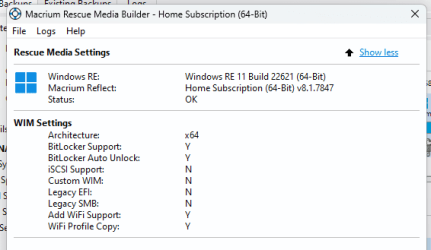
Correction, 1708319973072.png
1708320159347.png
All the stick drives I have for Rescue Media are rejected.
After formatting them (from FAT to NTFS) all 8 of my thumb drives are rejected for being too small.

What size stick is required and what format?
 

My Computers My Computers

  • At a glance

    Win11 Pro16GB2.30 gigahertz Intel 11th Gen Core i7-11800H
    OS
    Win11 Pro
    Computer type
    PC/Desktop
    Manufacturer/Model
    Beelink
    Memory
    16GB
    Graphics Card(s)
    2.30 gigahertz Intel 11th Gen Core i7-11800H
    Sound Card
    Intel® Smart Sound Technology for USB Audio
    Monitor(s) Displays
    laptop (small) and 1 or 2 external monitors
    Screen Resolution
    -
    Hard Drives
    PC711 NVMe SK hynix 1TB 1.02 TB NVMe ANB2N582412102F0G_0001
    PSU
    -
    Case
    Laptop
    Cooling
    fan
    Keyboard
    External!
    Mouse
    External
    Internet Speed
    -
    Browser
    Chrome (Chrome profiles), Firefox (Bookmark Search Plus2), Edge (History page), Opera (annoying)
    Antivirus
    WinDefender
    Other Info
    Win11 Home 23H2 22631.3447
  • At a glance

    Win108068 MB Usable Installed Memory2.30 gigahertz Intel 11th Gen Core i7-11800H
    Operating System
    Win10
    Computer type
    PC/Desktop
    Manufacturer/Model
    self
    Motherboard
    Gigabyte B75M-D3H
    Memory
    8068 MB Usable Installed Memory
    Graphics card(s)
    2.30 gigahertz Intel 11th Gen Core i7-11800H
    Sound Card
    Intel® Smart Sound Technology for USB Audio
    Monitor(s) Displays
    3 Displays
    Screen Resolution
    n/a
    Hard Drives
    SSD and others (internal and external)
    Case
    Desktop
    Cooling
    Fan
    Keyboard
    External
    Mouse
    External
    Browser
    Chrome, Firefox, Tor, Brave, Opera, etc.
    Antivirus
    Win Defender
    Other Info
    Win10 & unfortunately OneDrive: Can't completely rid myself of this!!
What size stick is required and what format?


My Macrium bootable USB stick has less than 1GB on a Fat32 partition.
The rest of the 16GB stick is unallocated.
 

My Computers My Computers

  • At a glance

    Win 11 Home ♦♦♦26200.9168 ♦♦♦♦♦♦♦25H2AMD Ryzen 7 3700XG.Skill (F4-3200C14D-16GTZKW)EVGA RTX 2070 (08G-P4-2171-KR)
    OS
    Win 11 Home ♦♦♦26200.9168 ♦♦♦♦♦♦♦25H2
    Computer type
    PC/Desktop
    Manufacturer/Model
    Built by Ghot® [May 2020]
    CPU
    AMD Ryzen 7 3700X
    Motherboard
    Asus Pro WS X570-ACE (BIOS 5302)
    Memory
    G.Skill (F4-3200C14D-16GTZKW)
    Graphics Card(s)
    EVGA RTX 2070 (08G-P4-2171-KR)
    Sound Card
    Realtek ALC1220P / ALC S1220A
    Monitor(s) Displays
    Dell U3011 30"
    Screen Resolution
    2560 x 1600
    Hard Drives
    2x Samsung 860 EVO 500GB,
    WD 4TB Black FZBX - SATA III,
    WD 8TB Black FZBX - SATA III,
    DRW-24B1ST CD/DVD Burner
    PSU
    PC Power & Cooling 750W Quad EPS12V
    Case
    Cooler Master ATCS 840 Tower
    Cooling
    CM Hyper 212 EVO (push/pull)
    Keyboard
    Ducky DK9008 Shine II Blue LED
    Mouse
    Logitech Optical M-100
    Internet Speed
    300/300
    Browser
    Firefox (latest)
    Antivirus
    Bitdefender Total Security
    Other Info
    Speakers: Klipsch Pro Media 2.1
  • At a glance

    Windows XP Pro 32bit w/SP3AMD Athlon 64 X2 5000+ (OC'd @ 3.2Ghz)TWIN2X2048-6400C4DHX (2 x 1GB, DDR2 800)EVGA 256-P2-N758-TR GeForce 8600GT SSC
    Operating System
    Windows XP Pro 32bit w/SP3
    Computer type
    PC/Desktop
    Manufacturer/Model
    Built by Ghot® (not in use)
    CPU
    AMD Athlon 64 X2 5000+ (OC'd @ 3.2Ghz)
    Motherboard
    ASUS M2N32-SLI Deluxe Wireless Edition
    Memory
    TWIN2X2048-6400C4DHX (2 x 1GB, DDR2 800)
    Graphics card(s)
    EVGA 256-P2-N758-TR GeForce 8600GT SSC
    Sound Card
    Onboard
    Monitor(s) Displays
    ViewSonic G90FB Black 19" Professional (CRT)
    Screen Resolution
    up to 2048 x 1536
    Hard Drives
    WD 36GB 10,000rpm Raptor SATA
    Seagate 80GB 7200rpm SATA
    Lite-On LTR-52246S CD/RW
    Lite-On LH-18A1P CD/DVD Burner
    PSU
    PC Power & Cooling Silencer 750 Quad EPS12V
    Case
    Generic Beige case, 80mm fans
    Cooling
    ZALMAN 9500A 92mm CPU Cooler
    Keyboard
    Logitech Classic Keybooard 200
    Mouse
    Logitech Optical M-BT96a
    Internet Speed
    300/300
    Browser
    Firefox 3.x ??
    Antivirus
    Symantec (Norton)
    Other Info
    Still assembled, still runs. Haven't turned it on for 15 years?
My Macrium bootable USB stick has less than 1GB on a Fat32 partition.
The rest of the 16GB stick is unallocated.
You could format rest as exFat to store drivers for example.
 

My Computer My Computer

At a glance

Windows 11 Pro + Win11 Canary VM.I9 13th gen i9-13900H 2.60 GHZ16 GB solderedIntegrated Intel Iris XE
OS
Windows 11 Pro + Win11 Canary VM.
Computer type
Laptop
Manufacturer/Model
ASUS Zenbook 14
CPU
I9 13th gen i9-13900H 2.60 GHZ
Motherboard
Yep, Laptop has one.
Memory
16 GB soldered
Graphics Card(s)
Integrated Intel Iris XE
Sound Card
Realtek built in
Monitor(s) Displays
laptop OLED screen
Screen Resolution
2880x1800 touchscreen
Hard Drives
1 TB NVME SSD (only weakness is only one slot)
PSU
Internal + 65W thunderbolt USB4 charger
Case
Yep, got one
Cooling
Stella Artois (UK pint cans - 568 ml) - extra cost.
Keyboard
Built in UK keybd
Mouse
Bluetooth , wireless dongled, wired
Internet Speed
900 mbs (ethernet), wifi 6 typical 350-450 mb/s both up and down
Browser
Edge
Antivirus
Defender
Other Info
TPM 2.0, 2xUSB4 thunderbolt, 1xUsb3 (usb a), 1xUsb-c, hdmi out, 3.5 mm audio out/in combo, ASUS backlit trackpad (inc. switchable number pad)

Macrium Reflect Home V8
Office 365 Family (6 users each 1TB onedrive space)
Hyper-V (a vm runs almost as fast as my older laptop)
1) Why, if I'm replacing a drive, should I use cloning and not imaging?
2) How does Imaging allow me to recover...part of the image? (does it have anything to do with setting the advanced options to 'validate')
3) a) How do I set up rescue media and for what (if the image goes awry?)
b) Why on the boot drive if that's the drive I'm going to write over?

If you are replacing a drive, you could use either cloning or imaging....assuming you do in fact have a pre-existing image file to restore. Maybe you don't....in which case you'd have to use cloning.

Imaging creates replicas of individual partitions...whichever partitions you choose to include in the image file. You can later restore one, some, or all of them. Cloning is more of an "all partitions" thing...the entire drive, to include data-only partitions if you have any.

You need the rescue media to start the PC so you can restore an image IF you cannot boot from your boot drive...as would be typical in a drive failure. If your boot drive still works, you would not need "rescue media", but you'd be a fool to assume the boot drive will always work. Use a USB stick for rescue media. As far as I recall, the stick can be very low capacity. Might take a minute or more for your PC to boot from it.
 

My Computer My Computer

At a glance

Windows 11 ProIntel 265KG Skill DDR5 2 x 16 kit 6000/36none
OS
Windows 11 Pro
Computer type
PC/Desktop
Manufacturer/Model
Fishmill Special
CPU
Intel 265K
Motherboard
MSI Pro Z890-A
Memory
G Skill DDR5 2 x 16 kit 6000/36
Graphics Card(s)
none
Sound Card
none
Monitor(s) Displays
Dell SE2726HS
Screen Resolution
1920 x 1080
Hard Drives
WD SN770 NVME 500 GB boot; Intel 660p NVME 2 TB and WD Green 3 TB storage
PSU
Be Quiet 13M 750 ATX 3.1
Case
Lancool PC-K65
Cooling
Noctua U12S
Keyboard
Logitech K120 Wired
Mouse
Dell MS-116
Browser
Chrome
Antivirus
Microsoft Defender and Malwarebytes

My Computers My Computers

  • At a glance

    Windows 11 build 26200.8973 / WSL 2 running U...Intel i7-1355U16GBIntel Iris XE
    OS
    Windows 11 build 26200.8973 / WSL 2 running Ubuntu
    Computer type
    Laptop
    Manufacturer/Model
    Dell Inspiron 14 5430
    CPU
    Intel i7-1355U
    Motherboard
    Dell 0GMW80
    Memory
    16GB
    Graphics Card(s)
    Intel Iris XE
    Sound Card
    Realtek
    Monitor(s) Displays
    Dell 14", LG 32" Curved Wide screen monitor and LG Ultrawide 26"
    Screen Resolution
    1920 x 1200 @ 60Hz, 1920 x 1080 @ 100Hz and 2560 x 1080 @ 60Hz
    Hard Drives
    Samsung 990 Pro 1TB NVME Gen 4 M.2 SSD
    PSU
    Dell
    Case
    Dell
    Cooling
    Dell
    Keyboard
    Dell KM3322W
    Mouse
    Dell Trackpad or Dell KM3322W
    Internet Speed
    900mb down / 400mb up FTTP
    Browser
    Edge 151.0.4129.59
    Antivirus
    Windows Defender
    Other Info
    Windows 365
    1Password
    1TB OneDrive
    Outlook Classic
    Visual Studio Code running in WSL
    Python 3.14
    Samsung Magician
    Garmin Express
    Dell TB16 Thunderbolt dock
    WSL
    WEI Score: 8.3
  • At a glance

    Windows 11Core i5 - 1035G48GBIntel Iris Plus
    Operating System
    Windows 11
    Computer type
    Tablet
    Manufacturer/Model
    Microsoft Surface Pro 7
    CPU
    Core i5 - 1035G4
    Motherboard
    Microsoft
    Memory
    8GB
    Graphics card(s)
    Intel Iris Plus
    Monitor(s) Displays
    Surface touch
    Screen Resolution
    2736 x 1824
    Hard Drives
    128GB
    PSU
    Microsoft
    Case
    Microsoft Keyboard
    Cooling
    None
    Keyboard
    Microsoft Surface Keyboard
    Mouse
    Microsoft Arc Intellimouse
    Internet Speed
    900mb / 400mb FTTP
    Browser
    Edge
    Antivirus
    Windows Defender
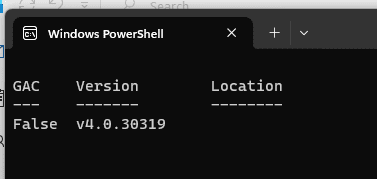
BTW Why do I get this on startup?
1708370870169.png
 

My Computers My Computers

  • At a glance

    Win11 Pro16GB2.30 gigahertz Intel 11th Gen Core i7-11800H
    OS
    Win11 Pro
    Computer type
    PC/Desktop
    Manufacturer/Model
    Beelink
    Memory
    16GB
    Graphics Card(s)
    2.30 gigahertz Intel 11th Gen Core i7-11800H
    Sound Card
    Intel® Smart Sound Technology for USB Audio
    Monitor(s) Displays
    laptop (small) and 1 or 2 external monitors
    Screen Resolution
    -
    Hard Drives
    PC711 NVMe SK hynix 1TB 1.02 TB NVMe ANB2N582412102F0G_0001
    PSU
    -
    Case
    Laptop
    Cooling
    fan
    Keyboard
    External!
    Mouse
    External
    Internet Speed
    -
    Browser
    Chrome (Chrome profiles), Firefox (Bookmark Search Plus2), Edge (History page), Opera (annoying)
    Antivirus
    WinDefender
    Other Info
    Win11 Home 23H2 22631.3447
  • At a glance

    Win108068 MB Usable Installed Memory2.30 gigahertz Intel 11th Gen Core i7-11800H
    Operating System
    Win10
    Computer type
    PC/Desktop
    Manufacturer/Model
    self
    Motherboard
    Gigabyte B75M-D3H
    Memory
    8068 MB Usable Installed Memory
    Graphics card(s)
    2.30 gigahertz Intel 11th Gen Core i7-11800H
    Sound Card
    Intel® Smart Sound Technology for USB Audio
    Monitor(s) Displays
    3 Displays
    Screen Resolution
    n/a
    Hard Drives
    SSD and others (internal and external)
    Case
    Desktop
    Cooling
    Fan
    Keyboard
    External
    Mouse
    External
    Browser
    Chrome, Firefox, Tor, Brave, Opera, etc.
    Antivirus
    Win Defender
    Other Info
    Win10 & unfortunately OneDrive: Can't completely rid myself of this!!
Imaging creates replicas of individual partitions...
Thank you for all the helpful explanations
As far as I recall, the stick can be very low capacity.
That's EXACTLY what I thought would be the case.
Then use a larger one.
LARGER thqn 58.5 GB?!
My Macrium bootable USB stick has less than 1GB on a Fat32 partition.
That's what I thought would be the case. (Though I don't know why one would use a FAT or FAT32 or exFat format.)
You could format rest as exFat to store drivers for example.
Cere always has the most involved, interesting, and least understandable (to ME) solution. I'm assuming you're speaking of the boot (Rescue media) thumb drive?
 

My Computers My Computers

  • At a glance

    Win11 Pro16GB2.30 gigahertz Intel 11th Gen Core i7-11800H
    OS
    Win11 Pro
    Computer type
    PC/Desktop
    Manufacturer/Model
    Beelink
    Memory
    16GB
    Graphics Card(s)
    2.30 gigahertz Intel 11th Gen Core i7-11800H
    Sound Card
    Intel® Smart Sound Technology for USB Audio
    Monitor(s) Displays
    laptop (small) and 1 or 2 external monitors
    Screen Resolution
    -
    Hard Drives
    PC711 NVMe SK hynix 1TB 1.02 TB NVMe ANB2N582412102F0G_0001
    PSU
    -
    Case
    Laptop
    Cooling
    fan
    Keyboard
    External!
    Mouse
    External
    Internet Speed
    -
    Browser
    Chrome (Chrome profiles), Firefox (Bookmark Search Plus2), Edge (History page), Opera (annoying)
    Antivirus
    WinDefender
    Other Info
    Win11 Home 23H2 22631.3447
  • At a glance

    Win108068 MB Usable Installed Memory2.30 gigahertz Intel 11th Gen Core i7-11800H
    Operating System
    Win10
    Computer type
    PC/Desktop
    Manufacturer/Model
    self
    Motherboard
    Gigabyte B75M-D3H
    Memory
    8068 MB Usable Installed Memory
    Graphics card(s)
    2.30 gigahertz Intel 11th Gen Core i7-11800H
    Sound Card
    Intel® Smart Sound Technology for USB Audio
    Monitor(s) Displays
    3 Displays
    Screen Resolution
    n/a
    Hard Drives
    SSD and others (internal and external)
    Case
    Desktop
    Cooling
    Fan
    Keyboard
    External
    Mouse
    External
    Browser
    Chrome, Firefox, Tor, Brave, Opera, etc.
    Antivirus
    Win Defender
    Other Info
    Win10 & unfortunately OneDrive: Can't completely rid myself of this!!
Firstly, I believe a USB should be at least 8GB.That is usually the standard.

I’ll be honest again, jro, you have problems with the simplest tasks, because of this I don’t personally know why you’re being urged to use Macrium. Sometimes the posts I read about it, people are having problems understanding it and seems to me to be over complicated. I personally don’t have time for over comlicated. One should just be able to press start and go.
AOMEI Backuper is probably the simplest of system backups. There is a tutorial in the link @Ghot supplied.

At least use both. Macrium & AOMEI
You can make a system image with AOMEI into a created folder on the image destination drive to keep it separated like drive/AOMEI/
 

My Computers My Computers

  • At a glance

    Windows 11 Pro 25H2 Build 26200.9168Intel(R) Core(TM) i7-4770K CPU @ 3.50GHz32.0 GB of I forget and the box is in storage.Gigabyte nVidia GeForce GTX 1660 Super OC 6GB
    OS
    Windows 11 Pro 25H2 Build 26200.9168
    Computer type
    PC/Desktop
    Manufacturer/Model
    Sin-built 2013
    CPU
    Intel(R) Core(TM) i7-4770K CPU @ 3.50GHz
    Motherboard
    ASUS ROG Maximus VI Formula
    Memory
    32.0 GB of I forget and the box is in storage.
    Graphics Card(s)
    Gigabyte nVidia GeForce GTX 1660 Super OC 6GB
    Sound Card
    ROG SupremeFX Formula 8-Channel High Definition Audio
    Monitor(s) Displays
    5 x LG 25MS500-B - 1 x 24MK430H-B - 1 x Wacom Pro 22" Touch Screen Tablet
    Screen Resolution
    All over the place
    Hard Drives
    Too many to list. OS on Samsung 1TB 870 QVO SATA
    PSU
    Silverstone 1500
    Case
    NZXT Phantom 820 Full-Tower Case
    Cooling
    Noctua NH-D15 Elite Class Dual Tower CPU Cooler / 6 x EziDIY 120mm / 2 x Corsair 140mm somethings / 1 x 140mm Thermaltake something / 2 x 200mm Corsair.
    Keyboard
    Corsair K95 / Logitech diNovo Edge Wireless
    Mouse
    Logitech: G402 / G502 / Mx Masters / Mx Air Cordless
    Internet Speed
    2000/500Mbps
    Browser
    All sorts
    Antivirus
    Kaspersky Premium
    Other Info
    ㅤㅤㅤㅤㅤㅤㅤㅤㅤㅤㅤㅤㅤㅤㅤㅤㅤㅤㅤㅤㅤㅤㅤㅤㅤㅤㅤㅤㅤㅤㅤㅤㅤㅤㅤㅤㅤㅤㅤㅤ⠀⠀⠀⠀⠀⠀⠀⠀⠀⠀
    TP-Link BE9300 WiFi 7 Bluetooth 5.4 (Archer TBE550E)
    TP-Link TX201 V1 2.5GB Lan

    Grandstream HT812 - VoIP
    ASUS DSL-AX82U - Mesh
    ASUS RT-AC68U - Mesh
    ASUS RT-BE88U Router

    Brother MFC-L2880DW Printer

    I’m on a horse.
  • At a glance

    Windows 11 Pro 25H2 Build 26200.9168 (Wifes)13th Generation Intel® Core™ i5-1340P Process...16GB LPDDR5-52001x Intel® Iris® Xe Graphics
    Operating System
    Windows 11 Pro 25H2 Build 26200.9168 (Wifes)
    Computer type
    Laptop
    Manufacturer/Model
    LENOVO Yoga 7 14IRL8 - Type 82YL
    CPU
    13th Generation Intel® Core™ i5-1340P Processor(Core™ i5-1340P)
    Memory
    16GB LPDDR5-5200
    Graphics card(s)
    1x Intel® Iris® Xe Graphics
    Sound Card
    Optimized with Dolby Atmos®
    Screen Resolution
    QHD 2880 x 1800 OLED
    Hard Drives
    M.2 512 GB SSD PCIe
    Mouse
    Logiteck MX Master 3S
    Internet Speed
    2000/500
    Antivirus
    Defender / Malwarebytes
    Other Info
    …still on a horse.


    Wireless Network: Wi-Fi 6E 2x2 AX; Bluetooth® 5.1 or above
    Ports: 1x 1 Novo button; 2 in 1 Audio Combo jack; Micro SD Card Reader; HDMI 1.4b; 2 x USB Type-C (TBT4)
    USB 3.2 Gen 2 DP 1.4a
    PD 3.0); 1 x USB 3.2 Gen1 Type A
    Camera
    1x 1080P FHD IR/RGB Hybrid with Privacy Shutter and Dual Array Microphone
    Graphics
    1x Intel® Iris® Xe Graphics
    Monitor
    14" WUXGA
    Form Factor
    Convertible Notebook
  • Windows 11 Pro 25H2 Build 26200.9168 (Wifes)

    Yoga 7 2-in-1 14IML9 - Type 83DJ

    Processor: Intel® Core™ Ultra 7 155H Processor(Core™ Ultra 7 155H)

    Memory: 32GB LPD5X-7467

    Hard Drive: 1 TB SSD PCIe

    Wireless Network: 1x Wi-Fi 6E 2x2 AX; Bluetooth® 5.1 or above

    Ports: 1 x HDMI 2.1 TMDS; 1 x Novo Button; 1 x Combo Audio Jack
    2 x USB-C (USB 4.0)
    1 x USB-A 3.2 Gen 1

    Camera: 1080P FHD IR Hybrid with Dual Microphone

    Graphics: Intel® Arc™ Graphics

    Monitor: 14" 2.8K

    ...Where's my horse?
I’ll be honest again, jro, you have problems with the simplest tasks, because of this I don’t personally know why you’re being urged to use Macrium.
No one is 'urging', we're just responding to jro's post #1 that states....
....I purchased (a 4-pack of) Macrium Reflect.
 

My Computers My Computers

  • At a glance

    Windows 11 HomeAMD Athlon Silver 3050U8GBRadeon Graphics
    OS
    Windows 11 Home
    Computer type
    Laptop
    Manufacturer/Model
    Acer Aspire 3 A315-23-R9VY
    CPU
    AMD Athlon Silver 3050U
    Memory
    8GB
    Graphics Card(s)
    Radeon Graphics
    Monitor(s) Displays
    laptop screen
    Screen Resolution
    1366x768 native resolution, up to 2560x1440 with Radeon Virtual Super Resolution
    Hard Drives
    1TB Samsung EVO 870 SSD (from April 2026: 250GB EVO 850)
    Internet Speed
    150 Mbps
    Browser
    Edge, Firefox
    Antivirus
    Defender
    Other Info
    UPDATE - 11 April 2026: due to lid hinges starting to break up this laptop has been retired from active duty. The OS with all software and files has been migrated to my System Seven in 'Other systems' to carry on as my general purpose 'main machine'.

    I've now clean installed 25H2 and used Garlin's scripts to update Secure Boot to CA 2023 and revoke the PCA 2011 certificates. It's new role is to test secure boot issues.

    Info for 2021-2026:
    fully 'Windows 11 ready' laptop. Windows 10 C: partition migrated from my old unsupported 'main machine' then upgraded to 11. A test migration ran Insider builds for 2 months. When 11 was released on 5th October 2021 it was re-imaged back to 10 and was offered the upgrade in Windows Update on 20th October. Windows Update offered the 22H2 Feature Update on 20th September 2022. It got the 23H2 Feature Update on 4th November 2023 through Windows Update, 24H2 on 3rd October 2024 through Windows Update by setting the Target Release Version for 24H2, and 25H2 on 30th September 2025 through Windows Update by setting the Target Release Version for 25H2.
  • At a glance

    Windows 11 ProIntel® Core™ i5-520M8GB(integrated graphics) Intel HD Graphics
    Operating System
    Windows 11 Pro
    Computer type
    Laptop
    Manufacturer/Model
    Dell Latitude E4310
    CPU
    Intel® Core™ i5-520M
    Motherboard
    0T6M8G
    Memory
    8GB
    Graphics card(s)
    (integrated graphics) Intel HD Graphics
    Screen Resolution
    1366x768
    Hard Drives
    500GB Crucial MX500 SSD
    Browser
    Firefox, Edge
    Antivirus
    Defender
    Other Info
    unsupported machine: Legacy bios, MBR, TPM 1.2, upgraded from W10 to W11 using W10/W11 hybrid install media workaround.

    In-place upgrade to 22H2 using ISO and a workaround.
    Feature Update to 23H2 by manually installing the Enablement Package.
    In-place upgrade to 24H2 using hybrid 23H2/24H2 install media.
    Upgraded to 25H2 by Enablement Package.

    Also running Insider Dev, and Canary builds and Windows 10 as native boot .vhdx.
  • My SYSTEM THREE is a Dell Latitude 5410, i7-10610U, 32GB RAM, 512GB NVMe ssd, supported device running Windows 11 Pro.

    My SYSTEM FOUR was a 2-in-1 convertible Lenovo Yoga 11e (1st gen) type 20DA, Celeron N2930, 8GB RAM, 256GB ssd. Unsupported device. This has now been sold. It has been replaced by my System Eight.

    My SYSTEM FIVE is a Dell Latitude 3190 2-in-1, Pentium Silver N5030, 8GB RAM, 1TB NVMe ssd, supported device running Windows 11 Pro, plus Insider Beta, Dev, and Canary builds (and a few others) as a native boot .vhdx.

    My SYSTEM SIX is a Dell Latitude 5550, Core Ultra 7 165H, 64GB RAM, 1TB NVMe SSD, supported device, Windows 11 Pro, Hyper-V host machine. Updated to 25H2 on 30th September 2025.

    My SYSTEM SEVEN is a Lenovo Thinkpad T580, 1920x1080 touchscreen, Intel Core i7-8650U, 16GB RAM, 512GB NVMe SSD + 2nd 512GB NVMe SSD, a supported device for Windows 11. This is my current general purpose 'main machine'. The installed Windows 11 Home from my System One has been migrated to this machine. As its new home has an existing digital licence for Pro I've been able to upgrade the migrated OS from Home to Pro.

    My SYSTEM EIGHT is a 2-in-1 convertible Lenovo Yoga 11e (5th gen) type 20LN, Celeron N4120, 8GB RAM, 512GB NVMe ssd, a supported device for Windows 11. Currently running Windows 11 Pro, plus Insider Dev, Beta, and Canary builds as native boot vhdx.
No one is 'urging', we're just responding to jro's post #1 that states....
He does seem to over complicate even the simplest of tasks. Not sure if it’s deliberate or not.
 

My Computers My Computers

  • At a glance

    Windows 11 build 26200.8973 / WSL 2 running U...Intel i7-1355U16GBIntel Iris XE
    OS
    Windows 11 build 26200.8973 / WSL 2 running Ubuntu
    Computer type
    Laptop
    Manufacturer/Model
    Dell Inspiron 14 5430
    CPU
    Intel i7-1355U
    Motherboard
    Dell 0GMW80
    Memory
    16GB
    Graphics Card(s)
    Intel Iris XE
    Sound Card
    Realtek
    Monitor(s) Displays
    Dell 14", LG 32" Curved Wide screen monitor and LG Ultrawide 26"
    Screen Resolution
    1920 x 1200 @ 60Hz, 1920 x 1080 @ 100Hz and 2560 x 1080 @ 60Hz
    Hard Drives
    Samsung 990 Pro 1TB NVME Gen 4 M.2 SSD
    PSU
    Dell
    Case
    Dell
    Cooling
    Dell
    Keyboard
    Dell KM3322W
    Mouse
    Dell Trackpad or Dell KM3322W
    Internet Speed
    900mb down / 400mb up FTTP
    Browser
    Edge 151.0.4129.59
    Antivirus
    Windows Defender
    Other Info
    Windows 365
    1Password
    1TB OneDrive
    Outlook Classic
    Visual Studio Code running in WSL
    Python 3.14
    Samsung Magician
    Garmin Express
    Dell TB16 Thunderbolt dock
    WSL
    WEI Score: 8.3
  • At a glance

    Windows 11Core i5 - 1035G48GBIntel Iris Plus
    Operating System
    Windows 11
    Computer type
    Tablet
    Manufacturer/Model
    Microsoft Surface Pro 7
    CPU
    Core i5 - 1035G4
    Motherboard
    Microsoft
    Memory
    8GB
    Graphics card(s)
    Intel Iris Plus
    Monitor(s) Displays
    Surface touch
    Screen Resolution
    2736 x 1824
    Hard Drives
    128GB
    PSU
    Microsoft
    Case
    Microsoft Keyboard
    Cooling
    None
    Keyboard
    Microsoft Surface Keyboard
    Mouse
    Microsoft Arc Intellimouse
    Internet Speed
    900mb / 400mb FTTP
    Browser
    Edge
    Antivirus
    Windows Defender
No one is 'urging', we're just responding to jro's post #1 that states....
And I am going to assume he bought it because…
 

My Computers My Computers

  • At a glance

    Windows 11 Pro 25H2 Build 26200.9168Intel(R) Core(TM) i7-4770K CPU @ 3.50GHz32.0 GB of I forget and the box is in storage.Gigabyte nVidia GeForce GTX 1660 Super OC 6GB
    OS
    Windows 11 Pro 25H2 Build 26200.9168
    Computer type
    PC/Desktop
    Manufacturer/Model
    Sin-built 2013
    CPU
    Intel(R) Core(TM) i7-4770K CPU @ 3.50GHz
    Motherboard
    ASUS ROG Maximus VI Formula
    Memory
    32.0 GB of I forget and the box is in storage.
    Graphics Card(s)
    Gigabyte nVidia GeForce GTX 1660 Super OC 6GB
    Sound Card
    ROG SupremeFX Formula 8-Channel High Definition Audio
    Monitor(s) Displays
    5 x LG 25MS500-B - 1 x 24MK430H-B - 1 x Wacom Pro 22" Touch Screen Tablet
    Screen Resolution
    All over the place
    Hard Drives
    Too many to list. OS on Samsung 1TB 870 QVO SATA
    PSU
    Silverstone 1500
    Case
    NZXT Phantom 820 Full-Tower Case
    Cooling
    Noctua NH-D15 Elite Class Dual Tower CPU Cooler / 6 x EziDIY 120mm / 2 x Corsair 140mm somethings / 1 x 140mm Thermaltake something / 2 x 200mm Corsair.
    Keyboard
    Corsair K95 / Logitech diNovo Edge Wireless
    Mouse
    Logitech: G402 / G502 / Mx Masters / Mx Air Cordless
    Internet Speed
    2000/500Mbps
    Browser
    All sorts
    Antivirus
    Kaspersky Premium
    Other Info
    ㅤㅤㅤㅤㅤㅤㅤㅤㅤㅤㅤㅤㅤㅤㅤㅤㅤㅤㅤㅤㅤㅤㅤㅤㅤㅤㅤㅤㅤㅤㅤㅤㅤㅤㅤㅤㅤㅤㅤㅤ⠀⠀⠀⠀⠀⠀⠀⠀⠀⠀
    TP-Link BE9300 WiFi 7 Bluetooth 5.4 (Archer TBE550E)
    TP-Link TX201 V1 2.5GB Lan

    Grandstream HT812 - VoIP
    ASUS DSL-AX82U - Mesh
    ASUS RT-AC68U - Mesh
    ASUS RT-BE88U Router

    Brother MFC-L2880DW Printer

    I’m on a horse.
  • At a glance

    Windows 11 Pro 25H2 Build 26200.9168 (Wifes)13th Generation Intel® Core™ i5-1340P Process...16GB LPDDR5-52001x Intel® Iris® Xe Graphics
    Operating System
    Windows 11 Pro 25H2 Build 26200.9168 (Wifes)
    Computer type
    Laptop
    Manufacturer/Model
    LENOVO Yoga 7 14IRL8 - Type 82YL
    CPU
    13th Generation Intel® Core™ i5-1340P Processor(Core™ i5-1340P)
    Memory
    16GB LPDDR5-5200
    Graphics card(s)
    1x Intel® Iris® Xe Graphics
    Sound Card
    Optimized with Dolby Atmos®
    Screen Resolution
    QHD 2880 x 1800 OLED
    Hard Drives
    M.2 512 GB SSD PCIe
    Mouse
    Logiteck MX Master 3S
    Internet Speed
    2000/500
    Antivirus
    Defender / Malwarebytes
    Other Info
    …still on a horse.


    Wireless Network: Wi-Fi 6E 2x2 AX; Bluetooth® 5.1 or above
    Ports: 1x 1 Novo button; 2 in 1 Audio Combo jack; Micro SD Card Reader; HDMI 1.4b; 2 x USB Type-C (TBT4)
    USB 3.2 Gen 2 DP 1.4a
    PD 3.0); 1 x USB 3.2 Gen1 Type A
    Camera
    1x 1080P FHD IR/RGB Hybrid with Privacy Shutter and Dual Array Microphone
    Graphics
    1x Intel® Iris® Xe Graphics
    Monitor
    14" WUXGA
    Form Factor
    Convertible Notebook
  • Windows 11 Pro 25H2 Build 26200.9168 (Wifes)

    Yoga 7 2-in-1 14IML9 - Type 83DJ

    Processor: Intel® Core™ Ultra 7 155H Processor(Core™ Ultra 7 155H)

    Memory: 32GB LPD5X-7467

    Hard Drive: 1 TB SSD PCIe

    Wireless Network: 1x Wi-Fi 6E 2x2 AX; Bluetooth® 5.1 or above

    Ports: 1 x HDMI 2.1 TMDS; 1 x Novo Button; 1 x Combo Audio Jack
    2 x USB-C (USB 4.0)
    1 x USB-A 3.2 Gen 1

    Camera: 1080P FHD IR Hybrid with Dual Microphone

    Graphics: Intel® Arc™ Graphics

    Monitor: 14" 2.8K

    ...Where's my horse?
Macrium Rescue Media Builder in progress.

And I am going to assume he bought it because…
Everyone here recommends it. Latest version, therefore latest documentation. 4 computers to image...
Rescue disk successfull 1708374593506.png
 

Attachments

  • 1708374398400.png
    1708374398400.png
    2.9 KB · Views: 1

My Computers My Computers

  • At a glance

    Win11 Pro16GB2.30 gigahertz Intel 11th Gen Core i7-11800H
    OS
    Win11 Pro
    Computer type
    PC/Desktop
    Manufacturer/Model
    Beelink
    Memory
    16GB
    Graphics Card(s)
    2.30 gigahertz Intel 11th Gen Core i7-11800H
    Sound Card
    Intel® Smart Sound Technology for USB Audio
    Monitor(s) Displays
    laptop (small) and 1 or 2 external monitors
    Screen Resolution
    -
    Hard Drives
    PC711 NVMe SK hynix 1TB 1.02 TB NVMe ANB2N582412102F0G_0001
    PSU
    -
    Case
    Laptop
    Cooling
    fan
    Keyboard
    External!
    Mouse
    External
    Internet Speed
    -
    Browser
    Chrome (Chrome profiles), Firefox (Bookmark Search Plus2), Edge (History page), Opera (annoying)
    Antivirus
    WinDefender
    Other Info
    Win11 Home 23H2 22631.3447
  • At a glance

    Win108068 MB Usable Installed Memory2.30 gigahertz Intel 11th Gen Core i7-11800H
    Operating System
    Win10
    Computer type
    PC/Desktop
    Manufacturer/Model
    self
    Motherboard
    Gigabyte B75M-D3H
    Memory
    8068 MB Usable Installed Memory
    Graphics card(s)
    2.30 gigahertz Intel 11th Gen Core i7-11800H
    Sound Card
    Intel® Smart Sound Technology for USB Audio
    Monitor(s) Displays
    3 Displays
    Screen Resolution
    n/a
    Hard Drives
    SSD and others (internal and external)
    Case
    Desktop
    Cooling
    Fan
    Keyboard
    External
    Mouse
    External
    Browser
    Chrome, Firefox, Tor, Brave, Opera, etc.
    Antivirus
    Win Defender
    Other Info
    Win10 & unfortunately OneDrive: Can't completely rid myself of this!!
Macrium Rescue Media Builder in progress...

First task when it finishes:

Attempt to boot from it. You can or you can't. If you can't, it is totally useless.

You'd select the USB drive as a boot device from the boot menu...accessible early in your boot process, most likely using an F key.

If it boots your PC, it will lead you slowly to the Macrium interface....from which you could make an image file immediately.
 

My Computer My Computer

At a glance

Windows 11 ProIntel 265KG Skill DDR5 2 x 16 kit 6000/36none
OS
Windows 11 Pro
Computer type
PC/Desktop
Manufacturer/Model
Fishmill Special
CPU
Intel 265K
Motherboard
MSI Pro Z890-A
Memory
G Skill DDR5 2 x 16 kit 6000/36
Graphics Card(s)
none
Sound Card
none
Monitor(s) Displays
Dell SE2726HS
Screen Resolution
1920 x 1080
Hard Drives
WD SN770 NVME 500 GB boot; Intel 660p NVME 2 TB and WD Green 3 TB storage
PSU
Be Quiet 13M 750 ATX 3.1
Case
Lancool PC-K65
Cooling
Noctua U12S
Keyboard
Logitech K120 Wired
Mouse
Dell MS-116
Browser
Chrome
Antivirus
Microsoft Defender and Malwarebytes
Ejected Rescue Disk.
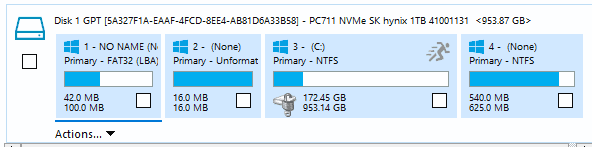
OK here's the tricky part: 1708374702015.png
1708374980336.png
Essential question: Should I image the complete (all partitions) drive?
You know the issue with the C (bitlocker) partition

After the image, I will be reformatting the C-drive and then installing a Win11 Local Drive (I understand "Local Drive" to mean an install avoiding MS 365 and OneDrive (i.e., not an install requiring the deletion/uninstall of OneDrive or MS365)

I don't understand BitLocker. Do I need to get any information from BitLocker before I blow that partition away?

(I'm starting to like Macrium Reflect😊

...Attempting to boot from the Rescue Disk.
 

My Computers My Computers

  • At a glance

    Win11 Pro16GB2.30 gigahertz Intel 11th Gen Core i7-11800H
    OS
    Win11 Pro
    Computer type
    PC/Desktop
    Manufacturer/Model
    Beelink
    Memory
    16GB
    Graphics Card(s)
    2.30 gigahertz Intel 11th Gen Core i7-11800H
    Sound Card
    Intel® Smart Sound Technology for USB Audio
    Monitor(s) Displays
    laptop (small) and 1 or 2 external monitors
    Screen Resolution
    -
    Hard Drives
    PC711 NVMe SK hynix 1TB 1.02 TB NVMe ANB2N582412102F0G_0001
    PSU
    -
    Case
    Laptop
    Cooling
    fan
    Keyboard
    External!
    Mouse
    External
    Internet Speed
    -
    Browser
    Chrome (Chrome profiles), Firefox (Bookmark Search Plus2), Edge (History page), Opera (annoying)
    Antivirus
    WinDefender
    Other Info
    Win11 Home 23H2 22631.3447
  • At a glance

    Win108068 MB Usable Installed Memory2.30 gigahertz Intel 11th Gen Core i7-11800H
    Operating System
    Win10
    Computer type
    PC/Desktop
    Manufacturer/Model
    self
    Motherboard
    Gigabyte B75M-D3H
    Memory
    8068 MB Usable Installed Memory
    Graphics card(s)
    2.30 gigahertz Intel 11th Gen Core i7-11800H
    Sound Card
    Intel® Smart Sound Technology for USB Audio
    Monitor(s) Displays
    3 Displays
    Screen Resolution
    n/a
    Hard Drives
    SSD and others (internal and external)
    Case
    Desktop
    Cooling
    Fan
    Keyboard
    External
    Mouse
    External
    Browser
    Chrome, Firefox, Tor, Brave, Opera, etc.
    Antivirus
    Win Defender
    Other Info
    Win10 & unfortunately OneDrive: Can't completely rid myself of this!!
Essential question: Should I image the complete (all partitions) drive?
Yes

I understand "Local Drive" to mean an install avoiding MS 365 and OneDrive (i.e., not an install requiring the deletion/uninstall of OneDrive or MS365)
Hey?
Local drive means C: Unplug other drives before installing Windows. Are you thinking of Local Account? Doesn’t matter if it’s a local account or a MS account, you’re still going to get MS365 Offers and a OneDrive install. Deal with that later.

I don't understand BitLocker. Do I need to get any information from BitLocker before I blow that partition away?
I thought that drive was discussed?
The only thing you needed to do was ensure that ALL of your personal files were backed up externally.
 

My Computers My Computers

  • At a glance

    Windows 11 Pro 25H2 Build 26200.9168Intel(R) Core(TM) i7-4770K CPU @ 3.50GHz32.0 GB of I forget and the box is in storage.Gigabyte nVidia GeForce GTX 1660 Super OC 6GB
    OS
    Windows 11 Pro 25H2 Build 26200.9168
    Computer type
    PC/Desktop
    Manufacturer/Model
    Sin-built 2013
    CPU
    Intel(R) Core(TM) i7-4770K CPU @ 3.50GHz
    Motherboard
    ASUS ROG Maximus VI Formula
    Memory
    32.0 GB of I forget and the box is in storage.
    Graphics Card(s)
    Gigabyte nVidia GeForce GTX 1660 Super OC 6GB
    Sound Card
    ROG SupremeFX Formula 8-Channel High Definition Audio
    Monitor(s) Displays
    5 x LG 25MS500-B - 1 x 24MK430H-B - 1 x Wacom Pro 22" Touch Screen Tablet
    Screen Resolution
    All over the place
    Hard Drives
    Too many to list. OS on Samsung 1TB 870 QVO SATA
    PSU
    Silverstone 1500
    Case
    NZXT Phantom 820 Full-Tower Case
    Cooling
    Noctua NH-D15 Elite Class Dual Tower CPU Cooler / 6 x EziDIY 120mm / 2 x Corsair 140mm somethings / 1 x 140mm Thermaltake something / 2 x 200mm Corsair.
    Keyboard
    Corsair K95 / Logitech diNovo Edge Wireless
    Mouse
    Logitech: G402 / G502 / Mx Masters / Mx Air Cordless
    Internet Speed
    2000/500Mbps
    Browser
    All sorts
    Antivirus
    Kaspersky Premium
    Other Info
    ㅤㅤㅤㅤㅤㅤㅤㅤㅤㅤㅤㅤㅤㅤㅤㅤㅤㅤㅤㅤㅤㅤㅤㅤㅤㅤㅤㅤㅤㅤㅤㅤㅤㅤㅤㅤㅤㅤㅤㅤ⠀⠀⠀⠀⠀⠀⠀⠀⠀⠀
    TP-Link BE9300 WiFi 7 Bluetooth 5.4 (Archer TBE550E)
    TP-Link TX201 V1 2.5GB Lan

    Grandstream HT812 - VoIP
    ASUS DSL-AX82U - Mesh
    ASUS RT-AC68U - Mesh
    ASUS RT-BE88U Router

    Brother MFC-L2880DW Printer

    I’m on a horse.
  • At a glance

    Windows 11 Pro 25H2 Build 26200.9168 (Wifes)13th Generation Intel® Core™ i5-1340P Process...16GB LPDDR5-52001x Intel® Iris® Xe Graphics
    Operating System
    Windows 11 Pro 25H2 Build 26200.9168 (Wifes)
    Computer type
    Laptop
    Manufacturer/Model
    LENOVO Yoga 7 14IRL8 - Type 82YL
    CPU
    13th Generation Intel® Core™ i5-1340P Processor(Core™ i5-1340P)
    Memory
    16GB LPDDR5-5200
    Graphics card(s)
    1x Intel® Iris® Xe Graphics
    Sound Card
    Optimized with Dolby Atmos®
    Screen Resolution
    QHD 2880 x 1800 OLED
    Hard Drives
    M.2 512 GB SSD PCIe
    Mouse
    Logiteck MX Master 3S
    Internet Speed
    2000/500
    Antivirus
    Defender / Malwarebytes
    Other Info
    …still on a horse.


    Wireless Network: Wi-Fi 6E 2x2 AX; Bluetooth® 5.1 or above
    Ports: 1x 1 Novo button; 2 in 1 Audio Combo jack; Micro SD Card Reader; HDMI 1.4b; 2 x USB Type-C (TBT4)
    USB 3.2 Gen 2 DP 1.4a
    PD 3.0); 1 x USB 3.2 Gen1 Type A
    Camera
    1x 1080P FHD IR/RGB Hybrid with Privacy Shutter and Dual Array Microphone
    Graphics
    1x Intel® Iris® Xe Graphics
    Monitor
    14" WUXGA
    Form Factor
    Convertible Notebook
  • Windows 11 Pro 25H2 Build 26200.9168 (Wifes)

    Yoga 7 2-in-1 14IML9 - Type 83DJ

    Processor: Intel® Core™ Ultra 7 155H Processor(Core™ Ultra 7 155H)

    Memory: 32GB LPD5X-7467

    Hard Drive: 1 TB SSD PCIe

    Wireless Network: 1x Wi-Fi 6E 2x2 AX; Bluetooth® 5.1 or above

    Ports: 1 x HDMI 2.1 TMDS; 1 x Novo Button; 1 x Combo Audio Jack
    2 x USB-C (USB 4.0)
    1 x USB-A 3.2 Gen 1

    Camera: 1080P FHD IR Hybrid with Dual Microphone

    Graphics: Intel® Arc™ Graphics

    Monitor: 14" 2.8K

    ...Where's my horse?
Ejected Rescue Disk.
OK here's the tricky part: View attachment 87711
View attachment 87712
Essential question: Should I image the complete (all partitions) drive?
You know the issue with the C (bitlocker) partition

After the image, I will be reformatting the C-drive and then installing a Win11 Local Drive (I understand "Local Drive" to mean an install avoiding MS 365 and OneDrive (i.e., not an install requiring the deletion/uninstall of OneDrive or MS365)

I don't understand BitLocker. Do I need to get any information from BitLocker before I blow that partition away?

(I'm starting to like Macrium Reflect😊

...Attempting to boot from the Rescue Disk.

You say you don't understand Bitlocker.

Then why is it enabled? Why bother with it at all?

My first impulse would be to disable it before making an image. Then re-enable it after that image is restored, if ever.

But for all I know, imaging a Bitlocked partition may be completely doable and transparent or completely impossible. What does your Macrium manual say about it?

You say "should I image the complete (all partitions) drive". That's the typical choice, but we don't know your motivations for using Macrium at all.

There is a choice at the upper left of the Macrium interface to "create an image of all partitions necessary to restore Windows" or words to that effect. That should work if your goal is to recover your Windows install from a bad situation.
 

My Computer My Computer

At a glance

Windows 11 ProIntel 265KG Skill DDR5 2 x 16 kit 6000/36none
OS
Windows 11 Pro
Computer type
PC/Desktop
Manufacturer/Model
Fishmill Special
CPU
Intel 265K
Motherboard
MSI Pro Z890-A
Memory
G Skill DDR5 2 x 16 kit 6000/36
Graphics Card(s)
none
Sound Card
none
Monitor(s) Displays
Dell SE2726HS
Screen Resolution
1920 x 1080
Hard Drives
WD SN770 NVME 500 GB boot; Intel 660p NVME 2 TB and WD Green 3 TB storage
PSU
Be Quiet 13M 750 ATX 3.1
Case
Lancool PC-K65
Cooling
Noctua U12S
Keyboard
Logitech K120 Wired
Mouse
Dell MS-116
Browser
Chrome
Antivirus
Microsoft Defender and Malwarebytes
but we don't know your motivations for using Macrium at all.
Yes, we do.
Jro is making an image of C in case his new install of windows goes astray. Like everybody should.
 

My Computers My Computers

  • At a glance

    Windows 11 Pro 25H2 Build 26200.9168Intel(R) Core(TM) i7-4770K CPU @ 3.50GHz32.0 GB of I forget and the box is in storage.Gigabyte nVidia GeForce GTX 1660 Super OC 6GB
    OS
    Windows 11 Pro 25H2 Build 26200.9168
    Computer type
    PC/Desktop
    Manufacturer/Model
    Sin-built 2013
    CPU
    Intel(R) Core(TM) i7-4770K CPU @ 3.50GHz
    Motherboard
    ASUS ROG Maximus VI Formula
    Memory
    32.0 GB of I forget and the box is in storage.
    Graphics Card(s)
    Gigabyte nVidia GeForce GTX 1660 Super OC 6GB
    Sound Card
    ROG SupremeFX Formula 8-Channel High Definition Audio
    Monitor(s) Displays
    5 x LG 25MS500-B - 1 x 24MK430H-B - 1 x Wacom Pro 22" Touch Screen Tablet
    Screen Resolution
    All over the place
    Hard Drives
    Too many to list. OS on Samsung 1TB 870 QVO SATA
    PSU
    Silverstone 1500
    Case
    NZXT Phantom 820 Full-Tower Case
    Cooling
    Noctua NH-D15 Elite Class Dual Tower CPU Cooler / 6 x EziDIY 120mm / 2 x Corsair 140mm somethings / 1 x 140mm Thermaltake something / 2 x 200mm Corsair.
    Keyboard
    Corsair K95 / Logitech diNovo Edge Wireless
    Mouse
    Logitech: G402 / G502 / Mx Masters / Mx Air Cordless
    Internet Speed
    2000/500Mbps
    Browser
    All sorts
    Antivirus
    Kaspersky Premium
    Other Info
    ㅤㅤㅤㅤㅤㅤㅤㅤㅤㅤㅤㅤㅤㅤㅤㅤㅤㅤㅤㅤㅤㅤㅤㅤㅤㅤㅤㅤㅤㅤㅤㅤㅤㅤㅤㅤㅤㅤㅤㅤ⠀⠀⠀⠀⠀⠀⠀⠀⠀⠀
    TP-Link BE9300 WiFi 7 Bluetooth 5.4 (Archer TBE550E)
    TP-Link TX201 V1 2.5GB Lan

    Grandstream HT812 - VoIP
    ASUS DSL-AX82U - Mesh
    ASUS RT-AC68U - Mesh
    ASUS RT-BE88U Router

    Brother MFC-L2880DW Printer

    I’m on a horse.
  • At a glance

    Windows 11 Pro 25H2 Build 26200.9168 (Wifes)13th Generation Intel® Core™ i5-1340P Process...16GB LPDDR5-52001x Intel® Iris® Xe Graphics
    Operating System
    Windows 11 Pro 25H2 Build 26200.9168 (Wifes)
    Computer type
    Laptop
    Manufacturer/Model
    LENOVO Yoga 7 14IRL8 - Type 82YL
    CPU
    13th Generation Intel® Core™ i5-1340P Processor(Core™ i5-1340P)
    Memory
    16GB LPDDR5-5200
    Graphics card(s)
    1x Intel® Iris® Xe Graphics
    Sound Card
    Optimized with Dolby Atmos®
    Screen Resolution
    QHD 2880 x 1800 OLED
    Hard Drives
    M.2 512 GB SSD PCIe
    Mouse
    Logiteck MX Master 3S
    Internet Speed
    2000/500
    Antivirus
    Defender / Malwarebytes
    Other Info
    …still on a horse.


    Wireless Network: Wi-Fi 6E 2x2 AX; Bluetooth® 5.1 or above
    Ports: 1x 1 Novo button; 2 in 1 Audio Combo jack; Micro SD Card Reader; HDMI 1.4b; 2 x USB Type-C (TBT4)
    USB 3.2 Gen 2 DP 1.4a
    PD 3.0); 1 x USB 3.2 Gen1 Type A
    Camera
    1x 1080P FHD IR/RGB Hybrid with Privacy Shutter and Dual Array Microphone
    Graphics
    1x Intel® Iris® Xe Graphics
    Monitor
    14" WUXGA
    Form Factor
    Convertible Notebook
  • Windows 11 Pro 25H2 Build 26200.9168 (Wifes)

    Yoga 7 2-in-1 14IML9 - Type 83DJ

    Processor: Intel® Core™ Ultra 7 155H Processor(Core™ Ultra 7 155H)

    Memory: 32GB LPD5X-7467

    Hard Drive: 1 TB SSD PCIe

    Wireless Network: 1x Wi-Fi 6E 2x2 AX; Bluetooth® 5.1 or above

    Ports: 1 x HDMI 2.1 TMDS; 1 x Novo Button; 1 x Combo Audio Jack
    2 x USB-C (USB 4.0)
    1 x USB-A 3.2 Gen 1

    Camera: 1080P FHD IR Hybrid with Dual Microphone

    Graphics: Intel® Arc™ Graphics

    Monitor: 14" 2.8K

    ...Where's my horse?
Back
Top Bottom