Solved Macrium, Imaging the C-Drive


I was under the impression that there was a different procedure involved if one wanted to install Win11 using a Local ACCOUNT--a procedure that bypasses elements particular to MS365 and OneDrive--and that procedure was explained in this forum's technical articles.
1) Am I mistaken? If so, is there a difference between installing Win11 through a local account vs through a non-local (Microsoft) account?
This overthinking, over-paranoia, and worry about a local account or MS account is your BIGGEST problem.
You let other user's preferences and biases with MS accounts or local accounts, and device encryption drive you insane.
you do not have to have Office 365 if you do not want it. You can unlink the MS account from one drive and uninstall it. You can turn off device encryption as well.

All the many voices on here throwing advice and numerous tutorials at you are the biggest problem.
 

My Computer My Computer

At a glance

Windows 10
OS
Windows 10
No need to "reformat" anything. When you do a clean install to a drive that already has something on it, you will be shown ALL partitions on the drive. DELETE THEM ALL at that point, leaving nothing but "unallocated space". Windows will do the necessary formatting during the install and make new partitions as it sees fit.

NTFS: New Technology File System. Use it.

You can open the Macrium image file with file explorer. Then you can
If you have a spare hard drive laying around, you might connect it instead of your current C drive and see if you can restore the image you just made to that spare and then confirm it will boot. You'd prefer to NOT be in the position of being in a real-life jam without ever having experience with Macrium restore.
I've got just the PERFECT LaCie drive😉... (but later)
 

My Computers My Computers

  • At a glance

    Win11 Pro16GB2.30 gigahertz Intel 11th Gen Core i7-11800H
    OS
    Win11 Pro
    Computer type
    PC/Desktop
    Manufacturer/Model
    Beelink
    Memory
    16GB
    Graphics Card(s)
    2.30 gigahertz Intel 11th Gen Core i7-11800H
    Sound Card
    Intel® Smart Sound Technology for USB Audio
    Monitor(s) Displays
    laptop (small) and 1 or 2 external monitors
    Screen Resolution
    -
    Hard Drives
    PC711 NVMe SK hynix 1TB 1.02 TB NVMe ANB2N582412102F0G_0001
    PSU
    -
    Case
    Laptop
    Cooling
    fan
    Keyboard
    External!
    Mouse
    External
    Internet Speed
    -
    Browser
    Chrome (Chrome profiles), Firefox (Bookmark Search Plus2), Edge (History page), Opera (annoying)
    Antivirus
    WinDefender
    Other Info
    Win11 Home 23H2 22631.3447
  • At a glance

    Win108068 MB Usable Installed Memory2.30 gigahertz Intel 11th Gen Core i7-11800H
    Operating System
    Win10
    Computer type
    PC/Desktop
    Manufacturer/Model
    self
    Motherboard
    Gigabyte B75M-D3H
    Memory
    8068 MB Usable Installed Memory
    Graphics card(s)
    2.30 gigahertz Intel 11th Gen Core i7-11800H
    Sound Card
    Intel® Smart Sound Technology for USB Audio
    Monitor(s) Displays
    3 Displays
    Screen Resolution
    n/a
    Hard Drives
    SSD and others (internal and external)
    Case
    Desktop
    Cooling
    Fan
    Keyboard
    External
    Mouse
    External
    Browser
    Chrome, Firefox, Tor, Brave, Opera, etc.
    Antivirus
    Win Defender
    Other Info
    Win10 & unfortunately OneDrive: Can't completely rid myself of this!!
This overthinking, over-paranoia, and worry about a local account or MS account is your BIGGEST problem.
You're probably right. (and how can I disagree with a face like that!)
But I've been so kicked around by OneDrive, much less so by members from across the aisle; am naturally paranoid and pessimistic; and would rather just play it safe if it's possible; because what I'm doing to this drive I have to do to 3 or 4 others...

What I am appreciating that is new are responses willing to 'explain why' rather than just 'insist that'...

I know you
install new copies of Windows almost daily,
but, since there seem to be so many workarounds, I want to
Step #19, here...
or
Yes, in fact I've just clean installed 23H2 today without connecting to the internet or using a Microsoft account.

At the initial setup screen after installing W11, press Shift+F10. This opens a command prompt. Type the command (note: there are no spaces in this command) OOBE\BypassNRO

The PC will restart and this time you'll see the option to skip connecting to the internet. You'll then be able to set it up with a local account.
or
Or you can simply install Windows 11 and when asked for your Microsoft account credentials, enter a bogus email address and password.

E.G. [email protected] Password=bear
:-)
capital O :-) Dur! Of course it’s letter O
or
Just enter [email protected] as MS email address, and any entry as password.
It will go "oops ......", and then you can enter local account.
...just because...

almost forgot...last step...copy my Outlook.pst file (though I suppose I can fish it out of the Macrium image--hmmm, I wonder if I can...
 

My Computers My Computers

  • At a glance

    Win11 Pro16GB2.30 gigahertz Intel 11th Gen Core i7-11800H
    OS
    Win11 Pro
    Computer type
    PC/Desktop
    Manufacturer/Model
    Beelink
    Memory
    16GB
    Graphics Card(s)
    2.30 gigahertz Intel 11th Gen Core i7-11800H
    Sound Card
    Intel® Smart Sound Technology for USB Audio
    Monitor(s) Displays
    laptop (small) and 1 or 2 external monitors
    Screen Resolution
    -
    Hard Drives
    PC711 NVMe SK hynix 1TB 1.02 TB NVMe ANB2N582412102F0G_0001
    PSU
    -
    Case
    Laptop
    Cooling
    fan
    Keyboard
    External!
    Mouse
    External
    Internet Speed
    -
    Browser
    Chrome (Chrome profiles), Firefox (Bookmark Search Plus2), Edge (History page), Opera (annoying)
    Antivirus
    WinDefender
    Other Info
    Win11 Home 23H2 22631.3447
  • At a glance

    Win108068 MB Usable Installed Memory2.30 gigahertz Intel 11th Gen Core i7-11800H
    Operating System
    Win10
    Computer type
    PC/Desktop
    Manufacturer/Model
    self
    Motherboard
    Gigabyte B75M-D3H
    Memory
    8068 MB Usable Installed Memory
    Graphics card(s)
    2.30 gigahertz Intel 11th Gen Core i7-11800H
    Sound Card
    Intel® Smart Sound Technology for USB Audio
    Monitor(s) Displays
    3 Displays
    Screen Resolution
    n/a
    Hard Drives
    SSD and others (internal and external)
    Case
    Desktop
    Cooling
    Fan
    Keyboard
    External
    Mouse
    External
    Browser
    Chrome, Firefox, Tor, Brave, Opera, etc.
    Antivirus
    Win Defender
    Other Info
    Win10 & unfortunately OneDrive: Can't completely rid myself of this!!
You're probably right.
I fix, set up, and transfer data to new computers for a living. They are all done with an MS account. Then if the user does not have an Office 365 subscription I rip that out and unlink one drive, uninstall it, and block it from coming back in the registry.
 

My Computer My Computer

At a glance

Windows 10
OS
Windows 10
Then if the user does not have an Office 365 subscription I rip that out and unlink one drive, uninstall it, and block it from coming back in the registry.
I was hoping this wouldn't be an issue. Every one of our computers has an unique Office365 install (one of the five one is allotted). Is this going to be an issue for me? (I'm not going to do the install till tomorrow.)
 

My Computers My Computers

  • At a glance

    Win11 Pro16GB2.30 gigahertz Intel 11th Gen Core i7-11800H
    OS
    Win11 Pro
    Computer type
    PC/Desktop
    Manufacturer/Model
    Beelink
    Memory
    16GB
    Graphics Card(s)
    2.30 gigahertz Intel 11th Gen Core i7-11800H
    Sound Card
    Intel® Smart Sound Technology for USB Audio
    Monitor(s) Displays
    laptop (small) and 1 or 2 external monitors
    Screen Resolution
    -
    Hard Drives
    PC711 NVMe SK hynix 1TB 1.02 TB NVMe ANB2N582412102F0G_0001
    PSU
    -
    Case
    Laptop
    Cooling
    fan
    Keyboard
    External!
    Mouse
    External
    Internet Speed
    -
    Browser
    Chrome (Chrome profiles), Firefox (Bookmark Search Plus2), Edge (History page), Opera (annoying)
    Antivirus
    WinDefender
    Other Info
    Win11 Home 23H2 22631.3447
  • At a glance

    Win108068 MB Usable Installed Memory2.30 gigahertz Intel 11th Gen Core i7-11800H
    Operating System
    Win10
    Computer type
    PC/Desktop
    Manufacturer/Model
    self
    Motherboard
    Gigabyte B75M-D3H
    Memory
    8068 MB Usable Installed Memory
    Graphics card(s)
    2.30 gigahertz Intel 11th Gen Core i7-11800H
    Sound Card
    Intel® Smart Sound Technology for USB Audio
    Monitor(s) Displays
    3 Displays
    Screen Resolution
    n/a
    Hard Drives
    SSD and others (internal and external)
    Case
    Desktop
    Cooling
    Fan
    Keyboard
    External
    Mouse
    External
    Browser
    Chrome, Firefox, Tor, Brave, Opera, etc.
    Antivirus
    Win Defender
    Other Info
    Win10 & unfortunately OneDrive: Can't completely rid myself of this!!
Every one of our computers has an unique Office365 install (one of the five one is allotted). Is this going to be an issue for me?
Not to confuse you more, Hopefully, you did not use the same email to install on all of the computers, You should be able to reinstall from the account for the computer you are working on.
 

My Computer My Computer

At a glance

Windows 10
OS
Windows 10
I did initially (use the same email address), but soon found, while talking to Microsoft, that it would be better to not do so. So I assigned a unique email address for each one.
. I'm not, at least for the beginning, interested in reinstalling Office365--will try and go for Office 2010 rather than anything 365.
. Though I thought Microsoft's Office 2010 was good--primarily because it is the standard, not because it is the best (Word has always been troublesome to use for real work like government proposals; and PowerPoint is a terrible graphics program--even for Charts and (simple) Diagrams which it's always being asked to do) I've always been quite happy with Outlook and Excel.
. Outlook with its (Notes Field) ability to accept rtf, is the best email program I've used! I was also satisfied, on my DAW workstation, using the free email I called OutlookMini--I don't know what it's called now and whether it's integrated with Outlook365 into a single Outlook.
. But I suspect I'll have to eventually switch to Thunderbird despite its inability to handle anything but text.
 

My Computers My Computers

  • At a glance

    Win11 Pro16GB2.30 gigahertz Intel 11th Gen Core i7-11800H
    OS
    Win11 Pro
    Computer type
    PC/Desktop
    Manufacturer/Model
    Beelink
    Memory
    16GB
    Graphics Card(s)
    2.30 gigahertz Intel 11th Gen Core i7-11800H
    Sound Card
    Intel® Smart Sound Technology for USB Audio
    Monitor(s) Displays
    laptop (small) and 1 or 2 external monitors
    Screen Resolution
    -
    Hard Drives
    PC711 NVMe SK hynix 1TB 1.02 TB NVMe ANB2N582412102F0G_0001
    PSU
    -
    Case
    Laptop
    Cooling
    fan
    Keyboard
    External!
    Mouse
    External
    Internet Speed
    -
    Browser
    Chrome (Chrome profiles), Firefox (Bookmark Search Plus2), Edge (History page), Opera (annoying)
    Antivirus
    WinDefender
    Other Info
    Win11 Home 23H2 22631.3447
  • At a glance

    Win108068 MB Usable Installed Memory2.30 gigahertz Intel 11th Gen Core i7-11800H
    Operating System
    Win10
    Computer type
    PC/Desktop
    Manufacturer/Model
    self
    Motherboard
    Gigabyte B75M-D3H
    Memory
    8068 MB Usable Installed Memory
    Graphics card(s)
    2.30 gigahertz Intel 11th Gen Core i7-11800H
    Sound Card
    Intel® Smart Sound Technology for USB Audio
    Monitor(s) Displays
    3 Displays
    Screen Resolution
    n/a
    Hard Drives
    SSD and others (internal and external)
    Case
    Desktop
    Cooling
    Fan
    Keyboard
    External
    Mouse
    External
    Browser
    Chrome, Firefox, Tor, Brave, Opera, etc.
    Antivirus
    Win Defender
    Other Info
    Win10 & unfortunately OneDrive: Can't completely rid myself of this!!
....though I suppose I can fish it out of the Macrium image--hmmm, I wonder if I can...
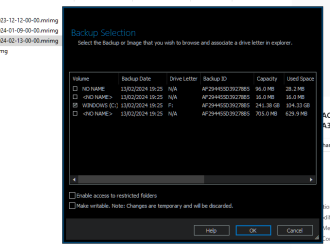
Yes, you can retrieve any individual file from a Reflect image. Just double-click on your .mrimg file, tick the box for the drive you want (it's a good idea to tick 'Enable access to restricted folders' too), then click OK. Your image will be mounted as a virtual drive that you can see and explore with File Explorer.

1708422014904.png
 

My Computers My Computers

  • At a glance

    Windows 11 HomeAMD Athlon Silver 3050U8GBRadeon Graphics
    OS
    Windows 11 Home
    Computer type
    Laptop
    Manufacturer/Model
    Acer Aspire 3 A315-23-R9VY
    CPU
    AMD Athlon Silver 3050U
    Memory
    8GB
    Graphics Card(s)
    Radeon Graphics
    Monitor(s) Displays
    laptop screen
    Screen Resolution
    1366x768 native resolution, up to 2560x1440 with Radeon Virtual Super Resolution
    Hard Drives
    1TB Samsung EVO 870 SSD (from April 2026: 250GB EVO 850)
    Internet Speed
    150 Mbps
    Browser
    Edge, Firefox
    Antivirus
    Defender
    Other Info
    UPDATE - 11 April 2026: due to lid hinges starting to break up this laptop has been retired from active duty. The OS with all software and files has been migrated to my System Seven in 'Other systems' to carry on as my general purpose 'main machine'.

    I've now clean installed 25H2 and used Garlin's scripts to update Secure Boot to CA 2023 and revoke the PCA 2011 certificates. It's new role is to test secure boot issues.

    Info for 2021-2026:
    fully 'Windows 11 ready' laptop. Windows 10 C: partition migrated from my old unsupported 'main machine' then upgraded to 11. A test migration ran Insider builds for 2 months. When 11 was released on 5th October 2021 it was re-imaged back to 10 and was offered the upgrade in Windows Update on 20th October. Windows Update offered the 22H2 Feature Update on 20th September 2022. It got the 23H2 Feature Update on 4th November 2023 through Windows Update, 24H2 on 3rd October 2024 through Windows Update by setting the Target Release Version for 24H2, and 25H2 on 30th September 2025 through Windows Update by setting the Target Release Version for 25H2.
  • At a glance

    Windows 11 ProIntel® Core™ i5-520M8GB(integrated graphics) Intel HD Graphics
    Operating System
    Windows 11 Pro
    Computer type
    Laptop
    Manufacturer/Model
    Dell Latitude E4310
    CPU
    Intel® Core™ i5-520M
    Motherboard
    0T6M8G
    Memory
    8GB
    Graphics card(s)
    (integrated graphics) Intel HD Graphics
    Screen Resolution
    1366x768
    Hard Drives
    500GB Crucial MX500 SSD
    Browser
    Firefox, Edge
    Antivirus
    Defender
    Other Info
    unsupported machine: Legacy bios, MBR, TPM 1.2, upgraded from W10 to W11 using W10/W11 hybrid install media workaround.

    In-place upgrade to 22H2 using ISO and a workaround.
    Feature Update to 23H2 by manually installing the Enablement Package.
    In-place upgrade to 24H2 using hybrid 23H2/24H2 install media.
    Upgraded to 25H2 by Enablement Package.

    Also running Insider Dev, and Canary builds and Windows 10 as native boot .vhdx.
  • My SYSTEM THREE is a Dell Latitude 5410, i7-10610U, 32GB RAM, 512GB NVMe ssd, supported device running Windows 11 Pro.

    My SYSTEM FOUR was a 2-in-1 convertible Lenovo Yoga 11e (1st gen) type 20DA, Celeron N2930, 8GB RAM, 256GB ssd. Unsupported device. This has now been sold. It has been replaced by my System Eight.

    My SYSTEM FIVE is a Dell Latitude 3190 2-in-1, Pentium Silver N5030, 8GB RAM, 1TB NVMe ssd, supported device running Windows 11 Pro, plus Insider Beta, Dev, and Canary builds (and a few others) as a native boot .vhdx.

    My SYSTEM SIX is a Dell Latitude 5550, Core Ultra 7 165H, 64GB RAM, 1TB NVMe SSD, supported device, Windows 11 Pro, Hyper-V host machine. Updated to 25H2 on 30th September 2025.

    My SYSTEM SEVEN is a Lenovo Thinkpad T580, 1920x1080 touchscreen, Intel Core i7-8650U, 16GB RAM, 512GB NVMe SSD + 2nd 512GB NVMe SSD, a supported device for Windows 11. This is my current general purpose 'main machine'. The installed Windows 11 Home from my System One has been migrated to this machine. As its new home has an existing digital licence for Pro I've been able to upgrade the migrated OS from Home to Pro.

    My SYSTEM EIGHT is a 2-in-1 convertible Lenovo Yoga 11e (5th gen) type 20LN, Celeron N4120, 8GB RAM, 512GB NVMe ssd, a supported device for Windows 11. Currently running Windows 11 Pro, plus Insider Dev, Beta, and Canary builds as native boot vhdx.
This overthinking, over-paranoia, and worry about a local account or MS account is your BIGGEST problem.
You let other user's preferences and biases with MS accounts or local accounts, and device encryption drive you insane.
you do not have to have Office 365 if you do not want it. You can unlink the MS account from one drive and uninstall it. You can turn off device encryption as well.

All the many voices on here throwing advice and numerous tutorials at you are the biggest problem.
1708428239990.png
 

My Computer My Computer

At a glance

Windows 11 Pro + Win11 Canary VM.I9 13th gen i9-13900H 2.60 GHZ16 GB solderedIntegrated Intel Iris XE
OS
Windows 11 Pro + Win11 Canary VM.
Computer type
Laptop
Manufacturer/Model
ASUS Zenbook 14
CPU
I9 13th gen i9-13900H 2.60 GHZ
Motherboard
Yep, Laptop has one.
Memory
16 GB soldered
Graphics Card(s)
Integrated Intel Iris XE
Sound Card
Realtek built in
Monitor(s) Displays
laptop OLED screen
Screen Resolution
2880x1800 touchscreen
Hard Drives
1 TB NVME SSD (only weakness is only one slot)
PSU
Internal + 65W thunderbolt USB4 charger
Case
Yep, got one
Cooling
Stella Artois (UK pint cans - 568 ml) - extra cost.
Keyboard
Built in UK keybd
Mouse
Bluetooth , wireless dongled, wired
Internet Speed
900 mbs (ethernet), wifi 6 typical 350-450 mb/s both up and down
Browser
Edge
Antivirus
Defender
Other Info
TPM 2.0, 2xUSB4 thunderbolt, 1xUsb3 (usb a), 1xUsb-c, hdmi out, 3.5 mm audio out/in combo, ASUS backlit trackpad (inc. switchable number pad)

Macrium Reflect Home V8
Office 365 Family (6 users each 1TB onedrive space)
Hyper-V (a vm runs almost as fast as my older laptop)
A lot of people have been cautioning--I say "cautioning" because they truly seem to be concerned with my over-cautious approach to FINALLY reinstalling Windows 11.
Thank you Cereberus and Porthos!

for example

This overthinking, over-paranoia, and worry about a local account or MS account is your BIGGEST problem.

View attachment 88114
1) I am using this tutorial to prepare my "Creating Windows 11 Media" disk. It has gone on for over 3 hours, cycled through 90% the last time I looked and is continuing...
View attachment 88115
2) I am also looking at the thread "

New laptop has bitlocker - where is recovery key​

which seems to describe a situation similar to what is happening with this computer
"
What the devil is going on?????

In short, I am following the directions I have been suggested to use and am encountering a situation where I am unable to create a "bootable Windows 11 installation USB that supports UEFI mode." using a computer with bitlocker problems, to wit: 1708735609601.pngand it looks like my 1708735656958.png (into over 3 hours of formatting) will never end.

And to make matters worse--talk about horrible coincidence, today I was billed $99 by Microsoft to renew a Microsoft 365 Office account I no longer want to have at all!

Because I am unable to create a "bootable Windows 11 installation USB that supports UEFI mode" I fear I cannot create a local account and therefore cannot reformat this computer. This is sheer hell!
 

My Computers My Computers

  • At a glance

    Win11 Pro16GB2.30 gigahertz Intel 11th Gen Core i7-11800H
    OS
    Win11 Pro
    Computer type
    PC/Desktop
    Manufacturer/Model
    Beelink
    Memory
    16GB
    Graphics Card(s)
    2.30 gigahertz Intel 11th Gen Core i7-11800H
    Sound Card
    Intel® Smart Sound Technology for USB Audio
    Monitor(s) Displays
    laptop (small) and 1 or 2 external monitors
    Screen Resolution
    -
    Hard Drives
    PC711 NVMe SK hynix 1TB 1.02 TB NVMe ANB2N582412102F0G_0001
    PSU
    -
    Case
    Laptop
    Cooling
    fan
    Keyboard
    External!
    Mouse
    External
    Internet Speed
    -
    Browser
    Chrome (Chrome profiles), Firefox (Bookmark Search Plus2), Edge (History page), Opera (annoying)
    Antivirus
    WinDefender
    Other Info
    Win11 Home 23H2 22631.3447
  • At a glance

    Win108068 MB Usable Installed Memory2.30 gigahertz Intel 11th Gen Core i7-11800H
    Operating System
    Win10
    Computer type
    PC/Desktop
    Manufacturer/Model
    self
    Motherboard
    Gigabyte B75M-D3H
    Memory
    8068 MB Usable Installed Memory
    Graphics card(s)
    2.30 gigahertz Intel 11th Gen Core i7-11800H
    Sound Card
    Intel® Smart Sound Technology for USB Audio
    Monitor(s) Displays
    3 Displays
    Screen Resolution
    n/a
    Hard Drives
    SSD and others (internal and external)
    Case
    Desktop
    Cooling
    Fan
    Keyboard
    External
    Mouse
    External
    Browser
    Chrome, Firefox, Tor, Brave, Opera, etc.
    Antivirus
    Win Defender
    Other Info
    Win10 & unfortunately OneDrive: Can't completely rid myself of this!!
To add some local intrigue to this whole situation...I just talked to local friend...a local realtor...who has no idea why she got involved in OneDrive, except that Microsoft told her she was involved--both vis-a-vis her phone and her computer--and has been billed by Microsoft because the material OneDrive has decided to "synchronize" onto the cloud, costs more than the amount of space Microsoft/(OneCloud) was willing to synchronize for free.

I know that, despite the fact I have been involved with (high level) computer technology since 1959, computationally, most of you are more expert with Microsoft than I am, or will probably ever be. I made the decision to represent the ordinary person since the 2000s, and this is an example of how an ordinary person is affected by Microsoft and by OneDrive. I'm very gratified to be involved with you all in what is happening with computers these days--I know most of you know a great deal more than me. I just hope to be able to responsibly represent the "common person (e.g., common man)" in a time where major companies are trying to take advantage as many "common people" as they are able to.
 

My Computers My Computers

  • At a glance

    Win11 Pro16GB2.30 gigahertz Intel 11th Gen Core i7-11800H
    OS
    Win11 Pro
    Computer type
    PC/Desktop
    Manufacturer/Model
    Beelink
    Memory
    16GB
    Graphics Card(s)
    2.30 gigahertz Intel 11th Gen Core i7-11800H
    Sound Card
    Intel® Smart Sound Technology for USB Audio
    Monitor(s) Displays
    laptop (small) and 1 or 2 external monitors
    Screen Resolution
    -
    Hard Drives
    PC711 NVMe SK hynix 1TB 1.02 TB NVMe ANB2N582412102F0G_0001
    PSU
    -
    Case
    Laptop
    Cooling
    fan
    Keyboard
    External!
    Mouse
    External
    Internet Speed
    -
    Browser
    Chrome (Chrome profiles), Firefox (Bookmark Search Plus2), Edge (History page), Opera (annoying)
    Antivirus
    WinDefender
    Other Info
    Win11 Home 23H2 22631.3447
  • At a glance

    Win108068 MB Usable Installed Memory2.30 gigahertz Intel 11th Gen Core i7-11800H
    Operating System
    Win10
    Computer type
    PC/Desktop
    Manufacturer/Model
    self
    Motherboard
    Gigabyte B75M-D3H
    Memory
    8068 MB Usable Installed Memory
    Graphics card(s)
    2.30 gigahertz Intel 11th Gen Core i7-11800H
    Sound Card
    Intel® Smart Sound Technology for USB Audio
    Monitor(s) Displays
    3 Displays
    Screen Resolution
    n/a
    Hard Drives
    SSD and others (internal and external)
    Case
    Desktop
    Cooling
    Fan
    Keyboard
    External
    Mouse
    External
    Browser
    Chrome, Firefox, Tor, Brave, Opera, etc.
    Antivirus
    Win Defender
    Other Info
    Win10 & unfortunately OneDrive: Can't completely rid myself of this!!
To add some local intrigue to this whole situation...I just talked to local friend...a local realtor...who has no idea why she got involved in OneDrive, except that Microsoft told her she was involved--both vis-a-vis her phone and her computer--and has been billed by Microsoft because the material OneDrive has decided to "synchronize" onto the cloud, costs more than the amount of space Microsoft/(OneCloud) was willing to synchronize for free.

I know that, despite the fact I have been involved with (high level) computer technology since 1959, computationally, most of you are more expert with Microsoft than I am, or will probably ever be. I made the decision to represent the ordinary person since the 2000s, and this is an example of how an ordinary person is affected by Microsoft and by OneDrive. I'm very gratified to be involved with you all in what is happening with computers these days--I know most of you know a great deal more than me. I just hope to be able to responsibly represent the "common person (e.g., common man)" in a time where major companies are trying to take advantage as many "common people" as they are able to.

There is nothing “Common” about the complications you create for yourself. Made a decision to represent the ordinary person? WTH does that mean?

@Edwin said it.; Why you’re bothering to image a drive that is so utterly ballsed up, just so you can reinstall Windows and start fresh, which is possibly one of the most basic operations you could go through (in my opinion) is beyond me.

High level computer technology since 1969?
There’s nothing intriguing about being billed by Microsoft, you’re billed because you’re opted in, it couldn’t be any simpler. Call them, get a refund.
 

My Computers My Computers

  • At a glance

    Windows 11 Pro 25H2 Build 26200.9168Intel(R) Core(TM) i7-4770K CPU @ 3.50GHz32.0 GB of I forget and the box is in storage.Gigabyte nVidia GeForce GTX 1660 Super OC 6GB
    OS
    Windows 11 Pro 25H2 Build 26200.9168
    Computer type
    PC/Desktop
    Manufacturer/Model
    Sin-built 2013
    CPU
    Intel(R) Core(TM) i7-4770K CPU @ 3.50GHz
    Motherboard
    ASUS ROG Maximus VI Formula
    Memory
    32.0 GB of I forget and the box is in storage.
    Graphics Card(s)
    Gigabyte nVidia GeForce GTX 1660 Super OC 6GB
    Sound Card
    ROG SupremeFX Formula 8-Channel High Definition Audio
    Monitor(s) Displays
    5 x LG 25MS500-B - 1 x 24MK430H-B - 1 x Wacom Pro 22" Touch Screen Tablet
    Screen Resolution
    All over the place
    Hard Drives
    Too many to list. OS on Samsung 1TB 870 QVO SATA
    PSU
    Silverstone 1500
    Case
    NZXT Phantom 820 Full-Tower Case
    Cooling
    Noctua NH-D15 Elite Class Dual Tower CPU Cooler / 6 x EziDIY 120mm / 2 x Corsair 140mm somethings / 1 x 140mm Thermaltake something / 2 x 200mm Corsair.
    Keyboard
    Corsair K95 / Logitech diNovo Edge Wireless
    Mouse
    Logitech: G402 / G502 / Mx Masters / Mx Air Cordless
    Internet Speed
    2000/500Mbps
    Browser
    All sorts
    Antivirus
    Kaspersky Premium
    Other Info
    ㅤㅤㅤㅤㅤㅤㅤㅤㅤㅤㅤㅤㅤㅤㅤㅤㅤㅤㅤㅤㅤㅤㅤㅤㅤㅤㅤㅤㅤㅤㅤㅤㅤㅤㅤㅤㅤㅤㅤㅤ⠀⠀⠀⠀⠀⠀⠀⠀⠀⠀
    TP-Link BE9300 WiFi 7 Bluetooth 5.4 (Archer TBE550E)
    TP-Link TX201 V1 2.5GB Lan

    Grandstream HT812 - VoIP
    ASUS DSL-AX82U - Mesh
    ASUS RT-AC68U - Mesh
    ASUS RT-BE88U Router

    Brother MFC-L2880DW Printer

    I’m on a horse.
  • At a glance

    Windows 11 Pro 25H2 Build 26200.9168 (Wifes)13th Generation Intel® Core™ i5-1340P Process...16GB LPDDR5-52001x Intel® Iris® Xe Graphics
    Operating System
    Windows 11 Pro 25H2 Build 26200.9168 (Wifes)
    Computer type
    Laptop
    Manufacturer/Model
    LENOVO Yoga 7 14IRL8 - Type 82YL
    CPU
    13th Generation Intel® Core™ i5-1340P Processor(Core™ i5-1340P)
    Memory
    16GB LPDDR5-5200
    Graphics card(s)
    1x Intel® Iris® Xe Graphics
    Sound Card
    Optimized with Dolby Atmos®
    Screen Resolution
    QHD 2880 x 1800 OLED
    Hard Drives
    M.2 512 GB SSD PCIe
    Mouse
    Logiteck MX Master 3S
    Internet Speed
    2000/500
    Antivirus
    Defender / Malwarebytes
    Other Info
    …still on a horse.


    Wireless Network: Wi-Fi 6E 2x2 AX; Bluetooth® 5.1 or above
    Ports: 1x 1 Novo button; 2 in 1 Audio Combo jack; Micro SD Card Reader; HDMI 1.4b; 2 x USB Type-C (TBT4)
    USB 3.2 Gen 2 DP 1.4a
    PD 3.0); 1 x USB 3.2 Gen1 Type A
    Camera
    1x 1080P FHD IR/RGB Hybrid with Privacy Shutter and Dual Array Microphone
    Graphics
    1x Intel® Iris® Xe Graphics
    Monitor
    14" WUXGA
    Form Factor
    Convertible Notebook
  • Windows 11 Pro 25H2 Build 26200.9168 (Wifes)

    Yoga 7 2-in-1 14IML9 - Type 83DJ

    Processor: Intel® Core™ Ultra 7 155H Processor(Core™ Ultra 7 155H)

    Memory: 32GB LPD5X-7467

    Hard Drive: 1 TB SSD PCIe

    Wireless Network: 1x Wi-Fi 6E 2x2 AX; Bluetooth® 5.1 or above

    Ports: 1 x HDMI 2.1 TMDS; 1 x Novo Button; 1 x Combo Audio Jack
    2 x USB-C (USB 4.0)
    1 x USB-A 3.2 Gen 1

    Camera: 1080P FHD IR Hybrid with Dual Microphone

    Graphics: Intel® Arc™ Graphics

    Monitor: 14" 2.8K

    ...Where's my horse?
Initially, I thought the problem was to rescue all your treasured files. Once that was done, to make a USB with Windows using Media Creation Tool, install Windows. 1. 2. 3…. Job done.
For the love of God, Jro, Keep it simple

Make an image of the new install. Makes a lot more sense than making an image of the current system state.
 

My Computers My Computers

  • At a glance

    Windows 11 Pro 25H2 Build 26200.9168Intel(R) Core(TM) i7-4770K CPU @ 3.50GHz32.0 GB of I forget and the box is in storage.Gigabyte nVidia GeForce GTX 1660 Super OC 6GB
    OS
    Windows 11 Pro 25H2 Build 26200.9168
    Computer type
    PC/Desktop
    Manufacturer/Model
    Sin-built 2013
    CPU
    Intel(R) Core(TM) i7-4770K CPU @ 3.50GHz
    Motherboard
    ASUS ROG Maximus VI Formula
    Memory
    32.0 GB of I forget and the box is in storage.
    Graphics Card(s)
    Gigabyte nVidia GeForce GTX 1660 Super OC 6GB
    Sound Card
    ROG SupremeFX Formula 8-Channel High Definition Audio
    Monitor(s) Displays
    5 x LG 25MS500-B - 1 x 24MK430H-B - 1 x Wacom Pro 22" Touch Screen Tablet
    Screen Resolution
    All over the place
    Hard Drives
    Too many to list. OS on Samsung 1TB 870 QVO SATA
    PSU
    Silverstone 1500
    Case
    NZXT Phantom 820 Full-Tower Case
    Cooling
    Noctua NH-D15 Elite Class Dual Tower CPU Cooler / 6 x EziDIY 120mm / 2 x Corsair 140mm somethings / 1 x 140mm Thermaltake something / 2 x 200mm Corsair.
    Keyboard
    Corsair K95 / Logitech diNovo Edge Wireless
    Mouse
    Logitech: G402 / G502 / Mx Masters / Mx Air Cordless
    Internet Speed
    2000/500Mbps
    Browser
    All sorts
    Antivirus
    Kaspersky Premium
    Other Info
    ㅤㅤㅤㅤㅤㅤㅤㅤㅤㅤㅤㅤㅤㅤㅤㅤㅤㅤㅤㅤㅤㅤㅤㅤㅤㅤㅤㅤㅤㅤㅤㅤㅤㅤㅤㅤㅤㅤㅤㅤ⠀⠀⠀⠀⠀⠀⠀⠀⠀⠀
    TP-Link BE9300 WiFi 7 Bluetooth 5.4 (Archer TBE550E)
    TP-Link TX201 V1 2.5GB Lan

    Grandstream HT812 - VoIP
    ASUS DSL-AX82U - Mesh
    ASUS RT-AC68U - Mesh
    ASUS RT-BE88U Router

    Brother MFC-L2880DW Printer

    I’m on a horse.
  • At a glance

    Windows 11 Pro 25H2 Build 26200.9168 (Wifes)13th Generation Intel® Core™ i5-1340P Process...16GB LPDDR5-52001x Intel® Iris® Xe Graphics
    Operating System
    Windows 11 Pro 25H2 Build 26200.9168 (Wifes)
    Computer type
    Laptop
    Manufacturer/Model
    LENOVO Yoga 7 14IRL8 - Type 82YL
    CPU
    13th Generation Intel® Core™ i5-1340P Processor(Core™ i5-1340P)
    Memory
    16GB LPDDR5-5200
    Graphics card(s)
    1x Intel® Iris® Xe Graphics
    Sound Card
    Optimized with Dolby Atmos®
    Screen Resolution
    QHD 2880 x 1800 OLED
    Hard Drives
    M.2 512 GB SSD PCIe
    Mouse
    Logiteck MX Master 3S
    Internet Speed
    2000/500
    Antivirus
    Defender / Malwarebytes
    Other Info
    …still on a horse.


    Wireless Network: Wi-Fi 6E 2x2 AX; Bluetooth® 5.1 or above
    Ports: 1x 1 Novo button; 2 in 1 Audio Combo jack; Micro SD Card Reader; HDMI 1.4b; 2 x USB Type-C (TBT4)
    USB 3.2 Gen 2 DP 1.4a
    PD 3.0); 1 x USB 3.2 Gen1 Type A
    Camera
    1x 1080P FHD IR/RGB Hybrid with Privacy Shutter and Dual Array Microphone
    Graphics
    1x Intel® Iris® Xe Graphics
    Monitor
    14" WUXGA
    Form Factor
    Convertible Notebook
  • Windows 11 Pro 25H2 Build 26200.9168 (Wifes)

    Yoga 7 2-in-1 14IML9 - Type 83DJ

    Processor: Intel® Core™ Ultra 7 155H Processor(Core™ Ultra 7 155H)

    Memory: 32GB LPD5X-7467

    Hard Drive: 1 TB SSD PCIe

    Wireless Network: 1x Wi-Fi 6E 2x2 AX; Bluetooth® 5.1 or above

    Ports: 1 x HDMI 2.1 TMDS; 1 x Novo Button; 1 x Combo Audio Jack
    2 x USB-C (USB 4.0)
    1 x USB-A 3.2 Gen 1

    Camera: 1080P FHD IR Hybrid with Dual Microphone

    Graphics: Intel® Arc™ Graphics

    Monitor: 14" 2.8K

    ...Where's my horse?
@Edwin said it.; Why you’re bothering to image a drive that is so utterly ballsed up, just so you can reinstall Windows and start fresh, which is possibly one of the most basic operations you could go through (in my opinion) is beyond me.
Everyone who has been in on this thread knows the response to Edwin's question. That is to be able to reinstall the totally f***ed up state of this computer in case there are problems installing Win11. I'm not going to look you up specifically, but I believe you were one of the people who encouraged me to IMMEDIATELY image my drive for this reason.
High level computer technology since 1969?
There’s nothing intriguing about being billed by Microsoft, you’re billed because you’re opted in, it couldn’t be any simpler. Call them, get a refund.
I was not billed by Microsoft. My friend was billed. The reason she was billed (as was my programmer friend) was because Microsoft had imposed upon both of them, vis-a-vis OneDrive a cloud/synchronization that required more space to put that information into the cloud than Microsoft was willing to do. They had placed data into their (Documents, Downloads, Pictures, etc, etc, etc, etc, ...) directories... This was their right to do. Then Microsoft came along and decided to OneDrive those locations. Because their allowed, AND SENSIBLE, use of those directories was more than Microsoft was willing to put onto the cloud they were penalized with a rental (otherwise referred to as "leased" fees, after the fact and since then they were charged for OneDrive despite the fact they never asked for OneDrive in the first place.
 

My Computers My Computers

  • At a glance

    Win11 Pro16GB2.30 gigahertz Intel 11th Gen Core i7-11800H
    OS
    Win11 Pro
    Computer type
    PC/Desktop
    Manufacturer/Model
    Beelink
    Memory
    16GB
    Graphics Card(s)
    2.30 gigahertz Intel 11th Gen Core i7-11800H
    Sound Card
    Intel® Smart Sound Technology for USB Audio
    Monitor(s) Displays
    laptop (small) and 1 or 2 external monitors
    Screen Resolution
    -
    Hard Drives
    PC711 NVMe SK hynix 1TB 1.02 TB NVMe ANB2N582412102F0G_0001
    PSU
    -
    Case
    Laptop
    Cooling
    fan
    Keyboard
    External!
    Mouse
    External
    Internet Speed
    -
    Browser
    Chrome (Chrome profiles), Firefox (Bookmark Search Plus2), Edge (History page), Opera (annoying)
    Antivirus
    WinDefender
    Other Info
    Win11 Home 23H2 22631.3447
  • At a glance

    Win108068 MB Usable Installed Memory2.30 gigahertz Intel 11th Gen Core i7-11800H
    Operating System
    Win10
    Computer type
    PC/Desktop
    Manufacturer/Model
    self
    Motherboard
    Gigabyte B75M-D3H
    Memory
    8068 MB Usable Installed Memory
    Graphics card(s)
    2.30 gigahertz Intel 11th Gen Core i7-11800H
    Sound Card
    Intel® Smart Sound Technology for USB Audio
    Monitor(s) Displays
    3 Displays
    Screen Resolution
    n/a
    Hard Drives
    SSD and others (internal and external)
    Case
    Desktop
    Cooling
    Fan
    Keyboard
    External
    Mouse
    External
    Browser
    Chrome, Firefox, Tor, Brave, Opera, etc.
    Antivirus
    Win Defender
    Other Info
    Win10 & unfortunately OneDrive: Can't completely rid myself of this!!
I believe you were one of the people who encouraged me to IMMEDIATELY image my drive for this reason.
That’s right. Until it was obvious that the state of this current install was so bad, it seemed futile to even bother. But as you persisted, so did my encouragement to help you achieve what by then seemed pointless. I have compassion, but it comes with brutal honesty.

I was not billed by Microsoft. My friend was billed. The reason she was billed (as was my programmer friend) was because Microsoft had imposed upon both of them, vis-a-vis OneDrive a cloud/synchronization that required more space to put that information into the cloud than Microsoft was willing to do. They had placed data into their (Documents, Downloads, Pictures, etc, etc, etc, etc, ...) directories... This was their right to do. Then Microsoft came along and decided to OneDrive those locations. Because their allowed, AND SENSIBLE, use of those directories was more than Microsoft was willing to put onto the cloud they were penalized with a rental (otherwise referred to as "leased" fees, after the fact and since then they were charged for OneDrive despite the fact they never asked for OneDrive in the first place.
All I read from this is “My friends have no idea what they’re doing” Blaming Microsoft is easy.
 

My Computers My Computers

  • At a glance

    Windows 11 Pro 25H2 Build 26200.9168Intel(R) Core(TM) i7-4770K CPU @ 3.50GHz32.0 GB of I forget and the box is in storage.Gigabyte nVidia GeForce GTX 1660 Super OC 6GB
    OS
    Windows 11 Pro 25H2 Build 26200.9168
    Computer type
    PC/Desktop
    Manufacturer/Model
    Sin-built 2013
    CPU
    Intel(R) Core(TM) i7-4770K CPU @ 3.50GHz
    Motherboard
    ASUS ROG Maximus VI Formula
    Memory
    32.0 GB of I forget and the box is in storage.
    Graphics Card(s)
    Gigabyte nVidia GeForce GTX 1660 Super OC 6GB
    Sound Card
    ROG SupremeFX Formula 8-Channel High Definition Audio
    Monitor(s) Displays
    5 x LG 25MS500-B - 1 x 24MK430H-B - 1 x Wacom Pro 22" Touch Screen Tablet
    Screen Resolution
    All over the place
    Hard Drives
    Too many to list. OS on Samsung 1TB 870 QVO SATA
    PSU
    Silverstone 1500
    Case
    NZXT Phantom 820 Full-Tower Case
    Cooling
    Noctua NH-D15 Elite Class Dual Tower CPU Cooler / 6 x EziDIY 120mm / 2 x Corsair 140mm somethings / 1 x 140mm Thermaltake something / 2 x 200mm Corsair.
    Keyboard
    Corsair K95 / Logitech diNovo Edge Wireless
    Mouse
    Logitech: G402 / G502 / Mx Masters / Mx Air Cordless
    Internet Speed
    2000/500Mbps
    Browser
    All sorts
    Antivirus
    Kaspersky Premium
    Other Info
    ㅤㅤㅤㅤㅤㅤㅤㅤㅤㅤㅤㅤㅤㅤㅤㅤㅤㅤㅤㅤㅤㅤㅤㅤㅤㅤㅤㅤㅤㅤㅤㅤㅤㅤㅤㅤㅤㅤㅤㅤ⠀⠀⠀⠀⠀⠀⠀⠀⠀⠀
    TP-Link BE9300 WiFi 7 Bluetooth 5.4 (Archer TBE550E)
    TP-Link TX201 V1 2.5GB Lan

    Grandstream HT812 - VoIP
    ASUS DSL-AX82U - Mesh
    ASUS RT-AC68U - Mesh
    ASUS RT-BE88U Router

    Brother MFC-L2880DW Printer

    I’m on a horse.
  • At a glance

    Windows 11 Pro 25H2 Build 26200.9168 (Wifes)13th Generation Intel® Core™ i5-1340P Process...16GB LPDDR5-52001x Intel® Iris® Xe Graphics
    Operating System
    Windows 11 Pro 25H2 Build 26200.9168 (Wifes)
    Computer type
    Laptop
    Manufacturer/Model
    LENOVO Yoga 7 14IRL8 - Type 82YL
    CPU
    13th Generation Intel® Core™ i5-1340P Processor(Core™ i5-1340P)
    Memory
    16GB LPDDR5-5200
    Graphics card(s)
    1x Intel® Iris® Xe Graphics
    Sound Card
    Optimized with Dolby Atmos®
    Screen Resolution
    QHD 2880 x 1800 OLED
    Hard Drives
    M.2 512 GB SSD PCIe
    Mouse
    Logiteck MX Master 3S
    Internet Speed
    2000/500
    Antivirus
    Defender / Malwarebytes
    Other Info
    …still on a horse.


    Wireless Network: Wi-Fi 6E 2x2 AX; Bluetooth® 5.1 or above
    Ports: 1x 1 Novo button; 2 in 1 Audio Combo jack; Micro SD Card Reader; HDMI 1.4b; 2 x USB Type-C (TBT4)
    USB 3.2 Gen 2 DP 1.4a
    PD 3.0); 1 x USB 3.2 Gen1 Type A
    Camera
    1x 1080P FHD IR/RGB Hybrid with Privacy Shutter and Dual Array Microphone
    Graphics
    1x Intel® Iris® Xe Graphics
    Monitor
    14" WUXGA
    Form Factor
    Convertible Notebook
  • Windows 11 Pro 25H2 Build 26200.9168 (Wifes)

    Yoga 7 2-in-1 14IML9 - Type 83DJ

    Processor: Intel® Core™ Ultra 7 155H Processor(Core™ Ultra 7 155H)

    Memory: 32GB LPD5X-7467

    Hard Drive: 1 TB SSD PCIe

    Wireless Network: 1x Wi-Fi 6E 2x2 AX; Bluetooth® 5.1 or above

    Ports: 1 x HDMI 2.1 TMDS; 1 x Novo Button; 1 x Combo Audio Jack
    2 x USB-C (USB 4.0)
    1 x USB-A 3.2 Gen 1

    Camera: 1080P FHD IR Hybrid with Dual Microphone

    Graphics: Intel® Arc™ Graphics

    Monitor: 14" 2.8K

    ...Where's my horse?
People care more than you might think. I know this because I have had private conversations with various members about your predicaments.
 

My Computers My Computers

  • At a glance

    Windows 11 Pro 25H2 Build 26200.9168Intel(R) Core(TM) i7-4770K CPU @ 3.50GHz32.0 GB of I forget and the box is in storage.Gigabyte nVidia GeForce GTX 1660 Super OC 6GB
    OS
    Windows 11 Pro 25H2 Build 26200.9168
    Computer type
    PC/Desktop
    Manufacturer/Model
    Sin-built 2013
    CPU
    Intel(R) Core(TM) i7-4770K CPU @ 3.50GHz
    Motherboard
    ASUS ROG Maximus VI Formula
    Memory
    32.0 GB of I forget and the box is in storage.
    Graphics Card(s)
    Gigabyte nVidia GeForce GTX 1660 Super OC 6GB
    Sound Card
    ROG SupremeFX Formula 8-Channel High Definition Audio
    Monitor(s) Displays
    5 x LG 25MS500-B - 1 x 24MK430H-B - 1 x Wacom Pro 22" Touch Screen Tablet
    Screen Resolution
    All over the place
    Hard Drives
    Too many to list. OS on Samsung 1TB 870 QVO SATA
    PSU
    Silverstone 1500
    Case
    NZXT Phantom 820 Full-Tower Case
    Cooling
    Noctua NH-D15 Elite Class Dual Tower CPU Cooler / 6 x EziDIY 120mm / 2 x Corsair 140mm somethings / 1 x 140mm Thermaltake something / 2 x 200mm Corsair.
    Keyboard
    Corsair K95 / Logitech diNovo Edge Wireless
    Mouse
    Logitech: G402 / G502 / Mx Masters / Mx Air Cordless
    Internet Speed
    2000/500Mbps
    Browser
    All sorts
    Antivirus
    Kaspersky Premium
    Other Info
    ㅤㅤㅤㅤㅤㅤㅤㅤㅤㅤㅤㅤㅤㅤㅤㅤㅤㅤㅤㅤㅤㅤㅤㅤㅤㅤㅤㅤㅤㅤㅤㅤㅤㅤㅤㅤㅤㅤㅤㅤ⠀⠀⠀⠀⠀⠀⠀⠀⠀⠀
    TP-Link BE9300 WiFi 7 Bluetooth 5.4 (Archer TBE550E)
    TP-Link TX201 V1 2.5GB Lan

    Grandstream HT812 - VoIP
    ASUS DSL-AX82U - Mesh
    ASUS RT-AC68U - Mesh
    ASUS RT-BE88U Router

    Brother MFC-L2880DW Printer

    I’m on a horse.
  • At a glance

    Windows 11 Pro 25H2 Build 26200.9168 (Wifes)13th Generation Intel® Core™ i5-1340P Process...16GB LPDDR5-52001x Intel® Iris® Xe Graphics
    Operating System
    Windows 11 Pro 25H2 Build 26200.9168 (Wifes)
    Computer type
    Laptop
    Manufacturer/Model
    LENOVO Yoga 7 14IRL8 - Type 82YL
    CPU
    13th Generation Intel® Core™ i5-1340P Processor(Core™ i5-1340P)
    Memory
    16GB LPDDR5-5200
    Graphics card(s)
    1x Intel® Iris® Xe Graphics
    Sound Card
    Optimized with Dolby Atmos®
    Screen Resolution
    QHD 2880 x 1800 OLED
    Hard Drives
    M.2 512 GB SSD PCIe
    Mouse
    Logiteck MX Master 3S
    Internet Speed
    2000/500
    Antivirus
    Defender / Malwarebytes
    Other Info
    …still on a horse.


    Wireless Network: Wi-Fi 6E 2x2 AX; Bluetooth® 5.1 or above
    Ports: 1x 1 Novo button; 2 in 1 Audio Combo jack; Micro SD Card Reader; HDMI 1.4b; 2 x USB Type-C (TBT4)
    USB 3.2 Gen 2 DP 1.4a
    PD 3.0); 1 x USB 3.2 Gen1 Type A
    Camera
    1x 1080P FHD IR/RGB Hybrid with Privacy Shutter and Dual Array Microphone
    Graphics
    1x Intel® Iris® Xe Graphics
    Monitor
    14" WUXGA
    Form Factor
    Convertible Notebook
  • Windows 11 Pro 25H2 Build 26200.9168 (Wifes)

    Yoga 7 2-in-1 14IML9 - Type 83DJ

    Processor: Intel® Core™ Ultra 7 155H Processor(Core™ Ultra 7 155H)

    Memory: 32GB LPD5X-7467

    Hard Drive: 1 TB SSD PCIe

    Wireless Network: 1x Wi-Fi 6E 2x2 AX; Bluetooth® 5.1 or above

    Ports: 1 x HDMI 2.1 TMDS; 1 x Novo Button; 1 x Combo Audio Jack
    2 x USB-C (USB 4.0)
    1 x USB-A 3.2 Gen 1

    Camera: 1080P FHD IR Hybrid with Dual Microphone

    Graphics: Intel® Arc™ Graphics

    Monitor: 14" 2.8K

    ...Where's my horse?
I just explained why other ordinary people I know have been scr**ed by Microsoft.

My current situation, which, after all these weeks I'm very interested in getting past, is "creating a "bootable Windows 11 installation USB that supports UEFI mode."

Following directions on the tutorial

Installation and Upgrade Clean Install Windows 11​

my 31.9 GB thumb drive has not been able to complete the creation of a "bootable Windows 11 installation USB that supports UEFI mode" after 3 hours of chugging along...

Any suggestions anyone??
 

My Computers My Computers

  • At a glance

    Win11 Pro16GB2.30 gigahertz Intel 11th Gen Core i7-11800H
    OS
    Win11 Pro
    Computer type
    PC/Desktop
    Manufacturer/Model
    Beelink
    Memory
    16GB
    Graphics Card(s)
    2.30 gigahertz Intel 11th Gen Core i7-11800H
    Sound Card
    Intel® Smart Sound Technology for USB Audio
    Monitor(s) Displays
    laptop (small) and 1 or 2 external monitors
    Screen Resolution
    -
    Hard Drives
    PC711 NVMe SK hynix 1TB 1.02 TB NVMe ANB2N582412102F0G_0001
    PSU
    -
    Case
    Laptop
    Cooling
    fan
    Keyboard
    External!
    Mouse
    External
    Internet Speed
    -
    Browser
    Chrome (Chrome profiles), Firefox (Bookmark Search Plus2), Edge (History page), Opera (annoying)
    Antivirus
    WinDefender
    Other Info
    Win11 Home 23H2 22631.3447
  • At a glance

    Win108068 MB Usable Installed Memory2.30 gigahertz Intel 11th Gen Core i7-11800H
    Operating System
    Win10
    Computer type
    PC/Desktop
    Manufacturer/Model
    self
    Motherboard
    Gigabyte B75M-D3H
    Memory
    8068 MB Usable Installed Memory
    Graphics card(s)
    2.30 gigahertz Intel 11th Gen Core i7-11800H
    Sound Card
    Intel® Smart Sound Technology for USB Audio
    Monitor(s) Displays
    3 Displays
    Screen Resolution
    n/a
    Hard Drives
    SSD and others (internal and external)
    Case
    Desktop
    Cooling
    Fan
    Keyboard
    External
    Mouse
    External
    Browser
    Chrome, Firefox, Tor, Brave, Opera, etc.
    Antivirus
    Win Defender
    Other Info
    Win10 & unfortunately OneDrive: Can't completely rid myself of this!!
All I read from this is “My friends have no idea what they’re doing” Blaming Microsoft is easy.
Yes it is easy (to blame Microsoft). And for exactly that reason it is right (to blame Microsoft).
Faced with files and folders and the ability to put them wherever one wants (by Microsoft, incidentally), Microsoft should not be allowed to charge any user for having done so--especially when, as I can very intelligently and sensibly explain, doing so is a very sensible and logical thing to do.
 

My Computers My Computers

  • At a glance

    Win11 Pro16GB2.30 gigahertz Intel 11th Gen Core i7-11800H
    OS
    Win11 Pro
    Computer type
    PC/Desktop
    Manufacturer/Model
    Beelink
    Memory
    16GB
    Graphics Card(s)
    2.30 gigahertz Intel 11th Gen Core i7-11800H
    Sound Card
    Intel® Smart Sound Technology for USB Audio
    Monitor(s) Displays
    laptop (small) and 1 or 2 external monitors
    Screen Resolution
    -
    Hard Drives
    PC711 NVMe SK hynix 1TB 1.02 TB NVMe ANB2N582412102F0G_0001
    PSU
    -
    Case
    Laptop
    Cooling
    fan
    Keyboard
    External!
    Mouse
    External
    Internet Speed
    -
    Browser
    Chrome (Chrome profiles), Firefox (Bookmark Search Plus2), Edge (History page), Opera (annoying)
    Antivirus
    WinDefender
    Other Info
    Win11 Home 23H2 22631.3447
  • At a glance

    Win108068 MB Usable Installed Memory2.30 gigahertz Intel 11th Gen Core i7-11800H
    Operating System
    Win10
    Computer type
    PC/Desktop
    Manufacturer/Model
    self
    Motherboard
    Gigabyte B75M-D3H
    Memory
    8068 MB Usable Installed Memory
    Graphics card(s)
    2.30 gigahertz Intel 11th Gen Core i7-11800H
    Sound Card
    Intel® Smart Sound Technology for USB Audio
    Monitor(s) Displays
    3 Displays
    Screen Resolution
    n/a
    Hard Drives
    SSD and others (internal and external)
    Case
    Desktop
    Cooling
    Fan
    Keyboard
    External
    Mouse
    External
    Browser
    Chrome, Firefox, Tor, Brave, Opera, etc.
    Antivirus
    Win Defender
    Other Info
    Win10 & unfortunately OneDrive: Can't completely rid myself of this!!
Yes it is easy (to blame Microsoft). And for exactly that reason it is right (to blame Microsoft).
Faced with files and folders and the ability to put them wherever one wants (by Microsoft, incidentally), Microsoft should not be allowed to charge any user for having done so--especially when, as I can very intelligently and sensibly explain, doing so is a very sensible and logical thing to do.
Not sure what you're talking about. You literally have to subscribe to pay for them to bill you. If you use your free allotment, they don’t just automatically sign you up for 1TB, you have to opt in. That would be illegal, why would Microsoft do that? At the worst, they would nag the hell out of you. You’re friends don’t know what they’re doing, they’ve opted in for 1TB. At least that’s my opinion.
 

My Computers My Computers

  • At a glance

    Windows 11 Pro 25H2 Build 26200.9168Intel(R) Core(TM) i7-4770K CPU @ 3.50GHz32.0 GB of I forget and the box is in storage.Gigabyte nVidia GeForce GTX 1660 Super OC 6GB
    OS
    Windows 11 Pro 25H2 Build 26200.9168
    Computer type
    PC/Desktop
    Manufacturer/Model
    Sin-built 2013
    CPU
    Intel(R) Core(TM) i7-4770K CPU @ 3.50GHz
    Motherboard
    ASUS ROG Maximus VI Formula
    Memory
    32.0 GB of I forget and the box is in storage.
    Graphics Card(s)
    Gigabyte nVidia GeForce GTX 1660 Super OC 6GB
    Sound Card
    ROG SupremeFX Formula 8-Channel High Definition Audio
    Monitor(s) Displays
    5 x LG 25MS500-B - 1 x 24MK430H-B - 1 x Wacom Pro 22" Touch Screen Tablet
    Screen Resolution
    All over the place
    Hard Drives
    Too many to list. OS on Samsung 1TB 870 QVO SATA
    PSU
    Silverstone 1500
    Case
    NZXT Phantom 820 Full-Tower Case
    Cooling
    Noctua NH-D15 Elite Class Dual Tower CPU Cooler / 6 x EziDIY 120mm / 2 x Corsair 140mm somethings / 1 x 140mm Thermaltake something / 2 x 200mm Corsair.
    Keyboard
    Corsair K95 / Logitech diNovo Edge Wireless
    Mouse
    Logitech: G402 / G502 / Mx Masters / Mx Air Cordless
    Internet Speed
    2000/500Mbps
    Browser
    All sorts
    Antivirus
    Kaspersky Premium
    Other Info
    ㅤㅤㅤㅤㅤㅤㅤㅤㅤㅤㅤㅤㅤㅤㅤㅤㅤㅤㅤㅤㅤㅤㅤㅤㅤㅤㅤㅤㅤㅤㅤㅤㅤㅤㅤㅤㅤㅤㅤㅤ⠀⠀⠀⠀⠀⠀⠀⠀⠀⠀
    TP-Link BE9300 WiFi 7 Bluetooth 5.4 (Archer TBE550E)
    TP-Link TX201 V1 2.5GB Lan

    Grandstream HT812 - VoIP
    ASUS DSL-AX82U - Mesh
    ASUS RT-AC68U - Mesh
    ASUS RT-BE88U Router

    Brother MFC-L2880DW Printer

    I’m on a horse.
  • At a glance

    Windows 11 Pro 25H2 Build 26200.9168 (Wifes)13th Generation Intel® Core™ i5-1340P Process...16GB LPDDR5-52001x Intel® Iris® Xe Graphics
    Operating System
    Windows 11 Pro 25H2 Build 26200.9168 (Wifes)
    Computer type
    Laptop
    Manufacturer/Model
    LENOVO Yoga 7 14IRL8 - Type 82YL
    CPU
    13th Generation Intel® Core™ i5-1340P Processor(Core™ i5-1340P)
    Memory
    16GB LPDDR5-5200
    Graphics card(s)
    1x Intel® Iris® Xe Graphics
    Sound Card
    Optimized with Dolby Atmos®
    Screen Resolution
    QHD 2880 x 1800 OLED
    Hard Drives
    M.2 512 GB SSD PCIe
    Mouse
    Logiteck MX Master 3S
    Internet Speed
    2000/500
    Antivirus
    Defender / Malwarebytes
    Other Info
    …still on a horse.


    Wireless Network: Wi-Fi 6E 2x2 AX; Bluetooth® 5.1 or above
    Ports: 1x 1 Novo button; 2 in 1 Audio Combo jack; Micro SD Card Reader; HDMI 1.4b; 2 x USB Type-C (TBT4)
    USB 3.2 Gen 2 DP 1.4a
    PD 3.0); 1 x USB 3.2 Gen1 Type A
    Camera
    1x 1080P FHD IR/RGB Hybrid with Privacy Shutter and Dual Array Microphone
    Graphics
    1x Intel® Iris® Xe Graphics
    Monitor
    14" WUXGA
    Form Factor
    Convertible Notebook
  • Windows 11 Pro 25H2 Build 26200.9168 (Wifes)

    Yoga 7 2-in-1 14IML9 - Type 83DJ

    Processor: Intel® Core™ Ultra 7 155H Processor(Core™ Ultra 7 155H)

    Memory: 32GB LPD5X-7467

    Hard Drive: 1 TB SSD PCIe

    Wireless Network: 1x Wi-Fi 6E 2x2 AX; Bluetooth® 5.1 or above

    Ports: 1 x HDMI 2.1 TMDS; 1 x Novo Button; 1 x Combo Audio Jack
    2 x USB-C (USB 4.0)
    1 x USB-A 3.2 Gen 1

    Camera: 1080P FHD IR Hybrid with Dual Microphone

    Graphics: Intel® Arc™ Graphics

    Monitor: 14" 2.8K

    ...Where's my horse?
There’s nothing intriguing about being billed by Microsoft, you’re billed because you’re opted in, it couldn’t be any simpler. Call them, get a refund.
NO! Not at all. Everyone who opts for Microsoft365 Office or a Win11 install gets OneDrive, whether they want it or not.

I'm not even going to respond to "Call them, get a refund." MY FRIEND.
Make an image of the new install. Makes a lot more sense than making an image of the current system state.
I have made an image. It was successful.
The next step is "creating a "bootable Windows 11 installation USB that supports UEFI mode." which has gone on for over 3 hours and has restarted 2 times.

And by the way, why am I getting the following two odd, forum related (??), errors?
1708741985932.png
 

My Computers My Computers

  • At a glance

    Win11 Pro16GB2.30 gigahertz Intel 11th Gen Core i7-11800H
    OS
    Win11 Pro
    Computer type
    PC/Desktop
    Manufacturer/Model
    Beelink
    Memory
    16GB
    Graphics Card(s)
    2.30 gigahertz Intel 11th Gen Core i7-11800H
    Sound Card
    Intel® Smart Sound Technology for USB Audio
    Monitor(s) Displays
    laptop (small) and 1 or 2 external monitors
    Screen Resolution
    -
    Hard Drives
    PC711 NVMe SK hynix 1TB 1.02 TB NVMe ANB2N582412102F0G_0001
    PSU
    -
    Case
    Laptop
    Cooling
    fan
    Keyboard
    External!
    Mouse
    External
    Internet Speed
    -
    Browser
    Chrome (Chrome profiles), Firefox (Bookmark Search Plus2), Edge (History page), Opera (annoying)
    Antivirus
    WinDefender
    Other Info
    Win11 Home 23H2 22631.3447
  • At a glance

    Win108068 MB Usable Installed Memory2.30 gigahertz Intel 11th Gen Core i7-11800H
    Operating System
    Win10
    Computer type
    PC/Desktop
    Manufacturer/Model
    self
    Motherboard
    Gigabyte B75M-D3H
    Memory
    8068 MB Usable Installed Memory
    Graphics card(s)
    2.30 gigahertz Intel 11th Gen Core i7-11800H
    Sound Card
    Intel® Smart Sound Technology for USB Audio
    Monitor(s) Displays
    3 Displays
    Screen Resolution
    n/a
    Hard Drives
    SSD and others (internal and external)
    Case
    Desktop
    Cooling
    Fan
    Keyboard
    External
    Mouse
    External
    Browser
    Chrome, Firefox, Tor, Brave, Opera, etc.
    Antivirus
    Win Defender
    Other Info
    Win10 & unfortunately OneDrive: Can't completely rid myself of this!!
Back
Top Bottom