

Coram Daes
Well-known member
It started with my server... drops conn to networked drive from my nas. Reconnect fails with following message:

So I started troubleshooting on the server and checked everything, So I figure it is just a glitch, do a quick net use and ping to check network connectivity (I am doing some reconfiguration of that, reducing hardware and connecting more devices directly via LAN and removing a couple of superfluous switches in the process.) and everything seems fine up until I get to the part where I try to reconnect the share I have on my NAS. It just wont work to map it. I am unable to map anything via "Map Network drive" or via net use.
And then I tried mapping from my W11:
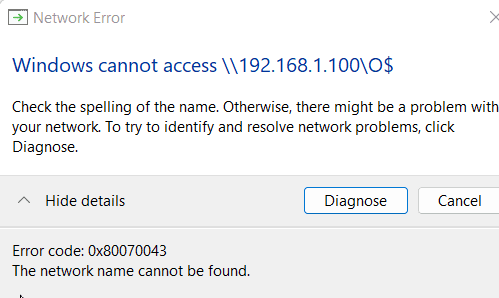
Hokay, this is not good. Error code 0x80070043
Via someone else I was directed here: https://docs.microsoft.com/en-us/tr...g/guest-access-in-smb2-is-disabled-by-default and I also searched a bit more and stumbled over additional suggestions enabling SMBv1, which was, obviously, disabled until now. Tried it, no go, and then uninstalled it again.
The error on the server may not be something you guys can help with, but when it also happens on W11 desktops, well I come here to ask.
The NAS has no issues that i can think of. Nothing in the logs and http connectivity is there.
So I started troubleshooting on the server and checked everything, So I figure it is just a glitch, do a quick net use and ping to check network connectivity (I am doing some reconfiguration of that, reducing hardware and connecting more devices directly via LAN and removing a couple of superfluous switches in the process.) and everything seems fine up until I get to the part where I try to reconnect the share I have on my NAS. It just wont work to map it. I am unable to map anything via "Map Network drive" or via net use.
And then I tried mapping from my W11:
Hokay, this is not good. Error code 0x80070043
Via someone else I was directed here: https://docs.microsoft.com/en-us/tr...g/guest-access-in-smb2-is-disabled-by-default and I also searched a bit more and stumbled over additional suggestions enabling SMBv1, which was, obviously, disabled until now. Tried it, no go, and then uninstalled it again.
The error on the server may not be something you guys can help with, but when it also happens on W11 desktops, well I come here to ask.
The NAS has no issues that i can think of. Nothing in the logs and http connectivity is there.
- Windows Build/Version
- 21H2
My Computer
At a glance
11AMD Ryzen 5 7600X Six-Core Processor2 x 16GB G.Skill F5-6000J3040G32G @ 6000Asus Strix Radeon RX 6750 XT
- OS
- 11
- Computer type
- PC/Desktop
- Manufacturer/Model
- Homebrew
- CPU
- AMD Ryzen 5 7600X Six-Core Processor
- Motherboard
- GigaByte X870E AORUS ELITE WIFI7
- Memory
- 2 x 16GB G.Skill F5-6000J3040G32G @ 6000
- Graphics Card(s)
- Asus Strix Radeon RX 6750 XT
- Sound Card
- Motherboards Realtek
- Monitor(s) Displays
- 2 x Dell U2720Q | 1 Dell P2415Qb
- Screen Resolution
- 2 x 3869x2160
- Hard Drives
- NVME GigaByte AG450E500G-G
NVME Samsung SSD 990 PRO 2TB
NVME KINGSTON SA2000M81000G
- PSU
- Lian-Li EDGE 850
- Case
- Lian-Li
- Cooling
- Noctua NH-D15 chromax | 1x Lian-li AIO GA II Trinity | 6x SL V2
- Keyboard
- Razer Huntsman v2 (Optical)
- Mouse
- Raze Basilisk v3
- Internet Speed
- 100/100
- Browser
- Vivaldi
- Antivirus
- Bitdefender Gravityzone






