
McAfee rouge software, re-install Windows 11?


bkelly

Member
Local time
11:46 AM
Posts
1
OS
Windows 11
Reinstall windows 11

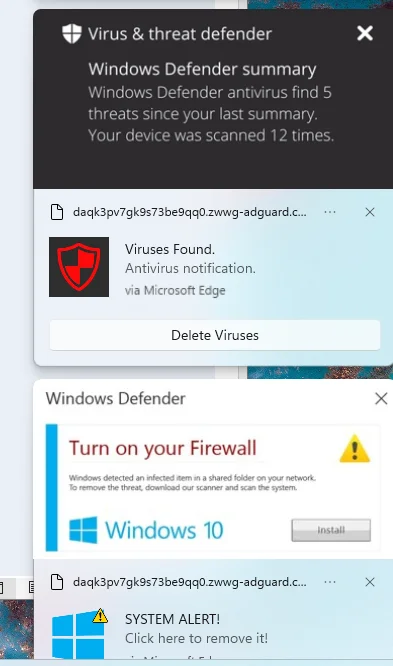
I cannot completely remove McAfee from my computer. I get several popup dialogs dialogs warning me about viruses on my computer. When click the option to remove the virus it opens the Edge browser takes me to a dialog to install McAfee.

I think a complete Windows 11 re-install is needed. BUT, last time that was done Microsoft complained that the product key had already been installed. How do I completely re-install on the same computer with the same product key?

Additional details

I used to use MSDN (Microsoft Developer’s Network) but it has migrated to a new name. I post there, received numerous replies, but they gave up on me without a resolution.

I ran the McAfee tool called MCPR several times. Did not help. Check the task manager and Processes utility for an installed app that looks like “PC App Store” or “PCAppStore” or anything like that. Not present. Use ctl-alt-del > Task Manager to get there.

Below is an image from the right edge of the monitor.
The dialog often post more than one a minute, are modal, and they all open a new tab in the Edge browser. Notice that one suggest to turn on the Firewall for Windows 10. Not windows 11, but 10.

Edit: I did a reinstall of Windows 11 using a utility found on a Microsoft website. It left all my applications in place and did not resolve this problem. I might have done it wrong. Now I suspect a complete reinstall is required. That will mean install all the utilities, but it seems to be a price that must be paid.
oct-9-01.webp
 
Last edited:

My Computer My Computer

At a glance

Windows 11Intel i5-10400, 2.9GHz32 GIntel UHD Graphics
OS
Windows 11
Computer type
PC/Desktop
CPU
Intel i5-10400, 2.9GHz
Memory
32 G
Graphics Card(s)
Intel UHD Graphics
Sound Card
Sound blaster
Monitor(s) Displays
Two HP monitors
Screen Resolution
1920 x 1080
"ChatGPT can make mistakes. Check important info."

I agree with your assessment. The warnings in the screenshot are almost certainly fake security alerts delivered through Microsoft Edge, rather than evidence that viruses or malware have been installed on the computer.

In fact, the screenshot contains several strong clues that this is a case of browser notification abuse (scareware) rather than a genuine Windows Defender warning.

I suspect that the OP inadvertently clicked Allow when a deceptive website requested permission to send notifications. The website is now exploiting that permission to display fraudulent antivirus warnings and direct the user to McAfee-related installation pages.

This could explain all the reported symptoms, including why McAfee's removal utility has accomplished nothing.

The first thing I would ask the OP to do is inspect Edge's list of websites allowed to send notifications. If removing those permissions stops the warnings, that would strongly support the browser-notification explanation and could resolve the problem in minutes, without reinstalling Windows.

What the screenshot tells us​

1. The notifications identify Microsoft Edge as their source. The notification reading "Viruses Found" includes the text "via Microsoft Edge" and displays what appears to be a randomly generated website address. This strongly suggests that a website has been granted permission to send browser notifications.

2. The warnings impersonate Windows Defender. The first notification says "Virus & threat defender," which is not the normal name of the Windows Security feature, "Virus & threat protection." The other warning uses Windows Defender branding to make the message look official.

3. The reference to Windows 10 is suspicious. As you noticed, the computer supposedly runs Windows 11, yet the warning offers to install something associated with Windows 10. That's typical of generic scareware advertising.

4. The warnings lead to a McAfee installation page. This is especially revealing. A legitimate Microsoft Defender security alert would not normally direct users to install McAfee through an advertising website.

5. Repeated notifications do not imply repeated infections. A website that has notification permission can generate numerous alarming messages without anything malicious being installed locally.

The important distinction is that a malicious or deceptive website can display frightening messages without having compromised Windows itself.

That doesn't prove the computer is clean, but nothing visible in this screenshot establishes an actual malware infection.

What I would recommend to the OP​

I would first remove the suspicious website's notification permission.

Open Microsoft Edge and enter this address:

edge://settings/content/notifications

Under Allowed, look for the suspicious website shown in the screenshot, or any other unfamiliar websites, and remove or block their notification permissions.

Microsoft explicitly confirms that website notifications can appear in the lower-right corner of Windows even when Edge is closed.

Next, check edge://extensions for unfamiliar extensions, and examine Edge's other website permissions. If necessary, reset Edge's settings.

The OP should then open the genuine Windows Security application from the Start menu, check Protection history, update its antivirus definitions, and perform a full scan. A Microsoft Defender Offline scan is also available if there is reason to suspect a persistent infection.

The fact that McAfee's MCPR removal tool didn't help is perfectly consistent with this explanation. MCPR removes McAfee software; it doesn't revoke the notification permissions granted to websites in Edge.
 
Last edited:

My Computers My Computers

  • At a glance

    Windows 11 ProAMD Ryzen 9 9950X3DKingston FURY Beast 64GB (2x32GB) DDR5 6000MT/sASUS TUF Gaming Radeon RX 9070 OC Edition 16G...
    OS
    Windows 11 Pro
    Computer type
    PC/Desktop
    CPU
    AMD Ryzen 9 9950X3D
    Motherboard
    ASRock B650E Taichi Lite
    Memory
    Kingston FURY Beast 64GB (2x32GB) DDR5 6000MT/s
    Graphics Card(s)
    ASUS TUF Gaming Radeon RX 9070 OC Edition 16GB GDDR6
    Hard Drives
    Solidigm P44 Pro 2TB M.2 NVMe SSD
  • At a glance

    Windows 11 HomeIntel Core Ultra 9 275HX64GB (2x 32GB) DDR5-6400NVIDIA GeForce RTX 5080 16GB GDDR7 Laptop GPU
    Operating System
    Windows 11 Home
    Computer type
    Laptop
    Manufacturer/Model
    Lenovo Legion Pro 7i Gen 10 16"
    CPU
    Intel Core Ultra 9 275HX
    Memory
    64GB (2x 32GB) DDR5-6400
    Graphics card(s)
    NVIDIA GeForce RTX 5080 16GB GDDR7 Laptop GPU
    Hard Drives
    2x 1TB M.2 NVMe SSD (SK Hynix)
Those are ads, not viruses that you see while browsing.
I bet they are only visible while a browser is open, hard to tell if startup boost is enabled.
And why a Win 10 popup on a Win 11 system? You can even read the URL at the top left of each ad.
Just clear all cookies, double check extensions and get yourself something to block the ads.
 

My Computers My Computers

  • At a glance

    All Branches but StableAMD Ryzen 7 7735HS 3200-4500 Mhz 8 cores x 232 GB DDR5Radeon Graphic / NVIDIA GeForce RTX 4060 8 GB...
    OS
    All Branches but Stable
    Computer type
    Laptop
    Manufacturer/Model
    Acer Nitro ANV15-51
    CPU
    AMD Ryzen 7 7735HS 3200-4500 Mhz 8 cores x 2
    Motherboard
    Sportage_RBH
    Memory
    32 GB DDR5
    Graphics Card(s)
    Radeon Graphic / NVIDIA GeForce RTX 4060 8 GB GDDR6
    Sound Card
    AMD/Realtek(R) Audio
    Monitor(s) Displays
    Integrated Monitor (15.3"vis)
    Screen Resolution
    FHD 1920X1080 16:9 144Hz
    Hard Drives
    KINGSTON OM8SEP4512Q-AA 1TB
    Western Digital 256GB
    PSU
    19V DC 6.32 A 120 W
    Cooling
    Dual Fans
    Mouse
    MS Bluetooth
    Internet Speed
    Fiber 1GB Cox -us & 1GB Orange-fr
    Browser
    Edge Canary- Firefox Nightly-Chrome Dev-Chrome Dev
    Antivirus
    Windows Defender
  • At a glance

    Windows 11 BetaAMD A9-94208 GB of DDR4AMD Radeon R5
    Operating System
    Windows 11 Beta
    Computer type
    Laptop
    Manufacturer/Model
    Asus X751BP
    CPU
    AMD A9-9420
    Memory
    8 GB of DDR4
    Graphics card(s)
    AMD Radeon R5
    Screen Resolution
    1600x900
    Hard Drives
    Seagate 1 TB
Those McAfee popups are caused by Malware or Adware on your computer. Before thinking about a clean install, try to get rid of the cause.

1. For ALL your installed browsers, delete ALL history, cache and cookies. If you do not know how to do this do a web search for "how to delete history, cache, and cookies in XXXXX" (where XXXX is the name of your browser.)

2. Run a full scan with Malwarebytes and quarantine everything MWB finds, This installs a trial of the software. After 14 days it will revert to free version. You do not have to buy it.
Restart.

3. Open Malwarebyts again and delete everything in quarantine.
To permanently delete everything inside the Malwarebytes quarantine list, open the application and use the Detection History page.

Steps to Delete Quarantined Items
    • Open Malwarebytes on your Windows or Mac device.
    • Click on Detection History on the main dashboard.
    • Select the Quarantined items tab.
    • Check the box next to each item you want to delete (or check the top box to select all items at once).
    • Click the Delete button to permanently remove the files from your computer.


4. Run a full scan will AdwCleaner AdwCleaner: Free Adware Removal & Cleaner Tool Delete anything it finds.

5. Restart the computer again. If the problem still remains, Download trial version of Hit Man Pro. Use it to scan and remove anything it finds.


If this fixes your issue your can uninstall all the programs you installed to fix it.
If none of this fixes it, then you can consider a clean install
 

My Computers My Computers

  • At a glance

    Windows 11 Pro 26H2 26300.9457i9-10900 10 core 20 threads32 gbnone-Intel UHD Graphics 630
    OS
    Windows 11 Pro 26H2 26300.9457
    Computer type
    PC/Desktop
    Manufacturer/Model
    Dell Optiplex 7080
    CPU
    i9-10900 10 core 20 threads
    Motherboard
    DELL 0J37VM
    Memory
    32 gb
    Graphics Card(s)
    none-Intel UHD Graphics 630
    Sound Card
    Integrated Realtek
    Monitor(s) Displays
    Benq 27
    Screen Resolution
    2560x1440
    Hard Drives
    2x1tb Solidigm m.2 nvme /External drives 512gb Samsung m.2 sata+2tb Kingston m2.nvme
    PSU
    500w
    Case
    MT
    Cooling
    Dell Premium
    Keyboard
    Logitech wired
    Mouse
    Logitech wireless
    Internet Speed
    so slow I'm too embarrassed to tell
    Browser
    #1 Edge #2 Firefox
    Antivirus
    Defender+MWB Premium
  • At a glance

    Windows 11 Pro 24H2 26200.9457AMD Ryzen 7 6800U32 gbintegrated
    Operating System
    Windows 11 Pro 24H2 26200.9457
    Computer type
    PC/Desktop
    Manufacturer/Model
    Beelink Mini PC SER5
    CPU
    AMD Ryzen 7 6800U
    Memory
    32 gb
    Graphics card(s)
    integrated
    Sound Card
    integrated
    Monitor(s) Displays
    Benq 27
    Screen Resolution
    2560x1440
    Hard Drives
    1TB Crucial nvme
    Keyboard
    Logitech wired
    Mouse
    Logitech wireless
    Internet Speed
    still too embarrassed to tell
    Browser
    Firefox
    Antivirus
    Defender
  • System 3 is non compliant Dell 9020 i7-4770/24gb ram Win11 PRO 26200.9457
You are using a desktop. I would follow the advice given already to the extent that your browser could use a cleaning. If the problem persisted then your issue may be something more serious than just cookies. You could be running some nasty software. Myself, I would add a new hard drive and attempt to install Win 11 26H2 as an upgrade to a new drive. That way if something does not turn out you still get to keep your older OS even if it is also Win 11. Once this is done you can drag and drop your personal files and folders over to your newly installed OS without losing any valuable data. But that's just me. Try the easy fix first. And yes, by all means, get yourself an ad blocker. These days they're hardly optional.
 

My Computer My Computer

At a glance

WIN 11, WIN 10, WIN 8.1, WIN 7 U, WIN 7 PRO, ...Intel i7 6900K and i9-7960X / AMD 3800X (8 core)128 GB CORSAIR DOMINATOR PLATINUM (B DIE)NVIDIA 1070 and RTX 3070
OS
WIN 11, WIN 10, WIN 8.1, WIN 7 U, WIN 7 PRO, WIN 7 HOME (32 Bit), LINUX MINT
Computer type
PC/Desktop
Manufacturer/Model
DIY, ASUS, and DELL
CPU
Intel i7 6900K and i9-7960X / AMD 3800X (8 core)
Motherboard
ASUS X99E-WS USB 3.1 and ASUS X299 SAGE
Memory
128 GB CORSAIR DOMINATOR PLATINUM (B DIE)
Graphics Card(s)
NVIDIA 1070 and RTX 3070
Sound Card
Crystal Sound (onboard)
Monitor(s) Displays
single Samsung 30" 4K and 8" aux monitor
Screen Resolution
4K and something equally attrocious. I'll be working on this.
Hard Drives
A, B, C, D, E, F, G, H, I, J, K, L, M, N, O, P, Q, R, S, T, U, V, W

Ports X, Y, and Z are reserved for USB access and removable drives.

Drive types consist of the following: Various mechanical hard drives bearing the brand names, Seagate, Toshiba, and Western Digital. Various NVMe drives bearing the brand names Kingston, Intel, Silicon Power, Crucial, Western Digital, and Team Group. Various SATA SSDs bearing various different brand names.

RAID arrays included:

LSI RAID 10 (WD Velociraptors) 1115.72 GB
LSI RAID 10 (WD SSDS) 463.80 GB

INTEL RAID 0 (KINGSTON HYPER X) System 447.14 GB
INTEL RAID 1 TOSHIBA ENTERPRIZE class Data 2794.52 GB
INTEL RAID 1 SEAGATE HYBRID 931.51 GB
PSU
SEVERAL. I prefer my Corsair Platinum HX1000i but I also like EVGA power supplies
Case
ThermalTake Level 10 GT (among others)
Cooling
Noctua is my favorite and I use it in my main. I also own various other coolers.
Keyboard
all kinds.
Mouse
all kinds
Internet Speed
360 mbps - 1 gbps (depending)
Browser
FIREFOX
Antivirus
KASPERSKY (no apologies)
Other Info
Gave Dell touch screen with Windows 11 to daughter and got me an OTVOC. Being a PC builder I own many desktop PCs as well. I am a father of five providing PCs, laptops, and tablets for all my family, most of which I have modified, rebuilt, or simply built from scratch. I do not own a cell phone, never have, never will.
Since this is a relatively new installation, it shouldn't take much time to reinstall. Download the official Windows 11 ISO from Microsoft here:


The second option (Media Creation Tool) can also create a bootable USB flash drive once it downloads the ISO. Or you can download the ISO directly (third option) and use Rufus to create the USB.


Then boot with that USB to load Windows 11 Setup. Im the hard disk screen click on each partition of the Windows disk and delete it. Delete them all to get rid of the virus and leave the whole disk unallocated. No need to create any partitions, Setup will automatically create them and make the Windows partition take all the rest space. No key is needed, if Setup doesn't automatically choose Home or Pro, reply you don't have a key, select the version you had before and proceed. After installation when first connected to the internet Windows will activate automatically using your digital license on Microsoft servers.
 

My Computers My Computers

  • At a glance

    Windows 11 Pro 23H2 (7584), 26H2 (9550)Mobile DualCore Intel Core 2 Duo T7250, 2000 MHz4GBMobile Intel(R) GMA 4500M (Mobile 4 series)
    OS
    Windows 11 Pro 23H2 (7584), 26H2 (9550)
    Computer type
    Laptop
    Manufacturer/Model
    Acer Extensa 5630EZ
    CPU
    Mobile DualCore Intel Core 2 Duo T7250, 2000 MHz
    Motherboard
    Acer Extensa 5630
    Memory
    4GB
    Graphics Card(s)
    Mobile Intel(R) GMA 4500M (Mobile 4 series)
    Sound Card
    Realtek ALC268 @ Intel 82801IB ICH9 - High Definition Audio Controller
    Monitor(s) Displays
    1
    Screen Resolution
    1280x800
    Hard Drives
    Samsung SSD 850 EVO 250GB SATA Device (250 GB, SATA-III)
    Internet Speed
    802.11g wireless 54 Mbps
    Browser
    MICROSOFT EDGE
    Antivirus
    WINDOWS DEFENDER
    Other Info
    Legacy MBR installation, no TPM, no Secure Boot, no WDDM 2.0 graphics drivers, no SSE4.2, cannot get more unsupported ;) This is only my test laptop. I had installed Windows 11 here before upgrading my main PC. For my main PC I use everyday see my 2nd system specs.
  • At a glance

    Windows 11 Pro 26H2 (build 26300.9550)Intel Core-i7 3770 3.40GHz s1155 (3rd generat...2x Kingston Hyper-X Blu 8GB DDR3-1600GIGABYTE GeForce RTX 3050 WINDFORCE OC V2 6GB...
    Operating System
    Windows 11 Pro 26H2 (build 26300.9550)
    Computer type
    PC/Desktop
    Manufacturer/Model
    Custom-built PC
    CPU
    Intel Core-i7 3770 3.40GHz s1155 (3rd generation)
    Motherboard
    Asus P8H61 s1155 ATX
    Memory
    2x Kingston Hyper-X Blu 8GB DDR3-1600
    Graphics card(s)
    GIGABYTE GeForce RTX 3050 WINDFORCE OC V2 6GB (GV-N3050WF2OCV2-6GD)
    Sound Card
    Realtek HD audio (ALC887)
    Monitor(s) Displays
    Sony Bravia KDL-19L4000 19" LCD TV via VGA
    Screen Resolution
    1440x900 32-bit 60Hz
    Hard Drives
    WD Blue SA510 2.5 1000GB SSD as system disk, Western Digital Caviar Purple 4TB SATA III (WD40PURZ) as second
    PSU
    Thermaltake Litepower RGB 550W Full Wired
    Case
    SUPERCASE MIDI-TOWER
    Cooling
    Deepcool Gamma Archer CPU cooler, 1x 8cm fan at the back
    Keyboard
    Mitsumi 101-key PS/2
    Mouse
    Microsoft Compact Optical Mouse
    Internet Speed
    802.11ac 5GHz wireless 260Mpbs
    Browser
    Microsoft Edge, Mozilla Firefox
    Antivirus
    Microsoft Windows Defender
    Other Info
    Legacy BIOS (MBR) installation, no TPM, no Secure Boot, WDDM 3.0 graphics drivers, WEI score 7.4
Screenshot 2026-10-09 205245.webp


edge://settings/content/notifications

In Microsoft Edge, the setting "Ask before sending (recommended)" controls whether websites can request permission to send notifications.
  • On (enabled): This is the default setting. Websites can ask for permission to send notifications. Edge displays a permission prompt, and the user can choose Allow or Block.
  • Off (disabled): Edge automatically blocks new notification permission requests without prompting the user.
Important: Turning this setting off does not necessarily revoke notification permissions already granted to websites. Therefore, check the websites listed under Allow and remove or block any suspicious entries.
 

My Computers My Computers

  • At a glance

    Windows 11 ProAMD Ryzen 9 9950X3DKingston FURY Beast 64GB (2x32GB) DDR5 6000MT/sASUS TUF Gaming Radeon RX 9070 OC Edition 16G...
    OS
    Windows 11 Pro
    Computer type
    PC/Desktop
    CPU
    AMD Ryzen 9 9950X3D
    Motherboard
    ASRock B650E Taichi Lite
    Memory
    Kingston FURY Beast 64GB (2x32GB) DDR5 6000MT/s
    Graphics Card(s)
    ASUS TUF Gaming Radeon RX 9070 OC Edition 16GB GDDR6
    Hard Drives
    Solidigm P44 Pro 2TB M.2 NVMe SSD
  • At a glance

    Windows 11 HomeIntel Core Ultra 9 275HX64GB (2x 32GB) DDR5-6400NVIDIA GeForce RTX 5080 16GB GDDR7 Laptop GPU
    Operating System
    Windows 11 Home
    Computer type
    Laptop
    Manufacturer/Model
    Lenovo Legion Pro 7i Gen 10 16"
    CPU
    Intel Core Ultra 9 275HX
    Memory
    64GB (2x 32GB) DDR5-6400
    Graphics card(s)
    NVIDIA GeForce RTX 5080 16GB GDDR7 Laptop GPU
    Hard Drives
    2x 1TB M.2 NVMe SSD (SK Hynix)
Back
Top Bottom




