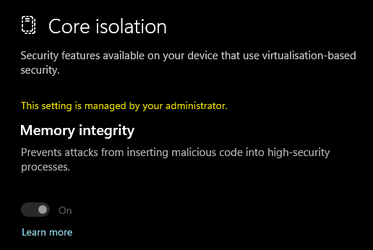
Solved Memory Integrity issue


How do I use this please?
You'll need to open an elevated command prompt and then enter the following command:

Code:
reg add HKEY_LOCAL_MACHINE\SYSTEM\CurrentControlSet\Control\DeviceGuard\Scenarios\HypervisorEnforcedCodeIntegrity /v Enabled /t REG_DWORD /d 0x1 /f

You may need to reboot the computer as well, however, please note that this will force code integrity even if there is incompatible drivers which may cause problems with your machine. I would suggest creating a restore point or backup before running the command.
 

My Computer My Computer

At a glance

Windows 11, Windows 10, Linux Fedora Cinnamon
OS
Windows 11, Windows 10, Linux Fedora Cinnamon
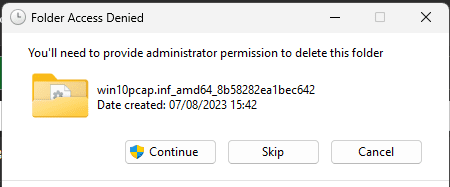
Thanks BlueRobot, I don't understand why I had win10pcap in the first place, when I deleted its 6 files nothing bad happened.

I've asked Daiyu Noburi for an uninstaller.

win10pcap.inf_amd64_8b58282ea1bec642 Why does it say amd64 I have an intel cpu?
 
Last edited:

My Computer My Computer

At a glance

win11i716gbNvidia
OS
win11
Computer type
Laptop
Manufacturer/Model
Dell
CPU
i7
Memory
16gb
Graphics Card(s)
Nvidia
Hard Drives
SSD
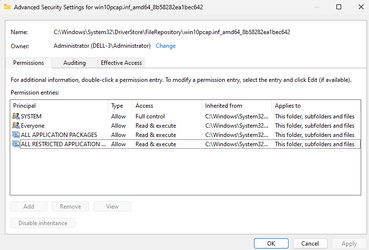
I'm trying to delete the files again. I am Admin but it won't let me delete.

1691484353254.png

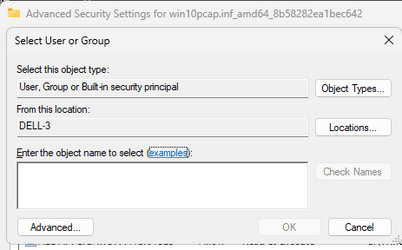
What do I put in object name box please:

1691484270291.png
 

My Computer My Computer

At a glance

win11i716gbNvidia
OS
win11
Computer type
Laptop
Manufacturer/Model
Dell
CPU
i7
Memory
16gb
Graphics Card(s)
Nvidia
Hard Drives
SSD
1691487398007.png

Apparently I need to click on 'Add' but its greyed out!
 

My Computer My Computer

At a glance

win11i716gbNvidia
OS
win11
Computer type
Laptop
Manufacturer/Model
Dell
CPU
i7
Memory
16gb
Graphics Card(s)
Nvidia
Hard Drives
SSD
Why does it say amd64 I have an intel cpu?
It's for historical purposes, amd64 is x86-x64.

From Wikipedia:

AMD64 (also variously referred to by AMD in their literature and documentation as “AMD 64-bit Technology” and “AMD x86-64 Architecture”) was created as an alternative to the radically different IA-64 architecture designed by Intel and Hewlett-Packard, which was backward-incompatible with IA-32, the 32-bit version of the x86 architecture. AMD originally announced AMD64 in 1999[14] with a full specification available in August 2000.

I'm trying to delete the files again. I am Admin but it won't let me delete.
You can't because the Driver Store is owned by the Trusted Installer. You should not delete anything from there by taking ownership. Just use the pnputil command which I suggested earlier or the GUI recommended by @glasskuter. Or better yet, install the latest drivers from Dell which has also been recommended.
 

My Computer My Computer

At a glance

Windows 11, Windows 10, Linux Fedora Cinnamon
OS
Windows 11, Windows 10, Linux Fedora Cinnamon
As I said before, I have the latest drivers from Dell. Made no difference.
I managed to get full control and delete the files - again (Revo Agent told me to reinstall, then use Revo to Uninstall but Revo did not have access and failed). I checked and files are gone. Should I now run the above Reg Edit script?
 

My Computer My Computer

At a glance

win11i716gbNvidia
OS
win11
Computer type
Laptop
Manufacturer/Model
Dell
CPU
i7
Memory
16gb
Graphics Card(s)
Nvidia
Hard Drives
SSD
Created restore point, ran script successfully.
1691489009372.png

However Mem Int still not on!

1691489166990.png

At least it is no longer saying I have incompatible drivers!
 

My Computer My Computer

At a glance

win11i716gbNvidia
OS
win11
Computer type
Laptop
Manufacturer/Model
Dell
CPU
i7
Memory
16gb
Graphics Card(s)
Nvidia
Hard Drives
SSD
Its fine now, Men Int ON, I had forgotten to reboot :eyeroll: Thanks to all who helped (y)
 

My Computer My Computer

At a glance

win11i716gbNvidia
OS
win11
Computer type
Laptop
Manufacturer/Model
Dell
CPU
i7
Memory
16gb
Graphics Card(s)
Nvidia
Hard Drives
SSD
As I said before, I have the latest drivers from Dell. Made no difference.
I managed to get full control and delete the files - again (Revo Agent told me to reinstall, then use Revo to Uninstall but Revo did not have access and failed). I checked and files are gone. Should I now run the above Reg Edit script?
Sounds like permissions may have been messed up, Personally run mem integrity off anyway but glad you got it sorted.
 

My Computer My Computer

At a glance

11[email protected]Viper Steelseries 32gb@ 3600mhzGigabyte 2070 Super 8GB, +200 core + 600 memory
OS
11
Computer type
PC/Desktop
Manufacturer/Model
Custom
CPU
[email protected]
Motherboard
Gigabyte Gaming X Z490
Memory
Viper Steelseries 32gb@ 3600mhz
Graphics Card(s)
Gigabyte 2070 Super 8GB, +200 core + 600 memory
Monitor(s) Displays
ASUS 4k HDR, Two 1080p Benq and Samsung
Screen Resolution
3840x2160/2560x1440/1920x1080
Hard Drives
Adata XPG SX8200 PRO 1tb
Samsung EVO 870 500GB
PSU
Corsair RX 650
Case
NZXT h510
Cooling
CM HYPER 212 RGB
Keyboard
Razer Ornata Chroma
Mouse
Steelseries Rival 710
1691510393014.png
 

My Computer My Computer

At a glance

win11i716gbNvidia
OS
win11
Computer type
Laptop
Manufacturer/Model
Dell
CPU
i7
Memory
16gb
Graphics Card(s)
Nvidia
Hard Drives
SSD
I'm glad you managed to resolve the issue in the end, please mark this thread as solved so whose with a similar problem can see that this thread as a solution.
 

My Computer My Computer

At a glance

Windows 11, Windows 10, Linux Fedora Cinnamon
OS
Windows 11, Windows 10, Linux Fedora Cinnamon
I had the same issue the code worked. THANK YOU VERY MUCH
reg add HKEY_LOCAL_MACHINE\SYSTEM\CurrentControlSet\Control\DeviceGuard\Scenarios\HypervisorEnforcedCodeIntegrity /v Enabled /t REG_DWORD /d 0x1 /f
 

My Computer My Computer

At a glance

Windows 11
OS
Windows 11

Latest Support Threads

Back
Top Bottom