Windows Experience Blog:
New Copilot and agentic experiences make powerful AI easy on Windows 11
Today, we’re taking an exciting step forward with a new wave of updates that make every Windows 11 PC an AI PC – with Copilot at the center of it all. We are making the most powerful AI more accessible by integrating it into the Windows experiences people are already using every day.When we think about what the promise of an AI PC is, it should be capable of three things:
- First, you should be able to interact with it naturally, in text or voice, and have it understand you.
- Second, it should be able to see what you see and be able to offer guided support.
- And third, it should be able to take action on your behalf.
We believe this shift to conversational input will be as transformative as the mouse and keyboard in terms of unlocking new capabilities on the PC for the broadest set of people.
Until now, the power of AI has often been gated behind your skill at prompting. The more context you provide and detail you share, the richer response you receive in return. But typing it out can be tedious and time consuming, especially if it takes multiple tries to get it right.
With 68% of consumers reporting using AI to support their decision making, voice is making this easier.1
The magic unlock with Copilot Voice and Copilot Vision is the ease of interaction. Using the new wake word, “Hey Copilot,” getting something done is as easy as just asking for it. And with your permission, Copilot Vision can analyze what’s on your screen helping you learn new apps, get recommendations for a project or show you how to do it. Since its initial release, early adopters of Copilot Vision have inspired us with their creative use cases, from troubleshooting settings, to getting step by step guidance, and even learning complex editing tools.
And this power is available to every Windows 11 device where Copilot is available.
Let’s dive into what’s new.
Just ask, with “Hey Copilot” on Windows 11
People are already talking at their PCs every day for dictation and note taking, transcriptions, searching, and with important accessibility features like Voice access and Voice typing. Now, your PC can understand you. We’re seeing that when people use voice, they engage with Copilot twice as much as when they use text. This ease of use leads to deeper engagement within Copilot.2
New wake and goodbye words make it even easier to use, which are generally available for Windows 11 PCs. This opt-in feature gives people a new way to easily start a conversation with Copilot Voice, anytime the feature is enabled.
To get started, enable “Hey, Copilot” in the Settings of your Copilot app, then simply ask a question starting with “Hey, Copilot…”. You’ll see the Copilot microphone appear on your screen, along with a chime to indicate that Coplot is listening.

Enable or Disable Hey Copilot in Windows 11
This tutorial will show you how to enable or disable "Hey Copilot" for the Copilot app for your account in Windows 11. Starting with Copilot app (version 1.25051.10.0 and higher), Microsoft is beginning to roll out Hey Copilot across all Insider Channels via the Microsoft Store. Windows...
 www.elevenforum.com
To end a conversation, you can say “Goodbye”, tap ‘X’ or Copilot will end the conversation automatically after a few seconds of no interaction. You will hear a chime confirming that the conversation has ended.
Copilot Vision on Windows is now available worldwide
We’re also making Copilot Vision on Windows available in all markets where Copilot is offered.
Use Copilot Vision to Share App or Screen with Copilot in Windows 11
This tutorial will show you how to use the Copilot Vision feature in Microsoft Edge and Copilot app to share screen with Copilot on Windows 10 and Windows 11. Copilot Vision on Windows lets you share any browser or app window on your screen and talking about it with Copilot. Copilot can then...
www.elevenforum.com
Including:
- Full desktop and app sharing: When you share your desktop or applications, Copilot can help analyze content, provide insights and answer your questions, coaching you through it aloud. Get tips on making improvements to your creative project, help with improving your resume or guidance while navigating a new game.
- Highlights: With Highlights, you can ask Copilot “show me how” for a specific task and it will show you within the app where to click and what to do. Altogether, Copilot can be by your side giving you tips while playing a game, viewing your photo and showing you how to improve the lighting to make it perfect, or reviewing your travel itinerary to let you know if your packing list is sufficient based on your destination.

Enable or Disable Highlights in Copilot Vision in Windows 11
This tutorial will show you how to turn on or off highlights in Copilot Vision for your account in Windows 10 and Windows 11. Copilot Vision on Windows lets you share any browser or app window on your screen and talking about it with Copilot. Copilot can then help analyze, offer insights, or...
www.elevenforum.com
- Full app context in Word, Excel and PowerPoint: When you share Word, Excel or PowerPoint files, Vision can see beyond what’s available on your screen. For example, if you ask Copilot to help review a PowerPoint deck, it could analyze the entire presentation without needing to flip through each slide.
- Text-in Text-out: Coming to Windows Insiders soon, we’re also enabling the ability to converse with Copilot Vision using text, with Copilot responding in text within the same chat window. Previously you could only use Vision using voice, and Copilot would coach you through it aloud. So, whether you forget your headphones or just prefer engaging via text, Vision will soon be able to support you across whichever scenario suits you best.
Delivering deeper and richer Windows 11 experiences, coming soon to Windows Insiders and Copilot Labs
The energy and enthusiasm of the Windows Insider community has helped shape the future of Windows for over a decade. Now, alongside Copilot Labs, we’re bringing even more experimental AI and agentic features to Windows Insiders.To ensure we deliver an experience our customers truly love, we’ll start by previewing the following experiences in the Windows Insider Program where your feedback will guide us as we refine and evolve the experiences.
Bringing Copilot into your flow with a reimagined taskbar experience
With the new Ask Copilot on the taskbar, Copilot becomes a natural part of how you use your PC, ready to help, guide and collaborate the moment you need it.
Our vision is simple yet bold: to make the taskbar a dynamic hub that helps you accomplish more with less effort, transforming everyday interactions into moments of productivity and delight. This opt-in experience provides one click access to Copilot Vision and Voice, enabling more natural engagement in your flow. With utility across voice, text and guided support with Copilot Vision, you can engage Copilot on your terms, in the way that works best for you.
With lightning-fast search results in a refreshed design, the new streamlined search experience makes finding apps, files and settings faster and easier, with results appearing and updating instantly as you type.
This experience leverages existing Windows APIs to return your apps, files and settings, like the Windows Search experience and does not grant Copilot access to your content.
Previewing Copilot Actions for local files in Copilot Labs
In May, we announced Copilot Actions on the web – allowing Copilot to take real actions on your behalf, like booking a table at your favorite restaurant or ordering groceries.
Coming soon to Windows Insiders in Copilot Labs, we’re previewing an experimental capability for Copilot Actions to expand beyond the browser to take actions directly on local files in Windows.
Whether you need a hand sorting through your recent vacation photos or need to extract info from a PDF, Copilot Actions can do the heavy lifting for you based on the context of what’s on your PC.
As a general-purpose agent—simply describe the task you want to complete in your own words, and the agent will attempt to complete it by interacting with desktop and web applications.
While this is happening, you can choose to focus on other tasks. At any time, you can take over the task or check in on the progress of the action, including reviewing what actions have been taken.
We’ll be starting with a narrow set of use cases while we optimize model performance and learn. You may see the agent make mistakes or encounter challenges with complex interfaces, which is why real-world testing of this experience is so critical to help us apply learnings to make this experience more capable and streamlined.
Bringing even more functionality to Copilot on Windows, with Copilot connectors, easy doc creation and Windows settings integration
Copilot connectors, now available to Windows Insiders, allow you to link your favorite services such as OneDrive files and Outlook contacts, emails and calendar events, as well as Google services including Google Drive, Gmail, Google Calendar and Google Contacts, directly to the Copilot on Windows app.

Enable or Disable Connectors in Copilot app on Windows 11
This tutorial will show you how enable or disable connectors in the Copilot app for your Microsoft account on Windows 11. Microsoft Copilot is your everyday AI companion, empowering you to achieve anything you can imagine. Starting with the Copilot app version 1.25095.161.0 and higher...
www.elevenforum.com
Once you’ve opted in to connect a service, Copilot can find and understand your personal content using your own words, making it easier to find and remember details in your connected personal content across multiple platforms. For example, you can say:
- “Find my dentist appointment details” to instantly surface calendar entries.
- “What is the email address of Mary?” to retrieve contact information without digging through your inbox.
- “Find my school paper from my Econ 201 class” so Copilot can search OneDrive and provide the most relevant document in seconds.
Finally, we’re also adding an integration with Copilot on Windows with Windows Settings. Just ask Copilot a question about your Windows PC settings using your own words, which will provide a direct link to the relevant Windows Settings. So now you can send directions such as, “Make my screen easier to read” or “Help me focus by reducing distractions,” and Copilot will guide you to the relevant Windows settings page.
Delivering deeper and more powerful AI actions so you can stay in your flow
We’re excited to introduce even more ways to get things done easier with new AI actions in Windows.Manus is a general AI agent that can take on various tasks on your PC. With the new Manus AI action in File Explorer, you can get help with complex tasks like creating a website using the documents in your local folder with just one click. Simply select the document, right click and select “create website with Manus,” and Manus will build a website for you in just minutes – no uploading, no coding.
Manus is also available as a native app on Windows. You can get the same AI powered assistance from Manus to build a website right from the chat window without leaving your session. Simply type in the Manus app, “Please use the image files on my device and generate a great professional looking website”.
Manus leverages the agentic platform capabilities available on Windows like Model Context Protocol to fetch the right document and build a website for you in minutes – no manually uploading your photos, no multiple clicks! You stay in your session or get to another task while Manus works in the background securely to help you accomplish your task. This experience is in private preview and we’ll have additional updates to share soon. For more information on the security of experiences leveraging the Model Context Protocol, see: Securing the Model Context Protocol: Building a safer agentic future on Windows.
We’re also introducing another new AI action in File Explorer to edit with Filmora, allowing you to jump right into video editing easily and seamlessly.
Finally, for Windows Insiders with Copilot+ PCs, we’re integrating Zoom with Click to Do.
Soon, you can instantly schedule a Zoom meeting by invoking Click to Do and simply hovering over an email address visible on your screen—no app switching, no copying details, no interruptions. This keeps you in your flow and lets you act right where you are.
With Gaming Copilot (Beta) and ROG Xbox Ally, Xbox and Windows introduce AI-powered gaming on the go
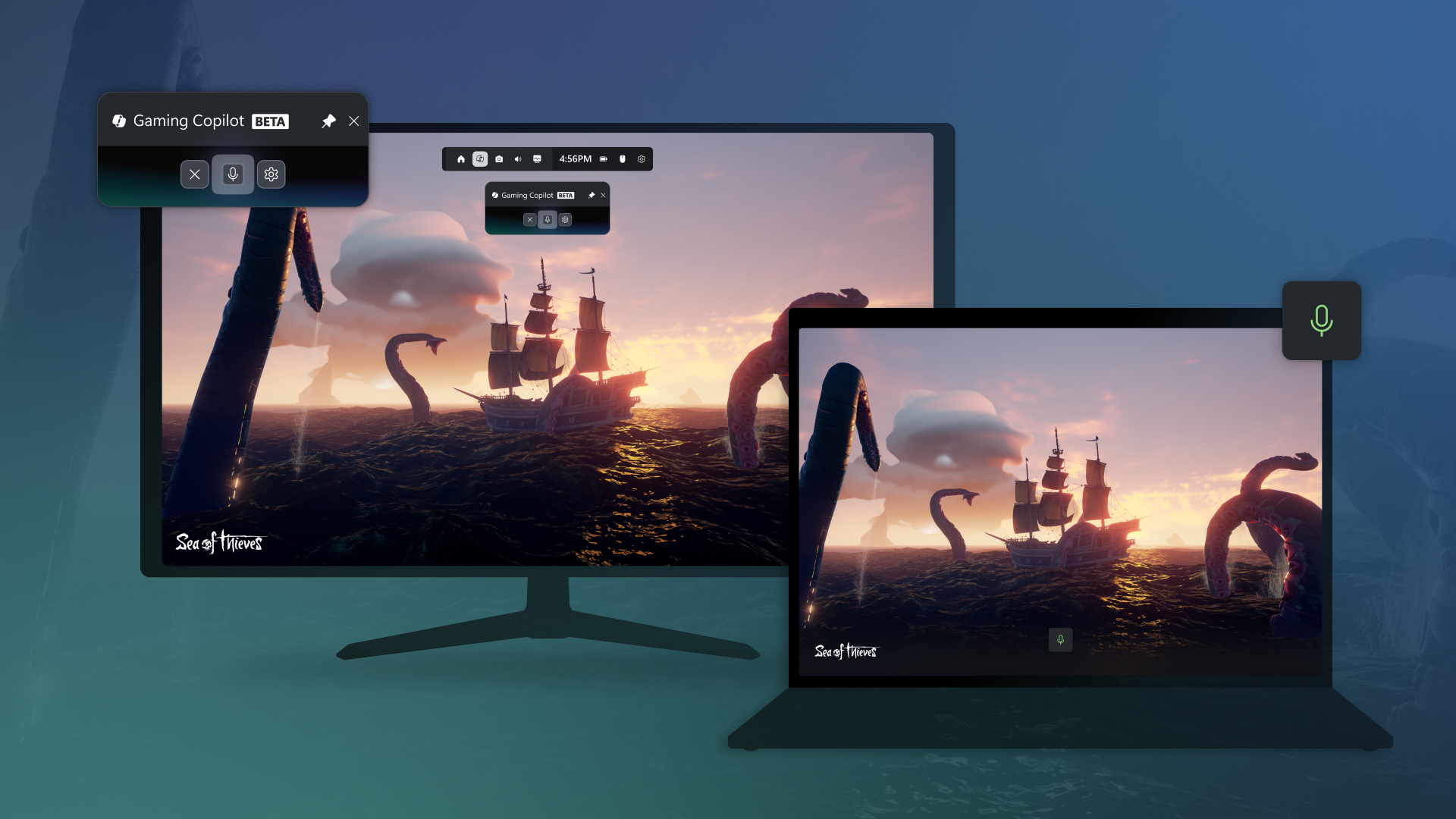
Gaming Copilot (Beta) in Game Bar.
Now, let’s talk about gaming.
Xbox and Windows are collaborating closer than ever to unlock new ways to play.
Players can now experience Xbox, Windows and Copilot in a whole new way with the ROG Xbox Ally and ROG Xbox Ally X, the handheld gaming devices developed in partnership with ASUS.
In addition to being able to quickly access games from Xbox, Game Pass and installed games from other leading PC stores, all in one place—you can talk to Copilot.
With the push of a button, you can access your personal gaming sidekick—Gaming Copilot. Long press the library button to start a conversation with Gaming Copilot for recommendations, help and more, without ever leaving your game.

Open Gaming Copilot on Game Bar in Windows 11
This tutorial will show you how to open the Gaming Copilot widget on Game Bar for your account in Windows 11. You can open the Game Bar to take control of all your favorite gaming activities while playing on your Windows 11 device. Gaming Copilot (Beta), the ultimate gaming sidekick, is...
www.elevenforum.com
Securing AI on Windows 11
Security is at the heart of all we do at Windows, in line with Microsoft’s Secure Future Initiative. Windows 11 is the most secure operating system we’ve ever made—by design and by default—with multiple layers of defense enabled to protect you from the moment you power on your PC.Security isn’t a checkbox; it’s an ongoing commitment. As we introduce powerful new agentic experiences on Windows, we’re more committed to evolving our safeguards to protect your privacy and security.
Below are three security commitments we’re making as we add Copilot Actions, another step in the agentic journey on Windows:
- You’re always in control of what Copilot Actions can do. Copilot Actions is turned off by default and you’re able to pause, take control or disable it at any time.
- You’ll have visibility into what Copilot Actions is doing. You can monitor its progress and stay informed at every step. If a sensitive or important decision is involved, it may request your approval for the specific action, keeping you in charge.
- We’re introducing it responsibly. In addition to extensive internal testing, a critical aspect of developing secure experiences is to roll them out responsibly, starting in preview and gathering feedback to refine our security and privacy controls.
Windows is committed to being the best, most secure platform for agentic experiences. We look forward to sharing more on security for agents on Windows, including enterprise controls, at Microsoft Ignite next month.
There’s never been a better time to upgrade to a Windows 11 PC
With support for Windows 10 PCs now ended, millions are upgrading to new Windows PCs that are faster, more secure and built for the future. Upgrading ensures you remain protected and ready to take full advantage of the latest innovations on Windows 11. And now, those upgrades come with something even more powerful: AI that’s ready to help, right out of the box.We want every person making the move to experience what it means to have a PC that’s not just a tool, but a true partner, and these experiences are available on any Windows 11 PC.
If you are looking for a new PC, there’s an incredible selection of Windows 11 PCs available today, offering choice and value at various price points from Surface and our ecosystem partners. For our fastest, most secure experience, look for a Copilot+ PC that comes with a neural processing unit capable of even more powerful AI experiences.
- The Acer Aspire 14 AI is designed for simplicity and the ideal device for those who need both performance and portability. Powered by an Intel Core Ultra processor (Series 2) and equipped with built-in Intel® Arc™ graphics, it delivers multi-day battery life in a sleek, ultra-modern design. Starting at $699.99 MSRP.
- The ASUS Vivobook 16 is a sleek, high-performance laptop designed for everyday productivity and creativity. Featuring a 16-inch display, this Copilot+ PC with AMD Ryzen AI 300 Series processor offers powerful performance, longer battery life and ample storage for everything you need. Starting at $799.99 MSRP.
- The Dell 14 Plus Laptop is a stylish and lightweight laptop powered by AMD Ryzen AI 300 Series. This Copilot+ PC is designed to run AI workloads locally while handling day-to-day tasks with ease, making it the perfect PC for on-the-go multitasking. Starting at $799.99 MSRP.
- The HP Omnibook X Flip 16-inch 2-in-1 Laptop is the AI-enhanced evolution of HP Envy with a premium design made to adapt to your lifestyle. Powered by an Intel Core Ultra processor (Series 2), this lightweight Copilot+ PC offers enhanced performance and unique AI experiences for independent professionals, creators, and students. Starting at $1,199.99 MSRP.
- The Lenovo Yoga 7 2-in-1 Copilot+ PC has a 360-degree convertible design, responsive touchscreen and Yoga Pen that make it easy to take notes, sketch ideas or unwind in your favorite mode. Powered by AMD Ryzen AI 300 Series processors and Lenovo’s AI Core, it delivers adaptive performance on a 16-inch IPS display. Starting at $749.99 MSRP.
- The Samsung Galaxy Book4 Edge 16, available in the Snapdragon X Elite, combines power and portability with up to 22 hours of video playback, Super Fast Charging and a 16-inch 3K Dynamic AMOLED 2x display. Navigate with ease using multi-touch gestures on the intuitive touchscreen—perfect for work or play. Starting at $1,499.99 MSRP.
- Surface Copilot+ PCs, powered by Snapdragon Series X, offer strong performance, long battery life and useful AI features in a sleek design, giving you more options. The Surface Laptop, 13-inch starts at $799.99 MSRP and delivers the longest battery life of any Surface, with up to 23 hours of video playback and up to 16 hours of active web browsing. The Surface Pro, 12-inch starts at $799.99 MSRP and is the thinnest and lightest Copilot+ PC yet, with a flexible design and built-in, adjustable kickstand.
For business customers, resellers such as Bechtle, CDW, ComputaCenter, SCC and more stand ready to support your upgrade path with scalable solutions.
Get started with the latest Copilot features on Windows 11 via update from the Microsoft Store.
For more on the latest features and improvements on Windows, including enhancements coming to Copilot+ PC experiences, widgets, security and more, learn more here.
We can’t wait to see what you create, discover and achieve with Windows and Copilot by your side.
1 Based on Microsoft-commissioned online study of U.S. consumers ages 13 years of age or older conducted by Edelman DXI and Assembly, 1,000 participants, July 2025.
2 Microsoft First Party Data, March 2025 – August 2025.
Source:

Making every Windows 11 PC an AI PC
New Copilot and agentic experiences make powerful AI easy on Windows 11 Today, we’re taking an exciting step forward with a new wave of updates that make every Windows 11 PC an AI PC – with Copilot at the center of it al
 blogs.windows.com
Last edited:


 -pilot ............MS is pulling it through our throats ....
 ( whether you like it or not )