Microsoft.sysinternals.processmonitor issues


Silencious

Well-known member
Local time
5:14 PM
Posts
34
Location
United Kingdom
OS
windows 11
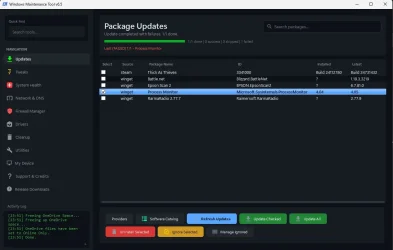
According to winget. I have version 4.04, and 4.05 is ready to upgrade. But when I try to update it, it fails. Can anyone help or explain what I'm doing wrong?
 

Attachments

  • Failed MSPM.webp
    Failed MSPM.webp
    48.1 KB · Views: 2

My Computer My Computer

At a glance

windows 11
OS
windows 11
I use the command line winget - I'm very pleased to find out that Sysinternals can be installed that way, and I'm very much guessing this might be the issue;

Found Sysinternals Suite [Microsoft.Sysinternals.Suite] Version 2026-07-09
This application is licensed to you by its owner.
Microsoft is not responsible for, nor does it grant any licenses to, third-party packages.
Downloading https://download.sysinternals.com/files/SysinternalsSuite.zip
██████████████████████████████ 192 MB / 192 MB
Installer hash does not match; this cannot be overridden when running as admin

Some kind of server-side problem someone needs to fix.
 

My Computer My Computer

At a glance

Win11Pro 25H2 (26200.9168)i7-12700f32gb ddr4nvidia rtx3060ti
OS
Win11Pro 25H2 (26200.9168)
Computer type
PC/Desktop
Manufacturer/Model
self-built
CPU
i7-12700f
Motherboard
gigabyte auros b660
Memory
32gb ddr4
Graphics Card(s)
nvidia rtx3060ti
Sound Card
onboard realtek
Monitor(s) Displays
1 x benq, 2 x lg
Screen Resolution
1 at 2560x1080, 2 at 1920x1080
Hard Drives
nvme 1tb crucial ssd
sata 1tb samsung ssd
1tb HDD, 3tb HDD
PSU
corsair rm750
Case
NZXT H710
Cooling
BeQuiet Dark Rock
Keyboard
steelseries apex 3
Mouse
generic usb
Internet Speed
500 down 20 up
Browser
librewolf
Antivirus
eset nod32
The winget package repository lists Process Monitor as bumped from version 4.0.5 to version 4.1 today.

You might want to restart WMT.
 

My Computer My Computer

At a glance

Windows 7
OS
Windows 7
What is WMT?
Rebooted, ran winget install --id=Microsoft.Sysinternals.Suite -e
Same error - I'm not fussed, it would be nice to have sysinternals installed natively
 

My Computer My Computer

At a glance

Win11Pro 25H2 (26200.9168)i7-12700f32gb ddr4nvidia rtx3060ti
OS
Win11Pro 25H2 (26200.9168)
Computer type
PC/Desktop
Manufacturer/Model
self-built
CPU
i7-12700f
Motherboard
gigabyte auros b660
Memory
32gb ddr4
Graphics Card(s)
nvidia rtx3060ti
Sound Card
onboard realtek
Monitor(s) Displays
1 x benq, 2 x lg
Screen Resolution
1 at 2560x1080, 2 at 1920x1080
Hard Drives
nvme 1tb crucial ssd
sata 1tb samsung ssd
1tb HDD, 3tb HDD
PSU
corsair rm750
Case
NZXT H710
Cooling
BeQuiet Dark Rock
Keyboard
steelseries apex 3
Mouse
generic usb
Internet Speed
500 down 20 up
Browser
librewolf
Antivirus
eset nod32
We have two separate problems.

1. The original poster is using a 3rd-party utility (Windows Maintenance Tool), and not the winget command.

2. MS pushed out a different version of the full Sysinternals Suite for download, but forgot to update the current SHA256 hash on the winget repo:
Code:
  InstallerUrl: https://download.sysinternals.com/files/SysinternalsSuite.zip
  InstallerSha256: 9012AA4D47692054CCCA7D03A4375F4AD8C48A2941085F9435CE375A47986C80

But the current ZIP file has a different SHA256 hash:
Code:
PS C:\Users\GARLIN\Downloads> Get-FileHash .\SysinternalsSuite.zip
                                                          
SHA256          EC1C22581518E5A8661EC26886BC2EAEFE9E59CF2AD7FBA41926C19D356DE169       C:\Users\GARLIN\Downloads\SysinternalsSuite.zip

Which means someone at MS forgot to update the installer config on GitHub. And you'll have to wait.
 

My Computer My Computer

At a glance

Windows 7
OS
Windows 7
In this guide, you will learn the steps to download and install updates for apps on Windows 11 and Windows 10 without the Microsoft Store using the Windows Package Manager (winget) command-line tool.


My Computer My Computer

At a glance

Windows 11AMD Ryzen 7 5700GMicron Technology DDR4-3200 16GBNVIDIA GeForce RTX 3060
OS
Windows 11
Computer type
PC/Desktop
Manufacturer/Model
HP Pavilion
CPU
AMD Ryzen 7 5700G
Motherboard
Erica6
Memory
Micron Technology DDR4-3200 16GB
Graphics Card(s)
NVIDIA GeForce RTX 3060
Sound Card
Realtek ALC671
Monitor(s) Displays
Samsung SyncMaster U28E590
Screen Resolution
3840 x 2160
Hard Drives
SAMSUNG MZVLQ1T0HALB-000H1
Thanks for the explanation Garlin
 

My Computer My Computer

At a glance

Win11Pro 25H2 (26200.9168)i7-12700f32gb ddr4nvidia rtx3060ti
OS
Win11Pro 25H2 (26200.9168)
Computer type
PC/Desktop
Manufacturer/Model
self-built
CPU
i7-12700f
Motherboard
gigabyte auros b660
Memory
32gb ddr4
Graphics Card(s)
nvidia rtx3060ti
Sound Card
onboard realtek
Monitor(s) Displays
1 x benq, 2 x lg
Screen Resolution
1 at 2560x1080, 2 at 1920x1080
Hard Drives
nvme 1tb crucial ssd
sata 1tb samsung ssd
1tb HDD, 3tb HDD
PSU
corsair rm750
Case
NZXT H710
Cooling
BeQuiet Dark Rock
Keyboard
steelseries apex 3
Mouse
generic usb
Internet Speed
500 down 20 up
Browser
librewolf
Antivirus
eset nod32
We have two separate problems.

1. The original poster is using a 3rd-party utility (Windows Maintenance Tool), and not the winget command.

2. MS pushed out a different version of the full Sysinternals Suite for download, but forgot to update the current SHA256 hash on the winget repo:
Code:
  InstallerUrl: https://download.sysinternals.com/files/SysinternalsSuite.zip
  InstallerSha256: 9012AA4D47692054CCCA7D03A4375F4AD8C48A2941085F9435CE375A47986C80

But the current ZIP file has a different SHA256 hash:
Code:
PS C:\Users\GARLIN\Downloads> Get-FileHash .\SysinternalsSuite.zip
                                                         
SHA256          EC1C22581518E5A8661EC26886BC2EAEFE9E59CF2AD7FBA41926C19D356DE169       C:\Users\GARLIN\Downloads\SysinternalsSuite.zip

Which means someone at MS forgot to update the installer config on GitHub. And you'll have to wait.
Thank you all for your inputs and thoughts. I posted my issue, but I forgot to say I did use PowerShell as admin and used the Winget commands, but it reported my same issue. Today, when I reviewed the replies, I followed the person who posted the YouTube video and now. All I have to report is that Windows Edge was the only app that needed upgrading, and the issue I had is no longer there. I wonder if MS has corrected their problem? Once again, thank you for your input.
 

My Computer My Computer

At a glance

windows 11
OS
windows 11
The video belongs to me, you can use winget upgradecommand to update all installed apps with available updates.

I myself use Sysinternal utility but i download it from Microsoft website.


My Computer My Computer

At a glance

Windows 11AMD Ryzen 7 5700GMicron Technology DDR4-3200 16GBNVIDIA GeForce RTX 3060
OS
Windows 11
Computer type
PC/Desktop
Manufacturer/Model
HP Pavilion
CPU
AMD Ryzen 7 5700G
Motherboard
Erica6
Memory
Micron Technology DDR4-3200 16GB
Graphics Card(s)
NVIDIA GeForce RTX 3060
Sound Card
Realtek ALC671
Monitor(s) Displays
Samsung SyncMaster U28E590
Screen Resolution
3840 x 2160
Hard Drives
SAMSUNG MZVLQ1T0HALB-000H1
Thank you all for your inputs and thoughts. I posted my issue, but I forgot to say I did use PowerShell as admin and used the Winget commands, but it reported my same issue. Today, when I reviewed the replies, I followed the person who posted the YouTube video and now. All I have to report is that Windows Edge was the only app that needed upgrading, and the issue I had is no longer there. I wonder if MS has corrected their problem? Once again, thank you for your input.
Sysinternals is provided in 3 different formats: winget package, Store app, and direct download.

The actual tools are the same inside all 3 files. But if you download the ZIP directly from MS, winget has no idea you have a newer copy of the package. It keeps a separate database of previously installed packages, and can't see your download. While you have a newer Sysinternals to use, winget still thinks it's behind in package versions.

The SHA256 hash is a mechanism to help protect against attackers tampering with the ZIP contents. winget and the Store will do the comparison for you. When you download the ZIP from MS, there's no published checksum for you to use. The risk is low since you're getting the file from MS, but it's not a trivial risk since most of the Sysinternals tools must be run as the Admin.
 

My Computer My Computer

At a glance

Windows 7
OS
Windows 7
I downloaded the above, but it looks complicated, and with them being execution files, I'm reluctant to click in case I ... muck it up. Thanks anyway. I'll keep the file anyway when I become more confident in Windows tech. I'll rely on you guys
 

My Computer My Computer

At a glance

windows 11
OS
windows 11
The ZIP file expects you to extract the files into a target folder. The winget and Store versions will always install them into the same "Program Files" folder for you.

While they constantly improve Sysinternals with bug fixes, you're not missing much if you don't have the newest version. Your current suite is fine for daily use. And someone at MS will eventually figure out the problem on their end.
 

My Computer My Computer

At a glance

Windows 7
OS
Windows 7
Same error - I'm not fussed, it would be nice to have sysinternals installed natively
A lot of malware uses lolbins like psexec, so not a good idea, just install tools you need. Then again, I use Nirsoft suite, so ... 🤐
1. The original poster is using a 3rd-party utility (Windows Maintenance Tool), and not the winget command.
It looks that WMT uses it's own update database, since process monitor was updated to 4.05 weeks ago.
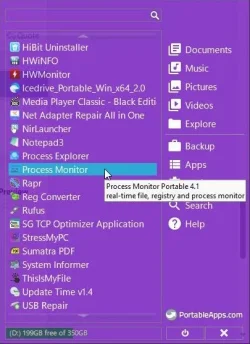
I use PortableApps for simple apps, it seems to be updated promptly, I use winget script for the rest.
Code:
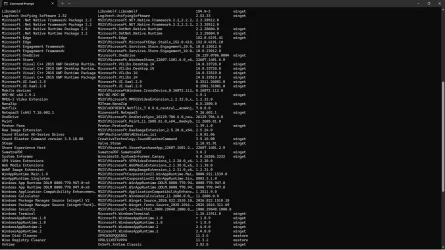
winget upgrade --all -h -u --accept-package-agreements --accept-source-agreements
 

Attachments

  • capture_08222026_173227.webp
    capture_08222026_173227.webp
    37.5 KB · Views: 1
  • capture_08222026_173609.webp
    capture_08222026_173609.webp
    248.5 KB · Views: 1

My Computer My Computer

At a glance

Home2FH2CanAMD Ryzen 5 8600G (07/24)2x32GB Kingston FURY DDR5 5600 MHz CL36 @5200...ASROCK Radeon RX 6600 Challenger D 8G @48FPS ...
OS
Home2FH2Can
Computer type
PC/Desktop
CPU
AMD Ryzen 5 8600G (07/24)
Motherboard
ASROCK B650M-HDV/M.2 (07/24) BIOS 4.43 AGESA ComboAM5 1.3.0.1b Patch A (07/26)
Memory
2x32GB Kingston FURY DDR5 5600 MHz CL36 @5200 CL40 (07/24)
Graphics Card(s)
ASROCK Radeon RX 6600 Challenger D 8G @48FPS (08/24)
Sound Card
Creative Sound BlasterX AE-5 Plus (05/24)
Monitor(s) Displays
24" Philips 24M1N3200ZS/00 (05/24)
Screen Resolution
1920×1080@165Hz via DP1.4
Hard Drives
Kingston KC3000 NVMe 2TB (05/24)
ADATA XPG GAMMIX S11 Pro 512GB (07/19)
PSU
Seasonic Core GM 550 Gold (04/24)
Case
Fractal Design Define 7 Mini with 3x Noctua NF-P14s/12@555rpm (04/24)
Cooling
Noctua NH-U12S with Noctua NF-P12 (04/24)
Keyboard
HP Pavilion Wired Keyboard 300 (07/24) + Rabalux 76017 Parker (01/24)
Mouse
Logitech M330 Silent Plus (07/26)
Internet Speed
500/100 Mbps via RouterOS (05/21) & TCP Optimizer
Browser
Edge, Brave for YouTube, LibreWolf for FB
Antivirus
NextDNS blocking 1/3 Traffic
Other Info
Phone: Motorola Moto G86 (02/26)
Backup: Hasleo Backup Suite (PreOS)
Headphones: Sennheiser RS170 (09/10)
Chair: Huzaro Force 4.4 Grey Mesh (05/24)
Notifier: Xiaomi Mi Band 9 Milanese (10/24)
FlexCore USB-C 3.2 Gen 1 (M) to LAN (F) (08/25)
The Sysinternal utilities portable no installation needed.
 

My Computer My Computer

At a glance

Windows 11AMD Ryzen 7 5700GMicron Technology DDR4-3200 16GBNVIDIA GeForce RTX 3060
OS
Windows 11
Computer type
PC/Desktop
Manufacturer/Model
HP Pavilion
CPU
AMD Ryzen 7 5700G
Motherboard
Erica6
Memory
Micron Technology DDR4-3200 16GB
Graphics Card(s)
NVIDIA GeForce RTX 3060
Sound Card
Realtek ALC671
Monitor(s) Displays
Samsung SyncMaster U28E590
Screen Resolution
3840 x 2160
Hard Drives
SAMSUNG MZVLQ1T0HALB-000H1

Latest Support Threads

Back
Top Bottom