Move Users Folder Location in Windows 11


tops

Well-known member
Member
Local time
5:46 PM
Posts
20
Location
Santo Andre - Sao Paulo - Brazil
OS
Windows 11
Hello everyone, all right?

Has anyone tried to install Windows 11 by moving the "users" folder out of place, like in this @Kari tutorial?

Another question: I was in the leaked build, I signed up for Windows Insider and with that, via Windows Update, I downloaded the new build and updated. Is it possible to generate an ISO with these files already downloaded or should I download again using UUP DUMP, for example? What do you recommend?

Are any of you using Windows 11 "productively" already, although we know it's not recommended? I ask this because my Windows 10 installation is unstable (I use it since the first RTM build just updating) and if I were to reinstall, I would do it with Windows 11.

Hugs!!
 

My Computer My Computer

At a glance

Windows 11Intel Core i7 6700 @ 3.40GHz Skylake Tecnolog...16,0GB Single-Channel DDR3 @ 800 Mhz (11-11-1...4096MB ATI Radeon RX 580 Series (Gigabyte)
OS
Windows 11
Computer type
PC/Desktop
CPU
Intel Core i7 6700 @ 3.40GHz Skylake Tecnology 14 nm
Motherboard
Gigabyte Technology Co. Ltd. B150M-D3H DDR3-CF (U3E1)
Memory
16,0GB Single-Channel DDR3 @ 800 Mhz (11-11-11-28)
Graphics Card(s)
4096MB ATI Radeon RX 580 Series (Gigabyte)
Sound Card
Realtek High Definition Audio
Monitor(s) Displays
SAMSUNG S22E310
Screen Resolution
(1920x1080@60Hz)
Hard Drives
931GB Seagate ST1000LM024 HN-M101MBB (SATA )
465GB Samsung SSD 980 500GB (Desconhecido (SSD))
2794GB Seagate Expansion Desk USB Device (USB (SATA) )
PSU
Seventeam
Case
Nilko
Keyboard
Logitech
Mouse
Logitech M90
Internet Speed
600 / 300 mbps
Browser
MS Edge / Google Chrome
Antivirus
Windows Defender
I use that method to relocate the Users folder and all user profiles to drive E:, as I have always done since early Vista days. Works like a charm in W11, absolutely no issues.

1625234082789.png

Kari
 

My Computers My Computers

  • At a glance

    Windows 11 PRO x64 DevIntel Core i7-8550U6 GBMicrosoft Hyper-V Video
    OS
    Windows 11 PRO x64 Dev
    Manufacturer/Model
    Hyper-V Virtual Machine (host in System 2 specs)
    CPU
    Intel Core i7-8550U
    Memory
    6 GB
    Graphics Card(s)
    Microsoft Hyper-V Video
    Monitor(s) Displays
    Laptop display (17.1") & Samsung U28E590 (27.7")
  • At a glance

    Windows 11 PRO x64 Dev ChannelIntel Core i7-8550U16 GBIntel(R) UHD Graphics 620 & NVIDIA GeForce 930MX
    Operating System
    Windows 11 PRO x64 Dev Channel
    Computer type
    Laptop
    Manufacturer/Model
    HP HP ProBook 470 G5
    CPU
    Intel Core i7-8550U
    Motherboard
    HP 837F KBC Version 02.3D.00
    Memory
    16 GB
    Graphics card(s)
    Intel(R) UHD Graphics 620 & NVIDIA GeForce 930MX
    Sound Card
    Conexant ISST Audio
    Monitor(s) Displays
    Laptop display (17.1") & Samsung U28E590 (27.7")
    Hard Drives
    128 GB SSD & 1 TB HDD
    Keyboard
    Wireless Logitech MK710 keyboard
    Mouse
    Wireless Logitech MSX mouse
    Internet Speed
    100 Mbps down, 20 Mbps up
    Browser
    Edge Chromium Dev Channel
    Antivirus
    Windows Defender
    Other Info
    2 * 3 TB USB HDD
    6 TB WD Mirror NAS
Additionally, I updated my Win10 install that I had \Users moved to a separate physical drive to WIn11 with no issues - other than being slow as #$%@#$%@#$% when upgrading via WU.
 

My Computers My Computers

  • At a glance

    Windows 11 23H2 Current buildAMD Ryzen 9 3950X4 * 32 GB - Corsair Vengeance 3600 MHzEVGA GeForce RTX 3080 Ti XC3 ULTRA GAMING (12...
    OS
    Windows 11 23H2 Current build
    Computer type
    PC/Desktop
    Manufacturer/Model
    HomeBrew
    CPU
    AMD Ryzen 9 3950X
    Motherboard
    MSI MEG X570 GODLIKE
    Memory
    4 * 32 GB - Corsair Vengeance 3600 MHz
    Graphics Card(s)
    EVGA GeForce RTX 3080 Ti XC3 ULTRA GAMING (12G-P5-3955-KR)
    Sound Card
    Realtek® ALC1220 Codec
    Monitor(s) Displays
    2x Eve Spectrum ES07D03 4K Gaming Monitor (Matte) | Eve Spectrum ES07DC9 4K Gaming Monitor (Glossy)
    Screen Resolution
    3x 3840 x 2160
    Hard Drives
    3x Samsung 980 Pro NVMe PCIe 4 M.2 2 TB SSD (MZ-V8P2T0B/AM) } 3x Sabrent Rocket NVMe 4.0 1 TB SSD (USB)
    PSU
    PC Power & Cooling’s Silencer Series 1050 Watt, 80 Plus Platinum
    Case
    Fractal Design Define 7 XL Dark ATX Full Tower Case
    Cooling
    Arctic Liquid Freezer III 420 RGB + Air 3x 140mm case fans (pull front) + 1x 120 mm (push back) and 1 x 120 mm (pull bottom)
    Keyboard
    SteelSeries Apex Pro Wired Gaming Keyboard
    Mouse
    Logitech MX Master 3S | MX Master 3 for Business
    Internet Speed
    AT&T LightSpeed Gigabit Duplex Ftth
    Browser
    Nightly (default) + Firefox (stable), Chrome, Edge , Arc
    Antivirus
    Defender + MB 5 Beta
  • At a glance

    ChromeOS Flex Dev Channel (current)Intel(R) Core(TM) i5-6300U CPU @ 2.40GHz, 250...16 GBIntel(R) HD Graphics 520
    Operating System
    ChromeOS Flex Dev Channel (current)
    Computer type
    Laptop
    Manufacturer/Model
    Dell Latitude E5470
    CPU
    Intel(R) Core(TM) i5-6300U CPU @ 2.40GHz, 2501 Mhz, 2 Core(s), 4 Logical Processor(s)
    Motherboard
    Dell
    Memory
    16 GB
    Graphics card(s)
    Intel(R) HD Graphics 520
    Sound Card
    Intel(R) HD Graphics 520 + RealTek Audio
    Monitor(s) Displays
    Dell laptop display 15"
    Screen Resolution
    1920 * 1080
    Hard Drives
    Toshiba 128GB M.2 22300 drive
    INTEL Cherryville 520 Series SSDSC2CW180A 180 GB SATA III SSD
    PSU
    Dell
    Case
    Dell
    Cooling
    Dell
    Keyboard
    Dell
    Mouse
    Logitech MX Master 3S (shared w. Sys 1) | Dell TouchPad
    Internet Speed
    AT&T LightSpeed Gigabit Duplex Ftth
I am not sure I understand why people bother with this. I keep my personal files (i.e., any files that are not the OS or installed programs) on a separate drive. They are not in the /Users folders and I never noticed any problem. Any reason you need to put your files in the /Users folders?
 

My Computer My Computer

At a glance

Windows 10i5-10600K16 GBGeForce GTX 1650
OS
Windows 10
Computer type
PC/Desktop
CPU
i5-10600K
Motherboard
Asus Rog Strix Z490-A Gaming
Memory
16 GB
Graphics Card(s)
GeForce GTX 1650
Monitor(s) Displays
Samsung U32J59x 32" 4K
Screen Resolution
3840x2160
Any reason you need to put your files in the /Users folders?
It's not about where to store personal files, it's about where to store ALL user profile related files. One simple and fast procedure while installing Windows, and all future user accounts created will store their user profile folders on another drive than Windows system drive.

It does automatically the same to all users profiles, than you do manually separately for each user, just better. I mean, you change the storage location for your docs, pics, music and whatever, but the method discussed in this thread moves all of those, plus anything related to user profiles. The more accounts you have, the more you gain.

A good example is AppData folders. Mine is currently over 20 GB. In addition, I have three other accounts, each around 10 GB AppData. Moving the whole Users folder to another disk, E: drive in my case, has already saved over 50 GB from C: drive, in addition to all personal data for all user accounts will be automatically saved to E:, no reason to change anything manually.

AppData.jpg

Kari
 

My Computers My Computers

  • At a glance

    Windows 11 PRO x64 DevIntel Core i7-8550U6 GBMicrosoft Hyper-V Video
    OS
    Windows 11 PRO x64 Dev
    Manufacturer/Model
    Hyper-V Virtual Machine (host in System 2 specs)
    CPU
    Intel Core i7-8550U
    Memory
    6 GB
    Graphics Card(s)
    Microsoft Hyper-V Video
    Monitor(s) Displays
    Laptop display (17.1") & Samsung U28E590 (27.7")
  • At a glance

    Windows 11 PRO x64 Dev ChannelIntel Core i7-8550U16 GBIntel(R) UHD Graphics 620 & NVIDIA GeForce 930MX
    Operating System
    Windows 11 PRO x64 Dev Channel
    Computer type
    Laptop
    Manufacturer/Model
    HP HP ProBook 470 G5
    CPU
    Intel Core i7-8550U
    Motherboard
    HP 837F KBC Version 02.3D.00
    Memory
    16 GB
    Graphics card(s)
    Intel(R) UHD Graphics 620 & NVIDIA GeForce 930MX
    Sound Card
    Conexant ISST Audio
    Monitor(s) Displays
    Laptop display (17.1") & Samsung U28E590 (27.7")
    Hard Drives
    128 GB SSD & 1 TB HDD
    Keyboard
    Wireless Logitech MK710 keyboard
    Mouse
    Wireless Logitech MSX mouse
    Internet Speed
    100 Mbps down, 20 Mbps up
    Browser
    Edge Chromium Dev Channel
    Antivirus
    Windows Defender
    Other Info
    2 * 3 TB USB HDD
    6 TB WD Mirror NAS
I am not sure I understand why people bother with this. I keep my personal files (i.e., any files that are not the OS or installed programs) on a separate drive. They are not in the /Users folders and I never noticed any problem. Any reason you need to put your files in the /Users folders?
Same here! I have a 4TB extra HDD I used for extra stuff. I don't save anything in Documents or Downloads just in case i have a crash or something.
 

My Computers My Computers

  • At a glance

    Windows 11 Pro x64 24H2 v26200.5074AMD Ryzen 9 3600X 12-Core @ 3.80GHzCorsair 32GB DDR4EVGA GeForce gtx 1660 Super
    OS
    Windows 11 Pro x64 24H2 v26200.5074
    Computer type
    PC/Desktop
    Manufacturer/Model
    Built Myself in 2025
    CPU
    AMD Ryzen 9 3600X 12-Core @ 3.80GHz
    Motherboard
    MSI X570 Gaming Plus
    Memory
    Corsair 32GB DDR4
    Graphics Card(s)
    EVGA GeForce gtx 1660 Super
    Sound Card
    On Board
    Monitor(s) Displays
    2 X AOC 27" , Dell 27"
    Screen Resolution
    1920 X 1080
    Hard Drives
    ~~~~~~~~~~~~~~~~~~~~~~~~~~
    ~ P34A60 512GB NVMe PCIe Gen3x4 M.2
    ~ 6TB Toshiba HDD
    ~ 6TB HDD (Backup)
    ~ SanDisk 250GB SSD
    ~ 2 X 1TB HDD
    ~~~~~~~~~~
    PSU
    eVGA 750w G+
    Case
    GAMDIAS White ATX Mid Tower Gaming Computer PC Case w/Tempered Glass
    Cooling
    AMD Wraith Prism
    Keyboard
    Nulea RT05 Wireless Ergonomic
    Mouse
    Nulea MD280 Wireless Vertical Mouse
    Internet Speed
    761Mbps (Download) / 692Mbps (Upload)
    Browser
    Firefox
    Antivirus
    Malwarebytes
    Other Info
    *This is my Main Computer That I use*
  • At a glance

    Windows 11 Pro x64 24H2 v26100.2894AMD Ryzen 7 1800X @ 3.60Ghz16GBAMD RX580
    Operating System
    Windows 11 Pro x64 24H2 v26100.2894
    Computer type
    PC/Desktop
    CPU
    AMD Ryzen 7 1800X @ 3.60Ghz
    Motherboard
    Asus Crosshair VI Hero
    Memory
    16GB
    Graphics card(s)
    AMD RX580
    Sound Card
    onBoard
    Monitor(s) Displays
    LG 27UK650-W 27", eMachine 22"
    Screen Resolution
    1920 X 1080
    Hard Drives
    250GB SSD
    PSU
    CORSAIR RM850
    Case
    GAMDIAS Black ATX Mid Tower Gaming Computer PC Case w/Tempered Glass
    Cooling
    Liquid
    Keyboard
    Nulea RT05 Wireless Ergonomic
    Mouse
    Nulea MD280 Wireless Vertical Mouse
    Internet Speed
    752Mbps (Download) / 537Mbps (Upload)
    Browser
    Firefox
    Antivirus
    Malwarebytes
    Other Info
    I use this computer for photo/video editing and to track severe weather
The main advantage of storing your files away from C: is if Windows develops a problem, you can simply format and your files will be intact.
 

My Computers My Computers

  • At a glance

    Windows 11 ProRyzen 9 3900xCorsair Dominator Platinum 32Gb@3600MHzAsus Strix 3080 Ti OC
    OS
    Windows 11 Pro
    Computer type
    PC/Desktop
    Manufacturer/Model
    Self Built
    CPU
    Ryzen 9 3900x
    Motherboard
    Asus Strix x570-E
    Memory
    Corsair Dominator Platinum 32Gb@3600MHz
    Graphics Card(s)
    Asus Strix 3080 Ti OC
    Monitor(s) Displays
    Samsung Odyssey G7 32" Curved Gaming Monitor, IIYAMA XUB2792QSU-W1 27"
    Screen Resolution
    2560x1440@240Hz, 2560x1440@70Hz
    Hard Drives
    Samsung 980 Pro 1 Tb (OS), Samsung 970 Pro 1 Tb (games), Samsung 860 Evo 1Tb (data), Samsung 860 Evo 4 Tb (games), Crucial MX500 1Tb (photos), Synology DS920+ 32 Tb NAS.
    PSU
    Corsair RM850x
    Case
    Corsair Crystal 680x
    Cooling
    Corsair H100i Se Platinum, 8 Corsair QL120/140 fans
    Keyboard
    Corsair K70 RGB Mk 2 SE Rapid Fire
    Mouse
    Corsair M65 Elite
    Internet Speed
    58/12 Mbps
    Browser
    Microsoft Edge
    Antivirus
    Windows Defender + Malwarebytes
    Other Info
    Astro a50 Headset, Samsung Galaxy Tab S3 Tablet.
    Creative T6300 5.1 Speakers. TPM 2.0 Module.
  • At a glance

    Arch Linux KDERyzen 5600xCorsair Vengeance 32Gb@3200MHzGigabyte RTX2070 Super Gaming OC
    Operating System
    Arch Linux KDE
    Computer type
    PC/Desktop
    Manufacturer/Model
    Self Built
    CPU
    Ryzen 5600x
    Motherboard
    Asus Strix B550-E
    Memory
    Corsair Vengeance 32Gb@3200MHz
    Graphics card(s)
    Gigabyte RTX2070 Super Gaming OC
    Sound Card
    Creative Soundblaster AE-5
    Monitor(s) Displays
    Asus Strix XG43VQ 43" Ultrawide
    Screen Resolution
    3840x1200 @ 120Mhz
    Hard Drives
    Aorus Gen 4 NVMe 1 Tb (Windows Insider), Samsung 850 Pro 512Gb (data), Samsung 850 Evo 1Tb (backups), Samsung 860 Evo 2Tb (Home folder), Blu-ray player
    PSU
    Corsair RM750i
    Case
    Fractal Define R6
    Cooling
    Scythe Mugen 5 rev B and Corsair QL fans
    Keyboard
    Corsair K70 RGB MK.2 Low Profile Rapidfire
    Mouse
    Glorious Model D
    Internet Speed
    58/12 Mbps
    Browser
    Microsoft Edge
    Antivirus
    Windows Defender + Malwarebytes
    Other Info
    Corsair Virtuoso Headset
The main advantage of storing your files away from C: is if Windows develops a problem, you can simply format and your files will be intact.
^^^^^^.

Even if my system drive crashes, All of the data is not on the system drive - thus saved.

And I don't mean just documents, photos, etc. I mean settings for app, everything in AppData, all profiles, etc.

Honestly, I don't see why people don't do this. I make regular backups of the drive that has \Users - which is all the important stuff. I don't bother with the system drive because I can easily install everything I need in short order.

But having that separate drive for all of \Users makes it a ton easier to get back to where you were before.

Perfect example: When I clean install Windows, I have my backup of the D: drive (which is where \Users resides). But I then also copy my profile to E:. It includes things like all my browser profiles (addons, content, saved sites, customizations, etc.) - I then format the 2 NVMe drives, install to NVMe01 (C) and then use Kar's tutorial to move \Users to NVMe02 (D), then I can install my apps. But after I copy back things from AppData, like the Google folder, the Microsoft folder (selectively, there are things you don't want to copy back, like crypto stuff - not cryptocurrency, cryptology (?) used by Microsoft apps) and Mozilla, each and every Browser I was using before is back exactly the same as before I formatted. Same exact addons, same exact settings, same exact websites last opened - because it is the same exact profile.

Same applies to ~65% of my apps. The rest are either saving files and settings in the cloud (like games) or I don't actually care for.

And this way, I can have 700 GB of games installed but not have to tailor my backup to exclude folders and such, because C:, where programs get installed, doesn't get imaged - really no need to. My data is what is important, not my apps.

It makes getting a system back up and running after a chosen clean install much, much faster.

And if you another of Kari's tutorial on how ot build a system image of your system including the apps, it becomes even that much faster - load image, copy fodlers from \AppData and poof - you're right back where you were in no time.
 

My Computers My Computers

  • At a glance

    Windows 11 23H2 Current buildAMD Ryzen 9 3950X4 * 32 GB - Corsair Vengeance 3600 MHzEVGA GeForce RTX 3080 Ti XC3 ULTRA GAMING (12...
    OS
    Windows 11 23H2 Current build
    Computer type
    PC/Desktop
    Manufacturer/Model
    HomeBrew
    CPU
    AMD Ryzen 9 3950X
    Motherboard
    MSI MEG X570 GODLIKE
    Memory
    4 * 32 GB - Corsair Vengeance 3600 MHz
    Graphics Card(s)
    EVGA GeForce RTX 3080 Ti XC3 ULTRA GAMING (12G-P5-3955-KR)
    Sound Card
    Realtek® ALC1220 Codec
    Monitor(s) Displays
    2x Eve Spectrum ES07D03 4K Gaming Monitor (Matte) | Eve Spectrum ES07DC9 4K Gaming Monitor (Glossy)
    Screen Resolution
    3x 3840 x 2160
    Hard Drives
    3x Samsung 980 Pro NVMe PCIe 4 M.2 2 TB SSD (MZ-V8P2T0B/AM) } 3x Sabrent Rocket NVMe 4.0 1 TB SSD (USB)
    PSU
    PC Power & Cooling’s Silencer Series 1050 Watt, 80 Plus Platinum
    Case
    Fractal Design Define 7 XL Dark ATX Full Tower Case
    Cooling
    Arctic Liquid Freezer III 420 RGB + Air 3x 140mm case fans (pull front) + 1x 120 mm (push back) and 1 x 120 mm (pull bottom)
    Keyboard
    SteelSeries Apex Pro Wired Gaming Keyboard
    Mouse
    Logitech MX Master 3S | MX Master 3 for Business
    Internet Speed
    AT&T LightSpeed Gigabit Duplex Ftth
    Browser
    Nightly (default) + Firefox (stable), Chrome, Edge , Arc
    Antivirus
    Defender + MB 5 Beta
  • At a glance

    ChromeOS Flex Dev Channel (current)Intel(R) Core(TM) i5-6300U CPU @ 2.40GHz, 250...16 GBIntel(R) HD Graphics 520
    Operating System
    ChromeOS Flex Dev Channel (current)
    Computer type
    Laptop
    Manufacturer/Model
    Dell Latitude E5470
    CPU
    Intel(R) Core(TM) i5-6300U CPU @ 2.40GHz, 2501 Mhz, 2 Core(s), 4 Logical Processor(s)
    Motherboard
    Dell
    Memory
    16 GB
    Graphics card(s)
    Intel(R) HD Graphics 520
    Sound Card
    Intel(R) HD Graphics 520 + RealTek Audio
    Monitor(s) Displays
    Dell laptop display 15"
    Screen Resolution
    1920 * 1080
    Hard Drives
    Toshiba 128GB M.2 22300 drive
    INTEL Cherryville 520 Series SSDSC2CW180A 180 GB SATA III SSD
    PSU
    Dell
    Case
    Dell
    Cooling
    Dell
    Keyboard
    Dell
    Mouse
    Logitech MX Master 3S (shared w. Sys 1) | Dell TouchPad
    Internet Speed
    AT&T LightSpeed Gigabit Duplex Ftth
I completely agree.
 

My Computers My Computers

  • At a glance

    Windows 11 ProRyzen 9 3900xCorsair Dominator Platinum 32Gb@3600MHzAsus Strix 3080 Ti OC
    OS
    Windows 11 Pro
    Computer type
    PC/Desktop
    Manufacturer/Model
    Self Built
    CPU
    Ryzen 9 3900x
    Motherboard
    Asus Strix x570-E
    Memory
    Corsair Dominator Platinum 32Gb@3600MHz
    Graphics Card(s)
    Asus Strix 3080 Ti OC
    Monitor(s) Displays
    Samsung Odyssey G7 32" Curved Gaming Monitor, IIYAMA XUB2792QSU-W1 27"
    Screen Resolution
    2560x1440@240Hz, 2560x1440@70Hz
    Hard Drives
    Samsung 980 Pro 1 Tb (OS), Samsung 970 Pro 1 Tb (games), Samsung 860 Evo 1Tb (data), Samsung 860 Evo 4 Tb (games), Crucial MX500 1Tb (photos), Synology DS920+ 32 Tb NAS.
    PSU
    Corsair RM850x
    Case
    Corsair Crystal 680x
    Cooling
    Corsair H100i Se Platinum, 8 Corsair QL120/140 fans
    Keyboard
    Corsair K70 RGB Mk 2 SE Rapid Fire
    Mouse
    Corsair M65 Elite
    Internet Speed
    58/12 Mbps
    Browser
    Microsoft Edge
    Antivirus
    Windows Defender + Malwarebytes
    Other Info
    Astro a50 Headset, Samsung Galaxy Tab S3 Tablet.
    Creative T6300 5.1 Speakers. TPM 2.0 Module.
  • At a glance

    Arch Linux KDERyzen 5600xCorsair Vengeance 32Gb@3200MHzGigabyte RTX2070 Super Gaming OC
    Operating System
    Arch Linux KDE
    Computer type
    PC/Desktop
    Manufacturer/Model
    Self Built
    CPU
    Ryzen 5600x
    Motherboard
    Asus Strix B550-E
    Memory
    Corsair Vengeance 32Gb@3200MHz
    Graphics card(s)
    Gigabyte RTX2070 Super Gaming OC
    Sound Card
    Creative Soundblaster AE-5
    Monitor(s) Displays
    Asus Strix XG43VQ 43" Ultrawide
    Screen Resolution
    3840x1200 @ 120Mhz
    Hard Drives
    Aorus Gen 4 NVMe 1 Tb (Windows Insider), Samsung 850 Pro 512Gb (data), Samsung 850 Evo 1Tb (backups), Samsung 860 Evo 2Tb (Home folder), Blu-ray player
    PSU
    Corsair RM750i
    Case
    Fractal Define R6
    Cooling
    Scythe Mugen 5 rev B and Corsair QL fans
    Keyboard
    Corsair K70 RGB MK.2 Low Profile Rapidfire
    Mouse
    Glorious Model D
    Internet Speed
    58/12 Mbps
    Browser
    Microsoft Edge
    Antivirus
    Windows Defender + Malwarebytes
    Other Info
    Corsair Virtuoso Headset
I am not sure I understand why people bother with this. I keep my personal files (i.e., any files that are not the OS or installed programs) on a separate drive. They are not in the /Users folders and I never noticed any problem. Any reason you need to put your files in the /Users folders?
Some user data you have no control over the location - it goes into appdata for instance. I have a separate partition on the same nvme drive as windows that I keep my user data on. I use the built in Windows settings for relocation of User Photos, documents, pictures etc. folders to that partition, and I create junctions in appdata for Mozilla Firefox, Thunderbird, and Edge profiles to that partition. I do this for backup purposes. - I don't care about any other user data in appdata I backup the Windows partition with Macrium Reflect, and sync the User data to external drives with robocopy. I can update windows, and back it up, without having to worry about my user data, including Mozilla profiles. I have the user data sync with robocopy automated with powershell scripts. This works well for me.

I don't just relocate the whole user folder since appdata contains lots of windows stuff that I think belongs with the Windows backup.

Screenshot 2021-07-05 013341.png


Screenshot 2021-07-05 013821.png
 
Last edited:

My Computers My Computers

  • At a glance

    Windows 11 ProIntel Core i9 14900K 5800/4500 P/E96GB (2x48) G.skill Ripjaws 6800Asus ROG Strix 4070 Ti OC
    OS
    Windows 11 Pro
    Computer type
    PC/Desktop
    Manufacturer/Model
    DIY Photoshop/Audio/Game/tinker
    CPU
    Intel Core i9 14900K 5800/4500 P/E
    Motherboard
    Asus ROG Maximus Z790 Dark Hero
    Memory
    96GB (2x48) G.skill Ripjaws 6800
    Graphics Card(s)
    Asus ROG Strix 4070 Ti OC
    Sound Card
    B&W 606 S3 speakers; Audiolabs 7000a integrated amp; RSL 10S Mk2 sub
    Monitor(s) Displays
    Eizo CG2730 ColorEdge, ViewSonic VP2768
    Screen Resolution
    2560 x 1440 x 2
    Hard Drives
    nvme: WDC SN850X 4TB, SN850 1TB, SK-Hynix 2 TB P41
    Spinners: Sabrent USB-C DS-SC5B 5-bay docking station, 6TB WDC Black, 6TB Ironwolf Pro 2x 2TB WDC Black
    PSU
    850W Seasonic Vertex PX-850
    Case
    FD North XL Mesh, Black Walnut
    Cooling
    EK Nucleus black 360 AIO w/Phanteks T30 fans; 2 Noctua NF-A14 Chromax ; T30 for memory
    Keyboard
    Keychron Q3 Max TKL w/GMK Redsuns Red Samuri keycaps
    Mouse
    Logitech G305 wireless gaming
    Internet Speed
    575 Mb/s down | 25 Mb/s up
    Browser
    Firefox
    Antivirus
    Defender, Macrium Reflect X
    Other Info
    Phangkey Amaterasu V2 Desk Mat
  • At a glance

    Apple M1
    Computer type
    Laptop
    Manufacturer/Model
    💻 Apple 13" Macbook Pro 2020 (m1)

    CPU
    Apple M1
    Screen Resolution
    2560x1600
    Browser
    Firefox
IMHO it's easier to create a browser profile on another disk and not worry about backup, for example
Set-ItemProperty -Path "HKLM:\SOFTWARE\Policies\Microsoft\Edge" -Name "UserDataDir" -Type String -Value "D:\Documents\Edge"
Set-ItemProperty -Path "HKLM:\SOFTWARE\Policies\Microsoft\Edge" -Name "DiskCacheDir" -Type String -Value "E:\Temp\Edge"
 

My Computer My Computer

At a glance

Microsoft Windows 11 HomeIntel Core i5-13490F2 x 16 Patriot Memory (PDP Systems) PSD516G56...GIGABYTE GeForce RTX 4070 WINDFORCE OC 12G (G...
OS
Microsoft Windows 11 Home
Computer type
PC/Desktop
Manufacturer/Model
MSI MS-7D98
CPU
Intel Core i5-13490F
Motherboard
MSI B760 GAMING PLUS WIFI
Memory
2 x 16 Patriot Memory (PDP Systems) PSD516G560081 6400MT (32-37-37-74); 1.35V)
Graphics Card(s)
GIGABYTE GeForce RTX 4070 WINDFORCE OC 12G (GV-N4070WF3OC-12GD)
Sound Card
Bluetooth Аудио
Monitor(s) Displays
INNOCN 15K1F
Screen Resolution
1920 x 1080
Hard Drives
WD_BLACK SN770 250GB
KINGSTON SNV2S1000G (ELFK0S.6)
PSU
Thermaltake Toughpower GF3 1000W
Case
CG560 - DeepCool
Cooling
ID-COOLING SE-224-XTS / 2 x 140Mm Fan - rear and top; 3 x 120Mm - front
Keyboard
Corsair K70 RGB TKL
Mouse
Corsair KATAR PRO XT
Internet Speed
100 Mbps
Browser
Firefox
Antivirus
Microsoft Defender Antivirus
Other Info
https://www.userbenchmark.com/UserRun/66553205
That may work for Edge. Mozilla? And you wouldn't worry about backup???
 

My Computers My Computers

  • At a glance

    Windows 11 ProIntel Core i9 14900K 5800/4500 P/E96GB (2x48) G.skill Ripjaws 6800Asus ROG Strix 4070 Ti OC
    OS
    Windows 11 Pro
    Computer type
    PC/Desktop
    Manufacturer/Model
    DIY Photoshop/Audio/Game/tinker
    CPU
    Intel Core i9 14900K 5800/4500 P/E
    Motherboard
    Asus ROG Maximus Z790 Dark Hero
    Memory
    96GB (2x48) G.skill Ripjaws 6800
    Graphics Card(s)
    Asus ROG Strix 4070 Ti OC
    Sound Card
    B&W 606 S3 speakers; Audiolabs 7000a integrated amp; RSL 10S Mk2 sub
    Monitor(s) Displays
    Eizo CG2730 ColorEdge, ViewSonic VP2768
    Screen Resolution
    2560 x 1440 x 2
    Hard Drives
    nvme: WDC SN850X 4TB, SN850 1TB, SK-Hynix 2 TB P41
    Spinners: Sabrent USB-C DS-SC5B 5-bay docking station, 6TB WDC Black, 6TB Ironwolf Pro 2x 2TB WDC Black
    PSU
    850W Seasonic Vertex PX-850
    Case
    FD North XL Mesh, Black Walnut
    Cooling
    EK Nucleus black 360 AIO w/Phanteks T30 fans; 2 Noctua NF-A14 Chromax ; T30 for memory
    Keyboard
    Keychron Q3 Max TKL w/GMK Redsuns Red Samuri keycaps
    Mouse
    Logitech G305 wireless gaming
    Internet Speed
    575 Mb/s down | 25 Mb/s up
    Browser
    Firefox
    Antivirus
    Defender, Macrium Reflect X
    Other Info
    Phangkey Amaterasu V2 Desk Mat
  • At a glance

    Apple M1
    Computer type
    Laptop
    Manufacturer/Model
    💻 Apple 13" Macbook Pro 2020 (m1)

    CPU
    Apple M1
    Screen Resolution
    2560x1600
    Browser
    Firefox
That may work for Edge. Mozilla? And you wouldn't worry about backup???
Firefox does not have such a policy (yet).
Profile management only through command line parameters:
firefox -P "profile_name"

A clean installation of Windows will erase only the c drive.
 

My Computer My Computer

At a glance

Microsoft Windows 11 HomeIntel Core i5-13490F2 x 16 Patriot Memory (PDP Systems) PSD516G56...GIGABYTE GeForce RTX 4070 WINDFORCE OC 12G (G...
OS
Microsoft Windows 11 Home
Computer type
PC/Desktop
Manufacturer/Model
MSI MS-7D98
CPU
Intel Core i5-13490F
Motherboard
MSI B760 GAMING PLUS WIFI
Memory
2 x 16 Patriot Memory (PDP Systems) PSD516G560081 6400MT (32-37-37-74); 1.35V)
Graphics Card(s)
GIGABYTE GeForce RTX 4070 WINDFORCE OC 12G (GV-N4070WF3OC-12GD)
Sound Card
Bluetooth Аудио
Monitor(s) Displays
INNOCN 15K1F
Screen Resolution
1920 x 1080
Hard Drives
WD_BLACK SN770 250GB
KINGSTON SNV2S1000G (ELFK0S.6)
PSU
Thermaltake Toughpower GF3 1000W
Case
CG560 - DeepCool
Cooling
ID-COOLING SE-224-XTS / 2 x 140Mm Fan - rear and top; 3 x 120Mm - front
Keyboard
Corsair K70 RGB TKL
Mouse
Corsair KATAR PRO XT
Internet Speed
100 Mbps
Browser
Firefox
Antivirus
Microsoft Defender Antivirus
Other Info
https://www.userbenchmark.com/UserRun/66553205
Firefox profiles can be easily moved to - or better yet, created in - any folder you want. Mine are certainly not in the /Users folder structure.

But, I guess I understand the reasoning now. It does come down to your usage pattern. My AppData folder is about 4.5 GB and I don't think there is anything I actually care about. Hence, I don't care about backing it up. On the other hand, if you do find those files useful, then it definitely makes sense to move them to another drive.
 

My Computer My Computer

At a glance

Windows 10i5-10600K16 GBGeForce GTX 1650
OS
Windows 10
Computer type
PC/Desktop
CPU
i5-10600K
Motherboard
Asus Rog Strix Z490-A Gaming
Memory
16 GB
Graphics Card(s)
GeForce GTX 1650
Monitor(s) Displays
Samsung U32J59x 32" 4K
Screen Resolution
3840x2160
IMHO it's easier to create a browser profile on another disk and not worry about backup, for example
Set-ItemProperty -Path "HKLM:\SOFTWARE\Policies\Microsoft\Edge" -Name "UserDataDir" -Type String -Value "D:\Documents\Edge"
Set-ItemProperty -Path "HKLM:\SOFTWARE\Policies\Microsoft\Edge" -Name "DiskCacheDir" -Type String -Value "E:\Temp\Edge"

Firefox profiles can be easily moved to - or better yet, created in - any folder you want. Mine are certainly not in the /Users folder structure.

But, I guess I understand the reasoning now. It does come down to your usage pattern. My AppData folder is about 4.5 GB and I don't think there is anything I actually care about. Hence, I don't care about backing it up. On the other hand, if you do find those files useful, then it definitely makes sense to move them to another drive.

Exactly. I have removed anything I care about that I can from Appdata. I do care about backing up the system image as I have many applications, like photoshop, etc. that would be inconvenient to install from scratch because of the licensing etc., but that is no big deal to catch up on even with an older windows image backup.
 

My Computers My Computers

  • At a glance

    Windows 11 ProIntel Core i9 14900K 5800/4500 P/E96GB (2x48) G.skill Ripjaws 6800Asus ROG Strix 4070 Ti OC
    OS
    Windows 11 Pro
    Computer type
    PC/Desktop
    Manufacturer/Model
    DIY Photoshop/Audio/Game/tinker
    CPU
    Intel Core i9 14900K 5800/4500 P/E
    Motherboard
    Asus ROG Maximus Z790 Dark Hero
    Memory
    96GB (2x48) G.skill Ripjaws 6800
    Graphics Card(s)
    Asus ROG Strix 4070 Ti OC
    Sound Card
    B&W 606 S3 speakers; Audiolabs 7000a integrated amp; RSL 10S Mk2 sub
    Monitor(s) Displays
    Eizo CG2730 ColorEdge, ViewSonic VP2768
    Screen Resolution
    2560 x 1440 x 2
    Hard Drives
    nvme: WDC SN850X 4TB, SN850 1TB, SK-Hynix 2 TB P41
    Spinners: Sabrent USB-C DS-SC5B 5-bay docking station, 6TB WDC Black, 6TB Ironwolf Pro 2x 2TB WDC Black
    PSU
    850W Seasonic Vertex PX-850
    Case
    FD North XL Mesh, Black Walnut
    Cooling
    EK Nucleus black 360 AIO w/Phanteks T30 fans; 2 Noctua NF-A14 Chromax ; T30 for memory
    Keyboard
    Keychron Q3 Max TKL w/GMK Redsuns Red Samuri keycaps
    Mouse
    Logitech G305 wireless gaming
    Internet Speed
    575 Mb/s down | 25 Mb/s up
    Browser
    Firefox
    Antivirus
    Defender, Macrium Reflect X
    Other Info
    Phangkey Amaterasu V2 Desk Mat
  • At a glance

    Apple M1
    Computer type
    Laptop
    Manufacturer/Model
    💻 Apple 13" Macbook Pro 2020 (m1)

    CPU
    Apple M1
    Screen Resolution
    2560x1600
    Browser
    Firefox
I use that method to relocate the Users folder and all user profiles to drive E:, as I have always done since early Vista days. Works like a charm in W11, absolutely no issues.

View attachment 1629

Kari
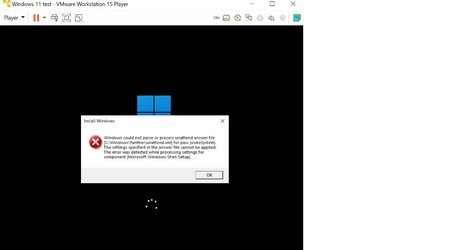
I tried applying this procedure installing Windows 11 on VMWare player and have not been successful after a few attempts. Attached is the screenshot of the error after Step 3 of Method One (after sysprep).... I tried same procedure with Windows 10 and it does work like a charm. I am keen to find out what went wrong
 

Attachments

  • Win11 VM reloc user err.jpg
    Win11 VM reloc user err.jpg
    35.9 KB · Views: 26

My Computer My Computer

At a glance

Windows 10
OS
Windows 10
I tried applying this procedure installing Windows 11 on VMWare player and have not been successful after a few attempts. Attached is the screenshot of the error after Step 3 of Method One (after sysprep).... I tried same procedure with Windows 10 and it does work like a charm. I am keen to find out what went wrong
Has anyone faced similar issue? Any suggestions? I read that Kari managed to successfully apply the procedure and I would like to know if I am doing anything wrong after being successful for exactly the same steps with Win10... Thanks in advance
 

My Computer My Computer

At a glance

Windows 10
OS
Windows 10
The error message says something is not correct in the answer file you provided.

Double check all the entries in it.
 

My Computers My Computers

  • At a glance

    Windows 11 23H2 Current buildAMD Ryzen 9 3950X4 * 32 GB - Corsair Vengeance 3600 MHzEVGA GeForce RTX 3080 Ti XC3 ULTRA GAMING (12...
    OS
    Windows 11 23H2 Current build
    Computer type
    PC/Desktop
    Manufacturer/Model
    HomeBrew
    CPU
    AMD Ryzen 9 3950X
    Motherboard
    MSI MEG X570 GODLIKE
    Memory
    4 * 32 GB - Corsair Vengeance 3600 MHz
    Graphics Card(s)
    EVGA GeForce RTX 3080 Ti XC3 ULTRA GAMING (12G-P5-3955-KR)
    Sound Card
    Realtek® ALC1220 Codec
    Monitor(s) Displays
    2x Eve Spectrum ES07D03 4K Gaming Monitor (Matte) | Eve Spectrum ES07DC9 4K Gaming Monitor (Glossy)
    Screen Resolution
    3x 3840 x 2160
    Hard Drives
    3x Samsung 980 Pro NVMe PCIe 4 M.2 2 TB SSD (MZ-V8P2T0B/AM) } 3x Sabrent Rocket NVMe 4.0 1 TB SSD (USB)
    PSU
    PC Power & Cooling’s Silencer Series 1050 Watt, 80 Plus Platinum
    Case
    Fractal Design Define 7 XL Dark ATX Full Tower Case
    Cooling
    Arctic Liquid Freezer III 420 RGB + Air 3x 140mm case fans (pull front) + 1x 120 mm (push back) and 1 x 120 mm (pull bottom)
    Keyboard
    SteelSeries Apex Pro Wired Gaming Keyboard
    Mouse
    Logitech MX Master 3S | MX Master 3 for Business
    Internet Speed
    AT&T LightSpeed Gigabit Duplex Ftth
    Browser
    Nightly (default) + Firefox (stable), Chrome, Edge , Arc
    Antivirus
    Defender + MB 5 Beta
  • At a glance

    ChromeOS Flex Dev Channel (current)Intel(R) Core(TM) i5-6300U CPU @ 2.40GHz, 250...16 GBIntel(R) HD Graphics 520
    Operating System
    ChromeOS Flex Dev Channel (current)
    Computer type
    Laptop
    Manufacturer/Model
    Dell Latitude E5470
    CPU
    Intel(R) Core(TM) i5-6300U CPU @ 2.40GHz, 2501 Mhz, 2 Core(s), 4 Logical Processor(s)
    Motherboard
    Dell
    Memory
    16 GB
    Graphics card(s)
    Intel(R) HD Graphics 520
    Sound Card
    Intel(R) HD Graphics 520 + RealTek Audio
    Monitor(s) Displays
    Dell laptop display 15"
    Screen Resolution
    1920 * 1080
    Hard Drives
    Toshiba 128GB M.2 22300 drive
    INTEL Cherryville 520 Series SSDSC2CW180A 180 GB SATA III SSD
    PSU
    Dell
    Case
    Dell
    Cooling
    Dell
    Keyboard
    Dell
    Mouse
    Logitech MX Master 3S (shared w. Sys 1) | Dell TouchPad
    Internet Speed
    AT&T LightSpeed Gigabit Duplex Ftth
Thanks for the reply.
The same answer file was used for installing Win10 and works fine whereas Win11 installation gives this error. I also checked if the word wrap caused the issue based on a reply in another forum... strange. But I am really keen to know what is causing it to fail with Win11. Attached are 2 copies of the answer files that I tried (saved with extension renamed to txt)
 

Attachments

My Computer My Computer

At a glance

Windows 10
OS
Windows 10
I checked both visually as well as with WinMerge and the files are indeed identical. Additionally, I double checked to make sure that the items were all in place as they should be.

Just to recap - Windows 10 and Windows 11, both in VMWare Player, and both instances did, indeed, have 2 virt HDs set up for use?

Which version of VMWare player are you using?

@Kari - any other ideas? This is your bread and butter tutorial, but I don't see anything wrong in the file itself.

Recap of pole's posts so it's all in one place:

I tried applying this procedure installing Windows 11 on VMWare player and have not been successful after a few attempts. Attached is the screenshot of the error after Step 3 of Method One (after sysprep).... I tried same procedure with Windows 10 and it does work like a charm. I am keen to find out what went wrong

Has anyone faced similar issue? Any suggestions? I read that Kari managed to successfully apply the procedure and I would like to know if I am doing anything wrong after being successful for exactly the same steps with Win10... Thanks in advance

Thanks for the reply.
The same answer file was used for installing Win10 and works fine whereas Win11 installation gives this error. I also checked if the word wrap caused the issue based on a reply in another forum... strange. But I am really keen to know what is causing it to fail with Win11. Attached are 2 copies of the answer files that I tried (saved with extension renamed to txt)
 

My Computers My Computers

  • At a glance

    Windows 11 23H2 Current buildAMD Ryzen 9 3950X4 * 32 GB - Corsair Vengeance 3600 MHzEVGA GeForce RTX 3080 Ti XC3 ULTRA GAMING (12...
    OS
    Windows 11 23H2 Current build
    Computer type
    PC/Desktop
    Manufacturer/Model
    HomeBrew
    CPU
    AMD Ryzen 9 3950X
    Motherboard
    MSI MEG X570 GODLIKE
    Memory
    4 * 32 GB - Corsair Vengeance 3600 MHz
    Graphics Card(s)
    EVGA GeForce RTX 3080 Ti XC3 ULTRA GAMING (12G-P5-3955-KR)
    Sound Card
    Realtek® ALC1220 Codec
    Monitor(s) Displays
    2x Eve Spectrum ES07D03 4K Gaming Monitor (Matte) | Eve Spectrum ES07DC9 4K Gaming Monitor (Glossy)
    Screen Resolution
    3x 3840 x 2160
    Hard Drives
    3x Samsung 980 Pro NVMe PCIe 4 M.2 2 TB SSD (MZ-V8P2T0B/AM) } 3x Sabrent Rocket NVMe 4.0 1 TB SSD (USB)
    PSU
    PC Power & Cooling’s Silencer Series 1050 Watt, 80 Plus Platinum
    Case
    Fractal Design Define 7 XL Dark ATX Full Tower Case
    Cooling
    Arctic Liquid Freezer III 420 RGB + Air 3x 140mm case fans (pull front) + 1x 120 mm (push back) and 1 x 120 mm (pull bottom)
    Keyboard
    SteelSeries Apex Pro Wired Gaming Keyboard
    Mouse
    Logitech MX Master 3S | MX Master 3 for Business
    Internet Speed
    AT&T LightSpeed Gigabit Duplex Ftth
    Browser
    Nightly (default) + Firefox (stable), Chrome, Edge , Arc
    Antivirus
    Defender + MB 5 Beta
  • At a glance

    ChromeOS Flex Dev Channel (current)Intel(R) Core(TM) i5-6300U CPU @ 2.40GHz, 250...16 GBIntel(R) HD Graphics 520
    Operating System
    ChromeOS Flex Dev Channel (current)
    Computer type
    Laptop
    Manufacturer/Model
    Dell Latitude E5470
    CPU
    Intel(R) Core(TM) i5-6300U CPU @ 2.40GHz, 2501 Mhz, 2 Core(s), 4 Logical Processor(s)
    Motherboard
    Dell
    Memory
    16 GB
    Graphics card(s)
    Intel(R) HD Graphics 520
    Sound Card
    Intel(R) HD Graphics 520 + RealTek Audio
    Monitor(s) Displays
    Dell laptop display 15"
    Screen Resolution
    1920 * 1080
    Hard Drives
    Toshiba 128GB M.2 22300 drive
    INTEL Cherryville 520 Series SSDSC2CW180A 180 GB SATA III SSD
    PSU
    Dell
    Case
    Dell
    Cooling
    Dell
    Keyboard
    Dell
    Mouse
    Logitech MX Master 3S (shared w. Sys 1) | Dell TouchPad
    Internet Speed
    AT&T LightSpeed Gigabit Duplex Ftth
Back
Top Bottom