MS Edge - Sync - Open Tabs


Mark K

Well-known member
Member
Local time
8:26 AM
Posts
454
OS
Windows 11 Pro
Both computers (2 laptops):
Windows 11 Pro 26200.8524
Microsoft Edge 148.0.3967.96
Microsoft Edge signed in to the same outlook.com account.

I have been trying to get Open tabs sync to work between two Microsoft Edge instances and I cannot get Open tabs to sync and open on the other browser. Is this another broken feature or am I missing something in the setup in getting the Open tabs to actually open on the other instance of Microsoft Edge?

1780177459432.webp

Microsoft Edge has been open and used on one of the laptops for a while with many tabs opens. Move to the other laptops, open Microsoft Edge, no opens tabs. Go in to Settings to Sync data/settings, still no Open tabs appear. Wait a while, still no open tabs. Tested this both directions between the two laptops and Open Tabs seems broken.

Microsoft states "... maintain a seamless browsing experience ..." with this setup, but so far in my setups and testing, it does NOT work.

Instructions from Microsoft:

Syncing Open Tabs in Microsoft Edge​

To successfully sync open tabs between devices using Microsoft Edge, follow these essential steps:

Sign In to Your Microsoft Account​

  • Ensure you are signed into the same Microsoft account on all devices where you want to sync your data.

Enable Sync Feature​

  1. On Desktop:
    • Open Microsoft Edge.
    • Click on your profile icon in the upper-right corner.
    • Select "Turn on sync" if it is not already enabled.
    • Go to "Manage profile settings" and select "Sync."
    • Ensure that the toggle for "Open tabs" is turned on.
  2. On Mobile:
    • Open the Microsoft Edge app.
    • Tap on your profile image and select "Accounts."
    • Sign in to your Microsoft account if you haven't already.
    • Tap on "Sync" and ensure "Open tabs" is enabled.

Manage Sync Settings​

You can customize which types of data are synced by accessing the sync settings on both your desktop and mobile devices. This includes options for syncing:
  • Favorites
  • Browsing history
  • Saved passwords
  • Open tabs

Troubleshooting Sync Issues​

If you encounter problems with syncing open tabs, consider the following:
  • Ensure you are connected to a stable internet connection.
  • Log out and log back into your Microsoft account on both devices.
  • Check for any browser extensions that may interfere with the sync process.
By following these steps, you can maintain a seamless browsing experience across all your devices using Microsoft Edge.
 
Windows Build/Version
Windows 11 Pro 26200.8524

My Computer

System One

  • OS
    Windows 11 Pro
    Computer type
    Laptop
    Manufacturer/Model
    Dell 16 Plus DB16255
    CPU
    AMD Ryzen AI 7 350 w/ Radeon 860M 50 TOPS
    Motherboard
    Dell 0PKMHG
    Memory
    32GB LPDDR5X 7500 MT/s
    Graphics Card(s)
    AMD Radeon 860M integrated (shared memory)
    Sound Card
    Stereo speakers (2.5 W x 2 = 5 W total peak)/Realtek SounzReal/Dolby Atmos
    Monitor(s) Displays
    Displays: 16" 1920 x 1200 (Full HD+/WUXGA) 300 nits 60Hz *** Samsung - 27” Odyssey FHD IPS 240Hz G-Sync Gaming Monitor
    Screen Resolution
    1920x1080 @ 60Hz
    Hard Drives
    EG6 KIOXIA 1TB NVME
    Case
    Ice Blue
    Cooling
    "dual-fan" or "enhanced" air-cooling system
    Mouse
    Logitech M650 Wireless/Bluetooth
    Internet Speed
    800/600 Fiber
Sync between Edge browsers on two different laptops doesn't work quite the way you think, particularly with Open Tabs.

To get a superb multipage outline of how it actually works, I asked the following question in Copilot:

How does Edge sync work between my two laptops?
 

My Computers

System One System Two

  • OS
    Windows 11 Pro
    Computer type
    Laptop
    Manufacturer/Model
    Dell XPS 16 DA16260
    CPU
    Intel Series 3 Core Ultra X9 388H
    Memory
    64GB LPDDR5x 9600 MT/s
    Graphics Card(s)
    Intel Arc graphics B390 Panther Lake
    Monitor(s) Displays
    16" 3.2K Tandem OLED Infinity Edge
    Screen Resolution
    3200 x 2000 16:10 236 PPI
    Hard Drives
    1 Terabyte M.2 PCIe NVMe SSD
    Case
    Black Anodized Aluminum
    Cooling
    Vapor Chamber Cooling
    Mouse
    None
    Internet Speed
    942 Mbps Netgear Mesh + 2 Satellites
    Browser
    Microsoft Edge (Chromium)
    Antivirus
    Windows Security (Defender)
    Other Info
    NPU delivering 67 TOPS
    Microsoft 365 subscription
    Microsoft OneDrive 1TB Cloud
    Microsoft Visual Studio
    Microsoft Visual Studio Code
    Microsoft Sysinternals Suite
    Microsoft BitLocker
    Microsoft Copilot
    Dell Support Assist
    Dell Command | Update
    Macrium Reflect X subscription
    1Password Password Manager
    Amazon Kindle for PC
    Lightroom/Photoshop subscription
    Interactive Brokers Trader Workstation
  • Operating System
    Windows 11 Pro
    Computer type
    Laptop
    Manufacturer/Model
    Microsoft Surface Laptop 7
    CPU
    Snapdragon® X Elite (12 Core) with Hexagon NPU delivering 45 TOPS
    Memory
    32GB LPDDR5x 8448 MT/s
    Graphics card(s)
    Integrated Adreno GPU
    Sound Card
    Omnisonic speakers with Dolby Atmos spatial sound
    Monitor(s) Displays
    13.8″ PixelSense Flow touchscreen 120 Hz 600 NIT
    Screen Resolution
    2304 × 1536 (201 PPI), 3:2 aspect ratio
    Hard Drives
    1 TB PCIe NVMe Gen 4 SSD
    Case
    Black Anodized Aluminum
    Cooling
    Vapor Chamber Cooling
    Mouse
    None
    Internet Speed
    942 Mbps Netgear Mesh + 2 Satellites
    Browser
    Microsoft Edge (Chromium)
    Antivirus
    Windows Security (Defender)
    Other Info
    Microsoft 365 subscription (Office)
    Microsoft OneDrive 1TB Cloud
    Microsoft Visual Studio 2026
    Microsoft Visual Studio Code
    Interactive Brokers Trader Workstation
    Lightroom/Photoshop subscription
    1Password Password Manager
    Microsoft Sysinternals
    Amazon Kindle for PC
    Microsoft BitLocker
    Microsoft Copilot
Sync between Edge browsers on two different laptops doesn't work quite the way you think, particularly with Open Tabs.

To get a superb multipage outline of how it actually works, I asked the following question in Copilot:

How does Edge sync work between my two laptops?

Microsoft Edge is set up correctly and Open tabs do not sync.

Copilot did not answer it:

Edge sync works by signing both of your laptops into the same Microsoft account and securely syncing selected browser data through Microsoft’s cloud. The core idea: anything you enable in Sync Settings is uploaded from one device and downloaded to the other, keeping both browsers aligned. Microsoft Support


🔧 What actually syncs between your laptops​

Each category can be turned on/off independently:

🔄 How the sync process works behind the scenes​

  1. You sign in to Edge on both laptops using the same Microsoft account.
  2. Edge encrypts your data (passwords use additional encryption).
  3. Data uploads to Microsoft’s cloud from device A.
  4. Device B downloads the updated data and merges it into your profile.
  5. Changes propagate continuously as long as both devices are online.
    Microsoft Support

🧭 Where to check your sync status​

On either laptop:
  1. Go to Settings → Profiles → Sync.
  2. Ensure Sync is ON and each category you want is toggled on.
    Microsoft Support
If something isn’t syncing, Edge will often show a warning (e.g., “Sync paused” or “Action required”).


🛠 Common reasons sync fails​

  • Different accounts signed in on each laptop.
  • Work/school accounts with sync disabled by IT. Microsoft
  • Sync toggles off for specific data types.
  • Network restrictions (VPN, firewall).
  • Outdated Edge version on one device.

🧩 Quick check for your situation​

Since you’re using two laptops, the most important thing is verifying:
  • Both are signed into the same Microsoft account
  • Sync is enabled
  • The specific data types you expect to sync are toggled on
If you want, I can walk you through checking the sync settings on each laptop. Would you like to verify your sync settings step‑by‑step or troubleshoot a specific item that isn’t syncing?

Then I selected in Copilot the link to: Edge open tabs not syncing

Copilot answer (none of these apply):

Your open tabs not syncing issue almost always comes down to one of a few very specific blockers. Let’s walk through the exact fixes that solve this problem on two‑laptop setups like yours.


🎯 The short answer​


Open tabs only sync when all requirements below are true. If even one is off, the feature silently stops working.
  • Both laptops must use the same Microsoft account
  • Open tabs toggle must be ON on both devices
  • Edge must be allowed to run in the background
  • Both devices must be online recently
  • History sync must also be ON (Edge uses it to power tab sync)

🛠 Step‑by‑step: Fix Edge open tabs not syncing​

1. Confirm the correct Microsoft account

Go to Settings → Profiles on both laptops.
If the accounts differ even slightly (e.g., work vs personal), open tabs will not sync.

Use this if you want to double‑check:
  • Verify same Microsoft account


2. Make sure​

On each laptop:

Settings → Profiles → Sync → Open tabs → ON

This toggle is separate from History, so check both.
  • Check open tabs toggle
  • Check history sync toggle


3. Ensure Edge is allowed to run in the background​

If Edge closes completely, it can’t upload your open tabs.

Windows:
Settings → Apps → Installed apps → Microsoft Edge → Advanced options → Background apps permissions → Always
  • Fix Edge background permissions

4. Check that both devices have been online recently​


Edge only syncs open tabs from devices that have been active in the last few minutes.


If one laptop was asleep or offline, its tabs won’t appear.
  • Refresh device sync status

5. Update Edge on both laptops
Open tabs sync breaks when versions differ significantly.

Menu → Help and feedback → About Microsoft Edge
  • Update Microsoft Edge

6. Sign out and back in (the “hard reset”)​

This forces a fresh sync handshake.

On both laptops:
Settings → Profiles → Sign out → Restart Edge → Sign in again


  • Reset Edge sync connection

7. Clear cloud sync data (only if still broken)​

This resets the sync engine without deleting local data.

Visit: edge://sync-internals → “Reset Sync”
Then restart Edge on both devices.
  • Clear Edge sync data

🧪 Quick diagnostic question for you​

Which of these symptoms matches what you’re seeing?
  • Tabs from other devices is empty
  • Only one laptop’s tabs appear
  • Tabs appear but are outdated
Tell me which one fits, and I’ll pinpoint the exact fix for your setup, Mark.
 

My Computer

System One

  • OS
    Windows 11 Pro
    Computer type
    Laptop
    Manufacturer/Model
    Dell 16 Plus DB16255
    CPU
    AMD Ryzen AI 7 350 w/ Radeon 860M 50 TOPS
    Motherboard
    Dell 0PKMHG
    Memory
    32GB LPDDR5X 7500 MT/s
    Graphics Card(s)
    AMD Radeon 860M integrated (shared memory)
    Sound Card
    Stereo speakers (2.5 W x 2 = 5 W total peak)/Realtek SounzReal/Dolby Atmos
    Monitor(s) Displays
    Displays: 16" 1920 x 1200 (Full HD+/WUXGA) 300 nits 60Hz *** Samsung - 27” Odyssey FHD IPS 240Hz G-Sync Gaming Monitor
    Screen Resolution
    1920x1080 @ 60Hz
    Hard Drives
    EG6 KIOXIA 1TB NVME
    Case
    Ice Blue
    Cooling
    "dual-fan" or "enhanced" air-cooling system
    Mouse
    Logitech M650 Wireless/Bluetooth
    Internet Speed
    800/600 Fiber
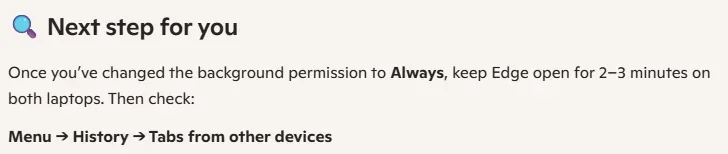
Part of Copilot answer is this:

1780182740108.webp

I do not know if I am understanding "Open tabs" sync in Microsoft Edge.

When Microsoft Edge syncs Open tabs in the browser to another instance, does it actually open those "Open tabs" sync from the other device in an actual tab, or does it just show a list of Open tabs open in the other Edge instance (Menu > History > Tabs from other devices? Then you can click on those sync open tabs in the other browser to open them or not?
 

My Computer

System One

  • OS
    Windows 11 Pro
    Computer type
    Laptop
    Manufacturer/Model
    Dell 16 Plus DB16255
    CPU
    AMD Ryzen AI 7 350 w/ Radeon 860M 50 TOPS
    Motherboard
    Dell 0PKMHG
    Memory
    32GB LPDDR5X 7500 MT/s
    Graphics Card(s)
    AMD Radeon 860M integrated (shared memory)
    Sound Card
    Stereo speakers (2.5 W x 2 = 5 W total peak)/Realtek SounzReal/Dolby Atmos
    Monitor(s) Displays
    Displays: 16" 1920 x 1200 (Full HD+/WUXGA) 300 nits 60Hz *** Samsung - 27” Odyssey FHD IPS 240Hz G-Sync Gaming Monitor
    Screen Resolution
    1920x1080 @ 60Hz
    Hard Drives
    EG6 KIOXIA 1TB NVME
    Case
    Ice Blue
    Cooling
    "dual-fan" or "enhanced" air-cooling system
    Mouse
    Logitech M650 Wireless/Bluetooth
    Internet Speed
    800/600 Fiber
My Copilot told me that my two laptops only list the tabs that are open on each laptop. I can see them by Ctrl + H and then ask for the list of tabs on the opposite computer by name. It doesn't physically keep them in sync.
 

My Computers

System One System Two

  • OS
    Windows 11 Pro
    Computer type
    Laptop
    Manufacturer/Model
    Dell XPS 16 DA16260
    CPU
    Intel Series 3 Core Ultra X9 388H
    Memory
    64GB LPDDR5x 9600 MT/s
    Graphics Card(s)
    Intel Arc graphics B390 Panther Lake
    Monitor(s) Displays
    16" 3.2K Tandem OLED Infinity Edge
    Screen Resolution
    3200 x 2000 16:10 236 PPI
    Hard Drives
    1 Terabyte M.2 PCIe NVMe SSD
    Case
    Black Anodized Aluminum
    Cooling
    Vapor Chamber Cooling
    Mouse
    None
    Internet Speed
    942 Mbps Netgear Mesh + 2 Satellites
    Browser
    Microsoft Edge (Chromium)
    Antivirus
    Windows Security (Defender)
    Other Info
    NPU delivering 67 TOPS
    Microsoft 365 subscription
    Microsoft OneDrive 1TB Cloud
    Microsoft Visual Studio
    Microsoft Visual Studio Code
    Microsoft Sysinternals Suite
    Microsoft BitLocker
    Microsoft Copilot
    Dell Support Assist
    Dell Command | Update
    Macrium Reflect X subscription
    1Password Password Manager
    Amazon Kindle for PC
    Lightroom/Photoshop subscription
    Interactive Brokers Trader Workstation
  • Operating System
    Windows 11 Pro
    Computer type
    Laptop
    Manufacturer/Model
    Microsoft Surface Laptop 7
    CPU
    Snapdragon® X Elite (12 Core) with Hexagon NPU delivering 45 TOPS
    Memory
    32GB LPDDR5x 8448 MT/s
    Graphics card(s)
    Integrated Adreno GPU
    Sound Card
    Omnisonic speakers with Dolby Atmos spatial sound
    Monitor(s) Displays
    13.8″ PixelSense Flow touchscreen 120 Hz 600 NIT
    Screen Resolution
    2304 × 1536 (201 PPI), 3:2 aspect ratio
    Hard Drives
    1 TB PCIe NVMe Gen 4 SSD
    Case
    Black Anodized Aluminum
    Cooling
    Vapor Chamber Cooling
    Mouse
    None
    Internet Speed
    942 Mbps Netgear Mesh + 2 Satellites
    Browser
    Microsoft Edge (Chromium)
    Antivirus
    Windows Security (Defender)
    Other Info
    Microsoft 365 subscription (Office)
    Microsoft OneDrive 1TB Cloud
    Microsoft Visual Studio 2026
    Microsoft Visual Studio Code
    Interactive Brokers Trader Workstation
    Lightroom/Photoshop subscription
    1Password Password Manager
    Microsoft Sysinternals
    Amazon Kindle for PC
    Microsoft BitLocker
    Microsoft Copilot
My Copilot told me that my two laptops only list the tabs that are open on each laptop. I can see them by Ctrl + H and then ask for the list of tabs on the opposite computer by name. It doesn't physically keep them in sync.
That makes sense as Firefox works that way.
 

My Computer

System One

  • OS
    Windows 11 Pro
    Computer type
    Laptop
    Manufacturer/Model
    Dell 16 Plus DB16255
    CPU
    AMD Ryzen AI 7 350 w/ Radeon 860M 50 TOPS
    Motherboard
    Dell 0PKMHG
    Memory
    32GB LPDDR5X 7500 MT/s
    Graphics Card(s)
    AMD Radeon 860M integrated (shared memory)
    Sound Card
    Stereo speakers (2.5 W x 2 = 5 W total peak)/Realtek SounzReal/Dolby Atmos
    Monitor(s) Displays
    Displays: 16" 1920 x 1200 (Full HD+/WUXGA) 300 nits 60Hz *** Samsung - 27” Odyssey FHD IPS 240Hz G-Sync Gaming Monitor
    Screen Resolution
    1920x1080 @ 60Hz
    Hard Drives
    EG6 KIOXIA 1TB NVME
    Case
    Ice Blue
    Cooling
    "dual-fan" or "enhanced" air-cooling system
    Mouse
    Logitech M650 Wireless/Bluetooth
    Internet Speed
    800/600 Fiber
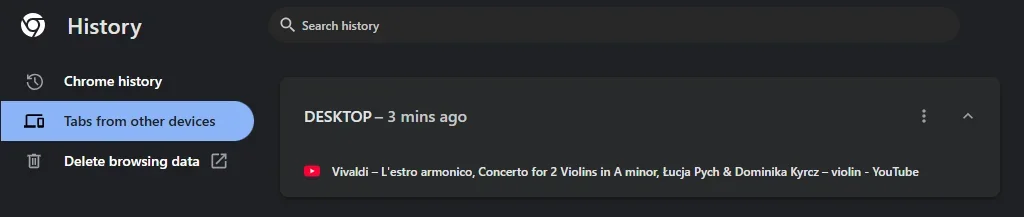
Not sure how Edge works, but, in Chrome you gotta go to History/Tabs from other devices...

13006.webp
 

My Computers

System One System Two

  • OS
    Windows 11 Pro
    Computer type
    PC/Desktop
    Manufacturer/Model
    ASUS ROG Strix
  • Operating System
    Windows 11 Pro
    Computer type
    Laptop
    Manufacturer/Model
    ASUS VivoBook
Are you using any content blocker? I managed to block sync via DNS by blocking *.data.microsoft.com
 

My Computer

System One

  • OS
    Home26H2Can
    Computer type
    PC/Desktop
    CPU
    AMD Ryzen 5 8600G (07/24)
    Motherboard
    ASROCK B650M-HDV/M.2 (07/24) BIOS 4.21 AGESA ComboAM5 1.3.0.1 (04/26)
    Memory
    2x32GB Kingston FURY DDR5 5600 MHz CL36 @5200 CL36 (07/24)
    Graphics Card(s)
    ASROCK Radeon RX 6600 Challenger D 8G @48FPS (08/24)
    Sound Card
    Creative Sound BlasterX AE-5 Plus (05/24)
    Monitor(s) Displays
    24" Philips 24M1N3200ZS/00 (05/24)
    Screen Resolution
    1920×1080@165Hz via DP1.4
    Hard Drives
    Kingston KC3000 NVMe 2TB (05/24)
    ADATA XPG GAMMIX S11 Pro 512GB (07/19)
    PSU
    Seasonic Core GM 550 Gold (04/24)
    Case
    Fractal Design Define 7 Mini with 3x Noctua NF-P14s/12@555rpm (04/24)
    Cooling
    Noctua NH-U12S with Noctua NF-P12 (04/24)
    Keyboard
    HP Pavilion Wired Keyboard 300 (07/24) + Rabalux 76017 Parker (01/24)
    Mouse
    Logitech M330 Silent Plus (01/26)
    Internet Speed
    500/100 Mbps via RouterOS (05/21) & TCP Optimizer
    Browser
    Edge, Brave for YouTube, LibreWolf for FB
    Antivirus
    NextDNS blocking 1/3 Traffic
    Other Info
    Phone: Motorola Moto G86 (02/26)
    Backup: Hasleo Backup Suite (PreOS)
    Headphones: Sennheiser RS170 (09/10)
    Chair: Huzaro Force 4.4 Grey Mesh (05/24)
    Notifier: Xiaomi Mi Band 9 Milanese (10/24)
    FlexCore USB-C 3.2 Gen 1 (M) to LAN (F) (08/25)

My Computer

System One

  • OS
    Windows 11 Pro
    Computer type
    Laptop
    Manufacturer/Model
    Dell 16 Plus DB16255
    CPU
    AMD Ryzen AI 7 350 w/ Radeon 860M 50 TOPS
    Motherboard
    Dell 0PKMHG
    Memory
    32GB LPDDR5X 7500 MT/s
    Graphics Card(s)
    AMD Radeon 860M integrated (shared memory)
    Sound Card
    Stereo speakers (2.5 W x 2 = 5 W total peak)/Realtek SounzReal/Dolby Atmos
    Monitor(s) Displays
    Displays: 16" 1920 x 1200 (Full HD+/WUXGA) 300 nits 60Hz *** Samsung - 27” Odyssey FHD IPS 240Hz G-Sync Gaming Monitor
    Screen Resolution
    1920x1080 @ 60Hz
    Hard Drives
    EG6 KIOXIA 1TB NVME
    Case
    Ice Blue
    Cooling
    "dual-fan" or "enhanced" air-cooling system
    Mouse
    Logitech M650 Wireless/Bluetooth
    Internet Speed
    800/600 Fiber

Latest Support Threads

Back
Top Bottom