My 13700KF is getting murderously hot


I just lowered my Vcore to 1.15 Volts. The temps are way better, but my Passmark test fell 30,000 ponts on the CPU. I went from 93rd percentile to 55th percentile. So I guess it's back to auto Voltage.

I am going to try one of the CPU brackets that MysteriousBox recommended and see what happens.
I just looked up the ideal voltage for your CPU. You may have lowered the voltage too much.

Gemini pulled this information together:

Stock / Auto Load: 1.35V – 1.45V+ (often runs too hot and hits thermal limits easily)
Optimized / Light Undervolt: 1.28V – 1.33V (ideal for lowering temperatures while keeping full multi-core boost performance
 

My Computers My Computers

  • At a glance

    Windows 11 Pro 25H2 RP channelRyzen 9 5900XCorsair Vengeance RGB PRO 64GB (2x32GB) DDR4 ...ASUS GeForce RTX 4070 Super OC 12GB DDR6 / ZO...
    OS
    Windows 11 Pro 25H2 RP channel
    Computer type
    PC/Desktop
    Manufacturer/Model
    Home built
    CPU
    Ryzen 9 5900X
    Motherboard
    MSI MPG X570S Edge Max WiFi
    Memory
    Corsair Vengeance RGB PRO 64GB (2x32GB) DDR4 3600 (PC4-28800) C18
    Graphics Card(s)
    ASUS GeForce RTX 4070 Super OC 12GB DDR6 / ZOTAC RTX 3060 Twin Edge OC 12GB GDDR6
    Sound Card
    Proprietary on MB / FiiO K5Pro DAC
    Monitor(s) Displays
    ViewSonic XG2530 25"/Benq XL2411P 24"/ ASUS VA24DQSB) 23.8"
    Screen Resolution
    1920x1080 240Hz/144Hz/60Hz (based on monitor setup above)
    Hard Drives
    SK hynix Gold P31 1TB PCIe NVMe Gen3 M.2 2280 Internal SSD
    ADATA XPG SX8200 Pro 1TB
    Samsung SSD 860 EVO 1TB 2.5 Inch SATA III Internal SSD
    PSU
    Corsair RM1000e
    Case
    Phanteks Enthoo Pro Full Tower Chassis with Window
    Cooling
    Corsair iCUE H60i RGB PRO XT Liquid CPU Cooler
    Keyboard
    Corsair K70
    Mouse
    Logitech MX Master 3
    Internet Speed
    ~950Mb/s download / ~700Mb/s upload
    Browser
    Edge (Chromium)
    Antivirus
    Norton 360
  • At a glance

    Windows 11 ProRyzen 7 3700X32MB DDR4I forget, but it's old. I can't see the need ...
    Operating System
    Windows 11 Pro
    Computer type
    PC/Desktop
    Manufacturer/Model
    Home Built
    CPU
    Ryzen 7 3700X
    Motherboard
    MSI B550 Gaming GEN3 Gaming Motherboard
    Memory
    32MB DDR4
    Graphics card(s)
    I forget, but it's old. I can't see the need to upgrade it.
    Sound Card
    Propietary
    Monitor(s) Displays
    ACER LED 24" (dual monitor setup)
    Screen Resolution
    1920X1080
    Hard Drives
    1TB Samsung SSD 3.5"
    Case
    Corsair
    Cooling
    Stock
    Keyboard
    Logitech
    Mouse
    Logitech
    Internet Speed
    ~750Mb/s download / ~750Mb/s upload
    Browser
    Edge
    Antivirus
    Defender and Malware Bytes
  • ASUS Vivobook 16X, 16" WUXGA(1920x1200) Business Laptop Computer, AMD Ryzen 7, 16GB DDR4 RAM, 1TB SSD, Windows 11 Pro, Wi-Fi 6, USB-C, Full-Sized Keyboard, Webcam, HDMI
Good plan.
If the heat sink is full of dust, clean that first.

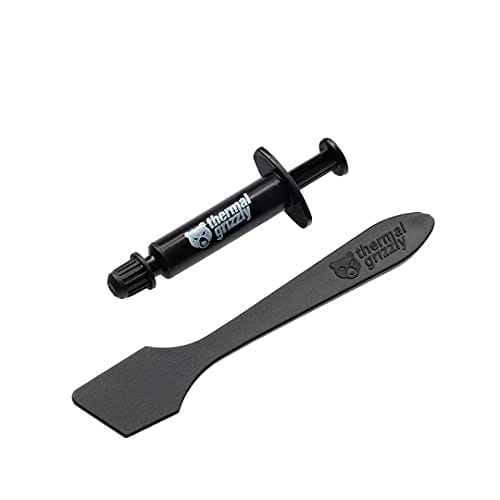
The following is one of, if not the best thermal compound...

Thermal Grizzly Kryonaut has great reviews as well.

It is very good performing paste but it pumps out pretty fastfast (the paste migrates from the middle to the sides) so it needs replaced yearly, maybe less. I switched to Noctua NT-H2 (which comes with that cooler) which performs a little bit less but doesn't pump out fast. I eventually moved to Thermal Grizzly Kryosheet, which doesn't pump out at all. It performs well and is very easy to apply (just drop it in).
 

My Computers My Computers

  • At a glance

    Windows 11 ProIntel Core i9 14900K 5800/4500 P/E all core96GB (2x48) G.skill Ripjaws 6800 MT/s DDR5Asus ROG Strix 4070 Ti OC
    OS
    Windows 11 Pro
    Computer type
    PC/Desktop
    Manufacturer/Model
    DIY Photoshop/Audio/Game/tinker
    CPU
    Intel Core i9 14900K 5800/4500 P/E all core
    Motherboard
    Asus ROG Maximus Z790 Dark Hero
    Memory
    96GB (2x48) G.skill Ripjaws 6800 MT/s DDR5
    Graphics Card(s)
    Asus ROG Strix 4070 Ti OC
    Sound Card
    Bowers & Wilkins 606 S3 speakers; Audiolabs 7000a integrated amp; RSL 10S Mk2 sub; Creative Pebble Pro Minimilist
    Monitor(s) Displays
    Eizo CG2730 ColorEdge, ViewSonic VP2768, i1 Display Pro calibration puck
    Screen Resolution
    2560 x 1440p x 2
    Hard Drives
    WDC SN850X 4TB nvme, SN850 1TB nvme, SK-Hynix 2 TB P41 nvme,. Sabrent USB-C DS-SC5B 5-bay docking station: 6TB WDC Black, 6TB Ironwolf Pro; 2x 2TB WDC Black HDD
    PSU
    850W Seasonic Vertex PX-850 ATX 3.0/PCI-E 5.0
    Case
    Fractal Design North XL Mesh, Black Walnut
    Cooling
    EK Nucleus black 360 AIO w/Phanteks T30-120 fans, 2 Noctua NF-A14 Chromax case fan, 1 T30-120 fan cooling memory
    Keyboard
    Keychron Q3 Max TKL with custom GMK Redsuns Red Samuri keycaps, TX Stabs
    Mouse
    Logitech G305 wireless gaming
    Internet Speed
    575 Mb/s down | 25 Mb/s up
    Browser
    Firefox
    Antivirus
    Defender, Macrium Reflect X
    Other Info
    Phangkey Amaterasu V2 Desk Mat
  • At a glance

    Apple M1
    Computer type
    Laptop
    Manufacturer/Model
    💻 Apple 13" Macbook Pro 2020 (m1)
    CPU
    Apple M1
    Screen Resolution
    2560x1600
    Browser
    Firefox
The CPU fans are set at full speed. I am not partial to fiddling with fan curves. I just leave it running full blast. I can't hear it anyway.

I am using the original retention frame. I had an AIO, but it really underperformed and I got rid of it. I am going to try adjusting the voltages and see if that helps.

Funny thing is, I rattled the heatsink this morning and now my temps are lower. I checked yesterday and I thought it was solid (and it still is), but my idle temp has dropped 10 degrees. I'm going to tear it apart again. :(


That's the plan. If this cooler can't handle it, I guesss I'll have to get another AIO

I was using an old version of Passmark. The CPU test was the one that caused the high temps and throttling. The others were fine.


Thank you for all of the advice, everyone. A big hug to all. It's very much appreciated. Here is my plan of attack:

1. Redo the TIM material on the heatsink and reseat the cooler
2. Re-run the Passmark test and verify temps
3. If necessary, start the undervolt tuning
4. Repeat #2
5. If I can't resolve this, an AIO is in my future.

I presume you are using the Intel profile. Undervolting by offset to the core voltage works well with that profile. Other methods faslsely trigger some of the other Intel protection methods like CEP, and can kill performance.

Once you tame the temperature a little, you can throttle your processor at a specific temperature in the in the BIOS. I have mine set to 85c. This is the Asus board so I am not sure the Gigabyte board has such a setting, but I bet it does. My 13900ks rarely reaches that temp on the latest passmark test or others and does not affect performance foe me. YMMV.

Good luck.
 

My Computers My Computers

  • At a glance

    Windows 11 ProIntel Core i9 14900K 5800/4500 P/E all core96GB (2x48) G.skill Ripjaws 6800 MT/s DDR5Asus ROG Strix 4070 Ti OC
    OS
    Windows 11 Pro
    Computer type
    PC/Desktop
    Manufacturer/Model
    DIY Photoshop/Audio/Game/tinker
    CPU
    Intel Core i9 14900K 5800/4500 P/E all core
    Motherboard
    Asus ROG Maximus Z790 Dark Hero
    Memory
    96GB (2x48) G.skill Ripjaws 6800 MT/s DDR5
    Graphics Card(s)
    Asus ROG Strix 4070 Ti OC
    Sound Card
    Bowers & Wilkins 606 S3 speakers; Audiolabs 7000a integrated amp; RSL 10S Mk2 sub; Creative Pebble Pro Minimilist
    Monitor(s) Displays
    Eizo CG2730 ColorEdge, ViewSonic VP2768, i1 Display Pro calibration puck
    Screen Resolution
    2560 x 1440p x 2
    Hard Drives
    WDC SN850X 4TB nvme, SN850 1TB nvme, SK-Hynix 2 TB P41 nvme,. Sabrent USB-C DS-SC5B 5-bay docking station: 6TB WDC Black, 6TB Ironwolf Pro; 2x 2TB WDC Black HDD
    PSU
    850W Seasonic Vertex PX-850 ATX 3.0/PCI-E 5.0
    Case
    Fractal Design North XL Mesh, Black Walnut
    Cooling
    EK Nucleus black 360 AIO w/Phanteks T30-120 fans, 2 Noctua NF-A14 Chromax case fan, 1 T30-120 fan cooling memory
    Keyboard
    Keychron Q3 Max TKL with custom GMK Redsuns Red Samuri keycaps, TX Stabs
    Mouse
    Logitech G305 wireless gaming
    Internet Speed
    575 Mb/s down | 25 Mb/s up
    Browser
    Firefox
    Antivirus
    Defender, Macrium Reflect X
    Other Info
    Phangkey Amaterasu V2 Desk Mat
  • At a glance

    Apple M1
    Computer type
    Laptop
    Manufacturer/Model
    💻 Apple 13" Macbook Pro 2020 (m1)
    CPU
    Apple M1
    Screen Resolution
    2560x1600
    Browser
    Firefox
It is very good performing paste but it pumps out pretty fastfast (the paste migrates from the middle to the sides) so it needs replaced yearly, maybe less. I switched to Noctua NT-H2 (which comes with that cooler) which performs a little bit less but doesn't pump out fast. I eventually moved to Thermal Grizzly Kryosheet, which doesn't pump out at all. It performs well and is very easy to apply (just drop it in).

Pumpout does not really occur on desktop type CPUs because the mounting pressure is high enough to keep it where it needs to be. It's more an issue for GPU or laptop where the mounting pressure is significantly lower.

Desktop CPUs are hardy, and I come from the Arctic Silver 5 days where repasting was practically unheard of unless you were one of the niche groups squeezing every last bit of OC. Noctua's paste is fine.
 

My Computer My Computer

At a glance

Windows 11 Pro 25H2i7 12700k64GB DDR5 [CMK64GX5M2B5200C40]MSI 4060
OS
Windows 11 Pro 25H2
Computer type
PC/Desktop
Manufacturer/Model
DIY
CPU
i7 12700k
Motherboard
7E07vM9 [Z790 Pro Max Wifi]
Memory
64GB DDR5 [CMK64GX5M2B5200C40]
Graphics Card(s)
MSI 4060
Monitor(s) Displays
ASUS VA24DQSB
Screen Resolution
1920x1080
Hard Drives
Samsung 980 Pro 1TB (OS Drive)
Samsung 980 Pro 1TB (Other)
Samsung 980 Pro 2TB (Secondary Drive)
Samsung 860 Pro 512 (Other)
WD Caviar Blue 640 (Other)
PSU
Corsair 850x
Cooling
Noctua NH-D15
Mouse
G502 X Lightspeed
Browser
Chrome, Firefox
Antivirus
Malwarebytes Premium, Defender

Latest Support Threads

Back
Top Bottom