
OEM's and their Secure Boot Keys (2023) BIOS Update Policy


neves

Well-known member
Power User
VIP
Local time
3:47 PM
Posts
1,074
OS
WinDOS 25H2
Have an Intel 9th Gen MSI Laptop released in 2020, bought in 2021 - while the last BIOS Update is from 09.29.2020. And Yes, MSI is one the stingiest brands - in terms of Drivers (this too - weren't updated anymore even a year after release) & BIOS Updates. Simply put... MSI offers decent hardware - but is among the OEMs with the weakest Drivers support. Giving credit where credit is due: They do offer some security support - if you open a support ticket for Intel ME FW Updates and the latest security patches. So i gave it a try - opening a ticket with an inquiry regarding UEFI Secure Boot Keys (2023 CA) Firmware Update - back in 29 September 2025, and was told...
"Hello Neves 0,

After our efforts, the Secure Boot Certificate 2023-related update is expected to be delivered directly via Windows Update in November. Please wait for the update.

Thank you for your understanding!"

November came and no update, but still, was told...

The firmware solution will still require some time.

Thank you for your understanding!

And also, latter on...

Welcome to the MSI Global Online Customer Service Center. We are glad to assist you.

Alright, we understand that you would like a firmware update that includes the 2023 Secure Boot keys.
We have already reported this internally. Please be patient, and we will notify you as soon as updated firmware becomes available.

Thank you for your patience.

A.I. or actual Human Support - this is just the middle man, but hey.... with 7 months left - i still had some hope. But the update never came. So i opened another ticket 4 months latter - hopefully thinking... this are busy people - have a lot on their hand (know what's that like) - so maybe they forgot. But... No, that wasn't the case. It's not that they forgot - but decided to officially drop their support for the Models with Intel 7th-11th Gen / AMD Ryzen 3000H-5000U processors. Pushing all the responsibility for this security update (which, as we all know by now - will render the systems with Secure Boot Enabled - unbootable - if not updated, so it's not some minor issue - but quite important to say the least) - to Microsoft or/and - its customers.

Amd sure, after 6 years (even 5 or 4 for MSI systems with Intel 11th Gen) - there's no law which presures them to still support this models. But there is such thing as common sense and respect for your customers - showing that you still care as a Brand - even couple of years down the line. But with moves like this MSI - made it clear - your money are their only interest. I say this, after doing some research - curios how many other major brands dropped their support for systems with Intel 11th Gen or older and this is what i found so far:

OEMPolicy for Intel 11th Gen and Older
MSIOfficial Stance: No BIOS updates for 7th–11th Gen. MSI explicitly states these models must wait for Windows Update to push the certificates automatically in 2026.
ASUSMixed: While they have released updates for many Z590/B560 (11th Gen) boards, many 10th Gen and older "End of Life" (EOL) motherboards and laptops are not receiving dedicated 2023-key BIOS updates.
GigabyteSilent: Similar to ASUS, high-end 11th Gen boards got updates, but most budget or pre-2020 hardware is being left to the Windows Update mechanism.
HPLimited: HP has committed to supporting Commercial PCs from 2018 and later. If your 11th Gen system is a consumer-grade Pavilion or older than 2018, it likely won't get a manual BIOS update.
DellProactive but Selective: Dell has updated a huge portion of their Latitude/OptiPlex lines back to 8th Gen, but older Inspiron or Vostro models may be left out.

What's your experince, and how accurate do you find above sheet - as a customer of other Brands (or even MSI)?
 

My Computer

System One

  • OS
    WinDOS 25H2
    Computer type
    Laptop
    CPU
    Intel & AMD
    Memory
    SO-DIMM SK Hynix 15.8 GB Dual-Channel DDR4-2666 (2 x 8 GB) 1329MHz (19-19-19-43)
    Graphics Card(s)
    nVidia RTX 2060 6GB Mobile GPU (TU106M)
    Sound Card
    Onbord Realtek ALC1220
    Screen Resolution
    1920 x 1080
    Hard Drives
    1x Samsung PM981 NVMe PCIe M.2 512GB / 1x Seagate Expansion ST1000LM035 1TB
I'm old enough to remember when you had to know enough about electronics to design your own power supply if you wanted a machine that wouldn't fail from inadequate voltage after filling all of the expansion slots. I'm not an IT weenie. I'm a mechanic who learned how to build and repair computers, because you can't carry everything you need to assemble a new car from its parts, in a backpack. And I'm eternally grateful to Dell and HP for building so many unreliable but easy-to-repair machines over the last few decades. I specialized in Dell and HP laptops for a long time.. because there are so many of them, and the hardware is still better supported than the rest of the manufacturers.
 

My Computer

System One

  • OS
    Windows 11 22H2 Pro (X-lite Micro 11 version)
    Computer type
    Laptop
    Manufacturer/Model
    Dell/ Precision 7680
    CPU
    i7 13850HX (20 cores, 28 threads)
    Motherboard
    Dell
    Memory
    32GB DDR5
    Graphics Card(s)
    Intel UHD/ RTX 1000 ADA
    Sound Card
    Realtek
    Monitor(s) Displays
    4K UHD Touchscreen
    Screen Resolution
    3840 x 2400
    Hard Drives
    Samsung 512GB system drive
    WD Blue 1TB game drive
    PSU
    240W AC adapter, 1800W when docked
    Internet Speed
    1 gigabit symmetrical
    Browser
    Firefox, Librewolf
    Antivirus
    None. Manully configured so nobody except me can change any critical system files. (Don't ask how, it's probably against some rule somewhere)
Pushing all the responsibility for this security update (which, as we all know by now - will render the systems with Secure Boot Enabled - unbootable - if not updated, so it's not some minor issue - but quite important to say the least) - to Microsoft or/and - its customers.
It will still boot, just that your certs will no longer get updated.
 

My Computer

System One

  • OS
    Windows 11
MSI is no worse than any other manufacturer, you seem to be vastly over concerned.

My Laptop is Lenovo brand from around 2022, UEFI/BIOS updates stopped barely a year later. All system updates come via Windows updates the last was 4 hours ago. So has Secure Boot keys end of February 2026.
That is in line with your table for MSI.
So unless you have deliberately stopped Diagnostic Data you would expect to get them shortly.
 

My Computer

System One

  • OS
    Windows 11
It will still boot, just that your certs will no longer get updated.
Until Windows ships a new boot manager which is signed by Windows UEFI CA 2023. Then your out-of-compliance BIOS can't do Secure Boot. So you're trapped with a version of Windows which can't be updated past the end of summer 2026.

For a number of PC's, it's possible to replace the factory certs in UEFI Setup Mode and install the Windows OEM Devices PK certs in its place. But that's a manual process, and will be scary for a large number of folks. It can't be fully automated since you have to be in front of the BIOS menus.
 

My Computer

System One

  • OS
    Windows 7
MSI is no worse than any other manufacturer, you seem to be vastly over concerned.

My Laptop is Lenovo brand from around 2022, UEFI/BIOS updates stopped barely a year later. All system updates come via Windows updates the last was 4 hours ago. So has Secure Boot keys end of February 2026.
That is in line with your table for MSI.
So unless you have deliberately stopped Diagnostic Data you would expect to get them shortly.

Hardware wise - they're above average, generally speaking. Even excel in some cases. Software wise - they're bellow average, same goes for Updates - as can be seen above.

Have a Lenovo and a HP laptop as well, but up till 2021 - i fixed/maintained laptops from every known brand - even less-known asian models, or bankrupt EU/German brands like Gericom. So no, I'm not biased. Just curious of different experiences - especially with late models, since i don't play the technician game anymore (not actively - at least).
 

My Computer

System One

  • OS
    WinDOS 25H2
    Computer type
    Laptop
    CPU
    Intel & AMD
    Memory
    SO-DIMM SK Hynix 15.8 GB Dual-Channel DDR4-2666 (2 x 8 GB) 1329MHz (19-19-19-43)
    Graphics Card(s)
    nVidia RTX 2060 6GB Mobile GPU (TU106M)
    Sound Card
    Onbord Realtek ALC1220
    Screen Resolution
    1920 x 1080
    Hard Drives
    1x Samsung PM981 NVMe PCIe M.2 512GB / 1x Seagate Expansion ST1000LM035 1TB
Until Windows ships a new boot manager which is signed by Windows UEFI CA 2023. Then your out-of-compliance BIOS can't do Secure Boot. So you're trapped with a version of Windows which can't be updated past the end of summer 2026.

For a number of PC's, it's possible to replace the factory certs in UEFI Setup Mode and install the Windows OEM Devices PK certs in its place. But that's a manual process, and will be scary for a large number of folks. It can't be fully automated since you have to be in front of the BIOS menus.
Secure Boot is (at the moment at least) not required to install or upgrade Windows.
Supported yes, active/enabled no (yet)
 

My Computer

System One

  • OS
    Windows 11 Pro 25H2 (RP channel)
    Computer type
    PC/Desktop
    Manufacturer/Model
    MSI
    CPU
    AMD Ryzen 7 9800X3D 8-core
    Motherboard
    MEG X870E Godlike
    Memory
    64GB Corsair Titanium 6000/CL30
    Graphics Card(s)
    MSI Suprim 5080 SOC
    Sound Card
    Soundblaster AE-9
    Monitor(s) Displays
    ASUS TUF Gaming VG289Q
    Screen Resolution
    3840x2160
    Hard Drives
    Samsung 9100 Pro 4TB (gen 5 x4, system drive/games)
    Samsung 990 Pro 2TB
    Samsung 980 Pro 2TB
    Samsung 870 Evo 4TB
    Samsung 870 Evo 2TB
    Samsung T9 4TB
    PSU
    Seasonic PX-2200
    Case
    Bequiet! Dark Base Pro 901
    Cooling
    Noctua NH-D15S Chromax black
    Keyboard
    Logitech G915 X (wired)
    Mouse
    Logitech G903 with PowerPlay charger
    Internet Speed
    900Mb/sec
    Browser
    Microsoft Edge
    Antivirus
    Windows Defender
True. But user apps can force your hand. For example, some multi-player games will require Secure Boot. Why do they care? In order to run their anti-cheat code, VBS needs to be enabled and that sits on top of Secure Boot.
 

My Computer

System One

  • OS
    Windows 7
Secure Boot is (at the moment at least) not required to install or upgrade Windows.
Supported yes, active/enabled no (yet)

True, for now. But you lose protection against bootkits malware (which hides in your PC's startup process before Windows even loads). Most antivirus software can’t see or stop these if Secure Boot is off. And since the old security certificates expire in June 2026, if Secure Boot is off -your PC won't be able to "prove" - that it's running a legitimate version of the Windows Boot Manager. This might prevent you from getting certain security patches.

Future feature updates (like the rumored Windows 12 or major Windows 11 builds) are expected to perform stricter checks. If it's disabled, the update might simply fail to install - or you might see a "System requirements not met" watermark on your desktop.

Gamers who play competitive games - which have a mandatory kernel-level anti-cheat - won't run with Secure Boot disabled. Point being, sure Windows runs just fine for now - with Secure Boot Disabled (which is actually a great thing for anyone messing with secure boot keys: in case something goes wrong and Windows can't boot you simply disable it and Windows will boot just fine - so you can fix the issue using same system), but not anyone is comfortable with above limitations. Which also, makes Linux a more viable options - with its own limitations (while running apps intended for WIndows) - but at least it's secure.
 

My Computer

System One

  • OS
    WinDOS 25H2
    Computer type
    Laptop
    CPU
    Intel & AMD
    Memory
    SO-DIMM SK Hynix 15.8 GB Dual-Channel DDR4-2666 (2 x 8 GB) 1329MHz (19-19-19-43)
    Graphics Card(s)
    nVidia RTX 2060 6GB Mobile GPU (TU106M)
    Sound Card
    Onbord Realtek ALC1220
    Screen Resolution
    1920 x 1080
    Hard Drives
    1x Samsung PM981 NVMe PCIe M.2 512GB / 1x Seagate Expansion ST1000LM035 1TB
For a number of PC's, it's possible to replace the factory certs in UEFI Setup Mode and install the Windows OEM Devices PK certs in its place. But that's a manual process,

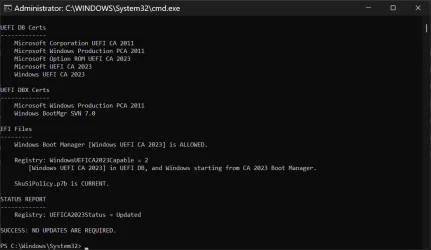
Since MSI cut their support branch for this product - i updated the keys manually, and it worked even automated from Windows. Tho, it took like 7 restarts till was finally applied. Only thing i changed in BIOS - for boot certificates, was setting it to - Custom (User Mode) - from Standard (Factory Locked).

2026-03-24_184013.webp

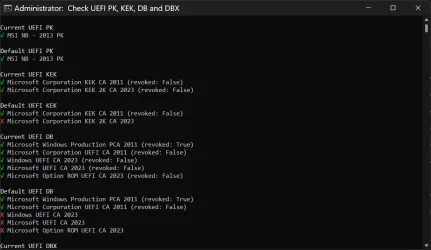
And it;'s still using the OEM PK:

2026-03-24_185635.webp

As can be seen above - Current UEFI PK is the MSI NB - 2013 PK. but this key's only job is to authorize changes to the KEK (Key Exchange Key) list. Because the current KEK already includes the Microsoft Corporation KEK 2K CA 2023, the system now has a chain of trust - that leads all the way to the new 2023 boot files. The PK doesn't actually check the Windows files, its only job is to sign updates to the KEK (Key Exchange Key) list. Also, the age of the PK doesn't weaken the encryption of the OS - it just defines who the owner of the hardware is (in this case MSI - well, me :).

Don't wanna mess with it - cause it's sometimes linked to the firmware as a core requirement (that's why an official OEM update - would be ideal - to replace the PK). If the new PK isn't formatted exactly how the MSI motherboard expects - the BIOS might lock up (simply put: brick itself) on the next reboot - because it can't verify its own internal security state. It's still a RSA-2048 key, so it's not so easy to break. For a hacker to use my 2013 PK to sign a malicious key, they would first need the Private Key (the actual digital file from MSI headquarters). I'm not that high profile (VIP) for anyone to take it to such extent. :)
 

My Computer

System One

  • OS
    WinDOS 25H2
    Computer type
    Laptop
    CPU
    Intel & AMD
    Memory
    SO-DIMM SK Hynix 15.8 GB Dual-Channel DDR4-2666 (2 x 8 GB) 1329MHz (19-19-19-43)
    Graphics Card(s)
    nVidia RTX 2060 6GB Mobile GPU (TU106M)
    Sound Card
    Onbord Realtek ALC1220
    Screen Resolution
    1920 x 1080
    Hard Drives
    1x Samsung PM981 NVMe PCIe M.2 512GB / 1x Seagate Expansion ST1000LM035 1TB
And since the old security certificates expire in June 2026, if Secure Boot is off -your PC won't be able to "prove" - that it's running a legitimate version of the Windows Boot Manager. This might prevent you from getting certain security patches.
This is not true. Some users must run with Secure Boot disabled, because they have legacy device drivers which don't pass security requirements.

Windows has never blocked your ability to get monthly updates based on HW restrictions, it will only block your ability to perform a clean install or upgrade to the next release. MS would prefer not to leave unsupported systems unprotected since it creates bad PR for the brand. It's not officially stated policy, but it's how they've operated for two decades.
 

My Computer

System One

  • OS
    Windows 7
I have Lenovo laptops (T530 series with Win10) and desktops (S30 series with Win10) that are all well past BIOS EOS.
I Mosby'ed both of them, and they are both now fully up to date certificate wise and boot UEFI just fine with 2023 certs.

I also have a Lenovo P520 on Win11 which is still getting BIOS updates, but I went ahead and Mosby'ed it too
so it is now fully up to date cert wise and booting Win11 UEFI with 2023 certs.

So I basically took the OEMs out of the loop on my systems.
 

My Computers

System One System Two

  • OS
    Win11 25H2 26200.7623
    Computer type
    PC/Desktop
    Manufacturer/Model
    Lenovo P520
    CPU
    Intel XEON W-2245 8c/16t
    Memory
    128GB DDR4-2933 ECC
    Graphics Card(s)
    Nvidia Quadro K4200
    Sound Card
    Bultin
    Monitor(s) Displays
    LCD 24in
    Screen Resolution
    1920x1200
    Hard Drives
    1TB SSD system, 16TB data 3.5in HDD, 16TB backup 3.5in HDD
    PSU
    900W
    Cooling
    Air
    Internet Speed
    1Gb
    Browser
    Firefox & Chrome
    Antivirus
    MalwareBytes
  • Operating System
    Win10 22H2
    Computer type
    Laptop
    Manufacturer/Model
    Lenovo T530
    CPU
    Intel Core i7-3520m
    Memory
    16GB
    Graphics card(s)
    integrated CPU graphics
    Hard Drives
    1TB SSD
    Internet Speed
    1Gb
    Browser
    Fiefox & Chrome
    Antivirus
    Malwarebytes
I probably made a very good decision in 2024 upgrading from Intel 10th Gen Based Desktop to AMD Ryzen 7 7700X Desktop

At least definitely supported for Secure Boot so i can still run Battlefield 6 on my system thankfully. Though i always had Secure Boot on even on Older System when i was using it back then. I just felt it was good security to have it on, just like other security features
 

My Computers

System One System Two

  • OS
    Windows 11 Pro 25H2 26200.8037
    Computer type
    PC/Desktop
    Manufacturer/Model
    PreBuilt
    CPU
    AMD Ryzen 7700X
    Motherboard
    MSI B650 VC WIfi Rev 1.0
    Memory
    32GB DDR 5 RGB 5600Mhz
    Graphics Card(s)
    Radeon 7800XT
    Sound Card
    Onboard Audio
    Monitor(s) Displays
    Asus VG245H
    Screen Resolution
    1920x1080
    Hard Drives
    Samsung 990 Evo Plus NVMe Boot
    Samsung 990 Pro 1TB Game NVMe


    External
    Western Digital Elements 500GB
    Western Digital My Passport 2TB Blue
    Western Digital My Passport 2TB Red
    Toshiba 2TB in External Enclosure
    Seagate 8TB in External Enclosure
    Seagate 1TB Portable USB 3 External Drive
    Western Digital My Book 8TB (Primary Backup drive)
    Western Digital Black 4TB In External Enclosure
    PSU
    750 Watt High Power
    Case
    Lian Li Lan Cool 216 ARGB Airflow
    Cooling
    2 160MM Front, 1 140MM Rear Exhaust
    Keyboard
    Logitech G513
    Mouse
    Logitech G502 X
    Internet Speed
    Gigabit 1100Mb/35 Upload
    Browser
    MS Edge Chromium and Bing Search
    Antivirus
    Windows Defender, Malwarebytes Premium
    Other Info
    UEFI, Secure Boot, TPM 2.0, Macrium Reflect X
  • Operating System
    Windows 11 Pro 25H2 26200.8037
    Computer type
    Laptop
    Manufacturer/Model
    Asus TUF A16 Advantage Edition FA617NT.A16.R7700
    CPU
    Ryzen 7 7735HS
    Motherboard
    OEM Asus Motherboard
    Memory
    16GB DDR 5
    Graphics card(s)
    AMD Radeon™ 680M & Radeon 7700S
    Sound Card
    Onboard
    Monitor(s) Displays
    16inch FHD 165hz
    Screen Resolution
    1920x1080
    Hard Drives
    512GB NVMe Boot Drive
    PSU
    Laptop PSU
    Case
    Laptop Case
    Cooling
    OEM Cooling
    Keyboard
    OEM Laptop Keyboard
    Mouse
    Touchpad & G502 Hero
    Internet Speed
    Gigabit 1100 Download/35 Upload
    Browser
    MS Edge with Bing search
    Antivirus
    Windows Defender & Malwarebytes Premium
    Other Info
    Macrium Reflect X
I have Lenovo laptops (T530 series with Win10) and desktops (S30 series with Win10) that are all well past BIOS EOS.
I Mosby'ed both of them, and they are both now fully up to date certificate wise and boot UEFI just fine with 2023 certs.

I also have a Lenovo P520 on Win11 which is still getting BIOS updates, but I went ahead and Mosby'ed it too
so it is now fully up to date cert wise and booting Win11 UEFI with 2023 certs.

So I basically took the OEMs out of the loop on my systems.
Did you revoke the 2011 certs when you Mosby'ed your computers, or will you revoke later with Mosby, or will you wait for Windows Update to eventually revoke?
 

My Computer

System One

  • OS
    Windows 10
Did you revoke the 2011 certs when you Mosby'ed your computers, or will you revoke later with Mosby, or will you wait for Windows Update to eventually revoke?
I did not revoke the 2011 cert when I did the Mosby install of the new 2023 certs.
Wanted to make sure all systems were booting from 2023 signed files before revoking the 2011 certs.
I'll let Windows do that 2011 revocation later if it feels like it.
 

My Computers

System One System Two

  • OS
    Win11 25H2 26200.7623
    Computer type
    PC/Desktop
    Manufacturer/Model
    Lenovo P520
    CPU
    Intel XEON W-2245 8c/16t
    Memory
    128GB DDR4-2933 ECC
    Graphics Card(s)
    Nvidia Quadro K4200
    Sound Card
    Bultin
    Monitor(s) Displays
    LCD 24in
    Screen Resolution
    1920x1200
    Hard Drives
    1TB SSD system, 16TB data 3.5in HDD, 16TB backup 3.5in HDD
    PSU
    900W
    Cooling
    Air
    Internet Speed
    1Gb
    Browser
    Firefox & Chrome
    Antivirus
    MalwareBytes
  • Operating System
    Win10 22H2
    Computer type
    Laptop
    Manufacturer/Model
    Lenovo T530
    CPU
    Intel Core i7-3520m
    Memory
    16GB
    Graphics card(s)
    integrated CPU graphics
    Hard Drives
    1TB SSD
    Internet Speed
    1Gb
    Browser
    Fiefox & Chrome
    Antivirus
    Malwarebytes
bios update might not be necessary. for example my asus z170 pro gaming mb has had the keys updated automatically by winupdate in early/mid march.
that's without a bios update from asus since 2018. hell, they didn't even bother unhiding the tpm settings inside the bios.

from event viewer under tpm-wmi heading:
"This device has updated Secure Boot CA/keys. This device signature information is included here."
i imagine unless you have a particular issue, you don't need to attempt forced updates until say may when it's cutting it close.

before the updates... the same tpm-wmi heading stated things like
"Updated Secure Boot certificates are available on this device but have not yet been applied to the firmware. Review the published guidance to complete the update and maintain full protection."

before that in late feb/early march, there are these messages under same heading
Secure Boot KEK update applied successfully
Secure Boot DB update to install Microsoft UEFI CA 2023 certificate applied successfully
Secure Boot DB update to install Microsoft Option ROM UEFI CA 2023 certificate applied successfully
Secure Boot Db update applied successfully

so... win update installed, but update not applied to firmware until ms decided to a bit later. maybe people should search to see if they can find similar entries before going diy.

for context. i might have copy/pasted powershell code to check if keys needed updating well before feb/march. never tried updating keys manually.
 
Last edited:

My Computer

System One

  • OS
    win10
bios update might not be necessary. for example my asus z170 pro gaming mb has had the keys updated automatically by winupdate in early/mid march.
that's without a bios update from asus since 2018. hell, they didn't even bother unhiding the tpm settings inside the bios.
so... win update installed, but update not applied to firmware until ms decided to a bit later. maybe people should search to see if they can find similar entries before going diy.

for context. i might have copy/pasted powershell code to check if keys needed updating well before feb/march. never tried updating keys manually.
A BIOS update is ideal, because if you're required to do a factory reset to UEFI defaults, you won't have to repeat the process. If the vendor doesn't want to issue a new BIOS, they can simply sign the KEK CA 2023 cert with their PK, and return a copy to MS. Some vendors own multiple PK's that have been used over the years, so you need the right signed KEK for your specific PK.

MS has collected a set of vendor-issued KEK's for the purpose of deploying them to user's PC's. The catch is it's not always obvious if your PC falls under this category. Some PC's won't be supported, even though a number of vendors are making last minute submissions to MS.

Unsupported PC's will have to do manual KEK key enrollment (if available), or Setup Mode.
 

My Computer

System One

  • OS
    Windows 7
I have the KEK update, but it's already April. If Microsoft don't do the final update by May they're cutting it a bit fine.
 

My Computers

System One System Two

  • OS
    Windows 11 Home 25H2
    Computer type
    Laptop
    Manufacturer/Model
    HP Pavilion 14-ce3606sa
    CPU
    Core i5-1035G1
    Memory
    32gb
    Hard Drives
    Samsung 870 evo sata ssd
    Cooling
    Could be better
    Internet Speed
    50 mbps Starlink
    Browser
    Firefox
    Other Info
    Originally came installed with a 500gb H10 Optane ssd
  • Operating System
    Windows 11 Home
    Computer type
    Laptop
    Manufacturer/Model
    HP Pavilion ce3606sa
    CPU
    Intel Core i5-1035G1
    Memory
    16gb
    Hard Drives
    Hynix Gold P31 2TB
    Internet Speed
    200mbps Starlink
    Browser
    Firefox
    Antivirus
    Defender
I have the KEK update, but it's already April. If Microsoft don't do the final update by May they're cutting it a bit fine.
Some of the hesitation is by design. Your PC is grouped into a "confidence bucket". It's a set of users who all own the exact same PC model/revision and BIOS firmware. The theory is if it works for enough owners of this unique combination, it will work for the rest.

A problem is how long should MS wait to collect data, before moving forward with forced updates? Maybe there simply aren't a lot of your PC's model out there to get a good sample size. Some PC models are very popular with large companies, so their data is easier to collect.

It's a balancing act. Yes, this should have started sooner. But a large part of the blame (in the late rounds) is the OEM's dragging their feet so it this process didn't begin last summer.
 

My Computer

System One

  • OS
    Windows 7
Some of the hesitation is by design. Your PC is grouped into a "confidence bucket". It's a set of users who all own the exact same PC model/revision and BIOS firmware. The theory is if it works for enough owners of this unique combination, it will work for the rest.

A problem is how long should MS wait to collect data, before moving forward with forced updates? Maybe there simply aren't a lot of your PC's model out there to get a good sample size. Some PC models are very popular with large companies, so their data is easier to collect.

It's a balancing act. Yes, this should have started sooner. But a large part of the blame (in the late rounds) is the OEM's dragging their feet so it this process didn't begin last summer.
Thank you. Well HP won't be doing any bios updates I'm sure. They haven't supported anything since 2020 for this former Windows 10 machine and no Windows 11 updates.
 

My Computers

System One System Two

  • OS
    Windows 11 Home 25H2
    Computer type
    Laptop
    Manufacturer/Model
    HP Pavilion 14-ce3606sa
    CPU
    Core i5-1035G1
    Memory
    32gb
    Hard Drives
    Samsung 870 evo sata ssd
    Cooling
    Could be better
    Internet Speed
    50 mbps Starlink
    Browser
    Firefox
    Other Info
    Originally came installed with a 500gb H10 Optane ssd
  • Operating System
    Windows 11 Home
    Computer type
    Laptop
    Manufacturer/Model
    HP Pavilion ce3606sa
    CPU
    Intel Core i5-1035G1
    Memory
    16gb
    Hard Drives
    Hynix Gold P31 2TB
    Internet Speed
    200mbps Starlink
    Browser
    Firefox
    Antivirus
    Defender

Latest Support Threads

Back
Top Bottom




