Macrium Reflect Image Explorer Driver Blocked (psmounterex.sys) - Cause and Workaround
Microsoft has explicitly revoked this driver for kernel loading via Code Integrity policy
Code:
PS Get-WinEvent -LogName "Microsoft-Windows-CodeIntegrity/Operational" | Where-Object { $_.Id -in 3023,3077 } | Select -First 5 TimeCreated, Id, Message

TimeCreated              Id Message
-----------              -- -------
2026-04-16 12:50:12 AM 3077 Code Integrity determined that a process (System) attempted to load \Device\HarddiskVolume3\Windows\System32\drivers\psmounterex.sys that did not meet the Authenticode signing level requirements or violated code integrity policy (Policy ID:{d2bda982-ccf6-4344-ac5b-0b44427b6816}).
2026-04-16 12:50:12 AM 3023 The driver \Device\HarddiskVolume3\Windows\System32\drivers\psmounterex.sys is blocked from loading as the driver has been revoked by Microsoft.
2026-04-15 10:33:05 PM 3077 Code Integrity determined that a process (System) attempted to load \Device\HarddiskVolume3\Windows\System32\drivers\psmounterex.sys that did not meet the Authenticode signing level requirements or violated code integrity policy (Policy ID:{d2bda982-ccf6-4344-ac5b-0b44427b6816}).
2026-04-15 10:33:05 PM 3023 The driver \Device\HarddiskVolume3\Windows\System32\drivers\psmounterex.sys is blocked from loading as the driver has been revoked by Microsoft.
2026-04-15 10:25:45 PM 3077 Code Integrity determined that a process (System) attempted to load \Device\HarddiskVolume3\Windows\System32\drivers\psmounterex.sys that did not meet the Authenticode signing level requirements or violated code integrity policy (Policy ID:{d2bda982-ccf6-4344-ac5b-0b44427b6816}).


sigcheck.exe -i -h "C:\Windows\System32\drivers\psmounterex.sys"

c:\windows\system32\drivers\psmounterex.sys:
        Verified:       Signed
        Link date:      5:44 AM 2023-10-02
        Signing date:   7:07 AM 2023-10-02
        Catalog:        c:\windows\system32\drivers\psmounterex.sys
        Signers:
           Microsoft Windows Hardware Compatibility Publisher
                Cert Status:    This certificate or one of the certificates in the certificate chain is not time valid.
                Valid Usage:    1.3.6.1.4.1.311.10.3.39, WHQL Crypto, Code Signing
                Cert Issuer:    Microsoft Windows Third Party Component CA 2012
                Serial Number:  33 00 00 00 F5 E8 77 3B 20 6B 1C CD 61 00 00 00 00 00 F5
                Thumbprint:     B878D8EB696CF3D4505E2F6641C57AF9062EC51A
                Algorithm:      sha256RSA
                Valid from:     12:14 PM 2023-01-12
                Valid to:       12:14 PM 2023-12-15
           Microsoft Windows Third Party Component CA 2012
                Cert Status:    Valid
                Valid Usage:    All
                Cert Issuer:    Microsoft Root Certificate Authority 2010
                Serial Number:  61 0B AA C1 00 00 00 00 00 09
                Thumbprint:     77A10EBF07542725218CD83A01B521C57BC67F73
                Algorithm:      sha256RSA
                Valid from:     4:48 PM 2012-04-18
                Valid to:       4:58 PM 2027-04-18
           Microsoft Root Certificate Authority 2010
                Cert Status:    Valid
                Valid Usage:    All
                Cert Issuer:    Microsoft Root Certificate Authority 2010
                Serial Number:  28 CC 3A 25 BF BA 44 AC 44 9A 9B 58 6B 43 39 AA
                Thumbprint:     3B1EFD3A66EA28B16697394703A72CA340A05BD5
                Algorithm:      sha256RSA
                Valid from:     2:57 PM 2010-06-23
                Valid to:       3:04 PM 2035-06-23
        Counter Signers:
           Microsoft Time-Stamp Service
                Cert Status:    This certificate or one of the certificates in the certificate chain is not time valid.
                Valid Usage:    Timestamp Signing
                Cert Issuer:    Microsoft Time-Stamp PCA 2010
                Serial Number:  33 00 00 01 BA 1F 3F 19 F7 C1 75 BD 7C 00 01 00 00 01 BA
                Thumbprint:     76A3477B5D7780227CEDA64819AE50054A88C2F2
                Algorithm:      sha256RSA
                Valid from:     1:22 PM 2022-09-20
                Valid to:       1:22 PM 2023-12-14
           Microsoft Time-Stamp PCA 2010
                Cert Status:    Valid
                Valid Usage:    Timestamp Signing
                Cert Issuer:    Microsoft Root Certificate Authority 2010
                Serial Number:  33 00 00 00 15 C5 E7 6B 9E 02 9B 49 99 00 00 00 00 00 15
                Thumbprint:     36056A5662DCADECF82CC14C8B80EC5E0BCC59A6
                Algorithm:      sha256RSA
                Valid from:     11:22 AM 2021-09-30
                Valid to:       11:32 AM 2030-09-30
           Microsoft Root Certificate Authority 2010
                Cert Status:    Valid
                Valid Usage:    All
                Cert Issuer:    Microsoft Root Certificate Authority 2010
                Serial Number:  28 CC 3A 25 BF BA 44 AC 44 9A 9B 58 6B 43 39 AA
                Thumbprint:     3B1EFD3A66EA28B16697394703A72CA340A05BD5
                Algorithm:      sha256RSA
                Valid from:     2:57 PM 2010-06-23
                Valid to:       3:04 PM 2035-06-23
        Signing date:   8:28 AM 2023-10-02
        Catalog:        c:\windows\system32\drivers\psmounterex.sys
        Signers:
           PARAMOUNT SOFTWARE UK LIMITED
                Cert Status:    This certificate or one of the certificates in the certificate chain is not time valid.
                Valid Usage:    Code Signing
                Cert Issuer:    GlobalSign GCC R45 EV CodeSigning CA 2020
                Serial Number:  0E A3 9D C6 65 3A DD C1 6F D0 A7 39
                Thumbprint:     C44F373501164ED9A2B47DA671D87C3C7E06E12E
                Algorithm:      sha256RSA
                Valid from:     7:10 AM 2021-12-31
                Valid to:       6:32 AM 2025-02-10
           GlobalSign GCC R45 EV CodeSigning CA 2020
                Cert Status:    Valid
                Valid Usage:    Code Signing
                Cert Issuer:    GlobalSign Code Signing Root R45
                Serial Number:  77 BD 0E 05 B7 59 0B B6 1D 47 61 53 1E 3F 75 ED
                Thumbprint:     C10BB76AD4EE815242406A1E3E1117FFEC743D4F
                Algorithm:      sha256RSA
                Valid from:     5:00 PM 2020-07-27
                Valid to:       5:00 PM 2030-07-27
           GlobalSign Code Signing Root R45
                Cert Status:    Valid
                Valid Usage:    Code Signing
                Cert Issuer:    GlobalSign
                Serial Number:  78 03 18 42 45 70 8A 41 CF 6F 01 B8 EE B4 A9 54
                Thumbprint:     4C5D80D2CD06B1A493C49B2E9BED4A57C2F873E5
                Algorithm:      sha384RSA
                Valid from:     5:00 PM 2020-07-27
                Valid to:       5:00 PM 2029-03-17
           GlobalSign Root CA - R3
                Cert Status:    Valid
                Valid Usage:    Client Auth, Code Signing, EFS, Email Protection, IPSEC Tunnel, IPSEC User, Server Auth, Timestamp Signing
                Cert Issuer:    GlobalSign
                Serial Number:  04 00 00 00 00 01 21 58 53 08 A2
                Thumbprint:     D69B561148F01C77C54578C10926DF5B856976AD
                Algorithm:      sha256RSA
                Valid from:     3:00 AM 2009-03-18
                Valid to:       3:00 AM 2029-03-18
        Counter Signers:
           Symantec SHA256 TimeStamping Signer - G3
                Cert Status:    Valid
                Valid Usage:    Timestamp Signing
                Cert Issuer:    Symantec SHA256 TimeStamping CA
                Serial Number:  7B D4 E5 AF BA CC 07 3F A1 01 23 04 22 41 4D 12
                Thumbprint:     A9A4121063D71D48E8529A4681DE803E3E7954B0
                Algorithm:      sha256RSA
                Valid from:     5:00 PM 2017-12-22
                Valid to:       4:59 PM 2029-03-22
           Symantec SHA256 TimeStamping CA
                Cert Status:    Valid
                Valid Usage:    Timestamp Signing
                Cert Issuer:    VeriSign Universal Root Certification Authority
                Serial Number:  7B 05 B1 D4 49 68 51 44 F7 C9 89 D2 9C 19 9D 12
                Thumbprint:     6FC9EDB5E00AB64151C1CDFCAC74AD2C7B7E3BE4
                Algorithm:      sha256RSA
                Valid from:     5:00 PM 2016-01-11
                Valid to:       4:59 PM 2031-01-11
           VeriSign Universal Root Certification Authority
                Cert Status:    Valid
                Valid Usage:    Client Auth, Code Signing, Email Protection, Server Auth, Timestamp Signing
                Cert Issuer:    VeriSign Universal Root Certification Authority
                Serial Number:  40 1A C4 64 21 B3 13 21 03 0E BB E4 12 1A C5 1D
                Thumbprint:     3679CA35668772304D30A5FB873B0FA77BB70D54
                Algorithm:      sha256RSA
                Valid from:     5:00 PM 2008-04-01
                Valid to:       4:59 PM 2037-12-01
        Company:        Windows (R) Win 7 DDK provider
        Description:    Paramount Software Image Mounting Driver
        Product:        PSMounterEx
        Prod version:   v8.0.7662
        File version:   v8.0.7662
        MachineType:    64-bit
        MD5:    8757BFC21D1189631EA050252D74AC29
        SHA1:   994B25EA09A4DD314A0D2EBC9AF9CB4A122FF797
        PESHA1: 9F58E9EA05A674CB3CDD05D9101C4F51099A6969
        PE256:  7218A4A093DF4D36D2309343A769204DD18709E6ED03C8AF44A4C520FE94723B
        SHA256: 16C6A5DB7819622CC568AEA78A2D4E74C2465B9FC3797923D58D4C84FE35A24B
        IMP:    BE0444BB7E9A09EF9E269F264C36D99A
Recently some users may find that mounting backup images fails and the driver "psmounterex.sys" will not load.
Symptoms
- Image mounting fails
- Driver service fails to start
- Event Viewer shows errors like:
Code:
Event ID 3023 / 3077
The driver ... is blocked from loading as the driver has been revoked by Microsoft

Code Integrity determined that a process (System) attempted to load ... psmounterex.sys ...
The driver ... is blocked from loading as the driver has been revoked by Microsoft
This is
NOT a broken or unsigned driver.
The driver is:
- Properly signed
- Previously working
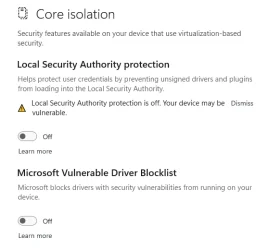
The issue is that Microsoft has added this driver to the Vulnerable Driver Blocklist, enforced by Code Integrity policy.
Microsoft recommended driver block rules
View a list of recommended block rules to block vulnerable non-Microsoft drivers discovered by Microsoft and the security research community.
learn.microsoft.com
The recommended blocklist xml policy file can be downloaded from the Microsoft Download Center
https://aka.ms/VulnerableDriverBlockList | VulnerableDriverBlockList.zip
You will find the psmounterex.sys file listed in the block list.
This blocklist is delivered via Windows Update and enforced at the kernel level.
On affected systems:
Policy ID: "{d2bda982-ccf6-4344-ac5b-0b44427b6816}"
File involved:
"C:\Windows\System32\CodeIntegrity\driversipolicy.p7b"
This policy was updated during recent Windows updates (April 2026 timeframe), which is why the issue appeared suddenly.
Windows 11 increasingly uses policy-based enforcement, not just signature validation.
I believe this is part of Microsoft's effort to mitigate "bring your own vulnerable driver" (BYOVD) attacks.
Workaround (Advanced Users)
WARNING: Enable System Restore and create a new System Restore Point first.
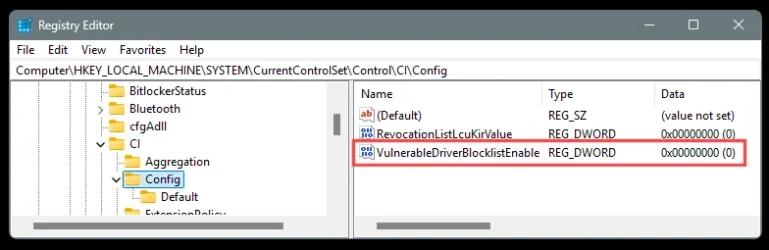
You can disable enforcement of the vulnerable driver blocklist with a registry modification
From an elevated admin command prompt run the following
Code:
reg add "HKLM\SYSTEM\CurrentControlSet\Control\CI\Config" /v VulnerableDriverBlocklistEnable /t REG_DWORD /d 0 /f
A
Reboot is required after applying this.
What This Does
- Disables enforcement of Microsoft's vulnerable driver blocklist
- Allows "psmounterex.sys" to load again
- Restores image mounting functionality
Pros
- Restores full functionality of older Macrium Reflect versions
- No need to upgrade software
- Does not disable driver signature enforcement entirely
- Windows Updates continue to work
Cons
- Disables protection against ALL drivers on the vulnerable driver blocklist
- Future Windows updates may still update the policy file (but it will not be enforced)
- Not recommended for inexperienced users
- Higer risk of potential malware attack
Security Risk (Important)
By disabling the blocklist:
- You are allowing drivers that Microsoft has flagged as potentially exploitable to run on your system
- This increases risk if malicious software attempts to use such drivers
In simple terms, You are trading some security protections for compatibility
Recommendations
If possible, use a newer version of the Macrium Reflect software with updated drivers
If staying on older versions:
- Apply the workaround
- Understand the risk
- Avoid running untrusted software
Summary
- Issue caused by Microsoft driver blocklist update
- Driver is not broken, it is intentionally blocked
- Workaround exists but reduces security protections
- Best solution long-term is updated software or isolated environment
I restored to a restore point from a few days ago and verified the issue was not present. I then restored again back to the current latest updated version of Windows 11 and verified the issue returned. I then applied the Registry modification and rebooted the computer and confirmed that mounting backups from Macrium Reflect 8.1 now mount once again.
Caveat emptor is Latin for "let the buyer beware.. you are reducing security and increasing the attack surface of your computer by disabling the revocation block list.