Overwhelmed - Macrium Reflect


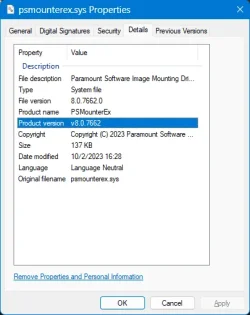
What's the driver version number on psmounterex.sys?

I'm digging through SkuSiPolicy for another project, and noticed driversipolicy.p7b bans all versions of the driver 8.0.7760.0 and lower.
 
Last edited:

My Computer My Computer

At a glance

Windows 7
OS
Windows 7

My Computers My Computers

  • At a glance

    Win 11 Pro 25H2 26200.8655Intel® Core™ i7-14700KG.SKILL Ripjaws S5 Series 64GB (2 x 32GB) DDR5ASUS GeForce RTX 4070 Super 12GB
    OS
    Win 11 Pro 25H2 26200.8655
    Computer type
    PC/Desktop
    Manufacturer/Model
    Self Built
    CPU
    Intel® Core™ i7-14700K
    Motherboard
    ASUS TUF Z690-PLUS WIFI BIOS 4505 11/29/25
    Memory
    G.SKILL Ripjaws S5 Series 64GB (2 x 32GB) DDR5
    Graphics Card(s)
    ASUS GeForce RTX 4070 Super 12GB
    Sound Card
    Sound Blaster AE-5 Plus
    Monitor(s) Displays
    ASUS TUF Gaming 27" 2K HDR Gaming
    Screen Resolution
    2560 x 1440
    Hard Drives
    Samsung 990 Pro 1TB NVMe (Win 11 25H2)
    SK hynix P41 500GB NVMe 25H2 DEV/Games
    SK hynix P41 2TB NVMe (x3)
    Crucial P3 Plus 4TB
    PSU
    Corsair RM850x Shift
    Case
    Antec Dark Phantom DP502 FLUX
    Cooling
    Corsair Nautilus 360 RS AIO
    Keyboard
    Logitech MK 320
    Mouse
    Razer Basilisk V3
    Internet Speed
    350Mbs
    Browser
    Firefox
    Antivirus
    Winows Security
    Other Info
    MR 8.1 Home

    System 3 Specs
    Win 11 Pro 25H2 26200.8655
    ASUS PRIME Z370-P II BIOS 3004 7/12/21
    Intel Core i7-8700 CPU @ 3.20GHz
    32GB DDR4 RAM (4x8)
    iGPU Intel UHD Graphics 630
  • At a glance

    Win 11 Pro 25H2 26200.8655Intel Core i7-11700F64 GB DDR4MSI GeForce RTX 3060 Ventus 2X 12GB
    Operating System
    Win 11 Pro 25H2 26200.8655
    Computer type
    PC/Desktop
    Manufacturer/Model
    Self Built
    CPU
    Intel Core i7-11700F
    Motherboard
    Asus TUF Gaming Z590 Plus WiFi (BIOS 2803)
    Memory
    64 GB DDR4
    Graphics card(s)
    MSI GeForce RTX 3060 Ventus 2X 12GB
    Sound Card
    SoundBlaster Audigy Fx V2
    Monitor(s) Displays
    Samsung F27T350
    Screen Resolution
    1920x1080
    Hard Drives
    Samsung 980 Pro 1TB
    Samsung 970 EVO Plus 2TB
    Samsung 870 EVO 500GB SSD
    PSU
    Corsair HX750
    Case
    Cougar MX330-G Window
    Cooling
    Thermalright Frozen Edge 240 Black AIO
    Internet Speed
    350Mbps
    Browser
    Firefox
    Antivirus
    Windows Security
If no later 8.0 driver exists, everyone is out of luck unless you disable vulnerable driver checking.

On paper it's theoretically possible to export the driversipolicy file, remove the offending rule, and recreate the file. But you would have to create a new (unsigned) WDAC policy which says not to read the Windows driver policy and use your own. I don't have that knowledge, you have to track down someone who does this for a living (security researcher or enterprise IT admin).
 

My Computer My Computer

At a glance

Windows 7
OS
Windows 7
My workround is to use 2 x .reg files with vulnerable... set to 0 to make Macrium work and vulnerable... set to 1 as below and then reboot
---------------------------------------------------------------------------
Windows Registry Editor Version 5.00

[HKEY_LOCAL_MACHINE\SYSTEM\CurrentControlSet\Control\CI\Config]
"VulnerableDriverBlocklistEnable"=dword:00000000
"RevocationListLcuKirValue"=dword:00000000

[HKEY_LOCAL_MACHINE\SYSTEM\CurrentControlSet\Control\CI\Config\Default]
 

My Computer My Computer

At a glance

windows 11
OS
windows 11
Computer type
PC/Desktop
Manufacturer/Model
HP 633 SF

My Computer My Computer

At a glance

Windows 10Intel i9-9900K64GBEVGA GeForce GTX 1070 TI
OS
Windows 10
Computer type
PC/Desktop
Manufacturer/Model
MSI Custom build
CPU
Intel i9-9900K
Motherboard
MSI MPG Z390 Gaming Edge AC
Memory
64GB
Graphics Card(s)
EVGA GeForce GTX 1070 TI
Internet Speed
1 Gbps
Browser
Firefox
Antivirus
Malwarebytes
What's the driver version number on psmounterex.sys?
I'm digging through SkuSiPolicy for another project, and noticed driversipolicy.p7b bans all versions of the driver 8.0.7760.0 and lower.
Driver versions psmounter.sys for different versions of Macrium Reflect:
7.2.4056 – for Macrium Reflect 7.3.5672 – 8.0.7175 (there is error psmounterex.sys)
8.0.7662 - for Macrium Reflect 8.1.XXXX (there is error psmounterex.sys)
8.0.7722 – for Macrium Reflect 10.0.XXXX (there is no error psmounterex.sys)
Moreover:
If the Macrium Reflect 8.1 program is installed, replace the driver psmounter.sys from Macrium Reflect 10.0 ... then nothing will change, the error will be present.
Although Macrium Reflect 10.0 does not have this error.
(??)
 
Last edited:

My Computer My Computer

At a glance

Windows 11 24H2 Enterprise LTSC 26100.1CPU E3-1270 V2 3.50GHz16Gb
OS
Windows 11 24H2 Enterprise LTSC 26100.1
Computer type
PC/Desktop
Manufacturer/Model
GigaByte Z77-HD3
CPU
CPU E3-1270 V2 3.50GHz
Memory
16Gb
Although Macrium Reflect 10.0 does not have this error.
(??)
Welcome to Eleven Forum.

Reflect X can still mount drives because it does not use psmounterex.sys.

Macrium Support said:
psmounterex.sys is not used within Version X (10), this is why you would be able to mount images using vX.

This issue will only affect Version 8.1 users who have applied the latest Windows 11 update (KB5083769)

We are continuing to investigate this further and will provide updates as more information becomes available

Kind Regards

Joe A

Macrium UK Support Team
 

My Computers My Computers

  • At a glance

    Windows 11 HomeAMD Athlon Silver 3050U8GBRadeon Graphics
    OS
    Windows 11 Home
    Computer type
    Laptop
    Manufacturer/Model
    Acer Aspire 3 A315-23-R9VY
    CPU
    AMD Athlon Silver 3050U
    Memory
    8GB
    Graphics Card(s)
    Radeon Graphics
    Monitor(s) Displays
    laptop screen
    Screen Resolution
    1366x768 native resolution, up to 2560x1440 with Radeon Virtual Super Resolution
    Hard Drives
    1TB Samsung EVO 870 SSD (from April 2026: 250GB EVO 850)
    Internet Speed
    150 Mbps
    Browser
    Edge, Firefox
    Antivirus
    Defender
    Other Info
    fully 'Windows 11 ready' laptop. Windows 10 C: partition migrated from my old unsupported 'main machine' then upgraded to 11. A test migration ran Insider builds for 2 months. When 11 was released on 5th October 2021 it was re-imaged back to 10 and was offered the upgrade in Windows Update on 20th October. Windows Update offered the 22H2 Feature Update on 20th September 2022. It got the 23H2 Feature Update on 4th November 2023 through Windows Update, 24H2 on 3rd October 2024 through Windows Update by setting the Target Release Version for 24H2, and 25H2 on 30th September 2025 through Windows Update by setting the Target Release Version for 25H2.

    UPDATE - 11 April 2026: due to mechanical deterioration this PC has been retired from active duty. The OS with all software and files has been migrated to my System Seven in 'Other systems' to carry on as my general purpose 'main machine'.
  • At a glance

    Windows 11 ProIntel® Core™ i5-520M8GB(integrated graphics) Intel HD Graphics
    Operating System
    Windows 11 Pro
    Computer type
    Laptop
    Manufacturer/Model
    Dell Latitude E4310
    CPU
    Intel® Core™ i5-520M
    Motherboard
    0T6M8G
    Memory
    8GB
    Graphics card(s)
    (integrated graphics) Intel HD Graphics
    Screen Resolution
    1366x768
    Hard Drives
    500GB Crucial MX500 SSD
    Browser
    Firefox, Edge
    Antivirus
    Defender
    Other Info
    unsupported machine: Legacy bios, MBR, TPM 1.2, upgraded from W10 to W11 using W10/W11 hybrid install media workaround.

    In-place upgrade to 22H2 using ISO and a workaround.
    Feature Update to 23H2 by manually installing the Enablement Package.
    In-place upgrade to 24H2 using hybrid 23H2/24H2 install media.
    Upgraded to 25H2 by Enablement Package.

    Also running Insider Dev, and Canary builds and Windows 10 as native boot .vhdx.
  • My SYSTEM THREE is a Dell Latitude 5410, i7-10610U, 32GB RAM, 512GB NVMe ssd, supported device running Windows 11 Pro.

    My SYSTEM FOUR is a 2-in-1 convertible Lenovo Yoga 11e 20DA, Celeron N2930, 8GB RAM, 256GB ssd. Unsupported device: currently running Win10 Pro, plus Win11 Pro RTM and Insider Dev, Beta, and RP 24H2 as native boot vhdx.

    My SYSTEM FIVE is a Dell Latitude 3190 2-in-1, Pentium Silver N5030, 8GB RAM, 1TB NVMe ssd, supported device running Windows 11 Pro, plus Insider Beta, Dev, and Canary builds (and a few others) as a native boot .vhdx.

    My SYSTEM SIX is a Dell Latitude 5550, Core Ultra 7 165H, 64GB RAM, 1TB NVMe SSD, supported device, Windows 11 Pro 24H2, Hyper-V host machine. Updated to 25H2 on 30th September 2025.

    My SYSTEM SEVEN is a Lenovo Thinkpad T580, Intel Core i7-8650U, 16GB RAM, 512GB NVMe SSD + 2nd 512GB NVMe SSD, a supported device for Windows 11. This is my current general purpose 'main machine'. The installed Windows 11 Home from my System One has been migrated to this machine.
I had email exchange with Macrium.
They replied that they are NOT making fixes to for "changes introduced by Microsoft"
They recommend upgrading to X.

I replied (in vain I guess):

Well,

That is one way to look at it.

But I -as a costumer- I see that different.

Microsoft is not flagging this for fun; they think that this Macrium product is not safe.

So Macrium has made an error in their eyes.

And your life-time-paid licensees are the victim of that.


Am I wrong in saying that this is a convenient way for Macrium to “force” the customers who do not have (and want) a non-descriptive Macrium product?as its

I cannot imagine that a company that has reliability and safety as its mission, would want that, do you?
 

My Computer My Computer

At a glance

Windows 11I7-13700K32GeForce 1660 Super
OS
Windows 11
Computer type
PC/Desktop
Manufacturer/Model
Custom made
CPU
I7-13700K
Motherboard
PRIME Z790-A WIFI
Memory
32
Graphics Card(s)
GeForce 1660 Super
Sound Card
On board
Monitor(s) Displays
Dell P2314H
Screen Resolution
HD
Hard Drives
SSD
Cooling
Yes :-)
Antivirus
ESET
They replied that they are NOT making fixes to for "changes introduced by Microsoft"

I don't think it would take much effort to change to the file X uses for image mounting.


My Computer My Computer

At a glance

Windows 11 Pro
OS
Windows 11 Pro
I had email exchange with Macrium.
They replied that they are NOT making fixes to for "changes introduced by Microsoft"
They recommend upgrading to X.

I replied (in vain I guess):

Well,

That is one way to look at it.

But I -as a costumer- I see that different.

Microsoft is not flagging this for fun; they think that this Macrium product is not safe.

So Macrium has made an error in their eyes.

And your life-time-paid licensees are the victim of that.


Am I wrong in saying that this is a convenient way for Macrium to “force” the customers who do not have (and want) a non-descriptive Macrium product?as its


I cannot imagine that a company that has reliability and safety as its mission, would want that, do you?
I have overcome my frustration on problem with mounting an image with Macrium free with one time purchase of this program. Lifetime use for less than 60 dollars with a coupon. Canadian company.


My Computer My Computer

At a glance

windows 11 ,Ubuntu Cinnamon - for tinkering onlyIntel i51140016 GB0
OS
windows 11 ,Ubuntu Cinnamon - for tinkering only
Computer type
PC/Desktop
Manufacturer/Model
No Name - Assembled by a Compute shop in a Strip Mall.
CPU
Intel i511400
Motherboard
ASUS PRIME B560-PLUS motherboard
Memory
16 GB
Graphics Card(s)
0
Sound Card
0
Monitor(s) Displays
25 in BenQ
Screen Resolution
1920 x 1080
Hard Drives
9 SSDs 4 Nvme, 2 in M.2 slot and 2 in PCIE with adapter + 5 Sata. DVD drive
PSU
600w
Case
Antec- VSK4000E-U3 Mid Tower
Internet Speed
Bell pure fibre optic. 3 GB package. 6E Wireless adapter 750/500
Browser
Firefox, Microsoft Edge
Antivirus
Defender
I actually purchased lifetime for this probably a decade ago. It was not as convenient as MR8 so I did not use it. However, I've not updated the program now for a long time. I suppose I can update it and test it out too. Thanks for jogging the memory on Active@ @FDretired
 

My Computer My Computer

At a glance

Windows 10Intel i9-9900K64GBEVGA GeForce GTX 1070 TI
OS
Windows 10
Computer type
PC/Desktop
Manufacturer/Model
MSI Custom build
CPU
Intel i9-9900K
Motherboard
MSI MPG Z390 Gaming Edge AC
Memory
64GB
Graphics Card(s)
EVGA GeForce GTX 1070 TI
Internet Speed
1 Gbps
Browser
Firefox
Antivirus
Malwarebytes
I propose a different workaround for this issue, while everyone waits.

Microsoft has gone on record that the Vulnerable Driver Blocklist (driversipolicy.p7b) can be updated at least 1-2 times per year. Normally it's always refreshed by the release of a new Windows in October. And sometimes an off-schedule update is pushed in the Monthly Update cycle.

But in reality, the blocklist doesn't change that often.

Unlike most malware, which is handled by Defender; the Vulnerable Driver Blocklist represents drivers provided by known legitimate software companies and individual developers. There is no malicious intent, but bad coding which leaves the drivers open to attack. Either those providers have failed to replace their vulnerable drivers, or users are stuck using outdated (and insecure) versions of the driver.

Looking back at Windows 11 24H2/25H2, the driver blocklist was replaced on: February 2025, May 2025, and April 2026

Instead of disabling the Vulnerable Driver Blocklist from the Security Center, or by using a reg key, we roll back to the March 2026 (or in reality, the May 2025) version of driversipolicy.p7b. After copying back the file, you must restart Windows for changes to take effect.

Macrium 8 will work exactly as before, because it's no longer blocked.

You should not be copying this file by hand. First, the policy file is protected by TrustedInstaller rights. This is a level above having normal Administrator privileges. NEVER use the takeown & icacls method to tamper with security files. Just don't mess up your Windows!!


1. This batch file (which really is PowerShell code) can safely remove driversipolicy.p7b, and hard links the previous policy file that's provided in the WinSxS component store. This is where Windows keeps older versions of files which have been replaced by later updates.

If you need to restore the latest (April 2026) version, the script will find it from WinSxS and link that version in place. When you switch between the two versions, the script will automatically change the Vulnerable Driver Blocklist setting to "on" or "off".

You can run the script as a normal user or Admin. If you're not Admin, it asks permission for Admin rights.

Code:
> Rollback-VulnerableDriverPolicy.bat
Rolling back to older version (.7623) of driversipolicy.p7b.  Please be patient.

 Volume in drive C has no label.
 Volume Serial Number is DE36-5A58

 Directory of C:\Windows\System32\CodeIntegrity

12/06/2025  06:27 PM           229,162 driversipolicy.p7b
               1 File(s)        229,162 bytes
               0 Dir(s)  21,264,400,384 bytes free

RESTART WINDOWS NOW.

Code:
> Rollback-VulnerableDriverPolicy.bat -restore
Restoring latest version (.8246) of driversipolicy.p7b.  Please be patient.

 Volume in drive C has no label.
 Volume Serial Number is DE36-5A58

 Directory of C:\Windows\System32\CodeIntegrity

04/15/2026  12:17 AM           242,130 driversipolicy.p7b
               1 File(s)        242,130 bytes
               0 Dir(s)  21,264,400,384 bytes free

RESTART WINDOWS NOW.

2. Restarting Windows is required.

3. If you run "sfc /scannow" to repair your Windows system, please re-run the batch file. A repair action will determine the wrong version of the policy file is in place, and restore the latest copy (which blocks Macrium 8).

4. This method won't help if your Windows is a clean install from the April 2026 Media Creation Tool. There may not be an older version to fallback on. You will have to copy the file from an older Windows system.

 

Attachments

My Computer My Computer

At a glance

Windows 7
OS
Windows 7
I had email exchange with Macrium.
They replied that they are NOT making fixes to for "changes introduced by Microsoft"
They recommend upgrading to X.

I replied (in vain I guess):

Well,

That is one way to look at it.

But I -as a costumer- I see that different.

Microsoft is not flagging this for fun; they think that this Macrium product is not safe.

So Macrium has made an error in their eyes.

And your life-time-paid licensees are the victim of that.


Am I wrong in saying that this is a convenient way for Macrium to “force” the customers who do not have (and want) a non-descriptive Macrium product?as its


I cannot imagine that a company that has reliability and safety as its mission, would want that, do you?
I was more direct and complained:

I purchased Reflect 8 on the basis that image mounting was an included and supported feature. It is unacceptable for Macrium to tell customers to disable Core Isolation — a Windows security feature — as a workaround. That is not a fix and it contradicts Microsoft’s own security guidance.

Under the Consumer Rights Act 2015, software sold in the UK must remain as described, fit for purpose, and must function for a reasonable period of time. Image mounting was a core, advertised feature of Reflect 8 at the point of sale. Its removal due to Macrium’s failure to maintain a compatible driver means the product no longer matches its description and is not fit for the purpose for which it was purchased. Advising customers to weaken system security is not an acceptable remedy. If Macrium does not restore the functionality, provide a free upgrade, or issue a refund, this constitutes a breach of contract under UK consumer law.

Unless Macrium restores the functionality, provides a free upgrade to Reflect X, or refunds the licence cost, you are in breach of contract for failing to supply the product as advertised.

This is a formal complaint. Escalate it to management and provide a substantive response.
 

My Computer My Computer

At a glance

Windows 11 ProCore i7-13700K64 GB Kingston Fury Beast DDR5Gigabyte GeForce RTX 2060 Super Gaming OC 8G
OS
Windows 11 Pro
Computer type
PC/Desktop
Manufacturer/Model
Self build
CPU
Core i7-13700K
Motherboard
Asus TUF Gaming Plus WiFi Z790
Memory
64 GB Kingston Fury Beast DDR5
Graphics Card(s)
Gigabyte GeForce RTX 2060 Super Gaming OC 8G
Sound Card
Realtek S1200A
Monitor(s) Displays
Viewsonic VP2770 & Dell (secondary)
Screen Resolution
2560 x 1440
Hard Drives
Kingston KC3000 2TB NVME SSD & SATA HDDs & SSD
PSU
EVGA SuperNova G2 850W
Case
Nanoxia Deep Silence 1
Cooling
Noctua NH-D14
Keyboard
Microsoft Digital Media Pro
Mouse
Logitech Wireless
Internet Speed
80 Mb / s
Browser
Chrome
Antivirus
Defender, Malwarebytes Free & AdwCleaner

My Computer My Computer

At a glance

Windows 11 Pro 26200.8655Ryzen 5 5600G24GB
OS
Windows 11 Pro 26200.8655
Computer type
PC/Desktop
Manufacturer/Model
Home Built
CPU
Ryzen 5 5600G
Motherboard
ASUS X470 Prime Pro
Memory
24GB
Monitor(s) Displays
Alienware 2518HF
Screen Resolution
1920 x 1080
Hard Drives
Boot: NVME WDC WDS500G; ASUS M.2 Riser card with 3 additional NVME drives
Various Internal SDD (Samsung and WDC) and HDD drives mostly Western Digital
PSU
Seasonic Focus Gold 650W
Case
Corsair 200R
Cooling
Noctua PWM fans x 3
Keyboard
Corsair K60 SE Pro
Mouse
Corsair Dark Core RGB Pro SE
Internet Speed
500/500
Browser
MS Edge
Antivirus
Malwarebytes Premium
Can we boot from a Macrium Rescue flash drive to mount or restore an image from the free version 8.0.7783? I don't think it uses the psmounterex.sys driver.
 

My Computers My Computers

  • At a glance

    Windows 11 Pro 25H2i7-8565U16GBIntel UHD Graphics 620
    OS
    Windows 11 Pro 25H2
    Computer type
    Laptop
    Manufacturer/Model
    Lenovo T490 (2020 Hardware)
    CPU
    i7-8565U
    Motherboard
    20N20028US
    Memory
    16GB
    Graphics Card(s)
    Intel UHD Graphics 620
    Sound Card
    Realtec Audio
    Monitor(s) Displays
    ASUS VE248
    Screen Resolution
    1920 X 1080
    Hard Drives
    Samsung SSD 970 PRO 512GB NVMe
    Internet Speed
    Frontier fiber 1GB
    Browser
    Chrome, Firefox, Edge
    Antivirus
    Norton 360 Deluxe Plus
    Other Info
    Supported hardware, upgraded from Windows 10 Pro to Windows 11 Pro version 24H2 on 06/01/2025 using the Windows 11 ISO file. Used the enablement package to upgrade to version 25H2 on 10/07/2025. Secure boot enabled. Secure Boot CA 2023 updated.
  • At a glance

    Windows 11 Pro 25H2i7-4770 (with SSE4.2, and POPCNT)16GBIntel HD Graphics 4600
    Operating System
    Windows 11 Pro 25H2
    Computer type
    PC/Desktop
    Manufacturer/Model
    Lenovo ThinkCentre M83 (2014 Hardware)
    CPU
    i7-4770 (with SSE4.2, and POPCNT)
    Motherboard
    10AL000GUS
    Memory
    16GB
    Graphics card(s)
    Intel HD Graphics 4600
    Sound Card
    Realtec High Definition Audio
    Monitor(s) Displays
    ASUS VE248
    Screen Resolution
    1920 X 1080
    Hard Drives
    Samsung SSD 860 PRO 1TB SATA
    Internet Speed
    Frontier fiber 1GB
    Browser
    Chrome, Firefox, Edge
    Antivirus
    Norton 360 Deluxe Plus
    Other Info
    Unsupported hardware, upgraded from Windows 10 Pro (TPM 1.2 & unsupported CPU, but does have SSE4.2, and POPCNT) to Windows 11 Pro version 24H2 on 06/15/2025. Added Registry Key HKEY_LOCAL_MACHINE\SYSTEM\Setup\MoSetup – AllowUpgradesWithUnsupportedTPMOrCPU=1 to allow installation using the Windows 11 ISO file. Used the enablement package to upgrade to version 25H2 on 10/08/2025. Secure boot enabled. Secure Boot CA 2023 updated.
Can we boot from a Macrium Rescue flash drive to mount or restore an image from the free version 8.0.7783? I don't think it uses the psmounterex.sys driver.
Yes, I tried this very test on my setup. Works well.
I believe that the only time the psmounterex.sys comes into play is when one wishes to mount and browse a backup image.
Others on this thread may know more, however, and I invite their input.

Truth-in-lending statement: My version is an old paid version of Macrium Reflect 8.1.8853
 

My Computer My Computer

At a glance

Windows 11 Pro 26200.8655Ryzen 5 5600G24GB
OS
Windows 11 Pro 26200.8655
Computer type
PC/Desktop
Manufacturer/Model
Home Built
CPU
Ryzen 5 5600G
Motherboard
ASUS X470 Prime Pro
Memory
24GB
Monitor(s) Displays
Alienware 2518HF
Screen Resolution
1920 x 1080
Hard Drives
Boot: NVME WDC WDS500G; ASUS M.2 Riser card with 3 additional NVME drives
Various Internal SDD (Samsung and WDC) and HDD drives mostly Western Digital
PSU
Seasonic Focus Gold 650W
Case
Corsair 200R
Cooling
Noctua PWM fans x 3
Keyboard
Corsair K60 SE Pro
Mouse
Corsair Dark Core RGB Pro SE
Internet Speed
500/500
Browser
MS Edge
Antivirus
Malwarebytes Premium
Good to know even though I rarely have had a need to mount and browse an image. Yesterday, I successfully completed full image backups on both my PCs with no problem, so running a backup is no problem for me right now. As long as I can boot from a Macrium Rescue flash drive and restore an image, I'm good.
 

My Computers My Computers

  • At a glance

    Windows 11 Pro 25H2i7-8565U16GBIntel UHD Graphics 620
    OS
    Windows 11 Pro 25H2
    Computer type
    Laptop
    Manufacturer/Model
    Lenovo T490 (2020 Hardware)
    CPU
    i7-8565U
    Motherboard
    20N20028US
    Memory
    16GB
    Graphics Card(s)
    Intel UHD Graphics 620
    Sound Card
    Realtec Audio
    Monitor(s) Displays
    ASUS VE248
    Screen Resolution
    1920 X 1080
    Hard Drives
    Samsung SSD 970 PRO 512GB NVMe
    Internet Speed
    Frontier fiber 1GB
    Browser
    Chrome, Firefox, Edge
    Antivirus
    Norton 360 Deluxe Plus
    Other Info
    Supported hardware, upgraded from Windows 10 Pro to Windows 11 Pro version 24H2 on 06/01/2025 using the Windows 11 ISO file. Used the enablement package to upgrade to version 25H2 on 10/07/2025. Secure boot enabled. Secure Boot CA 2023 updated.
  • At a glance

    Windows 11 Pro 25H2i7-4770 (with SSE4.2, and POPCNT)16GBIntel HD Graphics 4600
    Operating System
    Windows 11 Pro 25H2
    Computer type
    PC/Desktop
    Manufacturer/Model
    Lenovo ThinkCentre M83 (2014 Hardware)
    CPU
    i7-4770 (with SSE4.2, and POPCNT)
    Motherboard
    10AL000GUS
    Memory
    16GB
    Graphics card(s)
    Intel HD Graphics 4600
    Sound Card
    Realtec High Definition Audio
    Monitor(s) Displays
    ASUS VE248
    Screen Resolution
    1920 X 1080
    Hard Drives
    Samsung SSD 860 PRO 1TB SATA
    Internet Speed
    Frontier fiber 1GB
    Browser
    Chrome, Firefox, Edge
    Antivirus
    Norton 360 Deluxe Plus
    Other Info
    Unsupported hardware, upgraded from Windows 10 Pro (TPM 1.2 & unsupported CPU, but does have SSE4.2, and POPCNT) to Windows 11 Pro version 24H2 on 06/15/2025. Added Registry Key HKEY_LOCAL_MACHINE\SYSTEM\Setup\MoSetup – AllowUpgradesWithUnsupportedTPMOrCPU=1 to allow installation using the Windows 11 ISO file. Used the enablement package to upgrade to version 25H2 on 10/08/2025. Secure boot enabled. Secure Boot CA 2023 updated.
And of course everything works as it should on Macrium Reflect X, the latest and fully supported version.
 

My Computers My Computers

  • At a glance

    Windows 11 ProIntel Series 3 Core Ultra X9 388H64GB LPDDR5x 9600 MT/sIntel Arc graphics B390 Panther Lake
    OS
    Windows 11 Pro
    Computer type
    Laptop
    Manufacturer/Model
    Dell XPS 16 DA16260
    CPU
    Intel Series 3 Core Ultra X9 388H
    Memory
    64GB LPDDR5x 9600 MT/s
    Graphics Card(s)
    Intel Arc graphics B390 Panther Lake
    Monitor(s) Displays
    16" 3.2K Tandem OLED Infinity Edge
    Screen Resolution
    3200 x 2000 16:10 236 PPI
    Hard Drives
    1 Terabyte M.2 PCIe NVMe SSD
    Case
    Black Anodized Aluminum
    Cooling
    Vapor Chamber Cooling
    Mouse
    None
    Internet Speed
    942 Mbps Netgear Mesh + 2 Satellites
    Browser
    Microsoft Edge (Chromium)
    Antivirus
    Windows Security (Defender)
    Other Info
    NPU delivering 67 TOPS
    Microsoft 365 subscription
    Microsoft Office 365
    Microsoft OneDrive 1TB Cloud
    Microsoft Visual Studio
    Microsoft Visual Studio Code
    Microsoft Sysinternals Suite
    Microsoft BitLocker
    Microsoft Copilot
    Dell Support Assist
    Dell Command | Update
    Macrium Reflect X subscription
    1Password Password Manager
    Amazon Kindle for PC
    Lightroom/Photoshop subscription
    Interactive Brokers Trader Workstation
  • At a glance

    Windows 11 ProSnapdragon® X Elite (12 Core) with Hexagon NP...32GB LPDDR5x 8448 MT/sIntegrated Adreno GPU
    Operating System
    Windows 11 Pro
    Computer type
    Laptop
    Manufacturer/Model
    Microsoft Surface Laptop 7
    CPU
    Snapdragon® X Elite (12 Core) with Hexagon NPU delivering 45 TOPS
    Memory
    32GB LPDDR5x 8448 MT/s
    Graphics card(s)
    Integrated Adreno GPU
    Sound Card
    Omnisonic speakers with Dolby Atmos spatial sound
    Monitor(s) Displays
    13.8″ PixelSense Flow touchscreen 120 Hz 600 NIT
    Screen Resolution
    2304 × 1536 (201 PPI), 3:2 aspect ratio
    Hard Drives
    1 TB PCIe NVMe Gen 4 SSD
    Case
    Black Anodized Aluminum
    Cooling
    Vapor Chamber Cooling
    Mouse
    None
    Internet Speed
    942 Mbps Netgear Mesh + 2 Satellites
    Browser
    Microsoft Edge (Chromium)
    Antivirus
    Windows Security (Defender)
    Other Info
    Microsoft 365 subscription (Office)
    Microsoft Office 365
    Microsoft OneDrive 1TB Cloud
    Microsoft Visual Studio 2026
    Microsoft Visual Studio Code
    Interactive Brokers Trader Workstation
    Lightroom/Photoshop subscription
    1Password Password Manager
    Microsoft Sysinternals
    Amazon Kindle for PC
    Microsoft BitLocker
    Microsoft Copilot
And of course everything works as it should on Macrium Reflect X, the latest and fully supported version.
Macrium have a dilemma to solve. Reflect X isn't the only fully supported version, Reflect LTSC is based on v8.1 and will need a working psmounterex.sys.

Macrium said:
Macrium Reflect LTSC (Long Term Service Channel), built on our trusted and proven v8.1 platform, is the first backup solution specifically engineered for mission-critical environments, OEMs, and regulated industries where predictability isn't just desired - it's essential.
 

My Computers My Computers

  • At a glance

    Windows 11 HomeAMD Athlon Silver 3050U8GBRadeon Graphics
    OS
    Windows 11 Home
    Computer type
    Laptop
    Manufacturer/Model
    Acer Aspire 3 A315-23-R9VY
    CPU
    AMD Athlon Silver 3050U
    Memory
    8GB
    Graphics Card(s)
    Radeon Graphics
    Monitor(s) Displays
    laptop screen
    Screen Resolution
    1366x768 native resolution, up to 2560x1440 with Radeon Virtual Super Resolution
    Hard Drives
    1TB Samsung EVO 870 SSD (from April 2026: 250GB EVO 850)
    Internet Speed
    150 Mbps
    Browser
    Edge, Firefox
    Antivirus
    Defender
    Other Info
    fully 'Windows 11 ready' laptop. Windows 10 C: partition migrated from my old unsupported 'main machine' then upgraded to 11. A test migration ran Insider builds for 2 months. When 11 was released on 5th October 2021 it was re-imaged back to 10 and was offered the upgrade in Windows Update on 20th October. Windows Update offered the 22H2 Feature Update on 20th September 2022. It got the 23H2 Feature Update on 4th November 2023 through Windows Update, 24H2 on 3rd October 2024 through Windows Update by setting the Target Release Version for 24H2, and 25H2 on 30th September 2025 through Windows Update by setting the Target Release Version for 25H2.

    UPDATE - 11 April 2026: due to mechanical deterioration this PC has been retired from active duty. The OS with all software and files has been migrated to my System Seven in 'Other systems' to carry on as my general purpose 'main machine'.
  • At a glance

    Windows 11 ProIntel® Core™ i5-520M8GB(integrated graphics) Intel HD Graphics
    Operating System
    Windows 11 Pro
    Computer type
    Laptop
    Manufacturer/Model
    Dell Latitude E4310
    CPU
    Intel® Core™ i5-520M
    Motherboard
    0T6M8G
    Memory
    8GB
    Graphics card(s)
    (integrated graphics) Intel HD Graphics
    Screen Resolution
    1366x768
    Hard Drives
    500GB Crucial MX500 SSD
    Browser
    Firefox, Edge
    Antivirus
    Defender
    Other Info
    unsupported machine: Legacy bios, MBR, TPM 1.2, upgraded from W10 to W11 using W10/W11 hybrid install media workaround.

    In-place upgrade to 22H2 using ISO and a workaround.
    Feature Update to 23H2 by manually installing the Enablement Package.
    In-place upgrade to 24H2 using hybrid 23H2/24H2 install media.
    Upgraded to 25H2 by Enablement Package.

    Also running Insider Dev, and Canary builds and Windows 10 as native boot .vhdx.
  • My SYSTEM THREE is a Dell Latitude 5410, i7-10610U, 32GB RAM, 512GB NVMe ssd, supported device running Windows 11 Pro.

    My SYSTEM FOUR is a 2-in-1 convertible Lenovo Yoga 11e 20DA, Celeron N2930, 8GB RAM, 256GB ssd. Unsupported device: currently running Win10 Pro, plus Win11 Pro RTM and Insider Dev, Beta, and RP 24H2 as native boot vhdx.

    My SYSTEM FIVE is a Dell Latitude 3190 2-in-1, Pentium Silver N5030, 8GB RAM, 1TB NVMe ssd, supported device running Windows 11 Pro, plus Insider Beta, Dev, and Canary builds (and a few others) as a native boot .vhdx.

    My SYSTEM SIX is a Dell Latitude 5550, Core Ultra 7 165H, 64GB RAM, 1TB NVMe SSD, supported device, Windows 11 Pro 24H2, Hyper-V host machine. Updated to 25H2 on 30th September 2025.

    My SYSTEM SEVEN is a Lenovo Thinkpad T580, Intel Core i7-8650U, 16GB RAM, 512GB NVMe SSD + 2nd 512GB NVMe SSD, a supported device for Windows 11. This is my current general purpose 'main machine'. The installed Windows 11 Home from my System One has been migrated to this machine.
Macrium have a dilemma to solve. Reflect X isn't the only fully supported version, Reflect LTSC is based on v8.1 and will need a working psmounterex.sys.


Yes, I see the problem. For the home user it isn't supported.
 

My Computers My Computers

  • At a glance

    Windows 11 ProIntel Series 3 Core Ultra X9 388H64GB LPDDR5x 9600 MT/sIntel Arc graphics B390 Panther Lake
    OS
    Windows 11 Pro
    Computer type
    Laptop
    Manufacturer/Model
    Dell XPS 16 DA16260
    CPU
    Intel Series 3 Core Ultra X9 388H
    Memory
    64GB LPDDR5x 9600 MT/s
    Graphics Card(s)
    Intel Arc graphics B390 Panther Lake
    Monitor(s) Displays
    16" 3.2K Tandem OLED Infinity Edge
    Screen Resolution
    3200 x 2000 16:10 236 PPI
    Hard Drives
    1 Terabyte M.2 PCIe NVMe SSD
    Case
    Black Anodized Aluminum
    Cooling
    Vapor Chamber Cooling
    Mouse
    None
    Internet Speed
    942 Mbps Netgear Mesh + 2 Satellites
    Browser
    Microsoft Edge (Chromium)
    Antivirus
    Windows Security (Defender)
    Other Info
    NPU delivering 67 TOPS
    Microsoft 365 subscription
    Microsoft Office 365
    Microsoft OneDrive 1TB Cloud
    Microsoft Visual Studio
    Microsoft Visual Studio Code
    Microsoft Sysinternals Suite
    Microsoft BitLocker
    Microsoft Copilot
    Dell Support Assist
    Dell Command | Update
    Macrium Reflect X subscription
    1Password Password Manager
    Amazon Kindle for PC
    Lightroom/Photoshop subscription
    Interactive Brokers Trader Workstation
  • At a glance

    Windows 11 ProSnapdragon® X Elite (12 Core) with Hexagon NP...32GB LPDDR5x 8448 MT/sIntegrated Adreno GPU
    Operating System
    Windows 11 Pro
    Computer type
    Laptop
    Manufacturer/Model
    Microsoft Surface Laptop 7
    CPU
    Snapdragon® X Elite (12 Core) with Hexagon NPU delivering 45 TOPS
    Memory
    32GB LPDDR5x 8448 MT/s
    Graphics card(s)
    Integrated Adreno GPU
    Sound Card
    Omnisonic speakers with Dolby Atmos spatial sound
    Monitor(s) Displays
    13.8″ PixelSense Flow touchscreen 120 Hz 600 NIT
    Screen Resolution
    2304 × 1536 (201 PPI), 3:2 aspect ratio
    Hard Drives
    1 TB PCIe NVMe Gen 4 SSD
    Case
    Black Anodized Aluminum
    Cooling
    Vapor Chamber Cooling
    Mouse
    None
    Internet Speed
    942 Mbps Netgear Mesh + 2 Satellites
    Browser
    Microsoft Edge (Chromium)
    Antivirus
    Windows Security (Defender)
    Other Info
    Microsoft 365 subscription (Office)
    Microsoft Office 365
    Microsoft OneDrive 1TB Cloud
    Microsoft Visual Studio 2026
    Microsoft Visual Studio Code
    Interactive Brokers Trader Workstation
    Lightroom/Photoshop subscription
    1Password Password Manager
    Microsoft Sysinternals
    Amazon Kindle for PC
    Microsoft BitLocker
    Microsoft Copilot
Back
Top Bottom