Overwhelmed - Macrium Reflect


Yes it works :-)
 

My Computers My Computers

  • At a glance

    Win7,Win11i7-97002x16gb 3600mhz
    OS
    Win7,Win11
    Computer type
    PC/Desktop
    CPU
    i7-9700
    Motherboard
    gigabyte b365m ds3h
    Memory
    2x16gb 3600mhz
    Monitor(s) Displays
    benq gw2480
    PSU
    bequiet pure power 11 400CM
    Cooling
    cryorig m9i
  • At a glance

    win7,win11i5-84002x8gb 3200
    Operating System
    win7,win11
    Computer type
    PC/Desktop
    CPU
    i5-8400
    Motherboard
    gigabyte b365m ds3h
    Memory
    2x8gb 3200
    PSU
    xfx pro 450
If you want to get fancy with copy to context menu add explorerframe.dll to wim\windows\system32 folder

there's a couple of reg entries which I do with pecmd.exe but can probably also be done by adding them to startnet.cmd and calling it from winpeshl.ini

havent tried that way.
 

My Computers My Computers

  • At a glance

    Win7,Win11i7-97002x16gb 3600mhz
    OS
    Win7,Win11
    Computer type
    PC/Desktop
    CPU
    i7-9700
    Motherboard
    gigabyte b365m ds3h
    Memory
    2x16gb 3600mhz
    Monitor(s) Displays
    benq gw2480
    PSU
    bequiet pure power 11 400CM
    Cooling
    cryorig m9i
  • At a glance

    win7,win11i5-84002x8gb 3200
    Operating System
    win7,win11
    Computer type
    PC/Desktop
    CPU
    i5-8400
    Motherboard
    gigabyte b365m ds3h
    Memory
    2x8gb 3200
    PSU
    xfx pro 450
When booted from the rescue USB and mounting an image as a drive it opens in a Macrium PE Explorer Window. You can open more PE Explorer windows by clicking on the computer icon on the taskbar. Here I have opened three, the 'My Computer' one on the left is just there to show that the mounted image is the F: drive, and that my Windows drive appears as the D: drive (for now). The upper Window on the right is the mounted F: drive and I have navigated the the Screen Recordings folder in my user folder, Users\Owner. The lower right window I have navigated to where I want to copy the files(s) to on my D: drive (which will be the C: drive again when I boot back into Windows).

Select the file, files, or folders you want to copy from the image. Right-click on them and select 'Copy'. Right-click in the window where you want to copy them to, and select 'Paste'.
Thanks

Clicking on the computer icon did the trick

It worked. I copied a folder to one of my backup disk.
------------------------------------------

I find this approach less time consuming

1) Start->right click ->Device manager -> network adapters-> disable wireless adapter (I use wireless adapter)
2) Start->Settings->device security->core isolation details->Microsoft vulnerable block list-->off
3)Restart
4)Mount Macrium image and retrieve files or folder
5) undo #2
6)Restart
7)Undo #1
 
Last edited:

My Computer My Computer

At a glance

windows 11 ,Ubuntu Cinnamon - for tinkering onlyIntel i51140016 GB0
OS
windows 11 ,Ubuntu Cinnamon - for tinkering only
Computer type
PC/Desktop
Manufacturer/Model
No Name - Assembled by a Compute shop in a Strip Mall.
CPU
Intel i511400
Motherboard
ASUS PRIME B560-PLUS motherboard
Memory
16 GB
Graphics Card(s)
0
Sound Card
0
Monitor(s) Displays
25 in BenQ
Screen Resolution
1920 x 1080
Hard Drives
9 SSDs 4 Nvme, 2 in M.2 slot and 2 in PCIE with adapter + 5 Sata. DVD drive
PSU
600w
Case
Antec- VSK4000E-U3 Mid Tower
Internet Speed
Bell pure fibre optic. 3 GB package. 6E Wireless adapter 750/500
Browser
Firefox, Microsoft Edge
Antivirus
Defender
22000 is not recent
Older versions of Macrium Reflect and WinPE provide reliability, stability, and compatibility.
I am using Macrium Reflect v.8.0.7175 (BOOT ISO based on WinPE 2004 x64) to backup my Windows 10 21H2 LTSC and Windows 11 24H2 LTSC systems.
***
However, everyone can choose:
You can download WinPE packages with this Boot Agent v.8.
WinPE packages are based on these versions of Window:
pe11Dec24x64.zip (10.0.26100; Update 2025/12) based on Windows 11 24H2
pe11May23x64.zip
(10.0.22621) based on Windows 11 22H2
pe11x64.zip; pe11x86.zip
(10.0.22000) based on Windows 10/11 21H2
pe10_2004x64.zip
; pe10_2004x86.zip (10.0.19041) based on Windows 10 2004
pe10_1709x64.zip
; pe10_1709x86.zip (10.0.16299) based on Windows 10 1709

If you are creating a bootable version (MacriumRescue) for Macrium Reflect v. 8.0.7175 :
To Backup and Restore Windows 7/8/10, you can use pe10_1709x64.zip and newer.
To Backup and Restore Windows 10/11, you can use pe10_2004x64.zip and newer.
 
Last edited:

My Computer My Computer

At a glance

Windows 10/11
OS
Windows 10/11
Computer type
PC/Desktop
Manufacturer/Model
Windows 10 21H2 LTSC x64 [MSDN]; Windows 11 24H2 LTSC; m/b Z77-HD3(BIOS-MBR/UEFI); HDD WD 500Gb
Last edited:

My Computer My Computer

At a glance

Windows 11 ProCore i7-13700K64 GB Kingston Fury Beast DDR5Gigabyte GeForce RTX 2060 Super Gaming OC 8G
OS
Windows 11 Pro
Computer type
PC/Desktop
Manufacturer/Model
Self build
CPU
Core i7-13700K
Motherboard
Asus TUF Gaming Plus WiFi Z790
Memory
64 GB Kingston Fury Beast DDR5
Graphics Card(s)
Gigabyte GeForce RTX 2060 Super Gaming OC 8G
Sound Card
Realtek S1200A
Monitor(s) Displays
Viewsonic VP2770 & Dell (secondary)
Screen Resolution
2560 x 1440
Hard Drives
Kingston KC3000 2TB NVME SSD & SATA HDDs & SSD
PSU
EVGA SuperNova G2 850W
Case
Nanoxia Deep Silence 1
Cooling
Noctua NH-D14
Keyboard
Microsoft Digital Media Pro
Mouse
Logitech Wireless
Internet Speed
80 Mb / s
Browser
Chrome
Antivirus
Defender, Malwarebytes Free & AdwCleaner

My Computer My Computer

At a glance

Windows 10, Linux MINT (V-guests 7, 11, ZorinOS)Intel Core i7-1070032gB (DDR4)Intel UHD Graphics 630
OS
Windows 10, Linux MINT (V-guests 7, 11, ZorinOS)
Computer type
PC/Desktop
Manufacturer/Model
HP Z2 G5 Workstation
CPU
Intel Core i7-10700
Motherboard
HP Model# 8751
Memory
32gB (DDR4)
Graphics Card(s)
Intel UHD Graphics 630
Sound Card
Realtek basic audio
Monitor(s) Displays
32" (Viewsonic) UHD
Screen Resolution
3840 x 2160
Hard Drives
2-NvME (mainboard), 1-NvME (PCIe), 1-SATA3 SSD
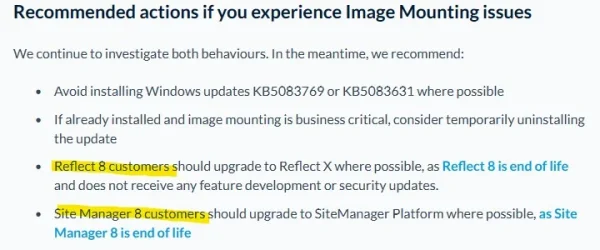
Seems they are recommending users upgrade to X.

View attachment 170884
In reply to that I told them - You need to fix the issue since I am still within the 6 year window for me to claim compensation from you under UK consumer law which I will pursue if you don’t fix the problem. I do have Reflect X for my important desktop PC but I have no intention of paying an annual licence fee for my less important laptops.
 

My Computer My Computer

At a glance

Windows 11 ProCore i7-13700K64 GB Kingston Fury Beast DDR5Gigabyte GeForce RTX 2060 Super Gaming OC 8G
OS
Windows 11 Pro
Computer type
PC/Desktop
Manufacturer/Model
Self build
CPU
Core i7-13700K
Motherboard
Asus TUF Gaming Plus WiFi Z790
Memory
64 GB Kingston Fury Beast DDR5
Graphics Card(s)
Gigabyte GeForce RTX 2060 Super Gaming OC 8G
Sound Card
Realtek S1200A
Monitor(s) Displays
Viewsonic VP2770 & Dell (secondary)
Screen Resolution
2560 x 1440
Hard Drives
Kingston KC3000 2TB NVME SSD & SATA HDDs & SSD
PSU
EVGA SuperNova G2 850W
Case
Nanoxia Deep Silence 1
Cooling
Noctua NH-D14
Keyboard
Microsoft Digital Media Pro
Mouse
Logitech Wireless
Internet Speed
80 Mb / s
Browser
Chrome
Antivirus
Defender, Malwarebytes Free & AdwCleaner
As much as I'd like them to fix the image mounting issue my hopes are very low that they will actually do it. They will probably keep recommending upgrading to Reflect X.
 

My Computer My Computer

At a glance

Windows 11AMD Ryzen 9 5950XCorsair Vengeance LPX CMK32GX4M2B3200C16 (64 GB)Asus ProArt RTX 5070 Ti OC
OS
Windows 11
Computer type
PC/Desktop
Manufacturer/Model
Custom
CPU
AMD Ryzen 9 5950X
Motherboard
Asus ROG Strix X570-F Gaming
Memory
Corsair Vengeance LPX CMK32GX4M2B3200C16 (64 GB)
Graphics Card(s)
Asus ProArt RTX 5070 Ti OC
Sound Card
Sound Blaster AE-9
Monitor(s) Displays
2 x Dell UltraSharp U2413f
Screen Resolution
1920 x 1200
Hard Drives
Samsung 990 Pro (2000 GB, M.2 2280)
Seagate Barracuda Pro (12TB, 3.5")
Seagate Exos X12 512E (12TB, 3.5")
WD Red Plus (12 TB, 3.5", CMR)
Corsair Force MP510 M.2 NVME SSD (1788 GB)
Samsung SSD 870 EVO 2TB (SATA)
PSU
Seasonic Vertex PX-1000 (1000 W)
Case
Corsair Obsidian 750D
Cooling
Deepcool GamerStorm Captain 240 Pro (12cm)
Keyboard
Logitech G910
Mouse
Logitech G502
Internet Speed
1000 Mbit/s (synchronous)
Browser
Firefox, Vivaldi
Antivirus
GDATA Internet Security
Reflect 8 is an end-of-life product and no longer receives feature development or ongoing security updates.

according to the link froggie posted

has anybody tried Garlin's suggestion of deleting that driverspolicy.p7b file
 

My Computers My Computers

  • At a glance

    Win7,Win11i7-97002x16gb 3600mhz
    OS
    Win7,Win11
    Computer type
    PC/Desktop
    CPU
    i7-9700
    Motherboard
    gigabyte b365m ds3h
    Memory
    2x16gb 3600mhz
    Monitor(s) Displays
    benq gw2480
    PSU
    bequiet pure power 11 400CM
    Cooling
    cryorig m9i
  • At a glance

    win7,win11i5-84002x8gb 3200
    Operating System
    win7,win11
    Computer type
    PC/Desktop
    CPU
    i5-8400
    Motherboard
    gigabyte b365m ds3h
    Memory
    2x8gb 3200
    PSU
    xfx pro 450
Older versions of Macrium Reflect and WinPE provide reliability, stability, and compatibility.
I am using Macrium Reflect v.8.0.7175 (BOOT ISO based on WinPE 2004 x64) to backup my Windows 10 21H2 LTSC and Windows 11 24H2 LTSC systems.
***
However, everyone can choose:
You can download WinPE packages with this Boot Agent v.8.
WinPE packages are based on these versions of Window:
pe11Dec24x64.zip (10.0.26100; Update 2025/12) based on Windows 11 24H2
pe11May23x64.zip
(10.0.22621) based on Windows 11 22H2
pe11x64.zip; pe11x86.zip
(10.0.22000) based on Windows 10/11 21H2
pe10_2004x64.zip
; pe10_2004x86.zip (10.0.19041) based on Windows 10 2004
pe10_1709x64.zip
; pe10_1709x86.zip (10.0.16299) based on Windows 10 1709

If you have enabled Secure Boot and Windows Update has applied the April 2026 Monthly Update, pe11Dec24x64.zip is still below the minimum requirement for SVN 8.0. Macrium needs to provide users with a newer pe11 ZIP file.

You will have to copy a newer bootx64.efi to the USB drive.
Code:
copy C:\Windows\Boot\EFI_EX\bootmgfw_EX.efi E:\EFI\boot\bootx64.efi
 

My Computer My Computer

At a glance

Windows 7
OS
Windows 7
according to the link froggie posted

has anybody tried Garlin's suggestion of deleting that driverspolicy.p7b file
I have on W11 Ent LTSC (24H2)... failure before @garlin install, success after install, failure after -restore.
 

My Computer My Computer

At a glance

Windows 10, Linux MINT (V-guests 7, 11, ZorinOS)Intel Core i7-1070032gB (DDR4)Intel UHD Graphics 630
OS
Windows 10, Linux MINT (V-guests 7, 11, ZorinOS)
Computer type
PC/Desktop
Manufacturer/Model
HP Z2 G5 Workstation
CPU
Intel Core i7-10700
Motherboard
HP Model# 8751
Memory
32gB (DDR4)
Graphics Card(s)
Intel UHD Graphics 630
Sound Card
Realtek basic audio
Monitor(s) Displays
32" (Viewsonic) UHD
Screen Resolution
3840 x 2160
Hard Drives
2-NvME (mainboard), 1-NvME (PCIe), 1-SATA3 SSD
As much as I'd like them to fix the image mounting issue my hopes are very low that they will actually do it. They will probably keep recommending upgrading to Reflect X.
That's a P--- Poor excuse for Macrium. The v8.1 LTSC edition is exactly the same as previous Home/Workstation/Pro, etc. and support is REQUIRED for this edition, for the Corps who use it. If they fix that (and they have to), that new driver is directly applicable to the current v8.x editions. In my eyes it would be unforgivable for them not to do that (at NO COST as well) for non-LTSC editions.
 

My Computer My Computer

At a glance

Windows 10, Linux MINT (V-guests 7, 11, ZorinOS)Intel Core i7-1070032gB (DDR4)Intel UHD Graphics 630
OS
Windows 10, Linux MINT (V-guests 7, 11, ZorinOS)
Computer type
PC/Desktop
Manufacturer/Model
HP Z2 G5 Workstation
CPU
Intel Core i7-10700
Motherboard
HP Model# 8751
Memory
32gB (DDR4)
Graphics Card(s)
Intel UHD Graphics 630
Sound Card
Realtek basic audio
Monitor(s) Displays
32" (Viewsonic) UHD
Screen Resolution
3840 x 2160
Hard Drives
2-NvME (mainboard), 1-NvME (PCIe), 1-SATA3 SSD
You will have to copy a newer bootx64.efi to the USB drive.
copy C:\Windows\Boot\EFI_EX\bootmgfw_EX.efi E:\EFI\boot\bootx64.efi
Yes, thanks.. Are you referring to the problem of replacing an old bootloader with a PCA 2011 certificate with a new one with a UEFI CA 2023 certificate?
If necessary, then we will replace the bootloader files in the BOOT ISO..
However, I have Secure Boot disabled.
***
Maybe there will be a new theme soon.: "Do I need to disable Secure Boot before creating a Backup?" :-)
 
Last edited:

My Computer My Computer

At a glance

Windows 10/11
OS
Windows 10/11
Computer type
PC/Desktop
Manufacturer/Model
Windows 10 21H2 LTSC x64 [MSDN]; Windows 11 24H2 LTSC; m/b Z77-HD3(BIOS-MBR/UEFI); HDD WD 500Gb
My point is Macrium needs to keep up. Every time there's a new boot manager released (for security reasons), Macrium has to push a newer PE ZIP file, or otherwise users who aren't clued in will be upset if Secure Boot is enabled.
 

My Computer My Computer

At a glance

Windows 7
OS
Windows 7
Maybe there will be a new theme soon.: "Do I need to disable Secure Boot before creating a Backup?" :-)
No, but there are two distinct possibilities that can happen:

1. Your rescue media is not Secure Boot-compliant and won't boot.

2. You successfully booted from a rescue disk, but your backup image is too old and is not Secure Boot-compliant.

In the second case, you would have to temporarily disable Secure Boot. After booting into Windows, wait until it's updated to the latest build, and then you can re-enable Secure Boot again. If you just finished the Secure Boot update process, it's always a good idea to make a fresh backup so the snapshot is already compliant.

But some users might only have a really old backup available, and they should be aware that the restored image might not boot with Secure Boot enabled.
 

My Computer My Computer

At a glance

Windows 7
OS
Windows 7
The PCA 2011 certificate for the bootloader will expire in the fall of 2026, and the UEFI CA 2023 certificate for the new bootloader will be valid until 2035...
we have time, .. let's wait..
 

My Computer My Computer

At a glance

Windows 10/11
OS
Windows 10/11
Computer type
PC/Desktop
Manufacturer/Model
Windows 10 21H2 LTSC x64 [MSDN]; Windows 11 24H2 LTSC; m/b Z77-HD3(BIOS-MBR/UEFI); HDD WD 500Gb
I propose a different workaround for this issue, while everyone waits.

Microsoft has gone on record that the Vulnerable Driver Blocklist (driversipolicy.p7b) can be updated at least 1-2 times per year. Normally it's always refreshed by the release of a new Windows in October. And sometimes an off-schedule update is pushed in the Monthly Update cycle.

But in reality, the blocklist doesn't change that often.

Unlike most malware, which is handled by Defender; the Vulnerable Driver Blocklist represents drivers provided by known legitimate software companies and individual developers. There is no malicious intent, but bad coding which leaves the drivers open to attack. Either those providers have failed to replace their vulnerable drivers, or users are stuck using outdated (and insecure) versions of the driver.

Looking back at Windows 11 24H2/25H2, the driver blocklist was replaced on: February 2025, May 2025, and April 2026

Instead of disabling the Vulnerable Driver Blocklist from the Security Center, or by using a reg key, we roll back to the March 2026 (or in reality, the May 2025) version of driversipolicy.p7b. After copying back the file, you must restart Windows for changes to take effect.

Macrium 8 will work exactly as before, because it's no longer blocked.

You should not be copying this file by hand. First, the policy file is protected by TrustedInstaller rights. This is a level above having normal Administrator privileges. NEVER use the takeown & icacls method to tamper with security files. Just don't mess up your Windows!!


1. This batch file (which really is PowerShell code) can safely remove driversipolicy.p7b, and hard links the previous policy file that's provided in the WinSxS component store. This is where Windows keeps older versions of files which have been replaced by later updates.

If you need to restore the latest (April 2026) version, the script will find it from WinSxS and link that version in place. When you switch between the two versions, the script will automatically change the Vulnerable Driver Blocklist setting to "on" or "off".

You can run the script as a normal user or Admin. If you're not Admin, it asks permission for Admin rights.

Code:
> Rollback-VulnerableDriverPolicy.bat
Rolling back to older version (.7623) of driversipolicy.p7b.  Please be patient.

 Volume in drive C has no label.
 Volume Serial Number is DE36-5A58

 Directory of C:\Windows\System32\CodeIntegrity

12/06/2025  06:27 PM           229,162 driversipolicy.p7b
               1 File(s)        229,162 bytes
               0 Dir(s)  21,264,400,384 bytes free

RESTART WINDOWS NOW.

Code:
> Rollback-VulnerableDriverPolicy.bat -restore
Restoring latest version (.8246) of driversipolicy.p7b.  Please be patient.

 Volume in drive C has no label.
 Volume Serial Number is DE36-5A58

 Directory of C:\Windows\System32\CodeIntegrity

04/15/2026  12:17 AM           242,130 driversipolicy.p7b
               1 File(s)        242,130 bytes
               0 Dir(s)  21,264,400,384 bytes free

RESTART WINDOWS NOW.

2. Restarting Windows is required.

3. If you run "sfc /scannow" to repair your Windows system, please re-run the batch file. A repair action will determine the wrong version of the policy file is in place, and restore the latest copy (which blocks Macrium 8).

4. This method won't help if your Windows is a clean install from the April 2026 Media Creation Tool. There may not be an older version to fallback on. You will have to copy the file from an older Windows system.

Thanks @garlin worked for us on our test environment. :)

After running the bat file the computer had to go through 2-stage (automatic) repair after I pressed F8 just before the final repair stage. After the second stage repair we ran the bat again and it said it is on previous (older) version of driversipolicy.p7b (1301)

The windows update history shows that KB5082063 is incomplete and requires a reboot.

We where able to run our Back-UP Job without Errors

After running bat with –restore :
Restoring latest version (.32684) of driversipolicy.p7b. Please be patient

The restore works, the Macrium error is back

Running bat shows:
Exiting. driversipolicy.p7b is already the latest version (.32684)

Another downgrade using the bat does not cause a repair action.

We will Probably wait till Wednesday (PATCH DAY) before trying it on live just to see, if Microsoft has grey-listed the driver or not and how it reacts when the may update is installed.

For now it works.
 

My Computer My Computer

At a glance

Windows 11
OS
Windows 11
Computer type
Laptop
Manufacturer/Model
Dell
No surprise.

This will do damage to the brand. I hope.

Macrium developed a "risky" driver and then afterwards complaining that Microsoft is to blame.


O, and the fact that v8 is EOL doesn't hold up, as they recently made another release, when it was already EOL.

What is the difference?

Am I mad/disappointed ? You bet!

I NEVER will buy a product of Macrium again. Untrustworthy
 

My Computer My Computer

At a glance

Windows 11I7-13700K32GeForce 1660 Super
OS
Windows 11
Computer type
PC/Desktop
Manufacturer/Model
Custom made
CPU
I7-13700K
Motherboard
PRIME Z790-A WIFI
Memory
32
Graphics Card(s)
GeForce 1660 Super
Sound Card
On board
Monitor(s) Displays
Dell P2314H
Screen Resolution
HD
Hard Drives
SSD
Cooling
Yes :-)
Antivirus
ESET
No changes in the May 2026 Monthly Update, it's the same set of blocked drivers as last month.

Code:
5083769.csv:"driversipolicy.p7b","Not versioned","11-Apr-2026","22:08","242,130"
5083769.csv:"driversipolicy.p7b","Not versioned","11-Apr-2026","21:53","242,130"
5089549.csv:"driversipolicy.p7b","Not versioned","07-May-2026","03:36","242,130"
5089549.csv:"driversipolicy.p7b","Not versioned","07-May-2026","03:33","242,130"
 

My Computer My Computer

At a glance

Windows 7
OS
Windows 7

Latest Support Threads

Back
Top Bottom