I can still mount MR images. Macrium Reflect 8.1.8631 (paid-lifetime)
@kelper
I leave mine OFF, all the time...
View attachment 168984
TL;DR:
Completely removing Macrium (I use Revo Uninstaller Pro to truly nuke all leftover crap from programs - never deleting anything in
red as I previously learned that doing so can cause Win 11 problems
Installing the recommended V8.0.xxxx version (with internet off to ensure I could uncheck Macrium's auto-update/check settings) and then running a fresh backup worked!
NOTE: the registration key I had when purchasing back in 2022 did NOT work, pressing the 'GET CODE' button emailed me a 'new key', which was a LOT shorter than the one received when originally purchasing the license? Unsure as to why, but it let me complete the installation?
DETAILED VERSION:
I had the same issue pop-up today (like you I paid for a lifetime license for the 'personal home use only' version, which has worked reliably with whatever the latest updated v8.1.xxxx version as recently as 2 days ago July-02-2026.
I made some changes (mostly cleaning up junk programs I don't need anymore) and it was time for a new image.
Macrium kept throwing 'serious errors' that on actually caused an entire system crash and reboot!
Upon logging back into Win 11 I went to eventviewer to see what was going on, to be presented by a bunch of errors related to existing backups, but more strangely, images that I had deleted.
It also had errors related to my Proton Drive AND Google Drive cloud backup operations, again something I have had running without issue for a LONG time.
Then Macrium guard errors plus errors referencing an older version of Macrium (v8.0.xxx) that clearly had been updated to V8.1.xxxx probably last year.
I had turned off automatic updates last year or perhaps before, after reading about people having issues with their version being reverted to a 30-day trial - whatever happened today had nothing to do with some update to Macrium.
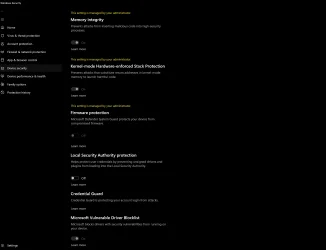
Here's my core isolation settings, again unchanged since at least mid-2025 after I had issues with the 'Firmware Protection' and 'Local Security Authority Protection's settings in the Win 11 'Core Isolation' settings area - I recall that this was related to a new game I had installed 'Arc Raiders' (from memory) that I found through searches on their official site/forums needed to be off due to the 'anti-cheat' components of the game. The 'Vulnerable Drivers' toggle is on and remains on, and has not caused issues with any games/their 'anti-cheat' components.
Blocked unauthorised process (C:\WINDOWS\Explorer.EXE) accessing file (\Device\HarddiskVolume9\
Blocked unauthorised process (C:\Users\xxxx\AppData\Local\Programs\Proton\Drive\ProtonDrive.exe) accessing file (\Device\HarddiskVolume9\8. Macrium Reflect Image\
Blocked unauthorised process (C:\Program Files\Google\Drive File Stream\126.0.5.0\GoogleDriveFS.exe) accessing file (\Device\HarddiskVolume6\1. Macrium Reflect Image Backups\
I have no idea what happened today, like I said, I had been using the V8.1.xxx final version for at least a year - a Win 11 25H2 thing perhaps?
But Macrium once again works, although I do miss the dark UI option that is not available in V8.0.xxxx
Hope this helps anyone else in the same boat as me to actually get to use the program they paid for - I messaged Macrium (in the section they provide when uninstalling the V8.1.xxx version as feedback for why I was uninstalling, suggesting that regardless of whether or not this was caused by Win 11 25H2 (my version is as up to date as it can be, even with the 'Xbox Mode' working - Version 25H2 (OS Build 26200.8737), that they still had a responsibility to honor paying customers who are more than happy with the older version and have no need for their new subscription based model. I will update this post if I get a response from Macrium!












